服务卡片是FA的一种界面展示形式,将FA重要信息或操作前置到卡片,以此达到服务直达、减少层级体验的目的。本篇Codelab主要介绍如何在HarmonyOS上开发一个时钟类FA卡片应用,帮助开发者快速上手卡片类应用开发。该卡片包含2*2、2*4两种布局样式,卡片应用在桌面上的显示效果如下:
我们首先需要完成HarmonyOS开发环境搭建,可参照如下步骤进行。
时钟FA卡片应用主要介绍了如何创建、更新和删除卡片,对象关系映射型数据库的使用以及如何启动计时器服务,整个工程的代码结构如下: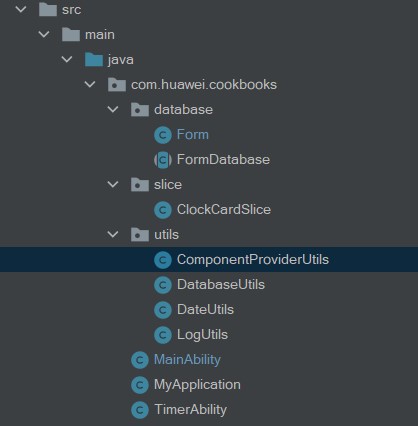
卡片应用是一款特殊的元能力服务,其配置文件config.json中声明以下几项,系统能够识别该应用为一款卡片应用,并与系统进行绑定。以本工程为例,config.json文件中"abilities"配置forms模块的细节如下:
"forms": [
  {
        "landscapeLayouts": [
          "$layout:form_image_with_info_date_card_2_2",
          "$layout:form_image_with_info_date_card_2_4"
        ],
        "isDefault": true,
        "scheduledUpdateTime": "10:30",
        "defaultDimension": "2*2",
        "name": "DateCard",
        "description": "This is a service widget",
        "colorMode": "auto",
        "type": "Java",
        "supportDimensions": [
          "2*2",
          "2*4"
        ],
        "portraitLayouts": [
          "$layout:form_image_with_info_date_card_2_2",
          "$layout:form_image_with_info_date_card_2_4"
        ],
        "updateEnabled": true,
        "updateDuration": 1,
        "formVisibleNotify": true
  }
]
本篇Codelab为卡片应用设计了2*2和2*4两种布局风格,效果如下图:
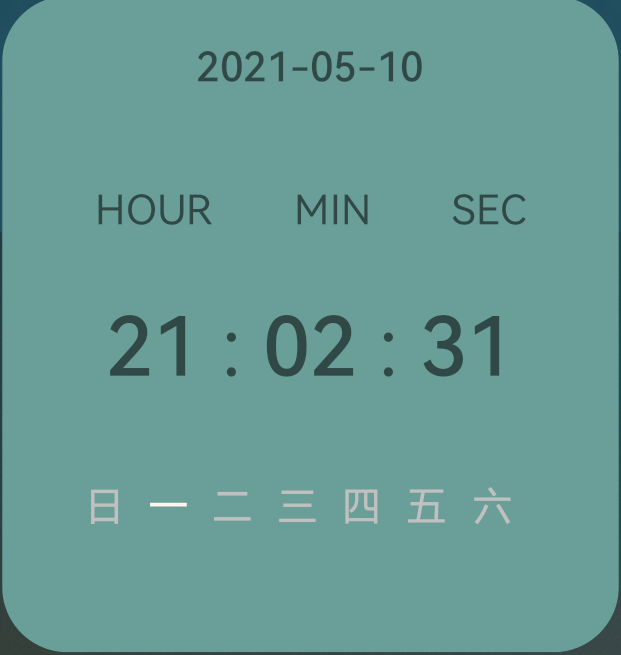

下面以2*2布局为例,详细进行介绍。整个2*2卡片展示的内容从上到下分别为日期、时间、星期,整体由DependentLayout布局内嵌套四个DirectionalLayout构成,每个DirectionalLayout 内均使用Text组件进行展示,部分代码如下:
<?xml version="1.0" encoding="utf-8"?>
<DependentLayout
    xmlns:ohos="http://schemas.huawei.com/res/ohos"
    ohos:height="match_parent"
    ohos:width="match_parent"
    ohos:background_element="#6A9F99"
    ohos:remote="true">
    <DirectionalLayout
        ohos:height="match_content"
        ohos:width="match_parent"
        ohos:orientation="vertical"
        >
        <Text...>
     </DirectionalLayout>
     <DirectionalLayout
         ohos:id="$+id:title"
         ohos:height="match_content"
         ohos:width="match_parent"
         ohos:alignment="horizontal_center"
         ohos:orientation="horizontal"
         ohos:top_margin="35fp"
         >
        <Text...>
        <Text...>
        <Text...>
      </DirectionalLayout>

     <DirectionalLayout
         ohos:id="$+id:time"
         ohos:height="match_content"
         ohos:width="match_parent"
         ohos:alignment="horizontal_center"
         ohos:below="$id:title"
         ohos:orientation="horizontal"
         ohos:top_margin="0.5fp"
         >
         <Text...>
         <Text...>
         <Text...>
         <Text...>
         <Text...>
     </DirectionalLayout>

     <DirectionalLayout
         ohos:height="match_content"
         ohos:width="match_parent"
         ohos:alignment="center"
         ohos:below="$id:time"
         ohos:margin="20fp"
         ohos:orientation="horizontal"
      >
         <Text...>
         <Text...>
         <Text...>
         <Text...>
         <Text...>
         <Text...>
         <Text...>
     </DirectionalLayout>
</DependentLayout>
本篇codelab使用对象关系映射数据库来对卡片ID,卡片名字等信息进行存储,我们创建了一个数据库(FormDatabase)和一张表(Form)。
首先定义了数据库类FormDatabase.java,数据库包含"Form"表,版本号为 "1",示例代码如下:
@Database(
    entities = {Form.class},
    version = 1)
public abstract class FormDatabase extends OrmDatabase {}
定义实体类Form.java,对应数据库内的表名为"form",包含了卡片id"formId"(主键),卡片名称"formName"和卡片规格"dimension"三个字段,示例代码如下:
@Entity(tableName = "form")
public class Form extends OrmObject {
    @PrimaryKey()
    private Long formId;
    private String formName;
    private Integer dimension;

    public Form(Long formId, String formName, Integer dimension) {
        this.formId = formId;
        this.formName = formName;
        this.dimension = dimension;
    }
    // 开发者自行添加字段的getter和setter方法或者参考完整代码
}
卡片程序安装启动后,会进入MainAbility,在onStart时,会首先启动卡片定时器服务TimerAbility,以便刷新时钟卡片,部分示例代码如下:
@Override
public void onStart(Intent intent) {
    super.onStart(intent);
    connect = helper.getOrmContext("FormDatabase", "FormDatabase.db", FormDatabase.class);
    // 启动TimerAbility
    Intent intentService = new Intent();
    Operation operation =
            new Intent.OperationBuilder()
                    .withDeviceId("")
                    .withBundleName("com.huawei.cookbooks")
                    .withAbilityName("com.huawei.cookbooks.TimerAbility")
                    .build();
    intentService.setOperation(operation);
    startAbility(intentService);
    super.setMainRoute(ClockCardSlice.class.getName());
}
当卡片使用方请求获取卡片时,卡片提供方会被拉起并调用onCreateForm回调函数,完成卡片信息的初始化,在MainAbility中有如下示例代码:
@Override
protected ProviderFormInfo onCreateForm(Intent intent) {
    if (intent == null) {
        return new ProviderFormInfo();
    }
    // 获取卡片id
    formId = INVALID_FORM_ID;
    if (intent.hasParameter(AbilitySlice.PARAM_FORM_IDENTITY_KEY)) {
        formId = intent.getLongParam(AbilitySlice.PARAM_FORM_IDENTITY_KEY, INVALID_FORM_ID);
    } else {
        return new ProviderFormInfo();
    }
    // 获取卡片名称
    String formName = EMPTY_STRING;
    if (intent.hasParameter(AbilitySlice.PARAM_FORM_NAME_KEY)) {
        formName = intent.getStringParam(AbilitySlice.PARAM_FORM_NAME_KEY);
    }
    // 获取卡片规格
    int dimension = DEFAULT_DIMENSION_2X2;
    if (intent.hasParameter(AbilitySlice.PARAM_FORM_DIMENSION_KEY)) {
        dimension = intent.getIntParam(AbilitySlice.PARAM_FORM_DIMENSION_KEY, DEFAULT_DIMENSION_2X2);
    }
    int layoutId = ResourceTable.Layout_form_image_with_info_date_card_2_2;
    if (dimension == DEFAULT_DIMENSION_2X4) {
        layoutId = ResourceTable.Layout_form_image_with_info_date_card_2_4;
    }
    formInfo = new ProviderFormInfo(layoutId, this);
    // 存储卡片信息
    Form form = new Form(formId, formName, dimension);
    ComponentProvider componentProvider = ComponentProviderUtils.getComponentProvider(form, this);
    formInfo.mergeActions(componentProvider);
    if (connect == null) {
        connect =
                helper.getOrmContext("FormDatabase", "FormDatabase.db", FormDatabase.class);
    }
    try {
        DatabaseUtils.insertForm(form, connect);
    } catch (Exception e) {
        DatabaseUtils.deleteFormData(form.getFormId(), connect);
    }
    return formInfo;
}
@Override
protected void onDeleteForm(long formId) {
    super.onDeleteForm(formId);
    // 删除数据库中的卡片信息
    DatabaseUtils.deleteFormData(formId, connect);
}
为了方便处理时钟卡片刷新的定时任务,我们创建了一个Service Ability,定时去更新卡片信息,在TimerAbility.java中有如下部分参考代码:
@Override
public void onStart(Intent intent) {
    connect = helper.getOrmContext("FormDatabase", "FormDatabase.db", FormDatabase.class);
    startTimer();
    super.onStart(intent);
}
// 卡片更新定时器,每秒更新一次
private void startTimer() {
    Timer timer = new Timer();
    timer.schedule(
            new TimerTask() {

                @Override

                public void run() {

                    updateForms();
                    notice();

                }
            },

            0,SEND_PERIOD);
}

private void updateForms() {
    // 从数据库中获取卡片信息
    OrmPredicates ormPredicates = new OrmPredicates(Form.class);
    List<Form> formList = connect.query(ormPredicates);
    // 更新时分秒
    if (formList.size() > 0) {
        for (Form form : formList) {
            // 遍历卡片列表更新卡片
            ComponentProvider componentProvider = ComponentProviderUtils.getComponentProvider(form, this);
            try {

                Long updateFormId = form.getFormId();

                updateForm(updateFormId, componentProvider);
            } catch (FormException e) {
                // 删除不存在的卡片
                DatabaseUtils.deleteFormData(form.getFormId(), connect);
                HiLog.error(LABEL_LOG, "onUpdateForm updateForm error");
            }
        }
    }
}
为了保持service不被系统销毁,需要使用前台service配合手机管家中的相关配置来达到目的。示例代码如下:
private void notice() {
        // 创建通知
        NotificationRequest request = new NotificationRequest(NOTICE_ID);
        request.setAlertOneTime(true);
        NotificationRequest.NotificationNormalContent content = new NotificationRequest.NotificationNormalContent();
        content.setText(DateUtils.getCurrentDate("yyyy-MM-dd HH:mm:ss"));
        NotificationRequest.NotificationContent notificationContent = new NotificationRequest.NotificationContent(content);
        request.setContent(notificationContent);
        // 绑定通知
        keepBackgroundRunning(NOTICE_ID, request);
}
有关卡片组件的更新,我们封装了ComponentProviderUtils这个类,在卡片更新时候,通过调用updateForm方法,传入参数formId和componentProvider,以达到日期、时间和星期实时更新的效果,部分代码和效果如下: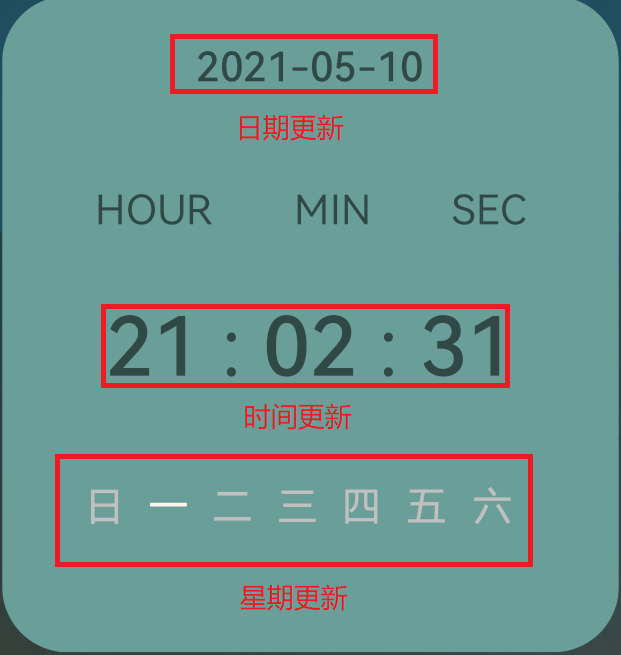
public static ComponentProvider getComponentProvider(Form form, Context context) {
    int layoutId = ResourceTable.Layout_form_image_with_info_date_card_2_2;
    if (form.getDimension() == DIM_VERSION) {
        layoutId = ResourceTable.Layout_form_image_with_info_date_card_2_4;
    }
    ComponentProvider componentProvider = new ComponentProvider(layoutId, context);
    setComponentProviderValue(componentProvider);
    return componentProvider;
}

// 为时钟各个组件赋值
private static void setComponentProviderValue(ComponentProvider componentProvider) {
    Calendar now = Calendar.getInstance();
    int hour = now.get(Calendar.HOUR_OF_DAY);
    int min = now.get(Calendar.MINUTE);
    int second = now.get(Calendar.SECOND);
    String hourString = int2String(hour);
    String minString = int2String(min);
    String secondString = int2String(second);
    componentProvider.setText(ResourceTable.Id_date, DateUtils.getCurrentDate("yyyy-MM-dd"));
    componentProvider.setText(ResourceTable.Id_hour, hourString);
    componentProvider.setText(ResourceTable.Id_min, minString);
    componentProvider.setText(ResourceTable.Id_sec, secondString);

    // 获取当前星期
    int weekDayId = getWeekDayId();
    componentProvider.setTextColor(weekDayId, nowWeekColor);

    // 将前一天的星期改回原色
    int lastWeekId = getLastWeekDayId();
    componentProvider.setTextColor(lastWeekId, primaryWeekColor);
}
恭喜您已经完成时钟卡片应用的开发,并且学到了: