入口方法
入口方法定义如下所示:
- Node.js 20.x
app.post('/invoke', function (req, res)完整的云函数示例代码请参考函数示例-Node.js 20.x。
- Java 1.8
@RequestMapping(path = "/invoke", method = RequestMethod.POST)完整的云函数示例代码请参考函数示例-Java 1.8。
- Python 3.11
@app.route("/invoke", methods=["POST"])完整的云函数示例代码请参考函数示例-Python 3.11。


日志记录
- 日志输出路径:/opt/huawei/logs/
- 日志固定输出格式:<pattern>{"M":"%replace(%t [%c] - %m){'\"','\\\"'}","T":"%d{yyyy-MM-dd HH:mm:ss.SSS,GMT}","L":"%level","LINE":"%file:%L","TENANTID":"${FAAS_FUNCTION_TENANTID}","FUNCTION":"${FAAS_FUNCTION_NAME}","VERSION":"${FAAS_FUNCTION_VERSION}","BUSINESSID":"${FAAS_FUNCTION_BUSINESS}","X-Trace-ID":"%X{x-trace-id}"}%n</pattern>;

其中“x-trace-id”可由用户根据实际情况填写,作为记录一条请求执行的标记,比如:MDC.put("x-trace-id", "xxx");
- 日志输出大小:<2GB
- 日志输出内容:平台无限制,但请注意敏感信息的处理。输出内容建议为标志性信息,方便筛选。
- 日志配置指导:
- Python项目配置日志工具类RuntimeRunLog,详情请参考函数示例-Python 3.11。
import logging import logging.handlers LOG_DEFAULT_MAX_BYTES = 50 * 1024 * 1024 LOG_DEFAULT_BACKUP_COUNT = 3 from _rotating_file_handler import RotatingFileHandler class RuntimeRunLog: def __init__(self): self.runtime_run_log = logging.getLogger('runtime-python-run') formatter = logging.Formatter(fmt='{"T": "%(asctime)s.%(msecs)03d","L": "%(levelname)s","M": "%(message)s"}', datefmt='%Y-%m-%d %H:%M:%S') log_file_name = '/opt/huawei/runtime-python-run.log' handler = RotatingFileHandler(file_name=log_file_name, mode='a', max_bytes=LOG_DEFAULT_MAX_BYTES, backup_count=LOG_DEFAULT_BACKUP_COUNT, log_name="runtime-python-run") handler.setLevel(logging.INFO) handler.setFormatter(formatter) self.runtime_run_log.addHandler(handler) self.runtime_run_log.setLevel(logging.INFO) runtime_run_log = RuntimeRunLog().runtime_run_log - Node.js项目
配置日志工具函数logConfig,详情请参考函数示例-Node.js 20.x。
- Java项目
引入slf4j依赖,并在项目“/resources”目录下添加slf4j的配置文件logback.xml,详情请参考函数示例-Java 1.8。

若您已引用云函数Server SDK,则无需再引入slf4j依赖。若未引用,需要您手动引入slf4j依赖,示例如下:
<dependency>
    <groupId>org.slf4j</groupId>
    <artifactId>slf4j-api</artifactId>
    <version>2.0.7</version>
</dependency>
logback.xml文件:
<?xml version="1.0" encoding="UTF-8"?>

<!-- Please refer to : https://logback.qos.ch/manual/configuration.html -->

<!-- The 'configuration' parameter is as follows: -->
<!-- scan: true means automatically reloading configuration file upon modification -->
<!-- scanPeriod: automatically reloading check period -->
<!-- debug: print the debug info or not, type: boolean (true/false) -->
<configuration scan="true" scanPeriod="120 seconds" debug="false">

    <!-- The scope of property can be "context, local, system" -->
    <property scope="context" name="LOG_HOME" value="../log"/>
    <property scope="context" name="CONTEXT_NAME" value="CloudSOALoggingContext"/>

    <contextName>${CONTEXT_NAME}</contextName>

    <!-- Run log -->
    <appender name="run_rolling_appender" class="ch.qos.logback.core.rolling.RollingFileAppender">
        <encoder>
            <pattern>{"M":"%m","T":"%d{yyyy-MM-dd HH:mm:ss.SSS}","L":"%level","LINE":"%file:%L","TENANTID":"${FAAS_FUNCTION_TENANTID}","FUNCTION":"${FAAS_FUNCTION_NAME}","VERSION":"${FAAS_FUNCTION_VERSION}","BUSINESSID":"${FAAS_FUNCTION_BUSINESS}","X-Trace-ID":"%X{x-trace-id}"}%n</pattern>
        </encoder>
        <file>/opt/huawei/logs/json-user-function.log</file>
        <rollingPolicy class="ch.qos.logback.core.rolling.FixedWindowRollingPolicy">
            <FileNamePattern>/opt/huawei/logs/json-user-function.log_%i.log</FileNamePattern>
            <minIndex>1</minIndex>
            <maxIndex>50</maxIndex>
        </rollingPolicy>
        <triggeringPolicy class="ch.qos.logback.core.rolling.SizeBasedTriggeringPolicy">
            <maxFileSize>50MB</maxFileSize>
        </triggeringPolicy>
    </appender>
    <appender name="run_appender_thread" class="ch.qos.logback.classic.AsyncAppender">
        <queueSize>1024</queueSize>
        <discardingThreshold>10</discardingThreshold>
        <appender-ref ref="run_rolling_appender"/>
        <includeCallerData>true</includeCallerData>
    </appender>
    <!-- Log configuration specification -->
    <!-- level can be: OFF ERROR WARN INFO DEBUG TRACE ALL -->
    <!-- additivity: should be false as we will not use this feature of LOGBACK -->
    <logger name="com.huawei.faas" level="INFO" additivity="false">
        <appender-ref ref="run_appender_thread"/>
    </logger>

    <root level="INFO">
        <appender-ref ref="run_appender_thread"/>
    </root>
</configuration>
- Python项目
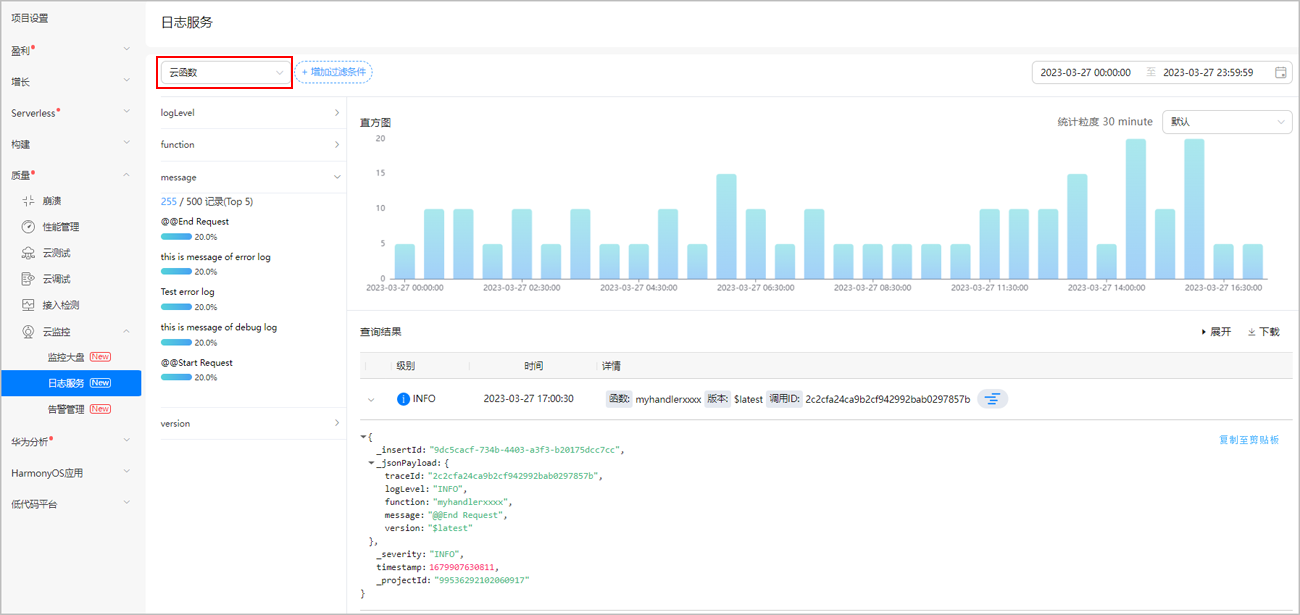
- 日志查看:当函数日志输出到“/opt/huawei/logs/”目录。时,您即可在云监控的日志服务页面查看云函数运行日志,详情请参考日志服务。
获取环境变量
Custom Runtime运行环境下,获取环境变量的方法,与开发者上传的工程项目里使用的编程语言所对应的获取环境变量的方法有关。
示例如下:
- Node.js 20.x
// 解析环境变量env1 let testEnv = process.env.env1; - Java 1.8
// 解析环境变量env1
String env1 = System.getenv("env1");
- Python 3.11
# 解析环境变量env1
env = os.environ['env1']
[h2]Node.js 20.x
/**
 * Describe the basic method of Cloud Functions
 */

const express = require('express');
const log4js = require("log4js");
const app = express();

let runJsonLogger = logEvent => {
    let logInfo = {
        M: logEvent.data[0] || "",
        T: logEvent.startTime,
        L: logEvent.level.levelStr,
        TRACE: logEvent.data[1], // logger若有第二个参数,需要设置为traceid
    };

    return JSON.stringify(logInfo);
};
log4js.addLayout("runjson", () => {
    return runJsonLogger;
});
let logConfig = {
    replaceConsole: true,
    appenders: {
        'out': {
            type: 'stdout',
            layout: {
                type: "colored"
            }
        },
        'files': {
            type: 'file',
            filename: '/opt/huawei/logs/logs.log',
            layout: {
                "type": "runjson",
                "pattern": "%x{showDate}|%m"
            }
        }
    },
    categories: {
        default: {
            appenders: ['out', 'files'],
            level: "INFO"
        }
    },
    disableClustering: true
}
log4js.configure(logConfig);
const logger = log4js.getLogger('CUSTOM-RUNTIME-NODEJS-DEMO-LOG');

app.post('/invoke', function (req, res) {
    // example of display environment variables
    let env1 = process.env.env1;

    // example of display logs
    logger.info("Test info log");
    logger.warn("Test warn log");
    logger.debug("Test debug log");
    logger.error("Test error log");

    logger.info("--------Start-------");
    try {
        let startTime = new Date().getTime();
        let endTime = startTime;
        let interval = 0;
        startTime = process.uptime() * 1000;

        // print input parameters and environment variables
        logger.info("req: " + req.query);
        logger.info("env1: " + env1);

        endTime = process.uptime() * 1000;
        interval = endTime - startTime;
        logger.info("intervalTime: " + interval);
        logger.info("--------Finished-------");

        let result = {"intervalTime": interval};
        res.send(JSON.stringify(result));
    } catch (error) {
        logger.error("--------Error-------");
        logger.error("error: " + error);
        res.send(error);
    }
});

app.listen(9000, function () {
    logger.info("---------server start now!-------");
});
[h2]Java 1.8
package com.example.demo;

import com.alibaba.fastjson.JSONObject;
import org.slf4j.Logger;
import org.slf4j.LoggerFactory;
import org.springframework.boot.SpringApplication;
import org.springframework.boot.autoconfigure.SpringBootApplication;
import org.springframework.web.bind.annotation.RequestBody;
import org.springframework.web.bind.annotation.RequestMapping;
import org.springframework.web.bind.annotation.RequestMethod;
import org.springframework.web.bind.annotation.RestController;

import javax.servlet.http.HttpServletRequest;
import java.util.HashMap;
import java.util.Map;

@SpringBootApplication
@RestController
public class Application {
    private static final Logger LOG = LoggerFactory.getLogger("com.huawei.customedemo");

    public static void main(String[] args) {
        LOG.info("start spring server now!");
        try {
            ClasspathLoader.loadClassPath();
        } catch (MyException e) {
            LOG.error("failed to load layer " + e.getMessage());
        }
        SpringApplication.run(Application.class, args);
    }

    @RequestMapping(path = "/invoke", method = RequestMethod.POST)
    public Object postSimple(HttpServletRequest req,  @RequestBody JSONObject body) {
        // example of display environment variables
        String env = System.getenv("env1");

        // example of display logs
        LOG.info("Test info log");
        LOG.warn("Test warn log");
        LOG.debug("Test debug log");
        LOG.error("Test error log");

        LOG.info("----------Start-----------");
        JSONObject result = new JSONObject();
        result.put("code", 0);
        try {
            long interval;
            long startTime = System.currentTimeMillis();

            LOG.info("receive post request");
            String query=req.getQueryString();
            String hwm=req.getHeader("hwm");
            Map<String,String[]> params =req.getParameterMap();
            String config=PropertyUtil.getProperty("key.rootkey.path");

            LOG.info("query :"+query);
            LOG.info("headers :"+hwm);
            LOG.info("params :"+JSONObject.toJSONString(params));
            LOG.info("body :"+body.toJSONString());
            LOG.info("config :"+config);

            long endTime = System.currentTimeMillis();
            interval = endTime - startTime;
            LOG.info("intervalTime: " + interval + "(ms)");
            result.put("intervalTime: ", interval + "(ms)");
            LOG.info("--------Finished---------");
        } catch (Exception e) {
            LOG.error("the ex is " + e.getMessage());
            result.put("msg", e.getMessage());
        }
        return result ;
    }
}
[h2]Python 3.11
"""
Describe the basic method of Cloud Functions
"""

import os
import sys
import time
from run import runtime_run_log as run_log

sys.path.append('python_modules')
from flask import Flask, request

app = Flask(__name__)

@app.route("/invoke", methods=["POST"])
def simple_fn():
    try:
        # example of display environment variables
        env1 = os.environ.get("env1")

        # example of display logs
        run_log.info("Test info log")
        run_log.debug("Test debug log")
        run_log.warning("Test warning log")
        run_log.error("Test error log")

        run_log.info("-------------Start--------------")
        startTime = int(time.time())

        # print input parameters and environment variables
        query = request.query_string.decode('utf-8')

        run_log.info("request: " + repr(query))
        headers = request.headers

        run_log.info("headers: " + str(headers))
        body = request.data.decode('utf-8')
        run_log.info("body: " + str(body))
        run_log.info("env1: " + env1)


        endTime = int(time.time())
        interval = endTime - startTime
        run_log.info("intervalTime: " + str(interval))
        run_log.info("-------------Finished--------------")

        return request.method + " success"
    except Exception as error:
        run_log.error("error: " + format(str(error)))
        return request.method + format(str(error))

if __name__ == '__main__':
    app.run(port=9000)
准备函数部署包
使用Node.js开发Custom Runtime函数部署包示例:nodejs.zip
Java1.8 函数部署包示例:java.zip
Python3 函数部署包示例:python.zip
Custom Runtime函数部署包结构如下所示,bootstrap可执行文件必须在zip根目录下,其他相关代码和依赖项可以自由放置。
function.zip
   |---bootstrap //可执行文件,启动Server
   |---WiseFunctionCustomDemo.jar
   |---其他相关代码和依赖等
bootstrap文件内容示例:
#!/bin/bash
java -jar WiseFunctionCustomDemo.jar