[h2]通过Maven方式引入
- 在Maven配置文件,默认名称为settings.xml,或工程中的pom.xml文件中设置华为开发者联盟Maven仓库地址。
<repositories> <repository> <id>developer_huawei</id> <url>https://developer.huawei.com/repo/</url> <releases> <enabled>true</enabled> </releases> <snapshots> <enabled>true</enabled> </snapshots> </repository> </repositories> - 配置agc-function-java依赖。
<dependency>
    <groupId>com.huawei.agconnect.server</groupId>
    <artifactId>agconnect-function-java</artifactId>
    <version>1.0.5.300</version>
</dependency>
入口方法
入口方法定义如下:
< T > handleRequest (I event, Context context) { ... } - < T >:方法返回数据对象,必须满足能转化为JSON字符串。
- handleRequest:入口方法名称。
- event:调用方传递的事件对象,JSON格式,可自定义。具体内容请参见event对象。
- context:函数运行时上下文对象,封装了日志接口context.getLogger()等。
完整的Java 1.8云函数示例代码请参考函数示例。
获取环境变量
您可在代码中使用context.getClientContext().getEnvironments().get(key)访问环境变量,获取环境变量env1示例如下:
String env1 = context.getClientContext().getEnvironments().get("env1"); 若环境变量未配置,则会返回环境变量为null。

异常处理
示例代码如下:
Map<String, String> result = new HashMap<>();
try {
    RunLog log = LogFactory.getRunLog();
    log.info(JSONObject.toJSONString(request));
    result.put("message", "success");
    return result;
} catch(Exception err) {
    Map<String, String> error = new HashMap<>();
    error.put("error", err.getMessage());
    return error;
}
函数示例
示例代码如下:

示例代码中入口方法handleRequest()的返回值类型仅供您参考,您可以根据实际需要定义。
package faas;

import com.alibaba.fastjson.JSONObject;
import java.util.HashMap;
import java.util.Map;

public class HelloPojo {
    /**
     * Describe the basic method of Cloud Functions
     *
     * @param request
     * @param context
     * @return HTTP response
     */
    public CanonicalHttpTriggerResponse handleRequest(JSONObject request, Context context) {
        // example of display environment variables
        String env1 = context.getClientContext().getEnvironments().get("env1");

        // example of display logs
        RunLog log = LogFactory.getRunLog();
        log.info("Test info log");
        log.warn("Test warn log");
        log.debug("Test debug log");
        log.error("Test error log");

        log.info("----------Start-----------");
        JSONObject result = new JSONObject();
        result.put("code", 0);
        try {
            long interval;
            long startTime = System.currentTimeMillis();

            // print input parameters and environment variables
            String req = request.getString("request");
            log.info("request : " + req + ", env1 : " + env1);

            long endTime = System.currentTimeMillis();
            interval = endTime - startTime;
            log.info("intervalTime: " + interval + "(ms)");
            result.put("intervalTime: ", interval + "(ms)");
            log.info("--------Finished---------");
        } catch (Exception e) {
            log.error("the ex is " + e.getMessage());
            result.put("msg", e.getMessage());
        }
        Map<String, String> header = new HashMap<>();
        header.put("faas-content-type", "json");
        header.put("res-type", "context.env");
        CanonicalHttpTriggerResponse resp = new CanonicalHttpTriggerResponse.Builder()
                .withContentType("application/json")
                .withHeaders(header)
                .base64Flag(false)
                .withStatusCode(200)
                .build();
        resp.setBody(result.toJSONString());
        return resp;
    }
}
pom.xml文件:
<dependency>
    <groupId>com.alibaba</groupId>
    <artifactId>fastjson</artifactId>
    <version>1.2.78</version>
</dependency>
<dependency>
    <groupId>com.huawei.agconnect.server</groupId>
    <artifactId>agconnect-function-java</artifactId>
    <version>1.0.5.300</version>
</dependency>
准备函数部署包
函数部署包示例:java_demo.zip
Java函数部署包推荐结构如下所示,处理程序所在代码jar和依赖项放到lib文件夹,其他配置项放在config文件夹。
function.zip
|---config
         |---配置项
|---lib
         |---依赖项 *.jar
         |---处理程序编译后的jar
可通过Maven工具管理Java项目依赖:
- 项目中增加zip_file.xml文件。

- 建议您把项目的配置文件,比如认证凭据文件agc-apiclient-*.json,放置到resources目录下,通过脚本一起打包到函数部署包的config目录。
- 若您要使用HelloPojo.class.getClassLoader().getResource("").getPath()获取resources目录下的文件路径,请按照以下示例步骤编写代码:
// 1.获取resources路径
String resourcePath = Test.class.getClassLoader().getResource("").getPath();
// 2.通过字符串拼接的方式得到配置文件agc-apiclient-*.json的路径
String filePath = resourcePath + "agc-apiclient-*.json";
<?xml version="1.0" encoding="UTF-8"?> <assembly xmlns="http://maven.apache.org/plugins/maven-assembly-plugin/assembly/1.1.2" > <id>auto-deploy</id> <baseDirectory></baseDirectory> <formats> <format>zip</format> </formats> <!--配置统一打包到config目录--> <fileSets> <fileSet> <directory>src/main/resources/</directory> <outputDirectory>config</outputDirectory> <includes> <include>**</include> </includes> <fileMode>0600</fileMode> <directoryMode>0700</directoryMode> </fileSet> </fileSets> <dependencySets> <dependencySet> <outputDirectory>lib</outputDirectory> <scope>runtime</scope> </dependencySet> </dependencySets> </assembly> - pom.xml文件添加如下内容,安装maven-assembly-plugin插件,从而根据zip_file.xml文件中的配置进行打包。
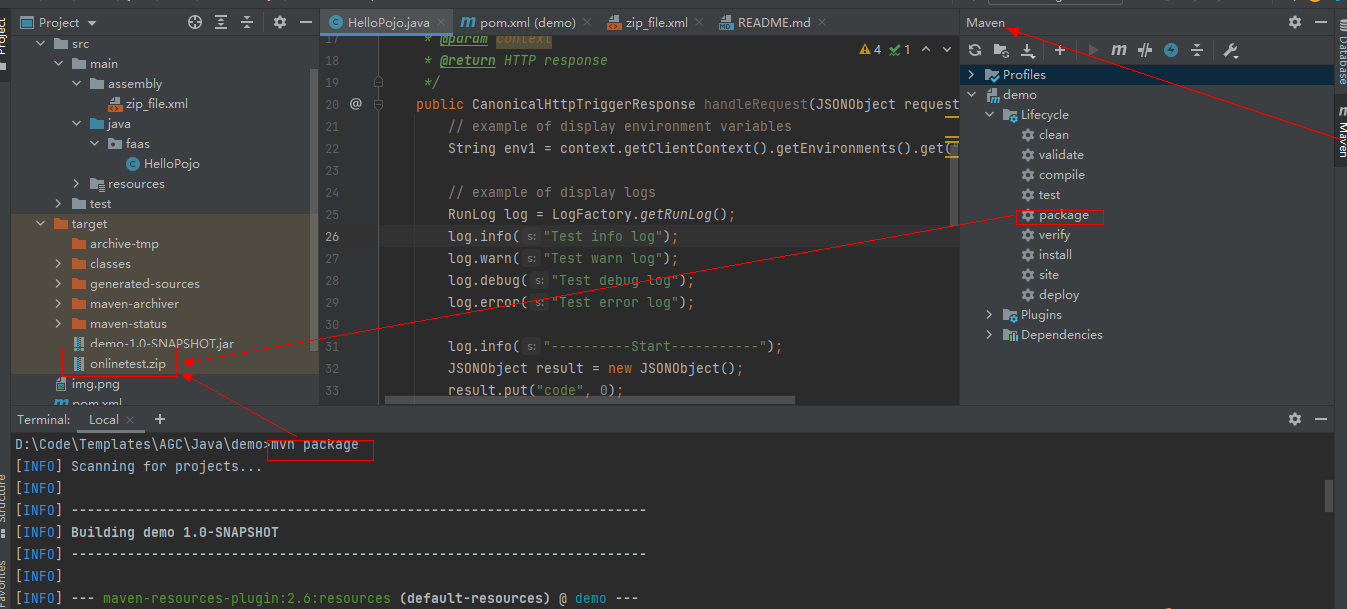
<!--打包功能--> <build> <plugins> <plugin> <groupId>org.apache.maven.plugins</groupId> <artifactId>maven-assembly-plugin</artifactId> <version>2.2-beta-5</version> <configuration> <archive> <manifest> <addDefaultImplementationEntries>true</addDefaultImplementationEntries> </manifest> </archive> <appendAssemblyId>false</appendAssemblyId> </configuration> <executions> <execution> <id>auto-deploy</id> <phase>package</phase> <goals> <goal>single</goal> </goals> <configuration> <descriptors> <descriptor>src/main/assembly/zip_file.xml</descriptor> </descriptors> <finalName>onlinetest</finalName> <outputDirectory>target</outputDirectory> <archiverConfig> <directoryMode>0700</directoryMode> <fileMode>0600</fileMode> <defaultDirectoryMode>0700</defaultDirectoryMode> </archiverConfig> </configuration> </execution> </executions> </plugin> </plugins> </build> - 编译项目后,执行mvn package命令,生成可上传的部署zip包。