系统特性
|
|
应用开发
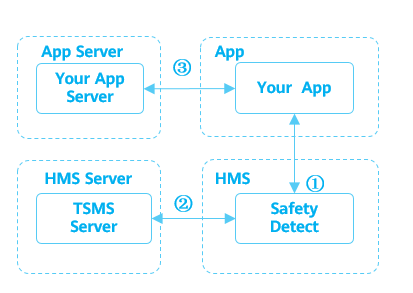
调用SysIntegrity API主要分为三个步骤:
- 获取nonce。 在调用Safety Detect SysIntegrity API时,您必须传入一个随机生成的nonce值。在检测结果中会包含这个nonce值,您可以通过校验这个nonce值来确定返回结果能够对应您的请求,并且没有被重放攻击。如果nonce值长度超出16-66字节范围,将导致调用失败,请参考下方注意说明内容。

nonce值必须满足以下条件:
- nonce值必须为16至66字节之间。
- 推荐的做法是,每次请求都从服务器随机生成新的nonce值。
- 请求Safety Detect SysIntegrity。
Safety Detect SysIntegrity提供两个接口,调用只有参数上的不同,都需要传入的参数是nonce和APP ID。sysIntegrity(SysIntegrityRequest sysIntegrityRequest)接口还需要在SysIntegrityRequest中传入签名的验证方式,这个将和您获取的JWS的Header中alg一致。
- nonce:上一小节我们获取的nonce值。
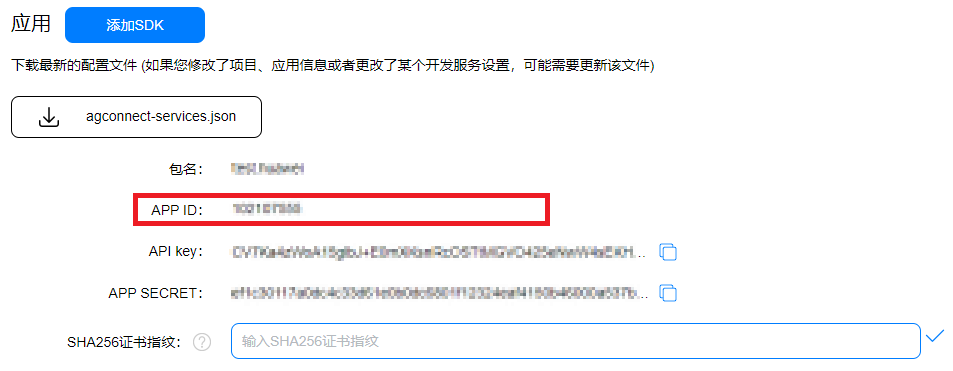
- APP ID:您可以通过如下方式获取APP ID。
登录AppGallery Connect网站,点击“我的项目”。
在项目列表中找到您的项目,在项目中点击需要配置签名证书指纹的应用。
在“项目设置 > 常规”页面的“应用”区域,可以查看应用的APP ID。
“Java”
private void invokeSysIntegrity() {
   SafetyDetectClient mClient = SafetyDetect.getClient(getActivity());
   // TODO(developer): Change the value of nonce to a random value generated by the server.
   byte[] nonce = 从服务器生成的随机的nonce值;
   String alg = "PS256";
   SysIntegrityRequest  sysintegrityrequest = new SysIntegrityRequest();
   sysintegrityrequest.setAppId("3*******");
   sysintegrityrequest.setNonce(nonce);
   sysintegrityrequest.setAlg(alg);
   Task task = mClient.sysIntegrity(sysintegrityrequest);
   task.addOnSuccessListener(new OnSuccessListener<SysIntegrityResp>() {
       @Override
       public void onSuccess(SysIntegrityResp response) {
           // Indicates communication with the service was successful.
           // Use response.getResult() to get the result data.
           String jwsStr = response.getResult();
       }
   }).addOnFailureListener(new OnFailureListener() {
       @Override
       public void onFailure(Exception e) {
           // An error occurred while communicating with the service.
           if (e instanceof ApiException) {
               // An error with the HMS API contains some
               // additional details.
               ApiException apiException = (ApiException) e;
               // You can retrieve the status code using
               // the apiException.getStatusCode() method.
               Log.e(TAG, "Error: " + SafetyDetectStatusCodes.getStatusCodeString(apiException.getStatusCode()) + ": " + apiException.getMessage());
           } else {
               // A different, unknown type of error occurred.
               Log.e(TAG, "ERROR:" + e.getMessage());
           }
       }
   });
}
“Kotlin”
  private fun invokeSysIntegrity() {
// TODO(developer): Change the value of nonce to a random value generated by the server.
         val nonce = 从服务器生成的随机的nonce值
// TODO(developer): Change your app ID. You can obtain your app ID in AppGallery Connect.
         val alg = "PS256"
         val sysIntegrityRequest = SysIntegrityRequest()
         sysIntegrityRequest.appId = APP_ID
         sysIntegrityRequest.nonce = nonce
         sysIntegrityRequest.alg = alg

         SafetyDetect.getClient(activity)
                 .sysIntegrity(sysIntegrityRequest)
                 .addOnSuccessListener { response -> // Indicates communication with the service was successful.
 // Use response.getResult() to get the result data.
                     val jwsStr = response.result

// Process the result data here
                     val jwsSplit = jwsStr.split(".").toTypedArray()
                     val jwsPayloadStr = jwsSplit[1]
                     val payloadDetail = String(Base64.decode(jwsPayloadStr.toByteArray(StandardCharsets.UTF_8), Base64.URL_SAFE), StandardCharsets.UTF_8)
                     try {
                         val jsonObject = JSONObject(payloadDetail)
                         val basicIntegrity = jsonObject.getBoolean("basicIntegrity")
                         fg_button_sys_integrity_go.setBackgroundResource(if (basicIntegrity) R.drawable.btn_round_green else R.drawable.btn_round_red)
                         fg_button_sys_integrity_go.setText(R.string.rerun)
                         val isBasicIntegrity = basicIntegrity.toString()
                         val basicIntegrityResult = "Basic Integrity: $isBasicIntegrity"
                         fg_payloadBasicIntegrity.text = basicIntegrityResult
                         if (!basicIntegrity) {
                             val advice = "Advice: " + jsonObject.getString("advice")
                             fg_payloadAdvice.text = advice
                         }
                     } catch (e: JSONException) {
                         val errorMsg = e.message
                         Log.e(TAG, errorMsg ?: "unknown error")
                     }


                 }
                 .addOnFailureListener { e -> // There was an error communicating with the service.
                     val errorMsg: String?
                     errorMsg = if (e is ApiException) {
// An error with the HMS API contains some additional details.
                         val apiException = e as ApiException
                         SafetyDetectStatusCodes.getStatusCodeString(apiException.statusCode) +
                                 ": " + apiException.message
// You can use the apiException.getStatusCode() method to get the status code.
                     } else {
// unknown type of error has occurred.
                         e.message
                     }
                     Log.e(TAG, errorMsg)
                     Toast.makeText(activity?.applicationContext, errorMsg, Toast.LENGTH_SHORT).show()
                     fg_button_sys_integrity_go.setBackgroundResource(R.drawable.btn_round_yellow)
                     fg_button_sys_integrity_go.setText(R.string.rerun)
                }
     }
- 在您的服务器中验证检测结果。
HMS Core帮助您将验证结果发送到华为服务器校验证书的准确性并将完成校验的结果通过SysIntegrityResp返回,使用此对象的getResult方法获取响应,格式为JSON WEB签名(JWS)。
- 解析JWS,获取header、payload、signature。
- 从header中获取证书链,使用Huawei CBG Root CA证书对其进行验证。
- 校验证书链中的叶证书域名,域名:sysintegrity.platform.hicloud.com。
- 从signature中获取签名,校验其签名。
- 从payload中获取完整性验证结果,格式和样例摘录如下:
{ "advice": "RESTORE_TO_FACTORY_ROM", "apkCertificateDigestSha256": ["gwpz0q/WtjtJZZK5lTXl74fI/8QAKGLAhdhlznKkLhQ="], "apkDigestSha256": "nBrInk2DLVQrgcQ1DXYnIUIMnjJ+mVo0lwUicF7OzJM=", "apkPackageName": "com.huawei.hms.safetydetectsample", "appId": "1*******", "basicIntegrity": false, "detail": ["root", "unlocked"], "nonce": "UjJScmEyNGZWbTV4YTJNZw==", "timestampMs": 1612683290520 }当检测结果中basicIntegrity为false,detail字段会列出检测结果为false的原因,具体描述请参考,您可以根据自身功能对安全的要求决定是否提醒用户。