系统特性
|
|
业务流程
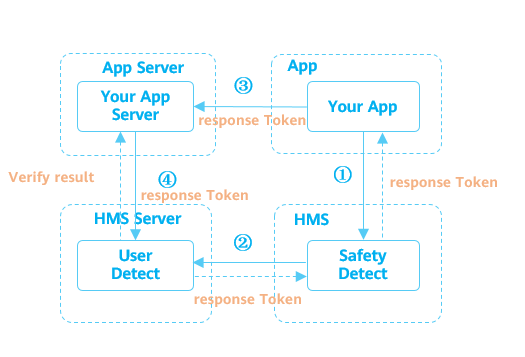
- 您的App集成HMS Core SDK调用HMS Safety Detect service。
- Safety Detect评估设备运行环境风险,如果风险等级为中或高,弹出验证码进行验证,并返回一个responseToken给您的App。
- 您的App提交responseToken至App服务端。
- App服务端发送responseToken至Safety Detect服务端获取检测结果。
[h2]初始化虚假用户检测
UserDetect提供了行为检测能力,如果您希望您的虚假用户检测功能具备该能力,可以通过调用initUserDetect接口初始化虚假用户检测,示例代码如下:
“Java”
private void initUserDetect() {
    // Replace with your activity or context as a parameter.
    SafetyDetectClient client = SafetyDetect.getClient(MainActivity.this);
    client.initUserDetect().addOnSuccessListener(new OnSuccessListener<Void>() {
        @Override
        public void onSuccess(Void v) {
            // Indicates communication with the service was successful.
        }
    }).addOnFailureListener(new OnFailureListener() {
        @Override
        public void onFailure(Exception e) {
            // There was an error communicating with the service.
        }
    });
}
“Kotlin”
private fun initUserDetect() {
// Replace with your activity or context as a parameter.
val client = SafetyDetect.getClient(this@MainActivity)
client.initUserDetect().addOnSuccessListener {
// Indicates communication with the service was successful.
}.addOnFailureListener {
// There was an error communicating with the service.
}
} [h2]调用UserDetect API
调用UserDetect API分为两步:
- 发起检测请求:调用UserDetect API的userDetection方法以发起虚假用户检测请求,API会返回一个responseToken。
您需要通过调用userDetection发起检测。通常在用户点击UI组件(如一个按钮)后触发调用该方法。调用userDetection方法时,您需要做以下事情:
- 传入您申请的appId作为该方法的参数。
- 分别添加OnSuccessListener和OnFailureListener实例作为监听器。
- 重写onSuccess、onFailure,处理对应的结果。
调用该方法的示例代码如下所示:“Java” public void onClick(View v) { SafetyDetectClient client = SafetyDetect.getClient(getActivity()); String appId = "your_app_id"; client.userDetection(appId) .addOnSuccessListener(new OnSuccessListener<UserDetectResponse>() { @Override public void onSuccess(UserDetectResponse userDetectResponse) { // Indicates communication with the service was successful. String responseToken = userDetectResponse.getResponseToken(); if (!responseToken.isEmpty()) { // Send the response token to your app server, and call the cloud API of HMS Core on your server to obtain the fake user detection result. } } }) .addOnFailureListener(new OnFailureListener() { @Override public void onFailure(Exception e) { // There was an error communicating with the service. String errorMsg; if (e instanceof ApiException) { // An error with the HMS API contains some additional details. // You can use the apiException.getStatusCode() method to get the status code. ApiException apiException = (ApiException) e; errorMsg = SafetyDetectStatusCodes.getStatusCodeString(apiException.getStatusCode()) + ": " + apiException.getMessage(); } else { // Unknown type of error has occurred. errorMsg = e.getMessage(); } Log.i(TAG, "User detection fail. Error info: " + errorMsg); } }); }“Kotlin” override fun onClick(v: View?) { val client = SafetyDetect.getClient(activity) val appId = "your_app_id" client.userDetection(appId) .addOnSuccessListener { userDetectResponse -> // Indicates communication with the service was successful. val responseToken = userDetectResponse.responseToken if (responseToken.isNotEmpty()) { // Send the response token to your app server, and call the cloud API of HMS Core on your server to obtain the fake user detection result. } } .addOnFailureListener { // There was an error communicating with the service. val errorMsg: String? = if (it is ApiException) { // An error with the HMS API contains some additional details. // You can use the apiException.getStatusCode() method to get the status code. (SafetyDetectStatusCodes.getStatusCodeString(it.statusCode) + ": " + it.message) } else { // Unknown type of error has occurred. it.message } Log.i(TAG, "User detection fail. Error info: $errorMsg") } }
若UserDetect API执行了onSuccess()方法,则说明用户已经完成了人机识别检测,但您还需到您应用服务器验证用户的responseToken。
- 获取检测结果:使用1获取response token调用云端获取检测结果:中国大陆地区调用nocaptcha云侧接口获取检测结果,海外地区通过verify云侧接口获取检测结果。
服务端主要分为两步:
- 获取accessToken。
- 调用云侧API获取检测结果。
具体步骤如下:
获取accessToken:详细请参见开放平台鉴权相关内容描述。
调用云侧API获取检测结果:调用云侧获取结果。消息请求示例如下所示。详细请参见云侧API。
POST https://{domain}/rms/v1/userRisks/verify?appId=****** HTTP/1.1//{domain}:请参见站点信息。
Content-Type: application/json;charset=utf-8
{ "accessToken":"AAWWHI94sgUR2RU5_P1ZptUiwLq7W8XWJO2LxaAPuXw4_HOJFXnBlN-q5_3bwlxVW_SHeDPx_s5bWW-9DjtWZsvcm9CwXe1FHJg0u-D2pcQPcb3sTxDTJeiwEb9WBPl_9w", "response":"1_55d74c04eab36a0a018bb7a879a6f49f072b023690cba936" }
[h2]App端关闭虚假用户检测
您可以通过调用shutdownUserDetect接口关闭虚假用户检测功能,释放资源,示例代码如下:
“Java”
private void shutdownUserDetect() {
    // Replace with your activity or context as a parameter.
    SafetyDetectClient client = SafetyDetect.getClient(MainActivity.this);
    client.shutdownUserDetect().addOnSuccessListener(new OnSuccessListener<Void>() {
        @Override
        public void onSuccess(Void v) {
            // Indicates communication with the service was successful.
        }
    }).addOnFailureListener(new OnFailureListener() {
        @Override
        public void onFailure(Exception e) {
            // There was an error communicating with the service.
        }
    });
}
“Kotlin”
private fun shutdownUserDetect() {
// Replace with your activity or context as a parameter.
val client = SafetyDetect.getClient(this@MainActivity)
client.shutdownUserDetect()
.addOnSuccessListener {
// Indicates communication with the service was successful.
}.addOnFailureListener {
// There was an error communicating with the service.
}
} 常见错误码处理
DETECT_FAIL:值19800
检测失败,建议重新调用User Detect API。
NETWORK_ERROR:值19002
未连接到互联网,建议在确保接入互联网后,再次调用User Detect API。