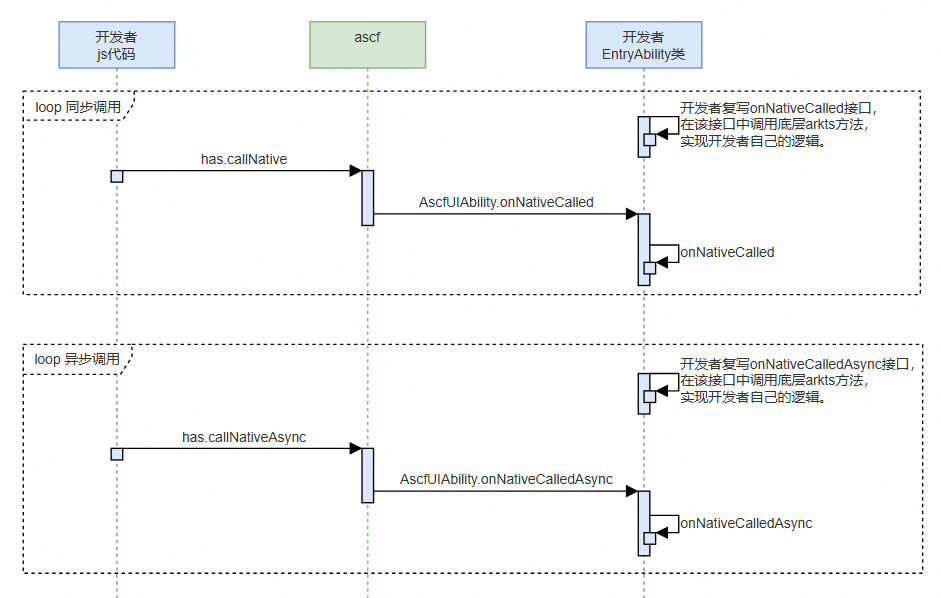
当前,ASCF可调用的系统能力小于ArkTS中元服务可调用的系统能力,可通过打通ASCF到ArkTS的调用能力,以快速补充ASCF缺失的能力。开发者可通过在EntryAbility类中复写onNativeCalled或者onNativeCalledAsync接口,来调用系统能力实现自己的功能,然后在JS代码中调用has.callNative或者has.callNativeAsync来触发EntryAbility类中编写的调用系统能力的逻辑,实现在JS代码中调用ArkTS系统能力。
AscfUIAbility.onNativeCalled
string AscfUIAbility.onNativeCalled(string|object params)
处理本地同步方法调用。
起始版本: 1.0.22
参数:
| 参数 | 类型 | 必填 | 描述 |
|---|---|---|---|
| params | string | object | 是 | 开发者根据该参数调用本地同步方法。 |
返回值:
返回string类型字符串,本地方法同步调用结果。
示例:
import { AscfUIAbility } from '@atomicservice/ascfapi';
import { atomicService } from '@kit.ScenarioFusionKit';

const SYSTEM_INFO_STATE_ARRAY: atomicService.SystemInfoType[] = [
  'brand', 'deviceModel', 'screenWidth', 'screenHeight',
  'statusBarHeight', 'screenSafeArea', 'language', 'osFullName', 'fontSizeSetting',
  'sdkApiVersion', 'bluetoothEnabled', 'wifiEnabled', 'locationEnabled',
  'deviceOrientation', 'theme', 'windowWidth', 'windowHeight'
];

export default class EntryAbility extends AscfUIAbility {
  onNativeCalled(params: string | object): string {
    // 示例1:获取SystemInfo
    if (typeof params === 'string' && params === 'getSystemInfo') {
      let systemInfo: atomicService.SystemInfo = atomicService.getSystemInfoSync(SYSTEM_INFO_STATE_ARRAY);
      return JSON.stringify(systemInfo);
    }
    // 示例2:执行计算
    if (typeof params === 'object') {
      const paramObj: Record<string, Object> = params as Record<string, Object>;
      if (paramObj.action === 'calculate' && paramObj.args) {
        const numbers: number[] = paramObj.args as number[];
        const sum: number = numbers.reduce((num1, num2) => num1 + num2, 0);
        return sum.toString();
      }
    }
    // 未处理的请求返回空字符串
    return '';
  }
}
AscfUIAbility.onNativeCalledAsync
Promise<object> AscfUIAbility.onNativeCalledAsync(string|object params)
处理本地异步方法调用。
起始版本: 1.0.22
参数:
| 参数 | 类型 | 必填 | 描述 |
|---|---|---|---|
| params | string | object | 是 | 开发者根据该参数调用本地异步方法。 |
返回值:
返回Promise<object>对象,本地异步方法调用结果。
示例:
import { AscfUIAbility } from '@atomicservice/ascfapi';
import { atomicService } from '@kit.ScenarioFusionKit';
import { call } from '@kit.TelephonyKit';

const SYSTEM_INFO_STATE_ARRAY: atomicService.SystemInfoType[] = [
  'brand', 'deviceModel', 'screenWidth', 'screenHeight',
  'statusBarHeight', 'screenSafeArea', 'language', 'osFullName', 'fontSizeSetting',
  'sdkApiVersion', 'bluetoothEnabled', 'wifiEnabled', 'locationEnabled',
  'deviceOrientation', 'theme', 'windowWidth', 'windowHeight'
];

export default class EntryAbility extends AscfUIAbility {
  onNativeCalledAsync(params: string | object): Promise<object> {
    // 示例1:获取SystemInfo
    if (typeof params === 'string' && params === 'getSystemInfo') {
      return atomicService.getSystemInfo(SYSTEM_INFO_STATE_ARRAY);
    }
    // 示例2:拨打电话
    if (typeof params === 'object') {
      const paramObj: Record<string, Object> = params as Record<string, Object>;
      if (paramObj.action === 'makeCall' && paramObj.args) {
        let phoneNumber: string = paramObj.args as string;
        return call.makeCall(phoneNumber).then(() => {
          return {} as Record<string, string>;
        });
      }
    }
    // 未处理的请求返回错误
    return Promise.reject(new Error('未知的异步操作'));
  }
}
框架间通信使用指导
开发者在EntryAbility类中复写onNativeCalled或者onNativeCalledAsync接口,然后在js代码中调用has.callNative或者has.callNativeAsync,即可实现在JS代码中调用ArkTS系统能力的功能。

当前接口仅允许在ArkTS侧实现对于底层接口的调用,不建议在ArkTS侧实现任何界面逻辑。
[h2]开发前准备
使用该功能前需要先申请元服务框架间通信能力权限,如需开通该权限可以发送邮件申请,华为运营人员将在3个工作日内反馈处理结果。
- 反馈邮箱地址:atomicservice@huawei.com
- 邮件标题:[元服务申请使用框架间通信]-[元服务名称]-[APP ID],APP ID查询方法见下方基础信息
- 邮件内容:说明需要使用的相关信息
- 说明您已知晓在HarmonyOS 4及以下系统中无法使用该能力,如有需要会自行处理代码逻辑隔离,保障用户体验
| 基础信息 | 描述 |
|---|---|
| 元服务名称 | 应用市场上架的元服务名称。 |
| APP ID | 登录HarmonyOS 开发者中心,在“开发者管理”左侧 > ID、证书和Profile > APP ID中找到对应项目,获取APP ID。 |
| 核心使用场景和理由 | 将核心使用场景的流程截图/低保真,与申请使用框架间通信的理由。 |
| 申请开放时间 | 预计使用该能力的时间(长期/到指定时间点) |
[h2]同步调用
-
const res = has.callNative('getSystemInfo');
console.info('callNative getSystemInfo res: ', res);

const sumRes = has.callNative({
  action: 'calculate',
  args: [1, 2, 3, 4, 5]
});
console.info('callNative calculate res: ', sumRes);
开发者在EntryAbility类中复写onNativeCalled接口
import { AscfUIAbility } from '@atomicservice/ascfapi';
import { atomicService } from '@kit.ScenarioFusionKit';

const SYSTEM_INFO_STATE_ARRAY: atomicService.SystemInfoType[] = [
  'brand', 'deviceModel', 'screenWidth', 'screenHeight',
  'statusBarHeight', 'screenSafeArea', 'language', 'osFullName', 'fontSizeSetting',
  'sdkApiVersion', 'bluetoothEnabled', 'wifiEnabled', 'locationEnabled',
  'deviceOrientation', 'theme', 'windowWidth', 'windowHeight'
];

export default class EntryAbility extends AscfUIAbility {
  onNativeCalled(params: string | object): string {
    // 示例1:获取SystemInfo
    if (typeof params === 'string' && params === 'getSystemInfo') {
      let systemInfo: atomicService.SystemInfo = atomicService.getSystemInfoSync(SYSTEM_INFO_STATE_ARRAY);
      return JSON.stringify(systemInfo);
    }
    // 示例2:执行计算
    if (typeof params === 'object') {
      const paramObj: Record<string, Object> = params as Record<string, Object>;
      if (paramObj.action === 'calculate' && paramObj.args) {
        const numbers: number[] = paramObj.args as number[];
        const sum: number = numbers.reduce((num1, num2) => num1 + num2, 0);
        return sum.toString();
      }
    }
    // 未处理的请求返回空字符串
    return '';
  }
}
[h2]异步调用
-
has.callNativeAsync({
  params: 'getSystemInfo',
  success: (res) => {
    console.info('callNativeAsync getSystemInfo success:', res);
  },
  fail: (err) => {
    console.error('callNativeAsync getSystemInfo fail:', err);
  },
  complete: (res) => {
    console.info('callNativeAsync getSystemInfo complete:', res);
  }
});
has.callNativeAsync({
  params: { action: 'makeCall', args: '13112341234' },
  success: (res) => {
    console.info('callNativeAsync makeCall success:', res);
  },
  fail: (err) => {
    console.error('callNativeAsync makeCall fail:', err);
  },
  complete: (res) => {
    console.info('callNativeAsync makeCall complete:', res);
  }
});
开发者在EntryAbility类中复写onNativeCalledAsync接口
import { AscfUIAbility } from '@atomicservice/ascfapi';
import { atomicService } from '@kit.ScenarioFusionKit';
import { call } from '@kit.TelephonyKit';

const SYSTEM_INFO_STATE_ARRAY: atomicService.SystemInfoType[] = [
  'brand', 'deviceModel', 'screenWidth', 'screenHeight',
  'statusBarHeight', 'screenSafeArea', 'language', 'osFullName', 'fontSizeSetting',
  'sdkApiVersion', 'bluetoothEnabled', 'wifiEnabled', 'locationEnabled',
  'deviceOrientation', 'theme', 'windowWidth', 'windowHeight'
];

export default class EntryAbility extends AscfUIAbility {
  onNativeCalledAsync(params: string | object): Promise<object> {
    // 示例1:获取SystemInfo
    if (typeof params === 'string' && params === 'getSystemInfo') {
      return atomicService.getSystemInfo(SYSTEM_INFO_STATE_ARRAY);
    }
    // 示例2:拨打电话
    if (typeof params === 'object') {
      const paramObj: Record<string, Object> = params as Record<string, Object>;
      if (paramObj.action === 'makeCall' && paramObj.args) {
        let phoneNumber: string = paramObj.args as string;
        return call.makeCall(phoneNumber).then(() => {
          return {} as Record<string, string>;
        });
      }
    }
    // 未处理的请求返回错误
    return Promise.reject(new Error('未知的异步操作'));
  }
}