承载网页的容器。
此组件会自动铺满整个页面,每个页面只允许添加一个web-view组件。
起始版本: 1.0.4
约束与限制:
使用web-view组件之前需要完成开发准备,具体请参见开发web-view组件。
支持模拟器: 从1.0.17版本开始,支持模拟器运行。
属性:
| 名称 | 类型 | 必填 | 描述 |
|---|---|---|---|
| src | string | 是 | webview指向网页的链接。 |
| bindload | eventhandler | 否 | 网页加载成功时候触发此事件。e.detail = { src }。 |
| binderror | eventhandler | 否 | 网页加载失败的时候触发此事件。e.detail = { src }。 |
| bindmessage | eventhandler | 否 | 网页通过postMessage方法向元服务发送消息。e.detail = { data },data是postMessage的参数组成的数组队列。 |
示例:
hxml文件:
<view>
  <web-view
    src="{{url}}"
    binderror="onError"
    bindload="onWebviewLoad"
    bindmessage="onWebviewMessage">
  </web-view>
</view>
JavaScript文件:
Page({
  data: {
    url: 'https://www.example.com' // 此处仅为样例,请开发者更换为可用webview指向的网页链接
  },
  onWebviewMessage(e) {
    console.info('onMessage:', e);
  },
  onError(e) {
    console.error('onError:', e);
  },
  onWebviewLoad(e) {
    console.info('onLoad:', e.detail);
  }
}); [h2]has.ascfweb.reLaunch
has.ascfweb.reLaunch(Object object)
关闭所有页面,打开到应用内的某个页面。
起始版本: 1.0.4
参数:
参数为Object对象,包括以下字段。
| 参数 | 类型 | 必填 | 描述 |
|---|---|---|---|
| url | string | 是 | 需要跳转的应用内页面路径(在app.json中定义的代码包路径),非tabBar的页面路径后可以带参数。参数与路径之间用?分隔,参数与键值用=相连,多个参数用&分隔。 支持格式:(假设app.json中定义了页面:“page/path/path”) - 以/开头,是全局路径。 - 其他路径,例如:a.png、./a.png、../a.png。 |
| success | function | 否 | 接口调用成功的回调函数。 |
| fail | function | 否 | 接口调用失败的回调函数。 |
| complete | function | 否 | 接口调用结束的回调函数(调用成功、失败都会执行)。 |
示例:
// A页面跳转
has.ascfweb.reLaunch({
  url: 'test?id=1'
});

// B页面
// options内含有路径后携带参数
Page({
  onLoad (option) {
    console.info(option.query);
  }
});
[h2]has.ascfweb.switchTab
has.ascfweb.switchTab(Object object)
如果应用定义了多标签(tab),即客户端窗口的底部或顶部有可切换页面的标签(tab),那么可以通过此接口跳转到tabBar页面,同时关闭其他所有非tabBar页面。
起始版本: 1.0.4
参数:
参数为Object对象,包括以下字段。
| 参数 | 类型 | 必填 | 描述 |
|---|---|---|---|
| url | string | 是 | 需要跳转的tabBar页面路径(需要在app.json的tabbar字段定义的页面),路径后不能带参数。 支持格式:(假设app.json的tabbar字段定义了页面:“page/tab1/tab1”) - 以/开头,加上tabbar字段定义的页面路径;例如:“/page/tab1/tab1”。 - 其他路径,例如:tab1、./tab1、../tab1。 |
| success | function | 否 | 接口调用成功的回调函数。 |
| fail | function | 否 | 接口调用失败的回调函数。 |
| complete | function | 否 | 接口调用结束的回调函数(调用成功、失败都会执行)。 |
示例:
app.json:
  "tabBar": {
    "list": [{
      "pagePath": "index",
      "text": "首页"
    },{
      "pagePath": "other",
      "text": "其他"
    }]
  }
js代码:
has.ascfweb.switchTab({
  url: '/index'
});
[h2]has.ascfweb.redirectTo
has.ascfweb.redirectTo(Object object)
关闭当前页面,跳转到应用内的某个页面,但是不允许跳转到tabBar页面。
起始版本: 1.0.4
参数:
参数为Object对象,包括以下字段。
| 参数 | 类型 | 必填 | 描述 |
|---|---|---|---|
| url | string | 是 | 需要跳转的应用内非tabBar的页面路径(在app.json中定义的代码包路径),路径后可以带参数。参数与路径之间用?分隔,参数与键值用=相连,多个参数用&分隔。 支持格式:(假设app.json中定义了页面:“page/path/path”) - 以/开头,是全局路径。 - 其他路径,例如:a.png、./a.png、../a.png。 |
| success | function | 否 | 接口调用成功的回调函数。 |
| fail | function | 否 | 接口调用失败的回调函数。 |
| complete | function | 否 | 接口调用结束的回调函数(调用成功、失败都会执行)。 |
示例:
has.ascfweb.redirectTo({
  url: 'test?id=1'
});
[h2]has.ascfweb.postMessage
has.ascfweb.postMessage(Object object)
此方法用于网页向元服务发送消息。消息会触发bindmessage上绑定的方法,方法的回调参数为网页postMessage的信息的数组队列。
起始版本: 1.0.4
参数:
参数为Object对象,包括以下字段。
| 参数 | 类型 | 必填 | 描述 |
|---|---|---|---|
| data | string | object | 是 | 发出的消息对象或字符串。 |
| options | object | 否 | 发送消息的可选配置。当前支持配置字段mode控制消息发送时机,mode支持以下合法值: - 'normal':默认,消息会在特定时机(如:网页后退、组件销毁)触发并向元服务发送。 - 'realtime':消息会立即向元服务发送。 起始版本: 2.0.4 |
| success | function | 否 | success回调表示把data数据存储成功。存储成功的数据会在元服务后退、组件销毁时,通过bindmessage发送给用户。 |
| fail | function | 否 | 回调表示没有把data数据存储成功。 |
| complete | function | 否 | 接口调用结束的回调函数(调用成功、失败都会执行)。 |
示例:
has.ascfweb.postMessage({ data: 'foo' });
has.ascfweb.postMessage({ data: { foo: 'bar' } });
has.ascfweb.postMessage({ data: { foo: 'bar' }, options: { mode: 'realtime' } });
[h2]has.ascfweb.onMessage
has.ascfweb.onMessage(callback: function): void
监听并接受来自postMessage发送过来的消息。
起始版本: 2.0.4
参数:
| 名称 | 类型 | 必填 | 说明 |
|---|---|---|---|
| callback | function | 是 | 回调方法,方法声明:(data) => void。 |
示例:
has.ascfweb.onMessage((data) => {
  console.info('onMessage, data:', data);
});
[h2]has.ascfweb.getEnv
has.ascfweb.getEnv(function callback)
获取当前环境。以callback形式返回结果。
起始版本: 1.0.4
参数:
| 参数 | 类型 | 必填 | 描述 |
|---|---|---|---|
| callback | function | 否 | 获取当前环境的回调函数。 |
callback返回值:
Object类型,包括以下字段。
| 参数 | 类型 | 描述 |
|---|---|---|
| ascfweb | boolean | 判断当前是否在ascfweb环境中。 |
| systemInfo | object | 系统信息。 |
systemInfo说明:
| 参数 | 类型 | 描述 |
|---|---|---|
| deviceType | string | 设备类型。 |
| brand | string | 设备品牌名称。 |
| productModel | string | 认证型号。 |
| osFullName | string | 系统版本。 |
| ascfVersion | string | ASCF框架的版本号,ascfVersion是三位版本号,由[大版本].[小版本].[修订版本]三部分组成,例如:1.0.0。 |
示例:
has.ascfweb.getEnv(function(res) {
  console.info(res.ascfweb);   // true
  console.info(res.systemInfo);
});
[h2]has.authorize
has.authorize(Object object)
提前向用户发起授权请求。调用后会立刻弹窗询问用户是否同意授权元服务使用某项功能或获取用户的某些数据,但不会实际调用对应接口。如果用户之前已经同意授权,则不会出现弹窗,直接返回成功。
起始版本: 2.0.2
参数:
参数为Object对象,包括以下字段。
| 参数 | 类型 | 必填 | 描述 |
|---|---|---|---|
| scope | string | 是 | 需要获取权限的scope,详见“scope列表”。 注意: 仅支持申请摄像头(scope.camera)和麦克风(scope.record)两种权限。 |
| success | function | 否 | 接口调用成功的回调函数。 |
| fail | function | 否 | 接口调用失败的回调函数。 |
| complete | function | 否 | 接口调用结束的回调函数(调用成功、失败都会执行)。 |

在申请权限时,需要在项目的配置文件中,逐个声明需要的权限,否则将无法获取授权。配置方式请参见声明权限。
示例:
has.authorize({
  scope: 'scope.camera',
  success: () => {
    console.info('authorize success');
  },
  fail: (err) => {
    console.error('authorize fail', err);
  },
  complete: (res) => {
    console.info('authorize complete', res);
  }
});
[h2]has.checkJsApi
has.checkJsApi(Object object)
使用checkJsApi判断当前宿主是否支持某些API。
起始版本: 1.0.4
参数:
参数为Object对象,包括以下字段。
| 参数 | 类型 | 必填 | 描述 |
|---|---|---|---|
| jsApiList | string[] | 是 | 需要check的api名称数组。 |
| success | function | 否 | 接口调用成功的回调函数。 |
| fail | function | 否 | 接口调用失败的回调函数。 |
| complete | function | 否 | 接口调用结束的回调函数(调用成功、失败都会执行)。 |
示例:
has.checkJsApi({
  jsApiList: ['chooseImage', 'previewImage', 'compressImage', 'uploadFile'],
  success(res) {
    console.info('checkJsApi success', res);
  },
  fail(err) {
    console.error('checkJsApi fail', err);
  }
});
[h2]has.chooseImage
has.chooseImage(Object object)
从本地相册选择图片或使用相机拍照。
起始版本: 1.0.4
约束与限制:
当前接口在元服务被嵌入式运行时暂不支持使用,建议规避或替换类似功能接口。
参数:
参数为Object对象,包括以下字段。
| 参数 | 类型 | 默认值 | 必填 | 描述 |
|---|---|---|---|---|
| count | number | 9 | 否 | 最多可以选择的图片张数。默认值为9,最大不能超过20。 |
| sizeType | string[] | ['original', 'compressed'] | 否 | 所选的图片的尺寸。 - original:原图。 - compressed:压缩图。 |
| sourceType | string[] | ['album', 'camera'] | 否 | 选择图片的来源。 - album:从相册选图。 - camera:使用相机拍摄。 |
| success | function | - | 否 | 接口调用成功的回调函数。 |
| fail | function | - | 否 | 接口调用失败的回调函数。 |
| complete | function | - | 否 | 接口调用结束的回调函数(调用成功、失败都会执行)。 |
success返回值:
| 参数 | 类型 | 描述 |
|---|---|---|
| tempFilePaths | Array<string> | 图片的本地临时文件路径列表(本地路径)。 |
| tempFiles | Array<object> | 图片的本地临时文件列表。 |
示例:
has.chooseImage({
  count: 1, // 默认9
  sizeType: ['original', 'compressed'], // 可以指定是原图还是压缩图,默认二者都有
  sourceType: ['album', 'camera'], // 可以指定来源是相册还是相机,默认二者都有
  success: (res) => {
    console.info('chooseImage success', res.tempFilePaths);
  },
  fail: (err) => {
    console.error('chooseImage fail', err);
  },
  complete: (res) => {
    console.info('chooseImage complete', res);
  }
});
[h2]has.previewImage
has.previewImage(Object object)
在新页面中预览图片,预览的过程中用户可以进行保存图片等操作。
起始版本: 1.0.4
注意事项:在调用此接口时如果需要支持保存网络资源,需要先完成配置服务器域名。
参数:
参数为Object对象,包括以下字段。
| 参数 | 类型 | 默认值 | 必填 | 描述 |
|---|---|---|---|---|
| current | string | urls的第一个元素(即第一张图片url) | 否 | 当前显示的图片的链接。 |
| urls | string[] | - | 是 | 需要预览的图片列表(支持网络图片和本地图片,本地图片路径以internal://开头)。 |
| showmenu | boolean | true | 否 | 是否显示长按菜单。 |
| success | function | - | 否 | 接口调用成功的回调函数。 |
| fail | function | - | 否 | 接口调用失败的回调函数。 |
| complete | function | - | 否 | 接口调用结束的回调函数(调用成功、失败都会执行)。 |
示例:
has.previewImage({
  current: '', // 当前显示图片的http链接
  urls: [] // 需要预览的图片http链接列表
});
[h2]has.uploadImage
has.uploadImage(Object object)
将本地图片上传到服务器。
起始版本: 1.0.4
需要权限:在module.json5中声明ohos.permission.INTERNET。
注意事项:在调用此接口前,需要先完成配置服务器域名。
参数:
参数为Object对象,包括以下字段。
| 参数 | 类型 | 必填 | 描述 |
|---|---|---|---|
| url | string | 是 | 开发者服务器地址。 |
| filePath | string | 是 | 要上传文件资源的路径(本地路径)。 |
| name | string | 是 | 文件对应的key,开发者在服务端可以通过这个key获取文件的二进制内容。 |
| header | string | 否 | HTTP请求Header,Header中不能设置Referer。 |
| formData | Object | 否 | HTTP请求中其他额外的form data。 |
| success | function | 否 | 接口调用成功的回调函数。 |
| fail | function | 否 | 接口调用失败的回调函数。 |
| complete | function | 否 | 接口调用结束的回调函数(调用成功、失败都会执行)。 |
示例:
has.chooseImage({
  success (res) {
    const tempFilePaths = res.tempFilePaths;
    has.uploadImage({
      url: 'https://www.example.com', // 此处仅为样例,请开发者更换为可用接口地址
      filePath: tempFilePaths[0],
      name: 'file',
      formData: {
        'user': 'test'
      },
      success: (res) => {
        const data = res.data;
        // do something
      }
    });
  }});
[h2]has.downloadImage
has.downloadImage(Object object)
下载图片资源到本地。
起始版本: 1.0.4
需要权限:在module.json5中声明ohos.permission.INTERNET。
注意事项:在调用此接口前,需要先完成配置服务器域名。
参数:
参数为Object对象,包括以下字段。
| 参数 | 类型 | 必填 | 描述 |
|---|---|---|---|
| url | string | 是 | 开发者服务器地址。 |
| header | string | 否 | HTTP请求Header,Header中不能设置Referer。 |
| filePath | string | 否 | 指定文件下载后存储的路径(只支持internal://files/开头的本地用户文件路径)。 |
| success | function | 否 | 接口调用成功的回调函数。 |
| fail | function | 否 | 接口调用失败的回调函数。 |
| complete | function | 否 | 接口调用结束的回调函数(调用成功、失败都会执行)。 |
示例:
has.downloadImage({
  url: 'https://www.example.com', // 此处仅为样例,请开发者更换为可用接口地址
  success(res) {
    // 只要服务器有响应数据,就会把响应内容写入文件并进入 success 回调,业务需要自行判断是否下载到了想要的内容
    if (res.statusCode === 200) {
      let filePath = res.filePath;
    }
  }
});
[h2]has.getNetworkType
has.getNetworkType(Object object)
获取网络类型。
起始版本: 1.0.4
需要权限: 在module.json5中声明ohos.permission.GET_NETWORK_INFO。
参数:
参数为Object对象,包括以下字段。
| 参数 | 类型 | 必填 | 描述 |
|---|---|---|---|
| success | function | 否 | 接口调用成功的回调函数。 |
| fail | function | 否 | 接口调用失败的回调函数。 |
| complete | function | 否 | 接口调用结束的回调函数(调用成功、失败都会执行)。 |
success返回值:
| 参数 | 类型 | 描述 |
|---|---|---|
| networkType | string | 网络类型。 - cellular:蜂窝网络。 - wifi:Wi-Fi网络。 - bluetooth:蓝牙网络。 - ethernet:以太网网络。 - vpn:VPN网络。 - none:无网络。 - unknown:不常见的网络类型。 |
示例:
has.getNetworkType({
  success: (res) => {
    const networkType = res.networkType; // 返回网络类型cellular,wifi,bluetooth,ethernet,vpn,none,unknown
    console.info('getNetworkType success', networkType);
  }
});
[h2]has.openLocation
has.openLocation(Object object)
使用引擎内置地图查看具体位置。
起始版本: 1.0.4
参数:
参数为Object对象,包括以下字段。
| 参数 | 类型 | 必填 | 描述 |
|---|---|---|---|
| latitude | number | 是 | 纬度,范围为-90 ~ 90,负数表示南纬。 说明: 中国大陆及港澳地区,请使用gcj02,其他地区请使用wgs84。 |
| longitude | number | 是 | 经度,范围为-180 ~ 180,负数表示西经。根据type字段决定使用哪套坐标系。 说明: 中国大陆及港澳地区,请使用gcj02,其他地区请使用wgs84。 |
| name | string | 是 | 位置名。 |
| address | string | 否 | 地址的详情说明。 |
| success | function | 否 | 接口调用成功的回调函数。 |
| fail | function | 否 | 接口调用失败的回调函数。 |
| complete | function | 否 | 接口调用结束的回调函数(调用成功、失败都会执行)。 |
示例:
has.openLocation({
  latitude: 0, // 纬度,浮点数,范围为90 ~ -90
  longitude: 0, // 经度,浮点数,范围为180 ~ -180。
  name: '', // 位置名
  address: '' // 地址详情说明
});
[h2]has.getLocation
has.getLocation(Object object)
获取当前的地理位置、速度。开启高精度定位,接口耗时会增加,可指定highAccuracyExpireTime作为超时时间。
起始版本: 1.0.4
需要权限: 在module.json5中声明ohos.permission.LOCATION和ohos.permission.APPROXIMATELY_LOCATION。
参数:
参数为Object对象,包括以下字段。
| 参数 | 类型 | 默认值 | 必填 | 描述 |
|---|---|---|---|---|
| type | string | wgs84 | 否 | wgs84返回gps坐标,gcj02返回国测局坐标。 |
| altitude | boolean | false | 否 | 传入true会返回高度信息,由于获取高度需要较高精确度,会减慢接口返回速度。 |
| isHighAccuracy | boolean | false | 否 | 开启高精度定位。 |
| highAccuracyExpireTime | number | - | 否 | 高精度定位超时时间,单位:ms。指定时间内返回最高精度,该值3000ms以上高精度定位才有效果。 |
| success | function | - | 否 | 接口调用成功的回调函数。 |
| fail | function | - | 否 | 接口调用失败的回调函数。 |
| complete | function | - | 否 | 接口调用结束的回调函数(调用成功、失败都会执行)。 |
success返回值:
| 参数 | 类型 | 描述 |
|---|---|---|
| latitude | number | 纬度,范围为-90~90,负数表示南纬,根据type参数确定使用坐标。 |
| longitude | number | 经度,范围为-180~180,负数表示西经,根据type参数确定使用坐标。 |
| speed | number | 速度,单位m/s。 |
| accuracy | number | 位置的精确度,反映与真实位置之间的接近程度,可以理解成:10,即与真实位置相差10m,越小越精确。 |
| altitude | number | 高度,单位:m。 |
| verticalAccuracy | number | 垂直精度,单位:m。 |
示例:
has.getLocation({
  type: 'wgs84', // 默认为wgs84的gps坐标,如果要返回直接给openLocation用的火星坐标,可传入'gcj02'
  success: (res) => {
    let latitude = res.latitude; // 纬度,浮点数,范围为90 ~ -90
    let longitude = res.longitude; // 经度,浮点数,范围为180 ~ -180。
    let speed = res.speed; // 速度,以米/每秒计
    let accuracy = res.accuracy; // 位置精度
  }
});
[h2]has.login
has.login(Object object)
调用接口获取登录凭证(code)。使用该凭证进一步换取用户登录状态信息,包括用户在当前程序中的唯一标识(openid)、平台账号下的唯一标识(unionid)。用户数据的加密与解密通信需要依赖会话密钥来完成。进一步使用时,请参见获取华为账号用户信息。
起始版本: 1.0.9
参数:
参数为Object对象,包括以下字段。
| 参数 | 类型 | 必填 | 描述 |
|---|---|---|---|
| success | function | 否 | 接口调用成功的回调函数。 |
| fail | function | 否 | 接口调用失败的回调函数。 |
| complete | function | 否 | 接口调用结束的回调函数(调用成功、失败都会执行)。 |
success返回值:
| 参数 | 类型 | 描述 |
|---|---|---|
| code | string | 用户登录凭证(有效期5min)。 |
| idToken | string | JWT格式的字符串,包含用户信息。 |
| openID | string | 华为账号用户在不同类型的产品的身份ID,同一个用户不同应用,OpenID值不同。 |
| unionID | string | 华为账号用户在同一个开发者账号下产品的身份ID,同一个用户,同一个开发者账号下管理的不同应用,UnionID值相同。 |
示例:
has.login({
  success: (res) => {
    console.info('login success', res);
  },
  fail: (err) => {
    console.error('login fail', err);
  },
  complete: (res) => {
    console.info('login complete', res);
  }
});
[h2]has.requestPayment
has.requestPayment(Object object)
拉起华为支付或跳转三方支付。使用前请参见华为支付服务-开发准备。
起始版本: 1.0.9
参数:
参数为Object对象,包括以下字段。
| 参数 | 类型 | 必填 | 描述 |
|---|---|---|---|
| orderStr | string | 是 | 拉起华为支付收银台或者跳转三方支付传入的订单信息,json字符串格式,具体数据格式要求请参见orderStr。 |
| payload | string | 否 | 预留信息,在请求接口时,入参如果传递,接口响应中则会原样返回。 说明: - 入参如果传递代表跳转三方支付,拉起H5支付场景下需要固定传递“AP”。 - 入参如果不传递代表拉起华为支付。 起始版本: 1.0.10 |
| success | function | 否 | 接口调用成功的回调函数。 |
| fail | function | 否 | 接口调用失败的回调函数。 |
| complete | function | 否 | 接口调用结束的回调函数(调用成功、失败都会执行)。 |
success返回值:
拉起华为支付success的返回值为空,跳转三方支付success的返回值包括以下字段。
| 参数 | 类型 | 描述 |
|---|---|---|
| selectedPaymentType | string | 用户选择的支付方式。 - wechat_pay:微信支付。 - ali_pay:支付宝支付。 - 其他(其他为商户申请配置三方支付方式时所申请的三方支付相关配置)。 |
| clientToken | string | 客户端凭证。 |
| nextStep | string | 下一步支付流程。 |
| extraInfo | string | 保留字段,json string格式。 |
| payload | string | 预留信息,在请求接口时,入参如果传递,接口响应中则会原样返回。 说明: 拉起H5支付场景下需要固定传递“AP”。 |
示例:
拉起华为支付:
has.requestPayment({
  orderStr: 'xxx',
  success: (res) => {
    console.info('requestPayment success', res);
  },
  fail: (err) => {
    console.error('requestPayment fail', err);
  },
  complete: (res) => {
    console.info('requestPayment complete', res);
  }
});
跳转三方支付:
has.requestPayment({
  orderStr: 'xxx',
  payload: 'AP',
  success: (res) => {
    console.info('requestPayment success', res);
  },
  fail: (err) => {
    console.error('requestPayment fail', err);
  },
  complete: (res) => {
    console.info('requestPayment complete', res);
  }
});
[h2]has.cashierPicker
has.cashierPicker(Object object)
拉起通用收银台。
起始版本: 1.0.10
参数:
参数为Object对象,包括以下字段。
| 参数 | 类型 | 必填 | 描述 |
|---|---|---|---|
| tradeSummary | string | 否 | 订单的摘要信息。 |
| amount | number | 否 | 订单总金额,单位:分。 |
| currency | string | 否 | 货币单位。 说明: - 不传递则收银台不显示货币单位。 - 传递后收银台可以转换成货币符号则显示货币符号(比如¥),转换不了则显示所传递的值。 |
| extraInfo | string | 否 | 保留字段。json string格式。若未填写,默认为空。 说明: 商户可以通过保留字段指定支付方式。指定收银台支付方式列表传递内容示例如下: {"selectPayType":"wechat_pay|xxx"}。 |
| success | function | 否 | 接口调用成功的回调函数。 |
| fail | function | 否 | 接口调用失败的回调函数。 |
| complete | function | 否 | 接口调用结束的回调函数(调用成功、失败都会执行)。 |
success返回值:
| 参数 | 类型 | 描述 |
|---|---|---|
| selectedPaymentType | string | 用户选择的支付方式。 - wechat_pay:微信支付。 - ali_pay:支付宝支付。 - 其他(其他为商户申请配置三方支付方式时所申请的三方支付相关配置)。 |
| clientToken | string | 客户端凭证。 |
示例:
has.cashierPicker({
  tradeSummary: '',
  amount: 100,
  currency: 'CNY',
  extraInfo: '',
  success: (res) => {
    console.info('cashierPicker success', res);
  },
  fail: (err) => {
    console.error('cashierPicker fail', err);
  },
  complete: (res) => {
    console.info('cashierPicker complete', res);
  }
});
[h2]has.requestContract
has.requestContract(Object object)
调起华为支付签约服务。
起始版本: 1.0.10
参数:
参数为Object对象,包括以下字段。
| 参数 | 类型 | 必填 | 描述 |
|---|---|---|---|
| contractStr | string | 是 | 拉起签约收银台入参,contractStr是json字符串的格式。 |
| success | function | 否 | 接口调用成功的回调函数。 |
| fail | function | 否 | 接口调用失败的回调函数。 |
| complete | function | 否 | 接口调用结束的回调函数(调用成功、失败都会执行)。 |
示例:
has.requestContract({
  contractStr: 'xxx',
  success: (res) => {
    console.info('requestContract success', res);
  },
  fail: (err) => {
    console.error('requestContract fail', err);
  },
  complete: (res) => {
    console.info('requestContract complete', res);
  }
});
[h2]has.queryIapEnvStatus
has.queryIapEnvStatus(Object object)
查询用户登录的账号服务地是否在IAP Kit支持结算的国家/地区中。当前只支持中国大陆。
需要权限: 开发前需要配置Client ID、配置签名证书指纹、开通商户服务、开启和激活应用内购买服务。
起始版本: 1.0.10
参数:
参数为Object对象,包括以下字段。
| 参数 | 类型 | 必填 | 描述 |
|---|---|---|---|
| success | function | 否 | 接口调用成功的回调函数。 |
| fail | function | 否 | 接口调用失败的回调函数。 |
| complete | function | 否 | 接口调用结束的回调函数(调用成功、失败都会执行)。 |
错误码信息:
| 错误码 | 错误信息 |
|---|---|
| 401 | Parameter error. |
| 1001860000 | The operation was canceled by the user. |
| 1001860001 | System internal error. |
| 1001860004 | Too frequent API calls. |
| 1001860005 | Network connection error. |
| 1001860050 | The HUAWEI ID is not signed in. |
| 1001860054 | The country or region of the signed-in HUAWEI ID does not support IAP. |
示例:
has.queryIapEnvStatus({
  success() {
    console.info('iap is support');
  },
  fail(err) {
    console.error('iap is not support', err);
  }
});
[h2]has.createIap
has.createIap(Object object)
发起购买,支持消耗型商品、非消耗型商品和自动续期订阅商品。在HarmonyOS 开发者中心创建商品后,使用此接口拉起华为应用内支付收银台,显示商品名称、价格等信息。
需要权限: 开发前需要配置Client ID、配置签名证书指纹、开通商户服务、开启和激活应用内购买服务。
起始版本: 1.0.10
参数:
参数为Object对象,包括以下字段。
| 参数 | 类型 | 必填 | 描述 |
|---|---|---|---|
| productId | string | 是 | 待支付的商品ID。商品ID来源于开发者在HarmonyOS 开发者中心中配置商品信息时设置的“商品ID”,具体请参见配置商品信息。 |
| productType | number | 是 | 需要查询的商品类型。 0:消耗型商品。 1:非消耗型商品。 2:自动续期订阅商品。 3:非续期订阅商品。 |
| developerPayload | string | 否 | 商户侧保留信息。 若该字段有值,在支付成功后的回调结果中会原样返回给应用。 说明: 该参数长度限制为[0, 256]。 |
| reservedInfo | string | 否 | 要求JSON String格式,商户可以将额外需要传入的字段以key-value的形式设置在JSON String中,并通过该参数传入。 例如: let reservedInfo = "{"key1":"value1","key2":"value2"}"; 说明: 该字段为预留字段,可选传入,开发者暂时无需关注。 |
| promotionalOfferId | string | 否 | 优惠ID。优惠ID来源于开发者在HarmonyOS 开发者中心中配置商品信息时设置的促销优惠标识符,具体请参见设置促销价格。传递该字段且要生效,需传递jwsRepresentation字段包含促销优惠信息。 |
| applicationUserName | string | 否 | 用户账户相关联的混淆字符串,唯一标识用户。传递优惠ID场景,可以传递该字段。 |
| jwsRepresentation | string | 否 | 包含购买参数信息的JWS格式签名数据。购买参数,如促销优惠等。详细说明见生成订阅优惠签名购买参数。 |
| success | function | 否 | 接口调用成功的回调函数。 |
| fail | function | 否 | 接口调用失败的回调函数。 |
| complete | function | 否 | 接口调用结束的回调函数(调用成功、失败都会执行)。 |
success返回值:
| 参数 | 类型 | 描述 |
|---|---|---|
| purchaseData | string | 包含支付结果的JSON字符串,包含的参数请参见PurchaseData。 |
错误码信息:
| 错误码 | 错误信息 |
|---|---|
| 102 | Param error. |
| 401 | Parameter error. |
| 1001860000 | The operation was canceled by the user. |
| 1001860001 | System internal error. |
| 1001860002 | The application is not authorized. |
| 1001860003 | Invalid product information. |
| 1001860004 | Too frequent API calls. |
| 1001860005 | Network connection error. |
| 1001860007 | The app to which the product belongs is not released in a specified location. |
| 1001860051 | Failed to purchase a product because the user already owns the product. |
| 1001860054 | The country or region of the signed-in HUAWEI ID does not support IAP. |
| 1001860056 | The user is not allowed to make purchase. |
| 1001860059 | Invalid promotional offer id. |
| 1001860060 | Invalid purchase signature. |
示例:
has.createIap({
  // 替换为实际的商品id
  productId: 'product_id',
  productType: 0,
  developerPayload: '',
  reservedInfo: JSON.stringify({ key1: 'value1' }),
  promotionalOfferId: '',
  applicationUserName: '',
  jwsRepresentation: '',
  success(res) {
    console.info('createIap success', res);
  },
  fail(err) {
    console.error('createIap fail', err);
  }
});
[h2]has.finishIap
has.finishIap(Object object)
应用完成已购商品的发货后,调用此接口确认发货,指明此次购买流程结束。
需要权限: 开发前需要配置Client ID、配置签名证书指纹、开通商户服务、开启和激活应用内购买服务。
起始版本: 1.0.10
参数:
参数为Object对象,包括以下字段。
| 参数 | 类型 | 必填 | 描述 |
|---|---|---|---|
| productType | number | 是 | 需要查询的商品类型。 0:消耗型商品。 1:非消耗型商品。 2:自动续期订阅商品。 3:非续期订阅商品。 |
| purchaseToken | string | 是 | 购买订单中返回的购买token。 单次购买中与具体购买订单一一对应;订阅购买中与订阅Id一一对应。 对应请求has.createIap或has.queryIap接口返回。 |
| purchaseOrderId | string | 是 | 购买订单中返回的购买订单ID。 对应has.createIap或has.queryIap接口返回。 |
| success | function | 否 | 接口调用成功的回调函数。 |
| fail | function | 否 | 接口调用失败的回调函数。 |
| complete | function | 否 | 接口调用结束的回调函数(调用成功、失败都会执行)。 |
错误码信息:
| 错误码 | 错误信息 |
|---|---|
| 102 | Param error. |
| 401 | Parameter error. |
| 1001860001 | System internal error. |
| 1001860002 | The application is not authorized. |
| 1001860004 | Too frequent API calls. |
| 1001860005 | Network connection error. |
| 1001860050 | The HUAWEI ID is not signed in. |
| 1001860052 | The purchase cannot be finished because the user has not paid for it. |
| 1001860053 | The purchase has been finished and cannot be finished again. |
| 1001860054 | The country or region of the signed-in HUAWEI ID does not support IAP. |
示例:
has.finishIap({
  productType: 0,
  // 替换为实际的purchaseToken
  purchaseToken: '***',
  // 替换为实际的purchaseOrderId
  purchaseOrderId: '***',
  success() {
    console.info('finishIap success ');
  },
  fail(err) {
    console.error('finishIap fail', err);
  }
});
[h2]has.queryIap
has.queryIap(Object object)
查询用户已订购商品的购买数据,包括消耗型商品和非消耗型商品,一次请求只能查询一种类型的商品。
需要权限: 开发前需要配置Client ID、配置签名证书指纹、开通商户服务、开启和激活应用内购买服务。
起始版本: 1.0.10
参数:
参数为Object对象,包括以下字段。
| 参数 | 类型 | 默认值 | 必填 | 描述 |
|---|---|---|---|---|
| productType | number | - | 是 | 需要查询的商品类型。 0:消耗型商品。 1:非消耗型商品。 2:自动续期订阅商品。 3:非续期订阅商品。 |
| continuationToken | string | - | 否 | 支持分页查询的数据定位标志。 第1次查询时可以不传该参数。如果用户拥有的商品数量非常大,当响应中存在continuationToken时,应用必须对当前方法发起另一个调用,并传入本次接收到的continuationToken。如果商品仍未查完,仍需要继续发起调用,直到不再返回continuationToken,表示已经返回全部商品。 |
| queryType | number | 1 | 否 | 查询类型。默认值为1。 0:消耗型商品、非消耗型商品或自动续期订阅商品的所有购买记录。 1:已购买但未交付的消耗型商品、非消耗型商品或自动续期订阅商品。 2:购买的非消耗型商品或当前有效的自动续期订阅商品。 在沙盒环境下: productType为1时,只返回已购买未确认发货的非消耗型商品。 productType为2时,只返回当前生效的自动续期订阅商品。 |
| success | function | - | 否 | 接口调用成功的回调函数。 |
| fail | function | - | 否 | 接口调用失败的回调函数。 |
| complete | function | - | 否 | 接口调用结束的回调函数(调用成功、失败都会执行)。 |
success返回值:
| 参数 | 类型 | 描述 |
|---|---|---|
| purchaseDataList | string[] | PurchaseData字符串的数组。 |
| continuationToken | string | 支持分页查询的数据定位标志。 如果用户拥有的商品数量非常大,当响应中存在continuationToken时,应用必须对当前方法发起另一个调用,并传入本次接收到的continuationToken。如果商品仍未查完,仍需要继续发起调用,直到不再返回continuationToken,表示已经返回全部商品。 |
错误码信息:
| 错误码 | 错误信息 |
|---|---|
| 102 | Param error. |
| 401 | Parameter error. |
| 1001860001 | System internal error. |
| 1001860002 | The application is not authorized. |
| 1001860004 | Too frequent API calls. |
| 1001860005 | Network connection error. |
| 1001860050 | The HUAWEI ID is not signed in. |
| 1001860054 | The country or region of the signed-in HUAWEI ID does not support IAP. |
示例:
has.queryIap({
  productType: 0,
  queryType: 1,
  success(res) {
    console.info('queryIap success', res);
  },
  fail(err) {
    console.error('queryIap fail', err);
  }
});
[h2]has.queryIapProducts
has.queryIapProducts(Object object)
获取在HarmonyOS 开发者中心上配置的商品的详情信息。
需要权限: 开发前需要配置Client ID、配置签名证书指纹、开通商户服务、开启和激活应用内购买服务。
起始版本: 1.0.10
参数:
参数为Object对象,包括以下字段。
| 参数 | 类型 | 必填 | 描述 |
|---|---|---|---|
| productType | number | 是 | 需要查询的商品类型。 0:消耗型商品。 1:非消耗型商品。 2:自动续期订阅商品。 3:非续期订阅商品。 |
| productIds | string[] | 是 | 待查询商品ID列表。 商品ID必须已经在当前应用中创建且唯一。 商品ID来源于开发者在HarmonyOS 开发者中心中配置商品信息时设置的商品ID,请参见配置商品信息。 说明: 一次查询最多支持200个商品,商品数量较多时建议分批查询。 |
| success | function | 否 | 接口调用成功的回调函数。 |
| fail | function | 否 | 接口调用失败的回调函数。 |
| complete | function | 否 | 接口调用结束的回调函数(调用成功、失败都会执行)。 |
success返回值:
返回Product数组。
错误码信息:
| 错误码 | 错误信息 |
|---|---|
| 102 | Param error. |
| 401 | Parameter error. |
| 1001860001 | System internal error. |
| 1001860002 | The application is not authorized. |
| 1001860003 | Invalid product information. |
| 1001860004 | Too frequent API calls. |
| 1001860005 | Network connection error. |
| 1001860007 | The app to which the product belongs is not released in a specified location. |
| 1001860050 | The HUAWEI ID is not signed in. |
| 1001860054 | The country or region of the signed-in HUAWEI ID does not support IAP. |
示例:
has.queryIapProducts({
  productType: 0,
  productIds: ['xxx-1', 'xxx-2'],
  success(res) {
    console.info('queryIapProducts success', res);
  },
  fail(err) {
    console.error('queryIapProducts fail', err);
  }
});
[h2]has.isIapSandboxActivated
has.isIapSandboxActivated(Object object)
检查沙盒测试能力是否生效。
需要权限: 开发前需要配置Client ID、配置签名证书指纹、开通商户服务、开启和激活应用内购买服务。
起始版本: 1.0.10
参数:
参数为Object对象,包括以下字段。
| 参数 | 类型 | 必填 | 描述 |
|---|---|---|---|
| success | function | 否 | 接口调用成功的回调函数。 |
| fail | function | 否 | 接口调用失败的回调函数。 |
| complete | function | 否 | 接口调用结束的回调函数(调用成功、失败都会执行)。 |
success返回值:
返回boolean,表示沙盒测试能力是否生效。
错误码信息:
| 错误码 | 错误信息 |
|---|---|
| 102 | Param error. |
| 401 | Parameter error. |
| 1001860001 | System internal error. |
| 1001860002 | The application is not authorized. |
| 1001860004 | Too frequent API calls. |
| 1001860005 | Network connection error. |
| 1001860050 | The HUAWEI ID is not signed in. |
| 1001860054 | The country or region of the signed-in HUAWEI ID does not support IAP. |
| 1001860057 | The app provision type is not debug. |
| 1001860058 | The HUAWEI ID is not test account. |
示例:
has.isIapSandboxActivated({
  success(res) {
    console.info('isIapSandboxActivated success', res);
  },
  fail(err) {
    console.error('isIapSandboxActivated fail', err);
  }
});
[h2]has.showIapManagedSubscriptions
has.showIapManagedSubscriptions(Object object)
跳转到订阅页或订阅详情页。
需要权限: 开发前需要配置Client ID、配置签名证书指纹、开通商户服务、开启和激活应用内购买服务。
起始版本: 1.0.10
参数:
参数为Object对象,包括以下字段。
| 参数 | 类型 | 必填 | 描述 |
|---|---|---|---|
| uiParameter | UIWindowParameter | 是 | 包含界面窗口模式的UIWindowParameter对象。 |
| groupId | string | 否 | 订阅组ID,来源于开发者在HarmonyOS 开发者中心中配置管理的订阅组,请参见新增订阅组。 说明: - 传递groupId,跳转到订阅详情页。 - 不传递groupId,跳转到订阅页。如果用户在应用只有一条订阅数据,此时会跳转到此条订阅的订阅详情页。 |
| success | function | 否 | 接口调用成功的回调函数。 |
| fail | function | 否 | 接口调用失败的回调函数。 |
| complete | function | 否 | 接口调用结束的回调函数(调用成功、失败都会执行)。 |
错误码信息:
| 错误码 | 错误信息 |
|---|---|
| 102 | Param error. |
| 401 | Parameter error. |
| 1001860001 | System internal error. |
| 1001860002 | The application is not authorized. |
| 1001860004 | Too frequent API calls. |
| 1001860005 | Network connection error. |
| 1001860050 | The HUAWEI ID is not signed in. |
| 1001860054 | The country or region of the signed-in HUAWEI ID does not support IAP. |
示例:
has.showIapManagedSubscriptions({
  uiParameter: {
    windowScreenMode: 1
  },
  groupId: 'xxx',
  success() {
    console.info('showIapManagedSubscriptions success');
  },
  fail(err) {
    console.error('showIapManagedSubscriptions fail', err);
  }
});
[h2]has.requestSubscribeMessage
has.requestSubscribeMessage(Object object)
订阅消息。
起始版本: 1.0.10
约束与限制:
当前接口在元服务被嵌入式运行时暂不支持使用,建议规避或替换类似功能接口。
参数:
参数为Object对象,包括以下字段。
| 参数 | 类型 | 必填 | 描述 |
|---|---|---|---|
| tmplIds | Array<string> | 是 | 需要订阅的消息模板的id的集合,一次调用最多可订阅3条消息。 |
| success | function | 否 | 接口调用成功的回调函数。 |
| fail | function | 否 | 接口调用失败的回调函数。 |
| complete | function | 否 | 接口调用结束的回调函数(调用成功、失败都会执行)。 |
success返回值:
| 参数 | 类型 | 描述 |
|---|---|---|
| errMsg | string | 接口调用成功时errMsg值为'requestSubscribeMessage:ok'。 |
| [TEMPLATE_ID:string] | string | [TEMPLATE_ID]是动态的键,即模板id,值包括'accept'、'reject'、'ban'、'filter'。'accept'表示用户同意订阅该条id对应的模板消息,'reject'表示用户拒绝订阅该条id对应的模板消息,'ban'表示已被后台封禁,'filter'表示该模板因为模板标题同名被后台过滤。 |
示例:
has.requestSubscribeMessage({
  tmplIds: [''],
  success: (res) => {
    console.info('requestSubscribeMessage success', res);
  },
  fail: (err) => {
    console.error('requestSubscribeMessage fail', err);
  },
  complete: (res) => {
    console.info('requestSubscribeMessage complete', res);
  }
});
[h2]has.startRealNameVerification
has.startRealNameVerification(Object object)
提供实名信息验证功能,调用该方法后会拉起实名信息验证授权组件。
起始版本: 1.0.10
依赖关系: HarmonyOS SDK版本≥5.1.1(19)且ROM版本≥5.1.1
参数:
参数为Object对象,包括以下字段。
| 参数 | 类型 | 必填 | 描述 |
|---|---|---|---|
| preVerifyId | string | 是 | 预验证ID。获取方式请参见实名信息预验证。 |
| success | function | 否 | 接口调用成功的回调函数。 |
| fail | function | 否 | 接口调用失败的回调函数。 |
| complete | function | 否 | 接口调用结束的回调函数(调用成功、失败都会执行)。 |
success返回值:
返回string,代表实名信息验证ID,用于实名信息验证结果查询。
错误码信息:
| 错误码 | 错误信息 |
|---|---|
| 102 | Param error. |
| 401 | Parameter error. Possible causes: 1. Mandatory parameters are left unspecified; 2. Incorrect parameter types. |
| 1020100000 | The application does not have the required capability. |
| 1020100001 | The user did not accept the agreement. |
| 1020100002 | The user canceled the operation. |
| 1020100003 | The pre-verify ID is invalid. |
| 1020100004 | The network is unavailable. |
| 1020100005 | System internal error. |
| 1020100008 | The app ID does not match. |
| 1020100009 | The user ID does not match. |
示例:
has.startRealNameVerification({
  preVerifyId: 'xxx',
  success: (res) => {
    console.info('startRealNameVerification success', res);
  },
  fail: (err) => {
    console.error('startRealNameVerification fail', err);
  },
  complete: (res) => {
    console.info('startRealNameVerification complete', res);
  }
});
[h2]has.startRealNameAuth
has.startRealNameAuth(Object object)
提供实名信息授权功能,调用该方法后会拉起实名信息授权组件。
起始版本: 1.0.10
依赖关系: HarmonyOS SDK版本≥5.1.1(19)且ROM版本≥5.1.1
参数:
参数为Object对象,包括以下字段。
| 参数 | 类型 | 必填 | 描述 |
|---|---|---|---|
| success | function | 否 | 接口调用成功的回调函数。 |
| fail | function | 否 | 接口调用失败的回调函数。 |
| complete | function | 否 | 接口调用结束的回调函数(调用成功、失败都会执行)。 |
success返回值:
返回string,代表实名信息授权ID,用于实名信息授权结果查询。
错误码信息:
| 错误码 | 错误信息 |
|---|---|
| 102 | Param error. |
| 401 | Parameter error. Possible causes: 1. Mandatory parameters are left unspecified; 2. Incorrect parameter types. |
| 1020100000 | The application does not have the required capability. |
| 1020100001 | The user did not accept the agreement. |
| 1020100002 | The user canceled the operation. |
| 1020100004 | The network is unavailable. |
| 1020100005 | System internal error. |
示例:
has.startRealNameAuth({
  success: (res) => {
    console.info('startRealNameAuth success', res);
  },
  fail: (err) => {
    console.error('startRealNameAuth fail', err);
  },
  complete: (res) => {
    console.info('startRealNameAuth complete', res);
  }
});
[h2]has.startFaceVerification
has.startFaceVerification(Object object)
提供人脸核身、实人验证功能,调用该方法后会拉起人脸核身、实人验证组件。
起始版本: 1.0.10
依赖关系: HarmonyOS SDK版本≥5.1.1(19)且ROM版本≥5.1.1
参数:
参数为Object对象,包括以下字段。
| 参数 | 类型 | 必填 | 描述 |
|---|---|---|---|
| preVerifyId | string | 是 | 预验证ID。获取方式请参见人脸核身实人预验证。 |
| success | function | 否 | 接口调用成功的回调函数。 |
| fail | function | 否 | 接口调用失败的回调函数。 |
| complete | function | 否 | 接口调用结束的回调函数(调用成功、失败都会执行)。 |
success返回值:
返回string,代表验证结果ID,用于人脸核身实人验证结果查询。
错误码信息:
| 错误码 | 错误信息 |
|---|---|
| 102 | Param error. |
| 401 | Parameter error. Possible causes: 1. Mandatory parameters are left unspecified; 2. Incorrect parameter types. |
| 1020100000 | The application does not have the required capability. |
| 1020100001 | The user did not accept the agreement. |
| 1020100002 | The user canceled the operation. |
| 1020100003 | The pre-verify ID is invalid. |
| 1020100004 | The network is unavailable. |
| 1020100005 | System internal error. |
| 1020100006 | The camera permission is not granted. |
| 1020100007 | The liveness detection failed. |
| 1020100008 | The app ID does not match. |
| 1020100009 | The user ID does not match. |
示例:
has.startFaceVerification({
  preVerifyId: 'xxx',
  success: (res) => {
    console.info('startFaceVerification success', res);
  },
  fail: (err) => {
    console.error('startFaceVerification fail', err);
  },
  complete: (res) => {
    console.info('startFaceVerification complete', res);
  }
});
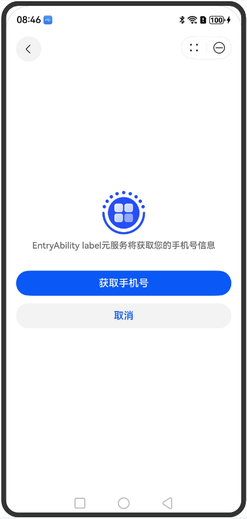
[h2]has.getPhoneNumber
has.getPhoneNumber(Object object):void
拉起获取手机号的功能页。使用前请参见开发前提-获取手机号完成环境配置。在获取到code后,将code传到开发者后台,并在开发者后台调用服务器端接口消费该code来获取用户级凭证,再通过获取用户信息接口,来获取用户手机号。每个code有效期为5min,且只能消费一次。code即是获取用户级凭证接口中需要的授权码(Authorization Code)。
起始版本: 1.0.12
参数:
参数为Object对象,包括以下字段。
| 参数 | 类型 | 必填 | 描述 |
|---|---|---|---|
| success | function | 否 | 接口调用成功的回调函数。 |
| fail | function | 否 | 接口调用失败的回调函数。 |
| complete | function | 否 | 接口调用结束的回调函数(调用成功、失败都会执行)。 |
success返回值:
| 参数 | 类型 | 描述 |
|---|---|---|
| code | string | 临时登录凭据。 |
fail返回值:
| 参数 | 类型 | 描述 |
|---|---|---|
| errCode | number | 错误码。 |
| errMsg | string | 错误信息。 |
错误码信息:
错误码统一为14000201,表示获取手机号失败,可能原因参考:华为账号服务ArkTS错误码。
示例:
has.getPhoneNumber({
  success: (res) => {
    console.info('getPhoneNumber success', res);
  },
  fail: (err) => {
    console.error('getPhoneNumber fail', err);
  },
  complete: (res) => {
    console.info('getPhoneNumber complete', res);
  }
});
体验示意图如下:
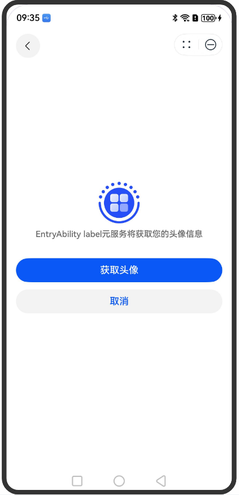
[h2]has.getAvatarInfo
has.getAvatarInfo(Object object): void
拉起获取用户头像的功能页。使用前请参见配置Client-id。
起始版本: 1.0.12
约束与限制:
当前接口在元服务被嵌入式运行时暂不支持使用,建议规避或替换类似功能接口。
参数:
参数为Object对象,包括以下字段。
| 参数 | 类型 | 必填 | 描述 |
|---|---|---|---|
| success | function | 否 | 接口调用成功的回调函数。 |
| fail | function | 否 | 接口调用失败的回调函数。 |
| complete | function | 否 | 接口调用结束的回调函数(调用成功、失败都会执行)。 |
success返回值:
| 参数 | 类型 | 描述 |
|---|---|---|
| avatarUri | string | 用户头像本地文件路径。 |
示例:
has.getAvatarInfo({
  success: (res) => {
    console.info('getAvatarInfo success', res);
  },
  fail: (err) => {
    console.error('getAvatarInfo fail', err);
  },
  complete: (res) => {
    console.info('getAvatarInfo complete', res);
  }
});
体验示意图如下:
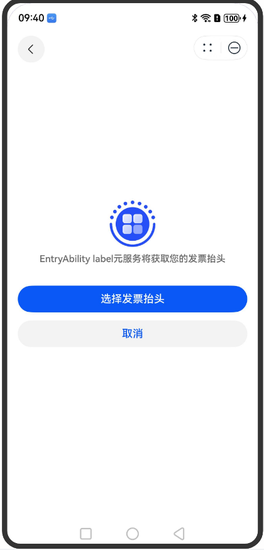
[h2]has.getInvoiceTitle
has.getInvoiceTitle(Object object): void
拉起获取发票抬头的功能页。使用前请参见配置Client-id。
起始版本: 1.0.12
参数:
参数为Object对象,包括以下字段。
| 参数 | 类型 | 必填 | 描述 |
|---|---|---|---|
| success | function | 否 | 接口调用成功的回调函数。 |
| fail | function | 否 | 接口调用失败的回调函数。 |
| complete | function | 否 | 接口调用结束的回调函数(调用成功、失败都会执行)。 |
success返回值:
| 参数 | 类型 | 描述 |
|---|---|---|
| type | string | 发票抬头类型。 |
| title | string | 发票抬头名称。 |
| taxNumber | string | 纳税人识别号。 |
| companyAddress | string | 公司地址。 |
| telephone | string | 公司电话。 |
| bankName | string | 公司银行名称。 |
| bankAccount | string | 公司银行账户。 |
示例:
has.getInvoiceTitle({
  success: (res) => {
    console.info('getInvoiceTitle success', res);
  },
  fail: (err) => {
    console.error('getInvoiceTitle fail', err);
  },
  complete: (res) => {
    console.info('getInvoiceTitle complete', res);
  }
});
体验示意图如下:
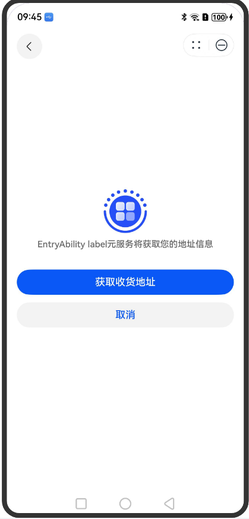
[h2]has.getDeliveryAddress
has.getDeliveryAddress(Object object): void
拉起获取收货地址的功能页。使用前请参见配置Client-id。
起始版本: 1.0.12
参数:
参数为Object对象,包括以下字段。
| 参数 | 类型 | 必填 | 描述 |
|---|---|---|---|
| success | function | 否 | 接口调用成功的回调函数。 |
| fail | function | 否 | 接口调用失败的回调函数。 |
| complete | function | 否 | 接口调用结束的回调函数(调用成功、失败都会执行)。 |
success返回值:
| 参数 | 类型 | 描述 |
|---|---|---|
| userName | string | 收货人姓名。 |
| telNumber | string | 收货人手机号。 |
| postalCode | string | 邮政编码。 |
| nationalCode | string | 国家码。 |
| provinceName | string | 省份名称。 |
| cityName | string | 城市名称。 |
| countyName | string | 地区名称。 |
| streetName | string | 街道名称。 |
| detailInfo | string | 详细地址。 |
示例:
has.getDeliveryAddress({
  success: (res) => {
    console.info('getDeliveryAddress success', res);
  },
  fail: (err) => {
    console.error('getDeliveryAddress fail', err);
  },
  complete: (res) => {
    console.info('getDeliveryAddress complete', res);
  }
});
体验示意图如下:
[h2]has.getServiceSubscription
has.getServiceSubscription(Object object): void
拉起订阅服务的功能页。使用前请参见开通推送服务、选用订阅模板。
起始版本: 1.0.12
参数:
参数为Object对象,包括以下字段。
| 参数 | 类型 | 必填 | 描述 |
|---|---|---|---|
| tmplIds | Array<string> | 是 | 需要订阅的消息模板的id的集合,一次调用最多可订阅3条消息。 |
| success | function | 否 | 接口调用成功的回调函数。 |
| fail | function | 否 | 接口调用失败的回调函数。 |
| complete | function | 否 | 接口调用结束的回调函数(调用成功、失败都会执行)。 |
success返回值:
| 参数 | 类型 | 描述 |
|---|---|---|
| errMsg | string | 调用结果信息,调用成功返回'requestSubscribeMessage:ok'。 |
示例:
has.getServiceSubscription({
  tmplIds: [''],
  success: (res) => {
    console.info('getServiceSubscription success', res);
  },
  fail: (err) => {
    console.error('getServiceSubscription fail', err);
  },
  complete: (res) => {
    console.info('getServiceSubscription complete', res);
  }
});
体验示意图如下:

[h2]PurchaseData
包含jws格式的订单信息、订阅状态信息。
起始版本: 1.0.10
| 名称 | 类型 | 必填 | 描述 |
|---|---|---|---|
| type | number | 是 | 商品类型。 0:消耗型商品。 1:非消耗型商品。 2:自动续期订阅商品。 3:非续期订阅商品。 |
| jwsPurchaseOrder | string | 否 | 包含订单信息的JWS格式数据。可参见对返回结果验签解码验签获取相关购买数据的JSON字符串,其包含的参数请参见PurchaseOrderPayload。 |
| jwsSubscriptionStatus | string | 否 | 包含订阅状态信息的JWS格式数据。可参见对返回结果验签解码验签获取相关订阅状态信息的JSON字符串。 |
[h2]PurchaseOrderPayload
订单信息模型,支持消耗型商品、非消耗型商品和自动续期订阅商品。
起始版本: 1.0.10
| 名称 | 类型 | 必填 | 描述 |
|---|---|---|---|
| environment | string | 是 | 环境类型。 - NORMAL:生产环境。 - SANDBOX:沙盒环境。 |
| purchaseOrderId | string | 是 | 具体一笔订单中对应的购买订单号ID。 |
| purchaseToken | string | 是 | 购买token,在购买消耗型/非消耗型商品场景中与具体购买订单一一对应,在自动续期订阅商品场景中与订阅ID一一对应。 |
| applicationId | string | 是 | 应用ID。 |
| productId | string | 是 | 商品ID。 |
| productType | string | 是 | 商品类型。具体取值如下: 0:消耗型商品。 1:非消耗型商品。 2:自动续期订阅商品。 3:非续期订阅商品。 |
| purchaseTime | number | 是 | 购买时间,UTC时间戳,单位:ms。 如果没有完成购买,则没有值。 |
| finishStatus | string | 否 | 发货状态。具体取值如下: 1:已发货。 2:未发货。 |
| needFinish | boolean | 否 | 是否需要确认发货,完成购买。具体取值如下: - true:必须确认发货,完成购买。 - false:可选确认发货,完成购买。 |
| price | number | 是 | 价格,单位:分。 |
| currency | string | 是 | 币种,请参见ISO 4217标准。例如CNY、USD、MYR。 |
| developerPayload | string | 否 | 商户侧保留信息,由开发者在调用支付接口时传入。 |
| purchaseOrderRevocationReasonCode | string | 否 | 购买订单撤销原因。 0:其他。 1:用户遇到问题退款。 |
| revocationTime | number | 否 | 购买订单撤销时间,UTC时间戳,单位:ms。 |
| offerTypeCode | string | 否 | 优惠类型。 1:推介促销。 2:优惠促销。 |
| offerId | string | 否 | 优惠ID。 |
| countryCode | string | 是 | 国家/地区码,用于区分国家/地区信息,请参见ISO 3166标准。 |
| signedTime | number | 是 | 签名时间,UTC时间戳,单位:ms。 |
[h2]SubGroupStatusPayload
订阅组相关的订阅状态信息。
起始版本: 1.0.10
| 名称 | 类型 | 必填 | 描述 |
|---|---|---|---|
| environment | string | 是 | 环境类型。 - NORMAL:生产环境。 - SANDBOX:沙盒环境。 |
| applicationId | string | 是 | 应用ID。 |
| packageName | string | 是 | 应用包名。 |
| subGroupId | string | 是 | 订阅组ID。 |
| lastSubscriptionStatus | object | 否 | 订阅组中最后生效的订阅状态SubscriptionStatus,比如A切换B,B切换C,此处是C的订阅状态。 |
| historySubscriptionStatusList | object[] | 否 | 订阅组最近生效的历史订阅状态SubscriptionStatus的列表,比如A切换B,B切换C,这里包含C,B,A三个订阅状态信息。 |
[h2]SubscriptionStatus
订阅状态信息。
起始版本: 1.0.10
| 名称 | 类型 | 必填 | 描述 |
|---|---|---|---|
| subGroupGenerationId | string | 是 | 订阅组的代ID。 - 用户切换订阅商品时,此ID不会改变。 - 订阅失效且超出保留期后,用户重新购买商品时,此ID会改变。 |
| subscriptionId | string | 是 | 商品的订阅ID。以下场景,此ID会发生改变: - 用户切换订阅商品时。 - 订阅失效且超出保留期后,用户重新购买商品时。 |
| purchaseToken | string | 是 | 购买token,在购买消耗型/非消耗型商品场景中与具体购买订单一一对应,在订阅型商品场景中与订阅ID一一对应。 |
| status | string | 是 | 订阅状态。 1:生效中。 2:已到期。 3:尝试扣费。 5:撤销。 |
| expiresTime | number | 是 | 自动续期订阅商品的过期时间,UTC时间戳,单位:ms。 |
| lastPurchaseOrder | object | 否 | 当前订阅最新的一笔购买订单。购买订单包含的参数请参见PurchaseOrderPayload。 |
| recentPurchaseOrderList | object[] | 否 | 当前订阅最新的购买订单列表,包含续期、折算等产生的购买订单。购买订单包含的参数请参见PurchaseOrderPayload。 |
| renewalInfo | object | 否 | 当前订阅最新的未来扣费计划,包含的参数请参见SubRenewalInfo。 |
[h2]SubRenewalInfo
订阅的扣费计划信息。
起始版本: 1.0.10
| 名称 | 类型 | 必填 | 描述 |
|---|---|---|---|
| environment | string | 是 | 环境类型。 - NORMAL:生产环境。 - SANDBOX:沙盒环境。 |
| subGroupGenerationId | string | 是 | 订阅组的代ID。 - 用户切换订阅商品时,此ID不会改变。 - 订阅失效且超出保留期后,用户重新购买商品时,此ID会改变。 |
| nextRenewPeriodProductId | string | 否 | 下一个计费周期续订的商品ID。 |
| productId | string | 是 | 当前生效的商品ID。 |
| autoRenewStatusCode | string | 是 | 自动续期状态。 0:关闭。 1:打开。 |
| hasInBillingRetryPeriod | boolean | 是 | 系统是否还在尝试扣费。 - true:是。 - false:否。 |
| priceIncreaseStatusCode | string | 否 | 目前涨价状态码。 1:用户暂未同意涨价。 2:用户已同意涨价。 |
| offerTypeCode | string | 否 | 优惠类型。 1:推介促销。 2:优惠促销。 |
| offerId | string | 否 | 优惠ID。 |
| renewalPrice | number | 否 | 下期续费价格,取消订阅场景下不返回,单位:分。 |
| currency | string | 否 | 币种,请参见ISO 4217标准。例如CNY、USD、MYR。 |
| renewalTime | number | 否 | 续期时间,UTC时间戳,单位:ms。 |
| expirationIntent | string | 否 | 订阅续期失败的原因。 1:用户取消。 2:商品无效。 3:签约无效。 4:扣费异常。 5:用户不同意涨价。 6:未知。 |
[h2]UIWindowParameter
界面窗口参数。
起始版本: 1.0.10
| 名称 | 类型 | 必填 | 描述 |
|---|---|---|---|
| windowScreenMode | number | 是 | 界面窗口模式。 1:界面窗口弹窗模式。 2:界面窗口全屏模式。 |
[h2]Product
包含单个商品详细信息。
起始版本: 1.0.10
| 名称 | 类型 | 必填 | 描述 |
|---|---|---|---|
| id | string | 是 | 商品ID。 |
| type | number | 是 | 商品类型。 0:消耗型商品。 1:非消耗型商品。 2:自动续期订阅商品。 3:非续期订阅商品。 |
| name | string | 是 | 商品名称,为配置商品信息时配置的名称。 用于显示在应用内支付收银台。 |
| description | string | 是 | 商品描述,即配置商品信息时配置的描述信息。 |
| price | string | 是 | 商品的展示价格,包含商品币种和价格,格式为“币种+商品价格”,例如EUR 0.15。 部分国家/地区会返回“货币符号+商品价格”,例如中国大陆返回“¥0.15”。 此价格含税。 - 当商品为消耗型/非消耗型商品时,若设置促销价格,该字段为商品的促销价格,未设置则为商品原价。 - 当商品为自动续期订阅商品时,该字段为商品的原价。 说明: 该字段已废弃,建议使用localPrice替代。 |
| localPrice | string | 否 | 商品的展示价格,包含商品币种和价格,格式为“币种+商品价格”,例如EUR 0.15。 部分国家/地区会返回“货币符号+商品价格”,例如中国大陆返回“¥0.15”。 此价格含税。 - 当商品为消耗型/非消耗型商品时,若设置促销价格,该字段为商品的促销价格,未设置则为商品原价。 - 当商品为自动续期订阅商品时,该字段为商品的原价。 |
| microPrice | number | 是 | 商品实际价格乘以1,000,000后的微单位价格。 例如某个商品实际价格是1.99美元,则该商品对应的微单位价格为:1.99*1000000=1990000。 - 当商品为消耗型/非消耗型商品或者非续期订阅商品,若设置促销价格,该字段为商品微单位促销价格,未设置则为商品微单位原价。 - 当商品为自动续期订阅商品时,该字段为商品微单位原价。 |
| originalLocalPrice | string | 是 | 商品的原价,包含商品币种和价格,格式为“币种+商品价格”,例如EUR 0.15。 部分国家/地区会返回“货币符号+商品价格”,例如中国大陆返回“¥0.15”。 此价格含税。 - 当商品为消耗型/非消耗型商品或者非续期订阅商品,无论是否设置促销价格,该字段均为商品原价。 - 当商品为自动续期订阅商品时,无此字段返回,开发者无需关注。 |
| originalMicroPrice | number | 是 | 商品原价的微单位价格。 商品原价乘以1,000,000后的微单位价格。 例如某个商品原价是1.99美元,则该商品对应的微单位价格为:1.99*1000000=1990000。 - 当商品为消耗型/非消耗型商品或者非续期订阅商品,无论是否设置促销价格,该字段均为商品微单位原价。 - 当商品为自动续期订阅商品时,无此字段返回,开发者无需关注。 |
| currency | string | 是 | 用于支付该商品的币种,例如CNY。 |
| status | number | 否 | 商品状态。 0:有效状态。 1:取消状态,即删除。此状态的商品不可续订,也不可订阅。 3:下线状态,不能订阅,但老用户仍可续订。 |
| subscriptionInfo | SubscriptionInfo | 否 | 自动续期订阅商品相关的信息。 |
| promotionalOffers | PromotionalOffer[] | 否 | 订阅商品支持的优惠信息列表。 |
| jsonRepresentation | string | 否 | 商品详细信息的原始JSON字符串。 |
[h2]SubscriptionInfo
订阅信息。
起始版本: 1.0.10
| 名称 | 类型 | 必填 | 描述 |
|---|---|---|---|
| periodUnit | number | 是 | 订阅周期单位。 0:天。 1:周。 2:月。 3:年。 4:分(预留参数,暂未支持)。 |
| periodCount | number | 是 | 订阅周期数量。 |
| groupId | string | 是 | 订阅组ID。 |
| groupLevel | number | 是 | 商品等级。 |
| hasEligibilityForIntroOffer | boolean | 否 | 用户是否享受过同组订阅的促销。取值如下: - true:已享受过。 - false:未享受过。 - 其他:未获取到状态。 |
| introductoryOffer | SubscriptionOffer | 否 | 促销信息。 |
[h2]SubscriptionOffer
促销信息。
起始版本: 1.0.10
| 名称 | 类型 | 必填 | 描述 |
|---|---|---|---|
| paymentMode | number | 是 | 促销的付费方式。 1:免费试用。 2:随用随付。 3:提前支付。 |
| periodUnit | number | 是 | 订阅周期单位。 0:天。 1:周。 2:月。 3:年。 4:分(预留参数,暂未支持)。 |
| periodCount | number | 是 | 促销期数。 |
| localPrice | string | 是 | 促销价格,包含商品币种和价格,格式为“币种+商品价格”,例如EUR 0.15。 部分国家/地区会返回“货币符号+商品价格”,例如中国大陆返回“¥0.15”。 |
| microPrice | number | 是 | 促销价格的微单位价格。 促销价格乘以1,000,000后的微单位价格。 |
| offerType | number | 是 | 促销类型。 0:推介促销。 1:优惠促销。 |
[h2]PromotionalOffer
订阅商品支持的自定义优惠信息。
起始版本: 1.0.10
| 名称 | 类型 | 必填 | 描述 |
|---|---|---|---|
| offerId | string | 是 | 优惠ID。 |
| paymentMode | number | 是 | 促销的付费方式。 1:免费试用。 2:随用随付。 3:提前支付。 |
| periodUnit | number | 否 | 订阅周期单位。 0:天。 1:周。 2:月。 3:年。 4:分(预留参数,暂未支持)。 |
| periodCount | number | 否 | 订阅周期数量。 |
| localPrice | string | 是 | 显示的优惠商品价格,包含商品币种和价格,格式为“币种+商品价格”,例如EUR 0.15。 部分国家/地区会返回“货币符号+商品价格”,例如中国大陆返回“¥0.15”。 |
| microPrice | number | 是 | 显示的优惠商品实际价格乘以1,000,000后的微单位价格。例如某个商品实际价格是1.99美元,则该商品对应的微单位价格为:1.99*1000000=1990000。 |