


智能客服
你问我答,随时在线为你解决问题















听书是融合内容服务、音频播放与系统交互的综合场景。本文介绍如何采用ArkTS和C++混合开发模式,使用OHAudio原生音频引擎实现高品质音频播放。应用支持本地播放、投播、后台播放、播控中心等完整功能,并针对音频焦点管理与低功耗播放等场景进行深度优化。
应用采用分层架构设计,分为三层:UI层、业务逻辑层、原生播放层,如下图所示。
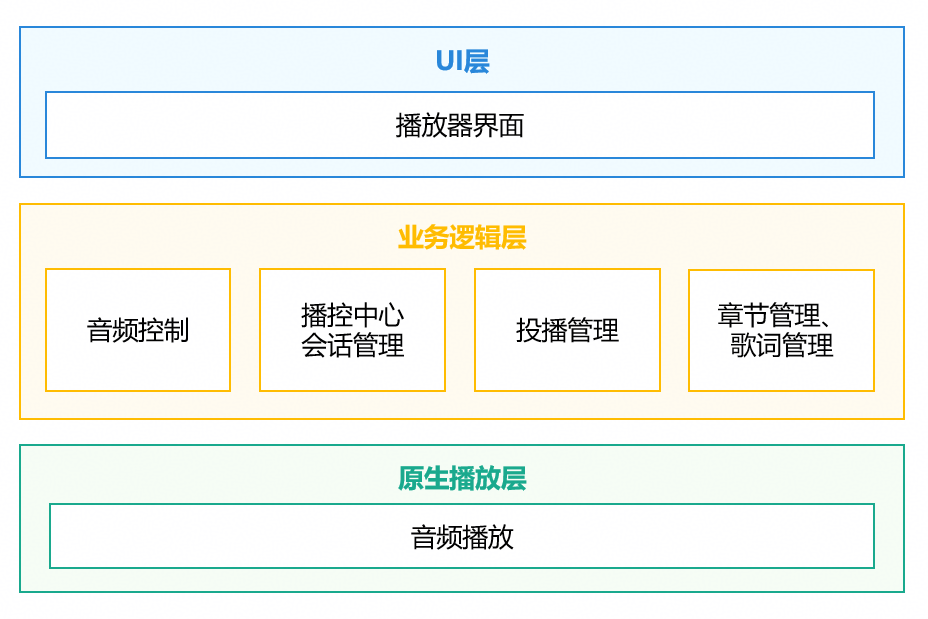
UI层:负责界面展示和用户交互,包括播放器页面、章节列表、歌词显示、控制按钮等组件。
业务逻辑层:核心业务管理模块,包含音频控制、播控中心会话管理、投播管理、章节管理、歌词管理。
原生播放层:C++实现的音频播放模块,包括音频播放控制。
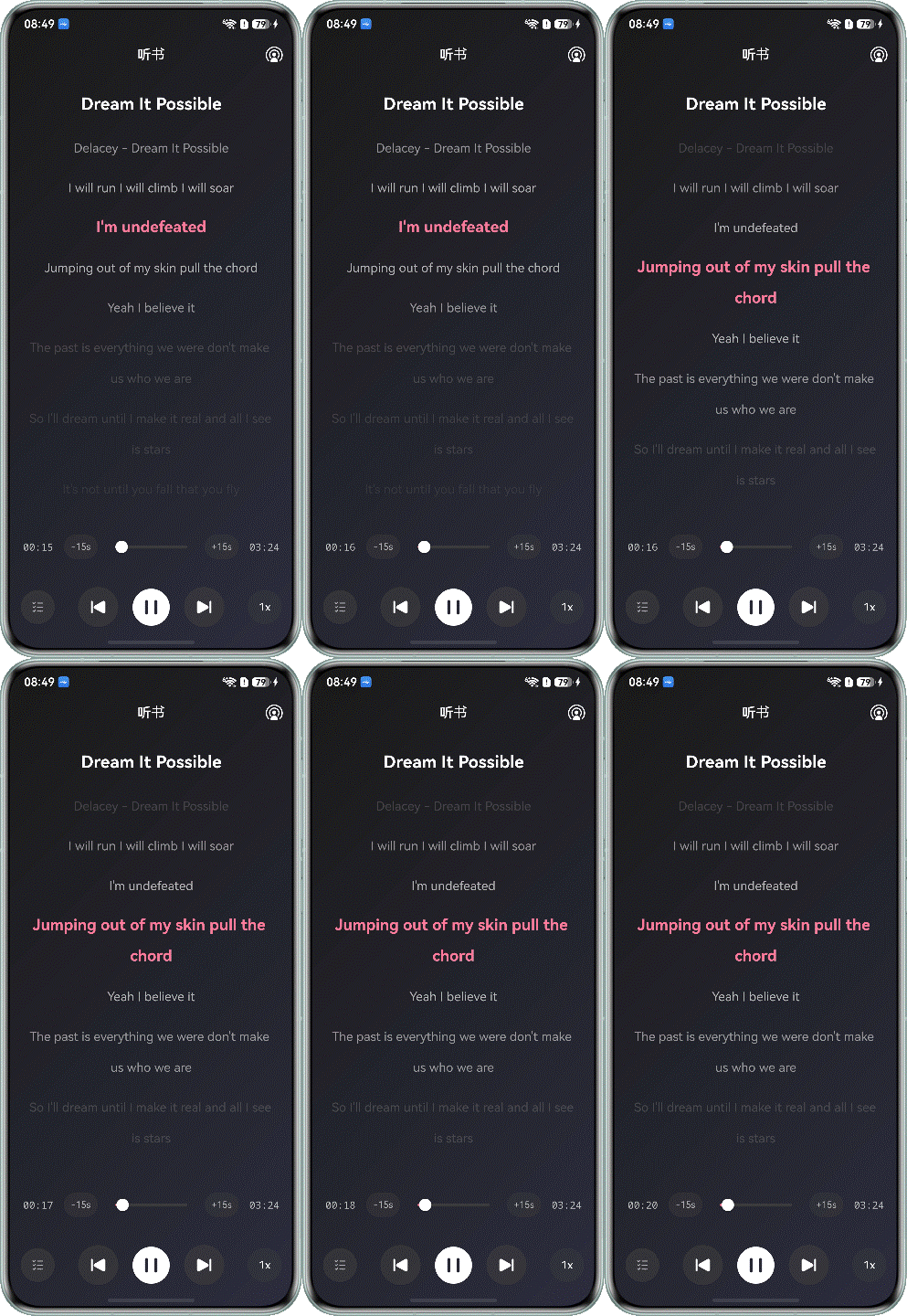
音频播放是听书场景的基础功能,支持播放控制、进度拖拽跳转、设置倍速等操作,播放效果图如下所示。
开发者通过OH_AudioStreamBuilder_Create()创建音频流构造器实例,设置OH_AudioStreamBuilder_SetRendererWriteDataCallback()音频数据写入的回调函数,通过OH_AudioStreamBuilder_GenerateRenderer()创建输出音频流实例。通过OH_AudioRenderer_Start()、OH_AudioRenderer_Pause()、OH_AudioRenderer_Stop()、OH_AudioRenderer_Release()接口实现音频的播放、暂停、停止和退出操作。
1.创建输出音频流实例。通过OH_AudioStreamBuilder_Create()创建rendererBuilder对象,设置音频流的采样率、通道数、采样格式、编码类型等属性。然后,通过OH_AudioStreamBuilder_GenerateRenderer()创建输出音频流实例。
void OHAudioPlayer::InitPlayer() {
    if ((audioRenderer != nullptr) || (rendererBuilder != nullptr) || (audioBookFileInfo != nullptr)) {
        OH_LOG_INFO(LOG_APP, "Previous audio player or builder or fileInfo remained and release it.");
        ReleasePlayer();
    }

    OH_AudioStream_Type streamType = AUDIOSTREAM_TYPE_RENDERER;
    auto ret = OH_AudioStreamBuilder_Create(&rendererBuilder, streamType);
    if (ret != AUDIOSTREAM_SUCCESS) {
        OH_LOG_ERROR(LOG_APP, "Create stream builder failed, ret: %{public}d", ret);
        return;
    }

    audioBookFileInfo = new AudioBookFileInfo();

    (void)OH_AudioStreamBuilder_SetSamplingRate(rendererBuilder, AudioConstants::SAMPLE_RATE);
    (void)OH_AudioStreamBuilder_SetChannelCount(rendererBuilder, AudioConstants::CHANNEL_COUNT);
    (void)OH_AudioStreamBuilder_SetSampleFormat(rendererBuilder, AUDIOSTREAM_SAMPLE_S16LE);
    (void)OH_AudioStreamBuilder_SetEncodingType(rendererBuilder, AUDIOSTREAM_ENCODING_TYPE_RAW);
    (void)OH_AudioStreamBuilder_SetRendererInfo(rendererBuilder, AUDIOSTREAM_USAGE_AUDIOBOOK);
    (void)OH_AudioStreamBuilder_SetRendererInterruptCallback(rendererBuilder, OnAudioInterruptEvent, nullptr);
    (void)OH_AudioStreamBuilder_SetRendererErrorCallback(rendererBuilder, OnAudioErrorEvent, nullptr);
    (void)OH_AudioStreamBuilder_SetRendererOutputDeviceChangeCallback(rendererBuilder, OnAudioOutputDeviceChangeEvent, nullptr);
    (void)OH_AudioStreamBuilder_SetRendererWriteDataCallback(rendererBuilder, OnAudioRendererWriteDataEvent,
                                                                reinterpret_cast<void *>(audioBookFileInfo));

    ret = OH_AudioStreamBuilder_GenerateRenderer(rendererBuilder, &audioRenderer);
    if (ret != AUDIOSTREAM_SUCCESS) {
        OH_LOG_ERROR(LOG_APP, "Create audio renderer failed, ret: %{public}d", ret);
        ReleasePlayer();
    }
    OH_AudioSession_Strategy strategy = {
        .concurrencyMode = CONCURRENCY_DEFAULT
    };
    // 4 = PAUSE_WHEN_INTERRUPTED, 2 = MUTE_WHEN_INTERRUPTED
    OH_AudioRenderer_SetIndependentAudioSessionStrategy(audioRenderer, &strategy, 4);
    OH_AudioManager_GetAudioResourceManager(&audioResourceManager);
    if (audioResourceManager != nullptr) {
        OH_AudioResourceManager_CreateWorkgroup(audioResourceManager, "AudioBookWorkgroup", &audioWorkgroup);
        OH_LOG_INFO(LOG_APP, "Audio workgroup created");
    }
    bufferQueue = new AudioBufferQueue(prefetchBufferSize);
    OH_LOG_INFO(LOG_APP, "Init player successfully.");
}2.设置音频写入的回调函数。在回调函数中,读取文件数据后,写入到AudioRenderer中。
OH_AudioData_Callback_Result OnAudioRendererWriteDataEvent([[maybe_unused]] OH_AudioRenderer *audioRenderer,
                                                            void *userData, void *audioData, int32_t audioDataSize) {
    auto audioBookFileInfo = reinterpret_cast<AudioBookFileInfo *>(userData);
    auto &player = OHAudioPlayer::GetInstance();
    int64_t remainedSize = audioBookFileInfo->audioBookFileSize - audioBookFileInfo->currentPlayOffset;
    int32_t bytesToRead = std::min(static_cast<int64_t>(audioDataSize), remainedSize);
    size_t actualRead = player.bufferQueue->Read(audioData, bytesToRead);

    if (actualRead < 0) {
        OH_LOG_ERROR(LOG_APP, "Read audio data error.");
        return AUDIO_DATA_CALLBACK_RESULT_INVALID;
    }

    audioBookFileInfo->currentPlayOffset += actualRead;
    int64_t framesProvided = actualRead / AudioConstants::FRAME_SIZE;
    player.totalFramesProvided += framesProvided;

    if (actualRead == audioDataSize) {
        return AUDIO_DATA_CALLBACK_RESULT_VALID;
    }

    if (actualRead < audioDataSize) {
        bool isLastFrame = (audioBookFileInfo->currentPlayOffset >= audioBookFileInfo->audioBookFileSize);
        if (isLastFrame) {
            memset_s(static_cast<char*>(audioData) + actualRead, audioDataSize - actualRead, 0, audioDataSize - actualRead);
            return AUDIO_DATA_CALLBACK_RESULT_VALID;
        } else {
            player.totalFramesProvided -= framesProvided;
            audioBookFileInfo->currentPlayOffset -= actualRead;
            OH_LOG_INFO(LOG_APP, "Incomplete frame, will retry. Read: %{public}ld, Requested: %{public}d", actualRead, audioDataSize);
            return AUDIO_DATA_CALLBACK_RESULT_INVALID;
        }
    }
    return AUDIO_DATA_CALLBACK_RESULT_VALID;
}3.播放音频。
void OHAudioPlayer::PlayAudioBook() {
    if (audioRenderer == nullptr) {
        OH_LOG_ERROR(LOG_APP, "The audioRenderer is null.");
        return;
    }
    auto ret = OH_AudioRenderer_Start(audioRenderer);
    if (ret != AUDIOSTREAM_SUCCESS) {
        OH_LOG_ERROR(LOG_APP, "Play audio book failed, ret: %{public}d", ret);
        return;
    }
    OH_LOG_INFO(LOG_APP, "Play audio book successfully.");
}4.暂停播放音频。
void OHAudioPlayer::PauseAudioBook() {
    if (audioRenderer == nullptr) {
        OH_LOG_ERROR(LOG_APP, "The audioRenderer is null.");
        return;
    }
    auto ret = OH_AudioRenderer_Pause(audioRenderer);
    if (ret != AUDIOSTREAM_SUCCESS) {
        OH_LOG_ERROR(LOG_APP, "Pause audio book failed, ret: %{public}d", ret);
        return;
    }
    OH_LOG_INFO(LOG_APP, "Pause audio book successfully.");
}5.跳转播放音频。
void OHAudioPlayer::SeekTo(uint32_t position) {
    PreparePosition(position);
    if (audioRenderer != nullptr) {
        OH_AudioRenderer_Start(audioRenderer);
    }
    OH_LOG_INFO(LOG_APP, "Seek to position successfully and started.");
}6.释放播放资源。
void OHAudioPlayer::ReleasePlayer() {
    StopPrefetch();

    if (bufferQueue != nullptr) {
        delete bufferQueue;
        bufferQueue = nullptr;
    }
    if (audioWorkgroup != nullptr && audioResourceManager != nullptr) {
        OH_AudioResourceManager_ReleaseWorkgroup(audioResourceManager, audioWorkgroup);
        audioWorkgroup = nullptr;
        OH_LOG_INFO(LOG_APP, "Audio workgroup released");
    }
    if (audioResourceManager != nullptr) {
        audioResourceManager = nullptr;
    }
    if (rendererBuilder != nullptr) {
        OH_AudioStreamBuilder_Destroy(rendererBuilder);
        rendererBuilder = nullptr;
    }
    if (audioRenderer != nullptr) {
        OH_AudioRenderer_Stop(audioRenderer);
        OH_AudioRenderer_Release(audioRenderer);
        audioRenderer = nullptr;
    }
    if (audioBookFileInfo != nullptr) {
        delete audioBookFileInfo;
        audioBookFileInfo = nullptr;
    }
    OH_LOG_INFO(LOG_APP, "Release player successfully.");
}在音频跳转时,需要同步刷新内容页面,使页面的内容与音频播放的内容保持一致,效果如下图所示。
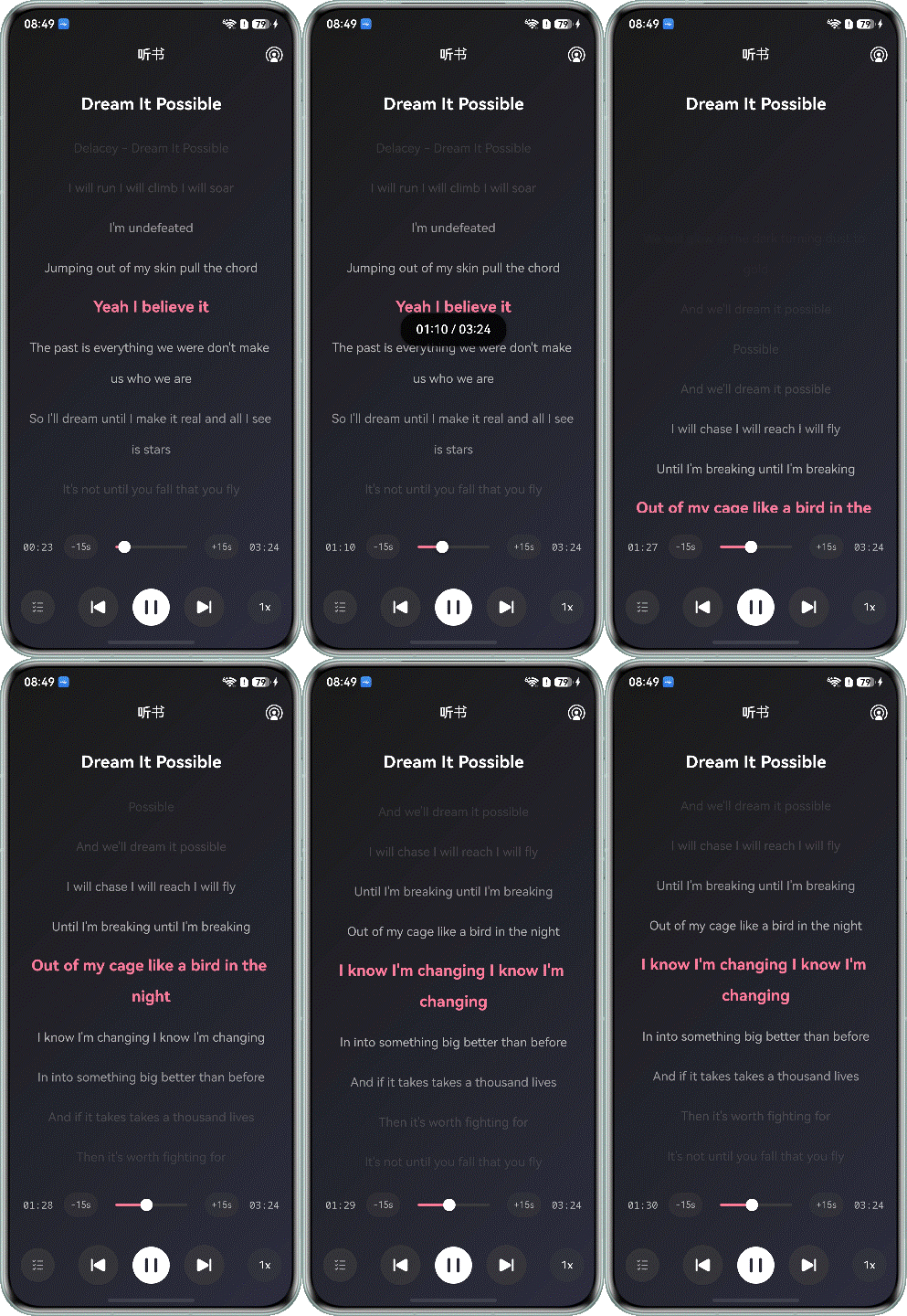
章节文本内容存放在lrc文件(带时间戳的歌词文件)中,包含了时间戳与对应的文本内容。应用加载文件内容后,通过List组件显示文本内容。
注册音频播放进度回调函数,在播放进度变化时同步滑动到对应文本,保持音频和文本一致。
1.加载听书的文本文件。
public async loadLrcFile(lyricPath: string): Promise<LrcLine[]> {
  Logger.info(TAG, `loadLrcFile started, path: ${lyricPath}`);
  this.lrcParser.clear();

  if (!lyricPath || lyricPath.length === 0) {
    Logger.info(TAG, 'Lyric file path is empty, skip loading');
    return [];
  }

  try {
    const context: common.UIAbilityContext = AppStorage.get('context') as common.UIAbilityContext;
    const resourceMgr = context.resourceManager;
    const fileContent = await resourceMgr.getRawFileContent(lyricPath);

    const textDecoder = util.TextDecoder.create('utf-8', { ignoreBOM: true });
    const lrcContent = textDecoder.decodeToString(fileContent, { stream: false });

    this.lrcParser.parse(lrcContent);
    const lrcLines: LrcLine[] = this.lrcParser.getLrcLines();

    Logger.info(TAG, `LRC file loaded successfully, total ${lrcLines.length.toString()} lines`);
    return lrcLines;
  } catch (error) {
    Logger.error(TAG, `LRC file loading failed: ${JSON.stringify(error)}`);
    return [];
  }
}2.将解析文件内容切分成文本数组lrcLines。
parse(lrcContent: string): void {
  Logger.info(TAG, 'Start parsing LRC file');
  this.lrcLines = [];
  if (!lrcContent || lrcContent.length === 0) {
    Logger.error(TAG, 'LRC file content is empty');
    return;
  }

  const lines: string[] = lrcContent.split('\n');
  for (const line of lines) {
    const trimmedLine: string = line.trim();
    if (trimmedLine.length === 0) {
      continue;
    }

    const match = trimmedLine.match(/\[(\d{2}):(\d{2})\.(\d{2,3})\](.*)/);
    if (match) {
      const minutes: number = parseInt(match[1]);
      const seconds: number = parseInt(match[2]);
      const milliseconds: number = parseInt(match[3].padEnd(3, '0'));
      const text: string = match[4].trim();
      const time: number = minutes * 60 * 1000 + seconds * 1000 + milliseconds;

      this.lrcLines.push({ time, text });
    }
  }

  this.lrcLines.sort((a, b) => a.time - b.time);
  Logger.info(TAG, `LRC file parsing completed, total ${this.lrcLines.length} lines`);
}3.通过registerProgressCallback()注册音频播放进度的回调函数。
setupProgressCallback(): void {
  this.audioControl.registerProgressCallback((currentTime: number) => {
    if (!this.isDragging) {
      this.currentTime = currentTime;
      Logger.info(TAG, `currentTime: ${this.currentTime}`);
      this.updateCurrentLrc();
      if (this.currentTime >= this.totalTime) {
        this.currentTime = this.totalTime;
      }
    }
  });
}4.通过scroller,将章节的文本滚动到对应的位置。
updateCurrentLrc(): void {
  const newIndex = this.lrcManager.getCurrentLineIndex(this.currentTime);
  if (newIndex !== this.currentLrcIndex) {
    this.currentLrcIndex = newIndex;
    if (newIndex >= 0) {
      this.scroller.scrollToIndex(newIndex, true, ScrollAlign.CENTER);
    }
  }
}将应用接入AVSession,通过播控中心进行播放控制与状态同步。
通过AVSession音频播控服务实现音频应用接入播控中心。
1.在initAVSession()方法中,创建并激活AVSession会话。
public async initAVSession() {
  this.context = AppStorage.get('context') as common.UIAbilityContext;
  if (!this.context) {
    Logger.error(TAG, 'Session create failed: context is undefined');
    return;
  }

  this.audioControlCenter = AudioControlCenter.getInstance();
  if (!this.audioControlCenter) {
    Logger.error(TAG, 'Session create failed: audioControlCenter is undefined');
    return;
  }

  try {
    this.avSession = await avSession.createAVSession(this.context, 'PLAY_AUDIO', 'audio');
    await this.avSession.activate().catch(() => {
      Logger.info(TAG, `Session activate error`);
    });
    this.avSession.setExtras({
      requireAbilityList: ['url-cast'],
    }).catch(() => {
      Logger.info(TAG, `Session setExtras error`);
    });
    await this.setAVMetadata();
    this.setLaunchAbility();
    this.setListenerForMesFromController();

    this.avCastManager = AVCastManager.getInstance();
    Logger.info(TAG, 'AVCastManager initialized');
  } catch (error) {
    Logger.error(TAG, 'initAVSession error');
  }
}2.在setLaunchAbility()方法中,设置会话的启动能力。
private setLaunchAbility() {
  if (!this.context) {
    return;
  }
  let wantAgentInfo: wantAgent.WantAgentInfo = {
    wants: [
      {
        bundleName: this.context.abilityInfo.bundleName,
        abilityName: this.context.abilityInfo.name
      }
    ],
    actionType: wantAgent.OperationType.START_ABILITIES,
    requestCode: 0,
    wantAgentFlags: [wantAgent.WantAgentFlags.UPDATE_PRESENT_FLAG]
  };
  wantAgent.getWantAgent(wantAgentInfo).then((agent) => {
    if (this.avSession) {
      this.avSession.setLaunchAbility(agent).catch(() => {
        Logger.error(TAG, `setLaunchAbility failed.`);
      });
    }
  }).catch((err: BusinessError) => {
    Logger.error(TAG, `getWantAgent failed: code: ${err.code}, message: ${err.message}`);
  });
}3.在setListenerForMesFromController()方法中,注册播放、暂停等各种控制命令的监听器。
private setListenerForMesFromController() {
  if (!this.avSession) {
    return;
  }
  try {
    this.avSession.on('play', this.onPlay);
    this.avSession.on('pause', this.onPause);
    this.avSession.on('playNext', this.onPlayNext);
    this.avSession.on('playPrevious', this.onPlayPrevious);
    this.avSession.on('seek', this.onSeek);
  } catch (error) {
    Logger.error(TAG, 'audioControlCenter is undefined in onPlay');
  }
}4.在setAVMetadata()方法中,设置当前播放的媒体元数据。
public async setAVMetadata() {
  try {
    if (!this.context || !this.avSession || !this.audioControlCenter) {
      return;
    }
    const currentChapterIndex = this.audioControlCenter.getCurrentChapterIndex();
    const chapter = this.audioControlCenter.getCurrentChapter();
    if (!chapter) {
      return;
    }

    const duration = this.audioControlCenter.getDuration();
    let metadata: avSession.AVMetadata = {
      assetId: `${currentChapterIndex}`,
      title: chapter.title,
      artist: chapter.author,
      duration: duration,
      avQueueName: 'My Audio Book',
      avQueueId: 'AudioBookQueueId1',
      filter: avSession.ProtocolType.TYPE_CAST_PLUS_STREAM | avSession.ProtocolType.TYPE_DLNA |
        avSession.ProtocolType.TYPE_CAST_PLUS_AUDIO
    };
    try {
      const queuePixelMap = await MediaUtils.getPixelMapFromResource(this.context, $r('app.media.image_cover'));
      metadata.avQueueImage = queuePixelMap;
    } catch (error) {
      Logger.error(TAG, `Failed to load queue image: ${JSON.stringify(error)}`);
    }
    // get lyric
    if (chapter.lyric) {
      const lrc = await MediaUtils.getLrcFromRawFile(this.context, chapter.lyric);
      if (lrc) {
        metadata.lyric = lrc;
      }
    }
    // get PixelMap
    if (chapter.avatar) {
      try {
        const pixelMap = await MediaUtils.getPixelMapFromResource(this.context, chapter.avatar);
        metadata.mediaImage = pixelMap;
      } catch (error) {
        Logger.error(TAG, `Failed to load avatar: ${JSON.stringify(error)}`);
      }
    }
    // set AVMetadata
    this.avSession.setAVMetadata(metadata).then(() => {
      Logger.info(TAG, 'setAVMetadata succeeded');
    }).catch((err: BusinessError) => {
      Logger.error(TAG, `setAVMetadata failed: code: ${err.code}, message: ${err.message}`);
    });
  } catch (error) {
    Logger.error(TAG, `setAVMetadata failed: ${JSON.stringify(error)}`);
  }
}5.设置播放状态。
public setPlayState(isPlay: boolean) {
  if (!this.avSession) {
    Logger.error(TAG, 'AVSession is undefined');
    return;
  }
  this.avSession.setAVPlaybackState({
    state: isPlay ? avSession.PlaybackState.PLAYBACK_STATE_PLAY : avSession.PlaybackState.PLAYBACK_STATE_PAUSE,
  }, (err: BusinessError) => {
    if (err) {
      Logger.error(TAG, `setPlayState failed: code: ${err.code}, message: ${err.message}`);
    } else {
      Logger.info(TAG, 'setPlayState succeeded');
    }
  });
}6.设置播放进度。
public setProgressState(ms: number) {
  if (!this.avSession) {
    return;
  }
  this.avSession.setAVPlaybackState({
    position: {
      elapsedTime: ms,
      updateTime: new Date().getTime()
    }
  }, (err: BusinessError) => {
    if (err) {
      Logger.error(TAG, `setProgressState failed: code: ${err.code}, message: ${err.message}`);
    } else {
      Logger.info(TAG, 'setProgressState succeeded');
    }
  });
}7.注销会话监听器。
public async unregisterSessionListener() {
  if (!this.avSession) {
    return;
  }
  try {
    this.avSession.off('play');
    this.avSession.off('pause');
    this.avSession.off('playNext');
    this.avSession.off('playPrevious');
    this.avSession.off('seek');
    this.avSession.destroy().catch(() => {
      Logger.error(TAG, `avSession destroy failed`);
    });
  } catch (error) {
    let err: BusinessError = error;
    Logger.error(TAG, `setProgressState failed: code: ${err.code}, message: ${err.message}`);
  }
}应用支持后台音频播放,用户可以切换到其他应用,且在其它应用没有设置焦点打断的情况下,音频播放不会中断。
开发者需先实现播控中心接入,申请后台运行权限和设置后台模式,然后为音频应用创建长时后台任务,实现音频后台持续播放。
1.在entry/src/main/module.json5 中,声明后台运行权限。
"requestPermissions": [
  {
    "name": "ohos.permission.KEEP_BACKGROUND_RUNNING",
    "reason": "$string:keep_background_running_reason",
    "usedScene": {
      "abilities": [
        "EntryAbility"
      ],
      "when": "always"
    }
  },
],2.申请后台长时任务,模式为AUDIO_PLAYBACK。
public static startContinuousTask(context?: common.UIAbilityContext): void {
  if (!context) {
    Logger.error(TAG, 'startContinuousTask failed, context undefined');
    return;
  }

  if (BackgroundUtil.isBackgroundRunning) {
    Logger.info(TAG, 'Background task is already running');
    return;
  }

  BackgroundUtil.isBackgroundRunning = true;

  let wantAgentInfo: wantAgent.WantAgentInfo = {
    wants: [
      {
        bundleName: context.abilityInfo.bundleName,
        abilityName: context.abilityInfo.name
      }
    ],
    actionType: wantAgent.OperationType.START_ABILITY,
    requestCode: 0,
    wantAgentFlags: [wantAgent.WantAgentFlags.UPDATE_PRESENT_FLAG]
  };

  wantAgent.getWantAgent(wantAgentInfo).then((wantAgentObj: Object) => {
    backgroundTaskManager.startBackgroundRunning(
      context,
      backgroundTaskManager.BackgroundMode.AUDIO_PLAYBACK,
      wantAgentObj
    ).then(() => {
      Logger.info(TAG, 'startBackgroundRunning succeeded');
    }).catch((error: BusinessError) => {
      Logger.error(TAG, `startBackgroundRunning failed code: ${error.code.toString()}`);
      BackgroundUtil.isBackgroundRunning = false;
    });
  }).catch((error: BusinessError) => {
    Logger.error(TAG, `getWantAgent failed code: ${error.code.toString()}`);
    BackgroundUtil.isBackgroundRunning = false;
  });
}3.开始播放时申请后台任务。
private async localPlay(): Promise<void> {
  Logger.info(TAG, 'localPlay started');
  if (this.isPlaying) {
    Logger.info(TAG, 'localPlay skipped, already playing');
    return;
  }
  try {
    audioPlayer.playAudioBook();
    this.isPlaying = true;
    this.startProgressTimer();
    this.notifyPlayStateChange(true);

    if (this.avSessionController) {
      this.avSessionController.setPlayState(true);
    }

    BackgroundUtil.startContinuousTask(this.context);

    Logger.info(TAG, 'localPlay completed');
  } catch (error) {
    Logger.error(TAG, `localPlay failed: ${JSON.stringify(error)}`);
    this.isPlaying = false;
    this.stopProgressTimer();
    this.notifyPlayStateChange(false);
    throw error as Error;
  }
}应用可以将手机上的音视频无缝流转到其他设备(如电脑、华为智慧屏)上继续播放,在远程设备上进行播放控制。
投播功能的实现基于AVSession媒体会话和AVCastController投播控制器的协同工作,具体原理可参考音频投播。
1.设置支持投播功能。
this.avSession.setExtras({
  requireAbilityList: ['url-cast'],
}).catch(() => {
  Logger.info(TAG, `Session setExtras error`);
});
await this.setAVMetadata();2.注册设备连接变化回调。
private async registerCastCallbacks(): Promise<void> {
  if (!this.avSession) {
    Logger.error(TAG, 'avSession not initialized');
    return;
  }
  try {
    this.avSession.on('outputDeviceChange', async (connectState: avSession.ConnectionState,
      device: avSession.OutputDeviceInfo) => {
      try {
        Logger.info(TAG, `outputDeviceChange: ${connectState}`);
        const currentDevice: avSession.DeviceInfo = device?.devices?.[0];
        if (currentDevice?.castCategory === avSession.AVCastCategory.CATEGORY_REMOTE) {
          if (connectState === avSession.ConnectionState.STATE_CONNECTED) {
            Logger.info(TAG, 'Device connected successfully');
            this.isConnected = true;
            this.currentDevice = currentDevice;
            if (this.avSession) {
              const controller = await this.avSession.getAVCastController();
              if (controller) {
                this.castController = controller;
                await this.registerCastControllerCallbacks();
              }
            }
            if (this.connectionCallback) {
              this.connectionCallback(true, currentDevice);
            }
          } else if (connectState === avSession.ConnectionState.STATE_DISCONNECTED) {
            Logger.info(TAG, 'Device disconnected');
            this.isConnected = false;
            this.currentDevice = undefined;
            if (this.connectionCallback) {
              this.connectionCallback(false);
            }
          }
        } else if (currentDevice?.castCategory === avSession.AVCastCategory.CATEGORY_LOCAL) {
          Logger.info(TAG, 'Device switched to local');
        }
        Logger.info(TAG, 'registerCastCallbacks completed');
      } catch (error) {
        Logger.error(TAG, `outputDeviceChange error:  ${JSON.stringify(error)}`);
      }
    });
  } catch (error) {
    Logger.error(TAG, `registerCastCallbacks error:  ${JSON.stringify(error)}`);
  }
}3.注册投播控制器回调。
private async registerCastControllerCallbacks(): Promise<void> {
  if (!this.castController) {
    Logger.error(TAG, 'castController not initialized');
    return;
  }

  try {
    this.castController.on('playPrevious', () => {
      Logger.info(TAG, 'playPrevious event received');
      if (this.playPreviousCallback) {
        this.playPreviousCallback();
      }
    });


    this.castController.on('playNext', () => {
      Logger.info(TAG, 'playNext event received');
      if (this.playNextCallback) {
        this.playNextCallback();
      }
    });

    this.castController.on('playbackStateChange', 'all', (playbackState: avSession.AVPlaybackState) => {
      Logger.info(TAG, `playbackStateChange: ${JSON.stringify(playbackState)}`);
      const state = playbackState?.state;
      const position = playbackState?.position?.elapsedTime;
      const volume = playbackState?.volume;
      const maxVol = playbackState?.maxVolume;
      const speed = playbackState?.speed;

      if (position !== undefined) {
        this.currentCastPosition = position;
      }
      if (volume !== undefined) {
        this.currentCastVolume = volume;
      }
      if (maxVol !== undefined && maxVol > 0) {
        this.maxVolume = maxVol;
        Logger.info(TAG, `Device max volume updated to: ${maxVol}`);
      }

      if (speed !== undefined) {
        this.currentCastSpeed = speed;
        Logger.info(TAG, `Cast speed updated to: ${speed}x`);
      }

      if (state !== undefined || position !== undefined || volume !== undefined || speed !== undefined) {
        if (this.playbackStateCallback) {
          const volToShow = this.currentCastVolume / this.maxVolume;
          this.playbackStateCallback(state, position, volToShow, speed);
        }
      }
    });

    this.castController.on('endOfStream', () => {
      Logger.info(TAG, 'endOfStream event received');
      if (this.endOfStreamCallback) {
        this.endOfStreamCallback();
      }
    });

    this.castController.on('seekDone', (position: number) => {
      Logger.info(TAG, `seekDone event: ${position}ms`);
      this.currentCastPosition = position;
      if (this.seekDoneCallback) {
        this.seekDoneCallback(position);
      }
    });
  } catch (error) {
    Logger.error(TAG, `castController error:  ${JSON.stringify(error)}`);
  }
  Logger.info(TAG, 'registerCastControllerCallbacks completed');
}4.准备并播放投播内容。
public async prepareAndPlay(chapter: AudioBookChapter, startPosition: number = 0, speed: number): Promise<void> {
  Logger.info(TAG, `prepareAndPlay started, chapter: ${chapter.title}, startPosition: ${startPosition}ms`);
  if (!this.castController) {
    Logger.error(TAG, 'castController not initialized');
    return;
  }

  if (!this.context) {
    Logger.error(TAG, 'context not initialized');
    return;
  }

  this.currentChapter = chapter;
  const lyricContent = await this.loadLyricContent(chapter);
  let playItem: avSession.AVQueueItem;
  await this.audioBookChapterBuilder.build(chapter);
  this.currentRawFileDescriptor = this.audioBookChapterBuilder.getRawFileDescriptor();

  if (!this.currentRawFileDescriptor) {
    Logger.error(TAG, 'Failed to get RawFileDescriptor');
    return;
  }

  const duration = MediaUtils.getMsFromByteLength(this.currentRawFileDescriptor.length);
  try {
    const protocols = this.currentDevice?.supportedProtocols;
    const isSupportCastPlusOrDlna =
      protocols &&
        ((protocols & avSession.ProtocolType.TYPE_CAST_PLUS_STREAM) > 0 ||
          (protocols & avSession.ProtocolType.TYPE_DLNA) > 0);

    if (isSupportCastPlusOrDlna && chapter.src) {
      Logger.info(TAG, 'Using complete audio file for casting');
      const fullPath: string = this.context.filesDir + '/' + chapter.src;
      const file: fileIo.File = await fileIo.open(fullPath);
      const avFileDescriptor: media.AVFileDescriptor = { fd: file.fd };
      playItem = {
        itemId: chapter.id,
        description: {
          assetId: 'AUDIO-' + JSON.stringify(chapter.id),
          title: chapter.title,
          artist: chapter.author,
          subtitle: 'audio',
          mediaType: 'AUDIO',
          fdSrc: avFileDescriptor,
          startPosition: startPosition,
          duration: duration,
          lyricContent: lyricContent,
          albumTitle: 'My Audio Book',
          appName: 'My Audio Book'
        }
      };
    }

    await new Promise<void>((resolve, reject) => {
      this.castController?.prepare(playItem, () => {
        Logger.info(TAG, 'prepare completed');
        resolve();
      });
    });

    await new Promise<void>((resolve, reject) => {
      this.castController?.start(playItem, () => {
        Logger.info(TAG, 'start completed');
        resolve();
      });
    });
    this.sendSpeedCommand(speed);
    Logger.info(TAG, 'prepareAndPlay completed');
  } catch (error) {
    Logger.error(TAG, `prepareAndPlay failed: ${JSON.stringify(error)}`);
    throw new Error(`prepareAndPlay failed: ${JSON.stringify(error)}`);
  }
}5. 发送投播控制命令,包含播放、暂停、跳转、倍速等功能。
public sendPlayCommand(): void {
  Logger.info(TAG, 'sendPlayCommand started');
  if (!this.castController) {
    Logger.error(TAG, 'castController not initialized');
    return;
  }
  const command: avSession.AVCastControlCommand = { command: 'play' };
  this.castController.sendControlCommand(command).catch(() => {
    Logger.error(TAG, 'sendControlCommand error');
  });
  Logger.info(TAG, 'sendPlayCommand completed');
}

public sendPauseCommand(): void {
  Logger.info(TAG, 'sendPauseCommand started');
  if (!this.castController) {
    Logger.error(TAG, 'castController not initialized');
    return;
  }
  const command: avSession.AVCastControlCommand = { command: 'pause' };
  this.castController.sendControlCommand(command).catch(() => {
    Logger.error(TAG, 'sendControlCommand error');
  });
  Logger.info(TAG, 'sendPauseCommand completed');
}

public sendStopCommand(): void {
  Logger.info(TAG, 'sendStopCommand started');
  if (!this.castController) {
    Logger.error(TAG, 'castController not initialized');
    return;
  }
  const command: avSession.AVCastControlCommand = { command: 'stop' };
  this.castController.sendControlCommand(command).catch(() => {
    Logger.error(TAG, 'sendControlCommand error');
  });
  Logger.info(TAG, 'sendStopCommand completed');
}6. 停止投播。
public async stopCasting(): Promise<void> {
  Logger.info(TAG, 'stopCasting started');
  if (!this.avSession) {
    Logger.error(TAG, 'avSession not initialized');
    return;
  }
  try {
    await this.avSession.stopCasting();
    this.isConnected = false;
    this.currentDevice = undefined;
    this.castController = undefined;
    Logger.info(TAG, 'stopCasting completed');
  } catch (error) {
    Logger.error(TAG, `stopCasting failed: ${JSON.stringify(error)}`);
    throw new Error(`stopCasting failed: ${JSON.stringify(error)}`);
  }
}用户在应用内播放后,上滑结束应用进程,再进入播控中心,点击播放键正常拉起应用播放。冷启动效果如下所示。
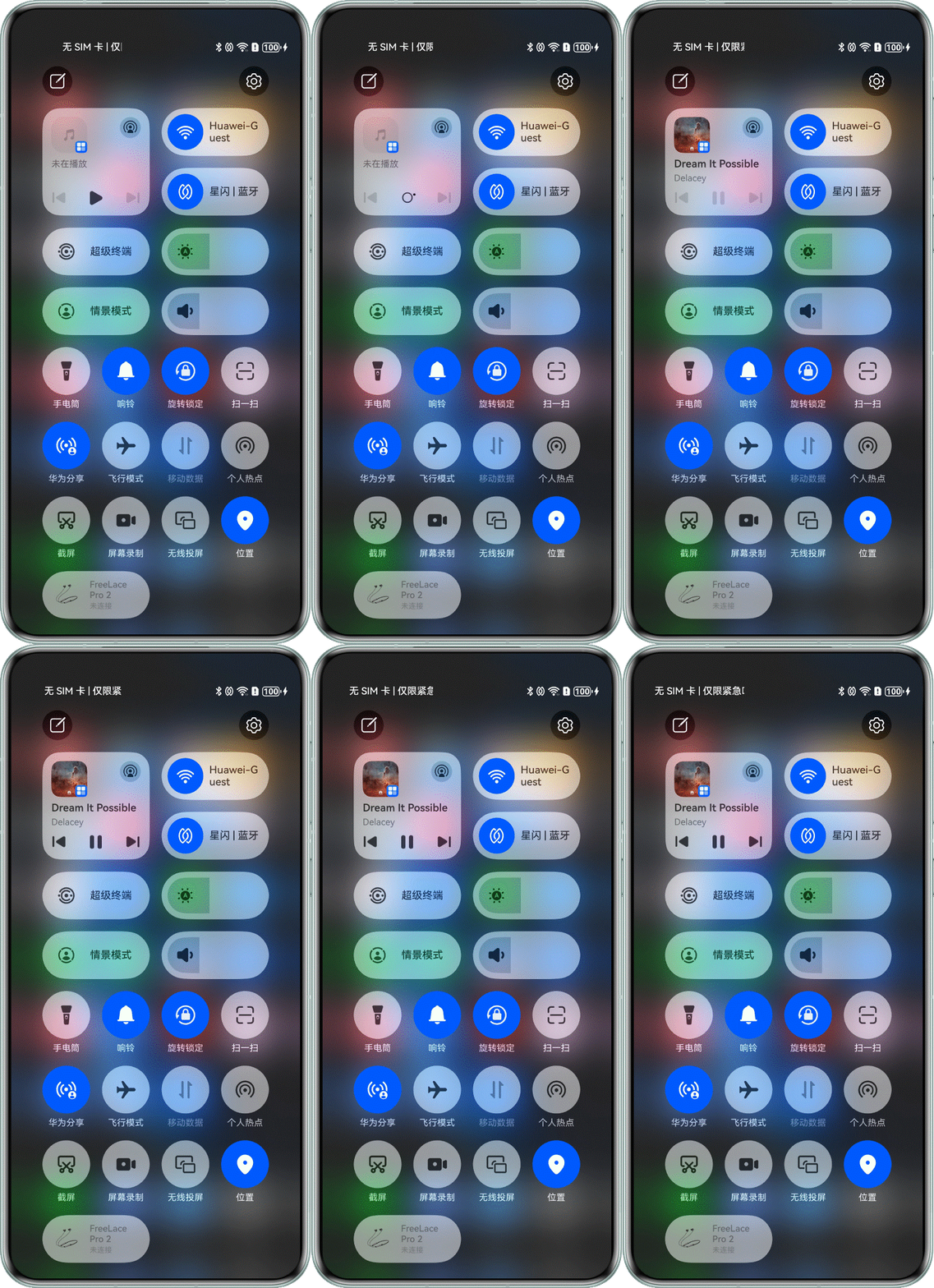
注册并适配端侧意图调用,实现一键冷启动播放和历史书单。
1.注册PlayAudio和PlayMusicList意图,具体步骤参考:意图注册。
2.设置书单名称、书单唯一标识Id的字段。
public async setAVMetadata() {
  try {
    if (!this.context || !this.avSession || !this.audioControlCenter) {
      return;
    }
    const currentChapterIndex = this.audioControlCenter.getCurrentChapterIndex();
    const chapter = this.audioControlCenter.getCurrentChapter();
    if (!chapter) {
      return;
    }

    const duration = this.audioControlCenter.getDuration();
    let metadata: avSession.AVMetadata = {
      assetId: `${currentChapterIndex}`,
      title: chapter.title,
      artist: chapter.author,
      duration: duration,
      avQueueName: 'My Audio Book',
      avQueueId: 'AudioBookQueueId1',
      filter: avSession.ProtocolType.TYPE_CAST_PLUS_STREAM | avSession.ProtocolType.TYPE_DLNA |
        avSession.ProtocolType.TYPE_CAST_PLUS_AUDIO
    };
    try {
      const queuePixelMap = await MediaUtils.getPixelMapFromResource(this.context, $r('app.media.image_cover'));
      metadata.avQueueImage = queuePixelMap;
    } catch (error) {
      Logger.error(TAG, `Failed to load queue image: ${JSON.stringify(error)}`);
    }
    // get lyric
    if (chapter.lyric) {
      const lrc = await MediaUtils.getLrcFromRawFile(this.context, chapter.lyric);
      if (lrc) {
        metadata.lyric = lrc;
      }
    }
    // get PixelMap
    if (chapter.avatar) {
      try {
        const pixelMap = await MediaUtils.getPixelMapFromResource(this.context, chapter.avatar);
        metadata.mediaImage = pixelMap;
      } catch (error) {
        Logger.error(TAG, `Failed to load avatar: ${JSON.stringify(error)}`);
      }
    }
    // set AVMetadata
    this.avSession.setAVMetadata(metadata).then(() => {
      Logger.info(TAG, 'setAVMetadata succeeded');
    }).catch((err: BusinessError) => {
      Logger.error(TAG, `setAVMetadata failed: code: ${err.code}, message: ${err.message}`);
    });
  } catch (error) {
    Logger.error(TAG, `setAVMetadata failed: ${JSON.stringify(error)}`);
  }
}3.实现意图执行逻辑。
private audioControlCenter: AudioControlCenter = AudioControlCenter.getInstance();

async onExecuteInUIAbilityBackgroundMode(intentName: string, intentParam: Record<string, Object>):
  Promise<insightIntent.ExecuteResult> {
  Logger.info(TAG, `onExecuteInUIAbilityBackgroundMode, intentName: ${intentName}`);

  switch (intentName) {
    case 'PlayMusic':
      let data = intentParam as Record<string, string>;
      return this.playFunc(data.entityId);
    case 'PlayMusicList':
      let entityId: string = (intentParam.items as Array<object>)?.[0]?.['entityId'];
      return this.playFunc(entityId);
    default:
      break;
  }

  return Promise.resolve({
    code: -1,
    result: { message: 'unknown intent' }
  } as insightIntent.ExecuteResult)
}作为听书应用,会面临多种音频打断场景。不同场景下,系统的处理方式和应用的应对策略各有不同。音频打断场景总览表如下所示:
打断类型 | 场景示例 | 启动顺序 | 系统行为 | 应用处理 |
|---|---|---|---|---|
暂停场景 | 通话、语音消息、闹铃等 | 先听书 | 主动停止播放并发送暂停事件 | 处理播放器状态 |
恢复场景 | 暂停类场景结束后 | - | 发送恢复事件但不主动播放 | 主动重新开始播放 |
停止场景 | 其他媒体应用启动 | 先听书 | 主动停止播放并发送停止事件 | 处理播放器状态 |
压低场景 | 导航语音播报 | 先听书 | 主动压低音量不发送事件 | 无需处理,自动恢复 |
压低场景 | 小艺AI、闹铃、铃声 | 后听书 | 主动压低音量不发送事件 | 无需处理,自动恢复 |
当音频流申请或释放音频焦点时,系统依据音频焦点策略,对所有音频流(包括播放和录制)实施焦点管理,详细内容可以参考音频焦点管理解决方案。
1.实现OnAudioInterruptEvent()回调函数。在共享打断类型下,提示音频恢复时,播放音频。在提示音频暂停、停止时,停止音频播放。
void OnAudioInterruptEvent(OH_AudioRenderer *audioRenderer, [[maybe_unused]] void *userData,
                                   OH_AudioInterrupt_ForceType type, OH_AudioInterrupt_Hint hint) {
    auto &player = OHAudioPlayer::GetInstance();

    if (hint == AUDIOSTREAM_INTERRUPT_HINT_PAUSE) {
        OH_LOG_INFO(LOG_APP, "Audio paused by interrupt.");
        player.isPaused.store(true);
        auto now = std::chrono::system_clock::now().time_since_epoch();
        player.pauseStartTime.store(std::chrono::duration_cast<std::chrono::milliseconds>(now).count());
        player.PlayStatusCallback(AudioConstants::PlayStatus::Pause);
    } else if (hint == AUDIOSTREAM_INTERRUPT_HINT_STOP) {
        OH_LOG_INFO(LOG_APP, "Audio stopped by interrupt.");
        player.PlayStatusCallback(AudioConstants::PlayStatus::Pause);
    } else if ((type == AUDIOSTREAM_INTERRUPT_SHARE) && (hint == AUDIOSTREAM_INTERRUPT_HINT_RESUME)) {
        OH_LOG_INFO(LOG_APP, "Audio resume interrupt received.");
        if (player.isPaused.load()) {
            auto now = std::chrono::system_clock::now().time_since_epoch();
            int64_t resumeTime = std::chrono::duration_cast<std::chrono::milliseconds>(now).count();
            int64_t pauseTime = player.pauseStartTime.load();
            int64_t elapsedMs = resumeTime - pauseTime;
            OH_LOG_INFO(LOG_APP, "Audio resume after %{public}ld ms.", elapsedMs);

            player.isPaused.store(false);

            if (elapsedMs <= player.RESUME_THRESHOLD_MS) {
                OH_LOG_INFO(LOG_APP, "Resume within 15s, resuming playback.");
                player.PlayStatusCallback(AudioConstants::PlayStatus::Play);
            } else {
                OH_LOG_INFO(LOG_APP, "Resume after 15s, not resuming playback.");
            }
        }
    } else if (hint == AUDIOSTREAM_INTERRUPT_HINT_MUTE) {
        OH_LOG_INFO(LOG_APP, "Audio muted, stopping progress update.");
        player.isMuted.store(true);
        player.mutePosition.store(player.GetCurrentPosition());
        auto now = std::chrono::system_clock::now().time_since_epoch();
        player.muteStartTime.store(std::chrono::duration_cast<std::chrono::milliseconds>(now).count());
        player.PlayStatusCallback(AudioConstants::PlayStatus::Muted);
    } else if (hint == AUDIOSTREAM_INTERRUPT_HINT_UNMUTE) {
        if (player.isMuted.load()) {
            auto now = std::chrono::system_clock::now().time_since_epoch();
            int64_t unmuteTime = std::chrono::duration_cast<std::chrono::milliseconds>(now).count();
            int64_t muteTime = player.muteStartTime.load();
            int64_t elapsedMs = unmuteTime - muteTime;
            player.isMuted.store(false);

            if (elapsedMs <= player.RESUME_THRESHOLD_MS) {
                OH_LOG_INFO(LOG_APP, "Unmute within 15s, notifying unmuted state.");
                player.PlayStatusCallback(AudioConstants::PlayStatus::UnMuted);
            } else {
                OH_LOG_INFO(LOG_APP, "Unmute after 15s, preparing position and notifying pause state.");
                uint32_t position = player.mutePosition.load();
                player.PreparePosition(position);
                player.PlayStatusCallback(AudioConstants::PlayStatus::Pause);
            }
        }
    }
}2.在InitPlayer() 方法中,注册音频打断回调。
(void)OH_AudioStreamBuilder_SetRendererInterruptCallback(rendererBuilder, OnAudioInterruptEvent, nullptr);
3. 在ArkTS层处理播放状态变化。
private async initAudioPlayer() {
  audioPlayer.initPlayer();
  audioPlayer.onPlayStatus((state: number) => {
    Logger.info(TAG, `onPlayStateChange is ${state}`);
    if (!this.isCasting) {
      switch (state) {
        case 1:
          this.play();
          break;
        case 2:
          this.pause();
          break;
        case 3:
          this.handleMuted();
          break;
        case 4:
          this.handleUnMuted();
          break;
      }
    }
  });
}