在开发过程中,优化影响性能的代码片段,以提高运行效率。以下实践总结了一些高性能的写法和建议:
变量声明
- 对于初期明确不会改变的变量,尽量使用const声明常量。这里的常量包括基础类型和引用类型。通过const声明,可以确保地址不会变化,减少因误操作导致的赋值错误,从而避免逻辑改变,并在编辑时及时发现错误。
- 对于number类型,编译器在优化时会区分int和double类型。开发者在初始化number类型的变量时指定number的类型,如果预期是整数类型就初始化为0,小数类型就初始化为0.0,避免将一个number类型初始化为undefined或者null。
- ESObject主要用于ArkTS和TS/JS跨语言调用的类型标注。在非跨语言场景中使用ESObject会引入不必要的跨语言调用,造成额外性能开销。建议在非跨语言调用的场景下减少使用ESObject,引入明确的类型进行注释。
属性访问
- 在要求性能的场景下,建议通过使用将全局变量存储为局部变量的方式来减少变量的属性查找,访问局部变量比访问全局变量更快。重复访问同一变量会造成不必要的消耗,尤其是在循环中,对性能的影响更大。
- 在ArkTS中,类结构的属性支持private、protected和public可访问修饰符。默认情况下,属性的可访问修饰符为public。给类属性添加访问修饰符选取适当的可访问修饰符可以提升代码的安全性、可读性。
数值计算与数据结构
- 如果是纯数值计算的场合,推荐数值计算使用TypedArray数据结构。TypedArray类型化数组是一种类似数组的对象,提供在内存缓冲区中访问原始二进制数据的机制。在图像数据处理和加解密计算中使用TypedArray可以提高数据处理效率,因为TypedArray基于ArrayBuffer实现,性能方面有显著提升。
- 通过选取合适的数据结构提高运行效率。例如,使用Record作为临时容器处理属性存取逻辑,或使用HashMap实现快速读写键值。HashMap是ArkTS提供的高性能容器类,底层使用红黑树实现,支持高效的数据读写操作。
减少同文件大量export *导出方式和延迟加载
- 由于依赖模块解析采用深度优先遍历,会从入口文件的第一个导入语句开始逐层查找,直到最后一个没有导入语句的模块。连接好该模块的导出变量后,再回到上一级模块重复此步骤。因此减少同文件大量export *导出方式,降低依赖模块解析、文件执行阶段耗时增长。
- 当工具类中存在较多暴露函数或变量时,推荐按需引用使用到的变量,延迟加载 (lazy import)可以减少该阶段中.ets文件执行耗时,即减少文件中所有export变量的初始化过程。
通过路径展开提升运行效率
传统HAR包导入即使只需要HAR包中单个变量,也会触发整个依赖链所有模块的加载和执行,造成性能浪费。ArkTS编译器提供expandImportPath(配置文件结构)配置项。通过修改配置项,编译器会将间接包名导入转换为精准的文件路径导入,跳过中间模块。该优化可消除冗余的模块解析和初始化,减少冷启动阶段不必要的资源消耗。

由于import路径展开会跳过中间模块的执行,若业务依赖模块的执行顺序,修改后可能会导致业务异常。具体场景请参阅通过import路径展开优化性能。
[h2]场景案例
未使用路径展开
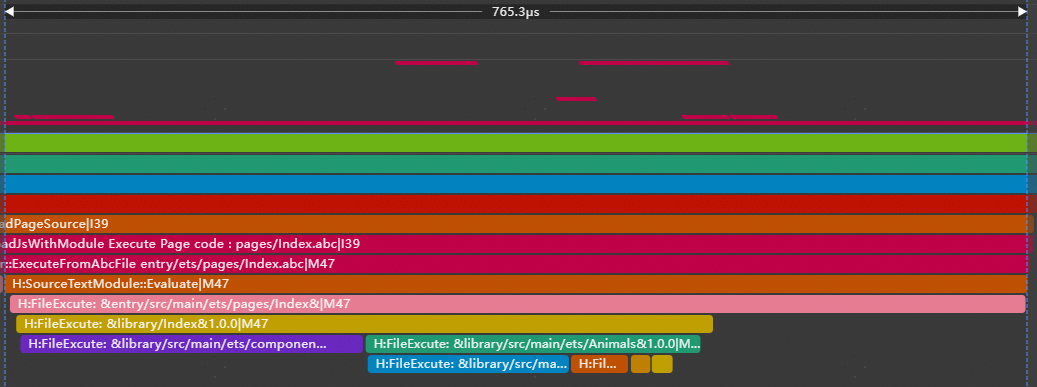
在以下示例中,即使只需要使用typeNum变量,但当使用import *全量导入HAR包时,所有关联模块(如Animals.ets等)仍会被加载执行,这会带来不必要的性能开销。
// entry\src\main\ets\pages\Index.ets
// Before optimization: Namespace Import
import { hilog } from '@kit.PerformanceAnalysisKit';
import * as library from 'library';

hilog.info(0x0000, 'testTag', 'library.typeNum is %{public}d', library.typeNum);

@Entry
@Component
struct Index {
  @State message: string = 'Hello World';

  build() {
    RelativeContainer() {
      Text(this.message)
        .id('HelloWorld')
        .fontSize($r('app.float.page_text_font_size'))
        .fontWeight(FontWeight.Bold)
        .alignRules({
          center: { anchor: '__container__', align: VerticalAlign.Center },
          middle: { anchor: '__container__', align: HorizontalAlign.Center }
        })
        .onClick(() => {
          this.message = 'Welcome';
        })
    }
    .height('100%')
    .width('100%')
  }
}
// library\src\main\ets\Animals.ets
import { hilog } from '@kit.PerformanceAnalysisKit';
export * from './Birds';
export * from './Fish';
export * from './Mammals';
export * from './TypeNum';
hilog.info(0x0000, 'testTag', 'library Animals.ets execute.'); // library\src\main\ets\Birds.ets
import { hilog } from '@kit.PerformanceAnalysisKit';
export const birds: string = 'Butterflies';
hilog.info(0x0000, 'testTag', 'library Birds.ets execute.'); // library\src\main\ets\Fish.ets
import { hilog } from '@kit.PerformanceAnalysisKit';
export const fish: string = 'carp';
hilog.info(0x0000, 'testTag', 'library Fish.ets execute.'); // library\src\main\ets\Mammals.ets
import { hilog } from '@kit.PerformanceAnalysisKit';
export const mammals: string = 'cat';
hilog.info(0x0000, 'testTag', 'library Mammals.ets execute.'); // library\src\main\ets\TypeNum.ets
import { hilog } from '@kit.PerformanceAnalysisKit';
export const typeNum: number = 4;
hilog.info(0x0000, 'testTag', 'library TypeNum.ets execute.'); // library\Index.ets
export { MainPage } from './src/main/ets/components/MainPage';
export * from "./src/main/ets/Animals"; oh-package.json如下增加模块依赖library包:
// entry\oh-package.json5
"dependencies": {
  "library": "file:../library"
} 
使用路径展开
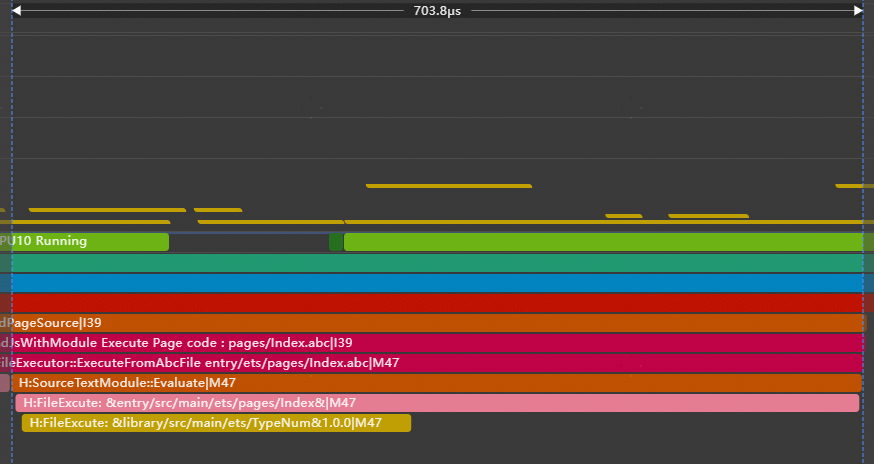
开发者可通过配置expandImportPath(配置文件结构)来启用路径展开功能,并且将导入方式改为import { typeNum } from 'library'。使源码中的import语句在编译时指向被引用符号的实际定义文件。从下图Trace上看此时只执行TypeNum.ets,同时通过修改前后的Trace对比也可以看出冷启动性能得到提升。
// entry\src\main\ets\pages\Index.ets
// After optimization: Named Space Import
import { hilog } from '@kit.PerformanceAnalysisKit';
import { typeNum } from 'library';

hilog.info(0x0000, 'testTag', 'library.typeNum is %{public}d', typeNum);

@Entry
@Component
struct Index {
  @State message: string = 'Hello World';

  build() {
    RelativeContainer() {
      Text(this.message)
        .id('HelloWorld')
        .fontSize($r('app.float.page_text_font_size'))
        .fontWeight(FontWeight.Bold)
        .alignRules({
          center: { anchor: '__container__', align: VerticalAlign.Center },
          middle: { anchor: '__container__', align: HorizontalAlign.Center }
        })
        .onClick(() => {
          this.message = 'Welcome';
        })
    }
    .height('100%')
    .width('100%')
  }
}