概述
随着移动互联网的快速发展,观看直播已成为用户获取信息和娱乐的重要方式。然而,在复杂的网络环境下,传统TCP协议在直播传输中存在建链时延大、队头阻塞、网络切换时断线重连等问题,严重影响用户体验。
QUIC(Quick UDP Internet Connections)协议是一种基于UDP的传输协议,旨在加速HTTP传输。它能够有效解决上述TCP协议问题,为直播场景提供更快速、更稳定的网络传输体验。针对当前TCP传输直播业务面临的挑战,本文面向HarmonyOS应用开发者,以ijkplayer播放器为例,介绍如何集成Remote Communication Kit(远场通信服务)提供的RCP_QUIC能力(具体请参考rcp_quic.h),以提升直播播放的流畅度和用户体验。
场景描述
视频和直播应用需支持多种网络传输协议,以适配不同的网络环境与CDN服务。主要痛点场景包括:
- 弱网环境:高时延、高丢包率导致播放卡顿
- 移动网络切换:信号波动、网络频繁切换引发断线重连
- 高并发场景:多用户同时访问造成拥塞
传统TCP协议在弱网环境下存在天然劣势,而QUIC协议能够提供更快速、更稳定的网络体验。通过集成QUIC协议,应用能够根据网络环境自动选择最优传输协议。
实现原理
QUIC协议通过多路复用和拥塞控制等核心特性,在高并发、移动网络及弱网场景下实现更高效、更可靠的数据传输。多路复用允许在同一连接上并行传输多个数据流,有效避免TCP的队头阻塞问题;拥塞控制机制能更好地适应弱网环境,在高丢包、高时延的网络下仍能保持稳定传输。
下面通过ijkplayer阐述RCP_QUIC的适配过程。ijkplayer是OpenHarmony环境下的一款基于FFmpeg的视频播放器。集成Remote Communication Kit(远场通信服务)提供的QUIC传输能力需要完成两项核心工作:FFmpeg支持QUIC传输协议支持,ijkplayer层支持QUIC URL解析与播放。
FFmpeg层QUIC传输的适配主要包含创建连接、终止连接、创建数据流、数据读写、关闭数据流等核心操作。整体流程如下:
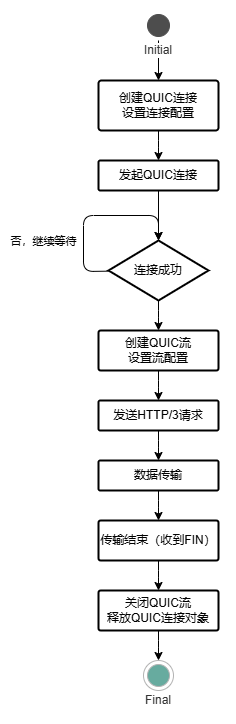
实现流程
- 通过HMS_Rcp_QuicConnCreate()创建连接对象,需要指定ALPN协议和用户对象;通过HMS_Rcp_QuicCreateSession()创建会话对象,用于管理全局资源。
- 设置HMS_Rcp_QuicConnSetOpt()连接参数:
- 配置RCP_QUIC_CONN_ON_CONNECTED_FUNCTION选项,当连接建立成功时触发回调。
- 配置RCP_QUIC_CONN_ON_ERROR_FUNCTION选项,当连接发生错误时触发回调。
- 配置RCP_QUIC_CONN_ON_CLOSED_FUNCTION选项,当连接关闭时触发回调。
- 配置RCP_QUIC_CONN_STREAM_INBOUND_FUNCTION选项,当服务端创建流时触发回调。
- 使用HMS_Rcp_QuicConnConnect()发起连接,传入会话对象、连接对象、服务端域名和端口。
- 通过HMS_Rcp_QuicConnStreamOpen()在连接上创建新的双向数据流。
- 使用HMS_Rcp_QuicStreamSetOpt()设置RCP_QUIC_STREAM_DATA_FUNCTION流数据监听。
- 使用HMS_Rcp_QuicConnStreamSend()通过数据流发送数据。
- 传输完成之后使用HMS_Rcp_QuicConnDestroy()销毁连接对象,关闭所有流并释放连接资源;使用HMS_Rcp_QuicDestroySession()销毁会话对象,释放全局资源。
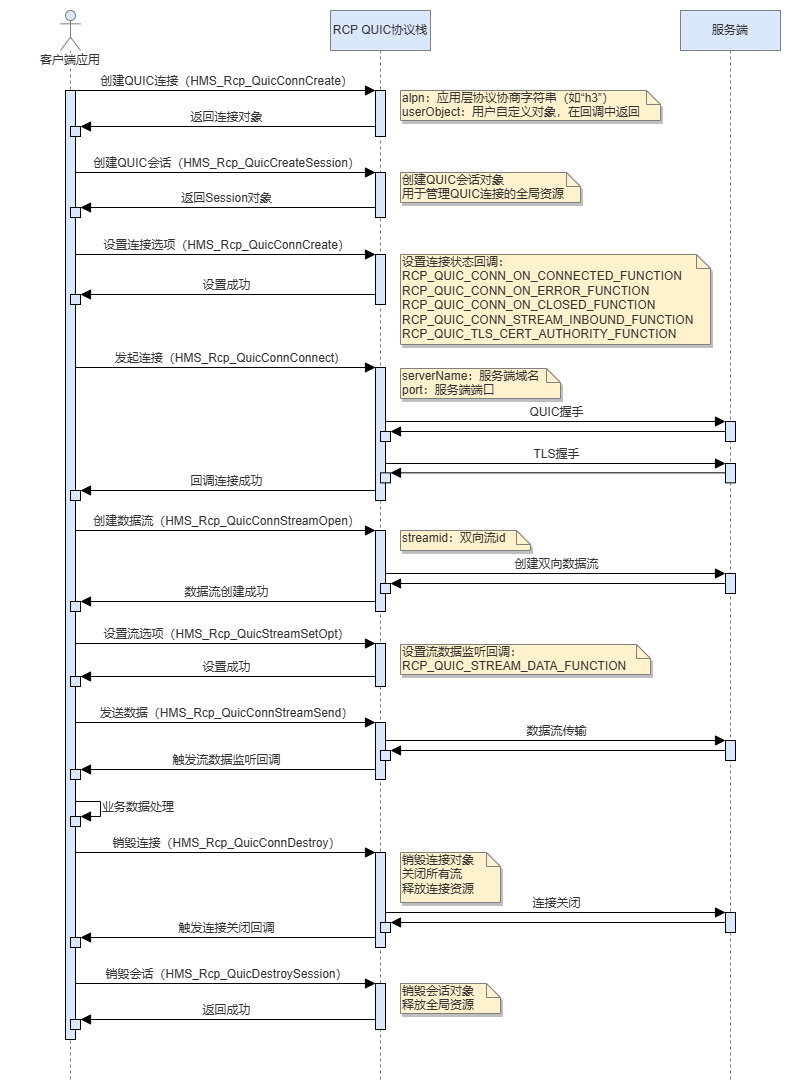
FFmpeg支持QUIC传输
本节介绍FFmpeg中QUIC协议传输层的核心实现。FFmpeg通过集成Remote Communication Kit(远场通信服务)中的rcp_quic.h接口,完成连接管理与数据收发等底层操作。
[h2]开发步骤
1. 建立QUIC连接
创建QUIC连接对象,解析并保存URI,建立QUIC连接并完成HTTP/3握手,最终返回连接结果。
static int Http3Open(URLContext *h, const char *uri, int flags, AVDictionary **options)
{
    HTTP3Context *s = h->privData;
    int ret;
    Rcp_QuicConn *conn = HMS_Rcp_QuicConnCreate("h3", h);
    Rcp_QuicSession *session = HMS_Rcp_QuicCreateSession();
    if (conn == NULL || session == NULL) {
        return AVERROR(ENOMEM);
    }

    s->quicConn = conn;
    s->quicSession = session;
    s->appCtx = (AVApplicationContext *)av_dict_strtoptr(s->appCtxIntptr);

    /* Initialize pipe for QUIC async receive - direct forwarding */
    int pipefd[2];
    if (pipe(pipefd) < 0) {
        HMS_Rcp_QuicConnDestroy(s->quicConn);
        s->quicConn = NULL;
        HMS_Rcp_QuicDestroySession(s->quicSession);
        s->quicSession = NULL;
        return AVERROR(ENOMEM);
    }
    // ...
    /* URI Saving and HTTP Headers Normalization */

    if (s->listen) {
        return Http3Listen(h, uri, flags, options);
    }
    av_application_will_http_open(s->appCtx, (void*)h, uri);
    ret = Http3OpenCnx(h, options);
    av_application_did_http_open(s->appCtx, (void*)h, uri, ret, s->http3Code, s->fileSize);
    if (ret < 0) {
        av_dict_free(&s->chainedOptions);
    }
    return ret;
}
初始化nghttp3连接并设置QUIC回调:
static int Http3Connect(URLContext *h, const char *path, const char *localPath, const char *hoststr, const char *auth,
    const char *proxyauth, int *newLocation)
{
    HTTP3Context *s = h->privData;
    int err;
    char *authstr = NULL;
    char *proxyauthstr = NULL;
    uint64_t off = s->off;

    // ...
    /* Initialize HTTP/3 connection */
    int ret = HMS_Rcp_QuicConnSetOpt(s->quicConn, RCP_QUIC_CONN_ON_CONNECTED_FUNCTION,
                                     QuicConnectionOnConnected, sizeof(QuicConnectionOnConnected));
    ret |= HMS_Rcp_QuicConnSetOpt(s->quicConn, RCP_QUIC_CONN_ON_ERROR_FUNCTION,
                                  QuicConnectionOnError, sizeof(QuicConnectionOnError));
    ret |= HMS_Rcp_QuicConnSetOpt(s->quicConn, RCP_QUIC_CONN_ON_CLOSED_FUNCTION,
                                  QuicConnectionOnClosed, sizeof(QuicConnectionOnClosed));
    ret |= HMS_Rcp_QuicConnSetOpt(s->quicConn, RCP_QUIC_CONN_STREAM_INBOUND_FUNCTION,
                                  QuicConnectionOnStreamInbound, sizeof(QuicConnectionOnStreamInbound));
    ret |= HMS_Rcp_QuicConnSetOpt(s->quicConn, RCP_QUIC_TLS_CERT_AUTHORITY_FUNCTION,
                                  QuicConnectionOnCertAuthority, sizeof(QuicConnectionOnCertAuthority));
    s->connected = false;
    ret |= HMS_Rcp_QuicConnConnect(s->quicSession, s->quicConn, hoststr, 443);  /* 443 is the target port number */
    /* Waiting for connection to succeed */
    while (s->connected == false) {
        usleep(0);
    }
    uint64_t streamid = 0;
    ret |= HMS_Rcp_QuicConnStreamOpen(s->quicConn, RCP_QUIC_STREAM_BIDI, &streamid, h);
    ret |= HMS_Rcp_QuicStreamSetOpt(s->quicConn, streamid, RCP_QUIC_STREAM_DATA_FUNCTION,
                                    QuicStreamOnReceiveData, sizeof(QuicStreamOnReceiveData));

    /* Save current stream ID for Http3Read */
    s->currentStreamId = streamid;
    Http3RequestInit(h, path, localPath, hoststr, auth, proxyauth, newLocation, streamid);
    /* Send HTTP Request and read Response Header */
    err = (off == s->off) ? 0 : -1;
done:
    av_freep(&authstr);
    av_freep(&proxyauthstr);
    return err;
}
2.握手阶段处理
QUIC协议服务端握手流程:底层协议握手→读取客户端请求头→发送响应头→握手完成。
static int Http3Handshake(URLContext *c)
{
    int ret;
    int err;
    int newLocation;
    HTTP3Context *h3c = c->privData;
    URLContext *uc = h3c->hd;
    switch (h3c->handshakeStep) {
        case LOWER_PROTO:
            if ((ret = ffurl_handshake(uc)) > 0) {
                return 2 + ret;  /* 2 is the return value in the handshake phase */
            }
            if (ret < 0) {
                return ret;
            }
            h3c->handshakeStep = READ_HEADERS;
            h3c->isConnectedServer = 1;
            return 2;  /* 2 is the return value in the handshake phase */
        case READ_HEADERS:
            if ((err = Http3ReadHeader(c, &newLocation)) < 0) {
                HandleHttp3Errors(c, err);
                return err;
            }
            h3c->handshakeStep = WRITE_REPLY_HEADERS;
            return 1;
        case WRITE_REPLY_HEADERS:
            if ((err = Http3WriteReply(c, h3c->replyCode)) < 0) {
                return err;
            }
            h3c->handshakeStep = FINISH;
            return 1;
        case FINISH:
            return 0;
    }
    return AVERROR(EINVAL);
}
3. 数据读取
通过管道转发QUIC数据流:
static int Http3Read(URLContext *h, uint8_t *buf, int size)
{
    HTTP3Context *s = h->privData;
    int srcSize;

    if (s->icyMetaint > 0) {
        srcSize = StoreIcy(h, size);
        if (srcSize < 0) {
            return srcSize;
        }
    }

    /* Check if QUIC mode is active (pipe initialized) */
    if (s->pipeFd >= 0 && s->quicConn != NULL) {
        /* QUIC mode: read from pipe - direct forwarding */
        ssize_t ret = read(s->pipeFd, buf, size);
        if (ret < 0) {
            if (errno == EAGAIN || errno == EWOULDBLOCK) {
                /* No data available, return 0 to indicate retry */
                return 0;
            }
            return AVERROR(errno);
        }

        if (ret == 0) {
            /* EOF - pipe write end closed */
            return AVERROR_EOF();
        }

        s->icyDataRead += ret;
        return (int)ret;
    }

    /* Fallback: use original TCP mode */
    srcSize = Http3ReadStream(h, buf, size);
    if (srcSize > 0) {
        s->icyDataRead += srcSize;
    }
    return srcSize;
}
4. 数据写入
写入请求数据,对于分块传输编码的数据会添加对应的格式头部:
static int Http3Write(URLContext *h, const uint8_t *buf, int size)
{
    char temp[11] = "";  /* 32-bit hex + CRLF + nul */
    int ret;
    char crlf[] = "\r\n";
    HTTP3Context *h3c = h->privData;

    if (!h3c->chunkedPost) {
        return ffurl_write(h3c->hd, buf, size);
    }

    if (size > 0) {
        if ((ret = snprintf_s(temp, sizeof(temp), "%x\r\n", size)) < 0) {
            return ret;
        }
        if ((ret = ffurl_write(h3c->hd, (const unsigned char*)temp, strlen(temp))) < 0 ||
            (ret = ffurl_write(h3c->hd, buf, size)) < 0          ||
            (ret = ffurl_write(h3c->hd, (const unsigned char*)crlf, sizeof(crlf) - 1)) < 0) {
            return ret;
            }
    }
    return size;
}
5. 关闭连接
资源清理与连接关闭:
static int Http3Close(URLContext *h)
{
    int ret = 0;
    HTTP3Context *s = h->privData;
    if (!s->endChunkedPost) {
        ret = Http3Shutdown(h, h->flags);
    }

    /* Cleanup pipe */
    if (s->pipeFd >= 0) {
        close(s->pipeFd);
        s->pipeFd = -1;
    }
    if (s->pipeWriteFd >= 0) {
        close(s->pipeWriteFd);
        s->pipeWriteFd = -1;
    }

    /* Cleanup synchronization primitives */
    ret = pthread_mutex_destroy(&s->responseMutex);
    if (ret != 0) {
        return ret;
    }
    ret = pthread_cond_destroy(&s->responseCond);
    if (ret != 0) {
        return ret;
    }

    /* Cleanup nghttp3 connection */
    if (s->h3Req) {
        nghttp3_conn_del(s->h3Req);
        s->h3Req = NULL;
    }
    /* Cleanup QUIC connection */
    if (s->quicConn) {
        HMS_Rcp_QuicConnDestroy(s->quicConn);
        s->quicConn = NULL;
        HMS_Rcp_QuicDestroySession(s->quicSession);
        s->quicSession = NULL;
    }

    if (s->hd) {
        ffurl_closep(&s->hd);
    }
    av_dict_free(&s->chainedOptions);
    return ret;
} [h2]开发步骤
1. 配置协议白名单
设置protocol_whitelist参数,将"quic"和"quics"加入播放器可识别的协议列表。
this.ijkplayer_napi._setOption(this.id, IjkMediaPlayer.OPT_CATEGORY_FORMAT, "protocol_whitelist",
  "async,cache,crypto,file,http,https,quic,quics,ijkhttphook,ijkinject,ijklivehook,ijklongurl,ijksegment,ijktcphook,pipe,rtp,tcp,tls,udp,ijkurlhook,data");
2. URL协议转换
在HarmonyOS应用中,根据用户选择的直播类型动态转换URL协议。当使用QUIC时,将“https://”前缀替换为“quics://”。
@State testLiveUrl: string = "";
@State httpLiveUrl: string = "";
@State quicLiveUrl: string = "";
@State liveType: LiveType = LiveType.Other;

async aboutToAppear(){
  try{
    if (this.liveType === LiveType.Quic) {
      this.httpLiveUrl = this.testLiveUrl.replace('https://', 'quics://');
    } else {
      this.httpLiveUrl = this.testLiveUrl;
    }
    if (this.liveType === LiveType.Quic || this.liveType === LiveType.Both) {
      this.quicLiveUrl = this.testLiveUrl.replace('https://', 'quics://');
    } else {
      this.quicLiveUrl = this.testLiveUrl;
    }
  } catch (e) {
    console.error(`aboutToAppear err: ${e}`);
  }
}