背景知识
实现镜像语言功能需要涉及以下步骤:
- 在resources文件中添加语言资源。
- 设置应用偏好语言:通过@ohos.i18n (国际化-I18n)提供的setAppPreferredLanguage设置后,应用将优先加载应用偏好语言对应的资源。
- 设置语言镜像:通过组件属性direction设置容器元素内主轴方向上的布局。通过调整布局方向为从右向左布局实现镜像效果。
- 设置图片镜像:通过matchTextDirection设置图片是否跟随系统语言方向,在RTL语言环境下显示镜像翻转效果。
解决方案
以维吾尔语为例实现镜像语言功能步骤如下:
- 在entry/src/main/resources添加ug语言资源。右击resources->New->Resource Directory。
- 在ug/element下添加string.json。
{ "string": [ { "name": "settings", "value": "تەڭشەك" } ] } - 在resources/base/element/string.json中添加和ug/string.json一样的字段名。
{ "string": [ { "name": "module_desc", "value": "module description" }, { "name": "EntryAbility_desc", "value": "description" }, { "name": "EntryAbility_label", "value": "label" }, { "name": "settings", "value": "设置" } ] } - 通过setAppPreferredLanguage设置应用偏好语言,设置后,应用将优先加载应用偏好语言对应的资源。
try {
  i18n.System.setAppPreferredLanguage('ug');
} catch (error) {
  let err: BusinessError = error as BusinessError;
  console.error(`call System.setAppPreferredLanguage failed, error code: ${err.code}, message: ${err.message}.`);
}
设置偏好语言为'default'后,应用语言将跟随系统语言,应用冷启动生效。
onCreate(): void {
  i18n.System.setAppPreferredLanguage('default');
  try {
    this.context.getApplicationContext().setColorMode(ConfigurationConstant.ColorMode.COLOR_MODE_NOT_SET);
  } catch (err) {
    hilog.error(DOMAIN, 'testTag', 'Failed to set colorMode. Cause: %{public}s', JSON.stringify(err));
  }
  hilog.info(DOMAIN, 'testTag', '%{public}s', 'Ability onCreate');
}
- 使用组件direction属性实现镜像能力。
属性
说明
LTR
顺序为从左向右。
RTL
顺序为从右向左。
Auto
设置为Direction.Auto,且当前的系统语言(如维吾尔语)的阅读习惯是从右向左。
.direction(Direction.Auto) // 设置为Direction.Auto,且当前的系统语言(如维吾尔语)的阅读习惯是从右向左
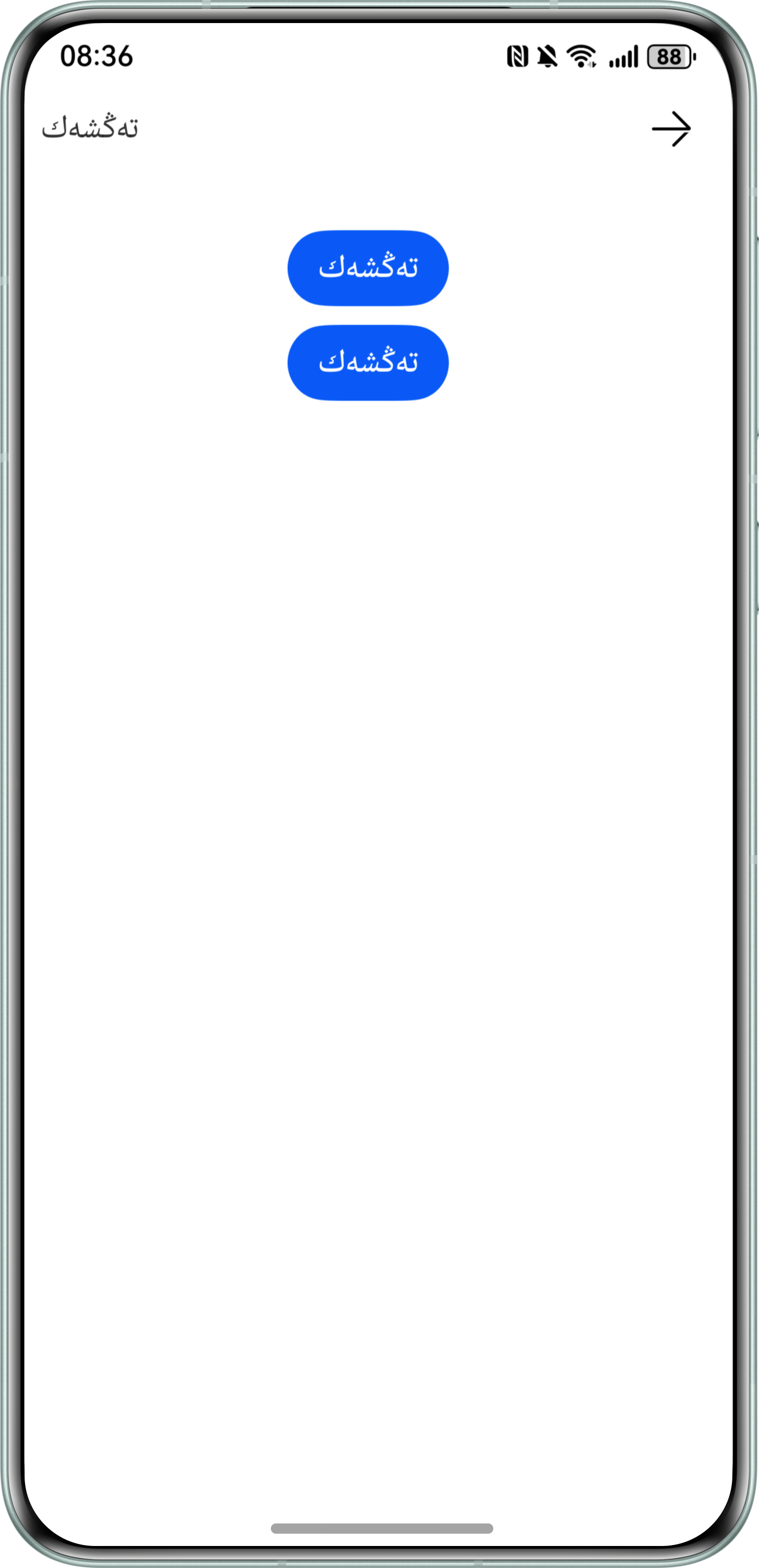
- matchTextDirection设置图片是否跟随系统语言方向,在RTL语言环境下显示镜像翻转显示效果。
- 图片跟随系统语言方向示例代码参考如下:
import { BusinessError } from '@kit.BasicServicesKit';
import { i18n } from '@kit.LocalizationKit';

@Entry
@Component
struct FollowSystemDirection {
  aboutToAppear() {
    try {
      i18n.System.setAppPreferredLanguage('ug');
    } catch (error) {
      let err: BusinessError = error as BusinessError;
      console.error(`call System.setAppPreferredLanguage failed, error code: ${err.code}, message: ${err.message}.`);
    }
  }

  build() {
    Column() {
      Row() {
        Image($r('sys.media.ohos_ic_back')) // 图片资源需开发者自行更换
          .height(25).objectFit(ImageFit.START).aspectRatio(1)
          .matchTextDirection(true) // 图片跟随系统语言方向
        Text($r('app.string.settings'))
          .fontSize(16)
      }
      .width('100%')
      .height(47)
      .backgroundImageSize(ImageSize.FILL)
      .justifyContent(FlexAlign.SpaceBetween)
      .alignItems(VerticalAlign.Center)
      .direction(Direction.Auto) // 设置为Direction.Auto,且当前的系统语言(如维吾尔语)的阅读习惯是从右向左

      Button($r('app.string.settings')) // 文本需开发者自行更换
        .width('auto')
        .margin({ top: 30 })
      Button($r('app.string.settings')) // 文本资源需开发者自行更换
        .width('auto')
        .margin({ top: 10 })
    }
    .padding({ left: 10, right: 20 })
  }
}
效果预览:
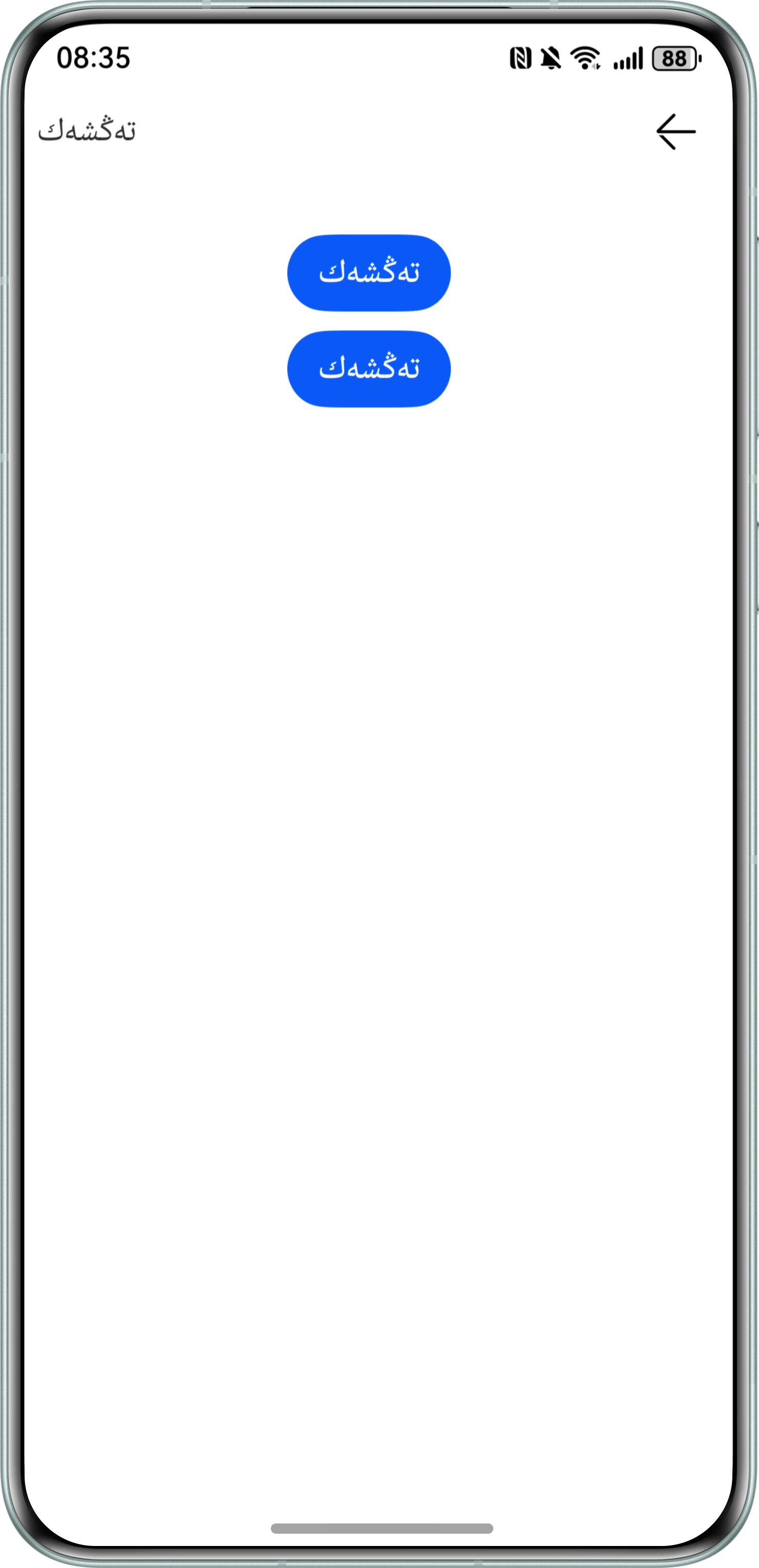
- 图片不跟随系统语言方向示例代码参考如下:
import { BusinessError } from '@kit.BasicServicesKit';
import { i18n } from '@kit.LocalizationKit';

@Entry
@Component
struct NotFollowSystemDirection {
  aboutToAppear() {
    try {
      i18n.System.setAppPreferredLanguage('ug');
    } catch (error) {
      let err: BusinessError = error as BusinessError;
      console.error(`call System.setAppPreferredLanguage failed, error code: ${err.code}, message: ${err.message}.`);
    }
  }

  build() {
    Column() {
      Row() {
        Image($r('sys.media.ohos_ic_back')) // 图片资源需开发者自行更换
          .height(25).objectFit(ImageFit.START).aspectRatio(1)
          .matchTextDirection(false) // 图片不跟随系统语言方向
        Text($r('app.string.settings'))
          .fontSize(16)
      }
      .width('100%')
      .height(47)
      .backgroundImageSize(ImageSize.FILL)
      .justifyContent(FlexAlign.SpaceBetween)
      .alignItems(VerticalAlign.Center)
      .direction(Direction.Auto) // 设置为Direction.Auto,且当前的系统语言(如维吾尔语)的阅读习惯是从右向左

      Button($r('app.string.settings')) // 文本需开发者自行更换
        .width('auto')
        .margin({ top: 30 })
      Button($r('app.string.settings')) // 文本需开发者自行更换
        .width('auto')
        .margin({ top: 10 })
    }
    .padding({ left: 10, right: 20 })
  }
}
效果预览:
- 图片跟随系统语言方向示例代码参考如下:


常见FAQ
Q:Direction.Rtl枚举值是字符串类型吗?
A:根据HarmonyOS最新文档的说明,现在Direction.Rtl枚举值不使用数据枚举值表示,用typeof Direction.Rtl可以确认Direction.Rtl类型为string类型。