背景知识
- Web组件提供网页显示的能力。
- 设置onLoadIntercept时,当Web组件加载url之前触发该回调,用于判断是否阻止此次访问。
- H5页面可通过设置window.location.href进行H5页面跳转。
- Navigation组件是路由导航的根视图容器,一般作为Page页面的根容器使用,其内部默认包含了标题栏、内容区和工具栏,其中内容区默认首页显示导航内容(Navigation的子组件)或非首页显示(NavDestination的子组件),首页和非首页通过路由进行切换。
问题定位
查看跳转前后显示页面的Web组件,跳转前后的页面都是通过同一个Tabs组件下的Web组件显示。通常情况下,跳转到某些特殊页面,如视频播放页面时,应使用不在Tabs组件内的Web组件显示。
Tabs({ barPosition: BarPosition.End, index: this.currentIndex, controller: this.tabscontroller }) {
  TabContent() {
    Column() {
      // 加载Web页面
      Web({ src: $rawfile('button.html'), controller: this.controller })
        .height('100%')
        .width('100%')
    }
    .width('100%').height('100%')
  }.tabBar(this.tabBuilder(0, '标签栏1'))

  TabContent() {
    Column().width('100%').height('100%')
  }.tabBar(this.tabBuilder(1, '标签栏2'))

  TabContent() {
    Column().width('100%').height('100%')
  }.tabBar(this.tabBuilder(2, '标签栏3'))
} 修改建议
Web组件使用onLoadIntercept和Navigation+NavDestination,跳转到视频播放页面时使用非Tabs组件下的Web组件显示页面。
Index.ets:
import { webview } from '@kit.ArkWeb';

@Entry
@Component
struct Index {
  pageInfos: NavPathStack = new NavPathStack();
  fontColor: string = '#182431';
  selectedFontColor: string = '#007DFF';
  @State currentIndex: number = 0;
  @State selectedIndex: number = 0;
  marginLeft: number = 30;
  private tabsController: TabsController = new TabsController();
  color: string = '#DB7093';
  controller: webview.WebviewController = new webview.WebviewController();

  @Builder
  tabBuilder(index: number, name: string) {
    Column() {
      Image($r('app.media.startIcon'))
        .width(40)
        .height(40)
        .objectFit(ImageFit.Contain)
        .margin({ top: 17})
      Text(name)
        .fontColor(this.selectedIndex === index ? this.selectedFontColor :
          this.fontColor)
        .fontSize(16)
        .fontWeight(this.selectedIndex === index ? 500 : 400)
        .lineHeight(22)
        .margin({ top: 10, bottom: 7 })
        .textAlign(TextAlign.Center)
        .width('100%')
    }
    .width('30%')
    .alignItems(HorizontalAlign.Center)
  }

  build() {
    Navigation(this.pageInfos) {
      Stack() {
        Tabs({ barPosition: BarPosition.End, index: this.currentIndex, controller: this.tabsController }) {
          TabContent() {
            Column() {
              // 加载Web页面
              Web({ src: $rawfile('button.html'), controller: this.controller })
                .height('100%')
                .width('100%')
                .fileAccess(true)
                .geolocationAccess(false)
                // 加载新页面前获取新页面地址
                .onLoadIntercept((event) => {
                  let url = event.data.getRequestUrl();
                  console.info('url is ' + url);
                  // 跳转到视频播放页面时跳转到新的Web组件播放
                  if (url === 'resource://rawfile/index_cn.html') {
                    this.pageInfos.pushPath({ name: 'newWeb', param: 'index_cn.html' });
                    return true; // 当前Web组件不加载该页面
                  }
                  return false;
                });
            }
            .width('100%').height('100%');
          }.tabBar(this.tabBuilder(0, '标签栏1'));

          TabContent() {
            Column().width('100%').height('100%');
          }.tabBar(this.tabBuilder(1, '标签栏2'));

          TabContent() {
            Column().width('100%').height('100%');
          }.tabBar(this.tabBuilder(2, '标签栏3'));
        }
        .barMode(BarMode.Scrollable)
        .barWidth('100%')
        .barHeight(100)
        .onChange((index: number) => {
          // currentIndex控制TabContent显示页签
          this.currentIndex = index;
          this.selectedIndex = index;
        })
        .onAnimationStart((index: number, targetIndex: number) => {
          if (index === targetIndex) {
            return;
          }
          // selectedIndex控制自定义TabBar内Image和Text颜色切换
          this.selectedIndex = targetIndex;
        })
        .width('100%')
        .height('100%');
      }
      .width('100%')
      .height('100%')
      .padding({top: '123px',bottom: '91px'})
    }
    .hideTitleBar(true)
    .height('100%')
    .width('100%')
    .mode(NavigationMode.Stack);
  }
}
NewWeb.ets:
import { webview } from '@kit.ArkWeb';

@Builder
export function NewWebBuilder() {
  NewWeb();
}

@Entry
@Component
export struct NewWeb {
  pageInfos: NavPathStack = new NavPathStack();
  @State url: string = '';
  controller: webview.WebviewController = new webview.WebviewController();

  build() {
    NavDestination() {
      Stack() {
        // 使用新的Web组件显示新页面
        Web({ src: $rawfile(this.url), controller: this.controller })
          .height('100%')
          .width('100%')
          .fileAccess(true)
          .geolocationAccess(false);
      }
      .height('100%')
      .width('100%')
      .padding({top: '123px',bottom: '91px'})
    }
    .onBackPressed(() => {
      this.pageInfos.pop(); // 弹出路由栈栈顶元素
      return true;
    })
    .onReady((context: NavDestinationContext) => {
      this.pageInfos = context.pathStack;
      this.url = this.pageInfos.getParamByName('newWeb').toString(); // 获取网页地址
    })
    .hideTitleBar(true)
    .height('100%')
    .width('100%')
    .backgroundColor(Color.White);
  }
}
button.html:
<!DOCTYPE html>
<html lang="zh">
<head>
    <meta charset="UTF-8">
    <title>跳转前页面</title>
    <style>
        body {
          display: flex;
          justify-content: center;  /* 水平居中 */
          align-items: center;      /* 垂直居中 */
          height: 100vh;              /* 占满视口高度 */
          width: 100vw;               /* 占满视口宽度 */
        }

        .container {
          display: flex;
          align-items: center; /* 垂直居中 */
          gap: 10px; /* 图片和输入框之间的间距 */
         }

        .search-btn {
          font-size: 40px;
          background-color: #0A59F7;
          color: white;
          border-radius: 80px;
          border-width: 0px;
          cursor: pointer;
          height: 130px;
          width: 450px;
        }
    </style>
</head>
<body>

<div class="container">
    <button class="search-btn" onclick="goToPage()">点击跳转到视频页面</button>
</div>

<script>
    function goToPage() {
      // 跳转到当前目录下的 index_cn.html
       window.location.href = "./index_cn.html";
    }
</script>
</body>
</html>
index_cn.html.ets:
<!DOCTYPE html>
<html lang="en">

<head>
    <meta charset="UTF-8">
    <meta name="viewport" content="width=device-width, initial-scale=1.0">
    <title>测试页面</title>
    <style>
        * {
            padding: 0;
            margin: 0;
        }

        body {
            width: 100vw;
            height: 100vh;
            box-sizing: border-box;
        }

        .page {
            display: flex;
            flex-direction: column;
            justify-content: flex-start;
            align-items: flex-start;
            width: 100%;
            height: 100%;
            box-sizing: border-box;
        }

        .video-box {
            width: 100%;
            display: flex;
            flex-direction: column;
            justify-content: start;
            align-items: center;
            box-sizing: border-box;
            margin-top: 20px;
        }

        .myVideo {
            width: 100%;
            height: calc(100vw * 9 / 16);
            object-fit: contain;
            background-color: black;
        }
    </style>
</head>

<body>
<div class="page">
    <h1 style="margin-left: 100px;margin-top: 20px">网页视频显示</h1>
    <div class="video-box">
        <video autoplay muted loop class="myVideo" controls>
            <!-- "www.example.mp4"需要替换为开发者需要的视频资源文件 -->
            <source src="www.example.mp4" type="video/mp4">
        </video>
    </div>

    <div style="margin-top: 40px; margin-left: 20px">
        <h2>视频简介</h2>
        <div style="margin-top: 10px">
            该网页视频为示例视频
        </div>
    </div>
</div>

</body>

</html> 访问在线网页时需添加网络权限:ohos.permission.INTERNET,具体申请方式请参考声明权限。
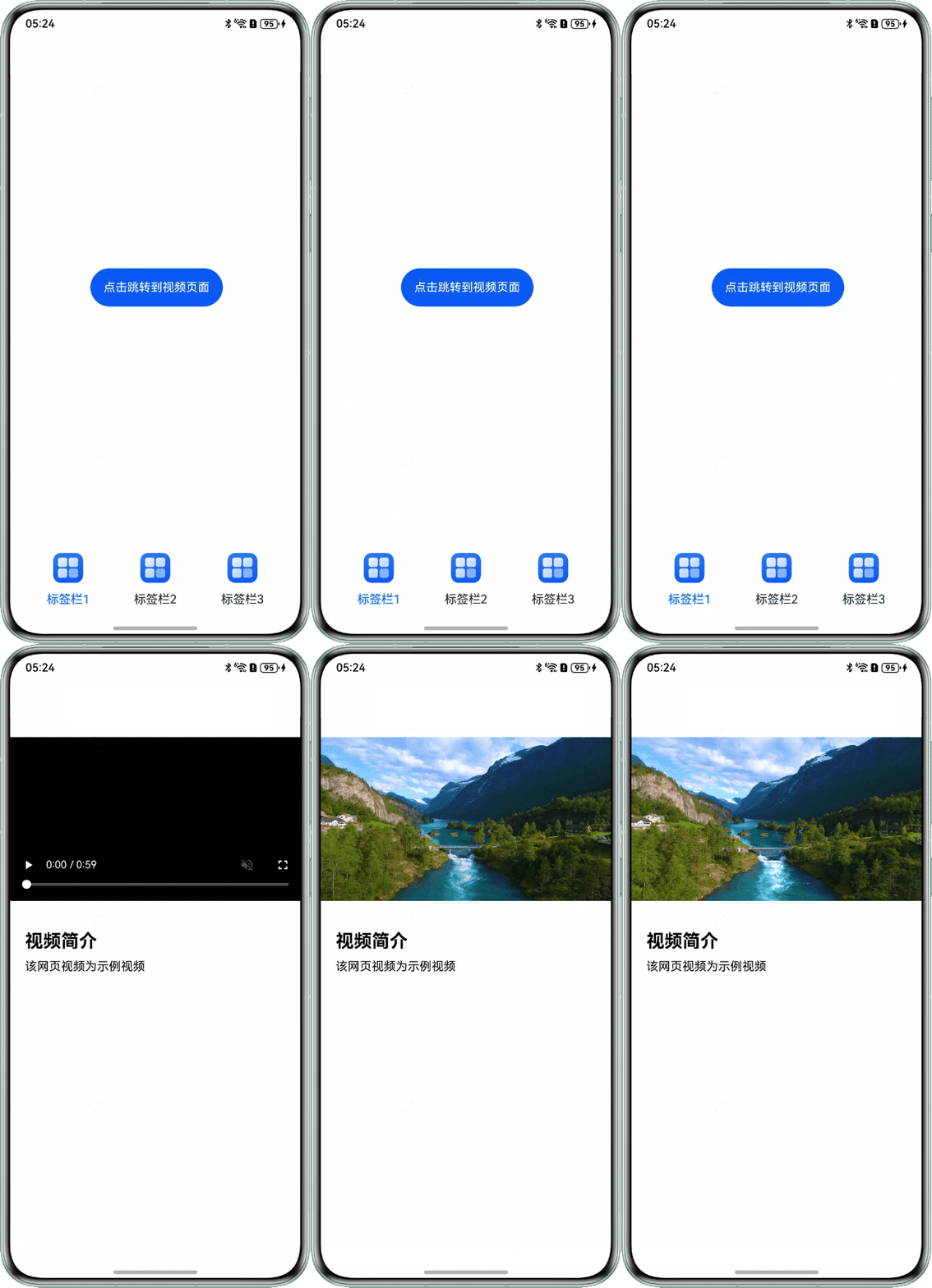
效果图如下: