插件包是基于HSP的共享包组件,用于扩展宿主应用(加载并运行插件的应用程序)的功能。插件通常由第三方开发者或宿主应用开发者创建,旨在为宿主应用提供额外的特性或服务,例如专业设计软件通过插件为不同行业提供定制能力。插件运行依赖系统能力,例如调用ArkTS接口、使用Ability组件等。若插件自身不依赖系统能力,则可沿用应用原有的插件打包方式,无需采用HSP形式。插件不能独立运行,必须依赖宿主应用提供的运行环境和功能支持。
需要权限
宿主应用使用插件需申请ohos.permission.kernel.SUPPORT_LOCAL_PLUGIN权限,具体申请方式请参考声明权限。
"requestPermissions": [
  {
    "name": "ohos.permission.kernel.SUPPORT_LOCAL_PLUGIN"
  }
] [h2]工程配置
-
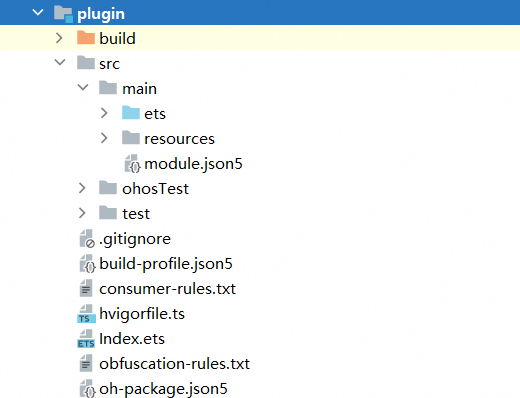
插件包本质上是动态共享包HSP,参考创建HSP模块在工程中创建插件模块plugin。
-
在app.json5中配置bundleType字段为appPlugin,该字段表示当前包为应用的插件包,bundleName为插件的包名。
{ "app": { "bundleName": "com.example.plugin", "vendor": "example", "versionCode": 1000000, "versionName": "1.0.0", "buildVersion": "1", "icon": "$media:layered_image", "label": "$string:app_name", "bundleType": "appPlugin" } } -
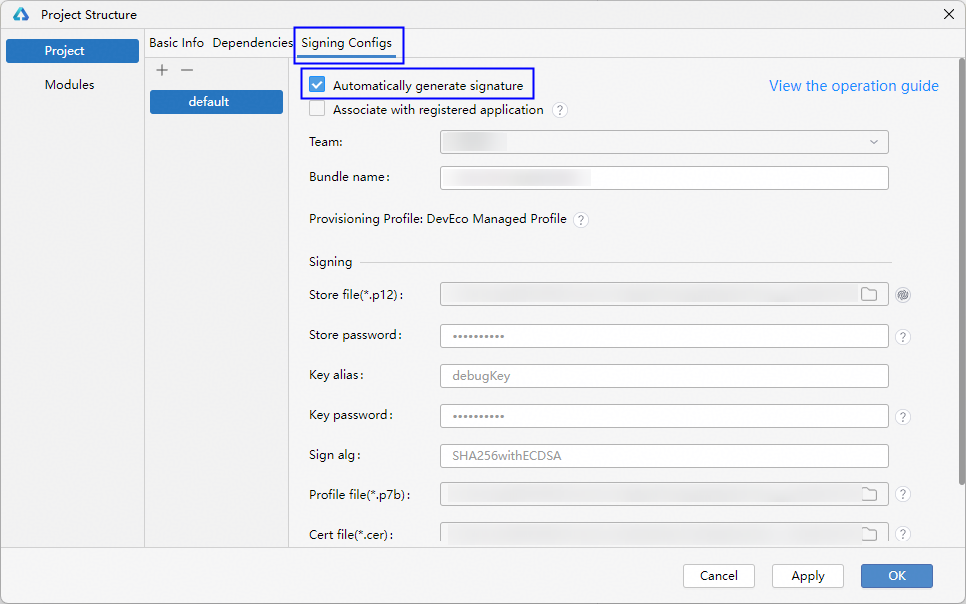
选择DevEco Studio菜单栏中的File > Project Structure,在Signing Configs页面勾选Automatically generate signature。
[h2]编译打包
-
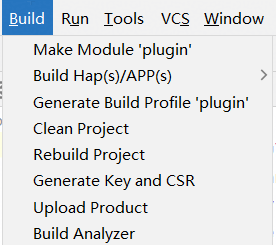
选中工程目录中插件模块的文件目录,通过DevEco Studio菜单栏的Build > Make Module ${libraryName}进行编译构建。
-
编译完成后,会在工程目录中生成对应的产物。

[h2]安装或更新插件
-
将插件包HSP放在宿主应用可访问的目录下,例如/storage/Users/currentUser或者宿主应用自身的沙箱目录。
-
在宿主应用的module.json5配置文件的requestPermissions字段中申请ohos.permission.kernel.SUPPORT_LOCAL_PLUGIN权限。
-
参考以下示例代码,在宿主应用中调用installLocalPlugin接口安装插件。
import { pluginBundleManager } from '@kit.AbilityKit';
import { BusinessError } from '@kit.BasicServicesKit';

// ...
let pluginPaths: string[] = ['/storage/Users/currentUser/plugin.hsp'];

pluginBundleManager.installLocalPlugin(pluginPaths)
  .then(() => {
    console.info('installLocalPlugin success');
  }).catch((err: BusinessError) => {
  console.error(`installLocalPlugin errData is errCode:${err.code}  message:${err.message}`);
});
// ...

- 更新插件后,依赖宿主应用重新加载或重启宿主应用生效。
- 如果插件包HSP放置在/storage/Users/currentUser目录下,宿主应用还需要额外申请ohos.permission.READ_WRITE_USER_FILE权限。
[h2]查询插件
在宿主应用中调用getAllLocalPluginInfoForSelf接口查询插件的信息。
import { pluginBundleManager } from '@kit.AbilityKit';
import { BusinessError } from '@kit.BasicServicesKit';

// ...
pluginBundleManager.getAllLocalPluginInfoForSelf().then((data): void => {
  console.info('getAllLocalPluginInfoForSelf plugin data is' + JSON.stringify(data));
}).catch((err: Error): void => {
  const businessErr = err as BusinessError;
  console.error(`getAllLocalPluginInfoForSelf errData is errCode:${businessErr.code}  message:${businessErr.message}`);
});
// ...
[h2]卸载插件
在宿主应用中调用uninstallLocalPlugin接口卸载插件。
import { pluginBundleManager } from '@kit.AbilityKit';
import { BusinessError } from '@kit.BasicServicesKit';

// ...
let pluginBundleName: string = 'com.example.plugin';

pluginBundleManager.uninstallLocalPlugin(pluginBundleName)
  .then(() => {
    console.info('uninstallLocalPlugin success');
  }).catch((err: BusinessError) => {
  console.error(`uninstallLocalPlugin errData is errCode:${err.code}  message:${err.message}`);
});
// ...