
Add HMS API 场景下,需要参考全部章节完成转换工作。
To HMS API场景需下,只需要参考1.1 开发准备、1.2 gradle配置文件、7 地图样式功能setMapStyle()章节。若使用了废弃接口,还需参考6 部分废弃接口替代方案。
使用工具转换完成后,需要同步工程,重新加载依赖,确保新引入的依赖下载完成。
开发者若需要应用支持HMS Map Kit,必须先完成开发准备中的以下步骤。
1. AppGallery Connect配置
2. 集成HMS SDK
3. 配置混淆脚本
4. 权限申请
开发者若需要应用支持Map.getMylocaiton()、Map.setOnMyLocationChangeListener()等已不推荐使用方法。可以使用Location kit对应方法替代,请参考Location的API文档以及6 部分废弃接口替代方案的示例代码。
在Add HMS API场景或者To HMS API的场景中,module中的gradle文件里的defaultConfig{}配置,需要确保minSdkVerison的版本大于等于 19,targetSdkVerison 29,compileSdkVersion 29,buildTooslVerison '29.0.2'。
- compileSdkVersion 29
- buildToolsVersion '29.0.2'
- defaultConfig {
- minSdkVersion 19
- targetSdkVersion 29
- }
module中gradle文件引入androidx.appcompat:appcompat依赖。
- implementation 'androidx.appcompat:appcompat:1.1.0'
- implementation 'androidx.recyclerview:recyclerview:1.1.0'
确保初始实例化SupportMapFragment的Activity继承的AppCompatActivity为adnroidx.appcompat:appcompat包中的。
- public class CameraDemoActivity extends androidx.appcompat.app.AppCompatActivity
Add HMS API场景中,module中gradle文件引入的google的base和basement插件的版本需大于等于17.1.0。
- implementation 'com.google.android.gms:play-services-base:17.1.0'
- implementation 'com.google.android.gms:play-services-basement:17.1.0'
增加JDK 1.8显示依赖。
- compileOptions {sourceCompatibility = 1.8 targetCompatibility = 1.8}
工具转化完成后,某些使用 switch-case选择语句会出现case expressions must be constant expression,switch中case必须为常量异常。此类方法需要转化成if-else形式,以此方式解决switch异常问题。
原代码示例:
- switch (reason) {
- case OnCameraMoveStartedListener.REASON_GESTURE:
- currPolylineOptions.color(Color.BLUE);
- reasonText = "GESTURE";
- break;
- case OnCameraMoveStartedListener.REASON_API_ANIMATION:
- currPolylineOptions.color(Color.RED);
- reasonText = "API_ANIMATION";
- break;
- case OnCameraMoveStartedListener.REASON_DEVELOPER_ANIMATION:
- currPolylineOptions.color(Color.GREEN);
- reasonText = "DEVELOPER_ANIMATION";
- break;
- }
修改代码示例:
- if (OnCameraMoveStartedListener.getREASON_GESTURE() == reason) {
- this.currPolylineOptions.color(Color.BLUE);
- reasonText = "GESTURE";
- } else if (OnCameraMoveStartedListener.getREASON_API_ANIMATION() == reason) {
- this.currPolylineOptions.color(Color.RED);
- reasonText = "API_ANIMATION";
- } else if (OnCameraMoveStartedListener.getREASON_DEVELOPER_ANIMATION() == reason) {
- this.currPolylineOptions.color(Color.GREEN);
- reasonText = "DEVELOPER_ANIMATION";
- } else {
- reasonText = "UNKNOWN_REASON";
- }
工具Add HMS API转换完成后,对于使用fragment展示的activity,我们提供配置classloader(简单,仅需导入资源和修改配置文件)和手写代码(复杂,手工转换工作量大)两种手工转换方式来实现兼容Google API和HMS。
目前classloader方式暂时不支持“Generate code for creating app dependent only on GMS SDK”模式下的Add HMS API转换,在使用工具转换时请不要勾选。
1. 解压压缩包并剪切资源文件。
a. 解压项目级目录下的xmsadapter/src/main/java文件夹下fragment-support.zip压缩包。
b. 将其中scripts、src、xh、xg四个文件夹移动到xmsadapter文件夹下。
2. 修改工程相关配置文件。
a. 在项目级目录下的settings.gradle文件里,添加如下引用。
- include ':xmsadapter:xh', ':xmsadapter:xg'
b. 在项目级目录下的build.gradle文件dependencies{}区块中,配置gradle插件版本为3.5.0以上。
- buildscript {
- dependencies {
- classpath 'com.android.tools.build:gradle:3.5.0'
- }
- }
c. 在项目级目录下的gradle/wrapper/gradle-wrapper.properties文件里,配置gradle版本为5.4.1以上。
- distributionUrl=https\://services.gradle.org/distributions/gradle-5.4.1-all.zip
d. 在app应用级目录下的build.gradle文件里,配置minSdkVersion为24以上,并在dependencies{}区块中添加如下依赖。
- android {
- defaultConfig {
- minSdkVersion 24
- }
- }
- dependencies {
- compileOnly project(':xmsadapter:xh')
- compileOnly project(':xmsadapter:xg')
- }
e. 在项目级目录下的xmsadapter/build.gradle文件里,添加如下引用。
- apply from: 'scripts/copy-dex.gradle'
3. 修改Fragment相关包名。
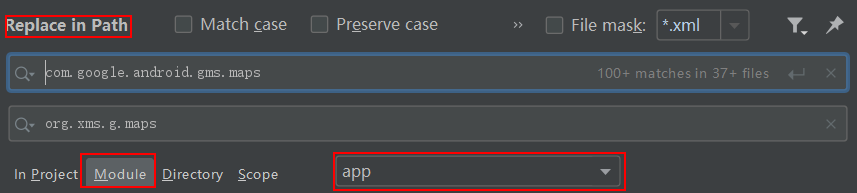
在Android Studio中选择Edit->Find->Replace in Path,选择Module过滤器和主应用(app)过滤器(如下图中红框所示),将com.google.android.gms.maps替换成org.xms.g.maps,然后点击Replace All。
4. 在程序入口处调用init方法初始化。
a. 在app主应用中实现一个程序入口类继承android.app.Application,并覆写其中onCreate方法。
- public class MyApp extends Application {
- @Override
- public void onCreate() {
- super.onCreate();
- GlobalEnvSetting.init(this,null);
- XMS.init(this);
- }
- }
b. 修改app应用级目录下的src/main/AndroidManifest.xml中应用包名属性application name,添加第一条中新增的application子类。
- <application
- android:name=".MyApp"
- </application>
5.配置打包Release版本应用的混淆规则。
a.如果您的应用打包Release版本时开启了proguard混淆优化参数,请检查app应用级目录下build.gradle文件中若有以下内容,表示已开启proguard混淆优化参数,则需要执行步骤b,否则无需执行。
- android {
- buildTypes {
- release {
- minifyEnabled true
- proguardFiles getDefaultProguardFile('proguard-android-optimize.txt'), 'proguard-rules.pro'
- }
- }
- }
b.为了避免被proguard错误地混淆或移除掉fragment相关代码,请在app应用级目录下的proguard-rules.pro文件中配置如下混淆过滤规则:
- -keep class * extends androidx.fragment.app.Fragment{*;}
- -keep class org.xms.g.maps.ExtensionMapOptions{*;}
- -keep class com.huawei.hms.maps.HuaweiMapOptions{*;}
- -keep class com.google.android.gms.maps.GoogleMapOptions{*;}
- -keep interface org.xms.g.maps.OnMapReadyCallback{*;}
- -keep interface com.huawei.hms.maps.OnMapReadyCallback{*;}
- -keep interface com.google.android.gms.maps.OnMapReadyCallback{*;}
- -keep class org.xms.g.maps.StreetViewPanoramaOptions{*;}
- -keep class com.google.android.gms.maps.OnStreetViewPanoramaReadyCallback{*;}
- -keep class com.huawei.hms.maps.OnStreetViewPanoramaReadyCallback{*;}
- -keep interface org.xms.g.maps.OnStreetViewPanoramaReadyCallback{*;}
- -keep interface com.google.android.gms.maps.OnStreetViewPanoramaReadyCallback{*;}
- -keep interface com.huawei.hms.maps.OnStreetViewPanoramaReadyCallback{*;}
- -keep class com.huawei.hms.dynamicloader.** { *; }
- -keep class com.huawei.hms.feature.dynamic.** {*;}
- -keep class com.huawei.hms.feature.** { *;}
6.异常规避。
目前不建议重复扫描。
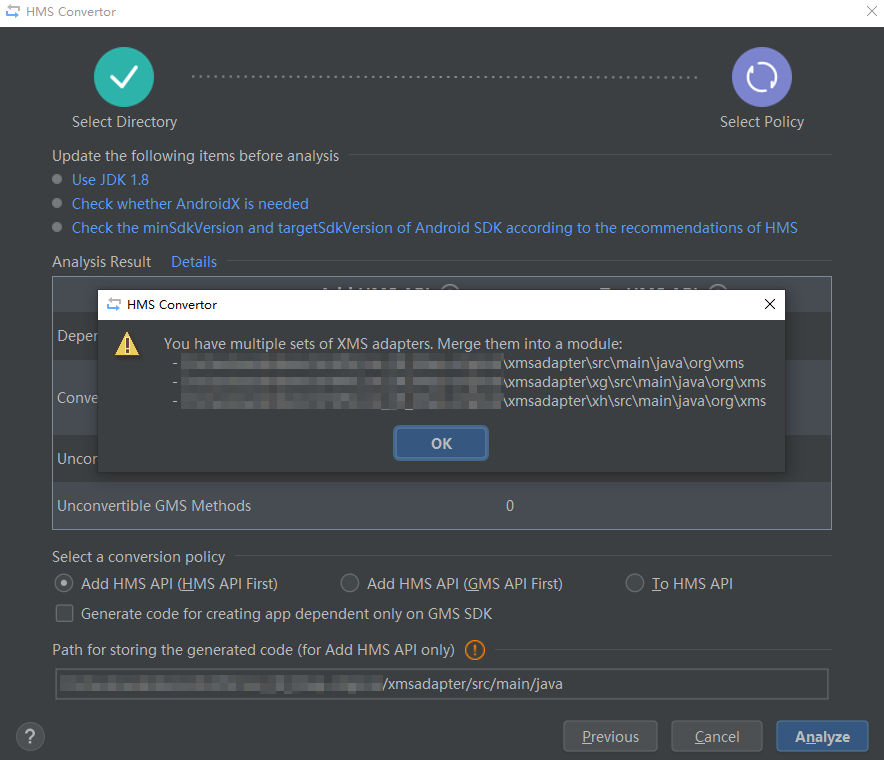
如果重新扫描分析工程中出现如下Merge提示信息,请先备份并移除xmsadapter文件夹下的xh和xg文件夹,待扫描分析完成以后,再将备份恢复至xmsadapter目录下。
1. 修改layout资源文件。
Add HMS API场景下,Google API和HMS需要使用独立的layout资源文件,在各自的资源文件中<fragment/>class路径不同。
HMS layout资源文件中Fragment定义参考:
- <fragment
- android:id="@+id/map"
- android:layout_width="match_parent"
- android:layout_height="match_parent"
- class="com.huawei.hms.maps.SupportMapFragment" />
Google API layout资源文件中Fragment定义参考:
- <fragment
- android:id="@+id/map"
- android:layout_width="match_parent"
- android:layout_height="match_parent"
- class="com.google.android.gms.maps.SupportMapFragment" />
资源文件参考:
basic_demo:原始layout资源文件。
basic_demo_hms:HMS的layout资源文件。

layout资源文件都需要一式两份,HMS和Google API各一份,配合代码兼容跳转使用。
2. 修改代码。
如果使用到了Fragment,可以在activity的onCreate()方法中通过if-else的方式一份代码同时兼容HMS和Google API。修改方式如下:
原代码示例:
- protected void onCreate(Bundle savedInstanceState) {
- super.onCreate(savedInstanceState);
- setContentView(R.layout.events_demo);
- mTapTextView = (TextView) findViewById(R.id.tap_text);
- mCameraTextView = (TextView) findViewById(R.id.camera_text);
- SupportMapFragment mapFragment =
- (SupportMapFragment) getSupportFragmentManager().findFragmentById(R.id.map);
- mapFragment.getMapAsync(this);
- }
修改后代码示例:
- protected void onCreate(Bundle savedInstanceState) {
- super.onCreate(savedInstanceState);
- //根据当前类型,选择根据G或者H创建
- if (org.xms.g.utils.GlobalEnvSetting.isHms()) {
- createAsH();
- } else {
- createAsG();
- }
- }
- /**
- * HMS 创建流程
- */
- private void createAsH() {
- Log.d(TAG, "create as hms");
- //设置hms资源文件
- setContentView(R.layout.events_demo_hms);
- //初始化参数
- initMember();
- //根据id获取hms的fragment
- com.huawei.hms.maps.SupportMapFragment hMapFragment =
- (com.huawei.hms.maps.SupportMapFragment) this.getSupportFragmentManager().findFragmentById(R.id.map);
- //地图加载
- hMapFragment.getMapAsync(this.getHInstanceOnMapReadyCallback());
- }
- /**
- * GMS 创建流程
- */
- private void createAsG() {
- Log.d(TAG, "create as gms");
- //设置gms资源文件
- setContentView(R.layout.events_demo);
- //初始化参数
- initMember();
- //根据id获取gms的fragment
- com.google.android.gms.maps.SupportMapFragment gMapFragment =
- (com.google.android.gms.maps.SupportMapFragment) this.getSupportFragmentManager()
- .findFragmentById(R.id.map);
- //地图加载
- gMapFragment.getMapAsync(this.getGInstanceOnMapReadyCallback());
- }
- /**
- * 成员变量初始化,抽离成单独方法
- */
- private void initMember() {
- this.mTapTextView = (TextView) findViewById(R.id.tap_text);
- this.mCameraTextView = (TextView) findViewById(R.id.camera_text);
- }
根据当前环境变量中isHms标识,选择Google API或者HMS加载地图资源,方法含义如下:
void initMember() :私有成员变量及可共用代码初始化位置。
void createAsG() :Google API创建流程。
void createAsH() :HMS创建流程。
工具完成转换后,如果在常量引用上有异常,可参考下方列表。googleMap中对常量采用直接使用的方式,但在Add HMS API场景下,常量使用Getter的方式来使用。如:
BitmapDescriptorFactory.HUE_ORANGE ,新的方式采用BitmapDescriptorFactory.getHUE_ORANGE(),Getter的方式来获取。
googleMap常量获取 | AddHMS API常量获取 |
import static com.google.android.gms.maps.GoogleMap.MAP_TYPE_HYBRID;(引用后直接使用) | ExtensionMap.getMAP_TYPE_NORMAL() |
BitmapDescriptorFactory.HUE_ORANGE | BitmapDescriptorFactory.getHUE_ORANGE(); |
HuaweiMap.OnCameraMoveStartedListener.REASON_API_ANIMATION | HuaweiMap.OnCameraMoveStartedListener.getREASON_API_ANIMATION() |
googleMap常量获取 | To HMS API常量获取 |
import static com.google.android.gms.maps.GoogleMap.MAP_TYPE_HYBRID;(引用后直接使用) | import static com.huawei.hms.maps.HuaweiMap.MAP_TYPE_HYBRID;(引用后直接使用) |
Marker等部分demo实现了OnMapAndViewReadyListener.OnGlobalLayoutAndMapReadyListener接口。其使用的Fragment支持Add HMS API场景的转换,在OnMapAndViewReadyListener类中进行,修改参考如下。
构造函数修改。构造函数中mapFragment的参数类型要从SupportMapFragment类型转换成父类Fragment。
- public OnMapAndViewReadyListener(
- Fragment mapFragment, OnGlobalLayoutAndMapReadyListener devCallback) {}
OnMapAndViewReadyListener兼容Google API和HMS示例代码如下:
- public class OnMapAndViewReadyListener implements OnGlobalLayoutListener, OnMapReadyCallback {
- /**
- * A listener that needs to wait for both the GoogleMap and the View to be initialized.
- */
- public interface OnGlobalLayoutAndMapReadyListener {
- void onMapReady(ExtensionMap googleMap);
- }
- private final View mapView;
- private final OnGlobalLayoutAndMapReadyListener devCallback;
- private boolean isViewReady;
- private boolean isMapReady;
- private ExtensionMap googleMap;
- public OnMapAndViewReadyListener(
- Fragment mapFragment, OnGlobalLayoutAndMapReadyListener devCallback) {
- //hms处理
- if (org.xms.g.utils.GlobalEnvSetting.isHms()) {
- com.huawei.hms.maps.SupportMapFragment hMapFragment = (com.huawei.hms.maps.SupportMapFragment) mapFragment;
- mapView = mapFragment.getView();
- this.devCallback = devCallback;
- registerListeners();
- // GoogleMap. Note if the GoogleMap is already ready it will still fire the callback later.
- hMapFragment.getMapAsync(this.getHInstanceOnMapReadyCallback());
- } else {
- //gms 处理
- com.google.android.gms.maps.SupportMapFragment gMapFragment = (com.google.android.gms.maps.SupportMapFragment) mapFragment;
- mapView = mapFragment.getView();
- this.devCallback = devCallback;
- registerListeners();
- // GoogleMap. Note if the GoogleMap is already ready it will still fire the callback later.
- gMapFragment.getMapAsync(this.getGInstanceOnMapReadyCallback());
- }
- }
- private void registerListeners() {
- isViewReady = false;
- isMapReady = false;
- googleMap = null;
- // View layout.
- if ((mapView.getWidth() != 0) && (mapView.getHeight() != 0)) {
- // View has already completed layout.
- isViewReady = true;
- } else {
- // Map has not undergone layout, register a View observer.
- mapView.getViewTreeObserver().addOnGlobalLayoutListener(this);
- }
- }
- @Override
- public void onMapReady(ExtensionMap googleMap) {
- // NOTE: The GoogleMap API specifies the listener is removed just prior to invocation.
- this.googleMap = googleMap;
- isMapReady = true;
- fireCallbackIfReady();
- }
- @SuppressWarnings("deprecation") // We use the new method when supported
- @SuppressLint("NewApi") // We check which build version we are using.
- @Override
- public void onGlobalLayout() {
- // Remove our listener.
- if (Build.VERSION.SDK_INT < Build.VERSION_CODES.JELLY_BEAN) {
- mapView.getViewTreeObserver().removeGlobalOnLayoutListener(this);
- } else {
- mapView.getViewTreeObserver().removeOnGlobalLayoutListener(this);
- }
- isViewReady = true;
- fireCallbackIfReady();
- }
- private void fireCallbackIfReady() {
- if (isViewReady && isMapReady) {
- devCallback.onMapReady(googleMap);
- }
- }
- }
Add HMS API场景下,activity调用OnMapAndViewReadyListener的onCreate()修改示例如下:
- @Override
- protected void onCreate(Bundle savedInstanceState) {
- super.onCreate(savedInstanceState);
- if (org.xms.g.utils.GlobalEnvSetting.isHms()) {
- createAsH();
- } else {
- createAsG();
- }
- }
- private void createAsH() {
- Log.d(TAG, "create as hms");
- setContentView(R.layout.marker_demo_hms);
- initMember();
- com.huawei.hms.maps.SupportMapFragment hMapFragment = (com.huawei.hms.maps.SupportMapFragment) getSupportFragmentManager().findFragmentById(R.id.map);
- new OnMapAndViewReadyListener(hMapFragment, this);
- }
- private void createAsG() {
- Log.d(TAG, "create as gms");
- setContentView(R.layout.marker_demo);
- initMember();
- com.google.android.gms.maps.SupportMapFragment hMapFragment = (com.google.android.gms.maps.SupportMapFragment) getSupportFragmentManager().findFragmentById(R.id.map);
- new OnMapAndViewReadyListener(hMapFragment, this);
- }
- private void initMember() {
- this.mTopText = (TextView) findViewById(R.id.top_text);
- this.mRotationBar = (SeekBar) findViewById(R.id.rotationSeekBar);
- this.mRotationBar.setMax(360);
- this.mRotationBar.setOnSeekBarChangeListener(this);
- this.mFlatBox = (CheckBox) findViewById(R.id.flat);
- this.mOptions = (RadioGroup) findViewById(R.id.custom_info_window_options);
- this.mOptions.setOnCheckedChangeListener(new OnCheckedChangeListener() {
- @Override
- public void onCheckedChanged(RadioGroup group, int checkedId) {
- if (MarkerDemoActivity.this.mLastSelectedMarker != null && MarkerDemoActivity.this.mLastSelectedMarker.isInfoWindowShown()) {
- // Refresh the info window when the info window's content has changed.
- MarkerDemoActivity.this.mLastSelectedMarker.showInfoWindow();
- }
- }
- });
- }
Add HMS API场景下,streeViewPanoramaFragment相对8.2 fragment的fragment在调用方式上略微有些不同,但基本思想都是根据系统类型做if-else处理。具体参考如下。
activity中onCreate修改示例
原始代码:
- protected void onCreate(final Bundle savedInstanceState) {
- super.onCreate(savedInstanceState);
- setContentView(R.layout.street_view_panorama_basic_demo);
- SupportStreetViewPanoramaFragment streetViewPanoramaFragment =
- (SupportStreetViewPanoramaFragment)
- getSupportFragmentManager().findFragmentById(R.id.streetviewpanorama);
- streetViewPanoramaFragment.getStreetViewPanoramaAsync(
- new OnStreetViewPanoramaReadyCallback() {
- @Override
- public void onStreetViewPanoramaReady(StreetViewPanorama panorama) {
- // Only set the panorama to SYDNEY on startup (when no panoramas have been
- // loaded which is when the savedInstanceState is null).
- if (savedInstanceState == null) {
- panorama.setPosition(SYDNEY);
- }
- }
- });
- }
修改后代码参考:
- @Override
- protected void onCreate(final Bundle savedInstanceState) {
- super.onCreate(savedInstanceState);
- if (org.xms.g.utils.GlobalEnvSetting.isHms()) {
- createAsH(savedInstanceState);
- } else {
- createAsG(savedInstanceState);
- }
- }
- private void createAsH(final Bundle savedInstanceState) {
- Log.d(TAG, "create as hms");
- setContentView(R.layout.street_view_panorama_basic_demo_hms);
- initMember();
- com.huawei.hms.maps.SupportStreetViewPanoramaFragment hStreetViewPanoramaFragment =
- (com.huawei.hms.maps.SupportStreetViewPanoramaFragment) getSupportFragmentManager().findFragmentById(R.id.streetviewpanorama);
- hStreetViewPanoramaFragment.getStreetViewPanoramaAsync(panorama -> {
- // Only set the panorama to SYDNEY on startup (when no panoramas have been
- // loaded which is when the savedInstanceState is null).
- // HMS 转成org.xms
- org.xms.g.maps.StreetViewPanorama xmsStreetViewPanorama =
- new org.xms.g.maps.StreetViewPanorama(null, panorama);
- if (savedInstanceState == null) {
- xmsStreetViewPanorama.setPosition(SYDNEY);
- }
- });
- }
- private void createAsG(final Bundle savedInstanceState) {
- Log.d(TAG, "create as gms");
- setContentView(R.layout.street_view_panorama_basic_demo);
- initMember();
- com.google.android.gms.maps.SupportStreetViewPanoramaFragment gStreetViewPanoramaFragment =
- (com.google.android.gms.maps.SupportStreetViewPanoramaFragment) getSupportFragmentManager().findFragmentById(R.id.streetviewpanorama);
- gStreetViewPanoramaFragment.getStreetViewPanoramaAsync(panorama -> {
- // Only set the panorama to SYDNEY on startup (when no panoramas have been
- // loaded which is when the savedInstanceState is null).
- // HMS 转成org.xms
- org.xms.g.maps.StreetViewPanorama xmsStreetViewPanorama =
- new org.xms.g.maps.StreetViewPanorama(panorama, null);
- if (savedInstanceState == null) {
- xmsStreetViewPanorama.setPosition(SYDNEY);
- }
- });
- }
- private void initMember() {
- }
streeViewPanoramaFragment的调用可以参考示例修改做业务的对应调整。
如果To HMS API场景使用Loaction kit的接口,需要增加Location依赖。版本号“${version”请参考Location kit的版本更新说明。
- implementation 'com.huawei.hms:location:${version}'
如果使用Location功能,需要确保当前已获得位置权限。
获取位置权限示例代码:
- /**
- * only have permission of location,location function is enable
- **/
- if(enableMyLocation()){
- getMyLocation();
- setOnMyLocationChangeListener();
- }
- /**
- * Request code for location permission request.
- *
- * @see #onRequestPermissionsResult(int, String[], int[])
- */
- private static final int LOCATION_PERMISSION_REQUEST_CODE = 1;
- /**
- * Enables the My Location layer if the fine location permission has been granted.
- */
- private boolean enableMyLocation() {
- if (ContextCompat.checkSelfPermission(this,
- Manifest.permission.ACCESS_FINE_LOCATION) != PackageManager.PERMISSION_GRANTED) {
- // Permission to access the location is missing.
- PermissionUtils.requestPermission(this, LOCATION_PERMISSION_REQUEST_CODE,
- Manifest.permission.ACCESS_FINE_LOCATION, true);
- return false;
- }else {
- return true;
- }
- }
此接口可以使用Location kit中的FusedLocationProviderClient.getLastLocation()方法替代。关于此接口的详细功能描述,可以参考Location kit的API参考中getLastLocation()方法。
示例代码:
To HMS API示例代码:
- // Current position.
- private android.location.Location myLocation;
- /**
- * this is an Example:
- * using location kit getLastLocation ,replace HuaweiMap.getMylocation() function
- */
- private void getMyLocation(){
- com.huawei.hmf.tasks.Task<android.location.Location> locationTask = LocationServices
- .getFusedLocationProviderClient(this).getLastLocation();
- locationTask.addOnCompleteListener(param0 -> {
- if (locationTask != null) {
- myLocation = locationTask.getResult();
- double Lat = myLocation.getLatitude();
- double Lng = myLocation.getLongitude();
- Log.d(TAG, " Lat is : " + Lat +", Lng is : "+Lng);
- }
- }).addOnFailureListener(param0 -> Log.d(TAG,"lastLocation is error"));
- }
Add HMS API示例代码:
- //current location
- private android.location.Location myLocation;
- /**
- * this is an Example:
- * using location kit getLastLocation ,replace HuaweiMap.getMylocation() function
- */
- private void getMyLocation(){
- org.xms.g.tasks.Task<android.location.Location> locationTask = LocationServices
- .getFusedLocationProviderClient(this).getLastLocation();
- locationTask.addOnCompleteListener(param0 -> {
- if (locationTask != null) {
- myLocation = locationTask.getResult();
- double Lat = myLocation.getLatitude();
- double Lng = myLocation.getLongitude();
- Log.d(TAG, " Lat is : " + Lat +", Lng is : "+Lng);
- }
- }).addOnFailureListener(param0 -> Log.d(TAG,"lastLocation is error"));
- }
此接口可以使用Location kit中的FusedLocationProviderClient.requestLocationUpdates(LocationRequest request,LocationCallback callback,Looper looper)方法替代。接口描述可以参考FusedLocationProviderClient。
To HMS API示例代码:
- /**
- * this is an Example
- * using location kit requestLocationUpdates(Request,LocationCallback,Looper) ,replace HuaweiMap.setOnMyLocationChangeListener()
- */
- private void setOnMyLocationChangeListener(){
- // When you construct request parameters, please refer to the development guide of the Location Kit.
- com.huawei.hms.location.LocationRequest request = new com.huawei.hms.location.LocationRequest();
- request.setInterval(2000);
- LocationServices
- .getFusedLocationProviderClient(this).requestLocationUpdates(request, new LocationCallback() {
- @Override
- public void onLocationResult( com.huawei.hms.location.LocationResult locationResult) {
- if (locationResult != null) {
- List<Location> locations = locationResult.getLocations();
- if (!locations.isEmpty()) {
- for (Location location : locations) {
- Log.i(TAG,
- "onLocationResult location[Longitude,Latitude,Accuracy]:"
- + location.getLongitude() + "," + location.getLatitude() + ","
- + location.getAccuracy());
- }
- }
- }
- }
- @Override
- public void onLocationAvailability(LocationAvailability locationAvailability) {
- if (locationAvailability != null) {
- boolean flag = locationAvailability.isLocationAvailable();
- Log.i(TAG, "onLocationAvailability isLocationAvailable:" + flag);
- }
- }
- }, android.os.Looper.myLooper()).addOnSuccessListener(new OnSuccessListener<Void>() {
- @Override
- public void onSuccess(Void param0) {
- Log.d(TAG,"onSuccess.....");
- }
- });
- }
Add HMS API示例代码:
- /**
- * this is an Example
- * using location kit requestLocationUpdates(Request,LocationCallback,Looper) ,replace HuaweiMap.setOnMyLocationChangeListener()
- */
- private void setOnMyLocationChangeListener(){
- //Construct request param,you can read location kit developer guide for details
- org.xms.g.location.LocationRequest request = new org.xms.g.location.LocationRequest();
- request.setInterval(2000);
- LocationServices
- .getFusedLocationProviderClient(this).requestLocationUpdates(request, new LocationCallback() {
- @Override
- public void onLocationResult( org.xms.g.location.LocationResult locationResult) {
- if (locationResult != null) {
- List<Location> locations = locationResult.getLocations();
- if (!locations.isEmpty()) {
- for (Location location : locations) {
- Log.i(TAG,
- "onLocationResult location[Longitude,Latitude,Accuracy]:"
- + location.getLongitude() + "," + location.getLatitude() + ","
- + location.getAccuracy());
- }
- }
- }
- }
- @Override
- public void onLocationAvailability(LocationAvailability locationAvailability) {
- if (locationAvailability != null) {
- boolean flag = locationAvailability.isLocationAvailable();
- Log.i(TAG, "onLocationAvailability isLocationAvailable:" + flag);
- }
- }
- }, android.os.Looper.myLooper()).addOnSuccessListener(new OnSuccessListener<Void>() {
- @Override
- public void onSuccess(Void param0) {
- Log.d(TAG,"onSuccess.....");
- }
- });
- }
此方法可以使用setOnCameraMoveStartedListener、setOnCameraMoveListener、setOnCameraIdleListener方法替代,实现moveCamera事件的监听。
示例代码:
- /**
- * this is an Example
- * using setOnCameraMoveStartedListener、setOnCameraMoveListener、setOnCameraIdleListener to
- * replace to HuaweiMap.setOnCameraChangeListener.
- */
- private void setOnCameraChangeListener() {
- Log.d(TAG, " start addMoveListener...");
- this.mMap.setOnCameraMoveStartedListener(i -> Log.d(TAG," start camera move..."));
- this.mMap.setOnCameraMoveListener(() -> Log.d(TAG," camera moving..."));
- this.mMap.setOnCameraIdleListener(() -> {
- Log.d(TAG," idle camera move... ");
- });
- }
地图样式设置(包括retro、night、grayscale、simple样式 )需要加载json资源文件,huaweiMap与googleMap使用的json文件格式上有差异,导致不能共用一份json资源文件。需要在业务代码层面做兼容适配。HuaweiMap 地图样式json文件下载链接。
To HMS API场景下的修改步骤:
1. 下载huawei json文件。
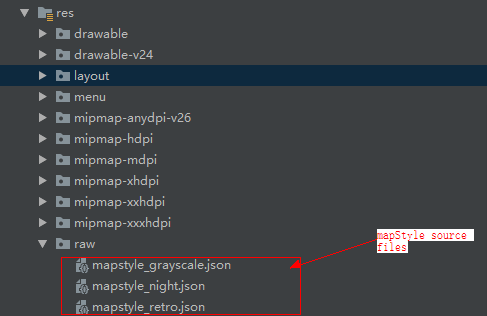
2. 在项目中res/raw目录下(即地图样式json资源文件目录,各项目可能有所不同),替换同名资源文件内容,替换文件如下图所示。
Add HMS API场景下的修改步骤:
1. 下载huawei json文件。
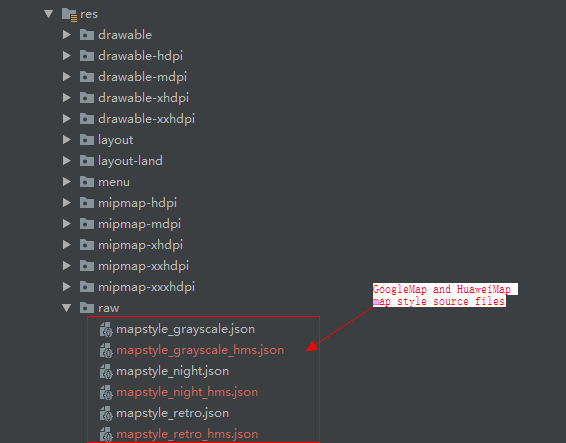
2. 在项目中res/raw目录下(即地图样式json资源文件目录,各项目可能有所不同),新增mapstyle_grayscale_hms.json、mapstyle_night_hms.json、mapstyle_retro_hms.json作为HuaweiMap地图样式资源文件,与googleMap地图样式资源文件并存,新增后文件如下图所示。
3. 修改后Add HMS API兼容示例代码如下。根据系统设置加载不同的json资源文件。
- private void setSelectedStyle() {
- MapStyleOptions style;
- switch (this.mSelectedStyleId) {
- case R.string.style_label_retro:
- // Sets the retro style via raw resource JSON.
- if(GlobalEnvSetting.isHms()){
- style = MapStyleOptions.loadRawResourceStyle(this, R.raw.mapstyle_retro_hms);
- }else{
- style = MapStyleOptions.loadRawResourceStyle(this, R.raw.mapstyle_retro);
- }
- break;
- case R.string.style_label_night:
- // Sets the night style via raw resource JSON.
- if(GlobalEnvSetting.isHms()){
- style = MapStyleOptions.loadRawResourceStyle(this, R.raw.mapstyle_night_hms);
- }else{
- style = MapStyleOptions.loadRawResourceStyle(this, R.raw.mapstyle_night);
- }
- break;
- case R.string.style_label_grayscale:
- // Sets the grayscale style via raw resource JSON.
- if(GlobalEnvSetting.isHms()){
- style = MapStyleOptions.loadRawResourceStyle(this, R.raw.mapstyle_grayscale_hms);
- }else{
- style = MapStyleOptions.loadRawResourceStyle(this, R.raw.mapstyle_grayscale);
- }
- break;
- case R.string.style_label_no_pois_no_transit:
- // Sets the no POIs or transit style via JSON string.
- style = new MapStyleOptions("[" + " {" + " \"featureType\":\"poi.business\","
- + " \"elementType\":\"all\"," + " \"stylers\":[" + " {"
- + " \"visibility\":\"off\"" + " }" + " ]" + " }," + " {"
- + " \"featureType\":\"transit\"," + " \"elementType\":\"all\"," + " \"stylers\":["
- + " {" + " \"visibility\":\"off\"" + " }" + " ]" + " }" + "]");
- break;
- case R.string.style_label_default:
- // Removes previously set style, by setting it to null.
- style = null;
- break;
- default:
- return;
- }
- this.mMap.setMapStyle(style);
- }