












 small
#HarmonyOS技术训练营第四期#Ark UI 开发的汇率转换应用
一、项目简介
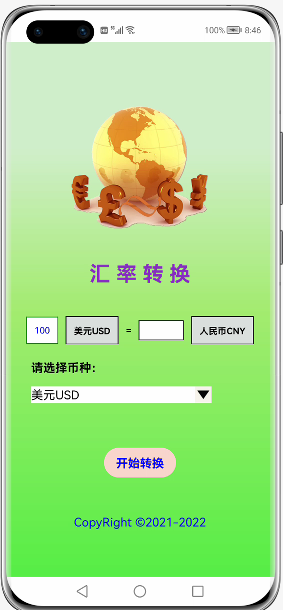
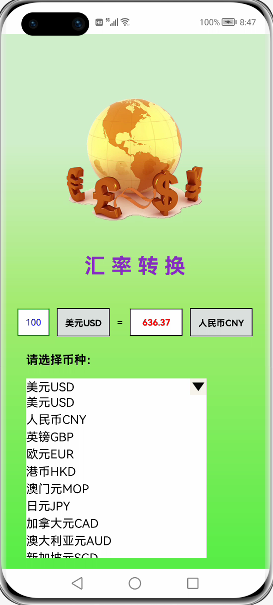
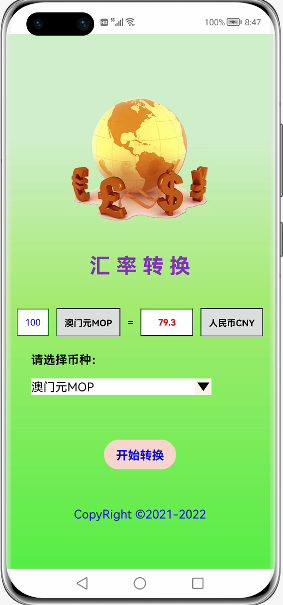
应用通过访问网络上公用接口(https://api.it120.cc/gooking/forex/rate?fromCode=CNY&toCode=目标货币),自动计算出100目标货币等于多少人民币,界面设计主要用到Image、Text、Button基本组件,Column、Row、Stack、List、ListItem容器组件,其中包括运用@Builder自定义的组件来显示下拉列表框。通过公用接口返回的JSON数据通过匹配定义的数据模型moneyModels解析得到要显示的结果。
二、项目结构
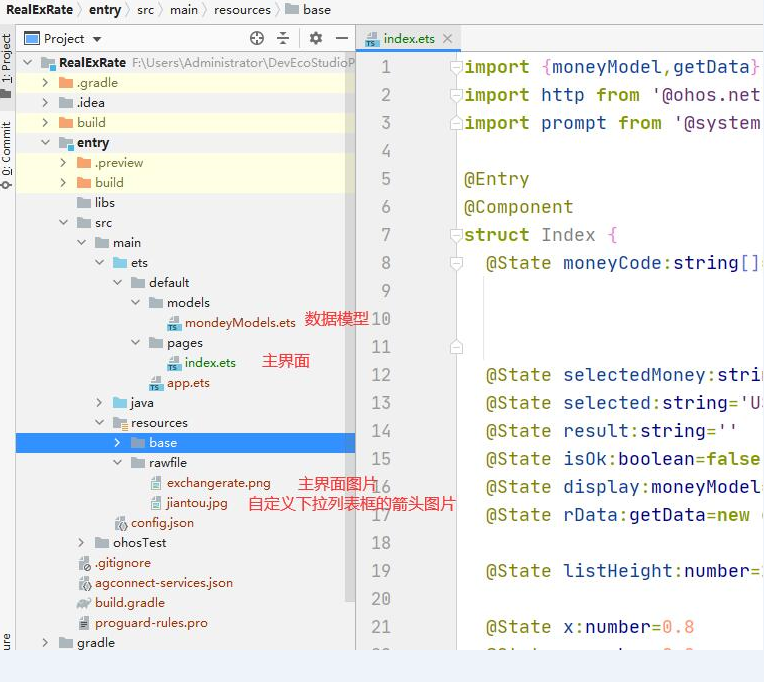
项目结构较为简单,主要包括主界面、数据模型和图片资源,如下图:
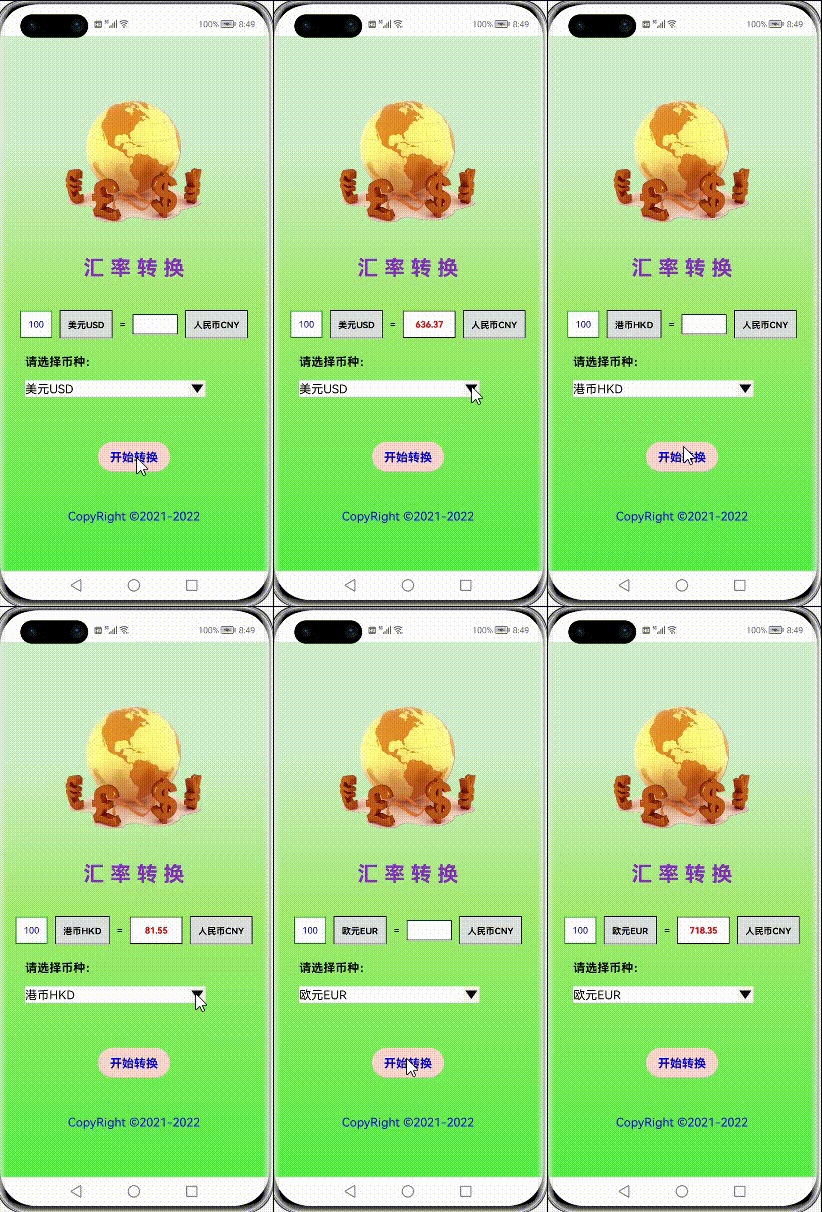
三、项目运行效果图
四、项目源码
1.moneyModels.ets //数据模型
export class moneyModel{
  code:number   //返回结果,code=0,成功
  data:getData  //返回结果数据集
  msg:string    //返回结果信息显示success
}

export class getData{
  rate:number           //汇率
  toCode:number         //100该货币对应的人民币数据
  fromCode:number       //转换基数100
}
2.index.ets //主界面文件
import {moneyModel,getData} from '../models/mondeyModels.ets'
import http from '@ohos.net.http'
import prompt from '@system.prompt';

@Entry
@Component
struct Index {
  @State moneyCode:string[]=['...','美元USD', '人民币CNY','英镑GBP','欧元EUR','港币HKD',
                             '澳门元MOP','日元JPY','加拿大元CAD', '澳大利亚元AUD','新加坡元SGD',
                             '韩元KRW','菲律宾比索PHP','泰国铢THB','瑞士法郎CHF','新西兰元NZD',
                             '丹麦克朗DKK','挪威克朗NOK','瑞典克朗SEK','卢布RUB','林吉特MYR','南非兰特ZAR']
  @State selectedMoney:string='美元USD'   //选择货币名称+代码
  @State selected:string='USD'            //选择货币代码
  @State result:string=''                 //显示结果
  @State isOk:boolean=false
  @State display:moneyModel=new moneyModel()
  @State rData:getData=new getData()

  @State listHeight:number=22           //初始化复合列表框高度

  @State x:number=0.8
  @State y:number=0.8
  @State op:number=1

  @State selectIndex:number=1

  //自定义组件,通过List、Text、Image组件模拟复合列表框功能
  @Builder ComboxList(){
    Row() {
      Stack({ alignContent: Alignment.TopEnd }) {           //Stack容器组件,子组件按照TopEnd对齐,按照由上到下的顺序,后入的组件显示在前一个组件上面
        List({ space: 2, initialIndex: 0 }) {
          ForEach(this.moneyCode, (item: string) => {       //数据懒加载,循环添加货币名称代码到List表中
            ListItem() {
              Text(item)
                .fontSize(16)
            }
            .onClick(() => {                          //列表子项目被点击,
              this.listHeight = 22                    //已经选择了货币种类,重新设置List高度为22,隐藏其他货币种类选项
              this.selectedMoney = item               //取得用户选择的货币种类名称+代码
              this.selected = this.selectedMoney.substr(this.selectedMoney.length - 3)   //通过String.substr()函数取得货币代码
              this.selectIndex=this.moneyCode.indexOf(item)   //取得用户选择的货币种类在列表框中的索引值,为下面的Text显示提供索引
              this.isOk = false
            })
          }, item => item)
        }
        .width(240)
        .height(this.listHeight)
        .backgroundColor(Color.White)

        Text(this.moneyCode[this.selectIndex])      //根据上面取得的用户选择货币种类的索引值,显示用户选择的货币种类
          .width(240)
          .height(22)
          .fontSize(16)
          .backgroundColor(Color.White)

        Image($rawfile('jiantou.jpg'))        //显示下拉箭头
          .width(22)
          .height(22)
          .objectFit(ImageFit.Fill)
          .onClick(() => {                  //下拉箭头被点击,List高度设置为240,供用户选择货币种类
            this.listHeight = 240
          })
      }
    }
  }

  build() {
   Column(){
      Image($rawfile('exchangerate.png'))     //显示exchangerate.png图片
        .objectFit(ImageFit.Contain)
        .height(240)
        .width(240)
        .opacity(this.op)
        .scale({x:this.x,y:this.y})
        .margin({top:50})

      Text('汇 率 转 换')
        .fontSize(28)
        .fontWeight(FontWeight.Bold)
        .fontColor('#842fbf')
        .margin({top:0,bottom:50})

      Row(){
        Text('100')
          .fontSize(12)
          .fontColor(Color.Blue)
          .fontWeight(FontWeight.Normal)
          .textAlign(TextAlign.Center)
          .border({width:1,color:Color.Green,radius:0,style:BorderStyle.Solid})
          .padding(10)
          .margin(5)
          .backgroundColor(Color.White)

        Text(this.selectedMoney)
          .fontSize(12)
          .fontWeight(FontWeight.Bold)
          .textAlign(TextAlign.Center)
          .borderWidth(1)
          .backgroundColor('#dbe0df')
          .padding(10)
          .margin(5)

        Text('=')
          .fontSize(12)
          .fontWeight(FontWeight.Bold)
          .textAlign(TextAlign.Center)
          .margin(5)

        if (this.isOk){           //判断是否联网获取到结果数据,如isOk=true,显示结果数据,否则结果显示为空
          Text(this.rData.toCode.toString())
            .width(70)
            .fontSize(12)
            .fontWeight(FontWeight.Bold)
            .fontColor(Color.Red)
            .textAlign(TextAlign.Center)
            .borderWidth(1)
            .padding(10)
            .margin(5)
            .backgroundColor(Color.White)
        }
        else{
          Text(this.result)
            .width(60)
            .fontSize(12)
            .fontWeight(FontWeight.Bold)
            .fontColor(Color.Red)
            .textAlign(TextAlign.Center)
            .borderWidth(1)
            .padding(10)
            .margin(5)
            .backgroundColor(Color.White)
        }

        Text('人民币CNY')
          .fontSize(12)
          .fontWeight(FontWeight.Bold)
          .textAlign(TextAlign.Start)
          .padding(10)
          .borderWidth(1)
          .backgroundColor('#dbe0df')
          .margin(5)
      }
      .margin({top:-15})

      Column(){
        Text('请选择币种:')
          .fontSize(16)
          .fontWeight(FontWeight.Bold)
          .textAlign(TextAlign.Start)
      }
      .width('80%')
      .alignItems(HorizontalAlign.Start)
      .margin({bottom:5})

        Column(){
          this.ComboxList()
        }
        .width('80%')
        .alignItems(HorizontalAlign.Start)
        .margin({top:10})

        Row(){
          Button('开始转换',{stateEffect:true,type:ButtonType.Capsule})
            .fontSize(16)
            .fontColor(Color.Blue)
            .fontWeight(FontWeight.Bold)
            .align(Alignment.Center)
            .backgroundColor('#f8d6cc')
            .padding(10)
            .margin({top:30})
            .onClick(()=>{
              this.getRequest()       //调用自定义函数访问公共接口取得数据
            })
            .margin({top:50})
        }

        Text('CopyRight ©2021-2022')
          .fontSize(16)
          .fontColor(Color.Blue)
          .fontWeight(FontWeight.Normal)
          .textAlign(TextAlign.Center)
          .margin({top:40})
    }
    .width('100%')
    .height('100%')
    .linearGradient(            //设置背景线性渐变
      {
        angle:180,
        colors:[['#d1efcb',0.2],['#a4ec70',0.5],['#56ee45',1]]
      }
    )
  }

  //自定义函数,通过访问公共接口取得货币转换数据
  getRequest(){
    let httpRequest=http.createHttp()
    let url:string='https://api.it120.cc/gooking/forex/rate?fromCode=CNY&toCode='+this.selected

    httpRequest.request(url,(err,data)=>{
      if (!err){
        if (data.responseCode==200){
          console.info('============data info=============='+JSON.stringify(data.result))
         var resultData:moneyModel=JSON.parse(JSON.stringify(data.result))
          this.display=resultData
          this.rData=this.display.data
          this.isOk=true
        }
        else{
          prompt.showToast({message:'网络错误',duration:2000})
        }
      }
      else{
        prompt.showToast({message:err.message,duration:2000})
      }
    })
  }
}
Ark用来开发界面确实很简单直观,这个程序也比较简单,而且从公共API接口得到的数据也不准确,程序中还有很多需要改进的地方,希望Ark能尽快完善运用到实际程序开发中。
gitee地址:https://gitee.com/small2021/hongmeng


1


浏览564 发布于2021-12-17 01:34未知归属地
全部评论
最多点赞
最新发布
最早发布

写回答
所见即所得编辑器, editor1
工具栏
0/50000
新增插入模板功能
一键使用模板,快速填写内容,轻松发帖~
知道了
- 为了保障您的信息安全,请勿上传您的敏感个人信息(如您的密码等信息)和您的敏感资产信息(如关键源代码、签名私钥、调试安装包、业务日志等信息),且您需自行承担由此产生的信息泄露等安全风险。
- 如您发布的内容为转载内容,请注明内容来源。
我要发帖子
了解社区公约,与您携手共创和谐专业的开发者社区。


 苏公安网备 32011402010933号