CaaS Engine provides open APIs that are based on the HUAWEI MeeTime service, helping you to incorporate voice and video calling into your apps' social framework (such as contacts and friends) with ease.
In this codelab, you will create a demo project, integrate the CaaS Engine SDK into the demo project, and set up the complete CaaS Engine service process.
In this codelab, you will learn how to:
CaaS Engine integration requires the following preparations:
Configure the repository in the build.gradle file of the project.
buildscript {
    repositories {
        google()
        jcenter()
        maven {url 'http://developer.huawei.com/repo/'}
    }
}
allprojects {
    repositories {
        maven {url 'http://developer.huawei.com/repo/'}
        google()
        jcenter()
    }
}
Add the following dependencies to the build.gradle file in the app directory of the project.
repositories {
    flatDir {
        dirs 'libs'
    }
}
dependencies {
    implementation group: 'com.huawei.caaskit', name: 'caaskitlite', version: '1.0.1.400', ext: 'aar'
}
Click the sync button, as shown in the following figure.
After the synchronization, the following screen is displayed.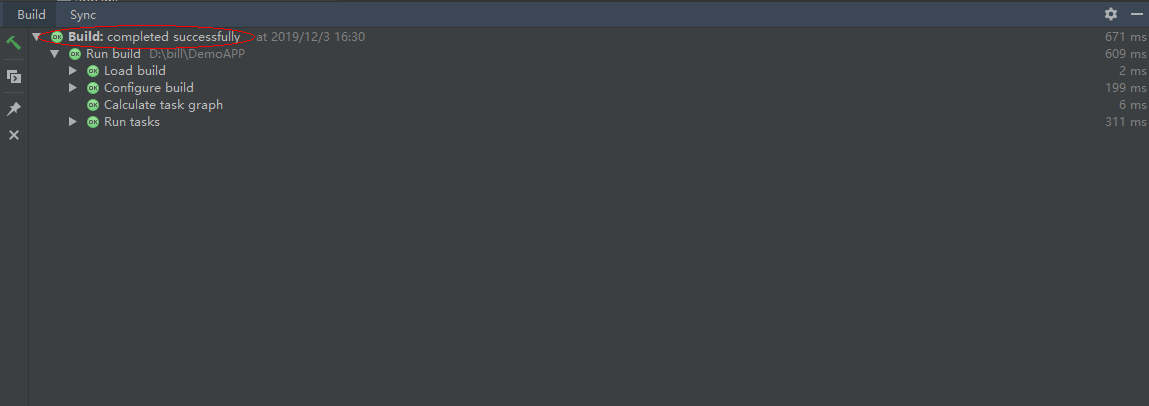
Add the app ID generated when creating the app on HUAWEI Developers to the AndroidManifest.xml file of the app. The name is com.huawei.hms.client.appid, and the value is appid=****, where ****** indicates the ID of your app.** For details about how to apply for the permission, see Configuring App Information in AppGallery Connect.
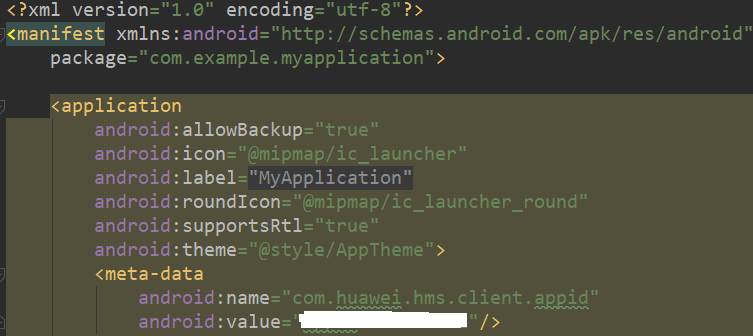
The initialization encapsulation code of the CaaS service is as follows:CaasKitHelper.java
public class CaasKitHelper {
    private static final String TAG = "CaasKitHelper";

    private static CaasKitHelper sCaasKitHelper;

    private HwCaasServiceManager mHwCaasServiceManager;

    private HwCaasHandler mHwCaasHandler;

    private Context mContext;

    private boolean mIsSendShowFail;

    private boolean mIsCaasKitInit;

    private boolean mIsHasCaaSContacts = false;

    private HwCallStateCallBack mCallStateCallBack = new HwCallStateCallBack() {
        @Override
        public void notifyCallState(HwCaasUtils.CallState state) {
            Log.d(TAG, "callState: " + state);
        }
    };

    private HwCaasServiceCallBack mCallBack = new HwCaasServiceCallBack() {
        @Override
        public void initSuccess(HwCaasHandler handler) {
            ...
        }

        @Override
        public void initFail(int retCode) {
            ...
        }

        @Override
        public void releaseSuccess() {
            ...
        }
    };

    private CaasKitHelper() {
        mContext = CaasKitApplication.getContext();
    }

    public synchronized static CaasKitHelper getInstance() {
        if (sCaasKitHelper == null) {
            sCaasKitHelper = new CaasKitHelper();
        }
        return sCaasKitHelper;
    }

    public void caasKitInit() {
        Log.d(TAG, "caasKitInit.");
        if (!mIsCaasKitInit) {
            // initialize mHwCaasServiceManager instance.
            mHwCaasServiceManager = HwCaasServiceManager.init();
            // initialize HwCaasHandler instance through handlerType.
            mHwCaasServiceManager.initHandler(mContext, HwCaasUtils.SCREEN_SHARING_TYPE, mCallBack);
            mIsCaasKitInit = true;
        }
    }
}
Add the following code to where appropriate:CaasKitDemoActivity.java
public class CaasKitDemoActivity extends AppCompatActivity {
    private static final String TAG = "CaaSKitDemoActivity";

    @Override
    protected void onCreate(Bundle savedInstanceState) {
        super.onCreate(savedInstanceState);
        getWindow().setFlags(WindowManager.LayoutParams.FLAG_FULLSCREEN,
                WindowManager.LayoutParams.FLAG_FULLSCREEN);
        setContentView(R.layout.activity_caaskitdemo);
        CaasKitHelper.getInstance().caasKitInit();
    }
}
CaasKitHelper.java
public class CaasKitHelper {
    private static final String TAG = "CaasKitHelper";

    private static final int VIEWHEIGHT = 248;

    private static final int VIEWWIDTH = 256;

    private static final int LOCATION_X = 102;

    private static final int LOCATION_Y = 140;

    private static CaasKitHelper sCaasKitHelper;

    private HwCaasServiceManager mHwCaasServiceManager;

    private HwCaasHandler mHwCaasHandler;

    private Context mContext;

    private boolean mIsSendShowFail;

    private boolean mIsCaasKitInit;

    private boolean mIsHasCaaSContacts = false;

    private HwCallStateCallBack mCallStateCallBack = new HwCallStateCallBack() {
        @Override
        public void notifyCallState(HwCaasUtils.CallState state) {
            Log.d(TAG, "callState: " + state);
        }
    };

    private HwCaasServiceCallBack mCallBack = new HwCaasServiceCallBack() {
        @Override
        public void initSuccess(HwCaasHandler handler) {
            // callback after successful initialization of HwCaasHandler.
            mHwCaasHandler = handler;
            if (mHwCaasHandler != null) {
                // Display the app name of the caller party. This is mandatory, otherwise, the MeeTime entry cannot be displayed.
                mHwCaasHandler.setCallerAppName("Application");
                // Select the style of the contacts view, which can be floating window or full screen style (similar to the system Contacts screen).
                mHwCaasHandler.setContactViewStyle(HwCaasUtils.ContactsViewStyle.FULL_SCREEN);

                // Set the size and initial position of the floating window. If full screen style is selected, skip this step.
//                mHwCaasHandler.setContactViewStyle(HwCaasUtils.ContactsViewStyle.FLOAT_VIEW);
//                mHwCaasHandler.setContactViewSize(VIEWWIDTH, VIEWHEIGHT);
//                mHwCaasHandler.setFloatViewLocation(HwCaasUtils.STARTVIEW,
//                        HwCaasUtils.POINT_RIGHTANDDOWN, LOCATION_X, LOCATION_Y);
//                mHwCaasHandler.setFloatViewLocation(HwCaasUtils.CONTACTVIEW, HwCaasUtils.POINT_RIGHTANDDOWN, LOCATION_X, LOCATION_Y);
            }
        }

        @Override
        public void initFail(int retCode) {
            ...
        }

        @Override
        public void releaseSuccess() {
            ...
        }
    };
}
CaasKitHelper.java
public class CaasKitHelper {
    private static final String TAG = "CaasKitHelper";
    private HwCaasHandler mHwCaasHandler;

    public void pauseShare() {
        Log.d(TAG, "pauseShare.");
        if (mHwCaasHandler != null) {
            boolean isSendoK = mHwCaasHandler.sendEventToCaasService(HwCaasUtils.SCREEN_SHARING_PAUSE);
            Log.d(TAG, "isSendoK: " + isSendoK);
        }
    }

    public void resumeShare() {
        Log.d(TAG, "resumeShare.");
        if (mHwCaasHandler != null) {
            boolean isSendoK = mHwCaasHandler.sendEventToCaasService(HwCaasUtils.SCREEN_SHARING_RESUME);
            Log.d(TAG, "isSendoK: " + isSendoK);
        }
    }
}
Add the following code to where appropriate:CaasKitDemoActivity.java
public class CaasKitDemoActivity extends AppCompatActivity {
    private static final String TAG = "CaaSKitDemoActivity";

    private Button mSharePause;

    private Button mShareResume;

    @Override
    protected void onCreate(Bundle savedInstanceState) {
      ...
        mSharePause = findViewById(R.id.share_pause);
        mShareResume = findViewById(R.id.share_resume);
        mSharePause.setOnClickListener(v ->{
            CaasKitHelper.getInstance().pauseShare();
        });
        mShareResume.setOnClickListener(v ->{
            CaasKitHelper.getInstance().resumeShare();
        });
    }
}
CaasKitHelper.java
public class CaasKitHelper {
    private static final String TAG = "CaasKitHelper";

    private static CaasKitHelper sCaasKitHelper;

    private HwCaasServiceManager mHwCaasServiceManager;

    private HwCaasHandler mHwCaasHandler;

    private Context mContext;

    private boolean mIsSendShowFail;

    private boolean mIsCaasKitInit;

    private boolean mIsHasCaaSContacts = false;


    public void sendShow() {
        Log.d(TAG, "sendShow.");
        if (mHwCaasHandler != null) {
            Log.d(TAG, "isHasCaaSContacts: " + mIsHasCaaSContacts);
            if (mIsHasCaaSContacts) {
                // The user touches the entry, and the contact list is displayed.
                boolean ret = mHwCaasHandler.sendEventToCaasService(HwCaasUtils.SHOW_CONTACTS);
                // The app displays a floating dock. After the user touches the dock, the contact list is displayed.
//                boolean ret = mHwCaasHandler.sendEventToCaasService(HwCaasUtils.SHOW);
                Log.d(TAG, "ret: " + ret);
            }
        } else {
            mIsSendShowFail = true;
            Log.e(TAG, "sendShow fail.");
        }
    }

    public boolean sendHide() {
        Log.d(TAG, "sendHide.");
        if (mHwCaasHandler != null) {
            // The method for hiding contact list is used together with HwCaasUtils.SHOW_CONTACTS.
            boolean ret = mHwCaasHandler.sendEventToCaasService(HwCaasUtils.HIDE_CONTACTS);
            // Use the method for hiding contact list with HwCaasUtils.SHOW.
//            boolean isSendoK = mHwCaasHandler.sendEventToCaasService(HwCaasUtils.HIDE);
            Log.d(TAG, "ret: " + ret);
            return ret;
        }
        Log.e(TAG, "sendHide fail.");
        return false;
    }
}
Add the following code to where appropriate:CaasKitDemoActivity.java
public class CaasKitDemoActivity extends AppCompatActivity {
    private static final String TAG = "CaaSKitDemoActivity";

    private Button mCallShow;

    private Button mCallHide;

    @Override
    protected void onCreate(Bundle savedInstanceState) {
        ...
        mCallShow = findViewById(R.id.call_show);
        mCallHide = findViewById(R.id.call_hide);
        mCallShow.setOnClickListener(v ->{
            CaasKitHelper.getInstance().sendShow();
        });
        mCallHide.setOnClickListener(v ->{
            CaasKitHelper.getInstance().sendHide();
        });
    }
}
CaasKitHelper.java
public class CaasKitHelper {
    ...
    public void caasKitRelease() {
        Log.d(TAG, "caasKitRelease." + mIsCaasKitInit);
        if (mIsCaasKitInit) {
            if (mHwCaasServiceManager != null) {
                // source release.
                mHwCaasServiceManager.release();
                mHwCaasServiceManager = null;
            }
            mIsCaasKitInit = false;
        }
    }
}
Add the following code to where appropriate:CaasKitDemoActivity.java
public class CaasKitDemoActivity extends AppCompatActivity {
    @Override
    protected void onDestroy() {
        super.onDestroy();
        Log.d(TAG, "onDestroy.");
        CaasKitHelper.getInstance().caasKitRelease();
    }
}
Well done. You have successfully completed this codelab and learned how to:
For more information, please click the following link:
Related documents