Video Kit, Cloud DB, and Cloud Storage are mostly used in media apps. An app can use Cloud Storage to save files in cloud and access them in any device. Cloud DB is used to store the data or content and access it from devices. Video Kit is used to play the videos smoothly with playback features, which supports different formats like 3GP, MP4 and TS.
This codelab describes the integration process of Cloud Storage, Cloud DB and Video Kit in the sample application. Cloud storage is used to save the video files in cloud and provide the file links. Cloud DB is used to maintain the user information in database where that data can be used to perform CRUD operations from any device. Video Kit provides the playback features for you to deliver a better playback experience for your users.
In this codelab you will how to integrate Cloud Storage, Cloud DB and Video Kit which are widely used in the multimedia field, such as social media apps, OTT platforms, educational apps, and entertainment apps. This codelab showcases the usage of Video Kit in details as some media apps are nearly built on its features. This codelab will help you create an educational app by using the three services: Cloud Storage, Cloud DB and Video Kit.
In this codelab, you will create an educational app.
|
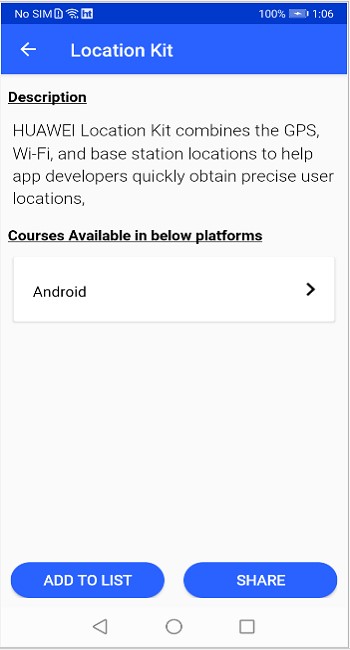
Course Details Screen |
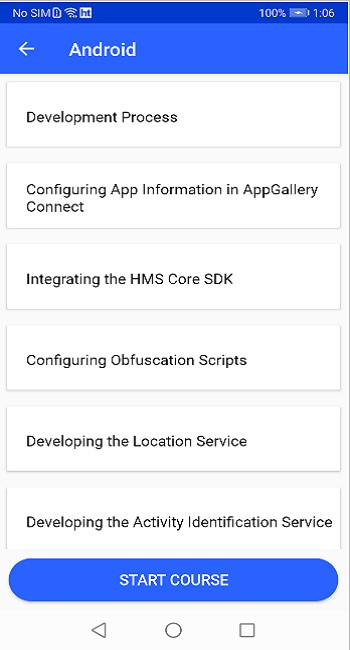
Course Content Screen |
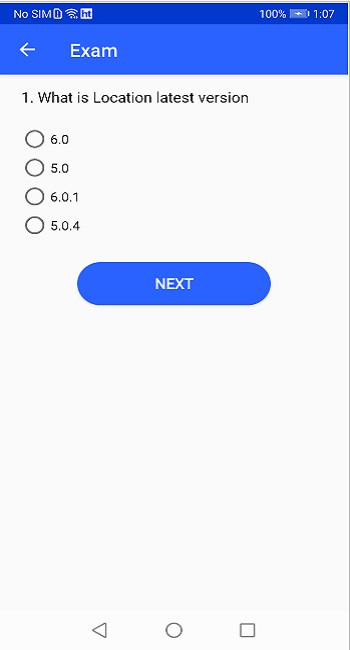
Exam Details Screen |
|
|
|
Process
What You Will Learn
In this codelab, you will learn how to:
To integrate HMS Core kits, you must complete the following preparations:
For details, please refer to Preparations for Integrating HUAWEI HMS Core.
Step 1. Enable Cloud Storage.
To store the video files in cloud, you need to integrate Cloud Storage and then upload the files to cloud.
After uploading the files, you can access the respective file path from any device.
Go to Project settings > Manage APIs in AppGallery Connect to enable the Cloud Storage API permission.

Step 2. Upload files to cloud in AppGallery Connect.

Step 3. Click View details and copy the sharing token file path. Save this path in Cloud DB database.
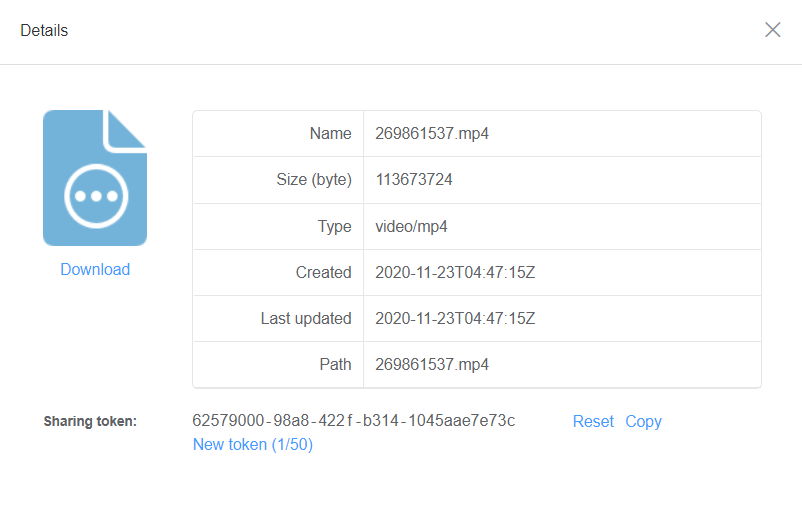
All the course data can be saved in cloud database and used by the app if you integrate Cloud DB. First you need to enable Cloud DB in AppGallery Connect and create the database and tables accordingly. When the database is ready, add the content to cloud database.
You can follow the seven steps below to learn how to integrate Cloud DB in your app.
Step 1: Enable Cloud DB and create tables.

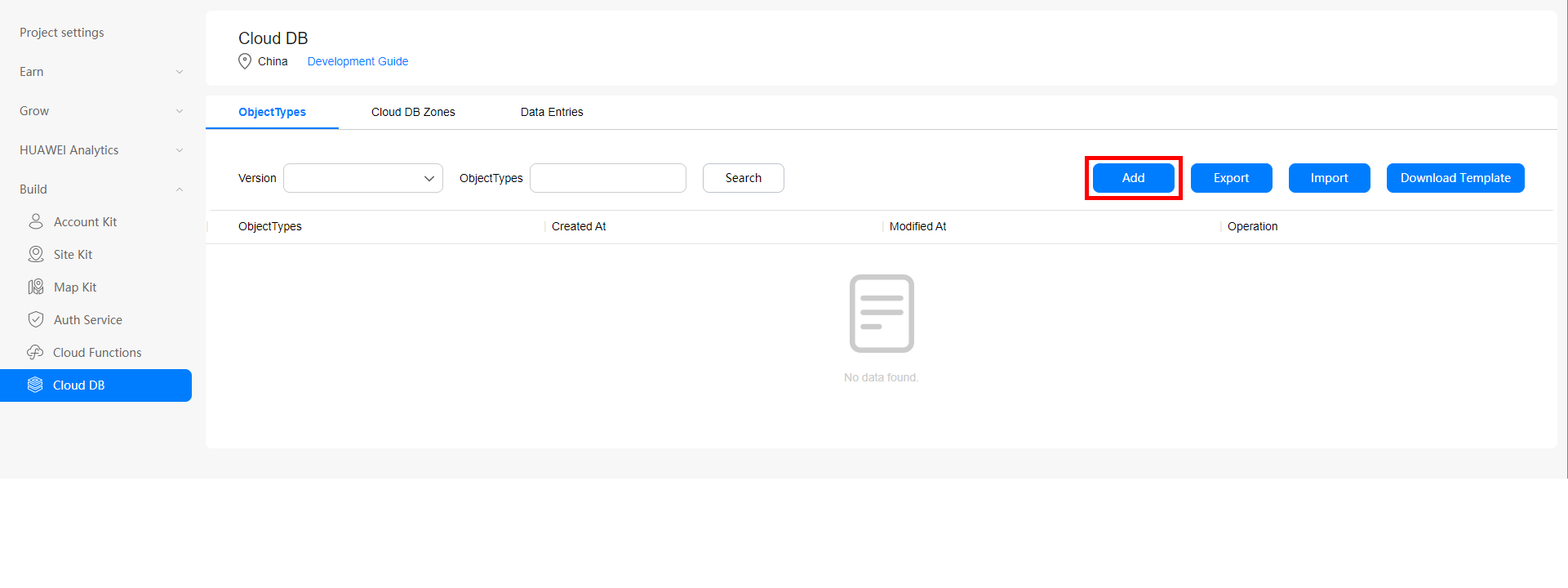
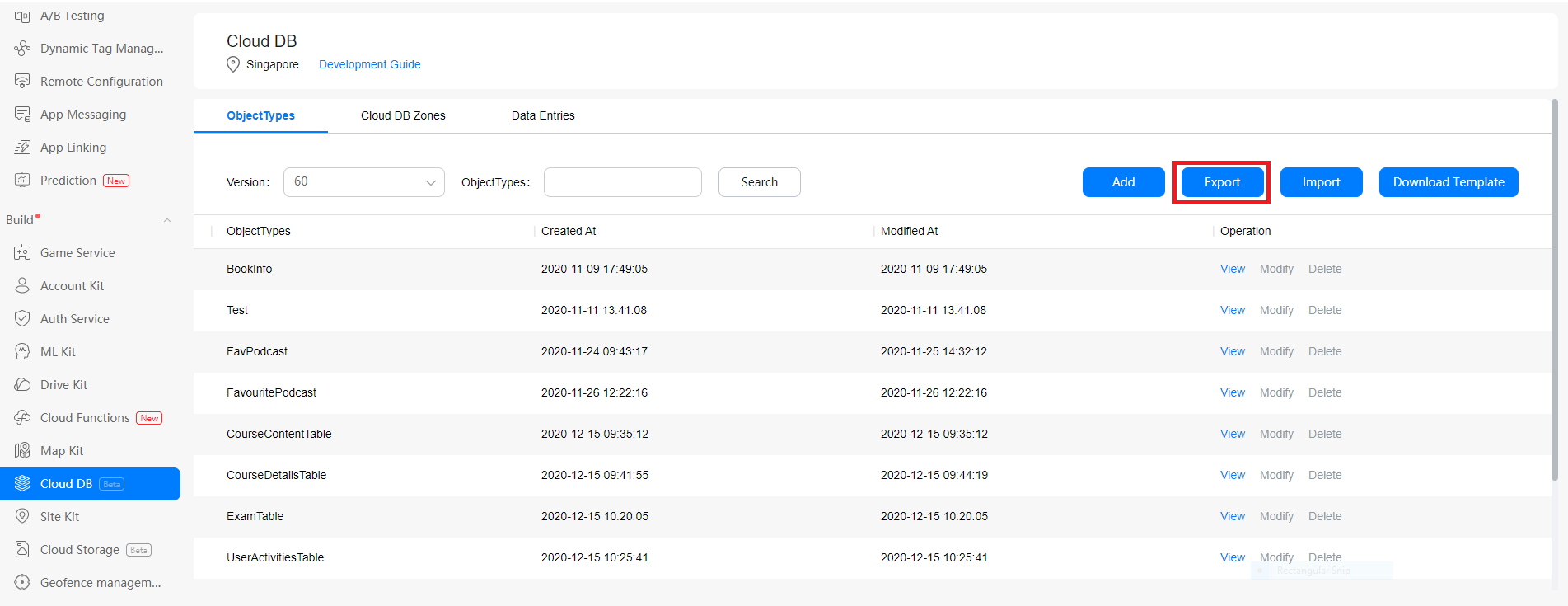

Click here to learn more details.
Step 2: Get the list of all courses by using Cloud DB
Before accessing the cloud database, you need to initialize Cloud DB service in Application class and open the database as an anonymous user. Then the data can be obtained at each request.
Initialize Cloud DB in Application class.
Java
 /**
     * Instantiates a new Cloud db helper.
     *
     * @param context the context
     */
    public CloudDbHelper (Context context) {

        AGConnectCloudDB.initialize (context);
        mCloudDB = AGConnectCloudDB.getInstance ();
        cloudDbQueyCalls = new CloudDbQueyCalls ();

    }
Kotlin
  /**
     * Instantiates a new Cloud db helper.
     * @param context the context
     */
    init {
    initAGConnectCloudDB(mContext)
    mCloudDB = AGConnectCloudDB.getInstance()
    cloudDbQueyCalls = CloudDbQueyCalls()
   }
Step 3: Open Cloud DB.
Java
 /**
     * Open cloud db zone v 2.
     *
     * @param cloudDbAction the cloud db action
     */
    public void openCloudDBZoneV2 (CloudDbAction cloudDbAction) {
          mConfig = new CloudDBZoneConfig (CloudDbConstants.CLOUD_DB,
                        CloudDBZoneConfig.CloudDBZoneSyncProperty.CLOUDDBZONE_CLOUD_CACHE,
                        CloudDBZoneConfig.CloudDBZoneAccessProperty.CLOUDDBZONE_PUBLIC);
        mConfig.setPersistenceEnabled (true);
        Task openDBZoneTask = mCloudDB.openCloudDBZone2 (mConfig, true);
        openDBZoneTask
               .addOnSuccessListener (
                        new OnSuccessListener () {
                            @Override
                            public void onSuccess (CloudDBZone cloudDBZone) {
                                mCloudDBZone = cloudDBZone;
                                cloudDbQueyCalls.setmCloudDBZone (mCloudDBZone);
                                cloudDbUiCallbackListener.onSuccessDbQueryMessage (
                                        cloudDbAction, "open clouddbzone success");
                            }
                        })
                .addOnFailureListener (new OnFailureListener () {
                            @Override
                            public void onFailure (Exception exp) {
                                cloudDbUiCallbackListener.onFailureDbQueryMessage (
                                        cloudDbAction, "");
                            }
                        });
    }
Kotlin
/**
 * Open cloud db zone v 2.
 *
 * @param cloudDbAction the cloud db action
 */
open fun openCloudDBZoneV2(cloudDbAction: CloudDbAction?) {
    mConfig = CloudDBZoneConfig(
            CloudDbConstants.CLOUD_DB,
            CloudDBZoneConfig.CloudDBZoneSyncProperty.CLOUDDBZONE_CLOUD_CACHE,
            CloudDBZoneConfig.CloudDBZoneAccessProperty.CLOUDDBZONE_PUBLIC)
    mConfig?.setPersistenceEnabled(true)
    val openDBZoneTask = mCloudDB.openCloudDBZone2(mConfig!!, true)
    openDBZoneTask
            .addOnSuccessListener { cloudDBZone ->
                mCloudDBZone = cloudDBZone
                cloudDbQueyCalls!!.setmCloudDBZone(mCloudDBZone)
                cloudDbUiCallbackListener?.onSuccessDbQueryMessage(
                        cloudDbAction, "open clouddbzone success")
            }
            .addOnFailureListener {
                cloudDbUiCallbackListener?.onFailureDbQueryMessage(
                        cloudDbAction, "")
            }
}
Step 4: Query all main courses to obtain the course list from Cloud DB and passing the data to the listener.
Java
/**
 * Query all main course categories in storage from cloud side with
    CloudDBZoneQueryPolicy.POLICY_QUERY_FROM_CLOUD_ONLY
 *
 * @param cloudDbAction the cloud db action
 */
public void queryAllMainCategories (CloudDbAction cloudDbAction) {

    if (mCloudDBZone == null) {
        return;
    }

    Task> coMainCategoryQueryTask =
            mCloudDBZone.executeQuery (CloudDBZoneQuery.where (CoursesMainCategoryTable.class),
                    CloudDBZoneQuery.CloudDBZoneQueryPolicy.POLICY_QUERY_FROM_CLOUD_ONLY);

    coMainCategoryQueryTask
            .addOnSuccessListener (coMainCategoryCloudDBZoneSnapshot ->
                    processMainCategories (coMainCategoryCloudDBZoneSnapshot, cloudDbAction))
            .addOnFailureListener (
                    e -> cloudDbUiCallbackListener.onFailureDbQueryMessage (cloudDbAction, ""));
}

private void processMainCategories (CloudDBZoneSnapshot snapshot, CloudDbAction cloudDbAction) {
    CloudDBZoneObjectList courseMainCategoryCursor =
        snapshot.getSnapshotObjects();
    List coMainCategoryArrayList = new ArrayList<>();
    try {
        while (courseMainCategoryCursor.hasNext()) {
            CoursesMainCategoryTable coMainCategory = courseMainCategoryCursor.next();
            coMainCategoryArrayList.add(coMainCategory);
        }
    } catch (AGConnectCloudDBException exp) {

    } finally {
        snapshot.release();
    }
    cloudDbUiCallbackListener.onSuccessDbData(cloudDbAction, (List) coMainCategoryArrayList);
}
Kotlin
/**
     * Query all main course categories in storage from cloud side with
     * CloudDBZoneQueryPolicy.POLICY_QUERY_FROM_CLOUD_ONLY
     *
     * @param cloudDbAction the cloud db action
     */
    fun queryAllMainCategories(cloudDbAction: CloudDbAction) {
        if (mCloudDBZone == null) {
            return
        }
        val coMainCategoryQueryTask = mCloudDBZone!!.executeQuery(
                CloudDBZoneQuery.where(CoursesMainCategoryTable::class.java),
                CloudDBZoneQuery.CloudDBZoneQueryPolicy.POLICY_QUERY_FROM_CLOUD_ONLY)
        coMainCategoryQueryTask
                .addOnSuccessListener { coMainCategoryCloudDBZoneSnapshot: CloudDBZoneSnapshot -> processMainCategories(coMainCategoryCloudDBZoneSnapshot, cloudDbAction) }
                .addOnFailureListener { e: Exception? -> cloudDbUiCallbackListener!!.onFailureDbQueryMessage(cloudDbAction, "") }
    }

    private fun processMainCategories(snapshot: CloudDBZoneSnapshot
                                      , cloudDbAction: CloudDbAction) {
        val courseMainCategoryCursor = snapshot.snapshotObjects
        val coMainCategoryArrayList: MutableList = ArrayList()
        try {
            while (courseMainCategoryCursor.hasNext()) {
                val coMainCategory = courseMainCategoryCursor.next()
                coMainCategoryArrayList.add(coMainCategory)
            }
        } catch (exp: AGConnectCloudDBException) {
        } finally {
            snapshot.release()
        }
        cloudDbUiCallbackListener!!.onSuccessDbData(cloudDbAction, coMainCategoryArrayList as List)
    }
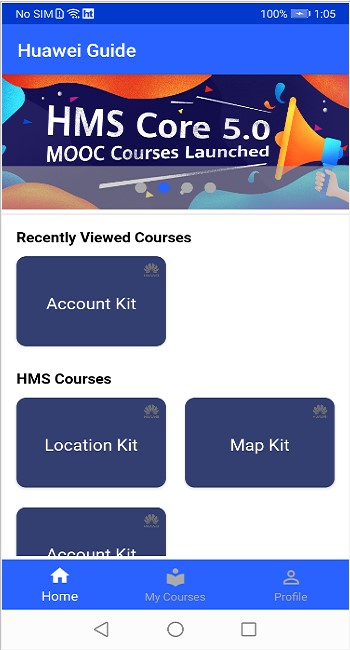
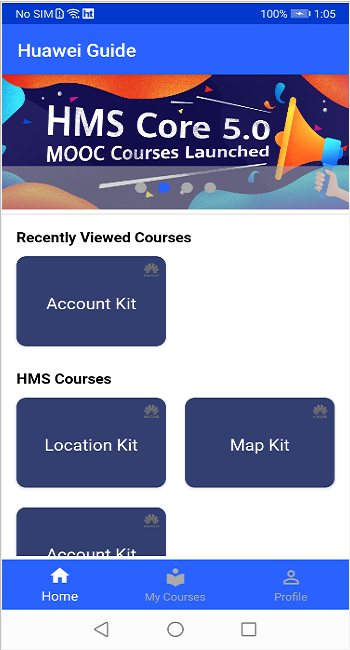
This screen shows a list of all courses by category, which are available in cloud database.
Step 5: Obtain the platforms and description for a specific course.
Java
  /**
     * Query course details courses in storage from cloud side with
        CloudDBZoneQueryPolicy.POLICY_QUERY_FROM_CLOUD_ONLY
     * @param query the query
     * @param cloudDbAction the cloud db action
     */
    public void queryCourseDetailsTable (CloudDBZoneQuery query, CloudDbAction
    cloudDbAction) {
        if (mCloudDBZone == null) {
            return;
        }
        Task> coDetailsQueryTask = null;
        coDetailsQueryTask =
                mCloudDBZone.executeQuery (
                        CloudDBZoneQuery.where (CourseDetailsTable.class),

          CloudDBZoneQuery.CloudDBZoneQueryPolicy.POLICY_QUERY_FROM_CLOUD_ONLY);

        if (query! = null) {
            coDetailsQueryTask = mCloudDBZone.executeQuery (query,
            CloudDBZoneQuery.CloudDBZoneQueryPolicy.POLICY_QUERY_FROM_CLOUD_ONLY);
        }
        coDetailsQueryTask
                .addOnSuccessListener (coDetailsCloudDBZoneSnapshot ->
                       processCourseDetailsTable (coDetailsCloudDBZoneSnapshot, cloudDbAction))
                .addOnFailureListener (
                        e -> cloudDbUiCallbackListener.onFailureDbQueryMessage (cloudDbAction,
                        ""));
    }

    private void processCourseDetailsTable (CloudDBZoneSnapshot snapshot,
        CloudDbAction cloudDbAction) {
        CloudDBZoneObjectList coDetailsCursor = snapshot.getSnapshotObjects ();
        List coursesArrayList = new ArrayList<> ();
        try {
            while (coDetailsCursor.hasNext ()) {
                CourseDetailsTable coDetails = coDetailsCursor.next ();
                coursesArrayList.add (coDetails);
            }
        } catch (AGConnectCloudDBException exp) {
        } finally {
            snapshot.release ();
        }
        cloudDbUiCallbackListener.onSuccessDbData (cloudDbAction, (List) coursesArrayList);
    }
Kotlin
/**
     * Query course details courses in storage from cloud
     * side with CloudDBZoneQueryPolicy.POLICY_QUERY_FROM_CLOUD_ONLY
     *
     * @param query         the query
     * @param cloudDbAction the cloud db action
     */
    fun queryCourseDetailsTable(
            query: CloudDBZoneQuery?, cloudDbAction: CloudDbAction) {
        if (mCloudDBZone == null) {
            return
        }
        var coDetailsQueryTask: Task>? = null
        coDetailsQueryTask = mCloudDBZone!!.executeQuery(
                CloudDBZoneQuery.where(CourseDetailsTable::class.java),
                CloudDBZoneQuery.CloudDBZoneQueryPolicy.POLICY_QUERY_FROM_CLOUD_ONLY)
        if (query != null) {
            coDetailsQueryTask = mCloudDBZone!!.executeQuery(
                    query,
                    CloudDBZoneQuery.CloudDBZoneQueryPolicy.POLICY_QUERY_FROM_CLOUD_ONLY)
        }
        coDetailsQueryTask
                .addOnSuccessListener(
                        OnSuccessListener { coDetailsCloudDBZoneSnapshot: CloudDBZoneSnapshot ->
                            processCourseDetailsTable(
                                    coDetailsCloudDBZoneSnapshot, cloudDbAction)
                        })
                .addOnFailureListener { e: Exception? ->
                    cloudDbUiCallbackListener!!.onFailureDbQueryMessage(
                            cloudDbAction, "")
                }
    }

    private fun processCourseDetailsTable(
            snapshot: CloudDBZoneSnapshot, cloudDbAction: CloudDbAction) {
        val coDetailsCursor = snapshot.snapshotObjects
        val coursesArrayList: MutableList = ArrayList()
        try {
            while (coDetailsCursor.hasNext()) {
                val coDetails = coDetailsCursor.next()
                coursesArrayList.add(coDetails)
            }
        } catch (exp: AGConnectCloudDBException) {
        } finally {
            snapshot.release()
        }
        cloudDbUiCallbackListener!!.onSuccessDbData(cloudDbAction, coursesArrayList as List)
    }
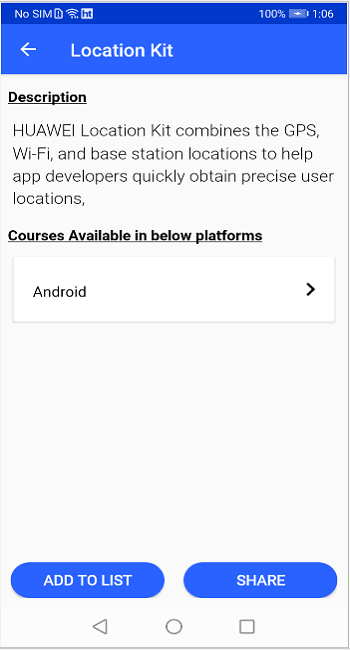
This screen shows the course description and the list of platforms available for a specific course.
Step 6: Obtain the content list of the specific course from Cloud DB.
Java
    /**
     * Query course content courses in storage from cloud side with
        CloudDBZoneQueryPolicy.POLICY_QUERY_FROM_CLOUD_ONLY
     *
     * @param query the query
     * @param cloudDbAction the cloud db action
     */
    public void queryCourseContentTable (CloudDBZoneQuery query, CloudDbAction
    cloudDbAction) {
        if (mCloudDBZone == null) {
            return;
        }
        Task> coContentQueryTask = null;

        if (query == null) {
            coContentQueryTask = mCloudDBZone.executeQuery (
                            CloudDBZoneQuery.where (CourseContentTable.class),

            CloudDBZoneQuery.CloudDBZoneQueryPolicy.POLICY_QUERY_FROM_CLOUD_ONLY);
        } else {
            coContentQueryTask = mCloudDBZone.executeQuery (query,
            CloudDBZoneQuery.CloudDBZoneQueryPolicy.POLICY_QUERY_FROM_CLOUD_ONLY);
        }

        coContentQueryTask
                .addOnSuccessListener (coContentCloudDBZoneSnapshot ->
                        processCourseContentTable (coContentCloudDBZoneSnapshot, cloudDbAction))
                .addOnFailureListener (
                        e -> cloudDbUiCallbackListener.onFailureDbQueryMessage (cloudDbAction, ""));
    }

   private void processCourseContentTable (CloudDBZoneSnapshot snapshot, CloudDbAction cloudDbAction) {
        CloudDBZoneObjectList coContentCursor = snapshot.getSnapshotObjects ();
        List coContentArrayList = new ArrayList<> ();
        try {
            while (coContentCursor.hasNext ()) {
                CourseContentTable coContent = coContentCursor.next ();
                coContentArrayList.add (coContent);
            }
        } catch (AGConnectCloudDBException exp) {

        } finally {
            snapshot.release ();
        }
        cloudDbUiCallbackListener.onSuccessDbData (cloudDbAction, (List) coContentArrayList);
    }
Kotlin
/**
 * Query course content courses in storage from cloud
 * side with CloudDBZoneQueryPolicy.POLICY_QUERY_FROM_CLOUD_ONLY
 *
 * @param query         the query
 * @param cloudDbAction the cloud db action
 */
fun queryCourseContentTable(
        query: CloudDBZoneQuery?, cloudDbAction: CloudDbAction) {
    if (mCloudDBZone == null) {
        return
    }
    var coContentQueryTask: Task>? = null
    coContentQueryTask = if (query == null) {
        mCloudDBZone!!.executeQuery(
                CloudDBZoneQuery.where(CourseContentTable::class.java),
                CloudDBZoneQuery.CloudDBZoneQueryPolicy.POLICY_QUERY_FROM_CLOUD_ONLY)
    } else {
        mCloudDBZone!!.executeQuery(
                query,
                CloudDBZoneQuery.CloudDBZoneQueryPolicy.POLICY_QUERY_FROM_CLOUD_ONLY)
    }
    coContentQueryTask
            .addOnSuccessListener(
                    OnSuccessListener { coContentCloudDBZoneSnapshot: CloudDBZoneSnapshot ->
                        processCourseContentTable(
                                coContentCloudDBZoneSnapshot, cloudDbAction)
                    })
            .addOnFailureListener { e: Exception? ->
                cloudDbUiCallbackListener!!.onFailureDbQueryMessage(
                        cloudDbAction, "")
            }
}

private fun processCourseContentTable(
        snapshot: CloudDBZoneSnapshot, cloudDbAction: CloudDbAction) {
    val coContentCursor = snapshot.snapshotObjects
    val coContentArrayList: MutableList = ArrayList()
    try {
        while (coContentCursor.hasNext()) {
            val coContent = coContentCursor.next()
            coContentArrayList.add(coContent)
        }
    } catch (exp: AGConnectCloudDBException) {
    } finally {
        snapshot.release()
    }
    cloudDbUiCallbackListener!!.onSuccessDbData(cloudDbAction, coContentArrayList as List)
}
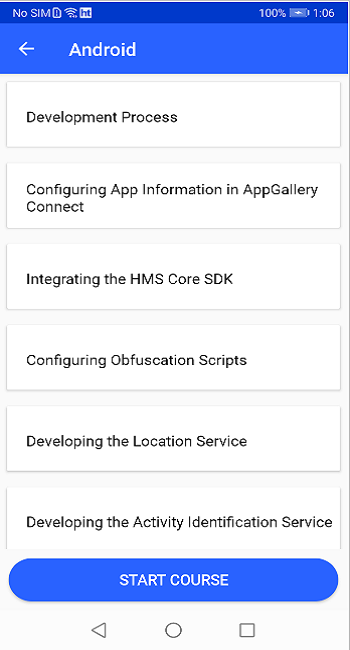
This screen shows the content list of the specific course.
Step 7: Obtain the exam question and options of the specific course
Java
   /**
     * Query com.huawei.training.database.tables.
     * QuestionsTable in storage from cloud side with
     * CloudDBZoneQueryPolicy.POLICY_QUERY_FROM_CLOUD_ONLY
     *
     * @param query the query
     * @param cloudDbAction the cloud db action
     */
    public void queryQuestionsTable (CloudDBZoneQuery<QuestionsTable> query, CloudDbAction     cloudDbAction) {

        if (mCloudDBZone == null) {
            return;
        }
        Task<CloudDBZoneSnapshot<QuestionsTable>> questionsQueryTask = null;

        if (query == null) {
            questionsQueryTask = mCloudDBZone.executeQuery (CloudDBZoneQuery.where (QuestionsTable.class),
                            CloudDBZoneQuery.CloudDBZoneQueryPolicy.POLICY_QUERY_FROM_CLOUD_ONLY);
        } else {
            questionsQueryTask = mCloudDBZone.executeQuery (query,
                            CloudDBZoneQuery.CloudDBZoneQueryPolicy.POLICY_QUERY_FROM_CLOUD_ONLY);
        }

        questionsQueryTask
                .addOnSuccessListener (questionsCloudDBZoneSnapshot -> processQuestionsTable (
                                questionsCloudDBZoneSnapshot, cloudDbAction))
                .addOnFailureListener (e -> cloudDbUiCallbackListener.onFailureDbQueryMessage (
                                cloudDbAction, ""));
    }

    private void processQuestionsTable (CloudDBZoneSnapshot<QuestionsTable> snapshot, CloudDbAction cloudDbAction) {
        CloudDBZoneObjectList<QuestionsTable> questionsCursor = snapshot.getSnapshotObjects ();
        List<QuestionsTable> questionsArrayList = new ArrayList<> ();
        try {
            while (questionsCursor.hasNext ()) {
                QuestionsTable questions = questionsCursor.next ();
                questionsArrayList.add (questions);
            }
        } catch (AGConnectCloudDBException exp) {
        } finally {
            snapshot.release ();
        }
        cloudDbUiCallbackListener.onSuccessDbData (cloudDbAction, (List) questionsArrayList);
    }
Kotlin
/**
 * Query com.huawei.training.database.tables.
 * QuestionsTable in storage from cloud side with
 * CloudDBZoneQueryPolicy.POLICY_QUERY_FROM_CLOUD_ONLY
 *
 * @param query         the query
 * @param cloudDbAction the cloud db action
 */
fun queryQuestionsTable(
        query: CloudDBZoneQuery<QuestionsTable>?, cloudDbAction: CloudDbAction) {
    if (mCloudDBZone == null) {
        return
    }
    var questionsQueryTask: Task<CloudDBZoneSnapshot<QuestionsTable>>? = null
    questionsQueryTask = if (query == null) {
        mCloudDBZone!!.executeQuery(
                CloudDBZoneQuery.where(QuestionsTable::class.java),
                CloudDBZoneQuery.CloudDBZoneQueryPolicy.POLICY_QUERY_FROM_CLOUD_ONLY)
    } else {
        mCloudDBZone!!.executeQuery(
                query,
                CloudDBZoneQuery.CloudDBZoneQueryPolicy.POLICY_QUERY_FROM_CLOUD_ONLY)
    }
    questionsQueryTask
            .addOnSuccessListener(
                    OnSuccessListener { questionsCloudDBZoneSnapshot: CloudDBZoneSnapshot<QuestionsTable> ->
                        processQuestionsTable(
                                questionsCloudDBZoneSnapshot, cloudDbAction)
                    })
            .addOnFailureListener { e: Exception? ->
                cloudDbUiCallbackListener!!.onFailureDbQueryMessage(
                        cloudDbAction, "")
            }
}

private fun processQuestionsTable(
        snapshot: CloudDBZoneSnapshot<QuestionsTable>, cloudDbAction: CloudDbAction) {
    val questionsCursor = snapshot.snapshotObjects
    val questionsArrayList: MutableList<QuestionsTable> = ArrayList()
    try {
        while (questionsCursor.hasNext()) {
            val questions = questionsCursor.next()
            questionsArrayList.add(questions)
        }
    } catch (exp: AGConnectCloudDBException) {
    } finally {
        snapshot.release()
    }
    cloudDbUiCallbackListener!!.onSuccessDbData(
            cloudDbAction, questionsArrayList as List<CloudDBZoneObject>)
}
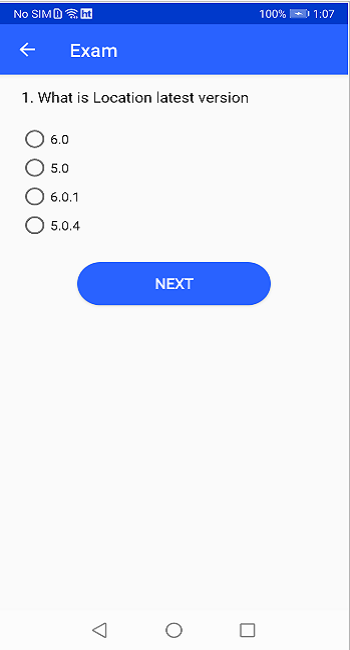
This screen shows the exam question and options of a specific course.
Step 1: Get the video streaming URL from cloud database and use Video Kit for video playback.
Initialize the video player in the Application class by using WisePlayerFactory.initFactory ().
Java
WisePlayerFactoryOptions factoryOptions = new WisePlayerFactoryOptions.Builder ().setDeviceId ("xxx").build ();
WisePlayerFactory.initFactory (this, factoryOptions, new InitFactoryCallback () {

    @Override
    public void onSuccess (WisePlayerFactory wisePlayerFactory) {
        Logger.d (TAG, "onSuccess wisePlayerFactory:" + wisePlayerFactory);
        factory = wisePlayerFactory;
    }

    @Override
    public void onFailure (int errorCode, String msg) {
        Logger.e (TAG, "onFailure errorcode:" + errorCode + " reason:" + msg);
    }
});
Kotlin
val factoryOptions = WisePlayerFactoryOptions.Builder().setDeviceId("xxx").build()
        WisePlayerFactory.initFactory(this, factoryOptions, initFactoryCallback)
    @Override
    public void onFailure (int errorCode, String msg) {
        Logger.e (TAG, "onFailure errorcode:" + errorCode + " reason:" + msg)
    }
});

private val initFactoryCallback: InitFactoryCallback = object : InitFactoryCallback {
            override fun onSuccess(wisePlayerFactory: WisePlayerFactory) {
                setWisePlayerFactory(wisePlayerFactory)
            }
            override fun onFailure(errorCode: Int, reason: String) {}
        }
Step 2: Get the WisePlayerFactory instance from Application class and create a player by using the createWisePlayer () method.
Java
WisePlayer wisePlayer = Application.getWisePlayerFactory ().createWisePlayer ();
Kotlin
WisePlayer wisePlayer = getWisePlayerFactory()?.createWisePlayer()
Step 3: Initialize the WisePlayer layout and add layout listeners.
Java
SurfaceView surfaceView = (SurfaceView) findViewById (R.id.surface_view);
SurfaceHolder surfaceHolder = surfaceView.getHolder ();
surfaceHolder.addCallback (this);
surfaceHolder.setType (SurfaceHolder.SURFACE_TYPE_PUSH_BUFFERS);

// Method 2: TextureView display interface
TextureView textureView = (TextureView) findViewById (R.id.texture_view);
textureView.setSurfaceTextureListener (this);
Kotlin
SurfaceView  surfaceView = (SurfaceView) findViewById (R.id.surface_view)
SurfaceHolder surfaceHolder = surfaceView?.getHolder ()
surfaceHolder?.addCallback (this)
surfaceHolder?.setType (SurfaceHolder.SURFACE_TYPE_PUSH_BUFFERS)

// Method 2: TextureView display interface
TextureView textureView = (TextureView) findViewById (R.id.texture_view)
textureView?.setSurfaceTextureListener (this)
Step 4: Set playback parameters such as playback URL.
Java
player.setPlayUrl ("video url");
player.setVideoType (PlayMode.PLAY_MODE_NORMAL);
player.setBookmark (10000);
Kotlin
player?.setPlayUrl ("video url")
player?.setVideoType (PlayMode.PLAY_MODE_NORMAL)
player?.setBookmark (10000)
Step 5: After setting the playback paramters, player.ready() is used to loading data in video player then onReady() will be called when the data is loaded in video player. When onReady() method is invoked then the video player is ready to start/play the video. By using player.start(), we can start playing the video.
Java
player.ready ();

@Override
public void onReady (WisePlayer wisePlayer) {
    player.start ();
}
Kotlin
player?.ready ()
override fun onReady(wisePlayer: WisePlayer) {    player?.start ()
}
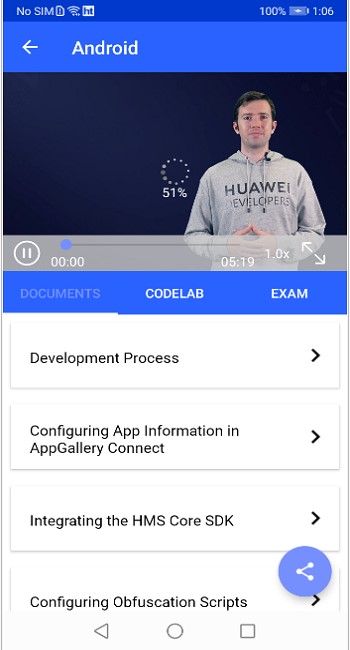
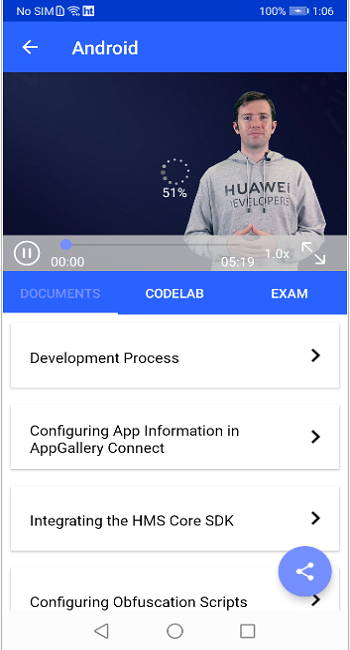
This screen shows the video, documents, codelab and exam of a specific course.
Well done. You have successfully completed this codelab and learned how to:
For more information, please click the following links:
To download the sample code, please click the button below.
Download