[Q1]How can developers interact with the ecosystem through the HUAWEI Ability Gallery?

A: We offer three service integration methods, and you can use as many of them as you like.

1) App Ability: Developers provide DeepLink for App/Quick apps. Services are presented by icons or links. The users get the services after clicking on the icon or link.

2) Content Ability: Developers provide APIs for services/content in accordance with Huawei. The services are provided by the Huawei, and the service will be presented to the user in the form of a voice conversation or a voice conversation with a card.

3) Card Ability: Developers use quick apps technology to develop card and click card jump logic. Users can access related services on the card page by viewing or interacting.

[Q2]Does releasing Abilities on HUAWEI Ability Gallery require me to submit my app?
A: If you want users to jump to your app, you need to submit the app to HUAWEI App Gallery before integrating it into HUAWEI Ability Gallery. If your app can already be downloaded from HUAWEI Ability Gallery, we don't need you to submit any app.

If you want users to jump to your quick app, you also need to submit your quick app to HUAWEI App Gallery first.

If you want users to jump to an H5 page (integrated through a Card Ability or Content Ability), you don't need to submit an app or a quick app, we just need the deeplink for the H5 page.


[Q3]How does HUAWEI Ability Gallery decide which services to present to a user intent?

A: There are two types of user-intended Abilities:

Event-triggered Abilities: When the predefined triggering conditions (e.g. time, place, and/or event) are met, the corresponding service card will be displayed to the user. The user may choose to subscribe to or cancel the service. 

Search-based Abilities: After a user searches for a service, the corresponding Ability will be included in the search result. Such Ability may be provided by more than one partner and is intelligently recommended to the user based on factors such as quality of service (delay and success rate), and social attributes (service popularity level)


[Q4]How long does it take to integrate an Ability to HUAWEI Ability Gallery?

A: Content Ability: 7 working days

Card Ability: 14 working days

App Ability: 1 working day


[Q5]What programming language does IDE support?
A: JAVASCRIPT. There are also design templates available in the IDE environment which you can use to configure your Ability.

[Q6]How do I receive Ability statistics through the developer portal?
Currently, HUAWEI Ability Gallery sends you periodic data reports. We are also building a data query function for the Console, so in the future you'll be able to download data from the Console yourself.

[Q7]How do developers gain financially?
A: HUAWEI Ability Gallery helps direct more users to your service or content, which can lead to more orders or purchases. It can also boost your brand awareness through cards and shortcuts.

[Q8]Does HUAWEI Ability Gallery collect data from apps?
A:Huawei does not collect data from you for Card Ability and App Ability. For Content Ability, you'll need to provide category-related data in order to generate Smart Cards. For example, for Live Sports cards, you can provide Huawei with information related to sports matches. Huawei can pull the necessary data about abilities from your server, rather than the app itself.

[Q9]Can users choose the services or change the order of the services in HUAWEI Assistant?
A: HUAWEI Assistant has a fixed order. Starting from the top, the services are: global search, instant access, SmartCare and news. Users can select any instant access service displayed on HUAWEI Assistant. For example, they can add the Ali Pay QR code and Navigation shortcuts on the home screen. A SmartCare card is only displayed once the user has subscribed, and the sequence of the cards is determined by the system. The card that was triggered last (for example sport scores which have been updated) will be displayed at the top.

[Q10] What are the differences between abilities and quick apps?

A: Abilities link user intent with various service offerings. Developers define abilities in HUAWEI Ability Gallery, and users can use these abilities on Huawei devices or through other traffic entries. Quick apps don't need to be installed, which make them easier for users to use.


[Q11]Where do ability cards redirect users?

A: Ability cards redirect users to quick apps, native apps, or web pages.


[Q12]Where can I access HUAWEI Ability Gallery from the console?

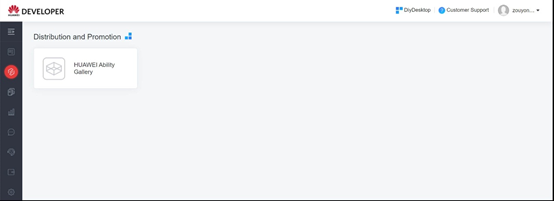
A: If you have not accessed HUAWEI Ability Gallery before, add the entry to it by clicking DiyDesktop in the upper right corner and selecting HUAWEI Ability Gallery on the page that is displayed.


[Q13]Do I need to fill in the Cyber Security and Privacy Protection Due Diligence? Where can I fill in or modify it?

A: Developers must process personal data in compliance with the data processing roles and rules stated in the Cooperation agreement, and must fill in the Cyber Security and Privacy Protection Due Diligence.

To fill in or modify the form, click Cyber Security and Privacy Protection Due Diligence on the Ability Gallery page. If you have not filled it in, a message will be displayed upon ability release, prompting you to fill it in.


[Q14]Can I add a category when creating an ability?

A: Yes, but you are advised to select an existing category. To add a category, send an email application to hagservice@huawei.com with the email subject written in the format of Ability category to be added+Project name+Developer account. The category can be added only after the application is approved.

[Q15]Can I test an ability that is being reviewed?

A: You can test the current version of the ability but cannot modify it. After the ability is approved, you can modify and test it again.


[Q16] How do I view operations data of a released ability?

A: Currently, you can send an email to hagservice@huawei.com to apply to view operations data. In the future, we will provide an entry for you to view operations data in HUAWEI Developer.

[Q17]Why is the error message "The ability display information contains language types not supported by the associated app" displayed when I release an ability?

A: The language selected when you release the ability does not match the language of the app released on HUAWEI AppGallery. Please click Manage Language to change the language.


Card Ability FAQs

[Q1]How do I set the version number of the quick app and the version number of the card engine separately?

A: Add the minplatformversion field for each object in the widgets array.

[Q2]If I have developed multiple cards, do I need to generate RPK packages for them separately?

A: No. You need to pack them in the same RPK package


[Q3]How do I upgrade a quick app in Huawei AppGallery but not the related card ability?

A: In HUAWEI Ability Gallery, go to Test > Device test to obtain a test QR code. Then use Huawei Ability Gallery Kit to scan the test QR code for testing. After a successful test, upload the latest RPK package to Huawei AppGallery to upgrade your quick app.


[Q4]How are the card size units dp and sp converted into px?

A: The dp and sp are basic units, in which sp is the font size unit. 1 dp = (1 x 750/360) px

Note: The unit px used for quick apps is not the standard pixel unit. All size-related styles (such as those specified by width and font-size) are all defined based on the base width (750 px by default) and scaled based on the screen width. For example, if width is set to 100 px, the actual width on a 1500 px wide screen is 200 px


[Q5]What is the default width of a card?

A: 750 px


[Q6]How do I set font-weight?

A: For the regular size, set it to normal or leave it empty.

For the medium size, set it to bold or 500.


[Q7]Can I gather different card abilities with a grid template

A: No


[Q8] After I configured correct color values, why did my ability still fail to adapt to the Dark Mode?

A: The mapping between UX color values and supported code formats is as follows:

Color   Value

Code   Format

#000000, 90% opacity

color: rgba(#000000, 0.9)

#000000, 60% opacity

color: rgba(#000000, 0.6)

#000000, 38% opacity

color: rgba(#000000, 0.38)

#007DFF

color: #007DFF

Note: The following format is not supported: {color:#000000, opacity:xxx}.


      Content Ability FAQs

[Q1]How long is the authorization code obtained using the account.authorize() API valid for?

A: The authorization code, refresh token (RT), and access token (AT) are valid for 5 minutes, six months, and 1 hour respectively.


App Ability FAQs

[Q1]How do I configure the activity link to the main page of an ability? What is the function of the link?

A: Configure the activity link to the home page by referring to the following example. After the activity link is provided, if no deep link is available, a user tapping the app ability will be redirected to the app home page.

Example: com.tencent.news.ui.worldcupActivity


[Q2]In the context of App Ability, what do you mean by "deeplink"?

A: A deeplink is a hyperlink that directs users to generally searchable or indexed content or pages in an app, quick app or H5, rather than sending them to the homepage. 


[Q3]Is App Ability available in Huawei web browser?

A: Currently, it is only available in instant access, global search results and HiVoice.