Cards are a new type of ability providing atomic services that are more fine-grained than apps. Cards enable interactions with users by displaying information or content that interests the users the most. Cards can be embedded in various super apps or interaction scenarios to provide smart services that can better meet user needs.
Cards and the main program of a quick app are compressed into the same RPK file and uploaded and released.
A card is a part of a quick app. One quick app may contain multiple cards and one card maps to only one page. A card is defined by the widgets field in the manifest.json file. The following table provides a description of the widgets field.
| Attribute | Type | Mandatory or Not | Description |
| name | String | Yes | Name of the card. |
| id | String | Yes | Unique identifier of the card in the quick app package. It consists of a string of up to 255 English letters or digits. |
| path | String | Yes | The path to the destination page of the card, which is the same as the path field in the router.page. One card maps to only one page. |
| component | String | Yes | Name of the destination page of the card. |
| targetManufactorys | Array | Yes | Each vendor has its own UI style requirements and an app developer may provide different cards for different vendors. Therefore, one field is used to specify the vendors to which a card applies. This helps prevent unnecessary reviews and rejections. Example: [“xx”, “yy”], where xx and yy indicate the English name of a vendor’s brand in lowercase. |
| desc | String | No | Detailed description of the card, including its functions and input parameters. |
| params | Array | No | Information about the input parameters necessary for card running. With the information, operation personnel or automated testing tools can run the card or verify its functions. The following table entitled “Description of params” provides the details. |
| uses-permission | Array | No | List of permissions used by the card. At present, permissions available to the card are: |
| minPlatformVersion | Integer | No | Minimum platform version number. If the version number is not provided, use the RPK version number instead. |
1. Description of params
| Attribute | Type | Mandatory or Not | Description |
| name | String | Yes | Name of the parameter. |
| mandatory | Boolean | No | Whether the parameter is mandatory or not. The default value is Yes. |
| valueSample | String | Yes | A sample value, which is used to guide testing and verification by operation personnel and is used by automated testing tools. |
| desc | String | Yes | Parameter description. |
2. Example
- "widgets":[
- {
- "name":"Show logistics information",
- "serviceCatalog": "SF Express",
- "path":"/widget1",
- "component":"Widget1",
- "targetManufactorys":["xx", "yy"],
- "params": [{"name":"keyName1","mandatory":true,"valueSample": "BMW X5", "desc":"Parameter description"},
- {"name":"keyName2", "mandatory": true, "valueSample":"Shenzhen", "desc":"Parameter description"}],
- "uses-permission":["ACCESS_FINE_LOCATION", "WRITE_CALENDAR"]
- },
- {
- "name":"Show order in real time",
- "serviceCatalog": "SF Express",
- "path":"/widget2",
- "component":"Widget2",
- "targetManufactorys":["xx", "yy"],
- "uses-permission":["ACCESS_FINE_LOCATION"]
- }
- ]
In addition to attributes of its own, a widget, as part of the quick app, shares some common information with the quick app. See the following table for details.
3. Common Information
| Attribute | Type | Default Value | Mandatory or Not | Description |
| package | String | - | Yes | Name of the app package, which distinguishes this app package from others. “com.company.module” is the recommended format, for example, “com.deviceunion.demo”. |
| name | String | - | Yes | Name of the app, which is displayed on the desktop as part of the app icon or in a pop-up window. |
| icon | String | - | Yes | Icon of the app, with a size of 192 x 192. |
| versionName | String | - | No | Name of the app version. |
| versionCode | Integer | - | Yes | App version number. |
Cards contain a series of extended attributes of a quick app. Therefore, the quick app package you provided must contain the main app pages and a number of optional card pages.
A card is a segment of executable page script embedded in other apps. Therefore, it must be independently runnable and renderable. Capabilities owned by a card are a subset of capabilities provided by quick app pages and are controlled by means of a negative list.
General principles for card development:
Do not use the common capability components as defined in app.ux nor reference a local image resource file. This ensures that the jsbundle file created through card compilation is independently renderable.
The main program of the quick app must not be routed to a card page. However, the main program obtains input parameters from a card page in the same way as it does from a common page, namely, it obtains the parameter value through this.paramName, where paramName indicates the name of the input parameter.
Card-related permissions are granted through pre-authorization (e.g. notifying users when a card is added). In this case, when an interface is invoked (e.g. to obtain location information) during card running, the permission will be granted by default and no pop-up window will be displayed to request authorization.
In extreme situations, for example, when the card being used is provided by quick app version 1, which has upgraded to version 2 before the user could jump to a specific page from the card, ensure that the quick app is compatible with the jump path of at least one earlier version.
Do not use a global object for card data storage because a global object can be accessed by other cards. This would pose security threats.
To jump from a card to a quick app or an APK, use router.push, rather than schema:internal:// or filter-based redirection.
| Attribute | Type | Remarks |
| $app | Object | As the global object of a quick app, it must not be used for cards. |
| $page | Object | As the common function provided by a quick app page, it must not be used for cards. |
| Attribute | Type | Remarks |
| onBackPress | Function | Cards are embedded in super apps and are inapplicable to the listening of back key events. |
| onMenuPress | Function | Cards are embedded in super apps and are inapplicable to the listening of menu click events. |
| Attribute | Type | Remarks |
| onCreate | Function | Cards are embedded in super apps and are inapplicable to onCreate events of a quick app. |
| onDestroy | Function | Cards are embedded in super apps and are inapplicable to onCreate events of a quick app. |
| Attribute | Type | Remarks |
| onmessage | Function | BroadcastChannel applies to inter-page communication rather than card-related scenarios. |
| postMessage | Function | BroadcastChannel applies to inter-page communication rather than card-related scenarios. |
| close | Function | BroadcastChannel applies to inter-page communication rather than card-related scenarios. |
| Term | Type | Remarks |
| appear | Event | Not supported for the time being due to framework restrictions. |
| disappear | Function | Not supported for the time being due to framework restrictions. |
| swipe | Function | Not supported for the time being due to framework restrictions. |
| Term | Type | Remarks |
| background-image | <uri> | Not supported for the time being due to framework restrictions. |
| background-size | contain|cover|auto|<length><percentage> | Not supported for the time being due to framework restrictions. |
| background-repeat | repeat|repeat-x|repeat-y|no-repeat | Not supported for the time being due to framework restrictions. |
| background-position | - | Not supported for the time being due to framework restrictions. |
| position | none | fixedFunction | Not supported for the time being due to framework restrictions. |
| Term | Type | Remarks |
| list | Component | A card should not be list-scrollable. To display multiple items, traverse and add item nodes through the for loop. |
| list-item | Component | Same as above. |
| refresh | Component | An independent button, rather than the refresh button, should be provided for updating a single card. |
| tabs | Component | It applies to the main program that can run in full screen mode. |
| tab-content | Component | It applies to the main program that can run in full screen mode. |
| tab-bar | Component | It applies to the main program that can run in full screen mode. |
| a | Component | Inapplicable. |
| richtext | Component | Rich text content is rendered by using WebView. A card has a limited display area and limited access to the memory. So, rich text rendering with WebVeiw is inapplicable. |
| web | Component | To use the web component for a card, set minPlatformVersion in the manifest file of the card to 1010 or a larger value. |
| text | Component | At present, cards do not support letter-spacing styles provided by the text component. To use the component, upgrade the quick app engine to version 1030. |
Constraints on API Use
| Term | Type | Remarks |
| system.app | Interface | Application information of a quick app, inapplicable to cards. |
| system.router:back | Interface | Inapplicable to cards. |
| system.router:replace | Interface | Inapplicable to cards. |
| system.router:clear | Interface | Inapplicable to cards. |
| system.router:getLength | Interface | Inapplicable to cards. |
| system.router:getState | Interface | Inapplicable to cards. |
| service.share | Interface | Not supported by cards for the time being. |
| system.notification | Interface | Inapplicable to the sending of status notifications. |
| system.request | Interface | Not supported by cards for the time being. |
| system.file | Interface | It is used by the main program, rather than cards. |
| system.webview | Interface | Open WebView from the main program. |
| system.sensor | Interface | Inapplicable to cards. |
| system.shortcut | Interface | The creation and query of desktop icons are inapplicable to cards. |
| system.device:getId | Interface | Inapplicable to cards. |
| system.device:device.getDeviceId | Interface | Inapplicable to cards. |
| system.device:device:getUserId | Interface | Inapplicable to cards. |
| system.record | Interface | Recording is a sensitive function, which is implemented in the main program. |
| system.media | Interface | Implemented in the main program and therefore inapplicable to cards. |
| service.wxpay | Interface | Generally, successful payment requires a secondary confirmation on the amount to be paid and is completed in the main program. Therefore, this is inapplicable to cards. |
| service.alipay | Interface | Generally, successful payment requires a secondary confirmation on the amount to be paid and is completed in the main program. Therefore, this is inapplicable to cards. |
| system.sms | Interface | Implemented in the main program and therefore inapplicable to cards. |
| service.share | Interface | Interface Implemented in the main program and therefore inapplicable to cards. |
| system.wifi | Interface | Implemented in the main program and therefore inapplicable to cards. |
| system.contact | Interface | Interface Implemented in the main program and therefore inapplicable to cards. |
| system.package:hasInstalled | Interface | Restricted use for cards. You can only query whether Android apps are installed but cannot query whether quick apps are installed. |
| system.storage | Interface | Implementation varies among different vendors. Some vendors have their card storage shared with quick apps in the quick app gallery, namely, values written into the system through this interface in the quick app can be read and written in the corresponding cards. Other vendors have their card storage embedded in the host app and is separated from quick apps. |
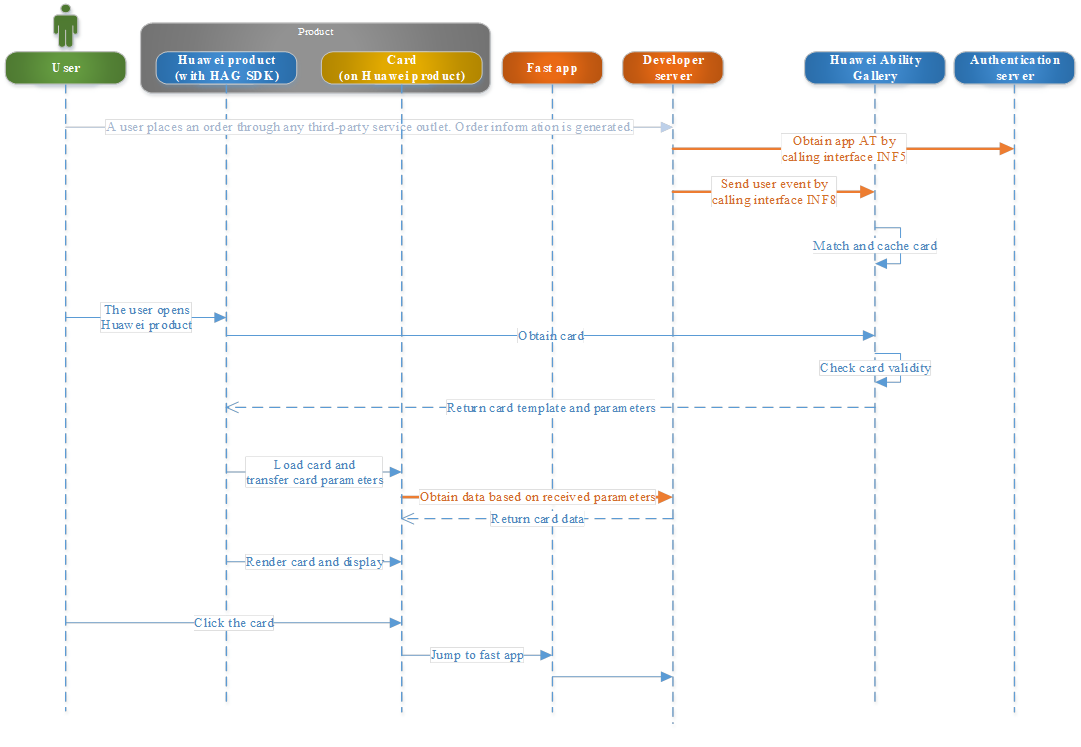
Developers may call the Huawei Ability Gallery event notification interface to trigger an ability for an end user. For example, after a developer sends a boarding notification to the Huawei Ability Gallery, a boarding notification card will be displayed when a user opens the corresponding Huawei product.
For the same ability, only one card is displayed at a time. Cards are displayed by the time they are triggered. The recently triggered card will overwrite those triggered earlier.
Account binding is required for abilities triggered by events. For details on how to bind accounts, see section Account Binding Process.
Apply for an app ID on the Huawei Developer website.
Develop the event notification ability, which will invoke the Huawei Ability Gallery event notification interface based on user events and send notifications to trigger a card.
Develop the interaction interface between the card and its server.
The following is an example of the process of triggering the recommendation ability based on a user order event.
The developer server obtains the permission to call the HUAWEI ABILITY GALLERY event notification interface. For details, see the Quick App API Description (INF5).
The developer server sends the user’s order event to the Huawei Ability Gallery. Major parameters in the event information are: event name (to map to a unique card), user openID, and card parameters (transparently transmitted by Huawei Ability Gallery to the card). For details, see the Quick App API Description (INF8).
After receiving the third-party app event, the Huawei Ability Gallery matches the event with the card based on the event name, and stores the matched card in the cache.
When a user opens a Huawei product, the device obtains card information (card template and card parameters). At the same time, the card validity period is verified.
The Huawei Ability Gallery SDK transfers card parameters to the card template.
The card initialization method (onInit) obtains card parameters (through this.key). Then, the card content is obtained by calling the developer server.
The Huawei account of a user can be associated with a third-party app account. So, when the user logs in to the Huawei account, he/she can use services provided by the third-party application without actually logging in to the application.
Huawei uses openID (generated based on a Huawei account) for binding with a third-party application account.
Each Huawei account has a unique openID for each application (distinguished by app ID).
See the Binding Account on UI.pdf. (Access Guide coming soon)
Apply for an app ID on the Huawei Developer website.
Apply for the account service for the corresponding RPK product on the Huawei Developer website.
In the quick app, develop the pages to be bound and the account binding logic.
On the developer server, develop the account binding logic.
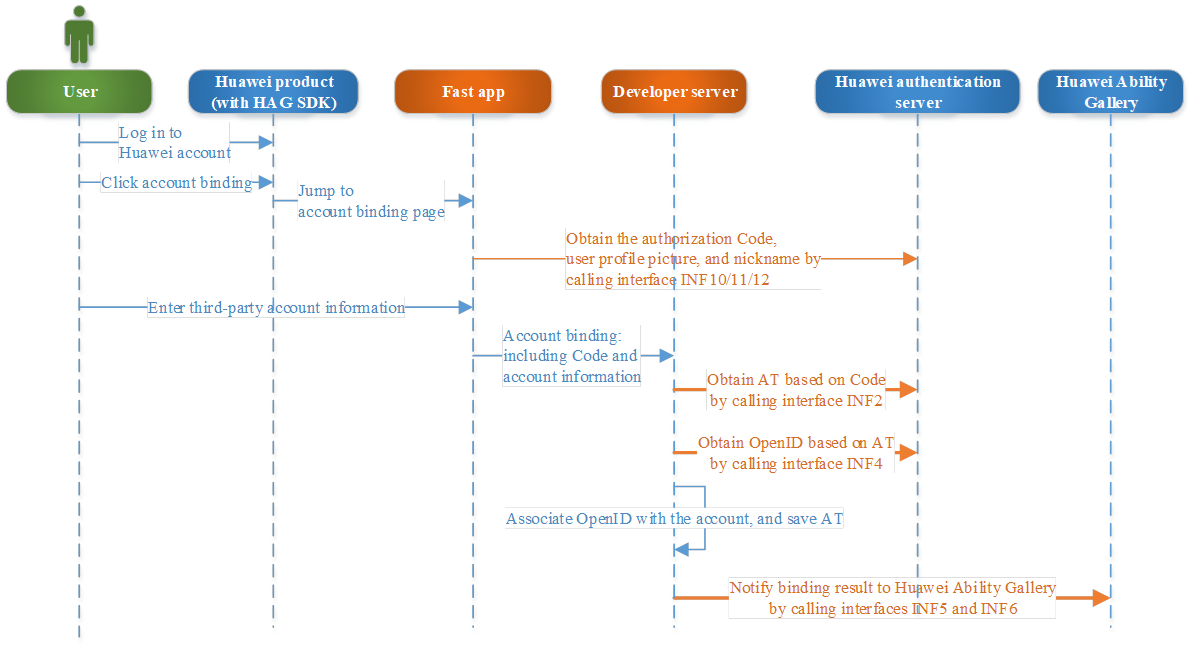
A user clicks the account binding button on his/her Huawei product. Then, the user is navigated to the account binding page.
On the account binding page of the quick app, invoke interfaces to obtain the user authorization code, user nickname, and profile picture. For details, see the quick App API Description (INF10, INF11, and INF12).
On the account binding page of the quick app, the user enters the account information and confirms authorization.
The quick app sends the account information and code to its cloud server.
Cloud server of the quick app calls interfaces of the Huawei authentication server and obtains the user OpenID and AcessToken based on user code. For details, see the Quick App API Description (INF2 and INF4).
The quick app server associates the OpenID with the account.
After completing account association, the quick app server calls the Huawei Ability Gallery interface to send the account association result back to the Huawei Ability Gallery. For details, see the Quick App API Description (INF5 and INF6).
After a user’s Huawei account is successfully bound to a third-party app account, the user can perform service operations in the corresponding quick app directly from his/her Huawei account directly. To prevent data errors when the user changes to another Huawei account, the developer server must obtain openID each time the quick app is used. The following process is recommended (which can be modified as needed):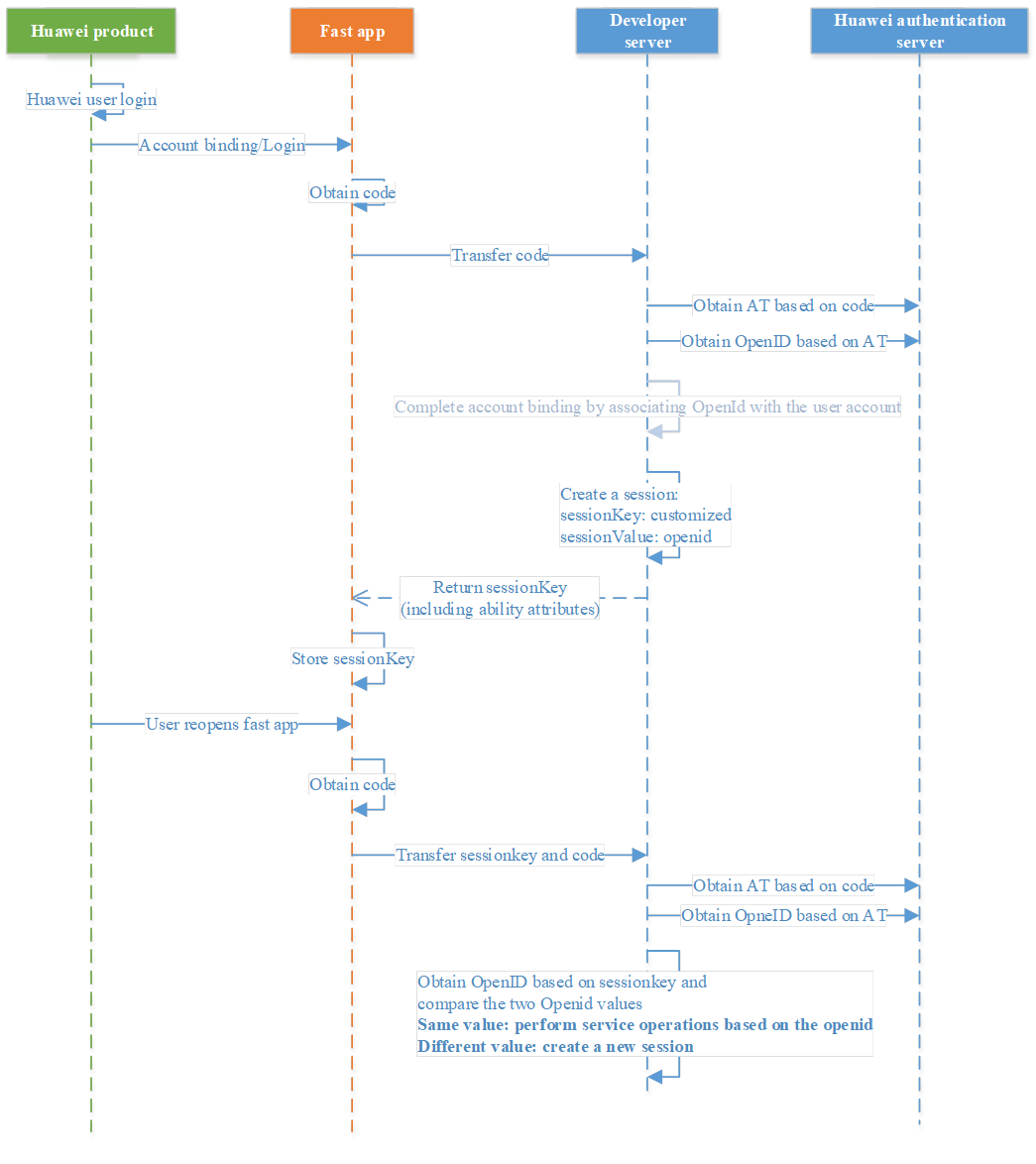
When a user opens the quick app, the quick app calls the account.authorize method of the engine to obtain code. For details, see the Quick App API Description ( INF10).
The quick app calls the developer server to perform service operations and sends the code to the server.
The developer server obtains the openID based on the code. For details, see the Quick App API Description (INF2 and INF4).
The developer server completes account binding by associating openID with the user account on the developer server. Then, it calls Huawei interfaces to publish the account binding result. For details, see the Quick App API Description (INF5 and INF6). (Optional step, with the login process skipped.)
Create a session (preferably in the KV structure). The session key is defined by the developer and the value is openID.
Issue the session key to the quick app.
3.2.6.2 Re-opening Quick App
When a user opens the quick app, the quick app calls the account.authorize method of the engine to obtain code. For details, see the Quick App API Description (INF10).
The quick app calls the developer server to perform service operations and sends the code and sessionKey to the server.
The developer server obtains the openID based on the code. For details, see the Quick App API Description (INF2 and INF4).
The developer server obtains the openID through the sessionKey and compares it with the openID obtained in step 3 (to check whether the user is the same user).
(1) If it is, perform service operations through the developer account associated with the openID.
(2) If it is not, create a new session.
Based on the search intents and keywords of a user for Huawei products such as HiTouch, HiVision, HiVoice, smart home, and scenario packages, search results can be presented to the user through cards or voice prompts. You may define that your quick app presents different cards in different Huawei products or uniformly the same card.
A user may search for an ability by specifying keywords in the search bar or by identifying keywords with HiTouch, which is triggered by pressing on the selected text with two fingers. Based on the keywords, Huawei finds out the applicable search card template and sends the complete keyword string to the card. During initiation, the card then passes on the keywords to the developer server, which will query and match content and return the found content back for rendering.
The maximum number of search keywords that a developer can configure for an ability is 300.
Define the card that will display search results. Based on the complete string of keywords from the user, the card will obtain and populate data content from the developer server.
On the Huawei Developer website, define the ability as being query-triggered and define the search keywords (at most 300).
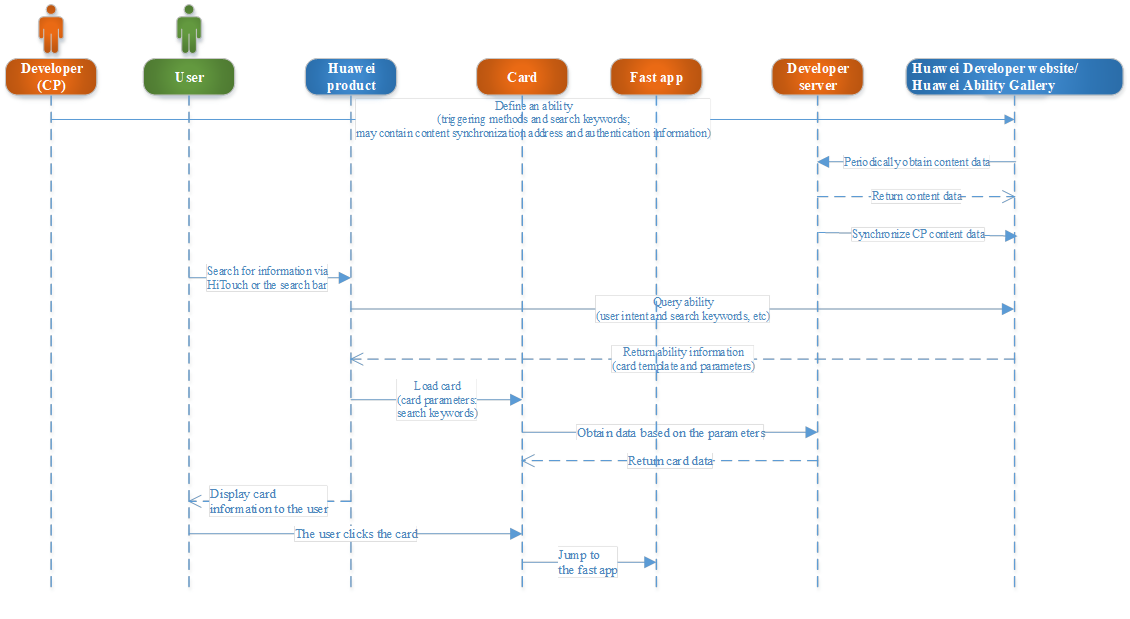
On the Huawei Developer website, configure search keywords (at most 300) for the ability. For details, see the Card Ability Access Guide.
A user searches for information via a Huawei product such as HiTouch or the search bar.
Based on the search intent and keywords of the user, the Huawei product finds the target card, loads the card template, and transfers the keywords to the card.
During initiation (onInit), the card receives the keywords and sends them to the developer server to obtain content to be rendered. The method for obtaining the user query statement from the card is this.hag_searchParam.
A user may search for an ability by scanning images or QR codes via HiVision. During search, Huawei parses the images and QR codes, identifies user intents and search keywords, finds out the applicable ability and card template, and sends the image stream and keywords (optional) to the card. During initiation, the card then passes on the image stream and keywords (optional) to the developer server, which will query and match content and return the found content back for rendering.
The maximum number of search keywords that a developer can configure for an ability is 300.
Define the card that will display search results. Based on the complete string of keywords from the user, the card will obtain and populate data content from the developer server.
On the Huawei Developer website, define the ability as being query-triggered and scan-triggered, and define the search keywords (at most 300).
When defining the ability, you may choose content synchronization and configure the synchronization method, server address, and authentication information. The synchronized content will be used as the search index to improve the hit rate of the ability. (Optional)
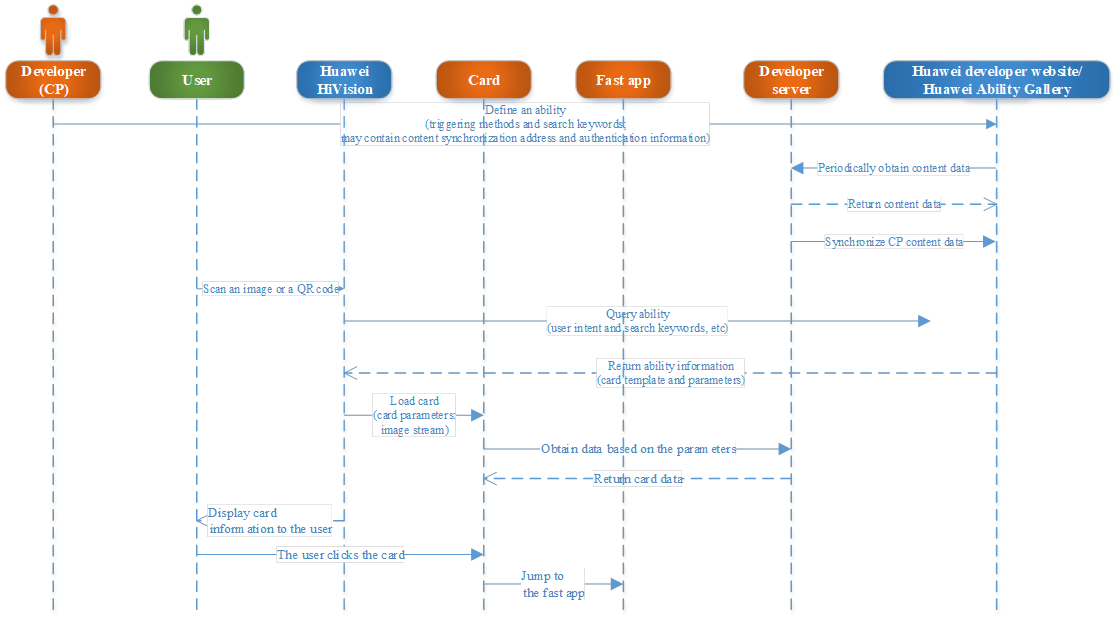
On the Huawei Developer website, configure search keywords (at most 300) for the ability. For details, see the Card Ability Access Guide.
Configure the content synchronization method and related information.
The server synchronizes the content information. For details, see the Content Synchronization Process.
A user scans an image or a QR code with the Huawei product HiVision.
The Huawei product analyzes the image or QR code, extracts the key query information, and compares it with the ability. Then, it returns the matched card information to HiVision, which triggers the card template and transfers the image stream and search keywords (optional) to the card.
During initiation (onInit), the card receives the image stream and keywords (Optional), and sends them to the developer server to obtain content to be rendered.
The method for obtaining the image stream during card creation is this.imgData and that for obtaining the search keywords is this.hag_searchParam (Optional).
To improve the hit rate of ability search, you can create search indexes on the Huawei Ability Gallery for content data corresponding to an ability.
Before content handshake, the content category, content volume, update frequency, and update volume must be evaluated.
When defining the ability, select content synchronization and configure the synchronization method, server address, and authentication information.
According to the Huawei interface specifications, provide the interface for obtaining vertical data and negotiate the call frequency, so that Huawei can call the interface and obtain data.
According to the Huawei interface specifications, call the vertical data push interface provided by Huawei in real time so that the data is pushed to the Huawei Ability Gallery simultaneously.
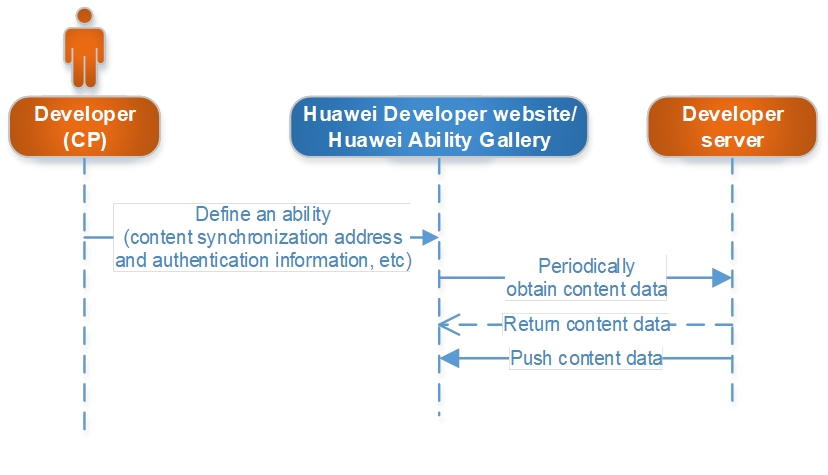
If content synchronization is selected during ability definition, configure the server address for providing content, the synchronization method, and the authentication information.
Based on the configured address, the Huawei Ability Gallery periodically requests the developer server to provide content data by vertical domain and receives content data pushed by the developer server. The received content data will be used for creating search indexes.
When a user searches for information via an outlet provided by Huawei device such as HiVision, HiTouch, HiVoice, and search bar, the Huawei Ability Gallery matches abilities with search indexes. On finding the required ability, it returns the ability information back to the device, which will present the ability to the user.
This section provides guidance for developers to synchronize content data to the Huawei Ability Gallery, including the synchronization process and definition of interfaces. It is designed to unify concepts and understanding, thereby facilitating operations.
Acronyms and Abbreviations
| Term | Extension | Remarks |
| HAG | Huawei Ability Gallery | |
| HTTP | Hyper Text Transfer Protocol | |
| XML | Extensible Markup Language | |
| JSON | JavaScript Object Notation | A lightweight data-interchange format. |
Through the service aggregation gateway, Huawei periodically calls developer interfaces to obtain developer content and provides interfaces for developers to synchronize content data in real time. The following figure shows the process: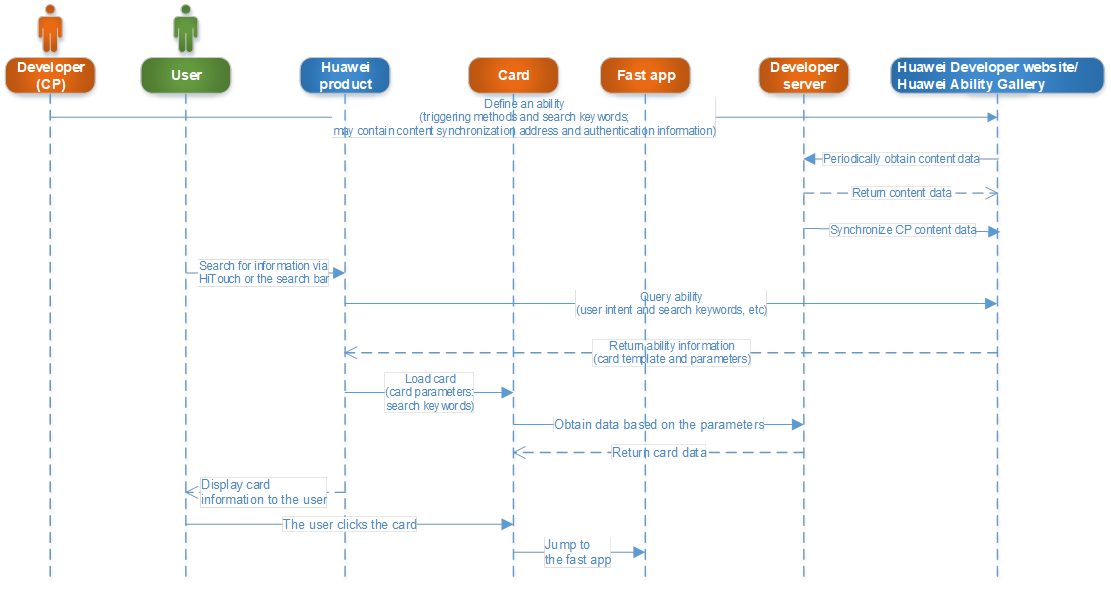
Before synchronizing developer content data, check items such as total data volume and daily variant according to the checklist.
| Check Item | Description | Check Result |
| Total data volume | Total amount (pieces) of data that a developer can provide for Huawei | |
| Daily variant | Amount (pieces) of data that a developer can update to Huawei each day | |
| Data size | The maximum size of a single piece of data | |
| Synchronization frequency | Frequency of a full synchronization and an incremental synchronization |
Interface protocol: HTTPS
Data format: Generally, requests and responses adopt the JSON format.
Request method: POST (submission) and DELETE (deletion).
The Huawei Ability Gallery provides an interface URL that is defined as http[s]://{Domain name}/{Module}?{Parameter}. The following table describes each part of the URL.
| Field | Meaning | Example |
| Domain name | Address for providing an interface to external users | hag.cloud.huawei.com |
| Module | Ability name | ?? |
Both interface resources and parameters are named in camel case, for example, cardList.
Status codes returned by the client include HTTP status codes and service error codes.
Adopt HTTP status codes that have been defined in the HTTP protocol RFC 2616. Do not define your own version of HTTP status codes if they are already available in the protocol.
Error codes for request errors or operation failures must be clearly defined in Content-body. The following table provides the definition and description of service error codes.
| Parameter | Type | Mandatory or Optional | Description |
| code | String | Mandatory | Error code. The value is 0 if the request is successful. |
| desc | String | Optional | Cause of error. The value can be null if the request is successful. |
1. Definition of Error Code
| Error Code | Error Message | Remarks |
| 0 | OK | Succeeded. |
| 1 | Invalid parameter | The parameter is invalid. |
| 2 | Incorrect signature | The signature is incorrect. |
| 3 | Too many parameters | There are too many parameters. |
| 4 | Unsupported signature method | This signature method is not supported. |
| 5 | Invalid/Used timestamp parameter | The time stamp is invalid. |
| 6 | Unsupported open api | This interface is not supported. |
| 12 | Session key invalid or no longer valid | The session key is invalid. |
| 31 | Forbidden | Information check failed. |
| 32 | Data parse error | An error occurred during data parsing. |
| 80 | Request Timeout | The request timed out. |
| 101 | Unknown error | An unknown error occurred. |
| 102 | Server internal error | A server error occurred. |
| 103 | Service temporarily unavailable | The service is unavailable for the time being. |
2. Notes
(1) Service2 error
If the returned error code is not 0, it is regarded that an error has occurred during service processing. The server needs to check the error code and find out the cause. For example, authentication failed, the parameter is incorrect, or XX exceeds the maximum capacity. Correct the parameters and resend the request to the server.
(2) HTTP error
If the returned status code is not 200, it indicates that an error has occurred in the server. The client needs to try again.
1. Interface Description
This interface is used by the Huawei service aggregation gateway to obtain hotel content information from third-party servers.
2. Interface Address
| Item | Description |
| Calling relationship | From Huawei server to third-party server |
| Calling method | HTTPS+POST |
| Request address | Address configured by a developer on the ability development platform for providing data |
| Constraints | 1. To save bandwidth, gzip must be enabled to compress responses from a developer. 2. Huawei server invokes services via HTTP persistent connection. To prevent connection cost from service invocation, the developer must support http:keep-alive. |
3. Request Packet
| Parameter | Type | M/O | Description |
| appKey | String | M | accessKey configured by a developer on the ability development platform. |
| appSecret | String(256) | M | Parameter signature = base64(hmac-sha256(secretKey, ts)), where secretKey is the access key allocated by Huawei to the developer server. |
| countryCode | String | O | Country code. CN is adopted by default if no other value is specified. |
| language | String | O | Language type. ZH is adopted by default if no other value is specified. |
| abilityId | String | O | When a developer has multiple abilities, content data can be obtained based on each ability. |
| ts | String | M | Time stamp, which is used for encryption and protection against cache penetration. |
| pageSize | Integer | M | The number of records returned on each page. The default value is 500. If the value 500 is selected, the actual amount of data returned by a developer to Huawei could be less than 500 pieces, for example, 200 pieces. |
| page | Integer | M | It indicates the start page of a returned record. The first request contains 0. |
| Request packet: { “appKey”: “ow1oDF6bBgW3CSIh”, “appSecret”: “”, “countryCode”: “CN”, “language”: “ZH”, “abilityId”: “106”, “ts”: “1460032806000”, “pageSize”: “200”, “page”: | |||
4. Response Packet
| Parameter | Type | M/O | Description |
| code | String | M | Service error code. |
| desc | String | O | Error description, which can be the success notification ok or thecause of error. |
| totalPage | Integer | M | Total number of pages that meet data requirements. |
| currentPage | Integer | M | Current page number. |
| data | JsonObject | O | Data obtained in batches. |
(1) Definition of the data structure for hotel content data:
| Parameter | Type | M/O | Description |
| contents | JsonArray | O | A list of hotel content information. |
(2) Definition of the hotels structure:
| Parameter | Type | M/O | Description | Usage |
| contentId | String | M | Unique ID of a hotel. Maximum length: 32 bytes. | The unique index for data modification or deletion. |
| name | String | O | Hotel name. Maximum length: 64 bytes. | A search condition or a search result. |
| alias | String | O | Hotel alias. Multiple hotel aliases are allowed, which are separated by a comma (“,”). Maximum length: 64 bytes. | A search condition. |
| description | String | O | An abstract. Maximum length: 512 bytes. | A search condition. |
| category | String | O | Type of hotel, such as economical, comfortable, and high-end. Maximum length: 32 bytes. | A search condition. |
| tags | String | O | Keywords. Multiple keywords are separated by a comma, for example, family friendly hotel and lake view. Maximum length: 64 bytes. | A search condition. |
| minPrice | Float | O | Minimum price, expressed in Yuan. The minimum price is 0.01 Yuan. | A search condition or a search result. |
| maxPrice | Float | O | Maximum price, expressed in Yuan. The minimum price is 0.01 Yuan. | A search condition. |
| location | LocationInfo | M | Geographical location information, such as longitude and latitude or a specific city and province. | A search condition or a search result. |
| infrastructure | String | O | Hotel facilities, such as conference rooms and gyms. They are separated by a comma (“,”). Maximum length: 64 bytes. | A search condition. |
| service | String | O | Hotel services, such as laundry and wake-up call. Multiple hotel services are separated with a comma (“,”). Maximum length: 64 bytes. | A search condition. |
| roomType | String | O | Description of the room type provided by a hotel, such as standard and King. Multiple room types are separated by a comma (“,”) Maximum length: 64 bytes. | A search condition. |
| images | ImageInfo | O | Hotel images. | A search result. |
| level | String | O | Hotel star ratings, such as three stars, four stars, and five stars. Maximum length: 32 bytes. | A search condition. |
| phone | String | O | Hotel telephone number. Multiple telephone numbers are separated with a comma (“,”). Maximum length: 32 bytes. | A search result. |
| aggregateRating | Float | O | Hotel rating. | A search condition. |
| boughtCount | Integer | O | Monthly sales volume. | A reference for ranking search results. |
| comment | JOSNARRAY | O | User comments. The latest 200 comments. If the number of comments is less than 200, all comments are returned. | A search condition and a reference for ranking search results. |
| status | String | O | Status, for example, available or sold out. Maximum length: 32 bytes. | A search condition. |
| h5Url | String | O | URL to an H5 page. Maximum length: 512 bytes. | It is used to redirect a user to the destination based on the search result. This parameter need not be provided if the corresponding card is already provided by the developer. |
| webUrl | String | O | URL to a web page. Maximum length: 512 bytes. | It is used to redirect a user to the destination based on the search result. This parameter need not be provided if the corresponding card is already provided by the developer. |
| appUrl | String | O | URL to an app page. Maximum length: 512 bytes. | It is used to redirect a user to the destination based on the search result. This parameter need not be provided if the corresponding card is already provided by the developer. |
| refPoints | String | O | Hotel surroundings. Maximum length: 64 bytes. | A search condition. |
| roomQuantity | Integer | O | Number of rooms. | A search condition. |
| offer | String | O | Special offers. Maximum length: 64 bytes. | A search condition or a search result. |
(3) Definition of the hotels structure:
| Parameter | Type | M/O | Description |
| comment | String | O | A comment. Maximum length: 128 bytes. |
| commentTime | String | O | Time when the comment is made. |
(4) Definition of the locationInfo structure:
| Parameter | Type | M/O | Description |
| country | String | O | Name of the country. |
| province | String | O | Name of the province. |
| city | String | O | Name of the city. |
| district | String | O | Name of the district. |
| town | String | O | Name of the town. |
| village | String | O | Name of the village. |
| detail | String | O | Detailed address. |
| coordinate Type | Integer | O | Coordinate type. 0: World Geodetic System WGS84 1: Chinese State Bureau of Surveying and Mapping coordinate system GCJ02 2: Baidu coordinate system BD09 |
| longitude | String | O | Longitude. |
| latitude | String | O | Latitude. |
(5) Definition of the ImageInfo structure:
| Parameter | Type | M/O | Description |
| url | String | M | Image URL. |
| height | Float | O | Image height. |
| width | Float | O | Image width. |
This section provides guidance for developers to synchronize content data to the Huawei Ability Gallery, including the synchronization process and definition of interfaces. It is designed to unify concepts and understanding, thereby facilitating operations.
Acronyms and Abbreviations
| Term | Extension | Remarks |
| HAG | Huawei Ability Gallery | |
| HTTP | Hyper Text Transfer Protocol | |
| XML | Extensible Markup Language | |
| JSON | JavaScript Object Notation | A lightweight data-interchange format. |
Through the service aggregation gateway, Huawei periodically calls developer interfaces to obtain developer content and provides interfaces for developers to synchronize content data in real time. The following figure shows the process: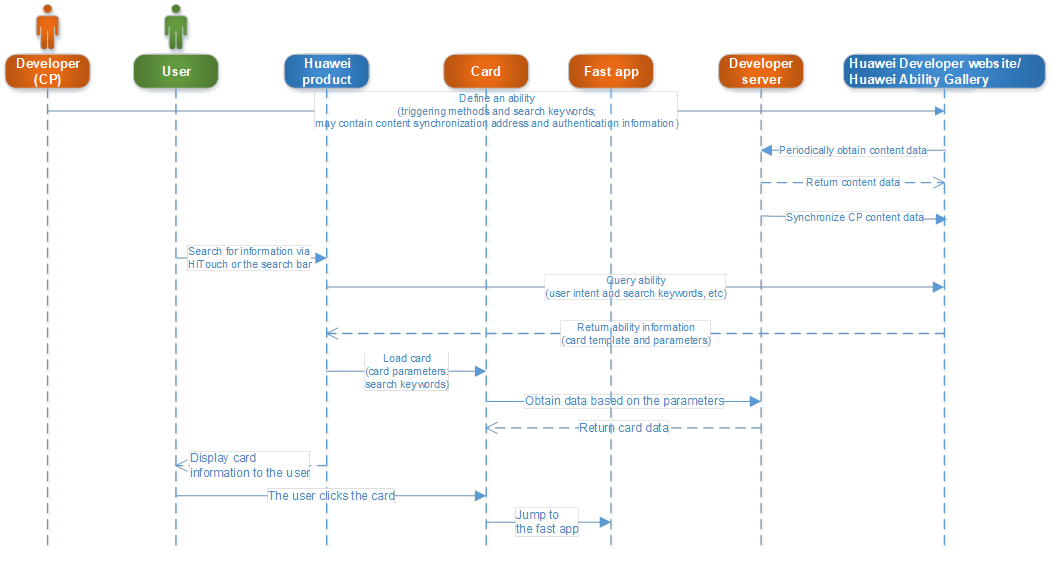
Before synchronizing developer content data, check items such as total data volume and daily variant according to the checklist.
| Check Item | Description | Check Result |
| Total data volume | Total amount (pieces) of data that a developer can provide for Huawei | |
| Daily variant | Amount (pieces) of data that a developer can update to Huawei each day | |
| Data size | The maximum size of a single piece of data | |
| Synchronization frequency | Frequency of a full synchronization and an incremental synchronization |
Interface protocol: HTTPS
Data format: Generally, requests and responses adopt the JSON and urlEncode formats.
Request method: POST (submission).
The Huawei Ability Gallery provides an interface URL that is defined as http[s]://{Domain name}/{Module}?{Parameter}. The following table describes each part of the URL.
| Field | Meaning | Example |
| Domain name | Address for providing an interface to external users | hag.cloud.huawei.com |
| Module | Ability name | hag-gw |
Both interface resources and parameters are named in camel case, for example, cardList.
1. Interface Description
Application-level token used for authentication when a developer server attempts to access the Huawei server.
2. Interface Address
| Item | Description |
| Message Direction | From developer server to Huawei authentication server. |
| Method | HTTPS+POST |
| URI (test environment) | https://logintestlf.hwcloudtest.cn/oauth2/v2/token |
| URI (production environment) | https://login.cloud.huawei.com/oauth2/v2/token |
3. Request
(1) Request Header
| Key | Value | Remarks |
| Content-Type | application/x-www-form-urlencoded |
(2) Request Body
| Key | Type | Value | Remarks |
| grant_type | string | client_credentials | A fixed value. |
| client_id | string | appID of a third-party developer. | |
| client_secret | string | appSecret of a third-party developer. |
The final Body is a string of the preceding fields and their values. “Key 1 = + urlEncode (value 1) + “ and “Key2= + urlEncode (value2) + “…
The value of each field must be processed through urlEncode.
4. Response
(1) If a request is correct, the server returns a JSON-encoded text carrying the following parameters:
| Field | Type | Mandatory or Not | Remarks |
| access_token | string | Mandatory | AT |
| expire_in | int | Mandatory | Access token’s validity period, in seconds. Default value: 1 hour. |
| scope | string | Optional | Final access scope of the access token. |
(2) If a request is incorrect, the server returns a JSON-encoded text carrying the following parameters:
| Field | Type | Mandatory or Not | Remarks |
| error | string | Mandatory | An error code. |
| error_description | string | Mandatory | Description of the error. |
1. Interface Description
The interface is used by a third-party developer to push news and media content to the Huawei Ability Gallery in real time, including but not limited to news, health information, automobile information, financial information, driving test information, and learning information.
2. Interface Address
| Item | Description |
| Calling relationship | From developer server to Huawei server. |
| Calling method | https+post |
| Request address | https://hag.cloud.huawei.com/hag-gw/v1/informations |
| Constraints | 1. To save bandwidth, gzip must be enabled to compress HTTP requests from a developer. 2. The Huawei server can receive at most 200 data records through one request. Exceeding this number, the server will return a failure message. |
3. Request Packet
(1) Request Header
| Parameter | Type | M/O | Description |
| x-appid | String | M | appID of a third-party developer. |
| Authorization | String | M | An application-level AccessToken. |
| Content-Type | String | M | This parameter is always set to application/json. |
| Accept | String | M | This parameter is always set to application/json. |
(2) Request Body
| Parameter | Type | M/O | Description |
| requestTime | String | M | Time when a request packet is sent. Format: yyyyMMddHHmmssSSS(UTC). |
| requestId | String | M | Unique ID of an event. It identifies whether a message needs to be retransmitted or canceled. In the case of retransmission, ensure that the requestId of the retransmitted message is the same as the requestId of the original message. The server will filter and reject repeated requests. In other cases, ensure that the requestId transmitted each time is different. UUID can be used as the requestId. Pattern: [a-zA-Z0-9-] Maximum length: 64 bytes. |
| countryCode | String | M | Country code, for example, CN. Maximum length: 8 bytes. |
| language | String | M | Language type, for example, ZH. Maximum length: 8 bytes. |
| abilityId | String | M | When a developer has multiple abilities, content data can be pushed based on each ability. When each ability is released on the Huawei Developer website, an ability ID of up to 32 bytes is assigned to it. |
| data | JsonObject | M | Nes and media data pushed in batches. |
(3) Definition of the data structure:
| Parameter | Type | M/O | Description |
| contents | JsonArray | M | A list of news and media content. |
(4) Definition of the contents structure:
| Parameter | Type | M/O | Description | Usage |
| contentId | String | M | ID of news and media content, which must be unique among all such content provided by a developer. Maximum length: 32 bytes. | The unique index for data modification or deletion. |
| pubTime | String | M | Content publishing time. Format: YYYY-MM-DD HH:MM:SS. | A reference for ranking content. |
| title | String | M | Content title. Maximum length: 128 bytes. | A search condition. |
| subtitle | String | O | Sub-content title. Maximum length: 128 bytes. | A search condition. |
| digest | String | M | Content abstract. Maximum length: 512 bytes. | A search condition. |
| source | String | M | Source of the content. Maximum length: 64 bytes. | A search condition. |
| imgUrl | String | O | URL to the image that is displayed for the content. URLs to multiple images are separated by a comma (“,”). Maximum length: 512 bytes. | Not used for the time being. |
| detailUrl | String | O | URL to the detailed view of the content. Maximum length: 512 bytes. | Not used for the time being. |
| text | String | M | News body. Maximum length: 1024 bytes. | A search condition. |
| category | String | M | Type of news and media information, including news, finance, travel, health, and automobile. | A search condition. |
| tag | String | M | Content tag, for example, Yao Ming, Basketball Association, and coach. Multiple tags are separated by a comma (“,”). | A search condition. |
| city | String | O | City name, for example, Beijing or Shenzhen, which is used to identify news of the city. | A search condition. |
| region | ImageInfo | O | District or county name, for example, Haidian or Chaoyang district in Beijing, which is used to identify news of the district or county. | A search condition. |
| Type | String | O | Type of content, including pure text, text and image, video, audio, image set, and GIF. | A search condition. |
| clkNum | Integer | O | The number of clicks. | A reference for ranking content. |
| upTimes | Integer | O | The number of likes. | A reference for ranking content. |
| downTimes | Integer | O | The number of dislikes. | A reference for ranking content. |
| replyCount | Integer | O | The number of comments. | A reference for ranking content. |
| heat | Integer | O | Content popularity. | A reference for ranking content. |
| Request format:
{
“requestTime”: “69d53781-3527-4918-9780-2bf6626fe4af”,
“requestId”: “ow1oDF6bBgW3CSIh”,
“countryCode”: “CN”,
“language”: “ZH”,
“abilityId”: “106”,
“data”: {
“contents”: [
{
“contentId”: “10000001000”,
“pubTime”: “2017-04-17 11:35:27”,
“title”: “Low visibility in urban areas of Beijing due to dusty weather in the north”,
“subtitle”: “Low visibility in urban areas of Beijing due to dusty weather in the north”,
“digest”: “Low visibility in urban areas of Beijing due to dusty weather in the north”,
“source”: “thepaper.cn”,
“detailUrl”: “http://c.m.163.com/nc/qa/3g-expand/huawei-photo.html?setid=2250334&channelid=0001“,
“text”: “Low visibility in urban areas of Beijing due to dusty weather in the north”,
“category”: “News”,
“tag”: “”,
“city”: “Beijing”,
“region”: “”,
“type”: “image”,
“clkNum”: “0”,
“upTimes”: “0”,
“downTimes”: “0”,
“replyCount”: “0”,
”countryCode”: “CN”,
“language”: “zh”,
}
]
} } | ||||
4. Response Packet
| Status Code | Description of Response |
| 200 | Content synchronization succeeded. No response is displayed. |
| 400 | Parameter check failed. Code: invalidParam. Response example:
{
“code”: “invalidParam”,
“desc”: “Paramter {} is invalid/should not be null/should be in [x,y]. “ } |
| 401 | The gateway verifies that the application-level access token has expired or is invalid. Apply for an access token again.
{
“error”: “session timeout”
} |
| 403 | The gateway failed to verify and process developer permissions. You are not authorized to call abilities from the Huawei Ability Gallery.
{
“error”: “access forbidden”
} |
| 404 | The URL requested by the developer does not exist. Response example:
{
“error”: “invalid path”
} |
| 406 | The developer’s request does not comply with the gateway specifications, for example, Header, which is mandatory, is missing. Response example:
{
“error”: “invalid AcceptType”,
“moreInfo”: “should be application/json”
} |
| 429 | Flow control because the number of client requests exceeds the quota. Code: usageLimits. The client may exponentially increase the wait time between retry attempts. The minimum retry interval is 30s. Response example:
{
“code”: “usageLimits”,
“desc”: “Request per minutes exceeds max limit.”
} |
| 500 | A server error occurred. Code: backendError. The client may exponentially increase the wait time between retry attempts. The minimum retry interval is 1s. Response example:
{
“code”: “backendError”,
“desc”: “Backend server error.”
} |
| Other errors | For a 4xx response, the client needs to locate and rectify the fault based on the error information. For a 5xx response, the client may exponentially increase the wait time between retry attempts. The minimum retry interval is 1s. |
This section provides guidance for developers to synchronize content data to the Huawei Ability Gallery, including the synchronization process and definition of interfaces. It is designed to unify concepts and understanding, thereby facilitating operations.
Acronyms and Abbreviations
| Term | Extension | Remarks |
| HAG | Huawei Ability Gallery | |
| HTTP | Hyper Text Transfer Protocol | |
| XML | Extensible Markup Language | |
| JSON | JavaScript Object Notation | A lightweight data-interchange format. |
Through the service aggregation gateway, Huawei periodically calls developer interfaces to obtain developer content and provides interfaces for developers to synchronize content data in real time. The following figure shows the process: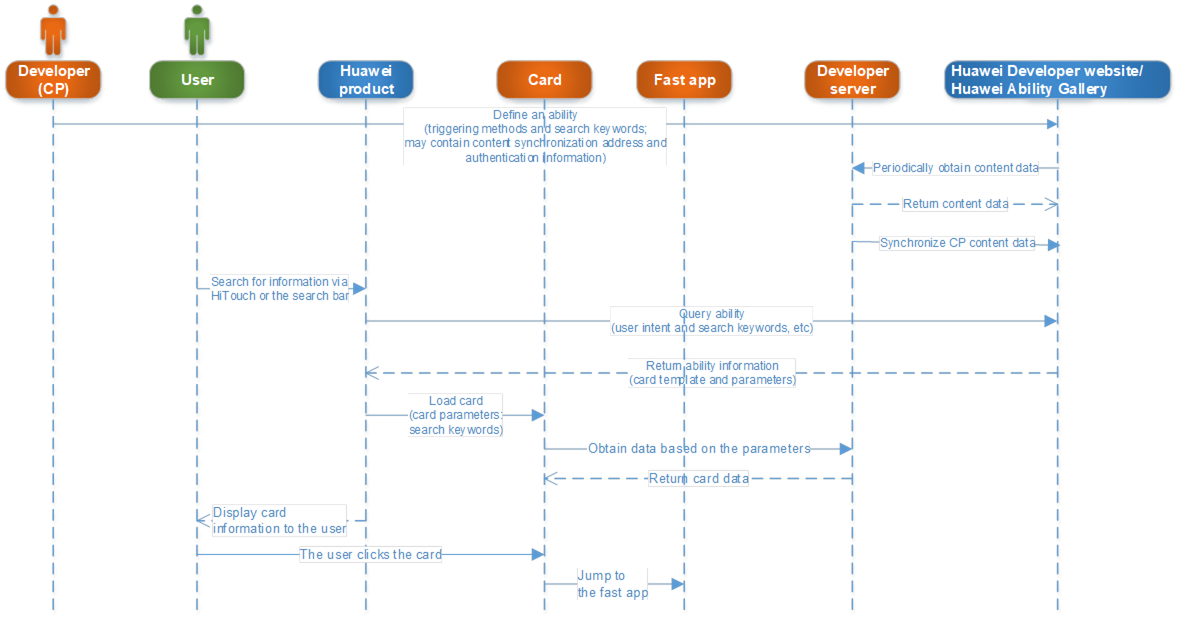
Before synchronizing developer content data, check items such as total data volume and daily variant according to the checklist.
| Check Item | Description | Check Result |
| Total data volume | Total amount (pieces) of data that a developer can provide for Huawei | |
| Daily variant | Amount (pieces) of data that a developer can update to Huawei each day | |
| Data size | The maximum size of a single piece of data | |
| Synchronization frequency | Frequency of a full synchronization and an incremental synchronization |
Interface protocol: HTTPS
Data format: Generally, requests and responses adopt the JSON format.
Request method: POST (submission).
The Huawei Ability Gallery provides an interface URL that is defined as http[s]://{Domain name}/{Module}?{Parameter}. The following table describes each part of the URL.
| Field | Meaning | Example |
| Domain name | Address for providing an interface to external users | hag.cloud.huawei.com |
| Module | Ability name | HAGGWService |
Both interface resources and parameters are named in camel case, for example, cardList.
A status packet returned by the client includes an HTTP status code and a service error code.
Adopt HTTP status codes that have been defined in the HTTP protocol RFC 2616. Do not define your own version of HTTP status codes if they are already available in the protocol.
Error codes for request errors or operation failures must be clearly defined in Content-body. The following table provides the definition and description of service error codes.
| Parameter | Type | Optional | Description |
| code | Mandatory | Error code. The value is 0 if the request is successful. | |
| desc | String | Optional | Cause of error. The value can be null if the request is successful. |
1. Definition of Error Code
| Error Code | Description | Remarks |
| 0 | OK | Succeeded. |
| 1 | Invalid parameter | The parameter is invalid. |
| 2 | Incorrect signature | The signature is incorrect. |
| 3 | Too many parameters | There are too many parameters. |
| 4 | Unsupported signature method | This signature method is not supported. |
| 5 | Invalid/Used timestamp parameter | The time stamp is invalid. |
| 6 | Unsupported open api | This interface is not supported. |
| 12 | Session key invalid or no longer valid | The session key is invalid. |
| 31 | Forbidden | Information check failed. |
| 32 | Data parse error | An error occurred during data parsing. |
| 80 | Request Timeout | The request timed out. |
| 101 | Unknown error | An unknown error occurred. |
| 102 | Server internal error | A server error occurred. |
| 103 | Service temporarily unavailable | The service is unavailable for the time being. |
2. Notes
(1) Service error
If the returned error code is not 0, it is regarded that an error has occurred during service processing. The server needs to check the error code and find out the cause. For example, auth failed, the parameter is incorrect, or XX exceeds the maximum capacity. Correct the parameters and resend the request to the server.
(2) HTTP error
If the returned status code is not 200, it indicates that an error has occurred in the server. The client needs to try again.
1. Interface Description
This interface is used by the Huawei service aggregation gateway to obtain financial content information from third-party servers.
2. 2. Interface Address
| Item | Description |
| Calling relationship | From Huawei server to third-party server |
| Calling method | HTTPS+POST |
| Request address | Address configured by a developer on the ability development platform for providing data |
| Constraint | 1. To save bandwidth, gzip must be enabled to compress responses from a developer. 2. Huawei server invokes services via HTTP persistent connection. To prevent connection cost from service invocation, the developer must support http:keep-alive. |
3. Request Packet
| Parameter | Type | M/O | Description |
| appKey | String | M | accessKey configured by a developer on the ability development platform. |
| appSecret | String(256) | M | Parameter signature = base64(hmac-sha256(secretKey, ts)), where secretKey is the access key allocated by Huawei to the developer server. |
| countryCode | String | O | Country code. CN is adopted by default if no other value is specified. |
| language | String | O | Language type. ZH is adopted by default if no other value is specified. |
| abilityId | String | O | When a developer has multiple abilities, content data can be obtained based on each ability. |
| ts | String | M | Time stamp, which is used for encryption and protection against cache penetration. It is formatted as the difference between the current computer time and 00:00 January 1, 1970 GMT, in milliseconds. |
| pageSize | Integer | M | The number of records returned on each page. The default value is 200. If the value 200 is selected, the actual amount of data returned by a developer to Huawei could be less than 200 pieces. |
| page | Integer | M | It indicates the start page of a returned record. The first request contains 0. |
| Request packet: { “appKey”: “ow1oDF6bBgW3CSIh”, “appSecret”: “”, “countryCode”: “CN”, “language”: “ZH”, “abilityId”: “106”, “ts”: “1460032806000”, “pageSize”: “200”, “page”: “1” } | |||
4. Response Packet
| Parameter | Type | M/O | Description |
| code | String | M | A service error rode. |
| desc | String | O | Error description, which can be the success notification ok or thecause of error. |
| totalPage | Integer | M | Total number of pages that meet data requirements. |
| currentPage | Integer | M | Current page number. |
| data | JsonObject | O | Data obtained in batches. |
| Response packet format: { “code”: “0”, “desc”: “OK”, “totalPage”: “5”, “currentPage”: “1”, “data”: { “ contents “: [ { “ contentId “: “1001”, “ type “: “0”, “code”: “600311”, “name”: “ Ronghua Industry Group”, “description”: “”, “exchange”: “ Shanghai Stock Exchange”, “mbmChartImageUrl”: “http://quote.eastmoney.com/sh600311.jpg“, “mbmChartUrl”: “http://quote.eastmoney.com/chart/h5.html?id=6003111&type=r“, “url”: “http://quote.eastmoney.com/sh600311.html" }, { “ contentId “: “1002”, “ type “: “0”, “code”: “000565”, “name”:”Chongqing Sanxia Paints Co. Ltd.”, “description”: “”, “exchange”: “ Shanghai Stock Exchange”, “mbmChartImageUrl”: “http://quote.eastmoney.com/sz000565.jpg“, “mbmChartUrl”: “http://quote.eastmoney.com/chart/h5.html?id=0005652&type=r“, “url”: “http://quote.eastmoney.com/sz000565.html“ } ] } } | |||
(1) Definition of the data structure for financial content data:
| Parameter | Type | M/O | Description |
| contents | JsonArray | O | A list of financial content information. |
(2) Definition of the contents structure:
| Parameter | Type | M/O | Description | Usage |
| contentId | String | M | ID of financial content, which must be unique among all such content provided by a developer. Maximum length: 32 bytes. | The unique index for data modification or deletion. |
| Type | String | M | Type of financial content, including stock, investment fund, securities, futures, foreign exchange, and wealth management. Maximum length: 32 bytes. | A search condition. |
| code | String | M | Code of financial content. For example, when type is set to 0, code indicates a stock symbol. Maximum length: 16 bytes. | A search condition or a search result. |
| name | String | M | Name of financial content. For example, when type is set to 0, code indicates a stock name. Maximum length: 64 bytes. | A search condition or a search result. |
| description | String | O | Description of financial content. Maximum length: 512 bytes. | A search condition. |
| exchange | String | O | Stock exchange where a company is listed. Maximum length: 64 bytes. | A search condition or a search result. |
| mbmChartImageUrl | String | O | URL to a stock chart. The URL is used to obtain a stock chart and display it in a card. Maximum length: 512 bytes. | A search result. |
| mbmChartUrl | String | O | URL to a stock page. The URL is used to redirect a user to the destination stock page after the user clicks a stock chart in the card. Maximum length: 512 bytes. | It is used to redirect a user to the destination based on the search result. |
| url | String | O | URL to a detailed stock view. The URL is used to redirect a user to the destination stock view. Maximum length: 512 bytes. | It is used to redirect a user to the destination based on the search result. |
Obtain a user-level AT/RT based on Code.
| Item | Description |
| Message direction | From developer server to Huawei authentication server. |
| Method | HTTPS + POST |
| URI (production environment) | https://login.cloud.huawei.com/oauth2/v2/token |
1. Request Header
| Key | Value | Remarks |
| Content-Type | application/x-www-form-urlencoded |
2. Request Body
| Parameter | Type | M/O | Description |
| accessToken | String(512) | M | A user-level AT. |
| requestTime | String(17) | M | Time when a request packet is sent. Format: yyyyMMddHHmmssSSS(UTC). |
| openId | String(512) | M | An ID assigned by Huawei to associate a third-party account with a Huawei account. |
| abilityId | String(128) | O | Ability ID of a notification, which can be obtained by a developer from the developer console of the Huawei Ability Gallery. For a developer with more than one abilityId, any of its abilities can be delivered because the Huawei Ability Gallery stores user AT/CT as per developer basis. |
| oAuthToken | OAuthToken | O | When completing account binding for a user, a developer may have to allocate AccessToken/RefreshToken to the user if the quick app server needs to authenticate quick app requests from the user. |
3. OAuthToken Fields and Their Values
| Parameter | Type | M/O | Description |
| accessToken | String(512) | M | AccessToken allocated by the quick app server to a user in compliance with the OAuth 2.0 specifications. |
| tokenExpire | Long | M | Validity period of the AccessToken of a user, in seconds. After the validity period expires, the Huawei Ability Gallery will apply for access to the quick app server by using refreshToken. |
| refreshToken | String(512) | M | An identifier allocated by the quick app server in compliance with the OAuth 2.0 specifications for refreshing AccessToken. |
| tokenType | String(64) | O | A field used for delivering Token. Default value: bearer. |
| Packet example: POST https://lfhagmirror.hwcloudtest.cn:8449/open-ability/v1/open-account-events/bind HTTP/1.1 Content Type: application/json; charset=UTF-8 Accept: application/json x-appid: 123456 Authorization: Bearer UoimwiI3bvOO+9vTomsXFMKR20cWk=
{ “requestTime”: “20180211134549678”, “accessToken”: “CFpcMunMZYkNcIxYVRcxrk0NoqatUoimwiI3bvOO+9vTomsXFMKR20cWk=”, “openId”: “YkNcIxYVRcxrk0NoqatUoimwiI3bvOO+9vToms”, “oAuthToken”: { “accessToken”: “kbjsItz4rj3569bapEAzLjrq3ZNnvlBw”, “tokenExpire”: 3125645, “refreshToken”: “SmkeDGg8jfue7GseDG9XqF2jnUlLzLAE”, “tokenType”: “bearer” } } | |||
1. If a request is correct, the server returns a JSON-encoded text carrying the following parameters:
| Field | Type | Mandatory or Not | Remarks |
| access_token | string | Mandatory | AT |
| expire_in | int | Mandatory | Access token’s validity period, in seconds. Default value: 1 hour. |
| refresh_token | string | Mandatory | The refresh token used for refreshing the access token. |
| scope | string | Optional | Final access scope of the access token. |
2. If a request is incorrect, the server returns a JSON-encoded text carrying the following parameters:
| Field | Type | Mandatory or Not | Remarks |
| error | string | Mandatory | An error code. For details about error codes, see section Huawei OAuth2.0 Error Response in the Huawei OAuth2.0 Service Interface Description. |
| error_description | string | Mandatory | Description of the error. |
After the AT of a user expires, refresh the AT based on RT.
| Item | Description |
| Message direction | From developer server to Huawei authentication server. |
| Method | HTTPS + POST |
| URI (production environment) | https://login.cloud.huawei.com/oauth2/v2/token |
1. Request Header
| Key | Value | Remarks |
| Content-Type | application/x-www-form-urlencoded |
2. Request Body
| Key | Type | Value | Remarks |
| grant_type | string | refresh_token | A fixed value. |
| refresh_token | string | The refresh token used for refreshing the access token. | |
| client_id | string | appID of a third-party developer. | |
| client_secret | string | appSecret of a third-party developer. | |
| scope | string | A list of permissions that are separated with spaces. If a request does not contain this parameter, it indicates that the data access permission requested is the same as that when the access token is obtained. | Optional |
The final Body is a string of the preceding fields and their values. “Key 1 = + urlEncode (value 1) + “ and “Key2= + urlEncode (value2) + “…
The value of each field must be processed through urlEncode.
1. If a request is correct, the server returns a JSON-encoded text carrying the following parameters:
| Field | Type | Mandatory or Not | Remarks |
| access_token | string | Mandatory | AT |
| expire_in | int | Mandatory | Access token’s validity period, in seconds. Default value: 1 hour. |
| refresh_token | string | Mandatory | The refresh token used for refreshing the access token. |
| scope | string | Optional | Final access scope of the access token. |
2. If a request is incorrect, the server returns a JSON-encoded text carrying the following parameters:
| Field | Type | Mandatory or Not | Remarks |
| error | string | Mandatory | An error code. |
| error_description | string | Mandatory | Description of the error. |
Obtain the Huawei OpenID based on a user-level AT.
| Item | Description |
| Message direction | From developer server to Huawei authentication server. |
| Method | HTTPS + POST |
| URI (production environment) | https://api.cloud.huawei.com/rest.php |
1. Request Header
| Key | Value | Remarks |
| Content-Type | application/x-www-form-urlencoded |
2. Request Body
| Key | Type | Value | Remarks |
| nsp_svc | string | huawei.oauth2.user.getTokenInfo | A fixed value. |
| open_id | string | OPENID | A fixed value, which must be expressed in uppercase. |
| access_token | string | User-level AT | The AT is obtained through Code. |
The final Body is a string of the preceding fields and their values. “Key 1 = + urlEncode (value 1) + “ and “Key2= + urlEncode (value2) + “…
The value of each field must be processed through urlEncode.
1. If a request is correct, the server returns a JSON-encoded text carrying the following parameters:
| Field | Type | Mandatory or Not | Remarks |
| client_id | string | Mandatory | appID of a third-party developer. |
| open_id | string | Mandatory | Mandatory Huawei openID of a user. |
| expire_in | int | Mandatory | Access token’s validity period, in seconds. |
| union_id | string | Optional | The Huawei unionid of a user. |
Obtain an application-level token for authentication when a developer server attempts to access the Huawei server.
| Item | Description |
| Message direction | From developer server to Huawei authentication server. |
| Method | HTTPS + POST |
| URI (production environment) | https://login.cloud.huawei.com/oauth2/v2/token |
1. Request Header
| Key | Value | Remarks |
| Content-Type | application/x-www-form-urlencoded |
2. Request Body
| Key | Type | Value | Remarks |
| grant_type | string | client_credentials | A fixed value. |
| client_id | string | appID of a third-party developer. | |
| client_secret | string | appSecret of a third-party developer. |
The final Body is a string of the preceding fields and their values. “Key 1 = + urlEncode (value 1) + “ and “Key2= + urlEncode (value2) + “…
The value of each field must be processed through urlEncode.
1. If a request is correct, the server returns a JSON-encoded text carrying the following parameters:
| Field | Type | Mandatory or Not | Remarks |
| access_token | string | Mandatory | AT |
| expire_in | int | Mandatory | Access token’s validity period, in seconds. Default value: 1 hour. |
| scope | string | Optional | Final access scope of the access token. |
2. If a request is incorrect, the server returns a JSON-encoded text carrying the following parameters:
| Field | Type | Mandatory or Not | Remarks |
| erro | string | Mandatory | An error code. |
| error_description | string | Mandatory | Description of the error. |
After successful account binding, the developer server notifies the Huawei Ability Gallery of the binding result. Then, the Huawei Ability Gallery records the binding status, which will be displayed to a user as part of the ability list.
| Item | Description |
| Message direction | From developer server to Huawei Ability Gallery. |
| Method | HTTPS + POST |
| URI (production environment) | https://hag.cloud.huawei.com/open-ability/v1/open-account-events/bind |
1. Request Header
| Parameter | Type | M/O | Description |
| x-appid | String(20) | M | appID of a third-party developer. |
| Authorization | String(512) | M | An application-level AccessToken. |
| Content-Type | String | M | This parameter is always set to application/json. |
| Accept | String | M | This parameter is always set to application/json. |
2. Request Body
| Parameter | Type | M/O | Description |
| accessToken | String(512) | M | A user-level AT. |
| requestTime | String(17) | M | Time when a request packet is sent. Format: yyyyMMddHHmmssSSS(UTC). |
| openId | String(512) | M | An ID assigned by Huawei to associate a third-party account with a Huawei account. |
| abilityId | String(128) | O | Ability ID of a notification, which can be obtained by a developer from the developer console of the Huawei Ability Gallery. For a developer with more than one abilityId, any of its abilities can be delivered because the Huawei Ability Gallery stores user AT/CT as per developer basis. |
| oAuthToken | OAuthToken | O | When completing account binding for a user, a developer may have to allocate AccessToken/RefreshToken to the user if the quick app server needs to authenticate quick app requests from the user. |
3. OAuthToken Fields and Their Values
| Parameter | Type | M/O | Description |
| accessToken | String(512) | M | AccessToken allocated by the quick app server to a user in compliance with the OAuth 2.0 specifications. |
| tokenExpire | Long | M | Validity period of the AccessToken of a user, in seconds. After the validity period expires, the Huawei Ability Gallery will apply for access to the quick app server by using refreshToken. |
| refreshToken | String(512) | M | An identifier allocated by the quick app server in compliance with the OAuth 2.0 specifications for refreshing AccessToken. |
| tokenType | String(64) | O | A field used for delivering Token. Default value: bearer. |
An example of request packet: POST https://lfhagmirror.hwcloudtest.cn:8449/open-ability/v1/service-events/notify HTTP/1.1 Content Type: application/json; charset=UTF-8 Accept: application/json x-appid: 123456 Authorization: Bearer UoimwiI3bvOO+9vTomsXFMKR20cWk=
{ “requestTime”: “20180211134549678”, “requestId”: “cIxYVRcxrk0NoqatU”, “openId”: “ YkNcIxYVRcxrk0NoqatUoimwiI3bvOO+9vToms “, “eventName”: “subcribeHotel”, “parameters”: “”, “effectiveTime”: “20180211134549678”, “expireTime”: “20180311134549678”, “oAuthToken”: { “accessToken”: “kbjsItz4rj3569bapEAzLjrq3ZNnvlBw”, “tokenExpire”: 3125645, “refreshToken”: “SmkeDGg8jfue7GseDG9XqF2jnUlLzLAE”, “tokenType”: “bearer” } } | |||
| Status Code | Description of Response |
| 200 | Successful account binding. No response is displayed. |
| 400 | Parameter check failed. Code: invalidParam. Response example: { “code”: “invalidParam”, “desc”: “Paramter {} is invalid/should not be null/should be in [x,y]. “ } |
| 401 | The gateway verifies that the application-level access token has expired or is invalid. Apply for an access token again. { “error”: “session timeout” } |
| 403 | The gateway failed to verify and process developer permissions. You are not authorized to call abilities from the Huawei Ability Gallery. { “error”: “access forbidden” } |
| 404 | The URL requested by the developer does not exist. Response example: { “error”: “invalid path” } |
| 406 | The developer’s request does not comply with the gateway specifications, for example, Header, which is mandatory, is missing. Response example: { “error”: “invalid AcceptType”, “moreInfo”: “should be application/json” } |
| 429 | Flow control because the number of client requests exceeds the quota. Code: usageLimits. The client may exponentially increase the wait time between retry attempts. The minimum retry interval is 30s. Response example: { “code”: “usageLimits”, “desc”: “Request per minutes exceeds max limit.” } |
| 500 | A server error occurred. Code: backendError. The client may exponentially increase the wait time between retry attempts. The minimum retry interval is 1s. Response example: { “code”: “backendError”, “desc”: “Backend server error.” } |
| Other errors | For a 4xx response, the client needs to locate and rectify the fault based on the error information. For a 5xx response, the client may exponentially increase the wait time between retry attempts. The minimum retry interval is 1s. |
After successful account unbinding, the developer server notifies the Huawei Ability Gallery of the unbinding result. Then, the Huawei Ability Gallery records the unbinding status, which will be displayed to a user as part of the ability list.
| Item | Description |
| Message direction | From developer server to Huawei Ability Gallery. |
| Method | HTTPS + POST |
| URI (production environment) | https://hag.cloud.huawei.com/open-ability/v1/open-account-events/unbind |
1. Request Header
| Parameter | Type | M/O | Description |
| x-appid | String(20) | M | appID of a third-party developer. |
| Authorization | String(512) | M | An application-level AccessToken. |
| Content-Type | String | M | This parameter is always set to application/json. |
| Accept | String | M | This parameter is always set to application/json. |
2. Request Body
| Parameter | Type | M/O | Description |
| requestTime | String(17) | M | Time when a request packet is sent. Format: yyyyMMddHHmmssSSS(UTC). |
| openId | String(512) | M | An ID assigned by Huawei to associate a third-party account with a Huawei account. |
| POST https://lfhagmirror.hwcloudtest.cn:8449/open-ability/v1/open-account-events/unbind HTTP/1.1 Content Type: application/json; charset=UTF-8 Accept: application/json x-appid: 123456 Authorization: Bearer UoimwiI3bvOO+9vTomsXFMKR20cWk=
{ “requestTime”: “20180211134549678”, “openId”: “YkNcIxYVRcxrk0NoqatUoimwiI3bvOO+9vToms” } | |||
| Status Code | Description of Response |
| 200 | Successful account unbinding. No response is displayed. |
| 400 | Parameter check failed. Code: invalidParam. Response example: { “code”: “invalidParam”, “desc”: “Paramter {} is invalid/should not be null/should be in [x,y]. “ } |
| 401 | The gateway verifies that the application-level access token has expired or is invalid. Apply for an access token again. { “error”: “session timeout” } |
| 403 | The gateway failed to verify and process developer permissions. You are not authorized to call abilities from the Huawei Ability Gallery. { “error”: “access forbidden” } |
| 404 | The URL requested by the developer does not exist. Response example: { “error”: “invalid path” } |
| 406 | The developer’s request does not comply with the gateway specifications, for example, Header, which is mandatory, is missing. Response example: { “error”: “invalid AcceptType”, “moreInfo”: “should be application/json” } |
| 429 | Flow control because the number of client requests exceeds the quota. Code: usageLimits. The client may exponentially increase the wait time between retry attempts. The minimum retry interval is 30s. Response example: { “code”: “usageLimits”, “desc”: “Request per minutes exceeds max limit.” } |
| 500 | A server error occurred. Code: backendError. The client may exponentially increase the wait time between retry attempts. The minimum retry interval is 1s. Response example: { “code”: “backendError”, “desc”: “Backend server error.” } |
| Other errors | For a 4xx response, the client needs to locate and rectify the fault based on the error information. For a 5xx response, the client may exponentially increase the wait time between retry attempts. The minimum retry interval is 1s. |
Based on a user event, for example, order state change, the developer server sends a notification to the Huawei Ability Gallery through this interface to trigger a card.
| Item | Description |
| Message direction | From developer server to Huawei Ability Gallery. |
| Method | HTTPS + POST |
| URI (production environment) | https://hag.cloud.huawei.com/open-ability/v1/service-events/notify |
1. Request Header
| Parameter | Type | M/O | Description |
| x-appid | String(20) | M | appID of a third-party developer. |
| Authorization | String(512) | M | An application-level AccessToken. |
| Content-Type | String | M | This parameter is always set to application/json. |
| Accept | String | M | This parameter is always set to application/json. |
2. Request Body
| Parameter | Type | M/O | Description |
| requestTime | String(17) | M | Time when a request packet is sent. Format: yyyyMMddHHmmssSSS(UTC). |
| requestId | String | M | Unique ID of an event. It identifies whether a message needs to be retransmitted or canceled. In the case of retransmission, ensure that the requestId of the retransmitted message is the same as the requestId of the original message. The server will filter and reject repeated requests. In other cases, ensure that the requestId transmitted each time is different. UUID can be used as the requestId. Pattern: [a-zA-Z0-9-]{1,64}. |
| openId | String(512) | M | An ID assigned by Huawei to associate a third-party account with a Huawei account. |
| eventName | String(100) | M | Event name, which is defined by the developer and assigned to a card according to the event card rule. Under the same appID, each event name must be unique. |
| parameters | String(255) | O | Event parameters, which are defined by the developer and transparently transmitted to card pages by the Huawei Ability Gallery. The parameters should adopt the JSON format. Parameter keys must not start with ““, “$”, or “hag“ and must not use reserved words such as for, if, show, and tid. |
| effectiveTime | String(17) | M | Time when an event takes effect, such as the hotel check-in time. The effective time adopts the UTC standard and is specific to millisecond. Format: yyyyMMddHHmmssSSS. |
| expireTime | String(17) M | Time when an event expires. After expiration, the event will not be notified to the user anymore. The expiration time adopts the UTC standard and is specific to millisecond. Format: yyyyMMddHHmmssSSS. | |
| abilityId | String(128) | O | Ability ID of a notification, which can be obtained by a developer from the developer console of the Huawei Ability Gallery. |
| oAuthToken | OAuthToken | O | After completing account binding for a user, a developer may have to allocate AccessToken/RefreshToken to the user if the quick app server needs to authenticate quick app requests from the user or update the AccessToken/RefreshToken that is stored in the Huawei Ability Gallery for the user. |
3. OAuthToken Fields and Their Values
| Parameter | Type | M/O | Description |
| accessToken | String(512) | M | AccessToken allocated by the quick app server to a user in compliance with the OAuth 2.0 specifications. |
| tokenExpire | Long | M | Validity period of the AccessToken of a user, in seconds. After the validity period expires, the Huawei Ability Gallery will apply for access to the quick app server by using refreshToken. |
| refreshToken | String(512) | M | An identifier allocated by the quick app server in compliance with the OAuth 2.0 specifications for refreshing AccessToken. |
| token Type | String(64) | O | A field used for delivering Token. Default value: bearer. |
An example of request packet: POST https://lfhagmirror.hwcloudtest.cn:8449/open-ability/v1/service-events/notify HTTP/1.1 Content Type: application/json; charset=UTF-8 Accept: application/json x-appid: 123456 Authorization: Bearer UoimwiI3bvOO+9vTomsXFMKR20cWk=
{ “requestTime”: “20180211134549678”, “requestId”: “cIxYVRcxrk0NoqatU”, “openId”: “ YkNcIxYVRcxrk0NoqatUoimwiI3bvOO+9vToms “, “eventName”: “subcribeHotel”, “parameters”: “”, “effectiveTime”: “20180211134549678”, “expireTime”: “20180311134549678”, “oAuthToken”: { “accessToken”: “kbjsItz4rj3569bapEAzLjrq3ZNnvlBw”, “tokenExpire”: 3125645, “refreshToken”: “SmkeDGg8jfue7GseDG9XqF2jnUlLzLAE”, “tokenType”: “bearer” } } | |||
| Status Code | Description of Response |
| 200 | Successful notification. (After event notification is successful, the Huawei Ability Gallery asynchronously processes the event or discards the event if an exception occurs.) No response is displayed. |
| 400 | Parameter check failed. Code: invalidParam. Response example: { “code”: “invalidParam”, “desc”: “Paramter {} is invalid/should not be null/should be in [x,y]. “ } |
| 401 | The gateway verifies that the application-level access token has expired or is invalid. Apply for an access token again. { “error”: “session timeout” } |
| 403 | The gateway failed to verify and process developer permissions. You are not authorized to call abilities from the Huawei Ability Gallery. { “error”: “access forbidden” } |
| 404 | The URL requested by the developer does not exist. Response example: { “error”: “invalid path” } |
| 406 | The developer’s request does not comply with the gateway specifications, for example, Header, which is mandatory, is missing. Response example: { “error”: “invalid AcceptType”, “moreInfo”: “should be application/json” } |
| 429 | Flow control because the number of client requests exceeds the quota. Code: usageLimits. The client may exponentially increase the wait time between retry attempts. The minimum retry interval is 30s. Response example: { “code”: “usageLimits”, “desc”: “Request per minutes exceeds max limit.” } |
| 500 | A server error occurred. Code: backendError. The client may exponentially increase the wait time between retry attempts. The minimum retry interval is 1s. Response example: { “code”: “backendError”, “desc”: “Backend server error.” } |
| Other errors | For a 4xx response, the client needs to locate and rectify the fault based on the error information. For a 5xx response, the client may exponentially increase the wait time between retry attempts. The minimum retry interval is 1s. |
| Item | Description |
| Method | POST |
| URI (production environment) | /service-events/revoke |
| Description | The developer revokes a user event. |
| Header Field | Description | Mandatory or Not | Type | Value Range |
| x-appid | Serial number of a small program registered by a developer with the Huawei Developer website. | Yes | string | Regular expression (pattern): [0-9]{1,20} |
| Field | Type | Mandatory or Not | Remarks |
| requestBody | RevokeServiceEventsReq | Yes | A request message. |
RevokeServiceEventsReq
| Field | Description | Mandatory or Not | Type | Value Range |
| requestTime | Time when a request packet is sent. Format: yyyyMMddHHmmssSSS(UTC). | Yes | string | Regular expression (pattern): [0-9]{17} |
| requestId | Unique ID of an event. It identifies whether a message needs to be retransmitted or canceled. In the case of retransmission, ensure that the requestId of the retransmitted message is the same as the requestId of the original message. The server will filter and reject repeated requests. In other cases, ensure that the requestId transmitted each time is different. UUID can be used as the requestId. | Yes | string | Regular expression (pattern): [a-zA-Z0-9-]{1,64} |
| openId | An ID assigned by Huawei to associate a third-party account with a Huawei account. | Yes | string | |
| abilityId | Ability ID of a notification. | No | string | Maximum length: 128 |
| Response Code | Response Body Type | Description |
| 200 | Successful notification. (After event notification is successful, the Huawei Ability Gallery asynchronously processes the event. Therefore, returning the response code 200 does not mean that a card will be immediately presented to the user. If an exception occurs, the Huawei Ability Gallery would discard the event.) | |
| 400 | ResultInfo | Parameter check failed. Code: invalidParam. |
| 401 | The gateway verifies that the application-level access token has expired or is invalid. Apply for an access token again. | |
| 403 | The gateway failed to verify and process CP/SP permissions. You are not authorized to call abilities from the Huawei Ability Gallery. | |
| 404 | ResultInfo | The user does not exist. Code: userNotFound. It indicates that the user has unbound his/her account from the Huawei server and the SP/CP should stop sending event notifications to the user and unbind the user account at the same time. |
| 429 | ResultInfo | Flow control because the number of client requests exceeds the quota. Code: usageLimits. The client may exponentially increase the wait time between retry attempts. The minimum retry interval is 30s. |
| 500 | ResultInfo | A server error occurred. Code: backendError. The client may exponentially increase the wait time between retry attempts. The minimum retry interval is 1s. |
| default | Other errors. For a 4xx response, the client needs to locate and rectify the fault based on the error information. For a 5xx response, the client may exponentially increase the wait time between retry attempts. The minimum retry interval is 1s. |
In a quick app, obtain user Code by calling SDK of the quick app. The Code is used to obtain the user-level AccessToken and OpenID on the developer server.
| Item | Description |
| Message direction | From quick app to Huawei quick app execution environment. |
| Method | Call the local SDK, specifically, account.authorize(OBJECT). I |
| nterface statement | {“name”: “service.account”} |
| Import module | import account from ‘@service.account’ or var account = require(“@service.account”) |
| Parameter | Type | Mandatory | Description |
| appid | String | Yes | ID obtained from the Huawei Developer website. |
| Type | String | Yes | This parameter is always set to code. |
| scope | String | Yes | This parameter is always set to scope.baseProfile. |
| Parameter | Type | Description |
| state | String | The value of the same field in the request. |
| code | String | The authorization code returned. |
| accessToken | String | The access token returned. This parameter is available in the simple mode. |
| tokenType | String | The token type returned. This parameter is available in the simple mode. |
| expiresIn Integer | Integer | Time when the access token expires, in seconds. This parameter is available in the simple mode. It can be left empty if the expiration time is set in other ways. |
| scope | String | The scope of permissions. This parameter is available in the simple mode. It can be left empty if the scope is the same as that as defined in the request. |
| Error Code | Description |
| 201 | Failed to access the account because the user rejected the request. |
In a quick app, obtain user token by calling SDK of the quick app. The token is used to obtain user information such as nickname and profile picture in the quick app.
| Item | Description |
| Message direction | From quick app to Huawei quick app execution environment. |
| Method | Call the local SDK, specifically, account.authorize(OBJECT). |
| Interface statement | {“name”: “service.account”} |
| Import module | import account from ‘@service.account’ or var account = require(“@service.account”) |
| Parameter | Type | Mandatory | Description |
| appid | String | Yes | ID obtained from the Huawei Developer website. |
| Type | String | Yes | This parameter is always set to token. |
| scope | String | Yes | This parameter is always set to scope.baseProfile. |
| Parameter | Type | Description |
| state | String | The value of the same field in the request. |
| code | String | The authorization code returned. |
| accessToken | String | A user token. |
| tokenType | String | The token type returned. This parameter is available in the simple mode. |
| expiresIn | Integer | Time when the access token expires, in seconds. This parameter is available in the simple mode. It can be left empty if the expiration time is set in other ways. |
| scope | String | The scope of permissions. This parameter is available in the simple mode. It can be left empty if the scope is the same as that as defined in the request. |
| Error Code | Description |
| 201 | Failed to access the account because the user rejected the request. |
The interface is used to obtain user information such as nickname and profile picture in the quick app by calling SDK of the quick app.
| Item | Description |
| Message direction | From quick app to Huawei quick app execution environment. |
| Method | Call the local SDK, specifically, account.getProfile(OBJECT). |
| Interface statement | {“name”: “service.account”} |
| Import module | import account from ‘@service.account’ or var account = require(“@service.account”) |
| Parameter | Type | Mandatory | Description |
| appid | String | Yes | ID obtained from the Huawei Developer website. |
| token | String | Yes | The user token obtained through INF11. |
| Parameter | Type | Description |
| unionid | String | Unique identifier of a user on the Huawei Developer website. This field is returned only when certain conditions are met (prior application to the Huawei Developer website is needed). |
| nickname | String | Nickname of a user, which can be left empty. |
| avatar | Object | URL to a user’s profile picture, which can be left empty. Profile picture URLs are organized by resolution. When only one resolution is available, the default URL can be used. |
When an authorization code has been obtained, call the account.checkUserSession interface to check whether the authorization code needs to be obtained again.
1. If no authorization code has been obtained or the response to a checkUserSession request is false, the account binding process needs to be executed again.
2. If the response to the checkUserSession request is true, it indicates that the current session is still valid.
| Item | Description |
| Message direction | From quick app to Huawei quick app execution environment. |
| Method | Call the local SDK, specifically, account.checkUserSession(OBJECT). |
| Interface statement | {“name”: “service.account”} |
| Import module | import account from ‘@service.account’ or var account = require(“@service.account”) |
| import account from ‘@service.account’ account.checkUserSession({ success: function (data2) { //Valid }, fail: function (data, code) { //Invalid } }); | |
OBJECT parameters:
| Parameter | Type | Mandatory or Not | Description |
| success | Function | No | Callback succeeded. The authorization is valid. |
| fail | Function | No | Callback failed. The authorization is invalid. |
None.
None.


