When you use local @Builder for passing data by reference, you need to consider the parent-child relationship of components. However, after using .bind(this) to change the function call context, the parent-child relationship of components may become inconsistent with the parent-child relationship of state management. To address this issue, the @LocalBuilder decorator is introduced. @LocalBuilder has the same function as local @Builder, and can better determine the parent-child relationship of components and the parent-child relationship of state management than local @Builder.
Before proceeding, you are advised to review @Builder.

This decorator is supported since API version 12.
This decorator is supported in ArkTS widgets since API version 12.
This decorator can be used in atomic services since API version 12.
[h2]Component-Level Builder Declaration
Syntax:
@LocalBuilder
myBuilderFunction() {
  // ···
}
Usage:
this.myBuilderFunction()
-
One or more @LocalBuilder functions can be defined in a custom component. These functions are treated as private and special member functions of the owning component.
-
Each @LocalBuilder function is accessible only within the owning component's scope and can be called from the component's build method or other local builder functions.
-
Inside the custom builder function body, this refers to the owning component. Component state variables are accessible from within the custom builder function implementation. Using this to access the custom components' state variables is recommended over parameter passing.
Differences Between @LocalBuilder and Local @Builder
When local @Builder functions are passed between components, it is common to use .bind(this) to modify the function context. However, this approach may lead to inconsistencies between the visual component hierarchy and the underlying state management relationships. In contrast, @LocalBuilder maintains stable parent-child relationships regardless of .bind(this) usage. This means that the parent component of elements defined in @LocalBuilder remains fixed and immutable.
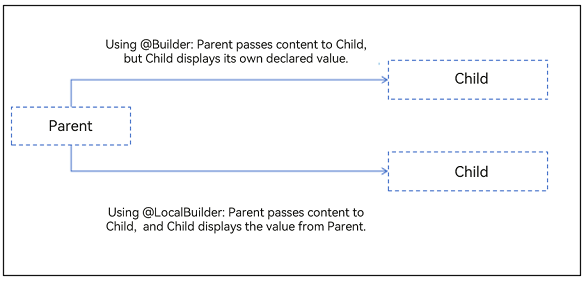

The bind() method creates a new bound function that sets the this value to the first parameter provided during creation.
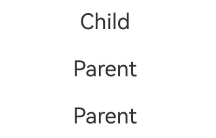
In the following example, when the function componentBuilder is modified by @Builder, the display effect is Child. When the function componentBuilder is modified by @LocalBuilder, the display effect is Parent.
@Component
struct Child {
  label: string = 'Child';
  @BuilderParam customBuilderParam: () => void;

  build() {
    Column() {
      this.customBuilderParam()
    }
    .width('100%')
  }
}

@Entry
@Component
struct Parent {
  label: string = 'Parent';

  @Builder
  componentBuilder() {
    Text(`${this.label}`) // In @Builder, this points to the component of the actual invoking point. In this case, because the invoking point is in the Child component, this points to the Child component.
      .fontSize(20)
      .margin(10)
  }

  @LocalBuilder
  componentLocalBuilder() {
    Text(`${this.label}`) // This in @LocalBuilder points to the parent component of the @LocalBuilder function.
      .fontSize(20)
      .margin(10)
  }

  build() {
    Column() {
      Child({ customBuilderParam: this.componentBuilder }) // Child component to display the string Child.
      Child({ customBuilderParam: this.componentLocalBuilder }) // Pass the function itself. When customBuilderParam is called in the Child component, the string "Parent" is displayed.
      Child({
        customBuilderParam: () => {
          this.componentLocalBuilder()
        }
      }) // Use the () => { function call } approach. When customBuilderParam is called in the Child component, the string "Parent" is displayed.
    }
    .width('100%')
  }
} 
Constraints
-
@LocalBuilder declarations are component-bound. Global declarations are not allowed.
-
@LocalBuilder cannot be used in conjunction with other decorators, whether built-in or custom.
-
@LocalBuilder cannot be used to decorate static functions in custom components.
-
You are advised to pass the function itself or use the () => { function call } format, instead of directly passing the execution result of the function.
Parameter Passing Rules
Parameters for @LocalBuilder functions can be passed by callback, by reference, or by value. The following rules must be followed:
-
Parameter types must exactly match their declared types. undefined and null values are prohibited.
-
All parameters must be immutable inside the @LocalBuilder function body.
-
The @LocalBuilder function body follows the same syntax rules as the build() function.
-
During callback-based transfer and reference-based transfer, UI component refresh within the @LocalBuilder function is supported. Passing by reference takes effect only when one parameter is passed and the parameter is directly passed as an object literal. When multiple parameters are passed, UI component refresh within the @LocalBuilder function is not supported.
[h2]Passing Parameters by Callback
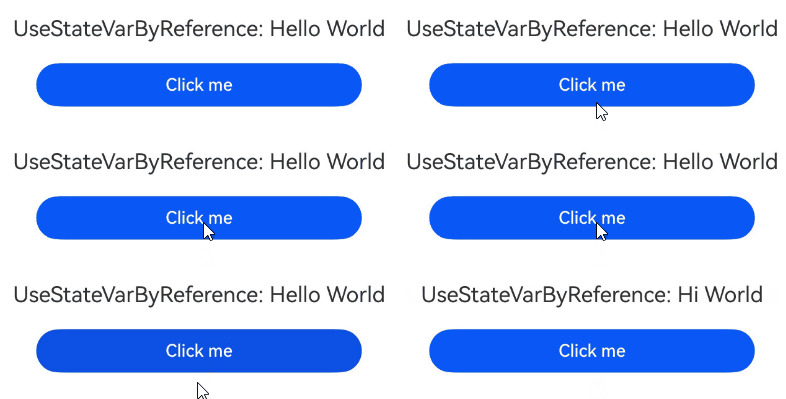
From API version 20, developers can use the UIUtils.makeBinding() function, the Binding class, and the MutableBinding class to refresh state variables in the @Builder function. For details, see makeBinding.
import { UIUtils, Binding } from '@kit.ArkUI';

@Entry
@Component
struct Parent {
  @State variableValue: string = 'Hello World';

  @LocalBuilder
  citeLocalBuilder(params: Binding<string>) {
    Row() {
      Text(`UseStateVarByReference: ${params.value}`)
        .fontSize(20)
        .margin(10)
    }
  }

  build() {
    Column() {
      // Use the UIUtils.makeBinding() method and the Binding class to refresh state variables in the @LocalBuilder function.
      this.citeLocalBuilder(UIUtils.makeBinding<string>(() => this.variableValue))
      Button('Click me')
        .width(300)
        .margin(10)
        .onClick(() => {
          this.variableValue = 'Hi World';
        })
    }
    .width('100%')
  }
} 
[h2]By-Reference Parameter Passing
In by-reference parameter passing, state variables can be passed, and the change of these state variables causes the UI re-rendering in the @LocalBuilder function.

If the @LocalBuilder function is used together with the $$ operator, when a child component calls the @LocalBuilder function of the parent component, parameter changes from the child component will not trigger UI re-rendering in the @LocalBuilder function. For details, see FAQs UI Is Not Refreshed When the @LocalBuilder Function Is Used Together with the $$ Parameter.
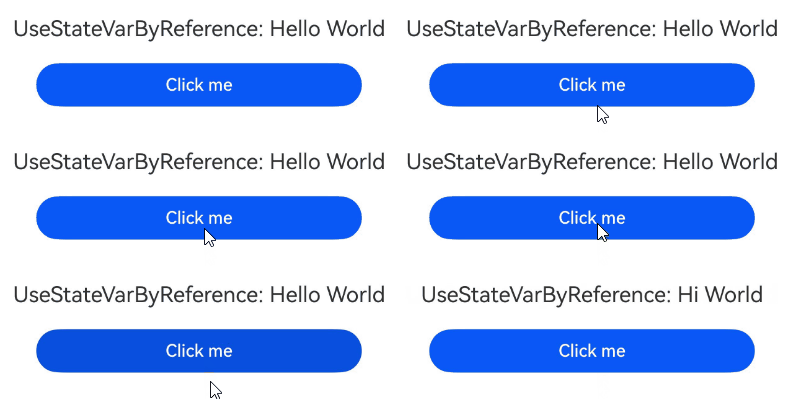
In the example, the @LocalBuilder function in the Parent component is called in the build function using the key-value pair syntax for parameter passing. After Click me is clicked, the Text content in the @LocalBuilder changes with the state variable.
class ReferenceType {
  paramString: string = '';
}

@Entry
@Component
struct Parent {
  @State variableValue: string = 'Hello World';

  @LocalBuilder
  citeLocalBuilder(params: ReferenceType) {
    Row() {
      Text(`UseStateVarByReference: ${params.paramString}`)
        .fontSize(20)
        .margin(10)
    }
  };

  build() {
    Column() {
      // Pass values in key-value pair format. When the passed-in parameters change, the UI in citeLocalBuilder is refreshed.
      this.citeLocalBuilder({ paramString: this.variableValue })
      Button('Click me')
        .width(300)
        .margin(10)
        .onClick(() => {
          this.variableValue = 'Hi World';
        })
    }
    .width('100%')
  }
} 
For passing parameters by reference in an @LocalBuilder function that invokes custom components, ArkUI provides $$ as the standard paradigm.
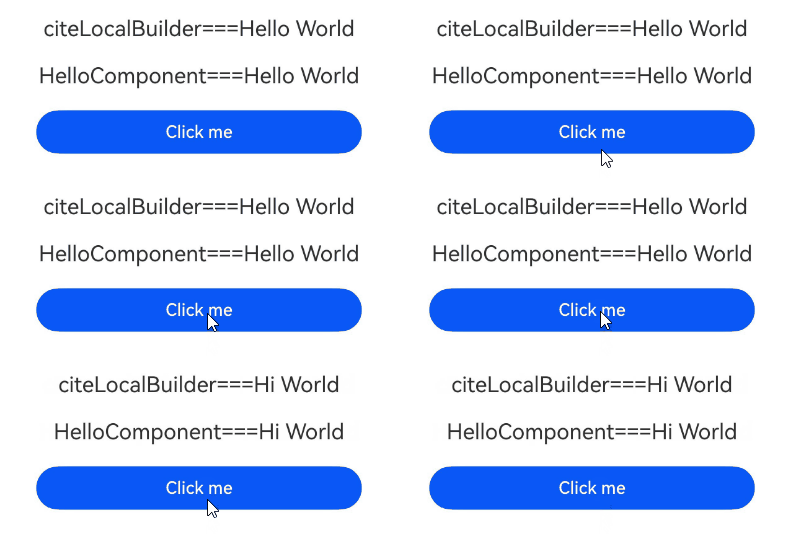
In the following example, in the @LocalBuilder function of the Parent component, a custom component is called with parameters passed by reference. When the value of the state variable in the Parent component changes, the message value of the custom component HelloComponent within the @LocalBuilder function will also change.
class ReferenceType {
  paramString: string = '';
}

@Component
struct HelloComponent {
  @Prop message: string;

  build() {
    Row() {
      Text(`HelloComponent===${this.message}`)
        .fontSize(20)
        .margin(10)
    }
  }
}

@Entry
@Component
struct Parent {
  @State variableValue: string = 'Hello World';

  @LocalBuilder
  citeLocalBuilder($$: ReferenceType) {
    Row() {
      Column() {
        Text(`citeLocalBuilder===${$$.paramString}`)
          .fontSize(20)
          .margin(10)
        HelloComponent({ message: $$.paramString })
      }
      .width('100%')
    }
  }

  build() {
    Column() {
      // Pass parameters by reference. When the passed-in parameters change, the UI in citeLocalBuilder is refreshed.
      this.citeLocalBuilder({ paramString: this.variableValue })
      Button('Click me')
        .width(300)
        .margin(10)
        .onClick(() => {
          this.variableValue = 'Hi World';
        })
    }
    .width('100%')
  }
} 
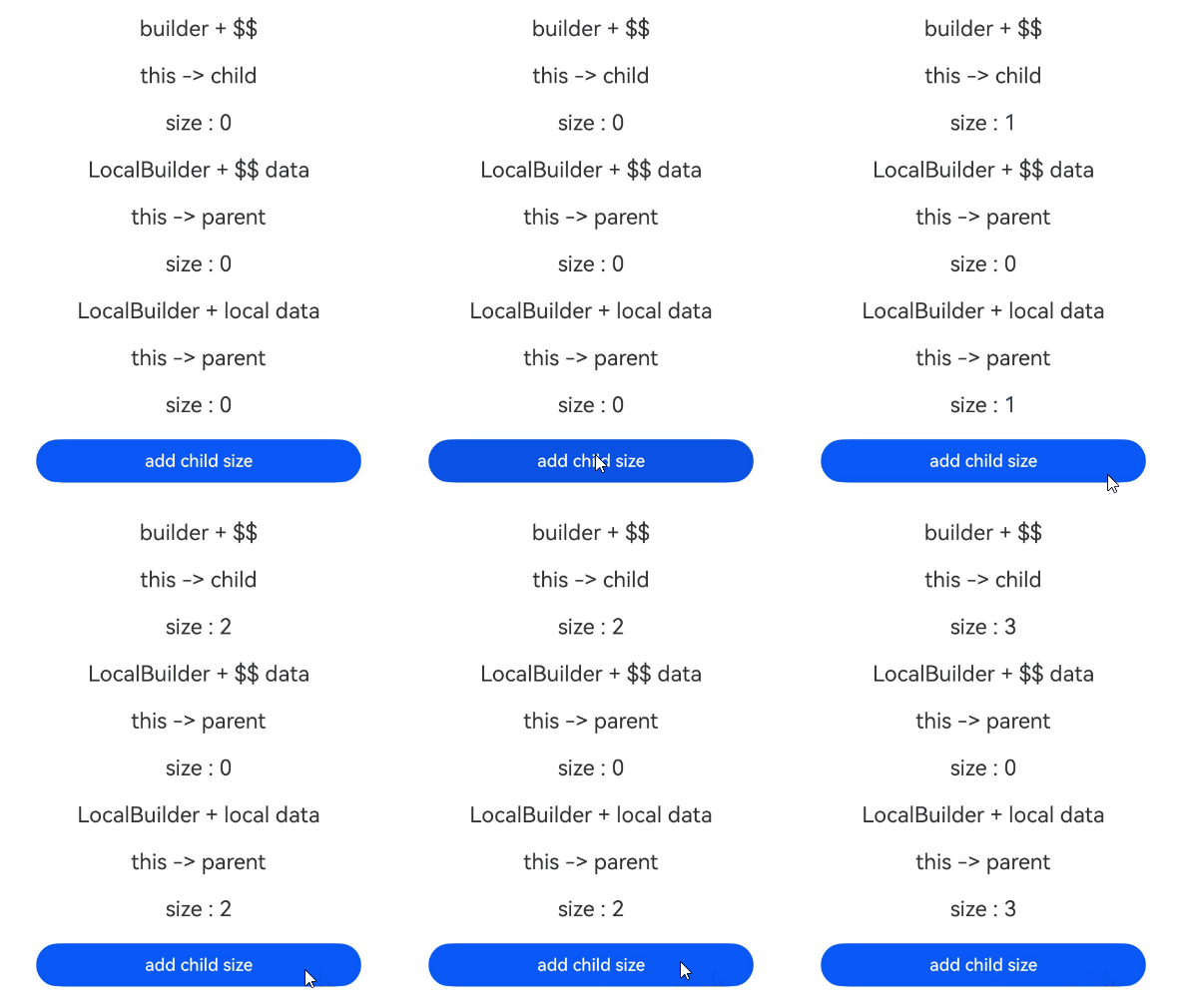
When a child component calls the @LocalBuilder function of its parent component with state variables, changes to the state variable do not trigger UI re-rendering within the @LocalBuilder function. This occurs because components created using the @LocalBuilder function remain bound to the parent, and the state variable updates only affect the current component and its children, not the parent. In contrast, using @Builder functions can trigger UI re-rendering. This is because @Builder dynamically changes the function's this context to point to the calling child component, binding the created components to the child instead of the parent component.
In the following example, the Child component transfers state variables to the @Builder and @LocalBuilder functions of the Parent component. Inside @Builder, this points to Child, and parameter changes trigger UI re-rendering. Inside @LocalBuilder, this points to Parent, and parameter changes do not trigger UI re-rendering. Only changes to the Parent component's own state variables will cause the UI to re-render.
class Data {
  public size: number = 0;
}

@Entry
@Component
struct Parent {
  label: string = 'parent';
  @State data: Data = new Data();

  @Builder
  componentBuilder($$: Data) {
    // Click the button to trigger UI refresh.
    Text('builder + $$')
      .fontSize(20)
      .margin(10)
    Text(`${'this -> ' + this.label}`)
      .fontSize(20)
      .margin(10)
    Text(`${'size : ' + $$.size}`)
      .fontSize(20)
      .margin(10)
  }

  @LocalBuilder
  componentLocalBuilder($$: Data) {
    // Clicking the button does not trigger UI refresh.
    Text('LocalBuilder + $$ data')
      .fontSize(20)
      .margin(10)
    Text(`${'this -> ' + this.label}`)
      .fontSize(20)
      .margin(10)
    Text(`${'size : ' + $$.size}`)
      .fontSize(20)
      .margin(10)
  }

  @LocalBuilder
  contentLocalBuilderNoArgument() {
    // Click the button to trigger UI refresh.
    Text('LocalBuilder + local data')
      .fontSize(20)
      .margin(10)
    Text(`${'this -> ' + this.label}`)
      .fontSize(20)
      .margin(10)
    Text(`${'size : ' + this.data.size}`)
      .fontSize(20)
      .margin(10)
  }

  build() {
    Column() {
      Child({
        contentBuilder: this.componentBuilder,
        contentLocalBuilder: this.componentLocalBuilder,
        contentLocalBuilderNoArgument: this.contentLocalBuilderNoArgument,
        data: this.data
      })
    }
    .width('100%')
  }
}

@Component
struct Child {
  label: string = 'child';

  @Builder
  customBuilder() {
  };

  @BuilderParam contentBuilder: ((data: Data) => void) = this.customBuilder;
  @BuilderParam contentLocalBuilder: ((data: Data) => void) = this.customBuilder;
  @BuilderParam contentLocalBuilderNoArgument: (() => void) = this.customBuilder;
  @Link data: Data;

  build() {
    Column() {
      this.contentBuilder({ size: this.data.size })
      this.contentLocalBuilder({ size: this.data.size })
      this.contentLocalBuilderNoArgument()
      Button('add child size')
        .width(300)
        .margin(10)
        .onClick(() => {
          this.data.size += 1;
        })
    }
    .width('100%')
  }
} 
[h2]By-Value Parameter Passing
By default, parameters in the @LocalBuilder functions are passed by value. In this case, when the passed parameter is a state variable, its change does not cause UI re-rendering in the @LocalBuilder function. Therefore, when using state variables, you are advised to use Passing Parameters By Callback or Passing Parameters By Reference.
In the following example, the Parent component passes the @State decorated label value to the @LocalBuilder function as a function parameter. In this case, the value obtained by the @LocalBuilder function is a regular variable value. As a result, when the label value changes, the value in the @LocalBuilder function remains unchanged.
@Entry
@Component
struct Parent {
  @State label: string = 'Hello';

  @LocalBuilder
  citeLocalBuilder(paramA1: string) {
    Row() {
      Text(`UseStateVarByValue: ${paramA1}`)
        .fontSize(20)
        .margin(10)
    }
    .height('100%')
  }

  build() {
    Column() {
      // Pass parameters by value.
      // When the label value decorated by @State changes, the value inside the @LocalBuilder function does not change.
      this.citeLocalBuilder(this.label)
    }
    .width('100%')
  }
} 
[h2]Using @LocalBuilder in @ComponentV2 Decorated Custom Components
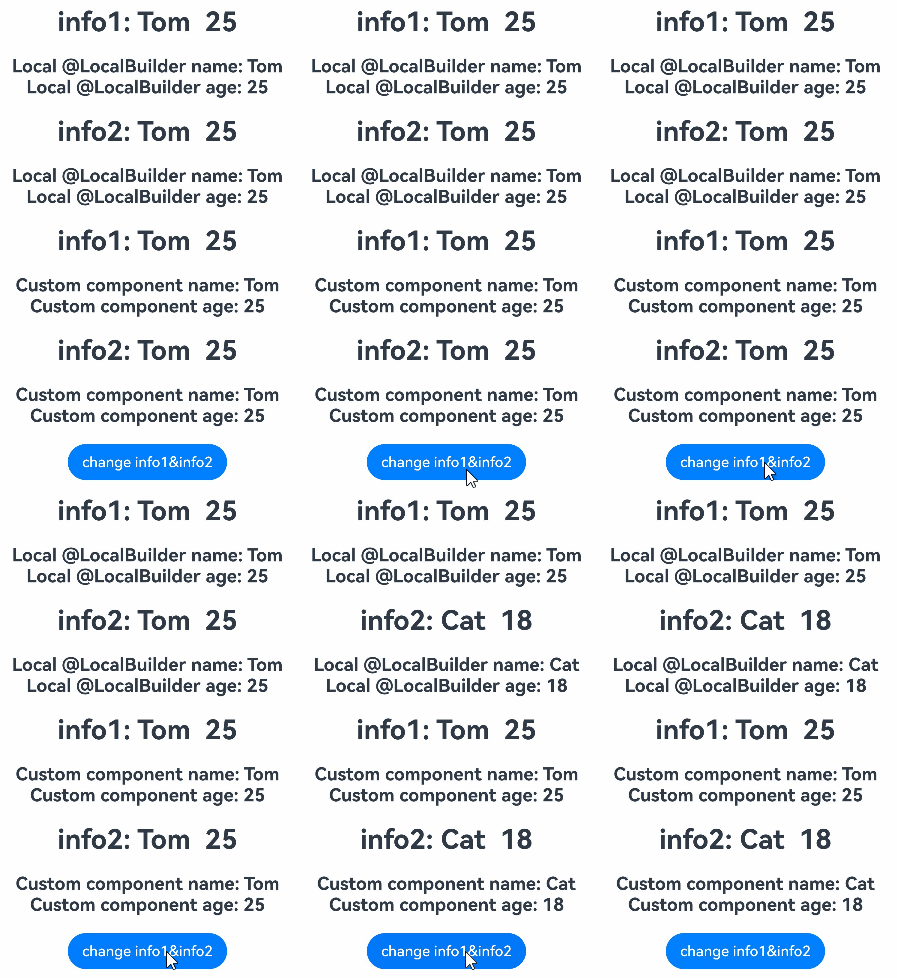
Use the local @LocalBuilder in the custom component decorated by @ComponentV2. When the variable is modified, the UI is refreshed.
@ObservedV2
class Info {
  @Trace name: string = '';
  @Trace age: number = 0;
}

@ComponentV2
struct ChildPage {
  @Require @Param childInfo: Info;

  build() {
    Column() {
      Text(`Custom component name: ${this.childInfo.name}`)
        .fontSize(20)
        .fontWeight(FontWeight.Bold)
      Text(`Custom component age: ${this.childInfo.age}`)
        .fontSize(20)
        .fontWeight(FontWeight.Bold)
    }
    .margin(20)
  }
}

@Entry
@ComponentV2
struct ParentPage {
  info1: Info = { name: 'Tom', age: 25 };
  @Local info2: Info = { name: 'Tom', age: 25 };

  @LocalBuilder
  privateBuilder() {
    Column() {
      Text(`Local @LocalBuilder name: ${this.info1.name}`)
        .fontSize(20)
        .fontWeight(FontWeight.Bold)
      Text(`Local @LocalBuilder age: ${this.info1.age}`)
        .fontSize(20)
        .fontWeight(FontWeight.Bold)
    }
    .margin(20)
  }

  @LocalBuilder
  privateBuilderSecond() {
    Column() {
      Text(`Local @LocalBuilder name: ${this.info2.name}`)
        .fontSize(20)
        .fontWeight(FontWeight.Bold)
      Text(`Local @LocalBuilder age: ${this.info2.age}`)
        .fontSize(20)
        .fontWeight(FontWeight.Bold)
    }
    .margin(20)
  }

  build() {
    Column() {
      Text(`info1: ${this.info1.name}  ${this.info1.age}`) // Text1
        .fontSize(30)
        .fontWeight(FontWeight.Bold)
      this.privateBuilder() // Call the local @LocalBuilder.
      Text(`info2: ${this.info2.name}  ${this.info2.age}`) // Text2
        .fontSize(30)
        .fontWeight(FontWeight.Bold)
      this.privateBuilderSecond() // Call the local @LocalBuilder.
      Text(`info1: ${this.info1.name}  ${this.info1.age}`) // Text1
        .fontSize(30)
        .fontWeight(FontWeight.Bold)
      ChildPage({ childInfo: this.info1 }) // Call the custom component.
      Text(`info2: ${this.info2.name}  ${this.info2.age}`) // Text2
        .fontSize(30)
        .fontWeight(FontWeight.Bold)
      ChildPage({ childInfo: this.info2 }) // Call the custom component.
      Button('change info1&info2')
        .onClick(() => {
          this.info1 = { name: 'Cat', age: 18 }; // Text1 will not be re-rendered because no decorator is used to listen for changes to info1.
          this.info2 = { name: 'Cat', age: 18 }; // Text2 will be re-rendered because a decorator is used to listen for changes to info2.
        })
    }
  }
} 
[h2]UI Is Not Refreshed When the @LocalBuilder Function Is Used Together with the $$ Parameter
If the @LocalBuilder function is used together with the $$ operator, when a child component calls the @LocalBuilder function of the parent component, parameter changes from the child component will not trigger UI re-rendering in the @LocalBuilder function.
Incorrect Usage
class LayoutSize {
  public size: number = 0;
}

@Entry
@Component
struct Parent {
  label: string = 'parent';
  @State layoutSize: LayoutSize = { size: 0 };

  @LocalBuilder
  componentBuilder($$: LayoutSize) {
    Text(`this: ${this.label}`)
    Text(`size: ${$$.size}`)
  }

  build() {
    Column() {
      Child({
        customBuilder: this.componentBuilder,
        layoutSize: this.layoutSize
      })
    }
  }
}

@Component
struct Child {
  label: string = 'child';
  @BuilderParam customBuilder: ((layoutSize: LayoutSize) => void);
  @Link layoutSize: LayoutSize;

  build() {
    Column() {
      this.customBuilder({ size: this.layoutSize.size }) // The child component calls the @LocalBuilder function of the parent component.
      Button('add child size')
        .onClick(() => {
          this.layoutSize.size += 1; // The parameter transferred by the subcomponent is changed, which does not cause the UI update in the @LocalBuilder function.
        })
    }
  }
}
Correct Usage
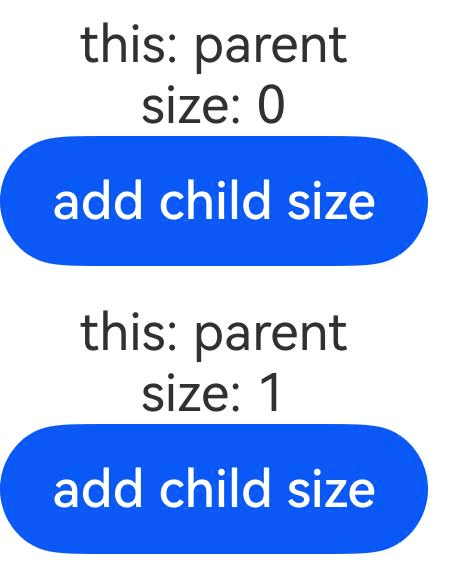
Create a state variable under the component that declares @LocalBuilder and access the state variable in the @LocalBuilder function. The UI component in @LocalBuilder can be updated when the state variable changes.
class LayoutSize {
  public size: number = 0;
}

@Entry
@Component
struct Parent {
  label: string = 'parent';
  @State layoutSize: LayoutSize = { size: 0 };

  @LocalBuilder
  componentBuilder() {
    Text(`this: ${this.label}`)
    Text(`size: ${this.layoutSize.size}`)
  }

  build() {
    Column() {
      Child({
        customBuilder: this.componentBuilder,
        layoutSize: this.layoutSize
      })
    }
  }
}

@Component
struct Child {
  label: string = 'child';
  @BuilderParam customBuilder: () => void;
  @Link layoutSize: LayoutSize;

  build() {
    Column() {
      this.customBuilder()
      Button('add child size')
        .onClick(() => {
          this.layoutSize.size += 1; // Changes to the parameters passed from the child component are propagated to the parent component's @State via @Link, refreshing the UI of the @LocalBuilder decorated function declared in the parent.
        })
    }
  }
} 
[h2]The layout is incorrect when the @LocalBuilder decorated function is directly called in the parameter.
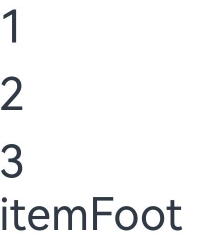
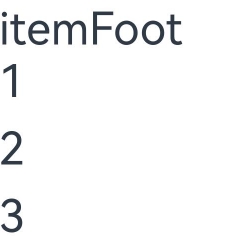
When a function decorated with @LocalBuilder is used as a parameter, the function execution result is directly passed, which may cause the layout to be different from the expected effect.
Incorrect Usage
@Entry
@Component
struct Page {
  @State message: string[] = ['1', '2', '3'];

  build() {
    List() {
      // Incorrect usage. The execution result of itemFoot is directly passed.
      ListItemGroup({ space: 10, footer: this.itemFoot() }) {
        ForEach(this.message, (item: string, index: number) => {
          ListItem() {
            Stack() {
              Text(item)
                .fontSize(30)
            }
          }
        })
      }
    }
  }

  @LocalBuilder
  itemFoot() {
    Column() {
      Text('itemFoot')
        .fontSize(30)
    }
  }
} 
Correct Usage
When a function decorated with @LocalBuilder is used as a parameter, use the () => {function call} format to ensure the layout behaves as expected.
@Entry
@Component
struct Page {
  @State message: string[] = ['1', '2', '3'];

  build() {
    List() {
      //Correct usage. Use the () => {function call} format.
      ListItemGroup({ space: 10, footer: () => { this.itemFoot() } }) {
        ForEach(this.message, (item: string, index: number) => {
          ListItem() {
            Stack() {
              Text(item)
                .fontSize(30)
            }
          }
        })
      }
    }
  }

  @LocalBuilder
  itemFoot() {
    Column() {
      Text('itemFoot')
        .fontSize(30)
    }
  }
}