In the process of adjusting camera rotation angles, several key terms are involved, including the device's natural orientation, camera lens installation angle, and screen display angle. Understanding these terms is essential for you to learn how the camera framework operates.
Device's Natural Orientation
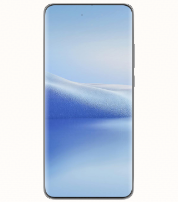
The natural orientation of a device is its default positioning during use. For example, for a mobile phone, the natural orientation is portrait, with the charging port facing downwards.
Screen Display Direction
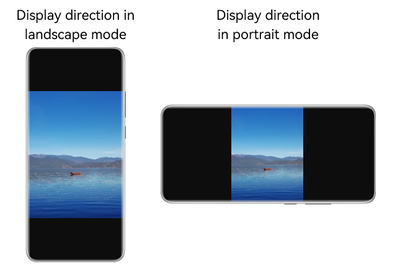
The screen display direction is how the device should be oriented for correct viewing from the user's point of view.
Screen Rotation Angle
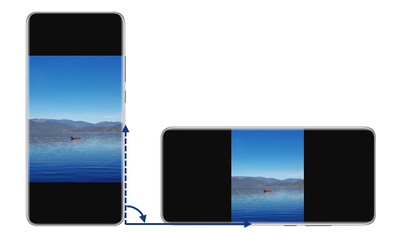
The screen rotation angle is the clockwise angle measured from the device's natural orientation to its current direction.
As shown in the figure, the included angle is the screen rotation angle, which can be obtained through Display.rotation.
Camera Lens Installation Angle
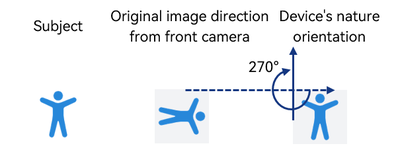
The camera lens installation angle refers to the clockwise angle from the image capture direction of the camera to the device's natural orientation.
For example, on mobile phones, a rear camera sensor is installed horizontally, and the direction of an image captured by a rear camera in portrait mode is shown in the figure.
To align with the device's natural orientation, the image must rotate 90 degrees clockwise, meaning that the lens installation angle of the rear camera is 90 degrees.
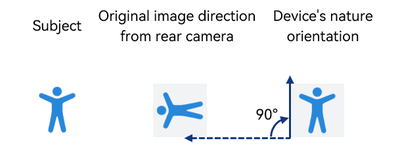
Conversely, the front camera, facing the user, has a lens installation angle of 270 degrees in portrait mode, as its output direction is the reverse of the rear camera's output.
Preview Rotation Angle

During preview, the image rotation angle is related to the screen rotation angle. The system uses the original image direction as the baseline and rotates the image based on the camera lens installation angle and the screen display compensation angle.
Formula: Image rotation angle = Camera lens installation angle + screen display compensation angle, with the latter being equivalent to the screen rotation angle.
The following uses a mobile phone as an example to describe how the camera processes an image in preview mode. The calculated angle is set on the system side and applies to the direct display scenario. For details about the application self-drawing, see Preview Rotation Angle in Self-Drawing Scenarios.
| Device and Lens Direction | Processing Diagram |
|---|---|
Device conditions: The mobile phone is in portrait mode, with the charging port facing downwards. A rear camera is used to take photos. Angles determined: - Lens installation angle of the rear camera = 90° - Screen rotation angle = 0°, Display.rotation = 0 - Image preview rotation angle = 90° + 0° = 90° |  |
Device conditions: The mobile phone is in landscape mode, with the charging port facing leftward. A rear camera is used to take photos. Angles determined: - Lens installation angle of the rear camera = 90° - Screen rotation angle = 90°, Display.rotation = 1 - Image preview rotation angle = 90° + 90° = 180° |  |
Device conditions: The mobile phone is in portrait mode, with the charging port facing upwards. A rear camera is used to take photos. Angles determined: - Lens installation angle of the rear camera = 90° - Screen rotation angle = 180°, Display.rotation = 2 - Image preview rotation angle = 90° + 180° = 270° |  |
Device conditions: The mobile phone is in landscape mode, with the charging port facing rightward. A rear camera is used to take photos. Angles determined: - Lens installation angle of the rear camera = 90° - Screen rotation angle = 270°, Display.rotation = 3 - Image preview rotation angle = 90° + 270° = 0° |  |
Device conditions: The mobile phone is in portrait mode, with the charging port facing downwards. A front camera is used to take photos. Angles determined: - Lens installation angle of the front camera = 270° - Mirrored output from the front camera - Screen rotation angle = 0°, Display.rotation = 0 - Image preview rotation angle = 270° + 0° = 270° |  |
Device conditions: The mobile phone is in landscape mode, with the charging port facing leftward. A front camera is used to take photos. Angles determined: - Lens installation angle of the front camera = 270° - Mirrored output from the front camera - Screen rotation angle = 90°, Display.rotation = 1 - Image preview rotation angle = 270° + 90° = 0° |  |
Device conditions: The mobile phone is in portrait mode, with the charging port facing upwards. A front camera is used to take photos. Angles determined: - Lens installation angle of the front camera = 270° - Mirrored output from the front camera - Screen rotation angle = 180°, Display.rotation = 2 - Image preview rotation angle = 270° + 180° = 90° |  |
Device conditions: The mobile phone is in landscape mode, with the charging port facing rightward. A front camera is used to take photos. Angles determined: - Lens installation angle of the front camera = 270° - Mirrored output from the front camera - Screen rotation angle = 270°, Display.rotation = 3 - Image preview rotation angle = 270° + 270° = 180° |  |
Preview Rotation Angle in Self-Drawing Scenarios
In self-drawing scenarios, applications obtain images and then use graphics processing libraries like libyuv or OpenGL for secondary processing. This generates new image data, which is subsequently sent to a display device for rendering.
A typical implementation involves using a callback stream created by ImageReceiver, where the application layer functions as the consumer to handle operations such as image rotation, thereby meeting the preview angle requirements in self-drawing scenarios. The preview angle in the self-drawing scenario is slightly different from that described in Preview Rotation Angle.
The primary differences are seen in scenarios involving the use of a front camera for previewing.
In self-drawing scenarios, the image can be rotated first based on the camera's installation angle, then mirrored, and finally rotated again to match the screen angle, as illustrated in Preview Rotation Angle. However, this approach involves multiple steps and is therefore not recommended.
In self-drawing scenarios, you can also rotate the image and then mirror the image. In this mode, horizontal mirroring and vertical mirroring need to be considered. The following figures show the detailed processing. For details about the code implementation, see Normalization of Preview Angles in Self-Drawing Scenarios.
| Device and Lens Direction | Processing Diagram |
|---|---|
Device conditions: The mobile phone is in portrait mode, with the charging port facing downwards. A front camera is used to take photos. Angles determined: - Lens installation angle of the front camera = 270° - Mirrored output from the front camera - Screen rotation angle = 0°, Display.rotation = 0 - Image preview rotation angle = 270° + 0° = 270° |  |
Device conditions: The mobile phone is in landscape mode, with the charging port facing leftward. A front camera is used to take photos. Angles determined: - Lens installation angle of the front camera = 270° - Mirrored output from the front camera - Screen rotation angle = 90°, Display.rotation = 1 - Image preview rotation angle = 270° + 90° = 0° |  |
Photo or Video Capture Angle
During photo capture or video recording, the image rotation angle is related to the gravity direction of the device (specified by the device rotation angle).
When the rear camera is used for shooting, the image rotation angle is calculated as follows: Image rotation angle = Camera lens installation angle + Gravity direction.
When the front camera is used for shooting, the image rotation angle is calculated as follows: Image rotation angle = Camera lens installation angle – Gravity direction.
| Device and Lens Direction | Processing Diagram |
|---|---|
Device conditions: The mobile phone is in landscape mode, with the charging port facing leftward. A rear camera is used to take photos. Angles determined: - Lens installation angle of the rear camera = 90° - Device rotation angle = 90° - Image preview rotation angle = 90° + 90° = 180° |  |
The application needs to listen for SensorId.GRAVITY to obtain the data of the gravity sensor in the x, y, and z directions and calculate the rotation angle. For details, see Calculating the Device Rotation Angle.