This document provides the integration design practice for verifying the authenticity of application requests.
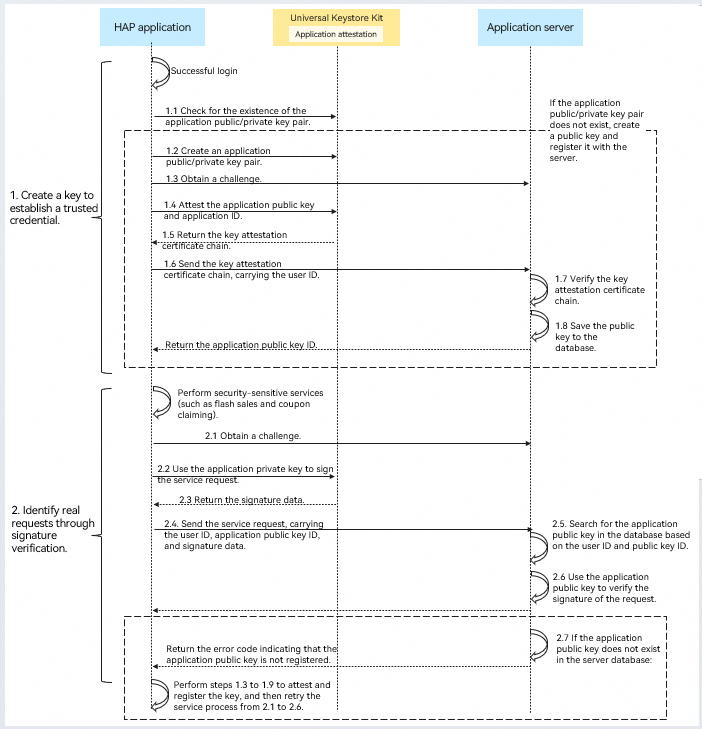
Creating a Key to Establish a Trusted Credential
A login user only needs to create a key to establish a trusted credential once. The process is triggered when the user successfully logs in.
-
Check whether the application public/private key pair exists. The alias of the application public/private key pair is in the serviceKey + user ID format.
If the application public/private key pair exists, the user has logged in to the device. In this case, the process of creating a key to establish a trusted certificate is complete. Otherwise, go to step 2.
-
Create an application public/private key pair. Create an asymmetric key pair (including a public key and a private key), for example, an RSA or ECC key pair, for device attestation.
-
Obtain the challenge. To prevent replay attacks in step 6, you are advised to obtain a one-time challenge from the application server. The application server uses a random number to generate the challenge and caches it to the server. The cache contains the following fields:
User ID, challenge, and service process (such as the process of creating a key to establish a trusted credential)
-
Verify the application public key and application ID. Call the offline key attestation API (anonAttestKeyItemOffline) of Universal Keystore Kit to verify the generated application public key and called application identity. The application passes the challenge.
-
Obtain the key attestation certificate chain. Universal Keystore Kit returns the key attestation certificate chain, which contains information such as the application public key, challenge, and application ID.
-
Send the key attestation certificate chain. The application sends the key attestation certificate chain to the application server.
The request message contains the user ID and key attestation certificate chain.
-
Verify the key attestation certificate chain. The application server uses the root certificate provided by the Universal Keystore Kit website to verify the validity of the certificate chain, challenge, and application ID.
(1) Verify the validity of the certificate chain and parse the application public key, challenge, application ID, and key management component ID.
(2) Based on the user ID and challenge in the request message, check for the record of the process of creating a key to establish a trusted credential in the server cache, and delete the challenge record if a match is found.
(3) Check whether the application ID, including the application package name and application signing key, is the same as expected.
(4) Check whether the ID of the key management component is 0x28c4fb4944afec11b9090242ac120002 (component ID of Universal Keystore Kit).
-
Save the application public key to the database. After verifying the certificate chain, the application server calculates the application public key ID (for example, through calculation using the SHA-256 algorithm and Base64 encoding of the calculated result) and saves the application public key to the server's database.
The database record includes the following fields: user ID, application public key ID, and application public key.
The application server returns the application public key ID to the application, and the application stores the application ID.
Identifying Real Requests Through Signature Verification
The signature verification process is triggered when security-sensitive device-cloud services are performed on the application, such as flash sales and coupon claiming.
-
Obtain the challenge. The application obtains a one-time challenge from the application server. The application server uses a random number to generate the challenge and caches it to the server. The cache contains the following fields:
User ID, challenge, and service process (for example, key usage process).
-
Use the application private key to sign a service request. Call the signature API of Universal Keystore Kit to sign the service request data using the specified application private key.

Sign the challenge and service request data.
-
Obtain the signature data. Universal Keystore Kit returns the signature data to the application.
-
Send a service request. The application sends a service request to the application server.
The request message contains the user ID, application public key ID, challenge, and signature data.
-
Search for the application public key based on its ID. The application server searches for the application public key based on its ID, and verifies the challenge.
(1) Based on the user ID and challenge in the request message, check for the record of the key usage process in the server cache, and delete the challenge record if a match is found.
(2) Query the application public key in the database based on the user ID and application public key ID.
-
Verify the signature of the request using the application public key. The application server uses the application public key to verify the signature in the request.
-
If the application public key does not exist in the server's database, the server returns an error code to the application, indicating that the application public key is not registered.
The application server creates a key to establish a trusted credential according to steps 1.3 to 1.8 in the flowchart. If the process is successful, the application server performs steps 2.1 to 2.6 again.

The application server may delete the application public key records that are not used for a long time based on the server's database capacity. In this case, step 7 is triggered.