Use Cases
Starting from version 6.0.0(20), simulated click detection is supported.
An app calls the detectSimulatedClickRisk API of Device Security Kit to obtain the simulated click detection result for detecting cheating behaviors like automated clicks and device farming.
The app can evaluate how to perform service operations based on the check result.
Constraints
Each app can call the API for up to 10 times every 30 seconds and up to 20 times per day on each device.
Service Process
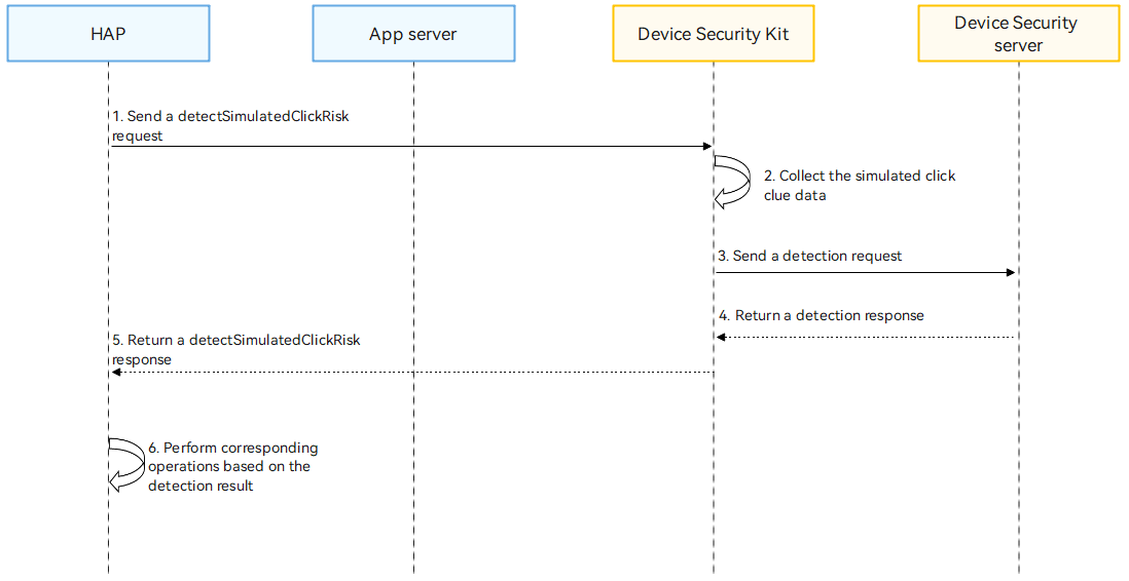
Process description:
-
Your app calls the detectSimulatedClickRisk API to initiate a simulated click detection request.
After receiving the request, Device Security Kit collects the simulated click clue data of the current device, sends the clue data to the Device Security server for detection, and passes the detection result to your app through the return value of the detectSimulatedClickRisk API.
-
Your app obtains the detection result and performs corresponding operations based on the result.
API Description
The following table lists the simulated click detection API. For more information about the API, please refer to API Reference.
| API | Description |
|---|---|
| detectSimulatedClickRisk(params: SimulatedClickDetectionRequest): Promise<string> | Detects simulated clicks. |
Development Procedure
-
Import the Device Security Kit module and related public modules.
import { hilog } from '@kit.PerformanceAnalysisKit'; import { businessRiskIntelligentDetection } from '@kit.DeviceSecurityKit'; import { BusinessError } from '@kit.BasicServicesKit'; -
Call the detectSimulatedClickRisk API to obtain the simulated click detection result.
const TAG: string = '[SimulatedClickRiskDetectModel]'; function simulatedClickRiskDetectPromise(): Promise<String> { return new Promise(async (resolve: Function, reject: Function) => { let params = { version: 1 } as businessRiskIntelligentDetection.SimulatedClickDetectionRequest; try { hilog.info(0x0000, TAG, 'Detect simulated click risk begin.'); businessRiskIntelligentDetection.detectSimulatedClickRisk(params).then((result: string) => { hilog.info(0x0000, TAG, 'Detect simulated click risk success: %{public}s', result); resolve(result); }).catch((error: Error) => { let e: BusinessError = error as BusinessError; hilog.error(0x0000, TAG, 'Detect simulated click risk failed: %{public}d %{public}s', e.code, e.message); reject(error); }); } catch (error) { let e: BusinessError = error as BusinessError; hilog.error(0x0000, TAG, 'Detect simulated click risk failed: %{public}d %{public}s', e.code, e.message); reject(error); } }); } -
Process the service in your app based on the detection result.
The simulated click detection result is a JSON string. The following is an example:
{
  "timestampMs": 9860437986543,
  "version": 1,
  "riskDecision": "fake",
  "tags": ["AbnormalTap"]
}
-
timestampMs: timestamp generated when a request is initiated.
-
riskDecision: risk detection result.
-
version: version number of the detection result message format. The default value is 1. Currently, the value can only be 1.
-
tags: key features of simulated clicks. If this field is empty, no key feature is found. If this field is not empty, key features are found.
Value of Tags Definition AbnormalDeviceIntegrity The device integrity is compromised. AbnormalDeviceBehavior Abnormal device behavior, such as device connection error and incorrect sensor status. AbnormalTap Abnormal clicks, such as click event injection and automated clicks. Value of riskDecision Definition fake This device exhibits high-risk cheating behaviors. For details, see the tags table above. likelyReal It's highly likely that a real user is currently operating the device. unknown Unknown. No obvious feature is detected. -