With playback control, audios and videos can be easily and efficiently projected to other HarmonyOS devices. For example, audios and videos on a mobile phone can be projected to a 2-in-1 device.
HarmonyOS provides unified in-application audio and video casting. By using the AVCastPicker (a casting component) and APIs, the application only needs to set the resource information, listen for state changes, and proactively control the playback behavior (such as play and pause). Other actions, including icon switching, device discovery, connection, and authentication, are performed by the system.
Basic Concepts
-
Audio and video management service, which is used to manage all audio and video behaviors in the system in a unified manner.
During local playback, the application needs to provide the AVSession with the media information (such as the song being played and the playback state), and receive and respond to control commands (such as 'pause' and 'playNext') from the media controller. For details, see Local AVSession.
During casting, an application can set and query the casting capability and create an AVCastController through the AVSession.
When starting content display (for example, video playback), an application may obtain a device that supports extended screen casting and register a listener. When an extended screen exists, content to be projected may be drawn in full-screen mode on the extended screen.
-
System-level casting component, which can be embedded into the UI component of an application. After a user touches this component, the system performs device discovery, connection, and authentication. The application only needs to call APIs to obtain the casting related callback.
-
Interface initiated by an application to control remote playback after casting. It can be used to play a media asset, pause playback, adjust the volume, and set playback mode and speed.
Background continuous task
To implement background playback, the application must request a continuous task in the background to prevent itself from being cleared or frozen after casting. For details, see Continuous Task.
Working Principles
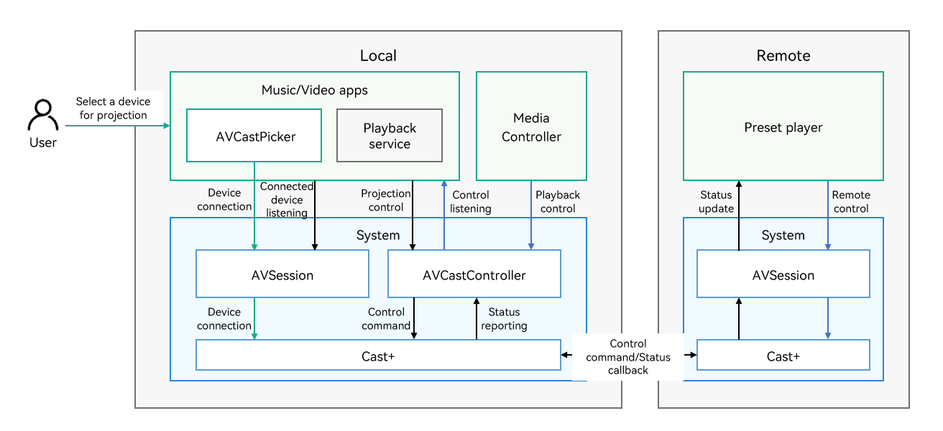
Discovering and connecting devices
A user touches the AVCastPicker component on the application UI, and the system discovers devices that can be used for casting. After a user selects a device from the device list, the system connects to the device. You need to check whether a remote device is available. There is no need to focus on the device discovery and connection process.
Applications can use the unified casting capability of the system only after they are connected to the AVSession. The system discovers and manages devices.
Entering remote casting
The application listens for the device connection state through AVSession. After the device is connected, the application can obtain an AVCastController object through AVSession to send control commands (such as 'play', 'pause', and 'playNext').
When an application starts remote casting, the local player must be stopped to prevent simultaneous playback on the local and remote devices. In addition, it is recommended that the application re-draw its UI, for example, change the UI to a remote control.
Controlling local playback
During local playback control (including the application and media controller), control commands are sent through the AVCastController. The system completes data transmission and information synchronization, and then updates the state of the preset remote player.
Controlling remote playback
Users can directly control the remote playback. In this way, the state of the remote player is changed accordingly.
Callback for remote player state changes
When the state of the remote player changes, a callback function is triggered to return the state information. The application can listen for state changes of the remote player through the AVCastController.