With the C APIs provided by the ImageProcessing module, you can implement Color Space Conversions (CSCs) of HDR2SDR, SDR2HDR, and SDR2SDR.
A typical usage scenario is image editing, as shown in the figure below.
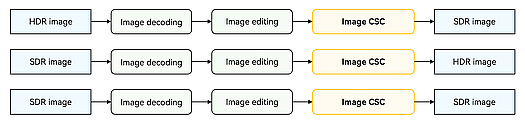
Specifications
Supported data input formats
Image CSC algorithm: HDR2SDR
Input ColorSpaceName Input HdrMetadataType Input PIXEL_FORMAT Output ColorSpaceName Output
Output PIXEL_FORMAT BT2020_HLG_LIMIT / BT2020_HLG HDR_METADATA_TYPE_ALTERNATE PIXEL_FORMAT_YCBCR_P010 / PIXEL_FORMAT_YCRCB_P010 / PIXEL_FORMAT_RGBA_1010102 SRGB_LIMIT/SRGB HDR_METADATA_TYPE_BASE PIXEL_FORMAT_RGBA_8888 / PIXEL_FORMAT_BGRA_8888 BT2020_PQ_LIMIT / BT2020_PQ HDR_METADATA_TYPE_ALTERNATE YCBCR_P010
YCRCB_P010
RGBA_1010102
SRGB_LIMIT/SRGB HDR_METADATA_TYPE_BASE PIXEL_FORMAT_RGBA_8888 / PIXEL_FORMAT_BGRA_8888 BT2020_HLG_LIMIT / BT2020_HLG HDR_METADATA_TYPE_NONE YCBCR_P010
YCRCB_P010
RGBA_1010102
SRGB_LIMIT/SRGB HDR_METADATA_TYPE_BASE PIXEL_FORMAT_RGBA_8888 / PIXEL_FORMAT_BGRA_8888 BT2020_PQ_LIMIT / BT2020_PQ HDR_METADATA_TYPE_NONE YCBCR_P010
YCRCB_P010
RGBA_1010102
SRGB_LIMIT/SRGB HDR_METADATA_TYPE_BASE PIXEL_FORMAT_RGBA_8888 / PIXEL_FORMAT_BGRA_8888 BT2020_HLG_LIMIT / BT2020_HLG HDR_METADATA_TYPE_ALTERNATE YCBCR_P010
YCRCB_P010
RGBA_1010102
DISPLAY_P3_LIMIT/DISPLAY_P3 HDR_METADATA_TYPE_BASE PIXEL_FORMAT_RGBA_8888 / PIXEL_FORMAT_BGRA_8888 BT2020_PQ_LIMIT / BT2020_PQ HDR_METADATA_TYPE_ALTERNATE YCBCR_P010
YCRCB_P010
RGBA_1010102
DISPLAY_P3_LIMIT/DISPLAY_P3 HDR_METADATA_TYPE_BASE PIXEL_FORMAT_RGBA_8888 / PIXEL_FORMAT_BGRA_8888 BT2020_HLG_LIMIT / BT2020_HLG HDR_METADATA_TYPE_NONE YCBCR_P010
YCRCB_P010
RGBA_1010102
DISPLAY_P3_LIMIT/DISPLAY_P3 HDR_METADATA_TYPE_BASE PIXEL_FORMAT_RGBA_8888 / PIXEL_FORMAT_BGRA_8888 BT2020_PQ_LIMIT / BT2020_PQ HDR_METADATA_TYPE_NONE YCBCR_P010
YCRCB_P010
RGBA_1010102
DISPLAY_P3_LIMIT/DISPLAY_P3 HDR_METADATA_TYPE_BASE PIXEL_FORMAT_RGBA_8888 / PIXEL_FORMAT_BGRA_8888 BT2020_HLG_LIMIT / BT2020_HLG HDR_METADATA_TYPE_ALTERNATE YCBCR_P010
YCRCB_P010
RGBA_1010102
SRGB_LIMIT/SRGB HDR_METADATA_TYPE_NONE PIXEL_FORMAT_RGBA_8888 / PIXEL_FORMAT_BGRA_8888 BT2020_PQ_LIMIT / BT2020_PQ HDR_METADATA_TYPE_ALTERNATE YCBCR_P010
YCRCB_P010
RGBA_1010102
SRGB_LIMIT/SRGB HDR_METADATA_TYPE_NONE PIXEL_FORMAT_RGBA_8888 / PIXEL_FORMAT_BGRA_8888 BT2020_HLG_LIMIT / BT2020_HLG HDR_METADATA_TYPE_NONE YCBCR_P010
YCRCB_P010
RGBA_1010102
SRGB_LIMIT/SRGB HDR_METADATA_TYPE_NONE PIXEL_FORMAT_RGBA_8888 / PIXEL_FORMAT_BGRA_8888 BT2020_PQ_LIMIT / BT2020_PQ HDR_METADATA_TYPE_NONE YCBCR_P010
YCRCB_P010
RGBA_1010102
SRGB_LIMIT/SRGB HDR_METADATA_TYPE_NONE PIXEL_FORMAT_RGBA_8888 / PIXEL_FORMAT_BGRA_8888 BT2020_HLG_LIMIT / BT2020_HLG HDR_METADATA_TYPE_ALTERNATE YCBCR_P010
YCRCB_P010
RGBA_1010102
DISPLAY_P3_LIMIT/DISPLAY_P3 HDR_METADATA_TYPE_NONE PIXEL_FORMAT_RGBA_8888 / PIXEL_FORMAT_BGRA_8888 BT2020_PQ_LIMIT / BT2020_PQ HDR_METADATA_TYPE_ALTERNATE YCBCR_P010
YCRCB_P010
RGBA_1010102
DISPLAY_P3_LIMIT/DISPLAY_P3 HDR_METADATA_TYPE_NONE PIXEL_FORMAT_RGBA_8888 / PIXEL_FORMAT_BGRA_8888 BT2020_HLG_LIMIT / BT2020_HLG HDR_METADATA_TYPE_NONE YCBCR_P010
YCRCB_P010
RGBA_1010102
DISPLAY_P3_LIMIT/DISPLAY_P3 HDR_METADATA_TYPE_NONE PIXEL_FORMAT_RGBA_8888 / PIXEL_FORMAT_BGRA_8888 BT2020_PQ_LIMIT / BT2020_PQ HDR_METADATA_TYPE_NONE YCBCR_P010
YCRCB_P010
RGBA_1010102
DISPLAY_P3_LIMIT/DISPLAY_P3 HDR_METADATA_TYPE_NONE PIXEL_FORMAT_RGBA_8888 / PIXEL_FORMAT_BGRA_8888 Image CSC algorithm: SDR2HDR
Input ColorSpaceName Input HdrMetadataType Input PIXEL_FORMAT Output ColorSpaceName Output
Output PIXEL_FORMAT SRGB_LIMIT HDR_METADATA_TYPE_NONE RGBA_8888 BT2020_HLG HDR_METADATA_TYPE_ALTERNATE YCBCR_P010 / RGBA_1010102 DISPLAY_P3_LIMIT HDR_METADATA_TYPE_NONE RGBA_8888 BT2020_HLG HDR_METADATA_TYPE_ALTERNATE YCBCR_P010 / RGBA_1010102 SRGB HDR_METADATA_TYPE_NONE RGBA_8888 BT2020_HLG HDR_METADATA_TYPE_ALTERNATE YCBCR_P010 / RGBA_1010102 DISPLAY_P3 HDR_METADATA_TYPE_NONE RGBA_8888 BT2020_HLG HDR_METADATA_TYPE_ALTERNATE YCBCR_P010 / RGBA_1010102 SRGB HDR_METADATA_TYPE_NONE RGBA_8888 BT2020_HLG HDR_METADATA_TYPE_NONE YCBCR_P010 / RGBA_1010102 DISPLAY_P3 HDR_METADATA_TYPE_NONE RGBA_8888 BT2020_HLG HDR_METADATA_TYPE_NONE YCBCR_P010 / RGBA_1010102 ADOBE_RGB_1998 HDR_METADATA_TYPE_NONE RGBA_8888
BGRA_8888
BT2020_HLG HDR_METADATA_TYPE_NONE YCBCR_P010 / RGBA_1010102 SRGB HDR_METADATA_TYPE_NONE RGBA_8888
BGRA_8888
BT2020_PQ HDR_METADATA_TYPE_NONE YCBCR_P010 / RGBA_1010102 DISPLAY_P3 HDR_METADATA_TYPE_NONE RGBA_8888
BGRA_8888
BT2020_PQ HDR_METADATA_TYPE_NONE YCBCR_P010 / RGBA_1010102 ADOBE_RGB_1998 HDR_METADATA_TYPE_NONE RGBA_8888
BGRA_8888
BT2020_PQ HDR_METADATA_TYPE_NONE YCBCR_P010 / RGBA_1010102 Image CSC algorithm: SDR2SDR
Input ColorSpaceName Input HdrMetadataType Input PIXEL_FORMAT Output ColorSpaceName Output
Output PIXEL_FORMAT SRGB HDR_METADATA_TYPE_NONE RGBA_8888,
BGRA_8888
SRGB HDR_METADATA_TYPE_NONE RGBA_8888 DISPLAY_P3 HDR_METADATA_TYPE_NONE RGBA_8888,
BGRA_8888
SRGB HDR_METADATA_TYPE_NONE RGBA_8888 ADOBE_RGB_1998 HDR_METADATA_TYPE_NONE RGBA_8888,
BGRA_8888
SRGB HDR_METADATA_TYPE_NONE RGBA_8888 SRGB HDR_METADATA_TYPE_NONE RGBA_8888,
BGRA_8888
DISPLAY_P3 HDR_METADATA_TYPE_NONE RGBA_8888 DISPLAY_P3 HDR_METADATA_TYPE_NONE RGBA_8888,
BGRA_8888
DISPLAY_P3 HDR_METADATA_TYPE_NONE RGBA_8888 ADOBE_RGB_1998 HDR_METADATA_TYPE_NONE RGBA_8888,
BGRA_8888
DISPLAY_P3 HDR_METADATA_TYPE_NONE RGBA_8888
Supported resolution specifications
| Minimum Resolution (Unit: Pixel) | Maximum Resolution (Unit: Pixel) |
|---|---|
| 32*32 | 8880*8880 |
Memory specifications:
The memory type for the PixelMap object to be processed must be the DMA memory.
[h2]Linking the Dynamic Libraries in the CMake Script
add_library(entry SHARED napi_init.cpp ImageProcessing/ImageProcessing.cpp)
target_link_libraries(entry PUBLIC ${BASE_LIBRARY})
[h2]Procedure on the ArkTS Side
Create an 8-bit PixelMap.
let srcPixelMap = nativePix.createPixelMap(this.inputHeight, this.inputWidth);
let outPutPixelMap = nativePix.createPixelMap(this.inputHeight, this.inputWidth);
Configure the color space and metadata information.
let colorSpaceDISPLAY_P3 : colorSpaceManager.ColorSpaceManager = colorSpaceManager.create(colorSpaceManager.ColorSpace.DISPLAY_P3);
let colorSpaceSrgb : colorSpaceManager.ColorSpaceManager = colorSpaceManager.create(colorSpaceManager.ColorSpace.SRGB);
inputpixelMap.setColorSpace(colorSpaceDISPLAY_P3);
inputpixelMap.setMetadata(image.HdrMetadataKey.HDR_METADATA_TYPE, image.HdrMetadataType.NONE);
outputpixelMap.setColorSpace(colorSpaceSrgb);
outputpixelMap.setMetadata(image.HdrMetadataKey.HDR_METADATA_TYPE, image.HdrMetadataType.NONE);
[h2]Procedure on the Native Side
Add the header files.
#include <multimedia/image_framework/image_mdk_common.h>
#include <multimedia/image_framework/image_pixel_map_mdk.h>
#include <multimedia/image_framework/image/pixelmap_native.h>
#include <multimedia/video_processing_engine/image_processing.h>
#include <multimedia/video_processing_engine/image_processing_types.h>
#include <native_color_space_manager/native_color_space_manager.h>
(Optional) Initialize the environment.
This is usually executed on the initial use within a process to preemptively handle certain time-consuming operations.
ImageProcessing_ErrorCode ret = OH_ImageProcessing_InitializeEnvironment();
(Optional) Check for capability support. Perform this operation before using the corresponding capability.
// Input format.
ImageProcessing_ColorSpaceInfo SRC_INFO;
ImageProcessing_ColorSpaceInfo DST_GAIN_INFO;
ImageProcessing_ColorSpaceInfo DST_INFO;
SRC_INFO.colorSpace = DISPLAY_P3;
SRC_INFO.metadataType = HDR_METADATA_TYPE_NONE;
SRC_INFO.pixelFormat = PIXEL_FORMAT_RGBA_8888;
DST_INFO.colorSpace = SRGB;
DST_INFO.metadataType = HDR_METADATA_TYPE_NONE;
DST_INFO.pixelFormat = PIXEL_FORMAT_RGBA_8888;
// Capability query.
bool flag = OH_ImageProcessing_IsColorSpaceConversionSupported(&SRC_INFO, &DST_INFO);
Create an 8-bit PixelMap.
napi_value ImageProcessing::CreatePixelMap(napi_env env, napi_callback_info info)
{
    napi_value udfVar = nullptr;
    napi_value pixelMap = nullptr;
    napi_value thisVar = nullptr;
    napi_value argValue[2] = {0};
    size_t argCount = 2;
    size_t count = 2;
    if (napi_get_cb_info(env, info, &argCount, argValue, &thisVar, nullptr) != napi_ok || argCount < count ||
        argValue[0] == nullptr || argValue[1] == nullptr) {
        return nullptr;
    }
    int32_t width = 0;
    int32_t height = 0;
    napi_get_value_int32(env, argValue[1], &width);
    napi_get_value_int32(env, argValue[0], &height);
    struct OhosPixelMapCreateOps createOps;
    createOps.width = width;
    createOps.height = height;
    int32_t rgba8888 = 3;
    createOps.pixelFormat = rgba8888;
    createOps.alphaType = 0;

    size_t bufferSize = createOps.width * createOps.height * 4;
    void *buff = malloc(bufferSize);
    int32_t res = OH_PixelMap_CreatePixelMapWithStride(env, createOps, (uint8_t *)buff, bufferSize, createOps.width * 4,
        &pixelMap);
    free(buff);
    OH_LOG_Print(LOG_APP, LOG_INFO, LOG_PRINT_DOMAIN, "createPixelMap",
        "OH_PixelMap_CreatePixelMapWithStride %{public}d", res);
    if (res != IMAGE_RESULT_SUCCESS || pixelMap == nullptr) {
        return udfVar;
    }
    return pixelMap;
}
Convert the ArkTS PixelMap to a C++ PixelMap.
OH_PixelmapNative* srcImg = nullptr;
OH_PixelmapNative_ConvertPixelmapNativeFromNapi(env, argValue[0], &srcImg);
OH_PixelmapNative* dstImg= nullptr;
OH_PixelmapNative_ConvertPixelmapNativeFromNapi(env, argValue[1], &dstImg);
Create an image CSC module.
The application may create such a module by using the image processing engine. In the code snippet below, the following variables are used:
- instance: image processing module instance.
- IMAGE_PROCESSING_TYPE_COLOR_SPACE_CONVERSION: image CSC type.
- IMAGE_PROCESSING_SUCCESS: expected return value.
OH_ImageProcessing* instance = nullptr;
ret = OH_ImageProcessing_Create(&instance, IMAGE_PROCESSING_TYPE_COLOR_SPACE_CONVERSION);
Execute the algorithm.
ret = OH_ImageProcessing_ConvertColorSpace(instance, srcImg, dstImg);
Destroy the image processing instance.
ret = OH_ImageProcessing_Destroy(instance);
instance = nullptr;
Deinitialize the environment.
ret = OH_ImageProcessing_DeinitializeEnvironment();