Preview Kit provides convenient file preview and opening boost functions for apps.
-
Apps can use the preview APIs provided by Preview Kit to quickly display the preview page, so that users can preview various types of files.
With Preview Kit, users can view files, including images, videos, audios, texts, and HTML pages. In addition, users can redirect to an app to view files through the Open in another app button in the upper right corner, after which they can perform operations on the files, such as rotating and zooming in an image.
Currently, Preview Kit uses WPS Office to implement preview capabilities. The preview screen displays "Powered by WPS Office", and provides an entry that allows users to open files with WPS Office and consistent preview style.
-
Preview Kit provides the file open boost function. Opening a large file typically takes several to tens of seconds. The file open boost function loads files in advance, shortening the file opening time and providing smooth and seamless experience for users. For details, please refer to File Open Boost.
-
Preview Kit also provides the file cache boost function. Typically, when a user opens or browses a file, an app must decode content such as images and videos within the file, which is a time-consuming process. The file cache boost function provides a caching mechanism that stores the decoded data onto the disk. When the user opens or browses the same file again, the app can retrieve the cached decoded data from the disk without executing the time-consuming decoding process. This significantly shortens the file loading duration, and delivers an ultra-smooth user experience. For details, please refer to File Cache Boost.
File Preview Scenarios
Preview Kit, catering to a majority of office development needs, enables users to preview a variety of file types including images, videos, audios, texts, and HTML pages. It provides the following capabilities:
-
Preview display: displays basic content of a file, such as texts and images. Multiple files can be selected and displayed in the preview list.
-
File sharing: shares a file with another software.
-
Opening through another software: redirects users to an app to view files through the Open in another app button. (When a preview request is initiated, your app will obtain the default software that can open this type of file.)
-
Image rotating and zooming in: allows users to rotate and zoom in images during preview on devices except PCs/2-in-1 devices.
File Open Boost Scenarios
After your document app integrates the file open boost service, it will recommend files that you may open to your app based on algorithms. The app can then preload files in the background in advance so that you can open the preloaded files in an extremely short time. This provides users with smooth file opening experience.
File Cache Boost Scenarios
When a user opens or browses a file in an app, the file cache boost function can create a cache file indexed by a specific key to store the cached data. The system performs persistent management on all caches of the app. When a user opens or browses the file again in the app, the app first searches for the corresponding cache using the key. If a cache hit occurs, the app reads the cached data directly from the disk, eliminating the need for repeated decoding. This significantly reduces repetitive decoding overhead, providing users with a seamless and smooth file opening and browsing experience.
[h2]Supported Devices
Preview Kit is supported on Huawei phones, tablets, and PCs/2-in-1 devices while the file open boost function is supported only on PCs/2-in-1 devices and tablets.
Emulator Support
This kit supports the Emulator, but there are some differences in feature support between real devices and the Emulator:
- General differences: For details, please refer to Differences Between the Emulator and the Real Device.
- The Emulator does not support preview of document files in formats such as .pdf, .pptx, .xlsx, and .docx.
- The Emulator does not support the file open boost and file cache boost functions.
File Types Supported by File Preview
Preview Kit supports the preview of images, videos, audios, texts, and HTML files. The following table lists some common formats. You can use the canPreview API to check whether a file can be previewed.
| Type | File Name Extension | MIME Type |
|---|---|---|
| Text | txt, cpp, c, h, java, xhtml, and xml | text/plain, text/x-c++src, text/x-csrc, text/x-chdr, text/x-java, application/xhtml+xml, and text/xml |
| Web page | html and htm | text/html |
| Image | jpg, png, gif, webp, bmp, and svg | image/jpeg, image/png, image/gif, image/webp, image/bmp, and image/svg+xml |
| Audio | m4a, aac, mp3, ogg, and wav | audio/mp4a-latm, audio/aac, audio/mpeg, audio/ogg, and audio/x-wav |
| Video | mp4, mkv, and ts | video/mp4, video/x-matroska, and video/mp2ts |
| Folder | N/A | N/A |
| Document | application/pdf | |
| Office document | doc, docx, xls, xlsx, ppt, pptx, csv, and ofd | application/msword, application/vnd.openxmlformats-officedocument.wordprocessingml.document, application/vnd.ms-excel, application/vnd.openxmlformats-officedocument.spreadsheetml.sheet, application/vnd.ms-powerpoint, application/vnd.openxmlformats-officedocument.presentationml.presentation, text/csv, and general.ofd |
Basic Concepts of File Preview
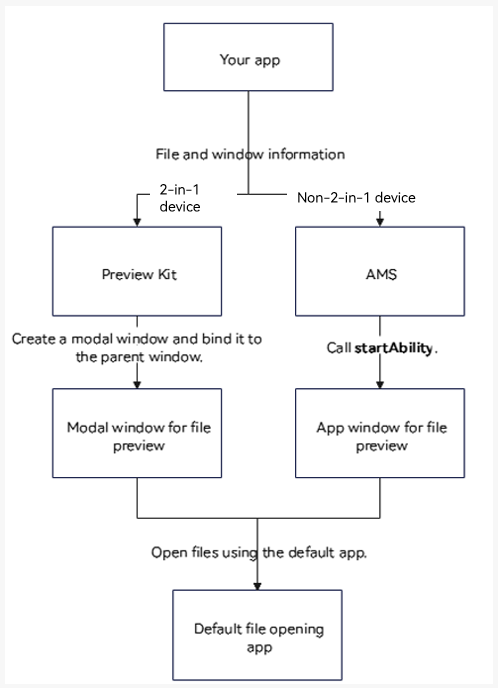
-
Modal window: bound to the parent window. When a modal window exists, the parent window cannot be moved or operated. The modal window consistently remains in front of the parent window.
-
App window: can be started through AMS.
-
AMS: AbilityManagerService, which is a system service for orchestrating the interactions among various abilities and managing their lifecycle stages.
Basic Concepts of File Cache Boost
- key
In the file cache boost function, a key serves as the unique identifier for each cached file object and is used to manage the cached data. The key value can be generated by applying a hash algorithm to the file content. For example, you can perform a SHA-256 hash operation on an image and use the generated hash value as the key value for that image cache object.