The image-based barcode scanning capability can scan and recognize barcodes in an image selected from the gallery to obtain information.
Use Cases
This capability can recognize 1D codes, 2D codes, and multifunctional codes from an image selected from the gallery and obtain the code type, value, position, and other information. It can be used to recognize one or multiple barcodes, such as 1D codes and payment codes, on an image.
Flowchart
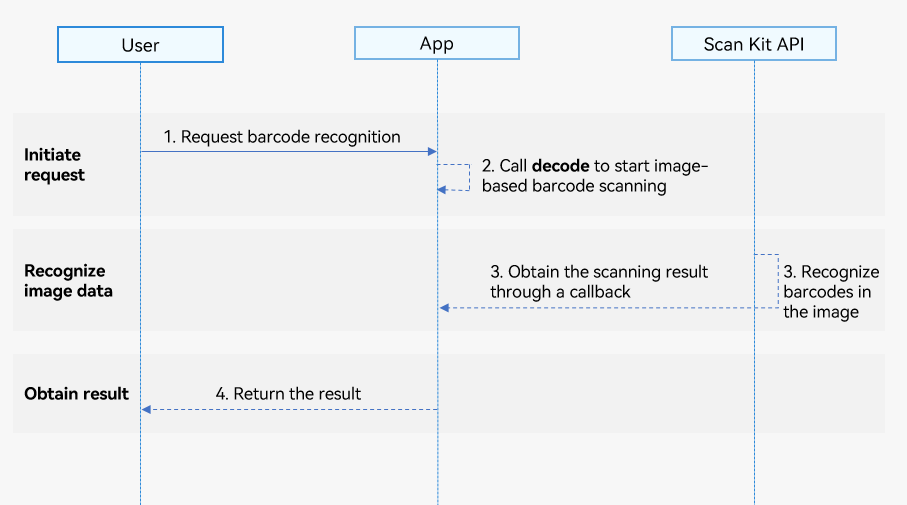
-
A user sends an image-based barcode scanning request to your app.
-
Your app calls the decode API of Scan Kit to start image-based barcode scanning.
-
Scan Kit returns the barcode scanning result through a callback.
-
Your app sends the barcode scanning result to the user.
API Description
The APIs use either a callback or promise to return the result. The table below lists the APIs using a callback and those using a promise. The APIs that use a callback provide the same functions as their counterparts that use a promise. For details about the API, please refer to API Reference.
| API | Description |
|---|---|
| decode(inputImage: InputImage, options?: scanBarcode.ScanOptions): Promise<Array<scanBarcode.ScanResult>> | Starts image-based barcode scanning. This API uses InputImage to pass the image, ScanOptions to set barcode scanning parameters (options is optional), and a promise to return the barcode scanning result asynchronously. |
| decode(inputImage: InputImage, options: scanBarcode.ScanOptions, callback: AsyncCallback<Array<scanBarcode.ScanResult>>): void | Starts image-based barcode scanning. This API uses InputImage to pass the image, ScanOptions to set barcode scanning parameters, and a callback to return the scanning result asynchronously. |
| decode(inputImage: InputImage, callback: AsyncCallback<Array<scanBarcode.ScanResult>>): void | Starts image-based barcode scanning. This API uses InputImage to pass the image and a callback to return the scanning result asynchronously. |
Development Procedure
Image-based barcode scanning can recognize 1D codes, 2D codes, and multifunctional codes in images to obtain the barcode value, type, and position information (coordinates of the upper left and lower right corners of the minimum bounding rectangle of the barcode image).
To make it easier for you to integrate the capability, a detailed sample project is provided for your reference.
The following describes how to call the decode API to scan barcodes in images:
-
Import the image-based barcode scanning API module and other relevant API modules. This API provides parameters and methods for recognizing barcodes in images.
// Import the log and PhotoViewPicker modules required for image-based barcode scanning. import { scanCore, scanBarcode, detectBarcode } from '@kit.ScanKit'; import { photoAccessHelper } from '@kit.MediaLibraryKit'; import { hilog } from '@kit.PerformanceAnalysisKit'; import { BusinessError } from '@kit.BasicServicesKit'; -
Call the decode API to parse the barcode image.
- Obtain the scanning result using a promise. You are advised to obtain the uri parameter in the InputImage object through the PhotoViewPicker.
@Entry @Component struct DetectPage { build() { Column() { Button('Promise with options') .backgroundColor($r('sys.color.ohos_id_color_button_normal')) .fontColor($r('sys.color.ohos_id_color_text_primary_activated')) .align(Alignment.Center) .type(ButtonType.Capsule) .width('90%') .margin({ bottom: 12 }) .onClick(() => { // Define the barcode scanning parameter **options**. const options: scanBarcode.ScanOptions = { scanTypes: [scanCore.ScanType.ALL], enableMultiMode: true }; // Use PhotoViewPicker to open the gallery and select an image. const photoOption = new photoAccessHelper.PhotoSelectOptions(); photoOption.MIMEType = photoAccessHelper.PhotoViewMIMETypes.IMAGE_TYPE; photoOption.maxSelectNumber = 1; const photoPicker = new photoAccessHelper.PhotoViewPicker(); photoPicker.select(photoOption).then((data) => { if (!data.photoUris || data.photoUris.length === 0) { hilog.error(0x0001, '[Scan Sample]', 'Failed to get photoUris'); return; } // Define the barcode scanning parameter inputImage. The uri parameter indicates the path of the image selected by PhotoViewPicker. const inputImage: detectBarcode.InputImage = { uri: data.photoUris[0] }; try { // Call the API for recognizing barcodes in an image. detectBarcode.decode(inputImage, options).then((data: Array<scanBarcode.ScanResult>) => { hilog.info(0x0001, '[Scan Sample]', `Succeeded in getting ScanResult by promise with options, result length: ${data.length}`); }).catch((err: BusinessError) => { hilog.error(0x0001, '[Scan Sample]', `Failed to get ScanResult by promise with options. Code: ${err.code}, message: ${err.message}`); }); } catch (err) { hilog.error(0x0001, '[Scan Sample]', `Failed to detectBarcode. Code: ${err.code}, message: ${err.message}`); } }).catch((err: BusinessError) => { hilog.error(0x0001, '[Scan Sample]', `Failed to select a photo. Code: ${err.code}, message: ${err.message}`); }); }) } .width('100%') .height('100%') .alignItems(HorizontalAlign.Center) .justifyContent(FlexAlign.Center) } } - Obtain the scanning result using a callback. You are advised to obtain the uri parameter in the InputImage object through the PhotoViewPicker.
@Entry
@Component
struct DetectPage {
  build() {
    Column() {
      Button('Callback with options')
        .backgroundColor($r('sys.color.ohos_id_color_button_normal'))
        .fontColor($r('sys.color.ohos_id_color_text_primary_activated'))
        .align(Alignment.Center)
        .type(ButtonType.Capsule)
        .width('90%')
        .margin({ bottom: 12 })
        .onClick(() => {
          // Define the barcode scanning parameter **options**.
          const options: scanBarcode.ScanOptions = {
            scanTypes: [scanCore.ScanType.ALL],
            enableMultiMode: true,
            enableAlbum: true
          };
          // Use PhotoViewPicker to open the gallery and select an image.
          const photoOption = new photoAccessHelper.PhotoSelectOptions();
          photoOption.MIMEType = photoAccessHelper.PhotoViewMIMETypes.IMAGE_TYPE;
          photoOption.maxSelectNumber = 1;
          const photoPicker = new photoAccessHelper.PhotoViewPicker();
          photoPicker.select(photoOption).then((data) => {
            if (!data.photoUris || data.photoUris.length === 0) {
              hilog.error(0x0001, '[Scan Sample]', 'Failed to get photoUris');
              return;
            }
            // Define the barcode scanning parameter inputImage. The uri parameter indicates the path of the image selected by PhotoViewPicker.
            const inputImage: detectBarcode.InputImage = { uri: data.photoUris[0] };
            try {
              // Call the API for recognizing barcodes in an image.
              detectBarcode.decode(inputImage, options,
                (err: BusinessError, data: Array<scanBarcode.ScanResult>) => {
                  if (err && err.code) {
                    hilog.error(0x0001, '[Scan Sample]',
                      `Failed to get ScanResult by callback with options. Code: ${err.code}, message: ${err.message}`);
                    return;
                  }
                  hilog.info(0x0001, '[Scan Sample]',
                    `Succeeded in getting ScanResult by callback with options, result length: ${data.length}`);
                });
            } catch (err) {
              hilog.error(0x0001, '[Scan Sample]',
                `Failed to detectBarcode. Code: ${err.code}, message: ${err.message}`);
            }
          }).catch((err: BusinessError) => {
            hilog.error(0x0001, '[Scan Sample]',
              `Failed to select a photo. Code: ${err.code}, message: ${err.message}`);
          });
        })
    }
    .width('100%')
    .height('100%')
    .alignItems(HorizontalAlign.Center)
    .justifyContent(FlexAlign.Center)
  }
}
- Obtain the scanning result using a promise. You are advised to obtain the uri parameter in the InputImage object through the PhotoViewPicker.
Emulator-based Development
This capability supports Emulator-based development. For details, please refer to Running Your App on the Emulator.