This feature provides version detection and in-app update reminders for apps that have been released, so that you can notify users of the latest version.
Use Cases
After your app is launched or when a user proactively checks for a new version, you can use this service to determine if an update is available. If there is a new version, this service can display update reminders to users.
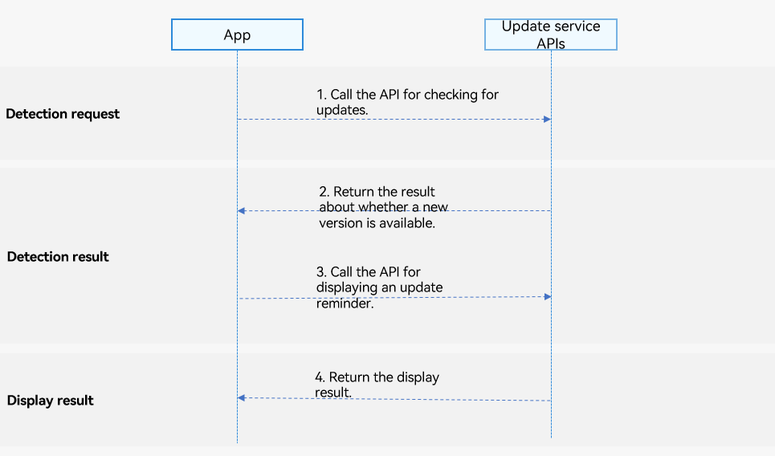
Service Process
-
The app calls the API for checking for updates.
-
The API returns the result about whether a new version is available.
-
Call the API for displaying an update pop-up.
-
The display result is returned to the app.
Constraints
-
The Update on AppGallery feature supports phones, tablets, and PCs/2-in-1 devices. Support for TVs is available starting from 5.1.1(19), and for wearables starting from 6.0.0(20).
-
The Update on AppGallery feature does not support the Emulator. Use a real device for debugging. If you use this service in the Emulator, the message "Unable to load content. Tap the screen to retry." will be displayed.
-
The app must have been released on AppGallery.
API Description
The Update on AppGallery feature provides the following APIs. For details, please refer to the API reference.
| API | Description |
|---|---|
| checkAppUpdate(context: common.UIAbilityContext): Promise<CheckUpdateResult> | Detects whether a new version is available. |
| showUpdateDialog(context:common.UIAbilityContext): Promise<ShowUpdateResultCode> | Displays an update pop-up. |
[h2]Detecting Whether a New App Version Is Available
-
Import the updateManager module and related common modules.
import { updateManager } from '@kit.AppGalleryKit'; import { hilog } from '@kit.PerformanceAnalysisKit'; import type { common } from '@kit.AbilityKit'; import { BusinessError } from '@kit.BasicServicesKit'; -
Construct an input parameter, which is a context of the common.UIAbilityContext type.
let context: common.UIAbilityContext = this.getUIContext().getHostContext() as common.UIAbilityContext;
-
Call the checkAppUpdate API to check whether a new app version is available.
try {
  updateManager.checkAppUpdate(context)
    .then((checkResult: updateManager.CheckUpdateResult) => {
      hilog.info(0, 'TAG', 'Succeeded in checking Result updateAvailable:' + checkResult.updateAvailable);
    }).catch((error: BusinessError) => {
    hilog.error(0, 'TAG', `checkAppUpdate onError.code is ${error.code}, message is ${error.message}`);
  });
} catch (error) {
  hilog.error(0, 'TAG', `checkAppUpdate onError.code is ${error.code}, message is ${error.message}`);
}

-
An update can be detected only if the locally installed version is lower than the version released on AppGallery.
-
The signature of the locally installed version must be the same as that of the version released on AppGallery.
-
Currently, closed testing and open testing are not supported.
[h2]Displaying an Update Pop-up
-
Import the updateManager module and related common modules.
import { updateManager } from '@kit.AppGalleryKit'; import { hilog } from '@kit.PerformanceAnalysisKit'; import type { common } from '@kit.AbilityKit'; import { BusinessError } from '@kit.BasicServicesKit'; -
Construct an input parameter, which is a context of the common.UIAbilityContext type.
let context: common.UIAbilityContext = this.getUIContext().getHostContext() as common.UIAbilityContext;
-
Call the showUpdateDialog API to display the update pop-up.
try {
  updateManager.showUpdateDialog(context)
    .then((resultCode: updateManager.ShowUpdateResultCode) => {
      hilog.info(0, 'TAG', 'Succeeded in showing UpdateDialog resultCode:' + resultCode);
    })
    .catch((error: BusinessError) => {
      hilog.error(0, 'TAG', `showUpdateDialog onError.code is ${error.code}, message is ${error.message}`);
    });
} catch (error) {
  hilog.error(0, 'TAG', `showUpdateDialog onError.code is ${error.code}, message is ${error.message}`);
}