The <switch> component is used to switch between the on and off states. For details, see switch.
Creating a <switch> Component
Create a <switch> component in the .hml file under pages/index.
<!-- xxx.hml -->
<div class="container">
    <switch checked="true"></switch>
</div>
/* xxx.css */
.container {
flex-direction: column;
background-color: #F1F3F5;
} 
Adding Attributes and Methods
The switch component uses the texton, textoff, and showtext attributes to set the text for the selected and unselected states. Set the checked attribute to true (the component is in the on state). Add a change event, which is triggered when the component state changes. After the event is triggered, the switchChange function is executed to obtain the current state of the component (off/on).
<!-- xxx.hml -->
<div class="container">
  <switch showtext="true" texton="open" textoff="close" checked="true" @change="switchChange"></switch>
</div>
/* xxx.css */
.container {
  width: 100%;
  height: 100%;
  display: flex;
  justify-content: center;
  align-items: center;
  background-color: #F1F3F5;
}
switch {
  texton-color: #002aff;
  textoff-color: silver;
  text-padding: 20px;
  font-size: 50px;
}
// xxx.js
export default {
switchChange(e){
if(e.checked){
this.getUIContext().getPromptAction().showToast({
message: "open"
});
}else{
this.getUIContext().getPromptAction().showToast({
message: "close"
});
}
}
} 

The text set by texton and textoff takes effect only when showtext is set to true.
Example Scenario
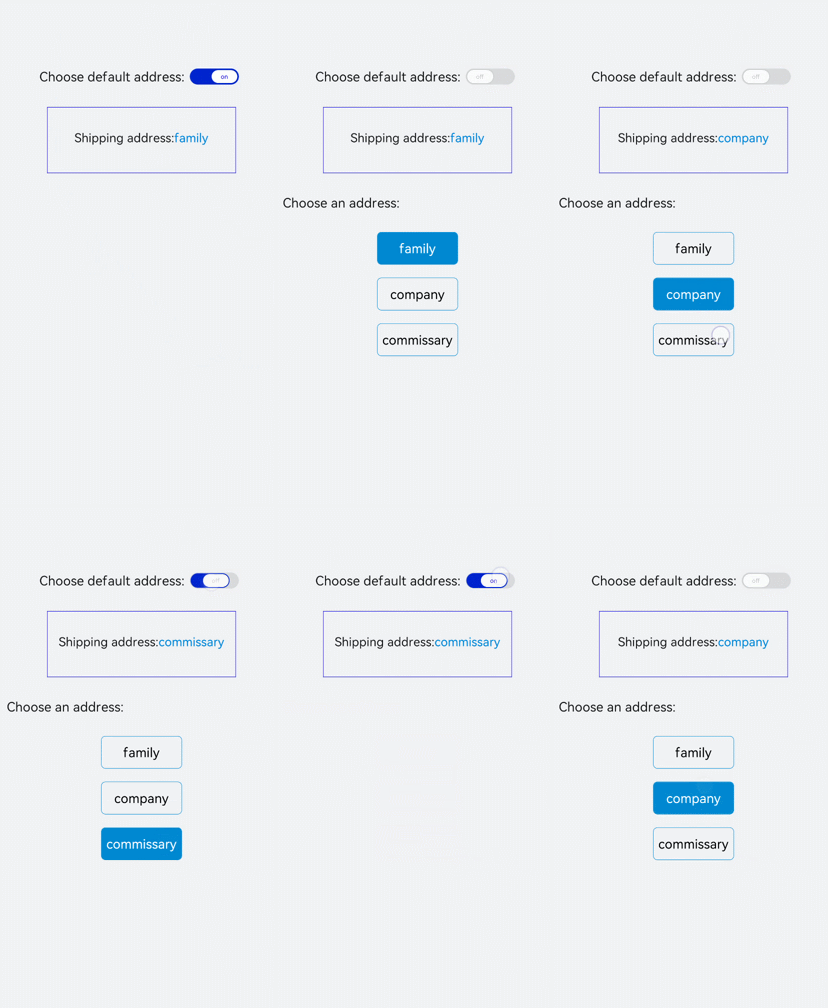
Turn on the switch and the default delivery address is used. When the switch is turned off, the address selection button is displayed on the page. Clicking the button can change the delivery address.
Implementation method: Create a <switch> component, set the checked attribute to true, and change the delivery address through data binding. Set the display attribute (the default value is none). When the switch is turned off and the display attribute is set to flex, the address module is displayed and clicking the button can change the color.
<!-- xxx.hml -->
<div class="container">
  <div class="change">
    <text>Choose default address:</text>
    <switch showtext="true" texton="on" textoff="off" checked="true" @change="switchChange"></switch>
  </div>
  <div class="content">
    <text class="address"><span>Shipping address:</span><span class="textSpan">{{address}}</span></text>
  </div>
  <div class="myAddress" style="display: {{addressDisplay}};">
    <text style="font-size: 30px;margin-bottom: 50px;">Choose an address:</text>
    <text class="addressText" style="background-color: {{item == address?'#0fabe7':''}};color: {{item == address?'white':'black'}};"
    for="item in addressList"@click="changeAddress({{$idx}})">{{item}}</text>
  </div>
</div>
/* xxx.css */
.container {
width: 100%;
height: 100%;
background-color: #F1F3F5;
flex-direction: column;
padding: 50px;
}
.change{
margin-top: 20%;
width: 100%;
justify-content: center;
}
switch{
texton-color: #002aff;
textoff-color: silver;
text-padding: 20px;
}
.content{
width: 70%;
text-align: center;
flex-direction: column;
border: 1px solid #002aff;
margin-left: 15%;
text-align: center;
}
.address{
width: 100%;
height: 100px;
line-height: 100px;
text-align: center;
font-size: 28px;
margin-bottom: 50px;
}
.textSpan{
color: #0aa9f1;
}
.myAddress{
flex-direction: column;
margin-top: 50px;
}
.addressText{
margin-left: 35%;
width: 30%;
height: 75px;
text-align: center;
color: white;
margin-bottom: 30px;
border-radius: 10px;
border: 1px solid #0fabe7;
} // xxx.js
export default {
data:{
address: '',
addressDisplay: 'none',
addressList: ['family','company','commissary'],
},
onInit(){
// Initialize the default address to the first one in the address list.
this.address = this.addressList[0];
},
switchChange(e){
if(e.checked){
this.addressDisplay = "none";
}else{
this.addressDisplay = "flex";
}
},
changeAddress(i){
this.address= this.addressList[i];
}
}