The Web component supports customizing request responses after the app intercepts a page request. You can use the onInterceptRequest() API to implement custom resource request responses. The custom request capability can be used in scenarios such as custom web page responses and custom file resource responses.
When a resource loading request is initiated on a web page, the application layer will receive the request. The application layer then constructs a local resource response and sends it to the web kernel. On receiving the response, the web kernel parses the response and loads page resources accordingly.
In the following example, the Web component intercepts the page request https://www.example.com/test.html, and a response resource is constructed in the app-side code to implement a custom page response scenario.
-
Code of the index1.html page:
<!DOCTYPE html> <html> <head> <meta charset="utf-8"> </head> <body> <!-- Page resource request --> <a href="https://www.example.com/test.html">intercept test!</a> </body> </html> -
Application code:
import { webview } from '@kit.ArkWeb'; @Entry @Component struct WebComponent { controller: webview.WebviewController = new webview.WebviewController(); responseResource: WebResourceResponse = new WebResourceResponse(); // Customize a response. @State webData: string = '<!DOCTYPE html>\n' + '<html>\n' + '<head>\n' + '<title>intercept test</title>\n' + '</head>\n' + '<body>\n' + '<h1>intercept ok</h1>\n' + '</body>\n' + '</html>' build() { Column() { Web({ src: $rawfile('index1.html'), controller: this.controller }) .onInterceptRequest((event) => { if (event) { console.info('url:' + event.request.getRequestUrl()); // Intercept the web page request. if (event.request.getRequestUrl() !== 'https://www.example.com/test.html') { return null; } } // Construct a custom response. this.responseResource.setResponseData(this.webData); this.responseResource.setResponseEncoding('utf-8'); this.responseResource.setResponseMimeType('text/html'); this.responseResource.setResponseCode(200); this.responseResource.setReasonMessage('OK'); return this.responseResource; }) } } } -
Page after being intercepted

Generate a CodeCache object for a custom JavaScript request response: If the resource of a custom request response is a JavaScript script, you can add the ResponseDataID field to the response header. After the web kernel reads this field, it generates a CodeCache for the JS resource to accelerate JS execution. If ResponseData is updated, this field must be updated accordingly. If the ResponseDataID field is not added, no CodeCache is generated by default.
In the following example, the Web component intercepts the page request https://www.example.com/test.js; a response resource is constructed in the app-side code, and the ResponseDataID field is added to the response header to enable CodeCache generation.
-
Code of the index2.html page:
<!DOCTYPE html> <html> <head> <meta charset="utf-8"> </head> <body> <div id="div-1">this is a test div</div> <div id="div-2">this is a test div</div> <div id="div-3">this is a test div</div> <div id="div-4">this is a test div</div> <div id="div-5">this is a test div</div> <div id="div-6">this is a test div</div> <div id="div-7">this is a test div</div> <div id="div-8">this is a test div</div> <div id="div-9">this is a test div</div> <div id="div-10">this is a test div</div> <div id="div-11">this is a test div</div> <script src="https://www.example.com/test.js"></script> </body> </html> -
Application code:
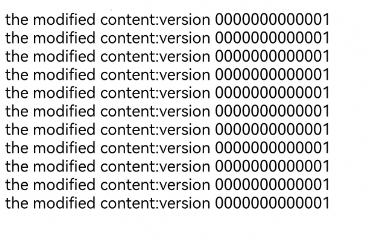
import { webview } from '@kit.ArkWeb'; @Entry @Component struct WebComponent { controller: webview.WebviewController = new webview.WebviewController(); responseResource: WebResourceResponse = new WebResourceResponse(); // Customize response data. (The CodeCache object is created only when the response data length is greater than or equal to 1024 bytes.) @State jsData: string = 'let text_msg = "the modified content:version 0000000000001";\n' + 'let element1 = window.document.getElementById("div-1");\n' + 'let element2 = window.document.getElementById("div-2");\n' + 'let element3 = window.document.getElementById("div-3");\n' + 'let element4 = window.document.getElementById("div-4");\n' + 'let element5 = window.document.getElementById("div-5");\n' + 'let element6 = window.document.getElementById("div-6");\n' + 'let element7 = window.document.getElementById("div-7");\n' + 'let element8 = window.document.getElementById("div-8");\n' + 'let element9 = window.document.getElementById("div-9");\n' + 'let element10 = window.document.getElementById("div-10");\n' + 'let element11 = window.document.getElementById("div-11");\n' + 'element1.innerHTML = text_msg;\n' + 'element2.innerHTML = text_msg;\n' + 'element3.innerHTML = text_msg;\n' + 'element4.innerHTML = text_msg;\n' + 'element5.innerHTML = text_msg;\n' + 'element6.innerHTML = text_msg;\n' + 'element7.innerHTML = text_msg;\n' + 'element8.innerHTML = text_msg;\n' + 'element9.innerHTML = text_msg;\n' + 'element10.innerHTML = text_msg;\n' + 'element11.innerHTML = text_msg;\n'; build() { Column() { Web({ src: $rawfile('index2.html'), controller: this.controller }) .onInterceptRequest((event) => { // Intercept the web page request. if (event?.request.getRequestUrl() == 'https://www.example.com/test.js') { // Construct a custom response. this.responseResource.setResponseHeader([ { // The value is a string of a maximum of 13 digits. It is a JavaScript identifier and must be updated to maintain consistency with JavaScript. headerKey: 'ResponseDataID', headerValue: '0000000000001' }]); this.responseResource.setResponseData(this.jsData); this.responseResource.setResponseEncoding('utf-8'); this.responseResource.setResponseMimeType('application/javascript'); this.responseResource.setResponseCode(200); this.responseResource.setReasonMessage('OK'); return this.responseResource; } return null; }) } } } -
Page after being intercepted