Worker primarily provides a multithreaded runtime environment for applications, allowing them to separate from the host thread during execution. This enables scripts to run in background threads for time-consuming operations, avoiding blocking the host thread during compute-intensive or high-latency tasks. For details about the APIs and their usage, see Worker.
Worker Operating Mechanism
Figure 1 Worker operating mechanism
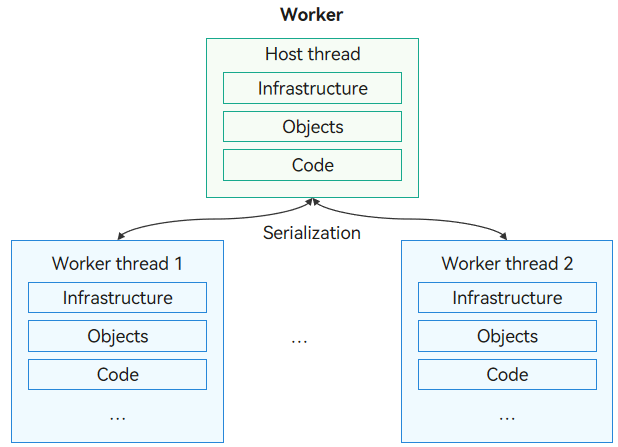
The thread that creates a Worker is referred to as the host thread (not limited to the main thread; Worker threads can also create its child Workers). The Worker thread (also called actor thread) is the thread on which the Worker itself runs. Each Worker thread and the host thread have independent instances, including separate execution environments, objects, and code segments. Therefore, there is a certain memory overhead associated with starting each Worker, and the number of Worker threads should be limited. Worker threads and the host thread communicate through a message-passing mechanism, using serialization, reference passing, or ownership transfer to complete the exchange of commands and data.
Precautions for Creating a Worker
The Worker thread file must be placed in the {moduleName}/src/main/ets/ directory to be included in the application package. You can create a Worker thread directory and file manually or automatically. The automatic mode is recommended. In manual mode, you must also synchronize the related configuration.
-
Manual creation: Manually create the worker.ets file in the workers folder in the ets directory, and configure the related field in build-profile.json5 so that the Worker thread file can be packed into the application package.
Stage model:
"buildOption": {
  "sourceOption": {
    "workers": [
      "./src/main/ets/workers/worker.ets"
    ]
  }
}
FA model:
"buildOption": { "sourceOption": { "workers": [ "./src/main/ets/MainAbility/workers/worker.ets" ] } } -
Automatic mode: DevEco Studio supports one-click generation of Workers. Right-click any position in the {moduleName} directory and choose New > Worker to generate the Worker template file and configuration information. There is no need to configure the fields in build-profile.json5.
Precautions for File URLs
Before calling an API of the Worker module, you must create a Worker object. The constructor is related to the API version and requires the URL to the Worker thread file to be passed in scriptURL.
// Import the module.
import { worker } from '@kit.ArkTS';

const worker1: worker.ThreadWorker = new worker.ThreadWorker('entry/ets/workers/worker.ets');
[h2]File URL Rules in Stage Model
The scriptURL can be written in any of the following formats:
Method 1: Use the **{moduleName}/ets/{relativePath}** format to load the Worker thread file. {relativePath} is the relative path of the Worker thread file to the {moduleName}/src/main/ets/ directory.
Path rule: **{moduleName}/ets/{relativePath}**
import { worker } from '@kit.ArkTS';
// URL of the Worker thread file: "entry/src/main/ets/workers/worker.ets"
const workerInstance1: worker.ThreadWorker = new worker.ThreadWorker('entry/ets/workers/worker.ets');

// URL of the Worker thread file: "testworkers/src/main/ets/ThreadFile/workers/worker.ets"
const workerInstance2: worker.ThreadWorker = new worker.ThreadWorker('testworkers/ets/ThreadFile/workers/worker.ets');
Method 2: Use the @{moduleName}/ets/{relativePath} format to load the Worker thread file.
Path rule: @{moduleName}/ets/{relativePath}
import { worker } from '@kit.ArkTS';
// @ path loading:
// URL of the Worker thread file: "har/src/main/ets/workers/worker.ets"
const workerInstance3: worker.ThreadWorker = new worker.ThreadWorker('@har/ets/workers/worker.ets');
Method 3: Load the worker thread file in relative path mode. (Only intra-package loading is supported. Cross-package loading is not supported.)
Path rule: ../../{relativePath}
import { worker } from '@kit.ArkTS';
// Relative path loading:
// URL of the Worker thread file: "har/src/main/ets/workers/worker.ets"
// URL of the file where the Worker object is created: "har/src/main/ets/components/mainpage/MainPage.ets"
const workerInstance4: worker.ThreadWorker = new worker.ThreadWorker('../../workers/worker.ets');
The following table lists the detailed file path loading rules.
Each row in the first column of the table indicates the location of the module that loads the Worker thread file, and each column in the first row indicates the location of the Worker thread file to be loaded. The remaining table content specifies whether this type of loading is supported and the corresponding syntax for the path rules.
For example, the cell at the second row and fourth column in the table indicates that the entry module can load the Worker thread file in the hsp module within the application via method 1.

-
When you load Worker thread files from the entry, feature, or hsp packages, method 3 is not recommended. Method 1 is preferred, which does not require path concatenation and enables quick creation of Workers.
-
The path suffix .ets/ts of Worker thread files can be omitted.
-
In scenarios involving cross-source code HSP/HAR packages, you need to configure dependencies for the required HSP/HAR packages in the oh-package.json5 file corresponding to the module package where the Worker is created. For details, see Referencing a Shared Package.
-
When a feature module needs to load Worker thread files from other modules, it must first complete the invocation of the feature module.
-
When useNormalizedOHMUrl is enabled (the useNormalizedOHMUrl field of the strictMode property in the application-level build-profile.json5 file at the same level as the entry in the project directory is set to true) or when the HAR is used as a third-party package, the Worker thread file contained the HAR can be loaded using a relative path.
| - | entry | feature | In-app HSP | Cross-project HSP | Source-code HAR | Third-party HAR |
|---|---|---|---|---|---|---|
| entry | Supported (method 1 and 3) | Supported (method 1) | Supported (method 1) | Not supported | Supported (method 2) | Not supported |
| feature | Not supported | Supported (method 1) for cross-package and (method 1 and 3) for intra-package scenarios | Supported (method 1) | Not supported | Supported (method 2) | Not supported |
| In-app HSP | Not supported | Supported (method 1) | Supported (method 1) for cross-package and (method 1 and 3) for intra-package scenarios | Not supported | Supported (method 2) | Not supported |
| Cross-project HSP | Not supported | Not supported | Not supported | Not supported | Not supported | Not supported |
| Source-code HAR | Not supported | Supported (method 1) | Supported (method 1) | Not supported | Supported (method 2) for cross-package and (method 2 and 3) for intra-package scenarios | Not supported |
| Third-party HAR | Not supported | Not supported | Not supported | Not supported | Not supported | Supported (method 3) only for intra-package scenarios |
Taking the scenario where the entry module loads a Worker thread file from a source-code HAR package as an example, the detailed steps are as follows:
-
Create a HAR. For details, see HAR.
-
Create the Worker thread file in the HAR.
workerPort.onmessage = (e: MessageEvents) => { console.info('worker thread receive message: ', e.data); workerPort.postMessage('worker thread post message to main thread'); } -
Configure the dependency of the HAR in the oh-package.json5 file of the entry module.
{ "name": "entry", "version": "1.0.0", "description": "Please describe the basic information.", "main": "", "author": "", "license": "", "dependencies": { "har": "file:../har" } } -
Load the Worker thread file from the HAR in the entry module.
import { worker } from '@kit.ArkTS';

@Entry
@Component
struct Index {
  @State message: string = 'Hello World';

  build() {
    RelativeContainer() {
      Text(this.message)
        .id('HelloWorld')
        .fontSize(50)
        .fontWeight(FontWeight.Bold)
        .alignRules({
          center: { anchor: '__container__', align: VerticalAlign.Center },
          middle: { anchor: '__container__', align: HorizontalAlign.Center }
        })
        .onClick(() => {
          // Use @ path loading mode and load the Worker thread file from the HAR.
          let workerInstance = new worker.ThreadWorker('@har/ets/workers/worker.ets');
          workerInstance.onmessage = () => {
            console.info('main thread onmessage');
          };
          workerInstance.postMessage('hello world');
          this.message = 'success';
        })
    }
    .height('100%')
    .width('100%')
  }
}
[h2]File URL Rules in FA Model
scriptURL in the constructor is the relative path from the Worker thread file to "{moduleName}/src/main/ets/MainAbility".
import { worker } from '@kit.ArkTS';

// The following three scenarios are involved.

// Scenario 1: URL of the Worker thread file: "{moduleName}/src/main/ets/MainAbility/workers/worker.ets"
const workerFA1: worker.ThreadWorker = new worker.ThreadWorker('workers/worker.ets', {name:'first worker in FA model'});

// Scenario 2: URL of the Worker thread file: "{moduleName}/src/main/ets/workers/worker.ets"
const workerFA2: worker.ThreadWorker = new worker.ThreadWorker('../workers/worker.ets');

// Scenario 3: URL of the Worker thread file: "{moduleName}/src/main/ets/MainAbility/ThreadFile/workers/worker.ets"
const workerFA3: worker.ThreadWorker = new worker.ThreadWorker('ThreadFile/workers/worker.ets');
Precautions for Lifecycle Management
-
After a Worker is created, its lifecycle must be managed manually. Creating and destroying Workers consume system resources. Therefore, you are advised to manage created Workers efficiently and reuse them when possible. Idle Workers still occupy resources. When a Worker is no longer needed, call terminate() or close() to destroy it actively. Note that after the terminate() API or close() method is called, the worker thread exits asynchronously. If you register the onexit() callback, the thread exits after the onexit() callback is complete. If a Worker is in a non-running state such as destroyed or being destroyed, calling its functional interfaces will throw corresponding errors.
-
The number of Workers is determined by the memory management policy, with a set memory threshold being the smaller of 1.5 GB and 60% of the device's physical memory. If the memory is sufficient, the system can run a maximum of 64 Workers at the same time, and the total number of runtimes created with napi_create_ark_runtime cannot exceed 80. If an attempt is made to create more Workers than this limit, the system displays the error message "Worker initialization failure, the number of Workers exceeds the maximum." The actual number of running Workers will be adjusted in real time based on current memory usage. When the cumulative memory usage of all Workers and the main thread exceeds the set threshold, Out of Memory (OOM) error occurs, and applications may crash.
Other Precautions
- The context objects in different threads are different. Therefore, Worker threads can use only thread-safe libraries. For example, non-thread-safe UI-related libraries cannot be used in Worker threads.
- A maximum of 16 MB data can be serialized at a time.
- AppStorage cannot be used in Worker threads.
- Do not use the export syntax to export any content in the Worker file. Otherwise, a JS crash may occur.
- After the application is suspended, its Worker thread will also be suspended.
- In addition to the preceding precautions, pay attention to concurrency precautions.
Basic Usage Example of Worker
-
Create Worker with DevEco Studio. Specifically, in DevEco Studio, right-click anywhere in the {moduleName} directory and choose New > Worker to automatically generate the Worker template file and configuration information. This section uses the creation of "worker" as an example.
You can also manually create Worker thread files. For specific methods and related considerations, see Precautions for Creating a Worker.
-
Import the Worker module.
// Index.ets import { ErrorEvent, MessageEvents, worker } from '@kit.ArkTS' -
In the host thread, call constructor() of ThreadWorker to create a Worker object, and register callback functions.
// Index.ets @Entry @Component struct Index { @State message: string = 'Hello World'; build() { RelativeContainer() { Text(this.message) .id('HelloWorld') .fontSize(50) .fontWeight(FontWeight.Bold) .alignRules({ center: { anchor: '__container__', align: VerticalAlign.Center }, middle: { anchor: '__container__', align: HorizontalAlign.Center } }) .onClick(() => { // Create a Worker object. let workerInstance = new worker.ThreadWorker('entry/ets/workers/worker.ets'); // Register the onmessage callback to capture the message sent by the Worker thread through the workerPort.postMessage API. This callback is executed in the host thread. workerInstance.onmessage = (e: MessageEvents) => { let data: string = e.data; console.info('workerInstance onmessage is: ', data); } // Register the onAllErrors callback to capture global exceptions generated during the onmessage callback, timer callback, and file execution of the Worker thread. This callback is executed in the host thread. workerInstance.onAllErrors = (err: ErrorEvent) => { console.error('workerInstance onAllErrors message is: ' + err.message); } // Register the onmessageerror callback. When the Worker object receives a message that cannot be serialized, this callback is invoked and executed in the host thread. workerInstance.onmessageerror = () => { console.error('workerInstance onmessageerror'); } // Register the onexit callback. When the Worker object is destroyed, this callback is invoked and executed in the host thread. workerInstance.onexit = (e: number) => { // When the Worker object exits normally, the code is 0. When the Worker object exits abnormally, the code is 1. console.info('workerInstance onexit code is: ', e); } // Send a message to the Worker thread. workerInstance.postMessage('1'); }) } .height('100%') .width('100%') } } -
Register the callback functions in the Worker thread file.
// worker.ets
import { ErrorEvent, MessageEvents, ThreadWorkerGlobalScope, worker } from '@kit.ArkTS';

const workerPort: ThreadWorkerGlobalScope = worker.workerPort;

// Register the onmessage callback. When the Worker thread receives a message from the host thread through the postMessage interface, this callback is invoked and executed in the Worker thread.
workerPort.onmessage = (e: MessageEvents) => {
  let data: string = e.data;
  console.info('workerPort onmessage is: ', data);

  // Send a message to the host thread.
  workerPort.postMessage('2');
}

// Register the onmessageerror callback. When the Worker object receives a message that cannot be serialized, this callback is invoked and executed in the Worker thread.
workerPort.onmessageerror = () => {
  console.error('workerPort onmessageerror');
}

// Register the onerror callback. When an exception occurs during the execution of the Worker thread, this callback is invoked and executed in the Worker thread.
workerPort.onerror = (err: ErrorEvent) => {
  console.error('workerPort onerror err is: ', err.message);
}
Multi-Level Worker Lifecycle Management
Multi-level Workers can be created. That is, a hierarchical thread relationship is formed by the mechanism of creating child Workers through parent Workers. The lifecycle of Worker threads should be manually managed. Therefore, it is important to properly manage the lifecycle of multi-level Workers. If a parent Worker is destroyed without terminating its child Workers, unpredictable results may occur. Therefore, ensure that the lifecycle of child Workers is within the lifecycle of the parent Worker. Before destroying the parent Worker, destroy all child Workers to prevent unexpected results.
[h2]Recommended Usage Example
// Create a Worker thread (parent Worker) in the host thread, and create a Worker thread (child Worker) in the parent Worker.
import { worker, MessageEvents, ErrorEvent } from '@kit.ArkTS';

// Create a parent Worker object in the host thread.
const parentWorker = new worker.ThreadWorker('entry/ets/workers/ParentWorker.ets');

parentWorker.onmessage = (e: MessageEvents) => {
  console.info('The host thread receives a message from the parent Worker' + e.data);
}

parentWorker.onexit = () => {
  console.info('The parent Worker exits');
}

parentWorker.onAllErrors = (err: ErrorEvent) => {
  console.error('The host thread receives an error from the parent Worker' + err.message);
}

parentWorker.postMessage('The host thread sends a message to the parent Worker - recommended example');
// ParentWorker.ets
import { ErrorEvent, MessageEvents, ThreadWorkerGlobalScope, worker } from '@kit.ArkTS';
// Create an object in the parent Worker for communicating with the host thread.
const workerPort: ThreadWorkerGlobalScope = worker.workerPort;
workerPort.onmessage = (e : MessageEvents) => {
if (e.data == 'The host thread sends a message to the parent Worker - recommended example') {
let childWorker = new worker.ThreadWorker('entry/ets/workers/ChildWorker.ets');
childWorker.onmessage = (e: MessageEvents) => {
console.info('The parent Worker receives a message from the child Worker' + e.data);
if (e.data == 'The child Worker sends information to the parent Worker') {
workerPort.postMessage('The parent Worker sends a message to the host thread');
}
}
childWorker.onexit = () => {
console.info('The child Worker exits');
// Destroy the parent Worker after the child Worker exits.
workerPort.close();
}
childWorker.onAllErrors = (err: ErrorEvent) => {
console.error('An error occurred on the child Worker' + err.message);
}
childWorker.postMessage('The parent Worker sends a message to the child Worker - recommended example');
}
} // ChildWorker.ets
import { ErrorEvent, MessageEvents, ThreadWorkerGlobalScope, worker } from '@kit.ArkTS';
// Create an object in the child Worker for communicating with the parent Worker.
const workerPort: ThreadWorkerGlobalScope = worker.workerPort;
workerPort.onmessage = (e: MessageEvents) => {
if (e.data == 'The parent Worker sends a message to the child Worker - recommended example') {
// Service logic of the child Worker...
console.info('The service execution is complete, and the child Worker is destroyed');
workerPort.close();
}
} [h2]Not Recommended Example
It is not recommended that a child Worker send messages to the parent Worker after the parent Worker is destroyed.
import { worker, MessageEvents, ErrorEvent } from '@kit.ArkTS';

const parentWorker = new worker.ThreadWorker('entry/ets/workers/ParentWorker.ets');

parentWorker.onmessage = (e: MessageEvents) => {
  console.info('The host thread receives a message from the parent Worker' + e.data);
}

parentWorker.onexit = () => {
  console.info('The parent Worker exits');
}

parentWorker.onAllErrors = (err: ErrorEvent) => {
  console.error('The host thread receives an error from the parent Worker' + err.message);
}

parentWorker.postMessage('The host thread sends a message to the parent Worker');
// ParentWorker.ets
import { ErrorEvent, MessageEvents, ThreadWorkerGlobalScope, worker } from '@kit.ArkTS';
const workerPort: ThreadWorkerGlobalScope = worker.workerPort;
workerPort.onmessage = (e : MessageEvents) => {
console.info('The parent Worker receives a message from the host thread' + e.data);
let childWorker = new worker.ThreadWorker('entry/ets/workers/ChildWorker.ets')
childWorker.onmessage = (e: MessageEvents) => {
console.info('The parent Worker receives a message from the child Worker' + e.data);
}
childWorker.onexit = () => {
console.info('The child Worker exits');
workerPort.postMessage('The parent Worker sends a message to the host thread');
}
childWorker.onAllErrors = (err: ErrorEvent) => {
console.error('An error occurred on the child Worker' + err.message);
}
childWorker.postMessage('The parent Worker sends a message to the child Worker');
// Destroy the parent Worker after the child Worker is created.
workerPort.close();
} // ChildWorker.ets
import { ErrorEvent, MessageEvents, ThreadWorkerGlobalScope, worker } from '@kit.ArkTS';
const workerPort: ThreadWorkerGlobalScope = worker.workerPort;
workerPort.onmessage = (e: MessageEvents) => {
console.info('The child Worker receives a message' + e.data);
// After the parent Worker is destroyed, the child Worker sends a message to the parent Worker. The behavior is unpredictable.
workerPort.postMessage('The child Worker sends a message to the parent Worker');
setTimeout(() => {
workerPort.postMessage('The child Worker sends a message to the parent Worker');
}, 1000);
} You are not advised to create a child Worker in the parent Worker when the parent Worker is initiating the destruction operation. Before creating a child Worker thread, ensure that the parent Worker thread is always alive. You are advised to create a child Worker when the parent Worker does not initiate the destruction operation.
import { worker, MessageEvents, ErrorEvent } from '@kit.ArkTS';

const parentWorker = new worker.ThreadWorker('entry/ets/workers/ParentWorker.ets');

parentWorker.onmessage = (e: MessageEvents) => {
  console.info('The host thread receives a message from the parent Worker' + e.data);
}

parentWorker.onexit = () => {
  console.info('The parent Worker exits');
}

parentWorker.onAllErrors = (err: ErrorEvent) => {
  console.error('The host thread receives an error from the parent Worker' + err.message);
}

parentWorker.postMessage('The host thread sends a message to the parent Worker');
// ParentWorker.ets
import { ErrorEvent, MessageEvents, ThreadWorkerGlobalScope, worker } from '@kit.ArkTS';
const workerPort: ThreadWorkerGlobalScope = worker.workerPort;
workerPort.onmessage = (e : MessageEvents) => {
console.info('The parent Worker receives a message from the host thread' + e.data);
// Create a child Worker after the parent Worker is destroyed. The behavior is unpredictable.
workerPort.close();
let childWorker = new worker.ThreadWorker('entry/ets/workers/ChildWorker.ets');
// Destroy the parent Worker before it is confirmed that the child Worker is successfully created. The behavior is unpredictable.
// let childWorker = new worker.ThreadWorker('entry/ets/workers/ChildWorker.ets');
// workerPort.close();
childWorker.onmessage = (e: MessageEvents) => {
console.info('The parent Worker receives a message from the child Worker' + e.data);
}
childWorker.onexit = () => {
console.info('The child Worker exits');
workerPort.postMessage('The parent Worker sends a message to the host thread');
}
childWorker.onAllErrors = (err: ErrorEvent) => {
console.error('An error occurred on the child Worker' + err.message);
}
childWorker.postMessage('The parent Worker sends a message to the child Worker');
} // ChildWorker.ets
import { ErrorEvent, MessageEvents, ThreadWorkerGlobalScope, worker } from '@kit.ArkTS';
const workerPort: ThreadWorkerGlobalScope = worker.workerPort;
workerPort.onmessage = (e: MessageEvents) => {
console.info('The child Worker receives a message' + e.data);
}