This topic describes application installation, uninstallation, and two update modes.
Installing or Uninstalling an Application
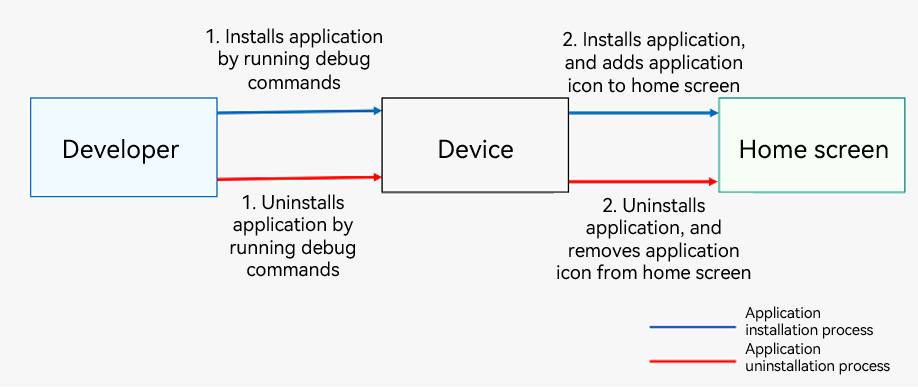
You can install and uninstall applications using debug commands, for example, the install and uninstall commands in the bm tool. For details, see the compilation, release, and deployment process flowchart.
Figure 1 Process of installing and uninstalling an application (applicable to developers)
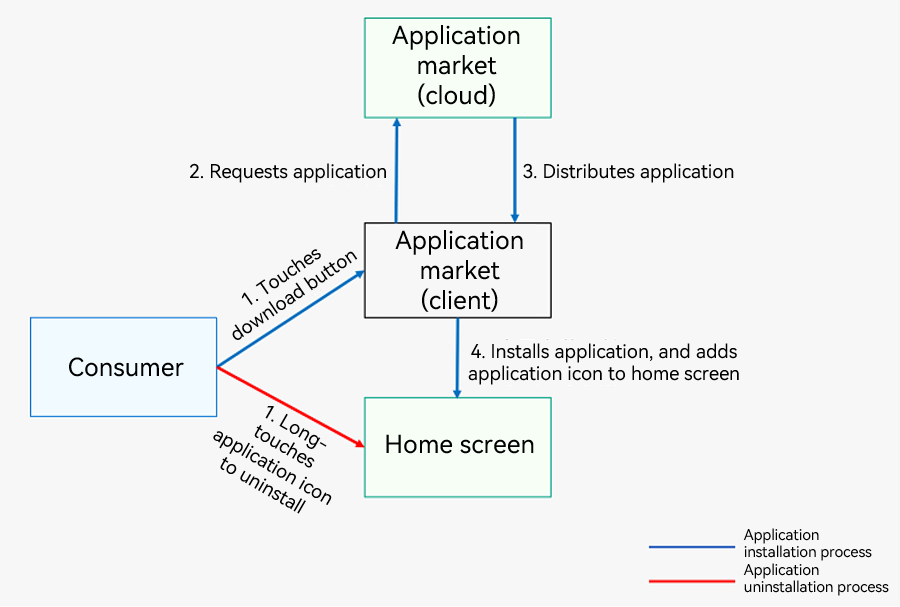
After an application is released to AppGallery, users can install the application on their devices through the AppGallery.
Figure 2 Process of installing and uninstalling an application (applicable to consumers)
Updating an Application
For developers, you need to first update the versionCode field in the app.json5 configuration file, package the application using DevEco Studio, and release it on AppGallery. For users, you can update the application in either of the following ways after a new version is released:
-
On AppGallery: AppGallery notifies the user of an available update, and the user can install the update by following the on-screen instructions.
-
In the application: You can implement version update notifications by following Detecting Whether a New App Version Is Available. When the app finishes launching or the user manually checks for a new version in the app, an update dialog box is displayed, and the user can update the app as prompted.