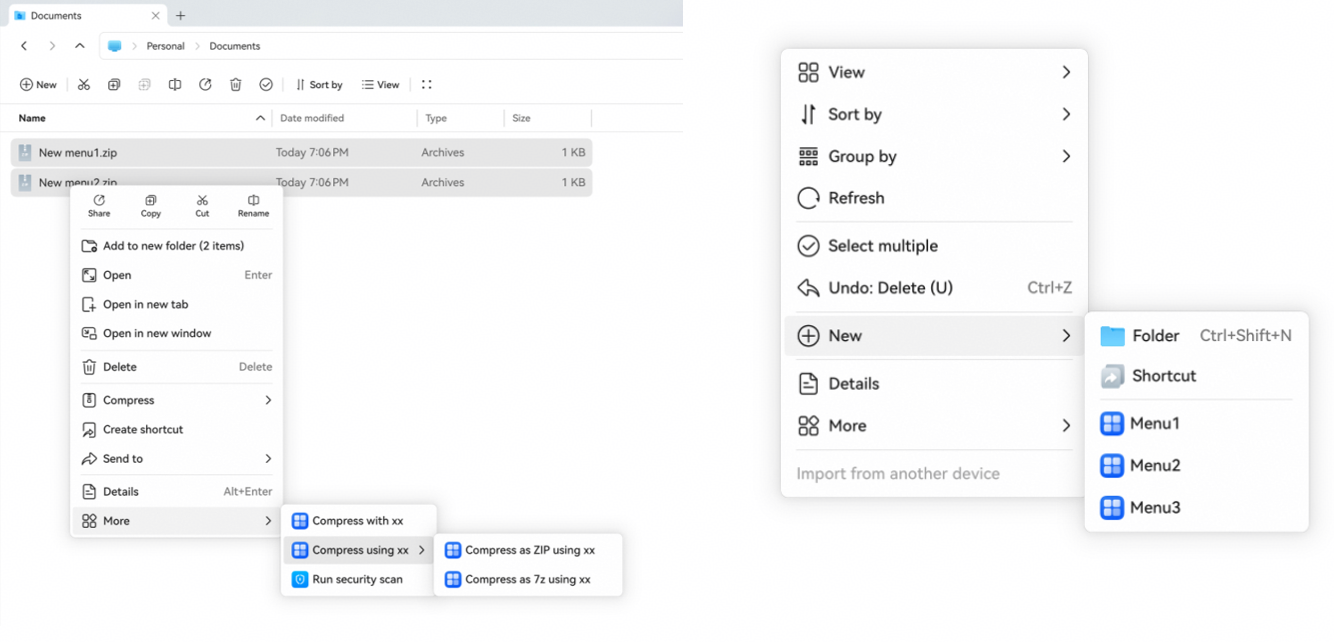
By configuring the context menu, an application can register custom menu items in the context menus of the desktop and File Manager. When a user clicks a custom menu item, the application is started to perform the corresponding operation. In this way, application capabilities can be conveniently integrated into the system file operation process. Typical scenarios are as follows:
- An application needs to add a custom menu to the context menus of the desktop and File Manager to start the application and implement service logic, for example, security check.
- An application needs to add a New menu to the context menus of the desktop and File Manager to create files, for example, creating a text document named New Text Document.txt.
Declaring the Context Menu
Configure the fileContextMenu field in the module.json5 configuration file. This field points to a profile file resource. You need to define the corresponding menu configuration file, for example, menu.json, in the resources/base/profile directory. The menu.json file name can be customized, but it must be the same as the resource name specified by fileContextMenu.
In the menu configuration file, you can define the context menu items registered by the application and their response behavior to declare the context menu configuration of the current HAP.

This field can be configured only in modules of the entry type.
{
  "module": {
    // ...
    "fileContextMenu": "$profile:menu", // Resource configuration, which points to the menu.json configuration file defined in profile.
    // ...
  }
} Complete Example
The following is a complete menu.json configuration file example, including the More menu and New menu.
{
  "fileContextMenu": [
    {
      "abilityName": "EntryAbility",
      "menuItem": "$string:compress_menu",
      "menuIcon": "$media:compress_icon",
      "menuHandler": "compress",
      "menuContext": [
        {
          "menuKind": 0
        },
        {
          "menuKind": 1,
          "menuRule": "both",
          "fileSupportType": [
            ".rar",
            ".zip"
          ]
        }
      ]
    }
  ],
  "newFile": [
    {
      "menuName": "$string:menu1",
      "menuIcon": "icon/menuIcon1.png",
      "fileType": ".docx",
      "fileContent": "template/demo.docx"
    },
    {
      "menuName": "$string:menu2",
      "menuIcon": "icon/menuIcon2.png",
      "fileType": ".txt",
      "fileContent": "template/demo.txt"
    },
    {
      "menuName": "$string:menu3",
      "menuIcon": "icon/menuIcon3.png",
      "fileType": ".xlsx",
      "fileContent": "template/demo.xlsx"
    }
  ]
}
The following figure shows the effect.