
The API version number format has been adjusted since 26.0.0 (for details, see the version number format adjustment description). This adjustment does not affect the basic logic for determining API compatibility. Therefore, the old version number format is still used in the examples provided in this document.
The relationship between the latest API versions is as follows:
26.0.0 > 6.1.1(24) > 6.1.0(23) > 6.0.2(22) > 6.0.1(21) > 6.0.0(20) > 5.1.1(19) > 5.1.0(18) > 5.0.5(17)
During application development, your application often depends on numerous third-party libraries. Compatibility issues can arise between the application HAP and third-party HAR files due to differences in their configured SDK version attribute fields.
For third-party library development, it is recommended that you use the latest released SDK version for compilation. By implementing API compatibility checks, you should set the minimum supported SDK version (compatibleSdkVersion) as low as possible. This maximizes the range of applications that can integrate your library. This is especially critical for libraries that do not depend on APIs from the HarmonyOS SDK, where setting compatibleSdkVersion to 12 is advised. Be aware that achieving broad compatibility may require adding numerous API compatibility checks, so you should evaluate and configure this value based on the API version distribution across existing devices.
SDK Attribute | Focus of Application Integrators | Focus of Third-Party Library Providers | Integration Rules |
|---|---|---|---|
compileSdkVersion | 1. Use the latest release version SDK for development. 2. Select stable and performant third-party library versions for integration. | 1. For libraries not dependent on system APIs, set this field to the latest release API version. 2. For libraries dependent on system APIs, set this field to the latest release API version. This value determines the scope of callable APIs. To maintain compatibility with earlier versions, you must implement compatibility checks for later-version APIs. | 1. For libraries in the source code format, the application's compileSdkVersion must be equal to or higher than the library's compileSdkVersion, otherwise a compilation error occurs. 2. For libraries in the bytecode format, there is no specific requirement. |
targetSdkVersion | 1. Configure the targetSdkVersion field based on your actual scenario. Since version 6.0.0(20), DevEco Studio prompts you to configure this field upon opening. 2. When upgrading this field, pay attention to API behavioral changes introduced in the new version and adapt your application accordingly. 3. When integrating a third-party library for your application, be aware of potential differences between your application's targetSdkVersion and the library's. | 1. For libraries not dependent on system APIs, set this field to the latest release API version. 2. For libraries dependent on system APIs: (1) If used APIs do not have behavioral changes, set this field to the latest release API version. (2) If used APIs have behavioral changes, set this field to the latest release API version and fully adapt all such APIs, shielding application integrators from the differences. | 1. If targetSdkVersion configured in the library differs from the application's, the final packaged application uses the application's configured value. 2. If the application's targetSdkVersion differs from the library's, you must check if the library's targetSdkVersion change introduces API behavioral changes and adapt accordingly (Recommended: The library uniformly shields behavioral differences; Alternative: The application handles the differences). |
compatibleSdkVersion | 1. Choose a reasonable value based on the API version distribution on HarmonyOS devices and your own costs. It is recommended that your application support at least 95% of existing devices. 2. When integrating a third-party library, check the value of this field in the library and verify whether the library implements compatibility checks for later-version APIs. | 1. For libraries not dependent on system APIs, this field can be set to 5.0.0(12), allowing integration by any application. 2. For libraries dependent on system APIs that aim for maximum integration, set this field equal to or higher than the minimum API version released in the last two years. | 1. The application's configured compatibleSdkVersion must be equal to or higher than the library's; otherwise, the build will fail with an error. |
To ensure consistent behavior when integrated into host applications with different targetSdkVersion values, the third-party library provider must adapt to API behavioral changes across versions during development. This is achieved by calling the getBundleInfoForSelf API to obtain the host application's bundleInfo.targetVersion and subsequently adapting these API behaviors accordingly.
[Example 1: Application Integrating a Library (Containing APIs with Behavioral Changes)]
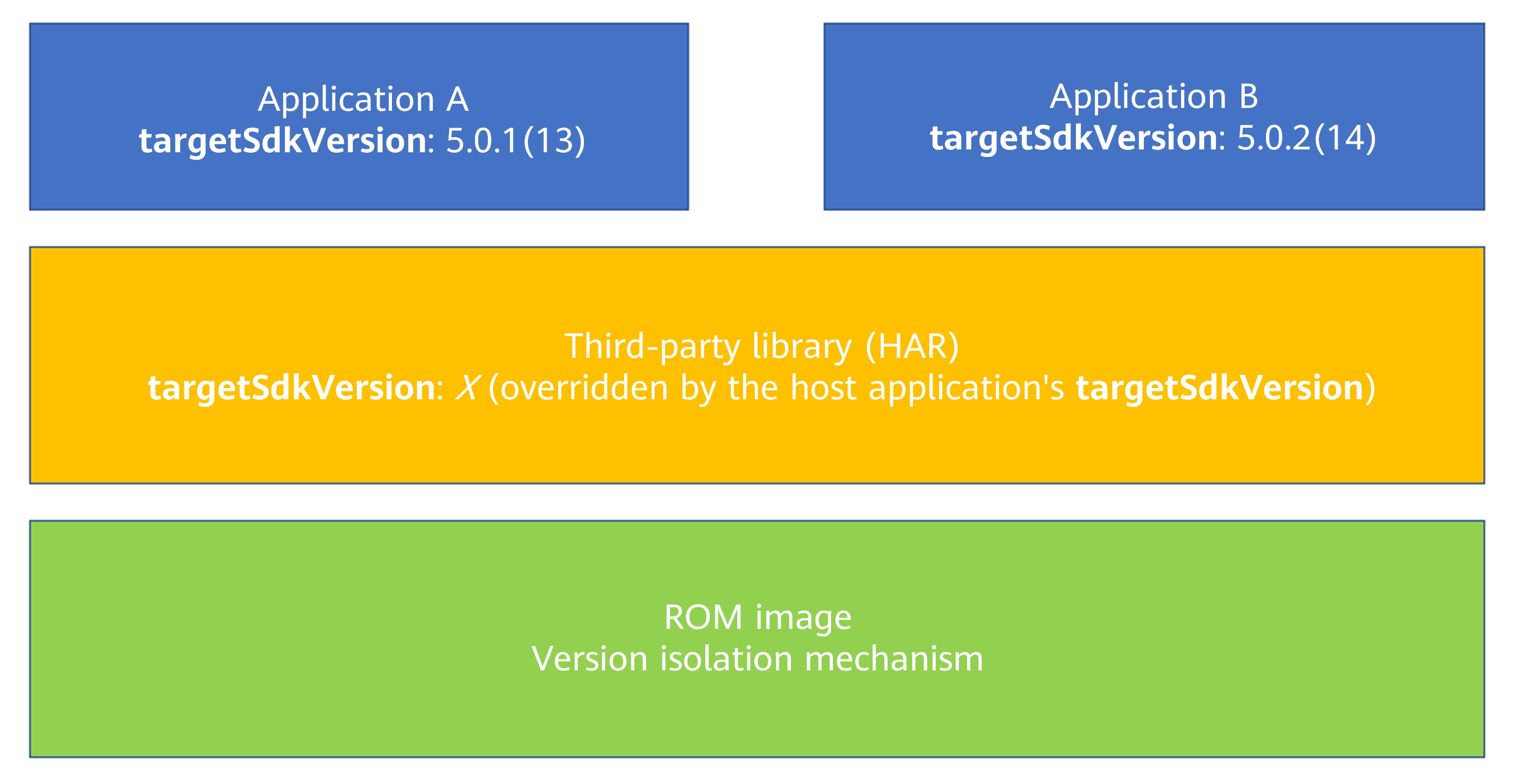
(1) Application A has targetSdkVersion set to 5.0.1(13); application B has targetSdkVersion set to 5.0.2(14).
(2) The third-party library has targetSdkVersion set to 5.0.2(14) and uses the orientation property of the Display object (from @ohos.display.d.ts). This property underwent a version-isolated behavioral change in version 5.0.2(14), which the system implemented to avoid impacting already-published applications.
(3) Because the final targetSdkVersion configuration packaged into the application is taken from the application itself (not the library), the library needs specific adaptation to ensure consistent behavior regardless of which application integrates it.
import bundleManager from '@ohos.bundle.bundleManager';
import display from '@ohos.display';
import hilog from '@ohos.hilog';
import deviceInfo from '@ohos.deviceInfo';
const TAG = 'DisplayCompat';
const SDK_VER_14 = 14;
const COMP_ID = 0xFF00;
enum Orientation {
  PORTRAIT = 0,
  LANDSCAPE = 1,
  PORTRAIT_INVERTED = 2,
  LANDSCAPE_INVERTED = 3
}
class DisplayCompat {
  private static targetVer = 0;
  private static deviceVer: number;
  private static callback: Callback<number>|null;
  public static async init() {
    if (!DisplayCompat.targetVer) {
      try {
        let bundleInfo:bundleManager.BundleInfo = await bundleManager.getBundleInfoForSelf(
          bundleManager.BundleFlag.GET_BUNDLE_INFO_WITH_APPLICATION
        );
        const targetSdkVersion = bundleInfo.targetVersion;
        DisplayCompat.targetVer = targetSdkVersion;
      } catch (e) {
        hilog.error(COMP_ID, TAG, 'Init failed: %{public}s', e);
      }
    }
    if (!DisplayCompat.deviceVer) {
      DisplayCompat.deviceVer = deviceInfo.sdkApiVersion;
    }
  }
  public static register(cb: Callback<number>) {
    if (typeof cb !== 'function') return;
    DisplayCompat.callback = cb;
    display.on('change', DisplayCompat.handleRotation);
  }
  public static unregister() {
    display.off('change', DisplayCompat.handleRotation);
    DisplayCompat.callback = null;
  }
  private static handleRotation = async (rot: number) => {
    if (!DisplayCompat.callback) return;
    try {
      if (!DisplayCompat.targetVer || !DisplayCompat.deviceVer) await DisplayCompat.init();
      const disp = display.getDefaultDisplaySync();
      if (!disp) return;
      // Check if the old behavior logic should be used.
      console.info(`mast shouldConvert()`+this.shouldConvert())
      DisplayCompat.callback(this.shouldConvert() ?
        this.convertOrientation(disp.orientation) : disp.rotation);
    } catch (e) {
      hilog.error(COMP_ID, TAG, 'Rotation error: %{public}s', e);
    }
  }
  /**
   * Check whether to use the old behavior.
   */
  private static shouldConvert() {
    // Use old behavior if: target version < 14, or target version ≥ 14 but device version < 14.
    return DisplayCompat.targetVer % 100 < SDK_VER_14 ||
      (DisplayCompat.targetVer % 100 >= SDK_VER_14 && DisplayCompat.deviceVer < SDK_VER_14);
  }
  /**
   * Convert to the orientation value of the old-version system.
   * @param orientation Original orientation value
   */
  private static convertOrientation(orientation: number): number {
    // Special handling for devices on earlier versions
    switch (orientation) {
      case Orientation.LANDSCAPE:
        return Orientation.LANDSCAPE_INVERTED;
      case Orientation.LANDSCAPE_INVERTED:
        return Orientation.LANDSCAPE;
      default:
        return orientation;
    }
  }
}
export default DisplayCompat;
[Example 2: Application Integrating a Library with a Higher compatibleSdkVersion]
An application configures its compatibleSdkVersion as 5.0.0(12), while its dependent third-party library configures its compatibleSdkVersion as 5.0.1(13). When the application depends on this library, the build process fails with an error message:
> hvigor ERROR: Failed :entry:default@MergeProfile...
> hvigor ERROR: 00306004 Specification Limit Violation
Error Message: The compatibleSDKVersion 12 cannot be smaller than 13 declared in library har.