















TL;DR
开源库:https://ohpm.openharmony.cn/#/cn/detail/@hadss%2Fdebug-db
可视化界面如下:
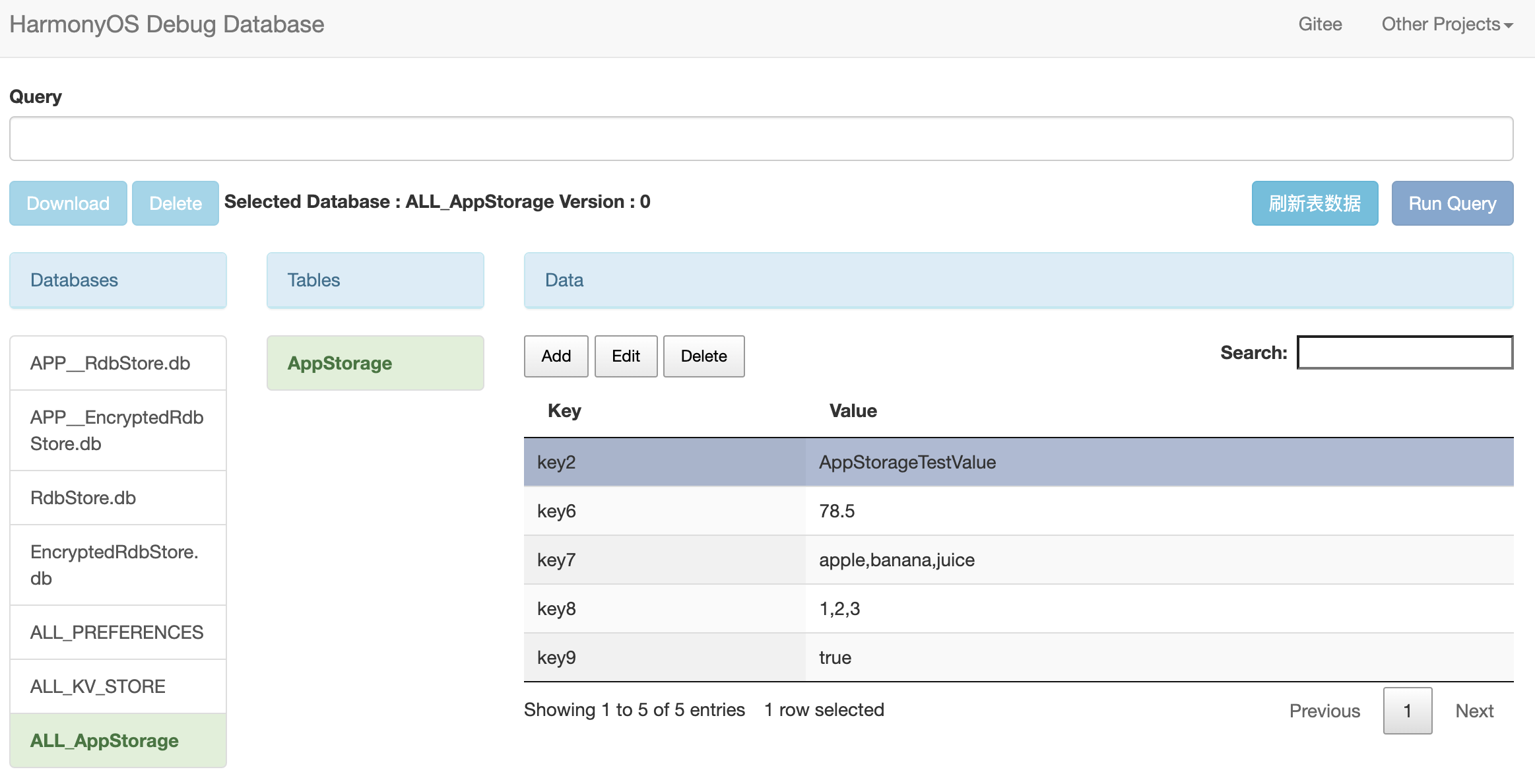
HarmonyOS Debug Database (debug-db)
HarmonyOS Debug Database 是一款功能强大的鸿蒙应用数据库调试工具,方便开发人员在应用程序 Debug 版本下快速调试关系型数据库 (RdbStore)、用户首选项 (Preferences)、键值数据库 (KVStore)、AppStorage
与 Android-Debug-Database 相似, HarmonyOS Debug Database 可使开发者以非常简单的方式在浏览器中直接查看和操作多种 HarmonyOS 数据库,提升调试效率。
功能特性
以下所有的功能都可以在不需要对设备进行 Root 操作(无需Root设备)的情况下使用:
RdbStore
- 查看指定UIAbilityContext以及ApplicationContext(APP__前缀)的所有RdbStore 数据库 (包括加密数据库)
- 支持自定义路径,递归扫描对应context下的rdb目录
- 查看指定 RdbStore 数据库中的所有表
- 查看 RdbStore 数据库中指定表的所有数据
- 在指定的 RdbStore 数据库上运行任何SQL查询来创建、删除数据库,或增删改查数据库数据
- 直接对 RdbStore 数据进行增删改查
- 下载指定 RdbStore 对应的数据库文件
KVStore
- 查看指定UIAbilityContext以及ApplicationContext下所有的 KVStore (包括加密KV数据库),storeId要唯一
- 查看指定 KVStore 中所有键值对数据
- 直接对 KVStore 数据进行增删改查
Preferences
- 查看指定UIAbilityContext以及ApplicationContext(APP__前缀)下所有的 Preferences
- 查看指定 Preferences中所有首选项数据
- 直接对 Preferences 数据进行增删改查
AppStorage
- 直接对 AppStorage 进行增删改查
使用说明
下载安装
ohpm install @hadss/debug-db
基础用法
import {DebugDB} from '@hadss/debug-db';

...
const context = getContext(this) as common.UIAbilityContext;
DebugDB.initialize(context); // 在浏览器中访问 http://XXX.XXX.XXX.XXX:8080/index.html (详细地址请在 Log 中查看)
高级用法:只在debug包中集成debug-db,打release包时去掉相关代码和配置
详情请参考demo工程:debug-database
1、在应用中导入DebugDB,设置UIAbilityContext(必选)及服务端运行的端口(可选,默认为8080)
下面为在应用中 ability 的 aboutToApper 阶段导入并启动 DebugDB 的一个完整示例。你也可以在应用程序的其他位置启动 DebugDB 服务:
import {common} from '@kit.AbilityKit';
import {DEBUG} from 'BuildProfile';

...
aboutToAppear(): void {
  if (DEBUG) {
    const context = getContext(this) as common.UIAbilityContext;
    const pkg = '@hadss/debug-db';
    import(pkg).then(async (ns: ESObject) => {
      await ns.DebugDB.initialize(context, { port: 9090, defaultStart: true });
    });
  }
}
2、配置代码分支裁剪(条件编译)以及动态import变量表达式
在项目打包时通常不希望将 Debug 版本使用的三方库打包进 Release 版本的 HAP 包中,因此需要在模块级的build-profile.json5配置文件中加入条件编译参数,并设置:
"buildOption": {
  "arkOptions": {
    "branchElimination": true,
    "runtimeOnly": {
      "packages": [
        '@hadss/debug-db'
      ],
    },
  }
}
参考文档:
3、编写hvigor自定义插件,打release包前删除对debug-db的依赖
import { hapTasks, OhosPluginId } from '@ohos/hvigor-ohos-plugin';
import { hvigor } from '@ohos/hvigor';

const DebugPkg = '@hadss/debug-db';

// 实现自定义插件
function debugPlugin(): HvigorPlugin {
  return {
    pluginId: 'debugPlugin',
    async apply(currentNode: HvigorNode): Promise<void> {
      clearDebugConfig(currentNode);
    }
  }
}

function clearDebugConfig(currentNode: HvigorNode) {
  const buildMode = hvigor.getParameter().getExtParam('buildMode');
  if (buildMode === 'release') {
    const hapContext = currentNode.getContext(OhosPluginId.OHOS_HAP_PLUGIN);
    if (!hapContext) {
      return;
    }

    // 去掉动态import变量表达式对应的runtimeOnly配置
    const buildProfileOpt = hapContext.getBuildProfileOpt();
    let runtimeOnly = buildProfileOpt?.buildOption?.arkOptions?.runtimeOnly;
    if (runtimeOnly?.packages?.includes(DebugPkg)) {
      runtimeOnly.packages = runtimeOnly.packages.filter((pkg) => pkg !== DebugPkg);
      console.log(`entry:debugPlugin, 打release包前删除build-profile.json5中${DebugPkg}相关配置`);
    }
    hapContext.setBuildProfileOpt(buildProfileOpt);

    // 删除entry对debug-db的依赖
    const dependenciesOpt = hapContext.getDependenciesOpt();
    delete dependenciesOpt[DebugPkg];
    console.log(`entry:debugPlugin, 打release包前删除${DebugPkg}调试用依赖包`);
    hapContext.setDependenciesOpt(dependenciesOpt);
  }
}

export default {
  system: hapTasks, /* Built-in plugin of Hvigor. It cannot be modified. */
  plugins: [debugPlugin()]         /* Custom plugin to extend the functionality of Hvigor. */
}
4、在浏览器中访问 DebugDB
当开发者启动应用程序后,应用后台会自动启动 DebugDB 服务,若成功启动,则可以在 DevEco Studio 的 Log 界面查看到以下日志:
You can access DebugDB through http://XXX.XXX.XXX.XXX:9090/index.html
日志中的网址即为 DebugDB 运行时的界面首页,另外,你也可以通过await DebugDB.getDebugDBAddress()直接获取到 DebugDB 的运行地址。
当应用程序处于运行状态时,你可以在浏览器中输入上述地址直接访问服务端,如果你希望手动开启和关闭服务,你可以通过DebugDB.start()和DebugDB.stop()直接开启和关闭服务。
参考文档:
DebugDB 界面
RdbStore
Preferences
KVStore
注意事项
- 真机和使用浏览器的设备需要处于同一个局域网,建议连接同一个wifi或者真机开热点、另一台设备连接真机热点。
- DebugDB.initialize方法默认会启动server,可以设置defaultStart=false默认不启动server,需要时再调用start方法启动。
- DebugDB stop后再start可能出现生效慢(demo实测要10-60s)或者不稳定的情况,请耐心等待一会儿。或者直接重启应用,首次start实测未发现问题。
- 未在模拟器中实测过,建议使用真机。


 上一篇
上一篇 


 苏公安网备 32011402010933号