概述
开发者可通过自定义插件和任务扩展构建能力,实现自动化构建步骤、定制化资源处理等需求。本文主要内容如下:
- 通过自定义插件示例分析可能的性能问题并给出优化方案。
- 通过自定义任务示例分析可能的性能问题并给出优化方案。
[h2]示例
开发者可以通过实现HvigorPlugin接口的方式开发自定义插件。下面示例在entry/hvigorfile.ts中定义一个插件,模拟开发者在构建Hap开始阶段下载必要资源的场景。
// entry/hvigorfile.ts
import { hapTasks } from '@ohos/hvigor-ohos-plugin';
import { HvigorPlugin, HvigorNode } from '@ohos/hvigor';

class MyCustomPlugin implements HvigorPlugin {
  pluginId = 'customPlugin';

  async apply(node: HvigorNode): Promise<void> {
    console.log('download start at', new Date());
    await new Promise<void>((resolve) => {
      setTimeout(() => {
        // 使用延时模拟耗时操作
        console.log('download end at', new Date());
        resolve();
      }, 5000);
    });
  }
}

export default {
  system: hapTasks,
  plugins: [new MyCustomPlugin()]
}
点击ReBuild Project构建工程,构建窗口输出日志如下:

执行Sync时,也会触发下载操作。

[h2]问题分析
HvigorPlugin的apply方法运行在构建生命周期的配置阶段(内部生命周期函数,开发者无法使用)。上述示例中,耗时的业务下载逻辑直接在apply方法中执行,apply方法无增量跳过机制,导致每次构建都必须执行,并且耗时的操作会阻塞主线程逻辑,影响开发效率。
[h2]优化方案
业务耗时的逻辑应避免直接在apply方法中执行,建议:
- 将业务逻辑放在明确的生命周期钩子函数中,如hvigor.nodesEvaluated(),确保业务在明确的阶段执行。
- 将业务逻辑注册为HvigorTask任务,使得业务在构建生命周期的执行阶段执行,并且可以选择使用任务的增量机制避免重复执行。
下面示例对上面实现进行改造,使用HvigorTask任务承载业务逻辑:
// entry/hvigorfile.ts
import { hapTasks, OhosPluginId, OhosHapContext, Target } from '@ohos/hvigor-ohos-plugin';
import { HvigorPlugin, HvigorNode, hvigor } from '@ohos/hvigor';

class MyCustomPlugin implements HvigorPlugin {
  pluginId = 'customPlugin';

  async apply(node: HvigorNode): Promise<void> {
    const hapContext = node?.getContext(OhosPluginId.OHOS_HAP_PLUGIN) as OhosHapContext;
    hapContext?.targets((target: Target) => {
      const targetName = target.getTargetName();
      // 把业务逻辑封装到任务里面,apply方法中不再执行下载操作,下载操作推迟到任务执行阶段
      node?.registerTask({
        name: `${targetName}@DownloadTask`,
        async run() {
          console.log('download start at', new Date());
          await new Promise<void>((resolve) => {
            setTimeout(() => {
              // 使用延时模拟耗时操作
              console.log('download end at', new Date());
              resolve();
            }, 5000);
          });
        },
        // 设置前置依赖任务,PreBuild任务会先于本任务执行
        dependencies: [`${targetName}@PreBuild`],
        // 设置后置依赖任务,本任务会先于CreateModuleInfo任务执行
        postDependencies: [`${targetName}@CreateModuleInfo`]
      });
    });
  }
}

export default {
  system: hapTasks,
  plugins: [new MyCustomPlugin()]
}
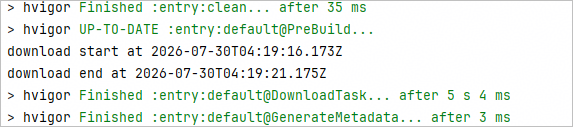
改造之后,Sync流程不会触发下载操作:

用户的业务逻辑在任务执行阶段执行:
还可以进一步利用任务的增量机制优化增量构建场景,请参考下文介绍。
[h2]示例
开发者可以在hvigorfile.ts中通过registerTask接口注册HvigorTask的方式开发自定义任务。每个模块级hvigorfile.ts可注册多个任务,任务之间通过dependencies(前置依赖)和postDependencies(后置依赖)声明依赖关系。
下面示例在entry/hvigorfile.ts中注册两个HvigorTask任务,模拟开发者操作编译产物的场景。
// entry/hvigorfile.ts
// 注册两个自定义任务操作输出目录
import { hapTasks, OhosPluginId, OhosHapContext, Target } from '@ohos/hvigor-ohos-plugin';
import { getNode, hvigor, HvigorNode } from '@ohos/hvigor';

hvigor.nodesEvaluated(() => {
  const node: HvigorNode | undefined = getNode(__filename);
  const hapContext = node?.getContext(OhosPluginId.OHOS_HAP_PLUGIN) as OhosHapContext;
  hapContext?.targets((target: Target) => {
    const targetName = target.getTargetName();
    const buildTargetOutputPath = target.getBuildTargetOutputPath();
    // 注册自定义任务CustomTask0
    node?.registerTask({
      name: `${targetName}@CustomTask0`,
      async run() {
        await new Promise<void>((resolve) => {
          setTimeout(() => {
            // 使用延时模拟耗时操作
            console.log(`${this.name} Processing files in the directory:`, buildTargetOutputPath);
            resolve();
          }, 5000);
        });
      },
      // 设置前置依赖任务,SignHap任务会先于本任务执行
      dependencies: [`${targetName}@SignHap`],
      // 设置后置依赖任务,本任务会先于assembleHap任务执行
      postDependencies: ['assembleHap']
    });
    // 注册自定义任务CustomTask1
    node?.registerTask({
      name: `${targetName}@CustomTask1`,
      async run() {
        await new Promise<void>((resolve) => {
          setTimeout(() => {
            console.log(`${this.name} Processing files in the directory:`, buildTargetOutputPath);
            resolve();
          }, 5000);
        });
      },
      dependencies: [`${targetName}@SignHap`],
      postDependencies: ['assembleHap']
    });
  });
});

export default {
  system: hapTasks,
  plugins: []
}
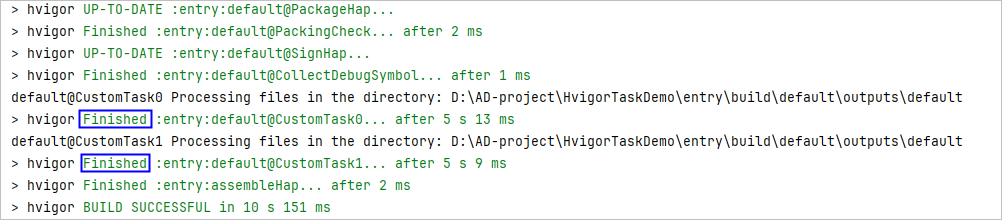
点击ReBuild Project构建工程,构建窗口输出日志如下,端到端全量构建约15s。

[h2]问题分析
以上示例代码存在两个问题,重复构建和串行构建。
- 问题一:重复构建
- 现象:两个自定义任务每次构建都会重新执行,即使源码未发生变化。表现为连续两次构建耗时基本相同,自定义任务显示为“Finished”状态,表示任务已执行完成。
- 影响:每次构建都执行自定义任务,影响开发效率。
- 问题二:串行构建
- 现象:两个自定义任务没有相互依赖关系,但Build Analyzer显示CustomTask0和CustomTask1任务串行执行,并且在主线程中执行,阻塞主线程执行其他任务。
- 影响:构建总耗时是多个任务耗时总和,构建时间长,且无法充分利用CPU。

[h2]优化方案
针对上述问题,建议按照以下方案进行优化。
- 优化一:增量构建
使用增量机制,通过配置input或output函数,声明任务依赖的文件或目录。Hvigor会记录这些文件/目录的元数据哈希值,仅在文件/目录发生变化时才执行任务。
以增加input函数为例,优化后的示例代码如下。// entry/hvigorfile.ts // 注册两个自定义任务操作输出目录 import fs from 'node:fs'; import { hapTasks, OhosPluginId, OhosHapContext, Target } from '@ohos/hvigor-ohos-plugin'; import { getNode, hvigor, HvigorNode, TaskInput } from '@ohos/hvigor'; hvigor.nodesEvaluated(() => { const node: HvigorNode | undefined = getNode(__filename); const hapContext = node?.getContext(OhosPluginId.OHOS_HAP_PLUGIN) as OhosHapContext; hapContext?.targets((target: Target) => { const targetName = target.getTargetName(); const buildTargetOutputPath = target.getBuildTargetOutputPath(); // 注册自定义任务CustomTask0 node?.registerTask({ name: `${targetName}@CustomTask0`, async run() { await new Promise<void>((resolve) => { setTimeout(() => { // 使用延时模拟耗时操作 console.log(`${this.name} Processing files in the directory:`, buildTargetOutputPath); resolve(); }, 5000); }); }, // 增加input输入依赖配置 input(input: TaskInput) { if (fs.existsSync(buildTargetOutputPath)) { // input.file方法声明任务依赖的文件或者目录,这里把buildTargetOutputPath目录加入增量判断集合中 // 当buildTargetOutputPath目录内容未变化时,任务会被跳过执行 input.file(buildTargetOutputPath); } }, // 设置前置依赖任务,SignHap任务会先于本任务执行 dependencies: [`${targetName}@SignHap`], // 设置后置依赖任务,本任务会先于assembleHap任务执行 postDependencies: ['assembleHap'] }); // 注册自定义任务CustomTask1 node?.registerTask({ name: `${targetName}@CustomTask1`, async run() { await new Promise<void>((resolve) => { setTimeout(() => { console.log(`${this.name} Processing files in the directory:`, buildTargetOutputPath); resolve(); }, 5000); }); }, // 增加input输入依赖配置 input(input: TaskInput) { if (fs.existsSync(buildTargetOutputPath)) { input.file(buildTargetOutputPath); } }, dependencies: [`${targetName}@SignHap`], postDependencies: ['assembleHap'] }); }); }); export default { system: hapTasks, plugins: [] }
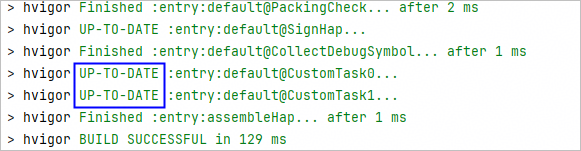
无代码变更时,重复构建,结果如下,自定义任务显示为“UP-TO-DATE”状态,表示任务被跳过。
- 优化二:并行执行
对于耗时较长的任务,可通过submitWorker接口将任务分发到worker线程中执行,实现并行处理。
使用场景:
- 单个任务处理耗时较长(如大量文件压缩、代码转译)。
- 多个同类型任务之间无依赖关系。
- 需要充分利用多核CPU资源。
优化后的示例代码如下。
- worker脚本实现。
// 在entry/scripts目录下创建custom-job.js
async function runJob(workInput) {
  await new Promise((resolve) => {
    setTimeout(() => {
      console.log(`${workInput.taskName} Processing files in the directory:`, workInput.outputPath);
      resolve();
    }, 5000);
  })
}

exports.runJob = runJob;
- 修改run的实现,使用submitWorker加载custom-job.js脚本并提交到worker中执行。
// entry/hvigorfile.ts
// 注册两个自定义任务操作输出目录
import fs from 'node:fs';
import path from "node:path";
import { hapTasks, OhosPluginId, OhosHapContext, Target } from '@ohos/hvigor-ohos-plugin';
import { getNode, hvigor, HvigorNode, TaskInput, submitWorker } from '@ohos/hvigor';

hvigor.nodesEvaluated(() => {
  const node: HvigorNode | undefined = getNode(__filename);
  const hapContext = node?.getContext(OhosPluginId.OHOS_HAP_PLUGIN) as OhosHapContext;
  hapContext?.targets((target: Target) => {
    const targetName = target.getTargetName();
    const buildTargetOutputPath = target.getBuildTargetOutputPath();
    // 注册自定义任务CustomTask0
    node?.registerTask({
      name: `${targetName}@CustomTask0`,
      async run() {
        // 提交custom-job.js脚本到worker中执行, 请确保该文件来源可信
        submitWorker(node, this.name, path.join(__dirname, 'scripts', 'custom-job.js', 'runJob'), {
          workInput: {
            taskName: this.name,
            outputPath: buildTargetOutputPath,
          }
        });
      },
      // 增加input输入依赖配置
      input(input: TaskInput) {
        if (fs.existsSync(buildTargetOutputPath)) {
          input.file(buildTargetOutputPath);
        }
      },
      // 设置前置依赖任务,SignHap任务会先于本任务执行
      dependencies: [`${targetName}@SignHap`],
      // 设置后置依赖任务,本任务会先于assembleHap任务执行
      postDependencies: ['assembleHap']
    });
    // 注册自定义任务CustomTask1
    node?.registerTask({
      name: `${targetName}@CustomTask1`,
      async run() {
        // 提交custom-job.js脚本到worker中执行, 请确保该文件来源可信
        submitWorker(node, this.name, path.join(__dirname, 'scripts', 'custom-job.js', 'runJob'), {
          workInput: {
            taskName: this.name,
            outputPath: buildTargetOutputPath,
          }
        });
      },
      // 增加input输入依赖配置
      input(input: TaskInput) {
        if (fs.existsSync(buildTargetOutputPath)) {
          input.file(buildTargetOutputPath);
        }
      },
      dependencies: [`${targetName}@SignHap`],
      postDependencies: ['assembleHap']
    });
  });
});

export default {
  system: hapTasks,
  plugins: []
}
并行效果验证:
- 通过Build Analyzer观察,CustomTask0和CustomTask1呈并行执行状态。

- 编译构建耗时也得到优化,从一开始的端到端全量构建15s降到10s左右。

总结
开发自定义插件和任务时,可从以下几方面实践并验证优化性能问题。
- 将复杂耗时的业务逻辑封装为独立的HvigorTask,并在插件的apply方法中进行注册。
- 插件用于组织和管理HvigorTask,不过度参与具体执行。
- 避免在hvigorfile.ts全局作用域编写同步执行代码,而是使用生命周期钩子函数(如nodesEvaluated)控制执行时机。
- 自定义任务配置input,声明依赖文件;或者配置output,声明输出文件;连续构建时,确认未变化的任务已被跳过,构建结果显示“UP-TO-DATE”。
- 耗时任务通过submitWorker分发到worker执行,通过Build Analyzer验证任务并行执行。