


智能客服
你问我答,随时在线为你解决问题















日落公告:HMS Toolkit服务当前已不再进行版本更新。中国区域的服务将在2026-11-30日落下线,日落后将不再提供服务。
为使您能够快速接入HMS Core服务,降低您的开发周期,实现一套代码两套功能。Add HMS API策略下,工具自动将GMS API转换成XMS API,同时根据路由设置规则动态设置XMS代码调用GMS API或者HMS API。路由设置规则请参见Add HMS API场景下路由初始化策略介绍。
XMS API由GMS API、HMS API和路由服务构成,屏蔽了GMS和HMS的差异。
GMS中的类:
public class G {
    ...
    public void show() {
        ...
    }
    ...
}
HMS中与G功能等价的类:
public class H {
    ...
    public void display() {
        ...
    }
    ...
}
Add HMS API策略下,会生成对应GMS中G的一个X类:
public class X {
    private G gInstance;
    private H hInstance;
    public X(G g, H h) {
        this.gInstance = g;
        this.hInstance = h;
    }
    public G getGInstance() { return gInstance; }
    public H getHInstance() { return hInstance; }
    ...
    public void show() {
        if (isHms()) { //路由,可以在GlobalEnvSetting.java中进行设置
            ((H)this.getHInstance()).display();
        } else {
            ((G)this.getGInstance()).show();
        }
    }
    ...
}
对于App出现了GMS的API,工具可以自动转换成XMS API,如:
原来调用GMS API的业务代码:
...
G inst = ...;
inst.show()
...
Add HMS API策略下,工具会把GMS API替换成XMS API:
...
X inst = ...; //替换成XMS类
inst.show() //调用XMS中的show方法,根据路由设置,选择调用GMS API或者HMS API
...
您可以通过路由设置,决定调用GMS API或者HMS API。
对于不能自动转换的API,请参见手工转换指导书手工适配,快速实现Add HMS API策略转换。
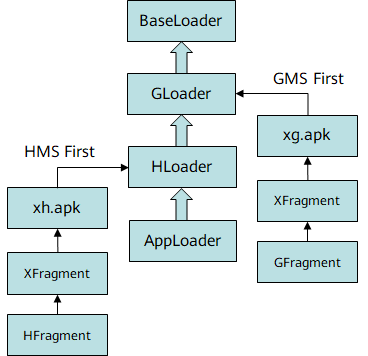
在Add HMS API策略下,针对部分接口使用组合方式无法转换的问题,我们提供了XClassLoader方案转换。该方案主要是为了减少用户手工修改资源的工作量。在该模式下,工具将会在xmsadapter模块中生成一个内置的xmsaux模块,该模块包含了xg模块、xh模块、xapi模块和XClassLoader相关代码。
GMS中的类:
public class GFragment extends Fragment {
    ...
    public G methodA() {
        ...
    }
    ...
}
HMS中与G功能等价的类:
public class HFragment extends Fragment {
    ...
    public H methodA() {
        ...
    }
    ...
}
Add HMS API策略下,会在xg模块下生成对应GMS中G的子类X:
public class XFragment extends GFragment {
    ...
    public X methodA() {
        super.methodA();
        ...
    }
    ...
}
在xh模块下生成对应HMS中H的子类X:
public class XFragment extends HFragment {
    ...
    public X methodA() {
        super.methodA();
        ...
    }
    ...
}
在xapi模块下生成只参与编译的子类X:
public class XFragment extends Fragment {
    ...
    public X methodA() {
        throw new java.lang.RuntimeException("Stub");
    }
    ...
}
基于Java类加载双亲委派机制,我们分别实现继承HMS API和GMS API的XMS API,通过xmsaux/scripts目录下的自定义gradle脚本打包不同的xg.apk和xh.apk,经由XClassLoader实现在APK运行时动态加载,从而实现根据路由选择调用HMS API和GMS API。
Add HMS API不支持序列化和反序列的自动转换,为了便于您快速实现,您需要根据自己使用的序列化和反序列化工具以及业务代码逻辑来手动实现。
首先您需要在应用级的build.gradle文件中添加编译依赖。
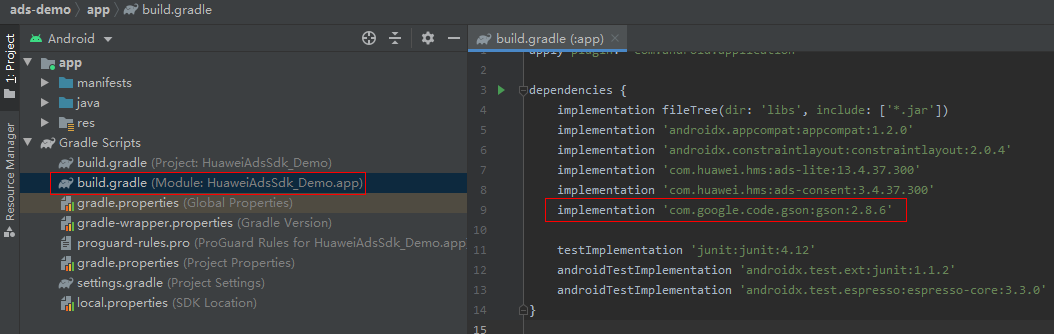
dependencies {
    implementation 'com.google.code.gson:gson:2.8.6'
}

如果出现错误,请检查网络连接是否正常,以及检查“build.gradle”文件是否正确。
基于Gson工具,提供如下方案,以供参考。
public class DataSerializer<T> implements JsonSerializer<T> {
    private Gson gson = new Gson();
    @Override
    public JsonElement serialize(T src, Type typeOfSrc, JsonSerializationContext context) {
        if (src instanceof ArrayList) {
            List list = new ArrayList();
            ArrayList al = (ArrayList)src;
            for (int i = 0; i < al.size(); i++) {
                if (GlobalEnvSetting.isHms()) {
                    list.add(gson.toJson(((XGettable)al.get(i)).getHInstance()));
                } else {
                    list.add(gson.toJson(((XGettable)al.get(i)).getGInstance()));
                }
            }
            return context.serialize(list);
        } else {
            if (GlobalEnvSetting.isHms()) {
                return  context.serialize(((XGettable)src).getHInstance());
            } else {
                return  context.serialize(((XGettable)src).getGInstance());
            }
        }
    }
} public class DataDeserializer<T> implements JsonDeserializer<T> {
Class xClass; // xms class
Class gClass; // gms class corresponding to the xms class
Class hClass; // hms class corresponding to the xms class
Gson gson = new Gson();
public DataDeserializer(Class xClass, Class gClass, Class hClass) {
this.xClass = xClass;
this.gClass = gClass;
this.hClass = hClass;
}
@Override
public T deserialize(JsonElement json, Type typeOfT, JsonDeserializationContext context) throws JsonParseException {
if (json.isJsonArray()) {
Object gObj = null;
Object hObj = null;
List list = new ArrayList<>();
JsonArray jsonArray = json.getAsJsonArray();
for (JsonElement element : jsonArray) {
if (GlobalEnvSetting.isHms()) {
gObj = gson.fromJson(element, hClass);
} else {
hObj = gson.fromJson(element, gClass);
}
try {
Constructor constructor = xClass.getConstructor(gClass, hClass);
list.add(constructor.newInstance(gObj, hObj));
} catch (NoSuchMethodException e) {
e.printStackTrace();
} catch (IllegalAccessException e) {
e.printStackTrace();
} catch (InstantiationException e) {
e.printStackTrace();
} catch (InvocationTargetException e) {
e.printStackTrace();
}
}
return (T) list;
} else {
Object gObj = null;
Object hObj = null;
if (org.xms.g.utils.GlobalEnvSetting.isHms()) {
hObj = gson.fromJson(json, hClass);
} else {
gObj = gson.fromJson(json, gClass);
}
try {
Constructor constructor = xClass.getConstructor(gClass, hClass);
return (T) constructor.newInstance(gObj, hObj);
} catch (NoSuchMethodException e) {
e.printStackTrace();
} catch (IllegalAccessException e) {
e.printStackTrace();
} catch (InstantiationException e) {
e.printStackTrace();
} catch (InvocationTargetException e) {
e.printStackTrace();
}
return null;
}
}
} private static Gson gson = new GsonBuilder().registerTypeAdapter(ArrayList.class, new DataDeserializer<ArrayList>(DetectedActivity.class, com.google.android.gms.location.DetectedActivity.class, com.huawei.hms.location.ActivityIdentificationData.class)) .registerTypeAdapter(ArrayList.class, new DataSerializer<ArrayList>()).create();
将反序列化类DataDeserializer和反序列化类DataSerializer注册到Gson中。
ArrayList是操作对象类型,将ArrayList元素类型对应的XMS API,GMS API,HMS API类型作为参数传入。
修改前的GMS API代码:
Type listType = new TypeToken<ArrayList<DetectedActivity>>() {}.getType();
ArrayList<DetectedActivity> detectedActivities = new Gson().fromJson(jsonArray, listType);
修改后的代码,只需要将new Gson替换成gson即可:
Type listType = new TypeToken<ArrayList<DetectedActivity>>() {}.getType();
ArrayList<DetectedActivity> detectedActivities = gson.fromJson(jsonArray, listType);
您除了在插件转换过程中选择HMS优先或者GMS优先外,还需要在工程中调用GlobalEnvSetting.init(Context ctx, XmsLog.XmsLogInterface logImpl)方法,检测当前环境是否有HMS或者GMS服务。
除了init方法外,还提供了GlobalEnvSetting.useHms和GlobalEnvSetting.useGms方法,在运行期任何时刻调用,强制选择HMS或者GMS路由(前提是当前环境必须安装了HMS或者GMS服务)。
init方法使用介绍:
public class MyApp extends Application {
    @Override
    public void onCreate() {
        super.onCreate();
        GlobalEnvSetting.init(this, null);
    }
} <application
android:name=".MyApp"
</application> GlobalEnvSetting.init(context, new XmsLog.XmsLogInterface() {
@Override
public void d(String TAG, String logStr) {
System.out.println("debug:" + TAG + ":" + logStr); // do debug log in your own log system
}
@Override
public void d(String TAG, String logStr, Throwable tr) {
System.out.println("debug:" + TAG + ":" + logStr); // do debug log in your own log system
}
@Override
public void i(String TAG, String logStr) {
System.out.println("info:" + TAG + ":" + logStr); // do info log in your own log system
}
@Override
public void i(String TAG, String logStr, Throwable tr) {
System.out.println("info:" + TAG + ":" + logStr); // do info log in your own log system
}
@Override
public void w(String TAG, String logStr) {
System.out.println("warn:" + TAG + ":" + logStr); // do warning log in your own log system
}
@Override
public void w(String TAG, String logStr, Throwable tr) {
System.out.println("warn:" + TAG + ":" + logStr); // do warning log in your own log system
}
@Override
public void e(String TAG, String logStr) {
System.err.println("error:" + TAG + ":" + logStr); // do error log in your own log system
}
@Override
public void e(String TAG, String logStr, Throwable tr) {
System.err.println("debug:" + TAG + ":" + logStr); // do error log in your own log system
//对tr做相关处理
}}); 如:[XmsLog][1]|[org.xms.g.utils.Utils][getOrCreateInstance][448] | instance : null | [2020-01-07 17:42:10]
public org.xms.g.tasks.Task<org.xms.g.awareness.snapshot.DetectedActivityResponse> getDetectedActivity() {
    com.google.android.gms.tasks.TaskgReturn = null;
    com.huawei.hmf.tasks.TaskhReturn = null;
    if(org.xms.g.utils.GlobalEnvSetting.isHms()) {
        org.xms.g.utils.XmsLog.d("XMSRouter", "((com.huawei.hms.kit.awareness.CaptureClient)this.getHInstance()).getBehavior()");
        hReturn = ((com.huawei.hms.kit.awareness.CaptureClient)this.getHInstance()).getBehavior();
    } else {
        org.xms.g.utils.XmsLog.d("XMSRouter", "((com.google.android.gms.awareness.SnapshotClient)this.getGInstance()).getDetectedActivity()");
        gReturn = ((com.google.android.gms.awareness.SnapshotClient)this.getGInstance()).getDetectedActivity();
    }
    if (gReturn == null && hReturn == null) {
        return null;
    }
    return new org.xms.g.tasks.Task.XImpl(gReturn, hReturn);
}
public Object getGInstance() {
    if (gInstance == null) {
        org.xms.g.utils.XmsLog.d("1", "gInstanceisnull");
    } else {
        org.xms.g.utils.XmsLog.d("2", "gInstance:" + gInstance.getClass().getName());
    }
    return gInstance;
}
您也可以调用org.xms.g.utils.XmsLog.d(String TAG, String logStr)接口,自定义TAG标签和logStr日志内容。
public static final int LOG_LEVEL_DEBUG = 0;   //工具开发时使用,不推荐设置
public static final int LOG_LEVEL_INFO = 1;   //工具开发时使用,不推荐设置
public static final int LOG_LEVEL_WARN = 2;   //默认日志级别
public static final int LOG_LEVEL_ERROR = 3;   //打印错误日志
public static final int LOG_LEVEL_CLOSE = 4;    //关闭日志
info和debug级别的日志是本转换工具开发时使用的,不建议您在使用XMS代码时打开,打开会影响工程的性能。
private static int logLevel = LOG_LEVEL_INFO; //一般情况下INFO就足够了,也可以根据您的具体需求设置为LOG_LEVEL_DEBUG
private static final boolean DEBUG_ENABLE = true;
在问题定位完毕后,需要改回原始的配置,避免影响工程的性能。
日志打印会占用IO,DEBUG级别的日志涉及所有的路由代码,打印量较大,建议只是在测试阶段使用,发布阶段使用WARN或者ERROR级别日志。
Kit | GMS依赖 | 对标GMS版本号 | 适用场景 | HMS依赖 |
|---|---|---|---|---|
Account Kit | implementation 'com.google.android.gms:play-services-auth:17.0.0' | 17.0.0 | To HMS API | implementation 'com.huawei.hms:hwid:6.0.1.300' |
Add HMS API | implementation 'com.huawei.hms:hwid:6.0.1.300' implementation 'com.google.android.gms:play-services-base:17.1.0' implementation 'com.google.android.gms:play-services-basement:17.1.0' implementation 'com.google.android.gms:play-services-auth-api-phone:17.3.0' | |||
implementation 'com.google.android.gms:play-services-auth:18.0.0' | 18.0.0 | To HMS API | implementation 'com.huawei.hms:hwid:6.0.1.300' | |
Add HMS API | implementation 'com.huawei.hms:hwid:6.0.1.300' implementation 'com.google.android.gms:play-services-base:17.1.0' implementation 'com.google.android.gms:play-services-basement:17.1.0' implementation 'com.google.android.gms:play-services-auth-base:17.1.0' implementation 'com.google.android.gms:play-services-auth-api-phone:17.4.0' | |||
Push Kit | implementation 'com.google.firebase:firebase-core:17.0.0' | 17.0.0 | To HMS API | implementation 'com.huawei.hms:hianalytics:6.1.0.300' |
Add HMS API | implementation 'com.google.android.gms:play-services-basement:17.1.0' implementation 'com.google.android.gms:play-services-base:17.1.0' implementation 'com.google.android.gms:play-services-gcm:17.0.0' implementation 'com.huawei.hms:hianalytics:6.1.0.300' | |||
implementation 'com.google.firebase:firebase-messaging:20.0.1' | 20.0.1 | To HMS API | implementation 'com.huawei.hms:hianalytics:6.1.0.300' implementation 'com.huawei.hms:push:5.3.0.304' | |
Add HMS API | implementation 'com.google.android.gms:play-services-basement:17.1.0' implementation 'com.google.android.gms:play-services-base:17.1.0' implementation 'com.google.android.gms:play-services-gcm:17.0.0' implementation 'com.huawei.hms:hianalytics:6.1.0.300' implementation 'com.huawei.hms:push:5.3.0.304' | |||
implementation 'com.google.firebase:firebase-messaging:20.2.0' | 20.2.0 | To HMS API | implementation 'com.huawei.hms:hianalytics:6.1.0.300' implementation 'com.huawei.hms:push:5.3.0.304' | |
Add HMS API | implementation 'com.google.android.gms:play-services-basement:17.1.0' implementation 'com.google.android.gms:play-services-base:17.1.0' implementation 'com.google.android.gms:play-services-gcm:17.0.0' implementation 'com.huawei.hms:hianalytics:6.1.0.300' implementation 'com.huawei.hms:push:5.3.0.304' | |||
Ads Kit | implementation 'com.google.android.gms:play-services-ads:18.3.0' | 18.3.0 | To HMS API | implementation 'com.huawei.hms:ads-lite:13.4.34.301' implementation 'com.huawei.hms:ads-identifier:3.4.34.301' implementation 'com.huawei.hms:ads-installreferrer:3.4.34.301' |
Add HMS API | implementation 'com.huawei.hms:ads-lite:13.4.34.301' implementation 'com.huawei.hms:ads-identifier:3.4.34.301' implementation 'com.huawei.hms:ads-installreferrer:3.4.34.301' implementation 'com.huawei.hms:hianalytics:6.1.0.300' implementation 'com.google.android.gms:play-services-basement:17.1.0' implementation 'com.google.android.gms:play-services-base:17.1.0' implementation 'com.android.installreferrer:installreferrer:1.0' | |||
implementation 'com.google.android.gms:play-services-ads:19.1.0' | 19.1.0 | To HMS API | implementation 'com.huawei.hms:ads-lite:13.4.34.301' implementation 'com.huawei.hms:ads-identifier:3.4.34.301' implementation 'com.huawei.hms:ads-installreferrer:3.4.34.301' | |
Add HMS API | implementation 'com.huawei.hms:ads-lite:13.4.34.301' implementation 'com.huawei.hms:ads-identifier:3.4.34.301' implementation 'com.huawei.hms:ads-installreferrer:3.4.34.301' implementation 'com.huawei.hms:hianalytics:6.1.0.300' implementation 'com.google.android.gms:play-services-basement:17.1.0' implementation 'com.google.android.gms:play-services-base:17.1.0' implementation 'com.android.installreferrer:installreferrer:1.0' | |||
Analytics Kit | implementation 'com.google.firebase:firebase-analytics:17.2.1' | 17.2.1 | To HMS API | implementation 'com.huawei.hms:hianalytics:6.1.0.300' |
Add HMS API | implementation 'com.huawei.hms:hianalytics:6.1.0.300' implementation 'com.google.android.gms:play-services-base:17.1.0' implementation 'com.google.android.gms:play-services-basement:17.1.0' implementation 'com.google.android.gms:play-services-analytics:17.0.0' | |||
implementation 'com.google.firebase:firebase-analytics:17.4.3' | 17.4.3 | To HMS API | implementation 'com.huawei.hms:hianalytics:6.1.0.300' | |
Add HMS API | implementation 'com.huawei.hms:hianalytics:6.1.0.300' implementation 'com.google.android.gms:play-services-base:17.1.0' implementation 'com.google.android.gms:play-services-basement:17.1.0' implementation 'com.google.android.gms:play-services-analytics:17.0.0' | |||
implementation 'com.google.firebase:firebase-analytics:18.0.0' | 18.0.0 | To HMS API | implementation 'com.huawei.hms:hianalytics:6.1.0.300' | |
Add HMS API | implementation 'com.huawei.hms:hianalytics:6.1.0.300' implementation 'com.google.android.gms:play-services-base:17.1.0' implementation 'com.google.android.gms:play-services-basement:17.1.0' implementation 'com.google.android.gms:play-services-analytics:17.0.0' | |||
Location Kit | implementation 'com.google.android.gms:play-services-location:17.0.0' | 17.0.0 | To HMS API | implementation 'com.huawei.hms:location:6.0.0.302' |
Add HMS API | implementation 'com.google.android.gms:play-services-basement:17.1.0' implementation 'com.google.android.gms:play-services-base:17.1.0' implementation 'com.huawei.hms:location:6.0.0.302' | |||
Site Kit | implementation 'com.google.android.libraries.places:places:2.3.0' | 不限制版本 | To HMS API | implementation 'com.huawei.hms:site:5.3.0.300' |
implementation 'com.google.android.libraries.places:places-compat:2.3.0' | 不限制版本 | To HMS API | implementation 'com.huawei.hms:site:5.3.0.300' | |
Map Kit | implementation 'com.google.android.gms:play-services-maps:17.0.0' | 17.0.0 | To HMS API | implementation 'com.google.android.material:material:1.0.0-rc01' implementation 'com.huawei.hms:maps:5.3.0.301' |
Add HMS API | implementation 'com.huawei.hms:maps:5.3.0.301' implementation 'com.huawei.hms:location:6.0.0.302' implementation 'com.google.android.gms:play-services-location:17.0.0' implementation 'com.google.android.material:material:1.0.0-rc01' implementation 'com.google.android.gms:play-services-base:17.1.0' implementation 'com.google.android.gms:play-services-basement:17.1.0' | |||
Game Service | implementation 'com.google.android.gms:play-services-games:18.0.1' | 18.0.1 | To HMS API | implementation 'com.huawei.hms:base:5.1.0.300' implementation 'com.huawei.hms:hwid:6.0.1.300' implementation 'com.huawei.hms:game:5.0.4.301' |
Add HMS API | implementation 'com.huawei.hms:base:5.1.0.300' implementation 'com.huawei.hms:hwid:6.0.1.300' implementation 'com.huawei.hms:game:5.0.4.301' implementation 'com.google.android.gms:play-services-base:17.1.0' implementation 'com.google.android.gms:play-services-basement:17.1.0' | |||
implementation 'com.google.android.gms:play-services-games:19.0.0' | 19.0.0 | To HMS API | implementation 'com.huawei.hms:base:5.1.0.300' implementation 'com.huawei.hms:hwid:6.0.1.300' implementation 'com.huawei.hms:game:5.0.4.301' | |
Add HMS API | implementation 'com.huawei.hms:base:5.1.0.300' implementation 'com.huawei.hms:hwid:6.0.1.300' implementation 'com.huawei.hms:game:5.0.4.301' implementation 'com.google.android.gms:play-services-base:17.1.0' implementation 'com.google.android.gms:play-services-basement:17.1.0' | |||
Drive Kit | implementation 'com.google.apis:google-api-services-drive:v3-rev188-1.25.0' | 1.25.0 | To HMS API | implementation 'com.huawei.hms:drive:5.0.0.300' implementation 'com.huawei.hms:hwid:6.0.1.300' implementation 'com.huawei.hms:push:5.3.0.304' |
Wallet Kit | implementation 'com.google.android.gms:play-services-wallet:18.0.0' | 18.0.0 | To HMS API | implementation 'com.huawei.hms:wallet:4.0.4.301' |
Add HMS API | implementation 'com.google.android.gms:play-services-basement:17.1.0' implementation 'com.google.android.gms:play-services-base:17.1.0' implementation 'com.google.android.gms:play-services-auth:18.0.0' implementation 'com.google.android.gms:play-services-auth-base:17.1.0' implementation 'com.google.android.gms:play-services-location:17.0.0' implementation 'com.google.android.gms:play-services-auth-api-phone:17.4.0' implementation 'com.huawei.hms:location:6.0.0.302' implementation 'com.huawei.hms:wallet:4.0.4.301' implementation 'com.huawei.hms:identity:5.3.0.300' implementation 'com.huawei.hms:hwid:6.0.1.300' implementation 'com.huawei.hms:maps:5.3.0.301' | |||
Health Kit | implementation 'com.google.android.gms:play-services-fitness:18.0.0' | 18.0.0 | To HMS API | implementation 'com.huawei.hms:hihealth-base:5.1.0.300' |
Add HMS API | implementation 'com.huawei.hms:hihealth-base:5.1.0.300' implementation 'com.google.android.gms:play-services-base:17.1.0' implementation 'com.google.android.gms:play-services-basement:17.1.0' | |||
ML Kit | implementation 'com.google.android.gms:play-services-vision:19.0.0' | 19.0.0 | To HMS API | implementation 'com.huawei.hms:ml-computer-vision-cloud:2.0.3.300' implementation 'com.huawei.hms:scan:2.1.0.300' |
Add HMS API | implementation 'com.huawei.hms:ml-computer-vision-cloud:2.0.3.300' implementation 'com.huawei.hms:scan:2.1.0.300' implementation 'com.google.android.gms:play-services-base:17.1.0' implementation 'com.google.android.gms:play-services-basement:17.1.0' | |||
implementation 'com.google.android.gms:play-services-vision:20.0.0' | 20.0.0 | To HMS API | implementation 'com.huawei.hms:ml-computer-vision-cloud:2.0.3.300' implementation 'com.huawei.hms:scan:2.1.0.300' | |
Add HMS API | implementation 'com.huawei.hms:ml-computer-vision-cloud:2.0.3.300' implementation 'com.huawei.hms:scan:2.1.0.300' implementation 'com.google.android.gms:play-services-base:17.1.0' implementation 'com.google.android.gms:play-services-basement:17.1.0' | |||
implementation 'com.google.firebase:firebase-ml-vision:24.0.1' | 24.0.1 | To HMS API | implementation 'com.huawei.hms:ml-computer-vision-cloud:2.0.3.300' implementation 'com.huawei.hms:scan:2.1.0.300' | |
Add HMS API | implementation 'com.google.android.gms:play-services-auth:18.0.0' implementation 'com.google.android.gms:play-services-auth-api-phone:17.4.0' implementation 'com.google.android.gms:play-services-auth-base:17.1.0' implementation 'com.google.android.gms:play-services-base:17.1.0' implementation 'com.google.android.gms:play-services-basement:17.1.0' implementation 'com.huawei.hms:hwid:6.0.1.300' implementation 'com.huawei.hms:ml-computer-vision-cloud:2.0.3.300' implementation 'com.huawei.hms:scan:2.1.0.300' implementation 'com.google.firebase:firebase-ml-natural-language:22.0.0' implementation 'com.google.firebase:firebase-ml-natural-language-translate:22.0.0' implementation 'com.google.firebase:firebase-ml-model-interpreter:22.0.1' | |||
implementation 'com.google.firebase:firebase-ml-vision-image-label-model:19.0.0' | 19.0.0 | BOTH | implementation 'com.huawei.hms:ml-computer-vision-image-classification-model:1.0.3.300' | |
implementation 'com.google.firebase:firebase-ml-vision-face-model:19.0.0' | 19.0.0 | BOTH | implementation 'com.huawei.hms:ml-computer-vision-face-recognition-model:1.0.3.300' | |
implementation 'com.google.firebase:firebase-ml-vision-object-detection-model:19.0.2' | 19.0.2 | BOTH | implementation 'com.huawei.hms:ml-computer-vision-object-detection-model:1.0.3.300' | |
Awareness Kit | implementation 'com.google.android.gms:play-services-awareness:17.1.0' | 17.1.0 | To HMS API | implementation 'com.huawei.hms:awareness:1.0.8.300' |
Add HMS API | implementation 'com.google.android.gms:play-services-base:17.1.0' implementation 'com.google.android.gms:play-services-basement:17.1.0' implementation 'com.huawei.hms:awareness:1.0.8.300' implementation 'com.huawei.hms:location:6.0.0.302' | |||
Scan Kit | implementation 'com.google.firebase:firebase-ml-vision-barcode-model:16.0.1' | 16.0.1 | BOTH | implementation 'com.huawei.hms:scan:2.1.0.300' implementation 'com.huawei.hms:scanplus:1.3.1.300' |
Nearby Service | implementation 'com.google.android.gms:play-services-nearby:17.0.0' | 17.0.0 | To HMS API | implementation 'com.huawei.hms:nearby:5.3.0.300' |
Add HMS API | implementation 'com.huawei.hms:nearby:5.3.0.300' implementation 'com.google.android.gms:play-services-basement:17.1.0' implementation 'com.google.android.gms:play-services-tasks:17.0.0' implementation 'com.google.android.gms:play-services-base:17.1.0' | |||
Safety Detect | implementation 'com.google.android.gms:play-services-safetynet:17.0.0' | 17.0.0 | To HMS API | implementation 'com.huawei.hms:safetydetect:6.1.0.300' implementation 'com.huawei.hms:base:6.0.1.302' |
Add HMS API | implementation 'com.google.android.gms:play-services-basement:17.1.0' implementation 'com.google.android.gms:play-services-tasks:17.0.0' implementation 'com.google.android.gms:play-services-base:17.1.0' implementation 'com.huawei.hms:base:6.0.1.302' implementation 'com.huawei.hms:safetydetect:6.1.0.300' | |||
Dynamic Tag Manager | implementation 'com.google.android.gms:play-services-analytics:17.0.0' | 17.0.0 | To HMS API | implementation 'com.huawei.hms:dtm-api:5.3.0.300' |
FIDO | implementation 'com.google.android.gms:play-services-fido:18.1.0' | 18.1.0 | To HMS API | implementation 'com.huawei.hms:fido-fido2:5.2.0.300' implementation 'com.huawei.hms:base:6.0.1.302' |
Add HMS API | implementation 'com.google.android.gms:play-services-basement:17.1.0' implementation 'com.google.android.gms:play-services-tasks:17.0.0' implementation 'com.google.android.gms:play-services-base:17.1.0' implementation 'com.huawei.hms:base:6.0.1.302' implementation 'com.huawei.hms:fido-fido2:5.2.0.300' | |||
Identity Kit | implementation 'com.google.android.gms:play-services-identity:17.0.0' | 17.0.0 | To HMS API | implementation 'com.huawei.hms:identity:5.3.0.300' |
Add HMS API | implementation 'com.huawei.hms:identity:5.3.0.300' implementation 'com.google.android.gms:play-services-basement:17.1.0' implementation 'com.google.android.gms:play-services-tasks:17.0.0' implementation 'com.google.android.gms:play-services-base:17.1.0' | |||
Panorama Kit | implementation 'com.google.android.gms:play-services-panorama:17.0.0' | 17.0.0 | To HMS API | implementation 'com.huawei.hms:panorama:5.0.2.304' |
Add HMS API | implementation 'com.huawei.hms:panorama:5.0.2.304' implementation 'com.google.android.gms:play-services-base:17.1.0' implementation 'com.google.android.gms:play-services-basement:17.1.0' | |||
HMS Core | implementation 'com.google.android.gms:play-services-tasks:17.0.0' | 17.0.0 | To HMS API | implementation 'com.huawei.hms:base:6.0.1.302' |
Add HMS API | implementation 'com.huawei.hms:base:6.0.1.302' implementation 'com.google.android.gms:play-services-basement:17.1.0' | |||
implementation 'com.google.android.gms:play-services-basement:17.1.0' | 17.1.0 | BOTH | implementation 'com.huawei.hms:base:6.0.1.302' | |
implementation 'com.google.android.gms:play-services-base:17.1.0' | 17.1.0 | BOTH | implementation 'com.huawei.hms:base:6.0.1.302' | |
In-App Purchases | implementation 'com.android.billingclient:billing:2.1.0' | 2.1.0 | To HMS API | implementation 'com.huawei.hms:iap:5.3.0.300' |
implementation 'com.android.billingclient:billing-ktx:2.1.0' | 2.1.0 | To HMS API | implementation 'com.huawei.hms:iap:5.3.0.300' | |
Remote Configuration | implementation 'com.google.firebase:firebase-config:19.1.3' | 19.1.3 | To HMS API | implementation 'com.huawei.agconnect:agconnect-remoteconfig:1.4.2.301 |
Add HMS API | implementation 'com.google.android.gms:play-services-base:17.1.0' implementation 'com.google.android.gms:play-services-basement:17.1.0' implementation 'com.huawei.hms:base:6.0.1.302' implementation 'com.huawei.agconnect:agconnect-remoteconfig:1.4.2.301' | |||
Crash | implementation 'com.google.firebase :firebase-crashlytics:17.0.0-beta02' | 17.0.0-beta02 | To HMS API | implementation 'com.huawei.agconnect:agconnect-crash:1.4.2.301' |
Add HMS API | implementation 'com.google.android.gms:play-services-base:17.1.0' implementation 'com.google.android.gms:play-services-basement:17.1.0' implementation 'com.huawei.hms:base:6.0.1.302' implementation 'com.huawei.agconnect:agconnect-crash:1.4.2.301' | |||
Cloud Functions | implementation 'com.google.firebase:firebase-functions:19.0.2' | 19.0.2 | To HMS API | implementation 'com.huawei.agconnect:agconnect-function:1.4.2.301' |
Add HMS API | implementation 'com.google.android.gms:play-services-base:17.1.0' implementation 'com.google.android.gms:play-services-basement:17.1.0' implementation 'com.huawei.hms:base:6.0.1.302' implementation 'com.huawei.agconnect:agconnect-function:1.4.2.301' | |||
App Linking | implementation 'com.google.firebase:firebase-dynamic-links:19.1.0' | 19.1.0 | To HMS API | implementation 'com.huawei.agconnect:agconnect-applinking:1.4.2.301' |
Add HMS API | implementation 'com.google.android.gms:play-services-base:17.1.0' implementation 'com.google.android.gms:play-services-basement:17.1.0' implementation 'com.huawei.hms:base:6.0.1.302' implementation 'com.huawei.agconnect:agconnect-applinking:1.4.2.301' | |||
Auth Service | implementation 'com.google.firebase:firebase-auth:19.3.0' | 19.3.0 | To HMS API | implementation 'com.huawei.agconnect:agconnect-auth:1.4.2.301' |
Add HMS API | implementation 'com.google.android.gms:play-services-base:17.1.0' implementation 'com.google.android.gms:play-services-basement:17.1.0' implementation 'com.huawei.hms:base:6.0.1.302' implementation 'com.huawei.agconnect:agconnect-auth:1.4.2.301' | |||
App Messaging | implementation 'com.google.firebase:firebase-inappmessaging-display:19.0.7' & implementation 'com.google.firebase:firebase-inappmessaging:19.0.7' | 19.0.7 | To HMS API | implementation 'com.huawei.agconnect:agconnect-appmessaging:1.4.2.301' |
Add HMS API | implementation 'com.google.android.gms:play-services-base:17.1.0' implementation 'com.google.android.gms:play-services-base:17.1.0' implementation 'com.google.android.gms:play-services-tasks:17.0.0' implementation 'com.google.firebase:firebase-inappmessaging-display:19.0.7' implementation 'com.google.firebase:firebase-inappmessaging:19.0.7' implementation 'com.huawei.agconnect:agconnect-appmessaging:1.4.2.301' implementation 'com.huawei.hms:base:6.0.1.302' | |||
Cloud Storage | implementation 'com.google.firebase:firebase-storage:19.1.1' | 19.1.1 | To HMS API | implementation 'com.huawei.agconnect:agconnect-storage:1.3.1.100' |
Add HMS API | implementation 'com.google.android.gms:play-services-base:17.1.0' implementation 'com.google.android.gms:play-services-basement:17.1.0' implementation 'com.google.android.gms:play-services-gcm:17.0.0' implementation 'com.huawei.agconnect:agconnect-storage:1.3.1.100' | |||
APM | implementation 'com.google.firebase:firebase-perf:19.0.7' | 19.0.7 | To HMS API | implementation 'com.huawei.agconnect:agconnect-apms:1.5.1.303' |
Add HMS API | implementation 'com.google.android.gms:play-services-base:17.1.0' implementation 'com.google.android.gms:play-services-basement:17.1.0' implementation 'com.huawei.agconnect:agconnect-apms:1.5.1.303' | |||
implementation 'com.google.firebase:perf-plugin:1.3.1.300' | 1.3.1.300 | BOTH | implementation 'com.huawei.agconnect:agconnect-apms-plugin:1.5.1.300' |
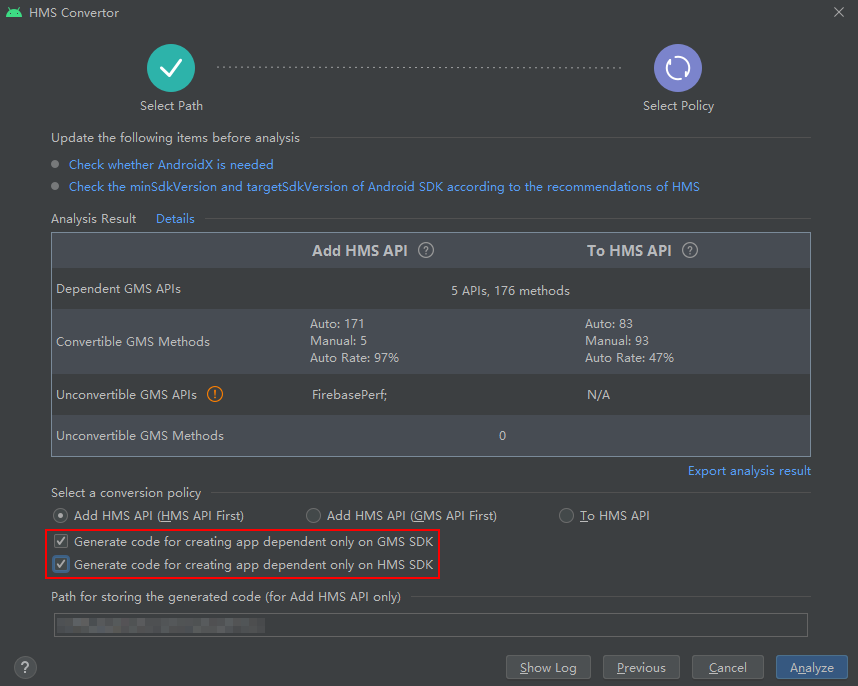
例如在app级的build.gradle原有的代码风味描述如下:
flavorDimensions "foo"
productFlavors {
    fooflavora {
        dimension "foo"
        // ...
    }
    fooflavorb {
        dimension "foo"
       //  ...
    }
}
Convertor转换工具会自动引入一个新的风味维度文件productFlavor.gradle,增加一个风味维度xadaptor:
flavorDimensions "xadaptor"
productFlavors {
    xmsgh {
        dimension "xadaptor"
        versionNameSuffix "-xmsgh"
    }
    xmsg {
        dimension "xadaptor"
        versionNameSuffix "-xmsg"
    }
    xmsh  {
        dimension "xadaptor"
        versionNameSuffix "-xmsh"
    }
} flavorDimensions "foo", "xadaptor"
productFlavors {
fooflavora {
dimension "foo"
// ...
}
fooflavorb {
dimension "foo"
// ...
}
}
dependencies {
implementation GMSA
api GMSB
// ...
} dependencies {
xmsgImplementation GMSA
xmsghImplementation GMSA
xmshImplementation GMSA
xmsgApi GMSB
xmsghApi GMSB
xmshApi GMSB
xmsgImplementation HMSA
xmsghImplementation HMSA
xmshImplementation HMSA
xmsgApi HMSB
xmsghApi HMSB
xmshApi HMSB
// ...
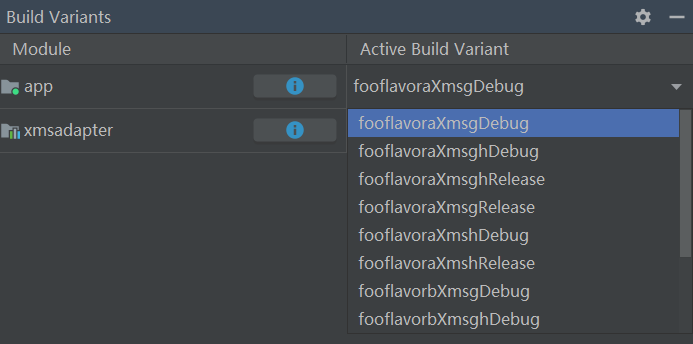
} 在正确的Sync后,点击Android Studio的Build Variants,选择需要的变体,直接编译即可。例如:
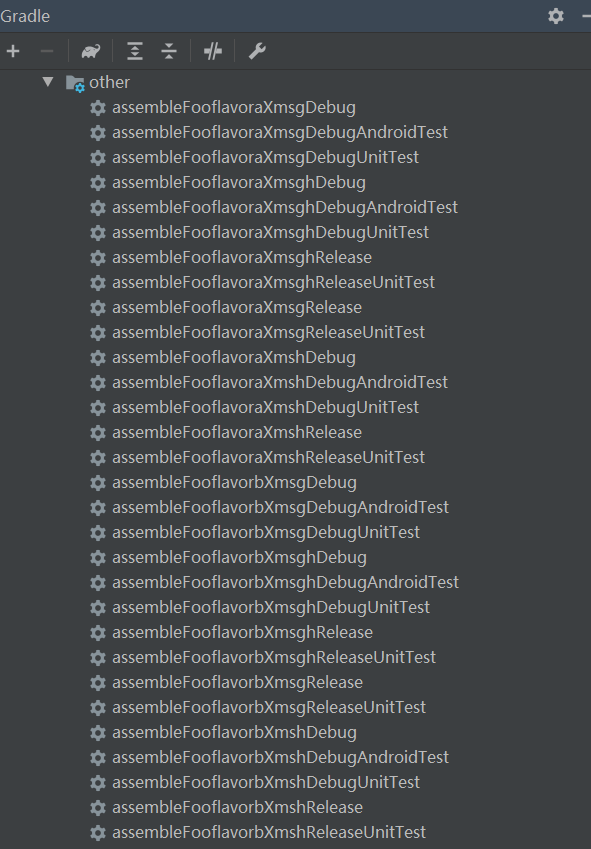
另一种编译方法是在gradle栏,寻找对应变体的编译任务。如果变体名字为“buildvariantname”,对应的编译任务是“assemble[buildvariantname]”。
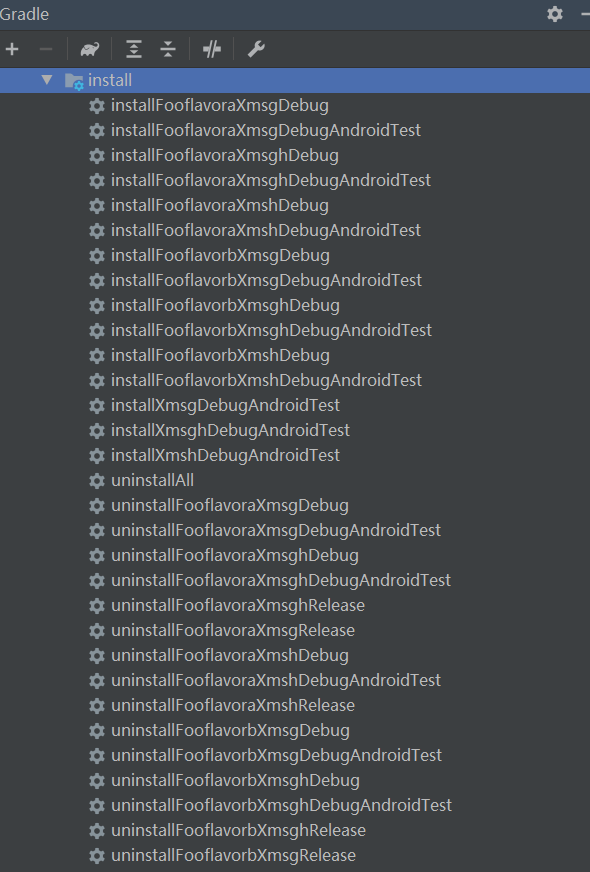
与之对应的,安装到设备的任务是“install[buildvariantname]”:
如果要在流水线上编译基于XMS(GMS/HMS)或者XMS(GMS&HMS)变体,只需要执行对应的assemble任务即可。也就是执行“gradle assemble[buildvariantname]”,与通过gradle任务编译类似。
如果您希望打包出纯净的GMS、HMS应用,或者避免出现某些编译、运行时错误,需要自行处理build.gradle、AndroidManifest.xml等文件中配置的GMS或HMS数据配置信息,例如apply plugin、meta-data、intent-filter等。
错误码 | 值 | 描述 | 解决方法 |
|---|---|---|---|
ERROR_GRS_FAIL | 10001 | 访问GRS服务失败。 | 用户请确保当前IDE网络通畅,利用浏览器或IDE的“Check connection”功能检查https://grs.dbankcloud.com/grs/1.0/devecostudio/router是否能正常访问。 |
ERROR_GET_APPID_ERROR | 60002 | AGC上应用列表为空。 | 在AGC上新建应用。 |
ERROR_GET_SHA256_RETURN_NO_CERT_FINGERPRINTS_KEY | 60012 | 获取APPSECRET的接口certFingerprints值为空。 | 此类情况,一般为AGC上未配置当前证书的指纹,可以进行环境配置,自动设置指纹。 |
ERROR_GET_REGION_RETURN_ERROR | 60015 | 查询区域的接口返回200,但是区域信息为空。 | 此类情况,一般为AGC上未设置数据存储区域,需要手工进行存储区域的设置。 |
ERROR_GET_USER_TEAM_EMPTY | 60017 | 获取团队信息的接口返回200,但是返回的信息中,没有包含任何团队信息。 | 此类情况,一般为帐号未实名注册,请参见帐号注册认证进行实名注册。 |
ERROR_TEST_TASKS_CREATED_TODAY_HAS_REACHED_THE_UPPER_LIMIT | 40008 | 今日创建测试任务次数已达上限。 | 您可以第二天继续创建任务。 |
RANGE_TO_LONG_ERROR | 70003 | 起始位置和终止位置之间的直线距离超过100KM,无法规划路径。 | 重新选择起始位置或终止位置后重试。 |
START_WEBSOCKET_ERROR | 70004 | Websocket启动失败。 | 重启Android Studio后重试。 |