deleteInstanceId()
Google API | Add HMS API | To HMS API |
|---|---|---|
FirebaseInstanceId.getInstance().deleteInstanceId(); | deleteInstanceInstanceId(getInstance(getApplicationContext())) 说明:方法抛出新异常ApiException,表示删除失败,您自行处理。 | HmsInstanceId.getInstance(getApplicationContext()).deleteAAID() 说明: 方法抛出新异常ApiException,表示删除失败,您自行处理,原IOException已删除。 |
deleteInstanceInstanceId方法参考(getInstance方法参见getInstance()):
public static void deleteInstanceInstanceId(org.xms.f.iid.FirebaseInstanceId instance) throws ApiException, IOException {
    if (org.xms.g.utils.GlobalEnvSetting.isHms()) {
        ((com.huawei.hms.aaid.HmsInstanceId) instance.getHInstance()).deleteAAID();
    }else {
        ((com.google.firebase.iid.FirebaseInstanceId) instance.getGInstance()).deleteInstanceId();
    }
}
deleteToken(String var1, String var2)
Google API | Add HMS API | To HMS API |
|---|---|---|
FirebaseInstanceId.getInstance().deleteToken(getString(R.string.gcm_defaultSenderId), FirebaseMessaging.INSTANCE_ID_SCOPE); | deleteInstanceToken(instance, projectId) 说明:方法抛出新异常ApiException,表示deleteToken失败,您自行处理。 | HmsInstanceId.getInstance(getApplicationContext()).deleteToken(projectId) 说明:方法抛出新异常ApiException,表示deleteToken失败,您自行处理,原IOException已删除。 |
deleteInstanceToken方法参考,需要传入发送者的项目ID,在AppGallery Connect顶部导航栏选择“我的项目”,左侧导航栏选择“项目设置”,在该页面获取发送者的项目ID。
public static void deleteInstanceToken(org.xms.f.iid.FirebaseInstanceId instance, projectId)throws ApiException, IOException {
    if (org.xms.g.utils.GlobalEnvSetting.isHms()) {
        ((com.huawei.hms.aaid.HmsInstanceId) instance.getHInstance()).deleteToken(projectId);
    } else {
        ((com.google.firebase.iid.FirebaseInstanceId)instance.getGInstance()).deleteToken(senderIdOrAppId,
                          com.google.firebase.messaging.FirebaseMessaging.INSTANCE_ID_SCOPE);
    }
}
getInstance()
Google API | Add HMS API | To HMS API |
|---|---|---|
FirebaseMessaging.getInstance() | org.xms.f.messaging.FirebaseMessaging.getInstance(getApplicationContext()) | HmsMessaging.getInstance(getApplicationContext()) |
FirebaseInstanceId.getInstance() | org.xms.f.iid.FirebaseInstanceId.getInstance(getApplicationContext()) | HmsInstanceId.getInstance(getApplicationContext()) |
org.xms.f.messaging.FirebaseMessaging.getInstance方法和org.xms.f.iid.FirebaseInstanceId.getInstance参考(getApplicationContext从Activity中获取):
public static org.xms.f.iid.FirebaseInstanceId getInstance(android.content.Context context) {
    com.google.firebase.iid.FirebaseInstanceId gReturn = null;
    com.huawei.hms.aaid.HmsInstanceId hReturn = null;
    if (org.xms.g.utils.GlobalEnvSetting.isHms()) {
        hReturn = com.huawei.hms.aaid.HmsInstanceId.getInstance(context);
    } else {
        gReturn = com.google.firebase.iid.FirebaseInstanceId.getInstance();
    }
    return new org.xms.f.iid.FirebaseInstanceId(gReturn, hReturn);
}
public static synchronized org.xms.f.messaging.FirebaseMessaging getInstance(android.content.Context context) {
    com.google.firebase.messaging.FirebaseMessaging gReturn = null;
    com.huawei.hms.push.HmsMessaging hReturn = null;
    if (org.xms.g.utils.GlobalEnvSetting.isHms()) {
        hReturn = com.huawei.hms.push.HmsMessaging.getInstance(context);
    } else {
        gReturn = com.google.firebase.messaging.FirebaseMessaging.getInstance();
    }
    return new org.xms.f.messaging.FirebaseMessaging(gReturn, hReturn);
}
getToken(String var1, String var2)
Google API | Add HMS API | To HMS API |
|---|---|---|
FirebaseInstanceId.getInstance().getToken(getString(R.string.gcm_defaultSenderId), FirebaseMessaging.INSTANCE_ID_SCOPE); | getInstanceToken(instance,projectId) 说明:方法抛出新异常ApiException,表示getToken失败,您自行处理。 | HmsInstanceId.getInstance(getApplicationContext()).getToken(projectId) 说明:方法抛出新异常ApiException,表示getToken失败,您自行处理,原IOException已删除。 |
getInstanceToken方法参考,需要传入发送者的项目ID,在AppGallery Connect顶部导航栏选择“我的项目”,左侧导航栏选择“项目设置”,在该页面获取发送者的项目ID。
public static String getInstanceToken(org.xms.f.iid.FirebaseInstanceId instance, String projectId)throws com.huawei.hms.common.ApiException, java.io.IOException {
    if (org.xms.g.utils.GlobalEnvSetting.isHms()) {
        return ((com.huawei.hms.aaid.HmsInstanceId) instance.getHInstance()).getToken(projectId);
    } else {
        return ((com.google.firebase.iid.FirebaseInstanceId) instance.getGInstance()).getToken(senderIdOrAppId,
                                      com.google.firebase.messaging.FirebaseMessaging.INSTANCE_ID_SCOPE);
    }
}
new RemoteMessage.Builder(String builder)
Google API | Add HMS API | To HMS API |
|---|---|---|
new RemoteMessage.Builder(senderId +"@fcm.googleapis.com") | new RemoteMessage.Builder(getBuilderConsString()) | new RemoteMessage.Builder("push.hcm.upstream") |
getBuilderConsString方法参考:
public static String getBuilderConsString() {
    if (org.xms.g.utils.GlobalEnvSetting.isHms()) {
        return "push.hcm.upstream";
    } else {
        // 如果是GMS通道,返回FCM的senderId
        return "61611129127" +"@fcm.googleapis.com";
    }
}
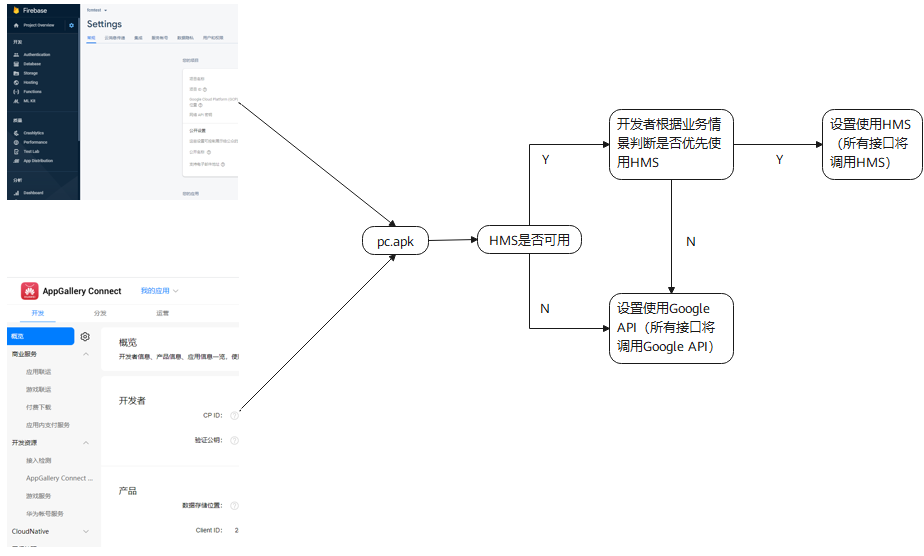
优先使用HMS判断
若您期望用户优先使用HMS(Add HMS API场景,To HMS API无需理会),可设置:
GlobalEnvSetting.useHms();
//当isHmsAvailable和isEmui都返回true时,HMS才可用
if (isHmsAvailable(getApplicationContext()) &&isEmui()) {
    GlobalEnvSetting.useHms();
}
public static boolean isHmsAvailable(android.content.Context context) {
    return Arrays
         .asList(com.huawei.hms.api.ConnectionResult.SUCCESS, com.huawei.hms.api.ConnectionResult.SERVICE_UPDATING,
             com.huawei.hms.api.ConnectionResult.SERVICE_VERSION_UPDATE_REQUIRED)
         .contains(HuaweiApiAvailability.getInstance().isHuaweiMobileServicesAvailable(context));
 }
public static boolean isEmui() {
    try {
        Class<?> clazz = Class.forName("android.os.SystemProperties");
        Method method = clazz.getDeclaredMethod("getInt", String.class, int.class);
        return (Integer) method.invoke(clazz, "ro.build.hw_emui_api_level", 0) > HwBuildEx.VersionCodes.EMUI_4_1;
    } catch (ClassNotFoundException | NoSuchMethodException | IllegalAccessException | IllegalArgumentException | InvocationTargetException | ClassCastException e) {
        return false;
    }
}
接收消息
HMS在收到通知栏、透传消息、发送上线消息、获取token、发送异常的场景下,您可通过本步骤处理相应结果。
在manifest文件中添加如下内容(若已存在,无需添加):
<service android:name=".DemoHmsMessageService"
            android:exported="false">
            <intent-filter>
            <action android:name="com.huawei.push.action.MESSAGING_EVENT"/>
            </intent-filter>
 </service>
新建类DemoHmsMessageService继承com.huawei.hms.push.HmsMessageService。
将已有的FirebaseMessagingService子类中的代码拷贝到新建类中,修改RemoteMessage的包为com.huawei.hms.push.RemoteMessage,修改RemoteMessage.Notification的包为com.huawei.hms.push.RemoteMessage.Notification。
RemoteMessage接口对应关系:
Google API | HMS API |
|---|---|
Map<String,String> data = remoteMessaged.getData() | Map<String,String> data = remoteMessaged.getDataOfMap() |
int priority = remoteMessaged.getOriginalPriority() | int priority = remoteMessaged.getOriginalUrgency() |
int priority = remoteMessaged.getPriority() | int priority = remoteMessaged.getUrgency() |
RemoteMessage.Notification对应关系:
Google API | HMS API |
|---|---|
boolean isDefaultLight = notification.getDefaultLightSettings() | boolean isDefaultLight = notification.isDefaultLight() |
boolean isDefaultSound= notification.getDefaultSound() | boolean isDefaultSound= notification.isDefaultSound() |
boolean isDefaultVibrate= notification.getDefaultVibrateSettings() | boolean isDefaultVibrate= notification.isDefaultVibrate() |
int badgeNumber= notification.getNotificationCount() | int badgeNumber= notification.getBadgeNumber() |
int importance= notification.getNotificationPriority() | int importance= notification.getImportance() |
boolean isAutoCancel = notification.getSticky() | boolean isAutoCancel = notification.isAutoCancel() |
long[] vibrateConfigs = notification.getVibrateTimings() | long[] vibrateConfigs = notification.getVibrateConfig() |

Add HMS API模式下,原来的代码中的FirebaseMessagingService子类的转换需要适配HmsMessageService,我们提供配置ClassLoader(简单,仅需修改配置文件)和新增HmsMessageService子类代码(复杂,手工转换工作量大)两种手工转换方式来实现兼容Google API和HMS。
目前ClassLoader方案暂时不支持用户工程使用插件化或者热修复框架,不支持用户自定义ClassLoader,若您的应用存在上述情况,请使用手写代码方案。
更多关于ClassLoader方案的原理介绍,请参见XClassLoader方案基本原理介绍。
[h2]配置ClassLoader方式
目前ClassLoader方式暂时不支持“Library”模式下的Add HMS API转换,在使用工具转换时请选择“App”模式。
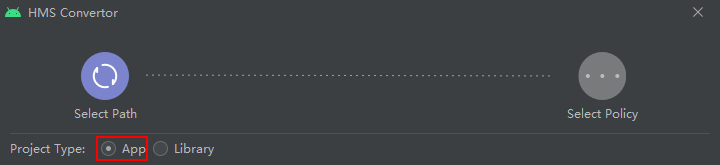

自动转换完后请先在"Conversion"中处理好所有文件中Dummy状态相关接口的手工转换。
- 修改工程相关配置文件。
- 若勾选了“Generate code for creating app dependent only on GMS SDK”模式,并且启用了单“xmsg”风味变体,请在项目级目录下的settings.gradle文件里修改引用配置如下。
include ':xmsadapter:xmsaux', 'xmsadapter:xmsaux:xg', 'xmsadapter:xmsaux:xapi'
若勾选了“Generate code for creating app dependent only on HMS SDK”模式,并且启用了单“xmsh”风味变体,请在项目级目录下的settings.gradle文件里修改引用配置如下。include ':xmsadapter:xmsaux', 'xmsadapter:xmsaux:xh', 'xmsadapter:xmsaux:xapi'
若勾选了以上任一模式,并且启用了单“xmsgh”风味变体,请在项目级目录下的settings.gradle文件里修改引用配置如下。include ':xmsadapter:xmsaux', 'xmsadapter:xmsaux:xg', 'xmsadapter:xmsaux:xh', 'xmsadapter:xmsaux:xapi'
代码风味变体详情请参见Convertor工具实现生成多种变体APK
- 在项目级目录下的build.gradle文件dependencies{}区块中,配置gradle插件版本为3.5.0以上。
buildscript { dependencies { classpath 'com.android.tools.build:gradle:3.5.0' } } - 在项目级目录下的gradle/wrapper/gradle-wrapper.properties文件里,配置gradle版本为5.4.1以上。
distributionUrl=https\://services.gradle.org/distributions/gradle-5.4.1-all.zip
- 对于多Module项目工程,需要在项目级目录下的gradle.properties文件里添加如下配置。
android.enableD8=false
android.enableD8.desugaring=false
- 在程序入口处调用init方法初始化。
- 在app主应用中实现一个程序入口类继承android.app.Application,并覆写其中onCreate方法。
public class MyApp extends Application { @Override public void onCreate() { super.onCreate(); GlobalEnvSetting.init(this,null); XLoader.init(this); } } - 修改app应用级目录下的src/main/AndroidManifest.xml中应用包名属性application name,添加第一条中新增的application子类。
<application
    android:name=".MyApp"
</application>
- 在app主应用中实现一个程序入口类继承android.app.Application,并覆写其中onCreate方法。
- 异常规避。
- 如果重新扫描分析工程中出现如下Merge提示信息,请先备份并移除xmsadapter文件夹下的xh、xg和xmsaux文件夹,待扫描分析完成以后,再将备份恢复至xmsadapter目录下。
- 为了您的应用安全,我们对打包进APK中assets目录下的xg.apk和xh.apk资源文件有安全校验功能。若在运行时遇到“Apk File is corrupted”报错,说明上述资源文件被篡改或者破坏,请在打包APK之前clean并重新rebuild整个工程。
- 如果您的应用在低版本的安卓手机上运行时遇到如下报错信息:
请在app/build.gradle添加如下配置信息:
android {
    defaultConfig {
        multiDexEnabled false
    }
}


[h2]新增FirebaseMessagingService子类
//FirebaseMessagingServiceDemo.java
import com.google.firebase.messaging.FirebaseMessagingService;
import com.google.firebase.messaging.RemoteMessage;
public class FirebaseMessagingServiceDemo extends FirebaseMessagingService {
    @Override
    public void onMessageReceived(RemoteMessage remoteMessage) {
        //...
    }
    @Override
    public void onNewToken(String token) {
        //...
    }
    @Override
    public void onMessageSent(String s) {
        //...
    }
    @Override
    public void onSendError(String s, Exception e) {
       //...
    }
    @Override
    public void onDeletedMessages() {
       //...
    }
    @Override
    public void onDestroy() {
        super.onDestroy();
        //...
    }
}
//HmsMessagingServiceDemo.java
import com.huawei.hms.push.HmsMessageService;
import com.huawei.hms.push.RemoteMessage;
public class HmsMessagingServiceDemo extends HmsMessageService {
    @Override
    public void onMessageReceived(RemoteMessage remoteMessage) {
        //...
    }
    @Override
    public void onNewToken(String token) {
        //...
    }
    @Override
    public void onMessageSent(String s) {
        //...
    }
    @Override
    public void onSendError(String s, Exception e) {
        //...
    }
    @Override
    public void onDeletedMessages() {
        //...
    }
    @Override
    public void onDestroy() {
        super.onDestroy();
        //...
    }
}


token保存使用
若您期望能保存或者使用获取的token,则可以调用getToken(String var1,String var2)方法后,通过HmsMessageService或FirebaseMessagingService的实现类中的onNewToken获取到token。

保存token时,注意区分Google API、HMS的token。
发送透传或者通知栏消息
若您期望能通过应用发送HMS Core透传或者通知栏消息,可参见接口说明。
区分发送HMS消息以及Google API消息方式:
if (org.xms.g.utils.GlobalEnvSetting.isHms()) {
        // 通过HMS通道发送消息
} else {
        // 通过GMS通道发送消息
}