


智能客服
你问我答,随时在线为你解决问题















当用户授权同意订阅消息模板后,元服务的服务端主动调用服务通知REST API接口,向登录了账号的设备发送订阅消息(服务通知消息)。
若订阅模板类型为“一次性订阅”,推送消息数量受控于元服务发起订阅请求并获得用户授权的次数。每次发送订阅消息都需要获取用户授权。
若订阅模板类型为“长期订阅”,推送消息数量将在服务通知的模板详情页说明,元服务可在模板限制的订阅周期及频次内多次下发通知,详情见选用订阅模板。
当前Push Kit仅支持订阅“一次性订阅”模板。
推送订阅消息的消息示例如下,更多详情请见服务通知。
- // Request URL
- POST https://push-api.cloud.huawei.com/v1/[projectId]/service_notification/send
-
- // Request Header
- Authorization: Bearer eyJr*****OiIx---****.eyJh*****iJodHR--***.QRod*****4Gp---****
-
- // Request Body
- {
- "msgId": "20240514ABCDE",
- "appId": "6**********972",
- "toOpenId": "A**********O",
- "templateId": "1**********2",
- "templateParams": {
- "thing_0": "待取号",
- "time_1": "2024年5月30日 13:00~2024年5月30日 14:00",
- "thing_2": "XX银行XX支行"
- }
- }
以“取号提醒”模板为例:
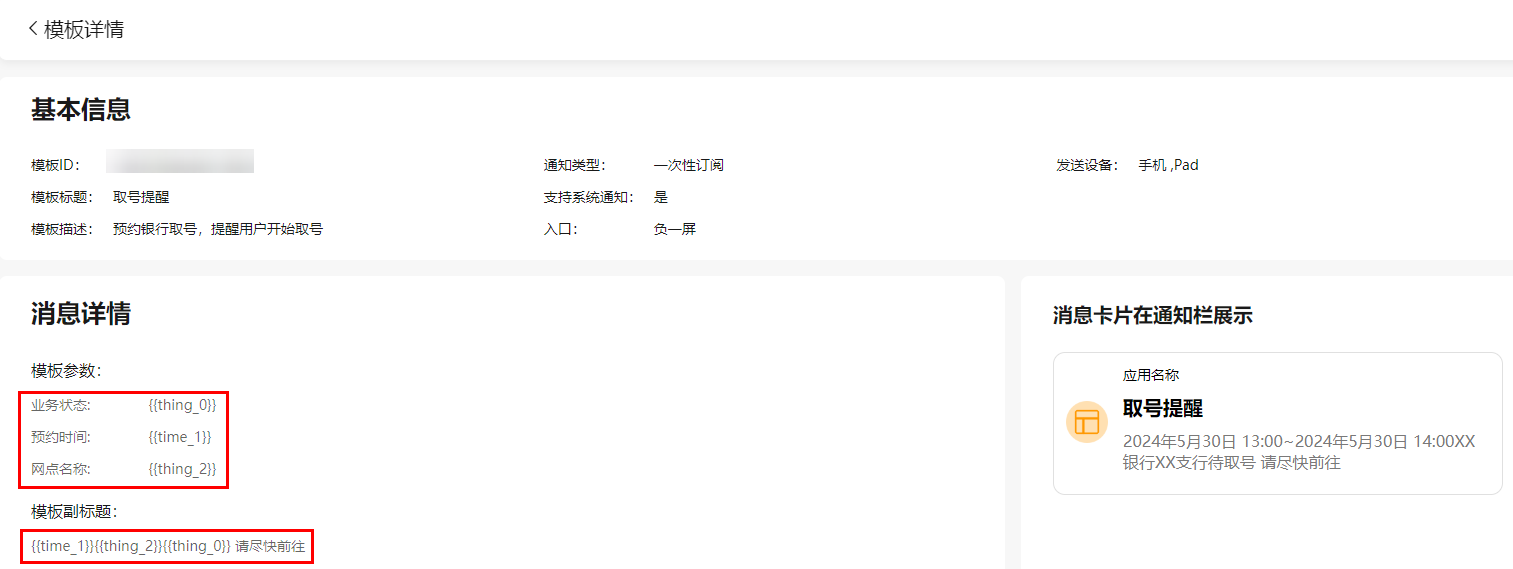
templateParams中的参数项为元服务选用的模板中的配置参数。具体可配置项请见选用订阅模板。
填写templateParams时,请确保填入元服务选用模板的所有已勾选模板参数。
消息示例如下,更多详情请见服务通知。
- // Request URL
- POST https://push-api.cloud.huawei.com/v1/[projectId]/service_notification/send
-
- // Request Header
- Authorization: Bearer eyJr*****OiIx---****.eyJh*****iJodHR--***.QRod*****4Gp---****
-
- // Request Body
- {
- "msgId": "2**********80",
- "appId": "6**********972",
- "toOpenId": "A**********O",
- "templateId": "1**********2",
- "templateParams": {
- "thing_0": "N0001",
- "time_1": "2024年4月27日 22:22",
- "thing_2": "软件大道101号"
- },
- "clickAction": {
- "actionType": 0,
- "data": { "testKey": "testValue" }
- }
- import { UIAbility, Want } from '@kit.AbilityKit';
- import { hilog } from '@kit.PerformanceAnalysisKit';
-
- export default class MainAbility extends UIAbility {
- onCreate(want: Want): void {
- // 获取消息中传递的data数据
- const data = want.parameters;
- hilog.info(0x0000, 'testTag', 'Succeeded in getting message data');
- // 根据实际业务场景对data进行处理
- }
- }
onNewWant()方法中覆写如下代码:
- import { UIAbility, Want } from '@kit.AbilityKit';
- import { hilog } from '@kit.PerformanceAnalysisKit';
-
- export default class MainAbility extends UIAbility {
- onNewWant(want: Want): void {
- // 获取消息中传递的data数据
- const data = want.parameters;
- hilog.info(0x0000, 'testTag', 'Succeeded in getting message data');
- // 根据实际业务场景对data进行处理
- }
- }
onNewWant()方法仅在单例(singleton)模式下可用。
消息示例如下,更多详情请见服务通知。
设置actions参数完成点击消息进入应用指定页示例(若skills中添加了uris参数,则uris内容需为空):
- {
- "name": "TestAbility",
- "srcEntry": "./ets/abilities/TestAbility.ets",
- "exported": false,
- "startWindowIcon": "$media:icon",
- "startWindowBackground": "$color:start_window_background",
- "skills": [
- {
- "actions": [
- "com.test.action"
- ]
- }
- ]
- }
设置uris参数完成点击消息进入应用指定页示例(skills中必须同时设置actions参数,actions参数为空字符),uris对象内部结构说明请参见skills标签。
- {
- "name": "TestAbility",
- "srcEntry": "./ets/abilities/TestAbility.ets",
- "exported": false,
- "skills": [
- {
- "actions": [""],
- "uris": [
- {
- "scheme": "https",
- "host": "www.xxx.com",
- "port": "8080",
- "path": "push/test"
- }
- ]
- }
- ]
- }
- // Request URL
- POST https://push-api.cloud.huawei.com/v1/[projectId]/service_notification/send
-
- // Request Header
- Authorization: Bearer eyJr*****OiIx---****.eyJh*****iJodHR--***.QRod*****4Gp---****
-
- // Request Body
- {
- "msgId": "2**********80",
- "appId": "6**********972",
- "toOpenId": "A**********O",
- "templateId": "1**********2",
- "templateParams": {
- "thing_0": "N0001",
- "time_1": "2024年4月27日 22:22",
- "thing_2": "软件大道101号"
- },
- "clickAction": {
- "actionType": 1,
- "action": "com.test.action",
- "uri": "https://www.xxx.com:8080/push/test",
- "data": { "testKey": "testValue" }
- }
- }
- import { UIAbility, Want } from '@kit.AbilityKit';
- import { hilog } from '@kit.PerformanceAnalysisKit';
-
- export default class TestAbility extends UIAbility {
- onCreate(want: Want): void {
- // 获取消息中传递的data数据
- const data = want.parameters;
- hilog.info(0x0000, 'testTag', 'Succeeded in getting message data');
- // 根据实际业务场景对data进行处理
- }
- }
onNewWant()方法中覆写如下代码:
- import { UIAbility, Want } from '@kit.AbilityKit';
- import { hilog } from '@kit.PerformanceAnalysisKit';
-
- export default class TestAbility extends UIAbility {
- onNewWant(want: Want): void {
- // 获取消息中传递的data数据
- const data = want.parameters;
- hilog.info(0x0000, 'testTag', 'Succeeded in getting message data');
- // 根据实际业务场景对data进行处理
- }
- }
onNewWant()方法仅在单例(singleton)模式下可用。