简介
元服务链接是专为元服务开发者设计的密文URL服务,可以直达元服务任意页面。作为开发者,您可以为自己的元服务生成并配置专属的元服务链接,同时设置其有效期,精准把握用户访问的时效与范围,将用户在时效内引导至元服务任意指定页面。
例如:当用户接收到“手机充值”的元服务链接后,他们可以通过点击该链接直接跳转至相应的元服务页面,实现一步直达的便捷体验。
使用场景
- 适用于社交分享内容传播场景:对于有高频分享场景的元服务,通过链接形式配合华为分享能力不仅简化了分享内容,还为用户提供了便捷流程的访问途径,提升用户体验。
- 适用于唤醒沉默用户、激发用户活跃度的场景:对于需要快速获得用户注意或启动特定功能的元服务,元服务链接配合短信或者PUSH消息能够减少用户操作步骤,提升服务响应速度。
- 适用于日常营销推广,广告优质引流的场景:在元服务推广营销过程中,元服务链接作为广告内容与用户的桥梁,能有效引导用户进入并体验元服务,增强广告转化率。
[h2]创建元服务链接
- 登录HarmonyOS 开发者中心,进入“应用管理”页面。
- 选择目标元服务后,左侧导航选择“基础服务 > 元服务链接”,进入“元服务链接”页面,点击“立即使用”。
- 点击“元服务链接”首页右上角的“创建”。
- 创建元服务链接,点击“保存”或者“发布”。
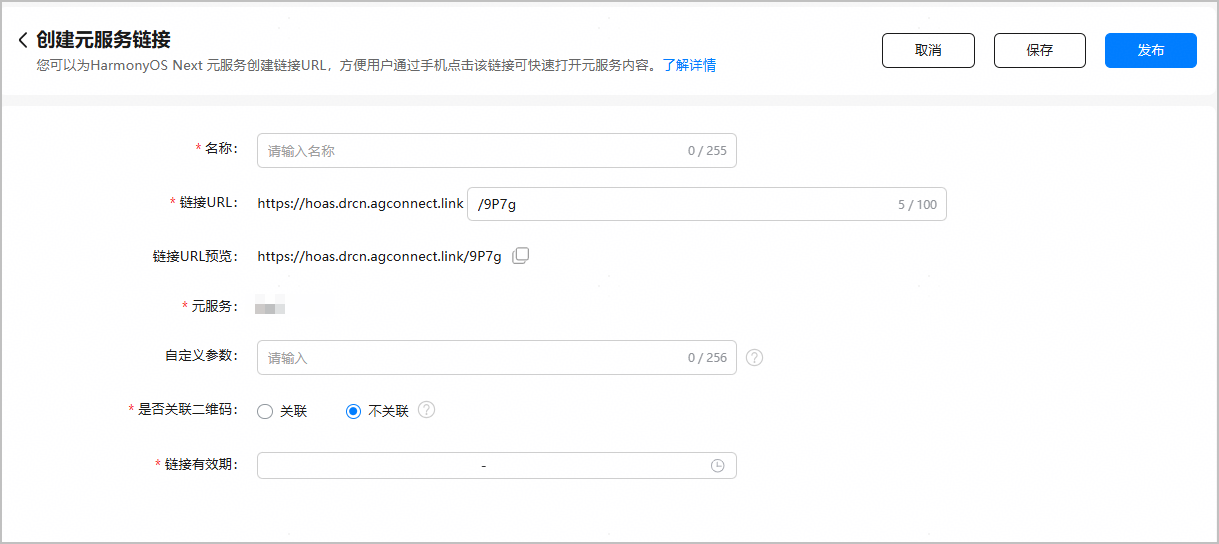
参数
说明
名称
配置元服务链接的名称。
链接URL
配置元服务链接:
前缀为平台固定域名,开发者不能修改或自定义;后缀字符串,默认自动生成,如需自行定义,应确保该字符串唯一且长度不超过100位。
说明:后缀字符串只能包含英文字母(a-z、A-Z)、数字(0-9)、下划线“_”和连字符“-”。
链接URL预览
预览完整的元服务链接,支持复制。
说明:(可选)开发者在使用元服务链接时,支持在链接URL后拼接动态自定义参数,用于精确定位到元服务指定页面。无需进行额外配置,直接拼接?加key=value键值对,多个键值对之间以“&”分隔。
链接示例:https://hoas.drcn.agconnect.link/9P7g?key1=value1&key2=value2
具体请参见使用动态自定义参数跳转到指定的页面。
元服务
需要配置链接的元服务的名称,支持复制。
(可选)自定义参数
配置静态自定义参数,用于精确定位到元服务指定页面。需要按key=value的键值对形式输入,多个键值对之间以“&”分隔。例如:key1=value1&key2=value2&key3=value3...
具体请参见使用静态自定义参数跳转到指定的页面。
是否关联二维码
是否将元服务与普通链接二维码进行关联。
本章节仅介绍如何使用元服务链接进行跳转,请选择“不关联”。
说明:如果希望用户扫描普通链接二维码后跳转到元服务,请选择“关联”并参见使用普通链接二维码跳转元服务。
链接有效期
链接有效期生效时间段需在1~90天范围内;结束时间必须晚于当前时间。


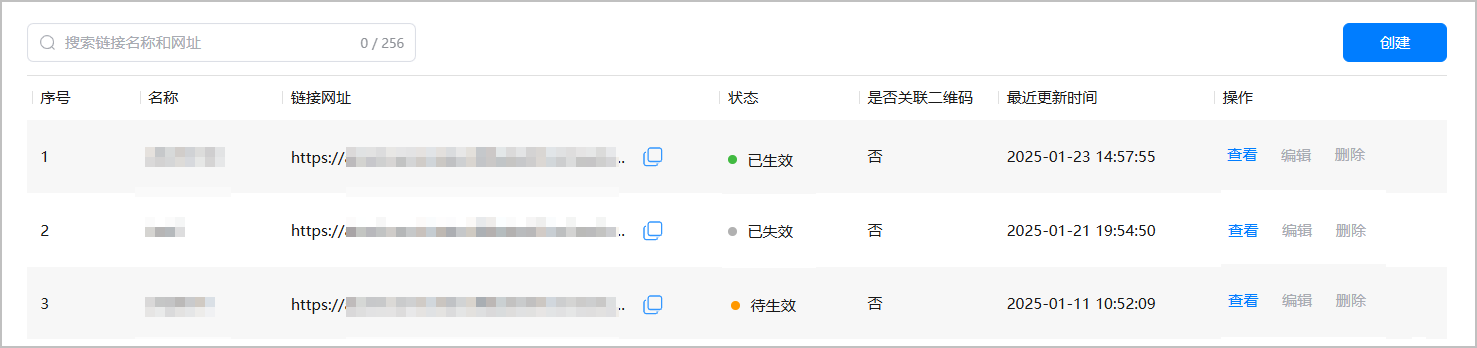
- 点击“保存”后,元服务链接为“草稿态”,您可以查看元服务链接、修改草稿态元服务链接或者删除元服务链接。

- 点击“发布”后,系统会判断当前时间是否在链接有效期内,并实时更新元服务链接状态:“待生效”、“已生效”或“已失效”,此时元服务链接将不支持编辑和删除操作。
[h2](可选)使用动态自定义参数跳转到指定的页面
开发者生成元服务链接后,可在链接URL的末尾添加动态自定义参数,从而精确定位到元服务指定页面。
链接示例:https://hoas.drcn.agconnect.link/9P7g?key1=value1&key2=value2
其中,?后为动态参数,由开发者自行拼接,无需在平台进行额外配置。

代码示例:在元服务的Ability(如EntryAbility)的onCreate()或者onNewWant()生命周期回调中添加如下代码,以处理传入的链接。
import { AbilityConstant, UIAbility, Want } from '@kit.AbilityKit';
import { hilog } from '@kit.PerformanceAnalysisKit';
import { url } from '@kit.ArkTS';
export default class EntryAbility extends UIAbility {
  onCreate(want: Want, launchParam: AbilityConstant.LaunchParam): void {
    // 从want中获取传入的链接信息。
    // 如传入的url为:https://hoas.drcn.agconnect.link/9P7g?action=showall
    let uri = want?.uri;
    if (uri) {
      // 从链接中解析query参数,拿到参数后,开发者可根据自己的业务需求进行后续的处理。
      try {
        let urlObject = url.URL.parseURL(uri);
        let action = urlObject.params.get('action');
        // 例如,当action为showall时,展示所有的节目。
        if (action === "showall"){
          // ...
        }
        // ...
      } catch (error) {
        hilog.error(0x0000, 'testTag', `Failed to parse url.`);
      }
    }
  }
}
[h2](可选)使用静态自定义参数跳转到指定的页面
开发者在创建元服务链接时,可设置静态自定义参数来精确定位到元服务指定页面。使用场景有如下两种:
- 场景一:元服务链接直接跳主包页面,无需传递subPackageName。
- 场景二:元服务链接跳转到子包时,需要配置subPackageName参数,指定子包名称。

subPackageName是系统保留KEY,仅用于子包提前安装,请勿作为静态自定义参数使用。
开发者跳转到指定页面,可以通过静态自定义参数,在运行时解析然后跳转到指定页面。跳转子页面实现示例:
- 示例一:使用router路由方式进行页面跳转。
- 配置元服务链接时,需要将页面路径配置到静态自定义参数中,示例如下:
pagePath=pages/SubPage

如果需要跳转到分包的页面,则pagePath需要配置为:@bundle:包名(bundleName)/模块名(moduleName)/路径/页面所在的文件名,例如:pagePath=@bundle:com.atomicservice.123456789/library/ets/pages/SubPage
- 在元服务的Ability(如EntryAbility)的onCreate()生命周期回调中解析传入的静态自定义参数,并在onWindowStageCreate()生命周期回调中实现跳转到指定页面。
import { UIAbility, Want } from '@kit.AbilityKit';
import { hilog } from '@kit.PerformanceAnalysisKit';
import { window } from '@kit.ArkUI';

export default class EntryAbility extends UIAbility {
  // 用来保存通过router方式从元服务链接跳转到指定的页面
  pagePath: string = '';

  onCreate(want: Want): void {
    this.resolvePagePath(want);
    hilog.info(0x0000, 'testTag', '%{public}s', 'Ability onCreate');
  }

    onWindowStageCreate(windowStage: window.WindowStage): void {
    // Main window is created, set main page for this ability
    hilog.info(0x0000, 'testTag', '%{public}s', 'Ability onWindowStageCreate');

    if(this.pagePath){
      windowStage.loadContent(this.pagePath, (err) => {
        if (err.code) {
          hilog.error(0x0000, 'testTag', '%{public}s', `Failed to load the content, cause: ${JSON.stringify(err)}`);
          return;
        }
        hilog.info(0x0000, 'testTag', '%{public}s', 'Succeeded in loading the content.');
      });
    }
    else{
      windowStage.loadContent('pages/Index', (err) => {
        if (err.code) {
          hilog.error(0x0000, 'testTag', '%{public}s', `Failed to load the content, cause: ${JSON.stringify(err)}`);
          return;
        }
        hilog.info(0x0000, 'testTag', '%{public}s', 'Succeeded in loading the content.');
      });
    }
  }

  resolvePagePath(want: Want){
    // 从want中获取传入的链接信息。如传入的url为:https://hoas.drcn.agconnect.link/9P7g
    let uri = want?.uri;
    hilog.info(0x0000, 'testTag', '%{public}s', `uri is: ${uri}`);
    if (uri) {
      // 解析通过router跳转的页面
      this.pagePath =  want.parameters?.['pagePath'] as string;
      hilog.info(0x0000, 'testTag', '%{public}s', `pagePath is: ${this.pagePath}`);
    }
  }
}
- 配置元服务链接时,需要将页面路径配置到静态自定义参数中,示例如下:
- 示例二:使用Navigation路由跳转到指定NavDestination。
- 配置元服务链接时,需要将NavDestination页面名称配置到静态自定义参数中,示例如下:
navRouterName=ProductList

- 静态自定义参数navRouterName指定需要跳转的NavDestination,取值为自定义pageMap方法中相应的值或者系统路由表routerMap中相应的name值(例如示例中的ProductList)。
- 如果需要分包中的NavDestination,则需要在静态自定义参数配置中增加配置subPackageName,指定需要跳转的NavDestination所在的分包名称,例如需要跳转到名称为product这个分包中的NavDestination(系统路由表中NavDestination对应的名称为ProductDetail),则静态自定义参数配置为subPackageName=product&navRouterName=ProductDetail。
- 在元服务的Ability(如EntryAbility)的onCreate()生命周期回调中解析传入的静态自定义参数,并通过LocalStorage共享到UI界面。
import { UIAbility, Want } from '@kit.AbilityKit'; import { hilog } from '@kit.PerformanceAnalysisKit'; import { window } from '@kit.ArkUI'; export default class EntryAbility extends UIAbility { // 用来共享ability中的对象到页面中 storage: LocalStorage|null = null; onCreate(want: Want): void { hilog.info(0x0000, 'testTag', '%{public}s', `want in onCreate is ${JSON.stringify(want)}`); this.resolveNavigationRouter(want); hilog.info(0x0000, 'testTag', '%{public}s', 'Ability onCreate'); } onDestroy(): void { hilog.info(0x0000, 'testTag', '%{public}s', 'Ability onDestroy'); } onWindowStageCreate(windowStage: window.WindowStage): void { // Main window is created, set main page for this ability hilog.info(0x0000, 'testTag', '%{public}s', 'Ability onWindowStageCreate'); windowStage.loadContent('pages/Index', this.storage, (err) => { if (err.code) { hilog.error(0x0000, 'testTag', '%{public}s', `Failed to load the content. cause: ${JSON.stringify(err)}`); return; } hilog.info(0x0000, 'testTag', '%{public}s', 'Succeeded in loading the content.'); }); } resolveNavigationRouter(want: Want){ // 从want中获取传入的链接信息,如传入的url为:https://hoas.drcn.agconnect.link/9P7g let uri = want?.uri; hilog.info(0x0000, 'testTag', '%{public}s', `uri is: ${uri}`); if (uri) { // 解析Navigation跳转页面的静态自定义参数 const navRouterName = want.parameters?.['navRouterName'] as string; hilog.info(0x0000, 'testTag', '%{public}s', `navRouterName is: ${navRouterName}`); const subPackageName = want.parameters?.['subPackageName'] as string; hilog.info(0x0000, 'testTag', '%{public}s', `subPackageName is: ${subPackageName}`); let para: Record<string, string> = { 'navRouterName': navRouterName , 'subPackageName': subPackageName}; this.storage = new LocalStorage(para); } } } - 在pages/Index中跳转到指定NavDestination。
import { NavPushPathHelper } from '@kit.ArkUI';
import { BusinessError } from '@kit.BasicServicesKit';
import { hilog } from '@kit.PerformanceAnalysisKit';

@Entry({ useSharedStorage: true })
@Component
struct Index {
  pathStack: NavPathStack = new NavPathStack();
  helper: NavPushPathHelper = new NavPushPathHelper(this.pathStack);
  @LocalStorageProp('subPackageName') subPackageName:string = '';
  @LocalStorageProp('navRouterName') navRouterName:string = '';

    build() {
    // 把页面栈对象传入Navigation
    Navigation(this.pathStack) {
        // 首页的页面内容
    }
    .title('Main');
  }
  aboutToAppear(): void{
    if(this.navRouterName){
      if(this.subPackageName){
        this.helper.pushPath(this.subPackageName, { name: this.navRouterName }, false)
          .then(() => {
            hilog.info(0x0000, 'testTag', '%{public}s', 'Succeeded in pushing the route page.');
          })
          .catch((error: BusinessError) => {
            hilog.info(0x0000, 'testTag', '%{public}s', `Failed to push the route page, code: ${error.code}, message: ${error.message}.`);
          });
      }
      else{
        this.pathStack.pushPathByName(this.navRouterName, null, false);
      }
    }
  }
}
- 配置元服务链接时,需要将NavDestination页面名称配置到静态自定义参数中,示例如下:
[h2]查看元服务链接
- 查看元服务链接列表。
支持在元服务链接页面的搜索框内,输入链接名称或网址可以进行模糊查询。

- 查看元服务链接信息详情。
点击目标元服务链接“操作”列的“查看”,即可查看元服务链接的基本信息。



[h2]通过openLink接口拉起元服务
拉起方应用通过UIAbilityContext.openLink()接口,传入目标元服务链接,从而拉起目标元服务。
openLink接口提供“以App Linking打开元服务”的方式进行目标元服务页跳转,开发者可根据业务需求进行编译。
若有匹配的元服务,则直接打开目标元服务;否则,抛异常给开发者进行处理。
为验证元服务链接的配置是否正确,请参照如下示例代码:
- 在“entry/src/main/ets/common”目录下添加GlobalContext.ets文件,开发初始化和获取应用上下文的接口。
import { common } from '@kit.AbilityKit'; export class GlobalContext { private static context: common.UIAbilityContext; public static initContext(context: common.UIAbilityContext): void { GlobalContext.context = context; } public static getContext(): common.UIAbilityContext { return GlobalContext.context; } } - 在“entry/src/main/ets/entryability/EntryAbility.ets”文件中导入GlobalContext,在onCreate方法中使用GlobalContext.initContext(this.context)初始化全局应用上下文。
- 在“entry/src/main/ets/pages/Index.ets”文件中,使用UIAbilityContext.openLink()接口打开元服务。
import { BusinessError } from '@kit.BasicServicesKit';
import { hilog } from '@kit.PerformanceAnalysisKit';
import { GlobalContext } from '../common/GlobalContext';

@Entry
@Component
struct Index {
  build() {
    Button('start link', { type: ButtonType.Capsule, stateEffect: true })
      .width('87%')
      .height('5%')
      .margin({ bottom: '12vp' })
      .onClick(() => {
        let context = GlobalContext.getContext();
        // link可替换成开发者自行配置的元服务链接
        let link: string = "https://hoas.drcn.agconnect.link/9P7g";
        context.openLink(link)
          .then(() => {
            hilog.info(0x0000, 'testTag', '%{public}s', 'Succeeded in opening the link.');
          })
          .catch((error: BusinessError) => {
            hilog.error(0x0000, 'testTag', `Failed to open link, code: ${error.code}, message: ${error.message}`);
          })
      })
  }
}
以“手机充值”元服务为例,代码中link若为该元服务首页的链接,当拉起方应用成功触发链接,弹窗提示“‘应用名’是否打开元服务”,点击“打开”则成功实现链接跳转元服务功能。
接口openLink还可以设置appLinkingOnly参数:
- 当参数设为true时:若系统查找到匹配的元服务,则直接打开目标元服务;否则抛异常给开发者进行处理。
- 当参数设为false或者默认时:若系统查找到匹配的元服务,则直接打开目标元服务;若检测到元服务链接非法或失效,则会拉起web界面。
context.openLink(link, { appLinkingOnly: true })
.then(() => {
  hilog.info(0x0000, 'testTag', '%{public}s', 'Succeeded in opening the link.');
})
[h2]通过系统浏览器或ArkWeb拉起元服务
ArkWeb深度集成了App Linking的能力,当用户在系统浏览器或者集成ArkWeb的元服务网页上点击某个链接时,若有链接匹配的元服务,系统会通过App Linking能力跳转至该元服务档案页,引导用户点击【打开元服务】,从而拉起目标元服务。

该场景不支持使用动态自定义参数。
[h2]报错场景
- 元服务链接过期失效后,系统提示报错如下:
- 当appLinkingOnly参数设为true时:点击链接会跳转失败,抛出openlink failed的错误码"16000019"。
- 当appLinkingOnly参数设为false或者默认时:会使用浏览器打开链接地址,展示异常错误页面。
- 输入链接检测为非元服务链接,如应用链接或无效链接等,系统提示报错如下:
- 当appLinkingOnly参数设为true时:优先判别是否为应用链接,如果为应用链接则会跳转至本地预安装的应用服务页面;否则在点击链接时会跳转失败,系统抛出openlink failed的错误码"16000019"。
- 当appLinkingOnly参数设为false或者默认时:优先判别是否为应用链接,如果为应用链接,则会跳转至本地预安装的应用服务页面;否则尝试通过浏览器网页打开。