问题现象:
模拟器运行ASCF框架无法正常启动,提示“Failed to install the HAP or HSP because the dependent module does not exist.”错误。
报错信息:
Install Failed: error: failed to install bundle.

code:9568305

error: Failed to install the HAP or HSP because the dependent module does not exist.
可能原因:
项目中所依赖的运行时的版本可能高于模拟器版本。
解决措施:
对于模拟器中的ASCF运行时,是不能安装和升级的,所以框架指定的版本号不能高于模拟器中预置的版本号,需要修改项目配置。
-
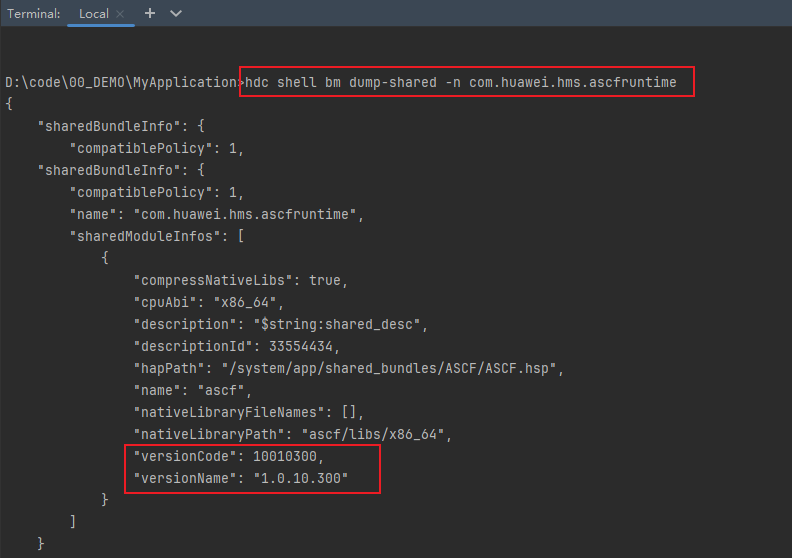
hdc环境配置请参考可选命令行直接执行hdc程序,使用如下命令读取版本号:
hdc shell bm dump-shared -n com.huawei.hms.ascfruntime
-
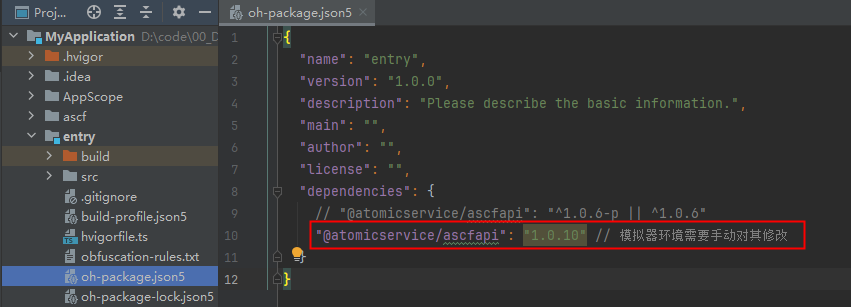
例如此时的versionName为“1.0.10.300”,则需要将entry/oh-package.json5配置文件中的版本字段"@atomicservice/ascfapi": "^1.0.6"改为"@atomicservice/ascfapi": "1.0.10",然后同步项目即可。
查询当前是否是模拟器的方法:
hdc shell param get const.product.model
结果为emulator,当前是模拟器环境。