在输入法框架中,可以通过getController方法获取到InputMethodController实例来绑定输入法并监听输入法应用的各种操作,比如插入、删除、选择、光标移动等。这样就可以在自绘编辑框中使用输入法,并实现更加灵活和自由的编辑操作。
开发步骤
-
开发者在自绘编辑框中使用输入法时,首先需要在DevEco Studio工程中新建一个ets文件,命名为自定义控件的名称,本示例中命名为CustomInput,在文件中定义一个自定义控件,并从@kit.IMEKit中导入inputMethod。
import { inputMethod } from '@kit.IMEKit'; @Component export struct CustomInput { build() { } } -
在控件中,使用Text组件作为自绘编辑框的文本显示组件,使用状态变量inputText作为Text组件要显示的内容。
import { BusinessError } from '@kit.BasicServicesKit'; import { inputMethod } from '@kit.IMEKit'; import Log from '../model/Log'; const TAG = '[Submenu]'; @Component export struct CustomInput { @State inputText: string = ''; // inputText作为Text组件要显示的内容 private isAttach: boolean = false; private inputController: inputMethod.InputMethodController = inputMethod.getController(); build() { Text(this.inputText) // Text组件作为自绘编辑框的文本显示组件。 .fontSize(16) .width('100%') .lineHeight(40) .id('customInput') .height(45) .border({ color: '#554455', radius: 30, width: 1 }) .maxLines(1) .onBlur(() => { this.off(); }) .onClick(() => { this.attachAndListener(); // 点击控件 }) } -
在控件中获取InputMethodController实例,先在文本点击时调用controller实例的attach方法绑定和拉起软键盘,再注册监听输入法插入文本、删除等方法。本示例仅展示插入、删除。

在PC/2in1、Tablet类型设备上,自绘编辑框通过监听输入法的insertText事件插入文本,但物理数字键的事件无法被消费,数字无法插入。开发者可配置自绘编辑框接收数字物理键盘输入能力,使自绘编辑框正常接收数字物理键盘输入。配置方式见自绘编辑框接收数字物理键盘输入配置。
import { BusinessError } from '@kit.BasicServicesKit'; import { inputMethod } from '@kit.IMEKit'; import Log from '../model/Log'; const TAG = '[Submenu]'; @Component export struct CustomInput { @State inputText: string = ''; // inputText作为Text组件要显示的内容 private isAttach: boolean = false; private inputController: inputMethod.InputMethodController = inputMethod.getController(); build() { Text(this.inputText) // Text组件作为自绘编辑框的文本显示组件。 .fontSize(16) .width('100%') .lineHeight(40) .id('customInput') .height(45) .border({ color: '#554455', radius: 30, width: 1 }) .maxLines(1) .onBlur(() => { this.off(); }) .onClick(() => { this.attachAndListener(); // 点击控件 }) } async attachAndListener() { // 绑定和设置监听 focusControl.requestFocus('customInput'); try { await this.inputController.attach(true, { inputAttribute: { textInputType: inputMethod.TextInputType.TEXT, enterKeyType: inputMethod.EnterKeyType.SEARCH } }); if (!this.isAttach) { this.inputController.on('insertText', (text) => { this.inputText += text; }) this.inputController.on('deleteLeft', (length) => { this.inputText = this.inputText.substring(0, this.inputText.length - length); }) this.isAttach = true; } } catch (err) { let error = err as BusinessError; Log.showError(TAG, `attach catch error: ${error.code} ${error.message}`); } } off() { this.isAttach = false; this.inputController.off('insertText'); this.inputController.off('deleteLeft'); } } -
在应用界面布局中引入该控件即可,此处假设使用界面为Index.ets和控件CustomInput.ets在同一目录下。
CustomInput()
自绘编辑框接收数字物理键盘输入配置
从API版本26.0.1开始,针对CustomInput(自绘编辑框)场景,应用在PC/2in1、Tablet类型设备上使用物理键盘输入数字时(如验证码输入界面),物理数字键事件无法消费,数字无法插入。输入法框架提供了自绘编辑框接收数字物理键盘输入能力,使自绘编辑框可以通过物理键盘完成输入。开发者可以通过配置文件自行控制是否启用该能力。

此配置仅在PC/2in1、Tablet类型设备上生效。
[h2]配置步骤
-
增加配置文件
在应用的entry/src/main/resources/base/profile目录下创建配置文件easy_go.json(示例文件名,可自行命名)。在module.json5配置文件中添加easyGo字段,并指向引用的easy_go.json配置文件。
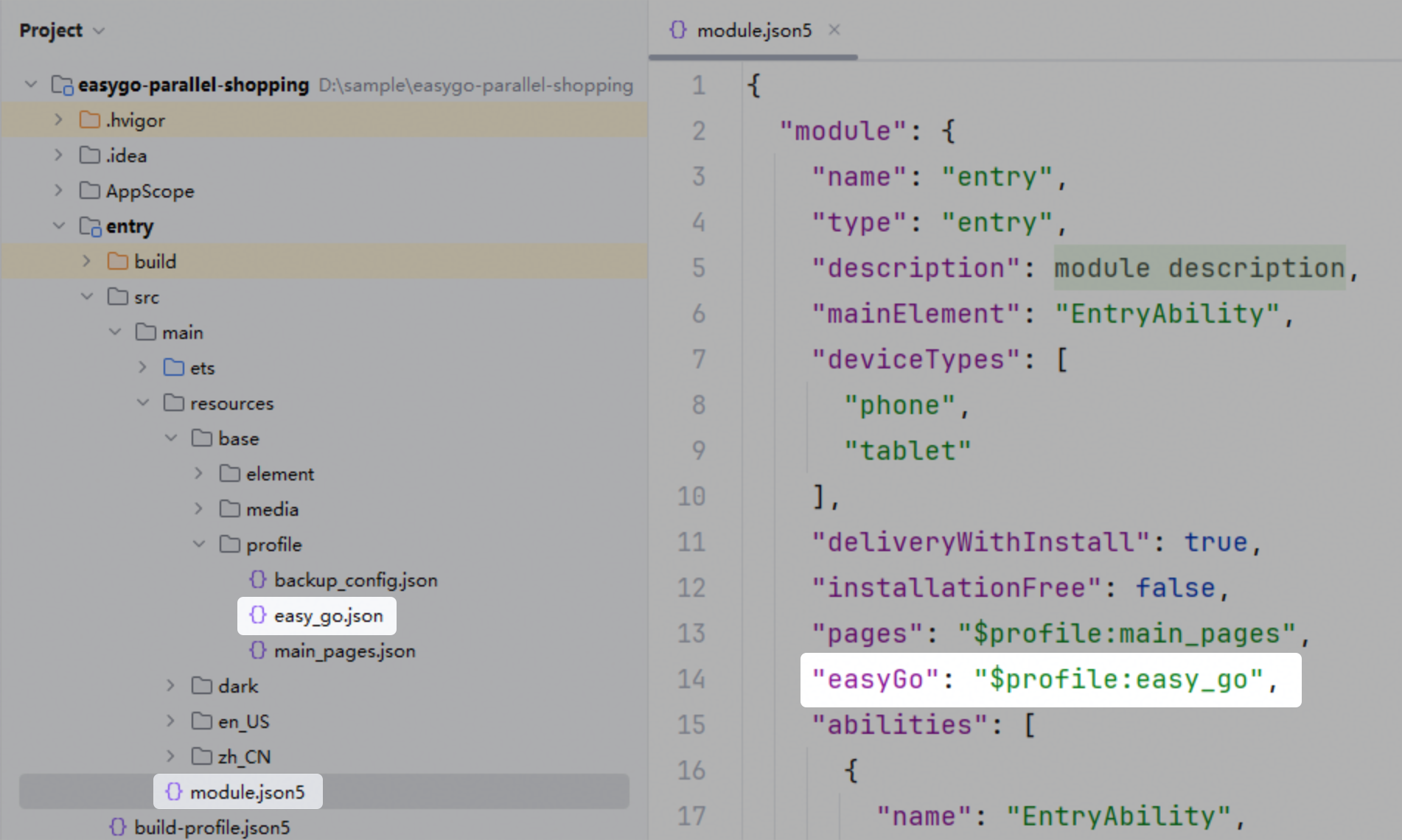
-
增加物理数字键转换配置
在easy_go.json配置文件中,配置自绘编辑框接收数字物理键盘输入能力相关属性。
[h2]配置内容说明
easy_go.json是一个标准的Object类型JSON文件,整体结构分为两层。第一层配置设备类型;第二层配置对应设备类型下的物理数字键转换选项。
-
设备类型
第一层配置,设置自绘编辑框接收数字物理键盘输入能力在不同设备类型下的表现。
{
  "common": {},
  "phone": {},
  "2in1": {},
  "tablet": {}
}
枚举值 说明 可选 common 通用设备配置,为所有设备类型提供基础默认配置。 否 phone Phone类型设备上生效的配置,配置后common配置在Phone类型设备上不再生效。 是 2in1 PC/2in1类型设备上生效的配置,配置后common配置在PC/2in1类型设备上不再生效。 是 tablet Tablet类型设备上生效的配置,配置后common配置在Tablet类型设备上不再生效。 是 -
数字键选项
第二层配置numKeyOptions字段,设置自绘编辑框接收数字物理键盘输入能力选项。内部字段说明如下:
字段名 说明 可选 autoConsumeNumKeysAndInsert 配置是否接收数字物理键盘输入。取值为true时,表示启用自绘编辑框接收数字物理键盘输入能力;取值为false时,表示不启用该能力。 否 -
配置示例

autoConsumeNumKeysAndInsert为必选项,配置numKeyOptions时必须指定该字段。
在PC/2in1设备上,配置为启用自绘编辑框接收数字物理键盘输入能力,示例如下:
{
  "common": {},
  "2in1": {
    "numKeyOptions": {
      "autoConsumeNumKeysAndInsert": true
    }
  }
}
在Tablet设备上,配置为不启用自绘编辑框接收数字物理键盘输入能力,示例如下:
{
  "common": {},
  "tablet": {
    "numKeyOptions": {
      "autoConsumeNumKeysAndInsert": false
    }
  }
}
