


智能客服
你问我答,随时在线为你解决问题















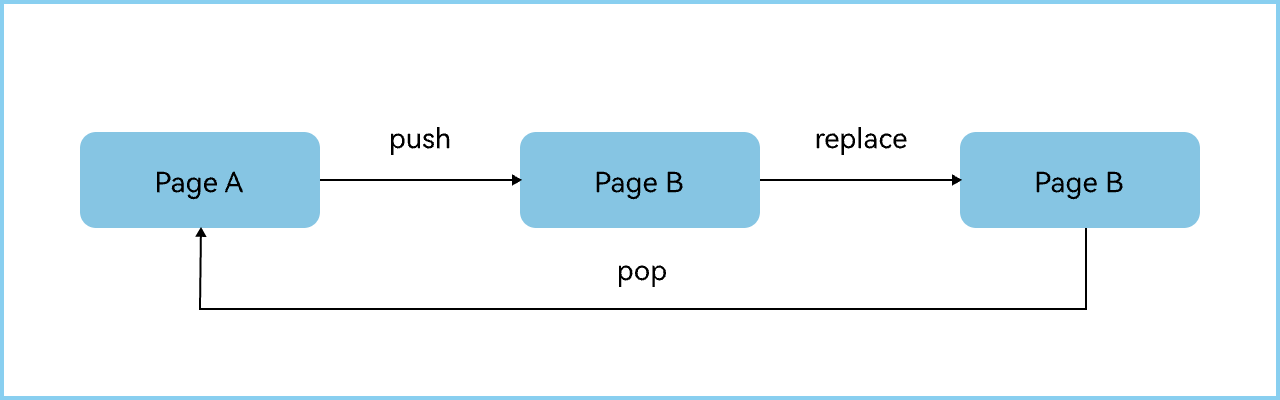
PageA通过pushPath跳转到PageB,PageB通过replacePath方式跳转到PageB,如何在PageB回到PageA的时候把数据返回到PageA。
- import { PageA } from './PageAS1';
- import { PageB } from './PageBS1';
-
- @Entry
- @Component
- struct Solution1 {
- @Provide pathStack: NavPathStack = new NavPathStack();
-
- @Builder
- pageMap(params: string) {
- if (params === 'PageA') {
- PageA();
- } else if (params === 'PageB') {
- PageB();
- }
- }
-
- build() {
- Navigation(this.pathStack) {
- Column() {
- Button('Push PageA')
- .onClick(() => {
- this.pathStack.pushPathByName('PageA', null);
- });
- }.width('100%').height('100%')
- .justifyContent(FlexAlign.Center);
- }.navDestination(this.pageMap);
- }
- }
- @ObservedV2
- export class Params {
- @Trace num: number = 0;
- click: (popInfo: PopInfo) => void = () => {
- };
- }
-
- @Component
- export struct PageA {
- @Consume pathStack: NavPathStack;
- private param: Params = new Params();
- // 封装的onPop回调
- customOnPop = (popInfo: PopInfo) => {
- this.param.num = popInfo.result as number;
- };
-
- aboutToAppear(): void {
- // 初始化参数
- this.param.num = 0;
- this.param.click = this.customOnPop;
- }
-
- build() {
- NavDestination() {
- Column() {
- Column() {
- Text('One Page')
- .fontSize('30');
- Text(`${this.param.num}`)
- .fontSize('30');
- }
- .justifyContent(FlexAlign.Center)
- .size({ width: '100%', height: '60%' });
-
- Row() {
- Button('push PageB')
- .onClick(() => {
- this.pathStack.pushPath({
- name: 'PageB', param: this.param, onPop: (popInfo) => {
- this.param.click(popInfo); // 使用封装的onPop回调
- }
- });
- });
- }.justifyContent(FlexAlign.SpaceAround)
- .alignItems(VerticalAlign.Center)
- .size({ width: '100%', height: '40%' });
- };
- }.width('100%').height('100%');
- }
- }
- import { Params } from './PageAS1';
-
- @Component
- export struct PageB {
- @Consume pathStack: NavPathStack;
- private param: Params = new Params();
-
- build() {
- NavDestination() {
- Column() {
- Row() {
- Text('Second Page')
- .fontSize('30');
- }
- .justifyContent(FlexAlign.Center)
- .alignItems(VerticalAlign.Center)
- .size({ width: '100%', height: '60%' });
-
- Column() {
- Button('Replace PageB')
- .onClick(() => {
- this.pathStack.replacePath({
- name: 'PageB', onPop: (popInfo) => {
- this.param.click(popInfo); // 使用传递过来的方法
- }
- });
- });
- Button('pop back')
- .onClick(() => {
- this.pathStack.pop(10);
- });
- }.size({ width: '100%', height: '40%' });
- };
- }.width('100%').height('100%')
- .onReady((ctx: NavDestinationContext) => {
- this.param = ctx?.pathInfo?.param as Params; // 接收传递的参数
- });
- }
- }
- @ObservedV2
- export class Params {
- @Trace num: number = 0;
- }
-
- @Component
- export struct PageA {
- @Consume pathStack: NavPathStack;
- private param: Params = new Params();
-
- aboutToAppear(): void {
- this.param.num = 0;
- }
-
- build() {
- NavDestination() {
- Column() {
- Column() {
- Text('One Page')
- .fontSize('30');
- Text(`${this.param.num}`)
- .fontSize('30');
- }.justifyContent(FlexAlign.Center)
- .size({ width: '100%', height: '60%' });
-
- Row() {
- Button('push PageB')
- .onClick(() => {
- this.pathStack.pushPath({ name: 'PageB' });
- });
- }.justifyContent(FlexAlign.SpaceAround)
- .alignItems(VerticalAlign.Center)
- .size({ width: '100%', height: '40%' });
- };
- }
- .onResult((num: number) => {
- this.param.num = num; // 接收回到此页面携带的参数
- }).size({ width: '100%', height: '100%' });
- }
- }
- @Component
- export struct PageB {
- @Consume pathStack: NavPathStack;
-
- build() {
- NavDestination() {
- Column() {
- Row() {
- Text('Second Page')
- .fontSize('30');
- }
- .justifyContent(FlexAlign.Center)
- .alignItems(VerticalAlign.Center)
- .size({ width: '100%', height: '60%' });
-
- Column() {
- Button('Replace PageB')
- .onClick(() => {
- this.pathStack.replacePath({ name: 'PageB' });
- });
-
- Button('pop back')
- .onClick(() => {
- this.pathStack.pop(10);
- });
- }.size({ width: '100%', height: '40%' });
- };
- }.size({ width: '100%', height: '100%' });
- }
- }
Q:Navigation使用pop跳转至单例页面时,如何重置目标页面的参数信息。
A:pop不可以重置param参数,pushPath默认的路由栈操作模式为STANDARD,将指定的NavDestination入栈,如果需要重置目标页面参数,需要使用pushPath指定页面栈操作模式为POP_TO_SINGLETON或MOVE_TO_TOP_SINGLETON,并传递新的参数,就可以实现和pop一样的效果并且能够重置param参数。
Q:对于单例页面,如何处理单例页面的数据接收问题?
A:HarmonyOS的onNewParam是当之前存在于栈中的NavDestination页面通过launchMode.MOVE_TO_TOP_SINGLETON或launchMode.POP_TO_SINGLETON移动到栈顶时,触发该回调,可基于此接收新数据。