智能客服
你问我答,随时在线为你解决问题















Repeat从API version 12开始支持。
本文档仅为开发者指南。API参数说明见:Repeat API参数说明。
Repeat基于数组类型数据来进行循环渲染,一般与容器组件配合使用。Repeat组件包含两种模式:non-virtualScroll模式和virtualScroll模式。
virtualScroll模式(开启virtualScroll开关):Repeat根据容器组件的有效加载范围(可视区域+预加载区域) 加载子组件。当容器滑动/数组改变时,Repeat会根据父容器组件传递的参数重新计算有效加载范围,实时管理列表节点的创建与销毁。
该模式适合需要懒加载的长数据列表/通过组件复用优化性能表现的场景。详细描述见virtualScroll模式。
Repeat与ForEach、LazyForEach的区别:
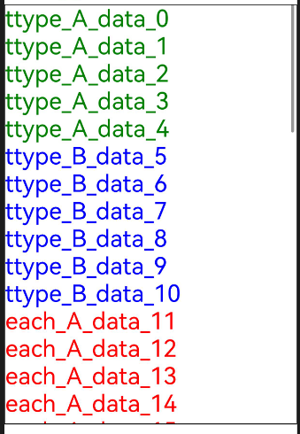
下面的示例代码使用Repeat组件的virtualScroll模式进行循环渲染。
- // 在List容器组件中使用Repeat virtualScroll模式
- @Entry
- @ComponentV2 // 推荐使用V2装饰器
- struct RepeatExample {
- @Local dataArr: Array<string> = []; // 数据源
-
- aboutToAppear(): void {
- for (let i = 0; i < 50; i++) {
- this.dataArr.push(`data_${i}`); // 为数组添加一些数据
- }
- }
-
- build() {
- Column() {
- List() {
- Repeat<string>(this.dataArr)
- .each((ri: RepeatItem<string>) => { // 默认模板
- ListItem() {
- Text('each_A_' + ri.item).fontSize(30).fontColor(Color.Red) // 文本颜色为红色
- }
- })
- .key((item: string, index: number): string => item) // 键值生成函数
- .virtualScroll({ totalCount: this.dataArr.length }) // 打开virtualScroll模式,totalCount为期望加载的数据长度
- .templateId((item: string, index: number): string => { // 根据返回值寻找对应的模板子组件进行渲染
- return index <= 4 ? 'A' : (index <= 10 ? 'B' : ''); // 前5个节点模板为A,接下来的5个为B,其余为默认模板
- })
- .template('A', (ri: RepeatItem<string>) => { // 'A'模板
- ListItem() {
- Text('ttype_A_' + ri.item).fontSize(30).fontColor(Color.Green) // 文本颜色为绿色
- }
- }, { cachedCount: 3 }) // 'A'模板的缓存列表容量为3
- .template('B', (ri: RepeatItem<string>) => { // 'B'模板
- ListItem() {
- Text('ttype_B_' + ri.item).fontSize(30).fontColor(Color.Blue) // 文本颜色为蓝色
- }
- }, { cachedCount: 4 }) // 'B'模板的缓存列表容量为4
- }
- .cachedCount(2) // 容器组件的预加载区域大小
- .height('70%')
- .border({ width: 1 }) // 边框
- }
- }
- }
运行后界面如下图所示。
Repeat virtualScroll模式使用限制:
Repeat通过键值识别数组如何改变:增加了哪些数据、删除了哪些数据,以及哪些数据改变了位置(索引)。键值生成函数.key()的使用建议如下:
Repeat子组件节点的操作分为四种:节点创建、节点更新、节点复用、节点销毁。其中,节点更新和节点复用的区别为:
.key()方法为每一项数据生成一个键值。请注意键值(key)与索引(index)的区别:键值是数据项的唯一标识符,Repeat根据键值是否发生变化判断数据项是否更新;索引则只标识数据项在数据源中的位置。
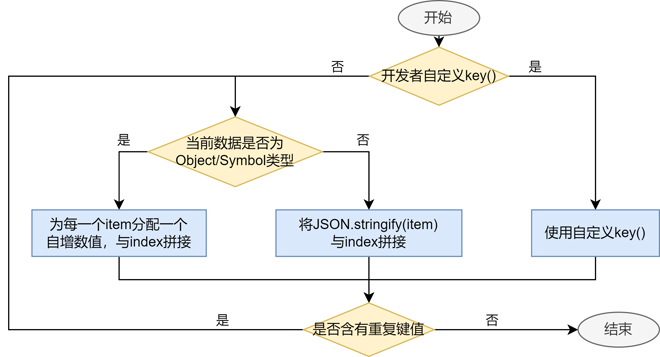
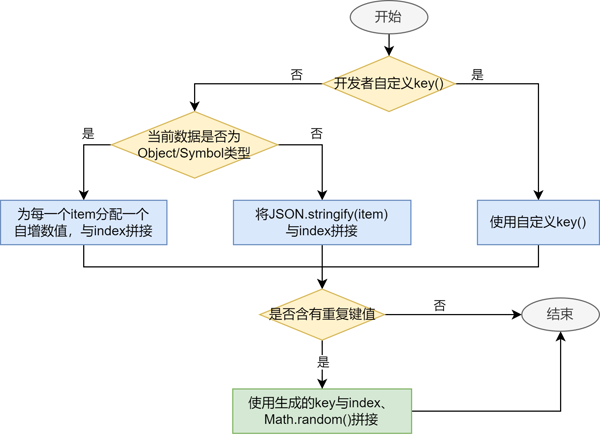
.key()的逻辑如下图所示。
当.key()缺省时,Repeat会生成新的随机键值。当发现有重复key时,Repeat会在已有键值的基础上递归生成新的键值,直到没有重复键值。
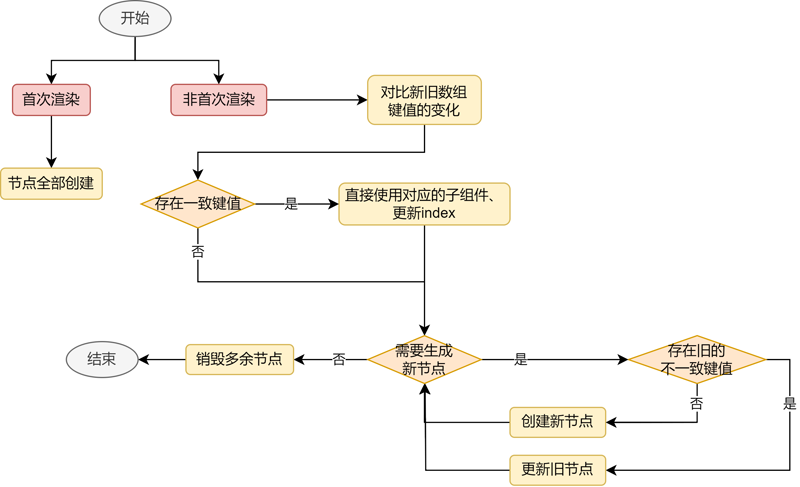
在Repeat首次渲染时,子组件全部创建。数组发生改变后,Repeat的处理分为以下几个步骤:
首先,遍历旧数组键值,如果新数组中没有该键值,将其加入键值集合deletedKeys。
其次,遍历新数组键值,依次判断以下条件,符合条件时进行对应的操作:
最后,如果新数组键值遍历结束后,deletedKeys非空,则销毁集合中的键值所对应的节点。
以下图中的数组变化为例。
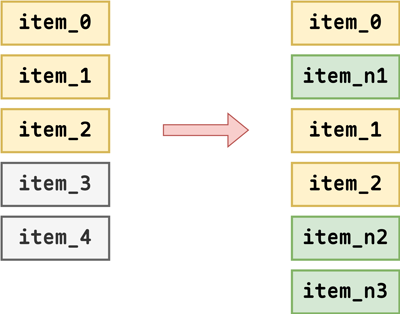
根据上述判断逻辑,item_0没有变化,item_1和item_2只更新了索引,item_n1和item_n2分别由item_4和item_3进行节点更新获得,item_n3为新创建的节点。
和non-virtualScroll模式的逻辑基本一致,如下图所示。
.key()方法为每一项数据生成一个键值。请注意键值(key)与索引(index)的区别:键值是数据项的唯一标识符,Repeat根据键值是否发生变化判断数据项是否更新;索引则只标识数据项在数据源中的位置。
当.key()缺省时,Repeat会生成新的随机键值。当存在重复key时,Repeat会重新生成随机key作为当前数据项的键值并且放进该列表。列表中已有的键值不受影响。随机key的构成:___${index}_+_${key}_+_${Math.random()},其中的变量依次为:索引、旧键值、随机数。
在Repeat首次渲染时,根据容器组件的有效加载范围(可视区域+预加载区域)创建当前需要的子组件。
在容器滑动/数组改变时,将失效的子组件节点(离开有效加载范围)加入空闲节点缓存列表中(断开与组件树的关系,但不销毁),在需要生成新的组件时,对缓存里的组件进行复用(更新被复用子组件的变量值,重新上树)。
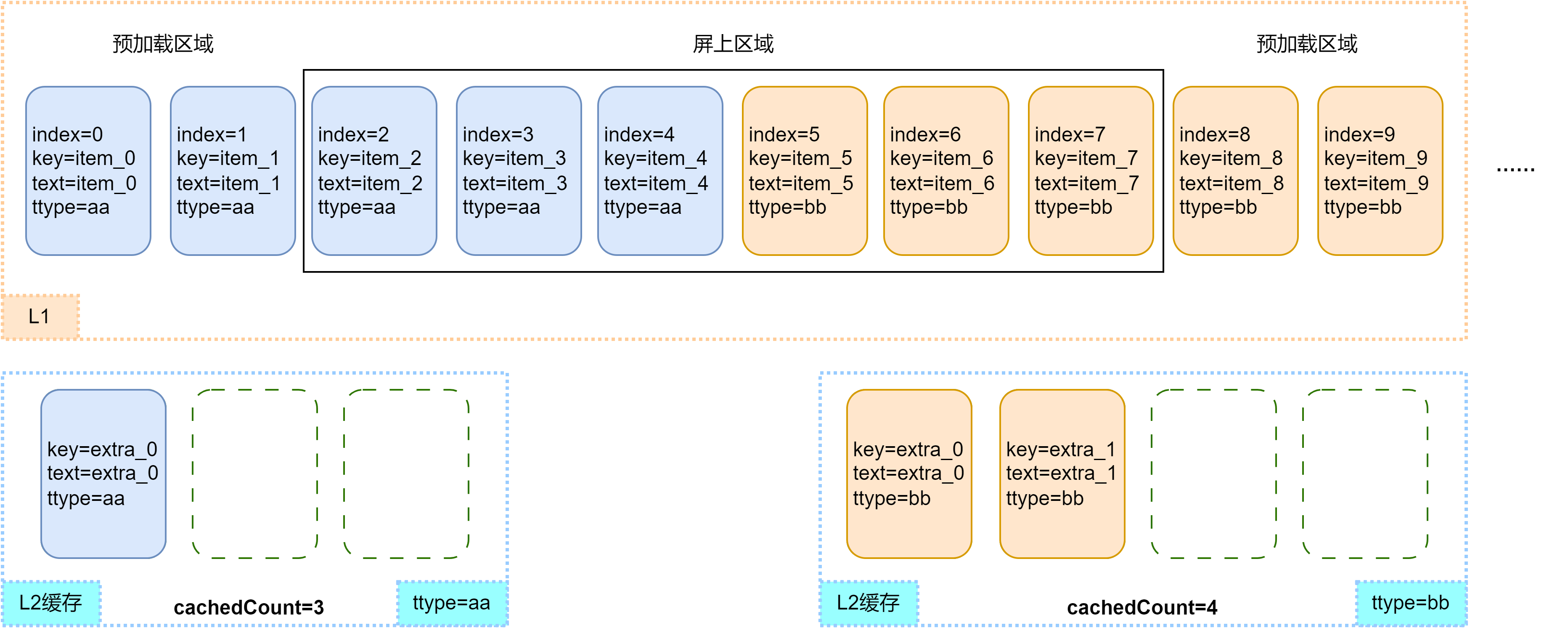
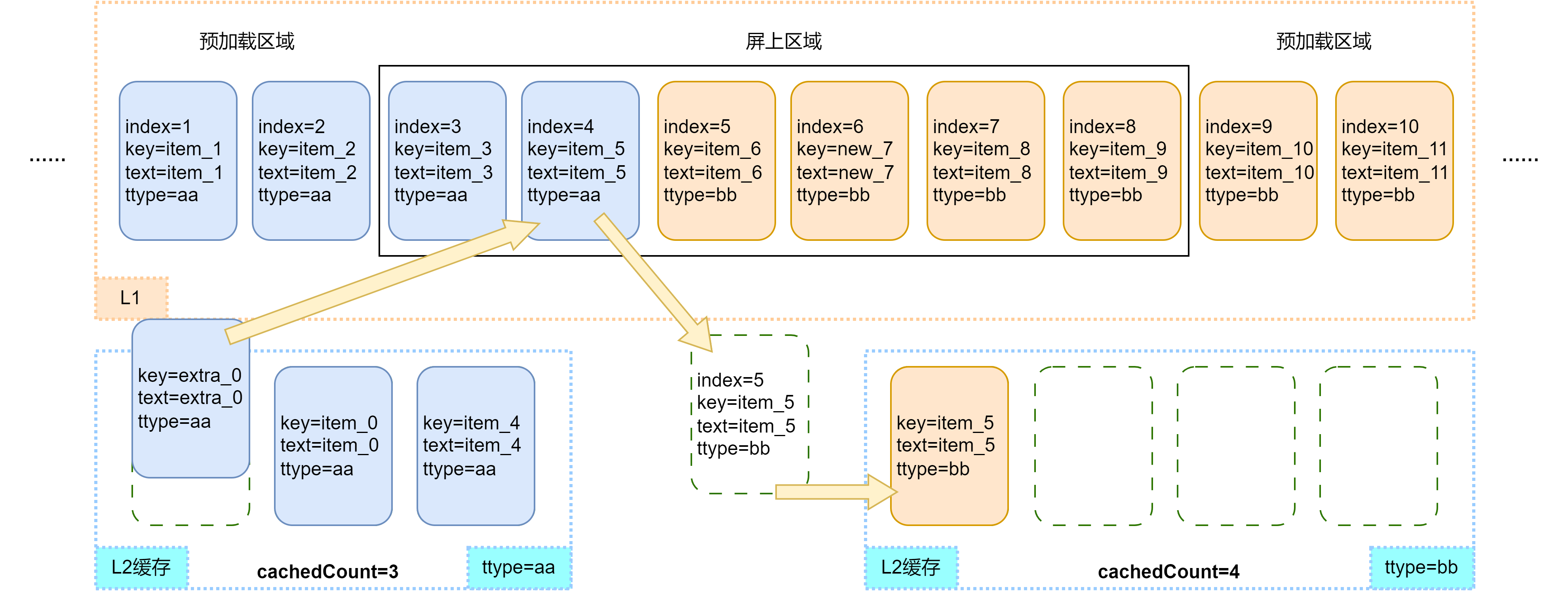
通过典型的滑动场景和数据更新场景示例来展示virtualScroll模式下子组件的渲染逻辑。定义长度为20的数组,数组前5项的template type为aa,其余项为bb。aa缓存池容量为3,bb缓存池容量为4。容器组件的预加载区域大小为2。为了便于理解,在aa和bb缓存池中分别加入一个和两个空闲节点。
首次渲染,列表的节点状态如下图所示。
滑动场景
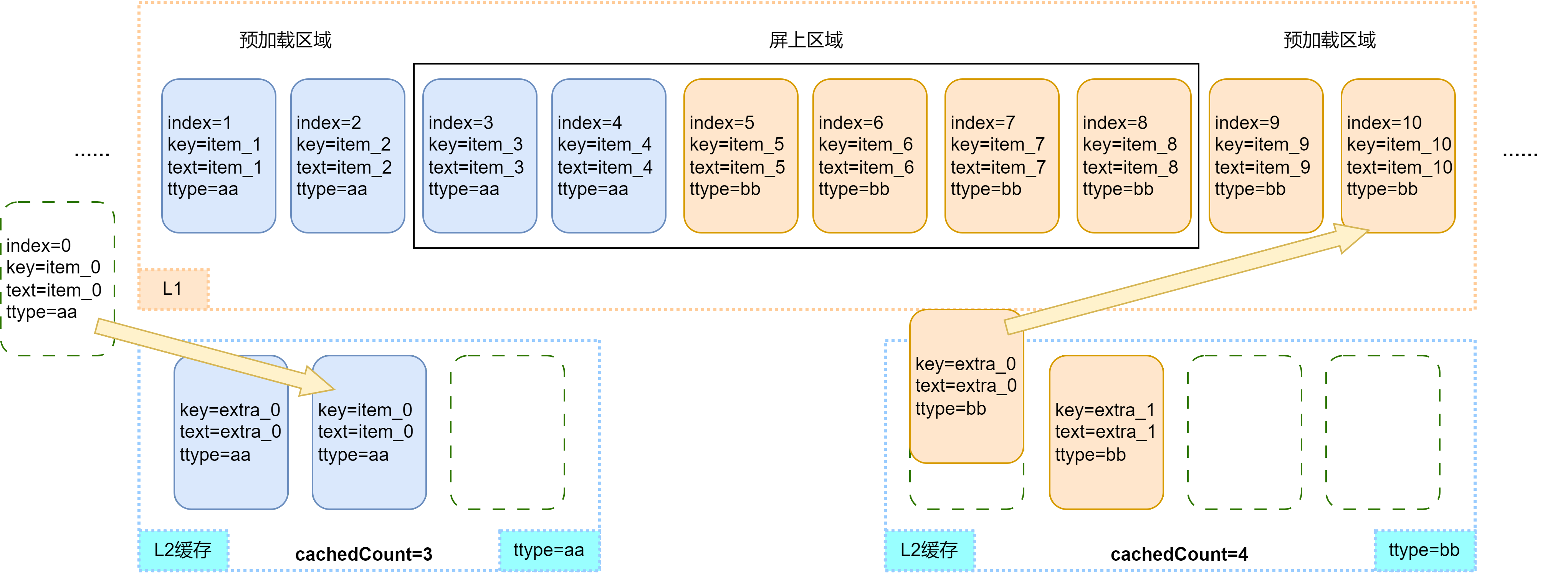
将屏幕向右滑动(屏幕内容右移)一个节点的距离,Repeat将开始复用缓存池中的节点。index=10的节点进入有效加载范围,计算出其template type为bb。由于bb缓存池非空,Repeat会从bb缓存池中取出一个空闲节点进行复用,更新其节点属性,该子组件中涉及数据item和索引index的其他孙子组件会根据V2状态管理的规则做同步更新。其他节点仍在有效加载范围,均只更新索引index。
index=0的节点滑出了有效加载范围。当UI主线程空闲时,会检查aa缓存池是否已满,此时aa缓存池未满,将该节点加入到对应的缓存池中。
如果此时对应template type的缓存池已满,Repeat会销毁掉多余的节点。
数据更新场景
在上一小节的基础上做如下的数组更新操作,删除index=4的节点,修改节点数据item_7为new_7。
首先,删除index=4的节点后,失效节点加入aa缓存池。后面的列表节点前移,新进入有效加载区域的节点item_11会复用bb缓存池中的空闲节点,其他节点均只更新索引index。如下图所示。
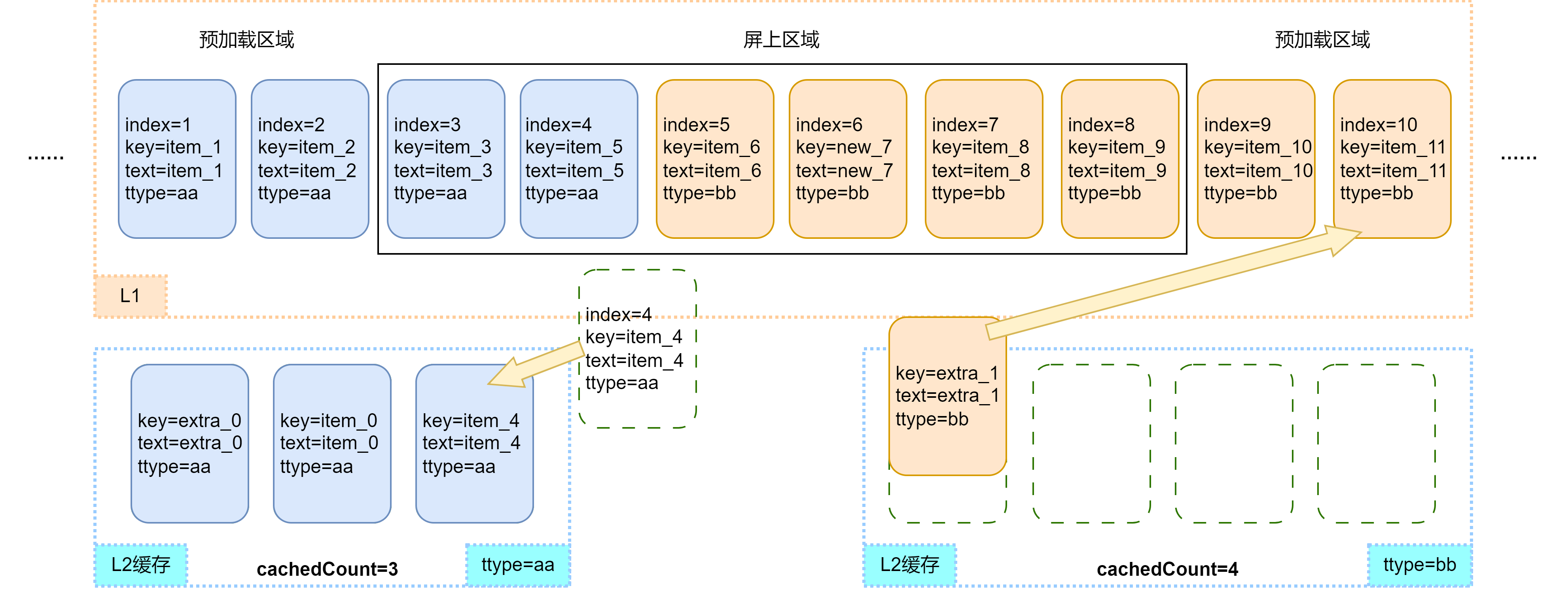
其次,节点item_5前移,索引index更新为4。根据template type的计算规则,节点item_5的template type变为aa,需要从aa缓存池中复用空闲节点,并且将旧节点加入bb缓存池。如下图所示。
template模板目前只支持在virtualScroll模式下使用。
totalCount表示期望加载的数据长度,默认为原数组长度,可以大于已加载数据项的数量。令arr.length表示数据源长度,以下为totalCount的处理规则:
当totalCount > arr.length时,在父组件容器滚动过程中,应用需要保证列表即将滑动到数据源末尾时请求后续数据,开发者需要对数据请求的错误场景(如网络延迟)进行保护操作,直到数据源全部加载完成,否则列表滑动的过程中会出现滚动效果异常。
cachedCount是相应的template type的缓存池中可缓存子组件节点的最大数量,仅在virtualScroll模式下生效。
滚动容器组件属性.cachedCount()和Repeat组件属性.template()的参数cachedCount都是为了平衡性能和内存,但是含义是不同的。
将cachedCount设置为当前模板的节点在屏上可能出现的最大数量时,Repeat可以做到尽可能多的复用。但后果是当屏上没有当前模板的节点时,缓存池也不会释放,应用内存会增大。需要开发者根据具体情况自行把控。
数据源变化
- @Entry
- @ComponentV2
- struct Parent {
- @Local simpleList: Array<string> = ['one', 'two', 'three'];
-
- build() {
- Row() {
- Column() {
- Text('点击修改第3个数组项的值')
- .fontSize(24)
- .fontColor(Color.Red)
- .onClick(() => {
- this.simpleList[2] = 'new three';
- })
-
- Repeat<string>(this.simpleList)
- .each((obj: RepeatItem<string>)=>{
- ChildItem({ item: obj.item })
- .margin({top: 20})
- })
- .key((item: string) => item)
- }
- .justifyContent(FlexAlign.Center)
- .width('100%')
- .height('100%')
- }
- .height('100%')
- .backgroundColor(0xF1F3F5)
- }
- }
-
- @ComponentV2
- struct ChildItem {
- @Param @Require item: string;
-
- build() {
- Text(this.item)
- .fontSize(30)
- }
- }
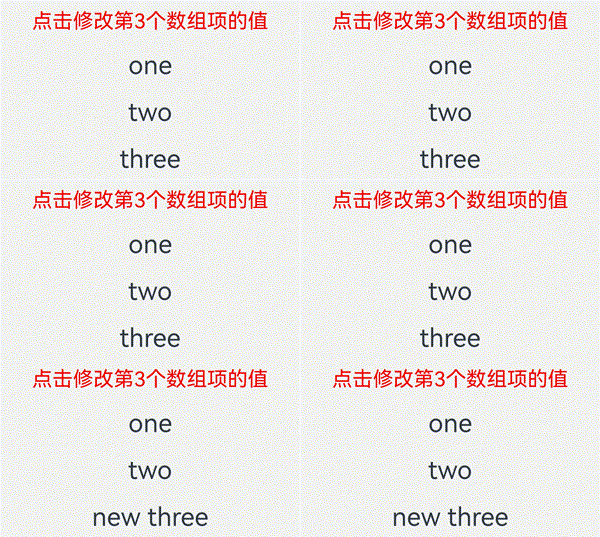
第三个数组项重新渲染时会复用之前的第三项的组件,仅对数据做了刷新。
索引值变化
下方例子当交换数组项1和2时,若键值和上次保持一致,Repeat会复用之前的组件,仅对使用了index索引值的组件做数据刷新。
- @Entry
- @ComponentV2
- struct Parent {
- @Local simpleList: Array<string> = ['one', 'two', 'three'];
-
- build() {
- Row() {
- Column() {
- Text('交换数组项1,2')
- .fontSize(24)
- .fontColor(Color.Red)
- .onClick(() => {
- let temp: string = this.simpleList[2];
- this.simpleList[2] = this.simpleList[1];
- this.simpleList[1] = temp;
- })
- .margin({bottom: 20})
-
- Repeat<string>(this.simpleList)
- .each((obj: RepeatItem<string>)=>{
- Text("index: " + obj.index)
- .fontSize(30)
- ChildItem({ item: obj.item })
- .margin({bottom: 20})
- })
- .key((item: string) => item)
- }
- .justifyContent(FlexAlign.Center)
- .width('100%')
- .height('100%')
- }
- .height('100%')
- .backgroundColor(0xF1F3F5)
- }
- }
-
- @ComponentV2
- struct ChildItem {
- @Param @Require item: string;
-
- build() {
- Text(this.item)
- .fontSize(30)
- }
- }
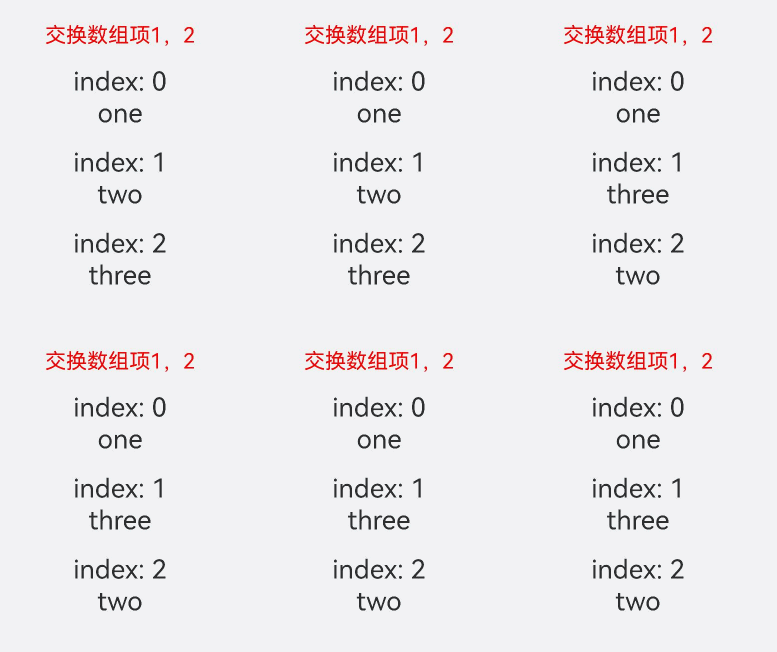
本小节将展示virtualScroll模式下,Repeat的实际使用场景和组件节点的复用情况。根据复用规则可以衍生出大量的测试场景,篇幅原因,只对典型的数据变化进行解释。
一个template
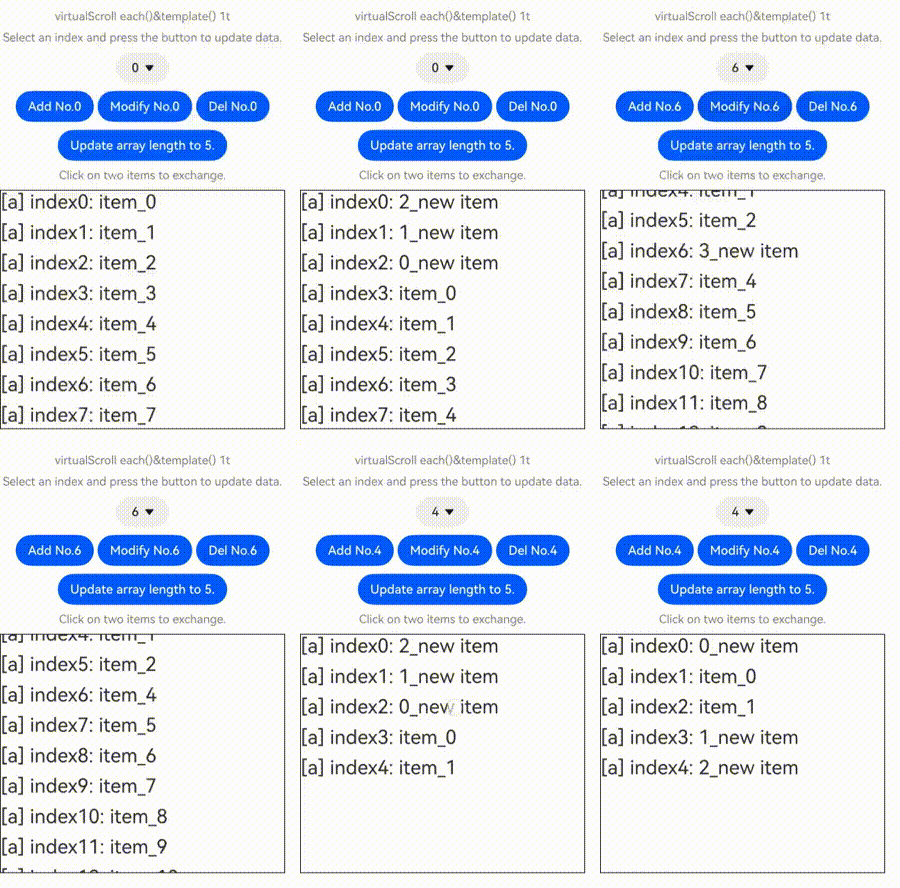
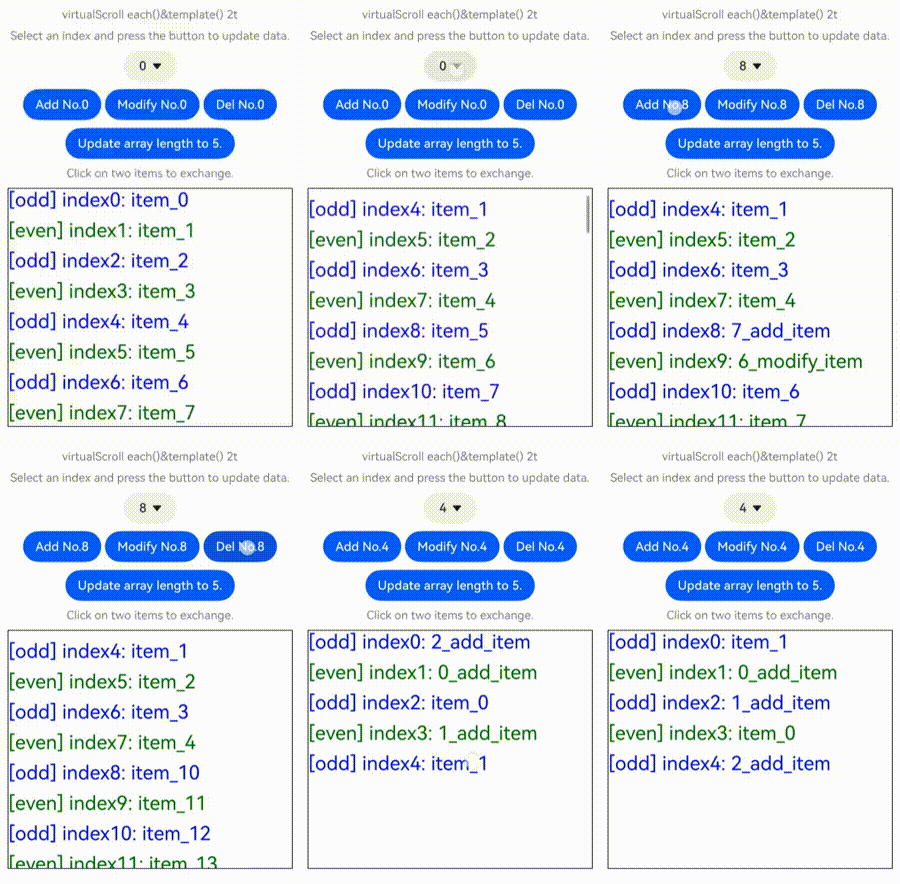
下面的代码示例展示了Repeat virtualScroll模式下修改数组的常见操作,包括插入数据、修改数据、删除数据、交换数据。点击下拉框选择索引index值,点击相应的按钮即可进行数据修改操作。依次点击数据项可以交换被点击的两个数据项。
- @ObservedV2
- class Repeat005Clazz {
- @Trace message: string = '';
-
- constructor(message: string) {
- this.message = message;
- }
- }
-
- @Entry
- @ComponentV2
- struct RepeatVirtualScroll {
- @Local simpleList: Array<Repeat005Clazz> = [];
- private exchange: number[] = [];
- private counter: number = 0;
- @Local selectOptions: SelectOption[] = [];
- @Local selectIdx: number = 0;
-
- @Monitor("simpleList")
- reloadSelectOptions(): void {
- this.selectOptions = [];
- for (let i = 0; i < this.simpleList.length; ++i) {
- this.selectOptions.push({ value: i.toString() });
- }
- if (this.selectIdx >= this.simpleList.length) {
- this.selectIdx = this.simpleList.length - 1;
- }
- }
-
- aboutToAppear(): void {
- for (let i = 0; i < 100; i++) {
- this.simpleList.push(new Repeat005Clazz(`item_${i}`));
- }
- this.reloadSelectOptions();
- }
-
- handleExchange(idx: number): void { // 点击交换子组件
- this.exchange.push(idx);
- if (this.exchange.length === 2) {
- let _a = this.exchange[0];
- let _b = this.exchange[1];
- let temp: Repeat005Clazz = this.simpleList[_a];
- this.simpleList[_a] = this.simpleList[_b];
- this.simpleList[_b] = temp;
- this.exchange = [];
- }
- }
-
- build() {
- Column({ space: 10 }) {
- Text('virtualScroll each()&template() 1t')
- .fontSize(15)
- .fontColor(Color.Gray)
- Text('Select an index and press the button to update data.')
- .fontSize(15)
- .fontColor(Color.Gray)
-
- Select(this.selectOptions)
- .selected(this.selectIdx)
- .value(this.selectIdx.toString())
- .key('selectIdx')
- .onSelect((index: number) => {
- this.selectIdx = index;
- })
- Row({ space: 5 }) {
- Button('Add No.' + this.selectIdx)
- .onClick(() => {
- this.simpleList.splice(this.selectIdx, 0, new Repeat005Clazz(`${this.counter++}_add_item`));
- this.reloadSelectOptions();
- })
- Button('Modify No.' + this.selectIdx)
- .onClick(() => {
- this.simpleList.splice(this.selectIdx, 1, new Repeat005Clazz(`${this.counter++}_modify_item`));
- })
- Button('Del No.' + this.selectIdx)
- .onClick(() => {
- this.simpleList.splice(this.selectIdx, 1);
- this.reloadSelectOptions();
- })
- }
- Button('Update array length to 5.')
- .onClick(() => {
- this.simpleList = this.simpleList.slice(0, 5);
- this.reloadSelectOptions();
- })
-
- Text('Click on two items to exchange.')
- .fontSize(15)
- .fontColor(Color.Gray)
-
- List({ space: 10 }) {
- Repeat<Repeat005Clazz>(this.simpleList)
- .each((obj: RepeatItem<Repeat005Clazz>) => {
- ListItem() {
- Text(`[each] index${obj.index}: ${obj.item.message}`)
- .fontSize(25)
- .onClick(() => {
- this.handleExchange(obj.index);
- })
- }
- })
- .key((item: Repeat005Clazz, index: number) => {
- return item.message;
- })
- .virtualScroll({ totalCount: this.simpleList.length })
- .templateId(() => "a")
- .template('a', (ri) => {
- Text(`[a] index${ri.index}: ${ri.item.message}`)
- .fontSize(25)
- .onClick(() => {
- this.handleExchange(ri.index);
- })
- }, { cachedCount: 3 })
- }
- .cachedCount(2)
- .border({ width: 1 })
- .width('95%')
- .height('40%')
- }
- .justifyContent(FlexAlign.Center)
- .width('100%')
- .height('100%')
- }
- }
该应用列表内容为100项自定义类RepeatClazz的message字符串属性,List组件的cachedCount设为2,模板'a'的缓存池大小设为3。应用界面如下图所示:
多个template
- @ObservedV2
- class Repeat006Clazz {
- @Trace message: string = '';
-
- constructor(message: string) {
- this.message = message;
- }
- }
-
- @Entry
- @ComponentV2
- struct RepeatVirtualScroll2T {
- @Local simpleList: Array<Repeat006Clazz> = [];
- private exchange: number[] = [];
- private counter: number = 0;
- @Local selectOptions: SelectOption[] = [];
- @Local selectIdx: number = 0;
-
- @Monitor("simpleList")
- reloadSelectOptions(): void {
- this.selectOptions = [];
- for (let i = 0; i < this.simpleList.length; ++i) {
- this.selectOptions.push({ value: i.toString() });
- }
- if (this.selectIdx >= this.simpleList.length) {
- this.selectIdx = this.simpleList.length - 1;
- }
- }
-
- aboutToAppear(): void {
- for (let i = 0; i < 100; i++) {
- this.simpleList.push(new Repeat006Clazz(`item_${i}`));
- }
- this.reloadSelectOptions();
- }
-
- handleExchange(idx: number): void { // 点击交换子组件
- this.exchange.push(idx);
- if (this.exchange.length === 2) {
- let _a = this.exchange[0];
- let _b = this.exchange[1];
- let temp: Repeat006Clazz = this.simpleList[_a];
- this.simpleList[_a] = this.simpleList[_b];
- this.simpleList[_b] = temp;
- this.exchange = [];
- }
- }
-
- build() {
- Column({ space: 10 }) {
- Text('virtualScroll each()&template() 2t')
- .fontSize(15)
- .fontColor(Color.Gray)
- Text('Select an index and press the button to update data.')
- .fontSize(15)
- .fontColor(Color.Gray)
-
- Select(this.selectOptions)
- .selected(this.selectIdx)
- .value(this.selectIdx.toString())
- .key('selectIdx')
- .onSelect((index: number) => {
- this.selectIdx = index;
- })
- Row({ space: 5 }) {
- Button('Add No.' + this.selectIdx)
- .onClick(() => {
- this.simpleList.splice(this.selectIdx, 0, new Repeat006Clazz(`${this.counter++}_add_item`));
- this.reloadSelectOptions();
- })
- Button('Modify No.' + this.selectIdx)
- .onClick(() => {
- this.simpleList.splice(this.selectIdx, 1, new Repeat006Clazz(`${this.counter++}_modify_item`));
- })
- Button('Del No.' + this.selectIdx)
- .onClick(() => {
- this.simpleList.splice(this.selectIdx, 1);
- this.reloadSelectOptions();
- })
- }
- Button('Update array length to 5.')
- .onClick(() => {
- this.simpleList = this.simpleList.slice(0, 5);
- this.reloadSelectOptions();
- })
-
- Text('Click on two items to exchange.')
- .fontSize(15)
- .fontColor(Color.Gray)
-
- List({ space: 10 }) {
- Repeat<Repeat006Clazz>(this.simpleList)
- .each((obj: RepeatItem<Repeat006Clazz>) => {
- ListItem() {
- Text(`[each] index${obj.index}: ${obj.item.message}`)
- .fontSize(25)
- .onClick(() => {
- this.handleExchange(obj.index);
- })
- }
- })
- .key((item: Repeat006Clazz, index: number) => {
- return item.message;
- })
- .virtualScroll({ totalCount: this.simpleList.length })
- .templateId((item: Repeat006Clazz, index: number) => {
- return (index % 2 === 0) ? 'odd' : 'even';
- })
- .template('odd', (ri) => {
- Text(`[odd] index${ri.index}: ${ri.item.message}`)
- .fontSize(25)
- .fontColor(Color.Blue)
- .onClick(() => {
- this.handleExchange(ri.index);
- })
- }, { cachedCount: 3 })
- .template('even', (ri) => {
- Text(`[even] index${ri.index}: ${ri.item.message}`)
- .fontSize(25)
- .fontColor(Color.Green)
- .onClick(() => {
- this.handleExchange(ri.index);
- })
- }, { cachedCount: 1 })
- }
- .cachedCount(2)
- .border({ width: 1 })
- .width('95%')
- .height('40%')
- }
- .justifyContent(FlexAlign.Center)
- .width('100%')
- .height('100%')
- }
- }
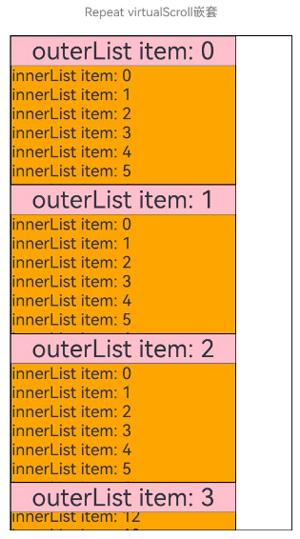
Repeat支持嵌套使用。下面是使用virtualScroll模式进行嵌套的示例代码:
- // Repeat嵌套
- @Entry
- @ComponentV2
- struct RepeatNest {
- @Local outerList: string[] = [];
- @Local innerList: number[] = [];
-
- aboutToAppear(): void {
- for (let i = 0; i < 20; i++) {
- this.outerList.push(i.toString());
- this.innerList.push(i);
- }
- }
-
- build() {
- Column({ space: 20 }) {
- Text('Repeat virtualScroll嵌套')
- .fontSize(15)
- .fontColor(Color.Gray)
- List() {
- Repeat<string>(this.outerList)
- .each((obj) => {
- ListItem() {
- Column() {
- Text('outerList item: ' + obj.item)
- .fontSize(30)
- List() {
- Repeat<number>(this.innerList)
- .each((subObj) => {
- ListItem() {
- Text('innerList item: ' + subObj.item)
- .fontSize(20)
- }
- })
- .key((item) => "innerList_" + item)
- .virtualScroll()
- }
- .width('80%')
- .border({ width: 1 })
- .backgroundColor(Color.Orange)
- }
- .height('30%')
- .backgroundColor(Color.Pink)
- }
- .border({ width: 1 })
- })
- .key((item) => "outerList_" + item)
- .virtualScroll()
- }
- .width('80%')
- .border({ width: 1 })
- }
- .justifyContent(FlexAlign.Center)
- .width('90%')
- .height('80%')
- }
- }
运行效果:
本节展示Repeat virtualScroll模式与容器组件的常见应用场景。
与List组合使用
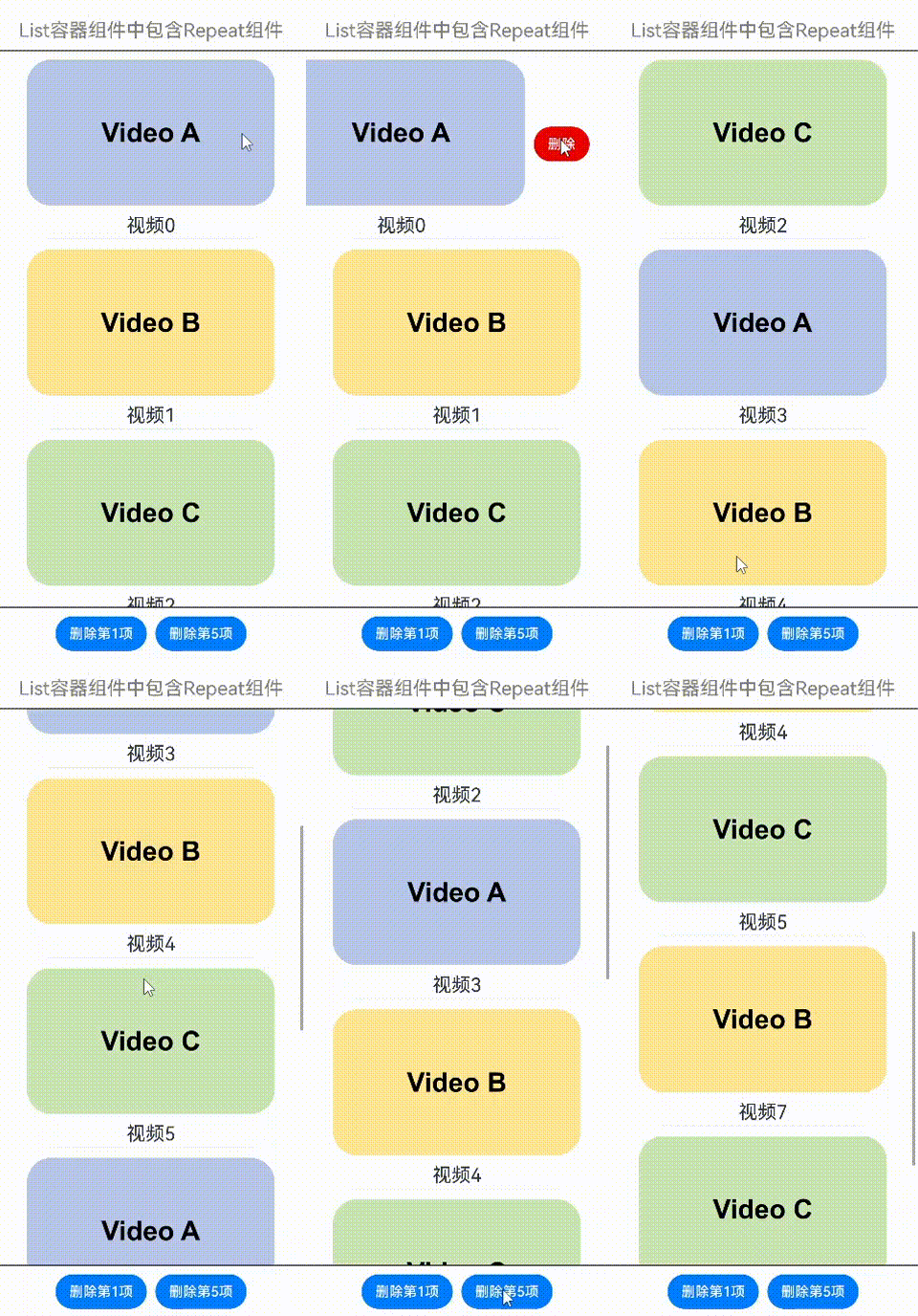
在List容器组件中使用Repeat的virtualScroll模式,示例如下:
- class DemoListItemInfo {
- name: string;
- icon: Resource;
-
- constructor(name: string, icon: Resource) {
- this.name = name;
- this.icon = icon;
- }
- }
-
- @Entry
- @ComponentV2
- struct DemoList {
- @Local videoList: Array<DemoListItemInfo> = [];
-
- aboutToAppear(): void {
- for (let i = 0; i < 10; i++) {
- // 此处app.media.listItem0、app.media.listItem1、app.media.listItem2仅作示例,请开发者自行替换
- this.videoList.push(new DemoListItemInfo('视频' + i,
- i % 3 == 0 ? $r("app.media.listItem0") :
- i % 3 == 1 ? $r("app.media.listItem1") : $r("app.media.listItem2")));
- }
- }
-
- @Builder
- itemEnd(index: number) {
- Button('删除')
- .backgroundColor(Color.Red)
- .onClick(() => {
- this.videoList.splice(index, 1);
- })
- }
-
- build() {
- Column({ space: 10 }) {
- Text('List容器组件中包含Repeat组件')
- .fontSize(15)
- .fontColor(Color.Gray)
-
- List({ space: 5 }) {
- Repeat<DemoListItemInfo>(this.videoList)
- .each((obj: RepeatItem<DemoListItemInfo>) => {
- ListItem() {
- Column() {
- Image(obj.item.icon)
- .width('80%')
- .margin(10)
- Text(obj.item.name)
- .fontSize(20)
- }
- }
- .swipeAction({
- end: {
- builder: () => {
- this.itemEnd(obj.index);
- }
- }
- })
- .onAppear(() => {
- console.info('AceTag', obj.item.name);
- })
- })
- .key((item: DemoListItemInfo) => item.name)
- .virtualScroll()
- }
- .cachedCount(2)
- .height('90%')
- .border({ width: 1 })
- .listDirection(Axis.Vertical)
- .alignListItem(ListItemAlign.Center)
- .divider({
- strokeWidth: 1,
- startMargin: 60,
- endMargin: 60,
- color: '#ffe9f0f0'
- })
-
- Row({ space: 10 }) {
- Button('删除第1项')
- .onClick(() => {
- this.videoList.splice(0, 1);
- })
- Button('删除第5项')
- .onClick(() => {
- this.videoList.splice(4, 1);
- })
- }
- }
- .width('100%')
- .height('100%')
- .justifyContent(FlexAlign.Center)
- }
- }
右滑并点击按钮,或点击底部按钮,可删除视频卡片:
与Grid组合使用
在Grid容器组件中使用Repeat的virtualScroll模式,示例如下:
- class DemoGridItemInfo {
- name: string;
- icon: Resource;
-
- constructor(name: string, icon: Resource) {
- this.name = name;
- this.icon = icon;
- }
- }
-
- @Entry
- @ComponentV2
- struct DemoGrid {
- @Local itemList: Array<DemoGridItemInfo> = [];
- @Local isRefreshing: boolean = false;
- private layoutOptions: GridLayoutOptions = {
- regularSize: [1, 1],
- irregularIndexes: [10]
- }
- private GridScroller: Scroller = new Scroller();
- private num: number = 0;
-
- aboutToAppear(): void {
- for (let i = 0; i < 10; i++) {
- // 此处app.media.gridItem0、app.media.gridItem1、app.media.gridItem2仅作示例,请开发者自行替换
- this.itemList.push(new DemoGridItemInfo('视频' + i,
- i % 3 == 0 ? $r("app.media.gridItem0") :
- i % 3 == 1 ? $r("app.media.gridItem1") : $r("app.media.gridItem2")));
- }
- }
-
- build() {
- Column({ space: 10 }) {
- Text('Grid容器组件中包含Repeat组件')
- .fontSize(15)
- .fontColor(Color.Gray)
-
- Refresh({ refreshing: $$this.isRefreshing }) {
- Grid(this.GridScroller, this.layoutOptions) {
- Repeat<DemoGridItemInfo>(this.itemList)
- .each((obj: RepeatItem<DemoGridItemInfo>) => {
- if (obj.index === 10 ) {
- GridItem() {
- Text('先前浏览至此,点击刷新')
- .fontSize(20)
- }
- .height(30)
- .border({ width: 1 })
- .onClick(() => {
- this.GridScroller.scrollToIndex(0);
- this.isRefreshing = true;
- })
- .onAppear(() => {
- console.info('AceTag', obj.item.name);
- })
- } else {
- GridItem() {
- Column() {
- Image(obj.item.icon)
- .width('100%')
- .height(80)
- .objectFit(ImageFit.Cover)
- .borderRadius({ topLeft: 16, topRight: 16 })
- Text(obj.item.name)
- .fontSize(15)
- .height(20)
- }
- }
- .height(100)
- .borderRadius(16)
- .backgroundColor(Color.White)
- .onAppear(() => {
- console.info('AceTag', obj.item.name);
- })
- }
- })
- .key((item: DemoGridItemInfo) => item.name)
- .virtualScroll()
- }
- .columnsTemplate('repeat(auto-fit, 150)')
- .cachedCount(4)
- .rowsGap(15)
- .columnsGap(10)
- .height('100%')
- .padding(10)
- .backgroundColor('#F1F3F5')
- }
- .onRefreshing(() => {
- setTimeout(() => {
- this.itemList.splice(10, 1);
- this.itemList.unshift(new DemoGridItemInfo('refresh', $r('app.media.gridItem0'))); // 此处app.media.gridItem0仅作示例,请开发者自行替换
- for (let i = 0; i < 10; i++) {
- // 此处app.media.gridItem0、app.media.gridItem1、app.media.gridItem2仅作示例,请开发者自行替换
- this.itemList.unshift(new DemoGridItemInfo('新视频' + this.num,
- i % 3 == 0 ? $r("app.media.gridItem0") :
- i % 3 == 1 ? $r("app.media.gridItem1") : $r("app.media.gridItem2")));
- this.num++;
- }
- this.isRefreshing = false;
- }, 1000);
- console.info('AceTag', 'onRefreshing');
- })
- .refreshOffset(64)
- .pullToRefresh(true)
- .width('100%')
- .height('85%')
-
- Button('刷新')
- .onClick(() => {
- this.GridScroller.scrollToIndex(0);
- this.isRefreshing = true;
- })
- }
- .width('100%')
- .height('100%')
- .justifyContent(FlexAlign.Center)
- }
- }
下拉屏幕,或点击刷新按钮,或点击“先前浏览至此,点击刷新”,可加载新的视频内容:
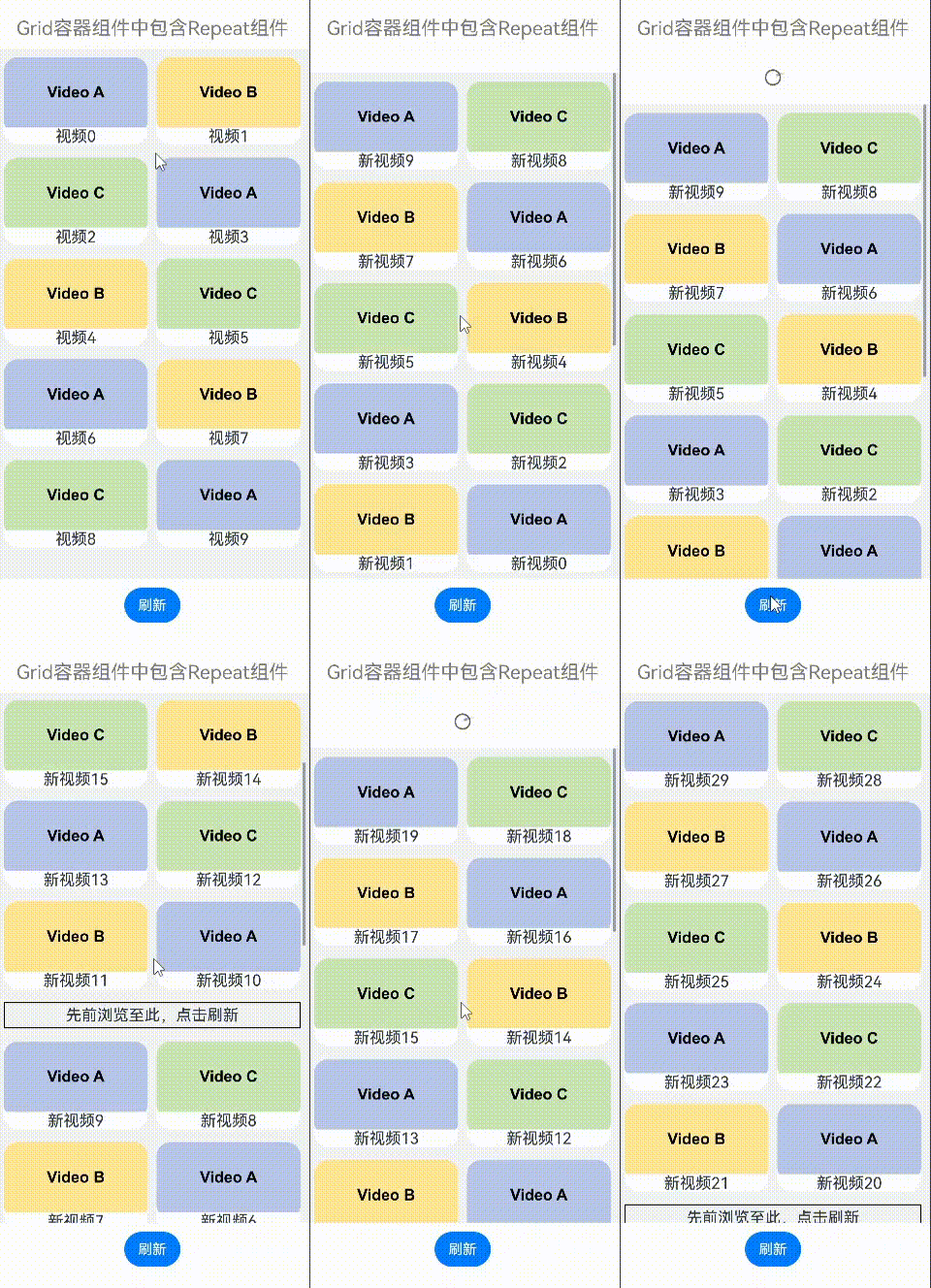
与Swiper组合使用
在Swiper容器组件中使用Repeat的virtualScroll模式,示例如下:
- const remotePictures: Array<string> = [
- 'https://www.example.com/xxx/0001.jpg', // 请填写具体的网络图片地址
- 'https://www.example.com/xxx/0002.jpg',
- 'https://www.example.com/xxx/0003.jpg',
- 'https://www.example.com/xxx/0004.jpg',
- 'https://www.example.com/xxx/0005.jpg',
- 'https://www.example.com/xxx/0006.jpg',
- 'https://www.example.com/xxx/0007.jpg',
- 'https://www.example.com/xxx/0008.jpg',
- 'https://www.example.com/xxx/0009.jpg'
- ];
-
- @ObservedV2
- class DemoSwiperItemInfo {
- id: string;
- @Trace url: string = 'default';
-
- constructor(id: string) {
- this.id = id;
- }
- }
-
- @Entry
- @ComponentV2
- struct DemoSwiper {
- @Local pics: Array<DemoSwiperItemInfo> = [];
-
- aboutToAppear(): void {
- for (let i = 0; i < 9; i++) {
- this.pics.push(new DemoSwiperItemInfo('pic' + i));
- }
- setTimeout(() => {
- this.pics[0].url = remotePictures[0];
- }, 1000);
- }
-
- build() {
- Column() {
- Text('Swiper容器组件中包含Repeat组件')
- .fontSize(15)
- .fontColor(Color.Gray)
-
- Stack() {
- Text('图片加载中')
- .fontSize(15)
- .fontColor(Color.Gray)
- Swiper() {
- Repeat(this.pics)
- .each((obj: RepeatItem<DemoSwiperItemInfo>) => {
- Image(obj.item.url)
- .onAppear(() => {
- console.info('AceTag', obj.item.id);
- })
- })
- .key((item: DemoSwiperItemInfo) => item.id)
- .virtualScroll()
- }
- .cachedCount(9)
- .height('50%')
- .loop(false)
- .indicator(true)
- .onChange((index) => {
- setTimeout(() => {
- this.pics[index].url = remotePictures[index];
- }, 1000);
- })
- }
- .width('100%')
- .height('100%')
- .backgroundColor(Color.Black)
- }
- }
- }
定时1秒后加载图片,模拟网络延迟:
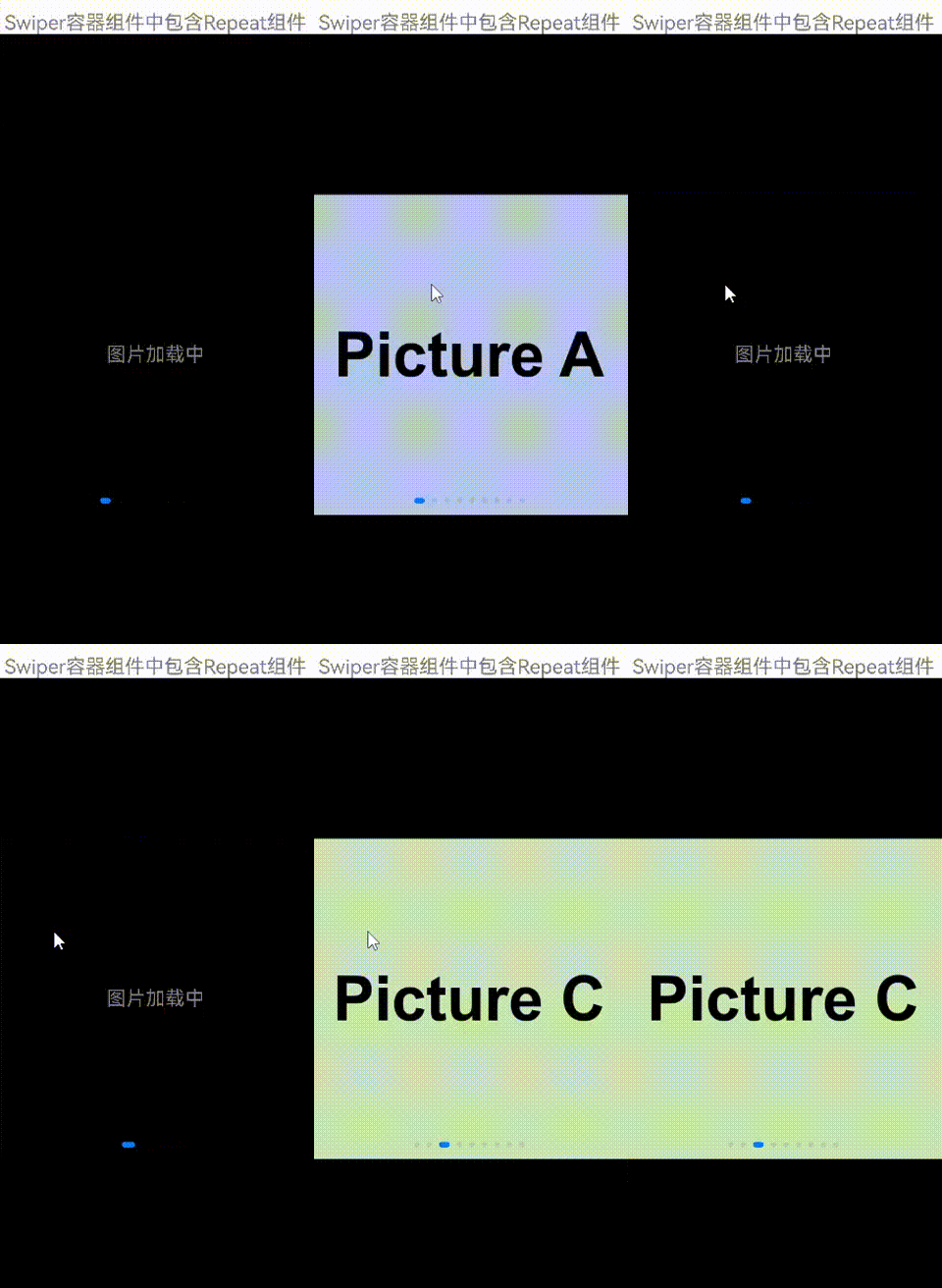
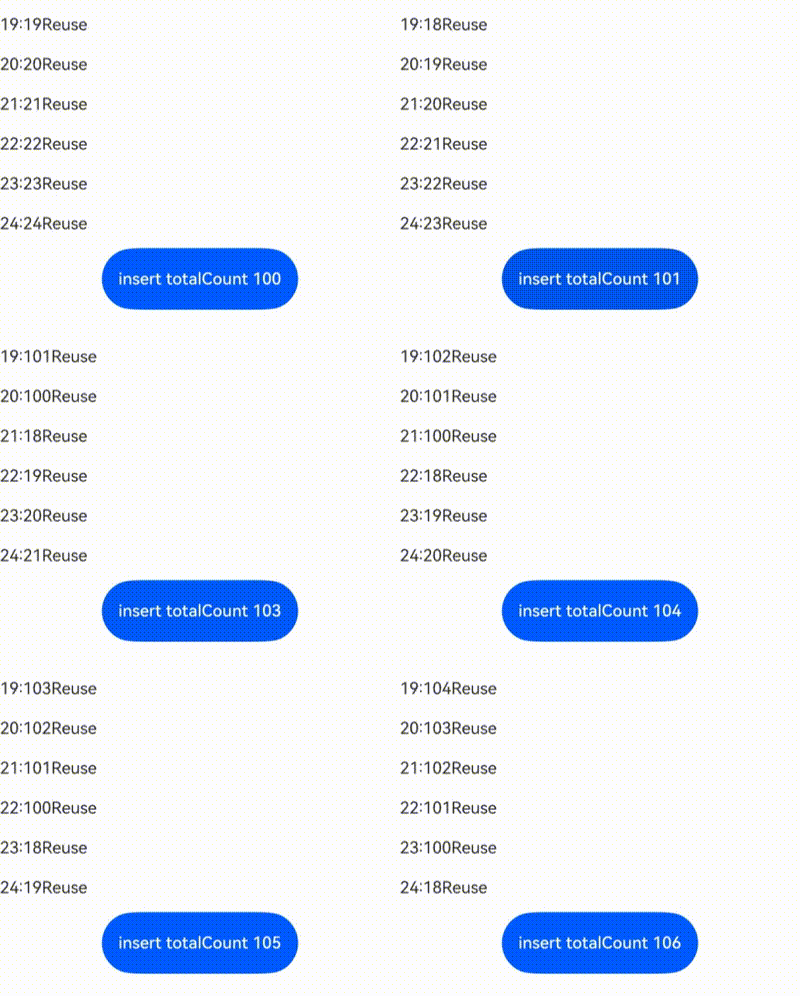
以下示例中,屏幕外的数据源变化将影响屏幕中List列表Scroller停留的位置:
在List组件中声明Repeat组件,实现key值生成逻辑和each逻辑(如下示例代码),点击按钮“insert”,在屏幕显示的第一个元素前面插入一个元素,屏幕出现向下滚动。
- // 定义一个类,标记为可观察的
- // 类中自定义一个数组,标记为可追踪的
- @ObservedV2
- class ArrayHolder {
- @Trace arr: Array<number> = [];
-
- // constructor,用于初始化数组个数
- constructor(count: number) {
- for (let i = 0; i < count; i++) {
- this.arr.push(i);
- }
- }
- }
-
- @Entry
- @ComponentV2
- struct RepeatTemplateSingle {
- @Local arrayHolder: ArrayHolder = new ArrayHolder(100);
- @Local totalCount: number = this.arrayHolder.arr.length;
- scroller: Scroller = new Scroller();
-
- build() {
- Column({ space: 5 }) {
- List({ space: 20, initialIndex: 19, scroller: this.scroller }) {
- Repeat(this.arrayHolder.arr)
- .virtualScroll({ totalCount: this.totalCount })
- .templateId((item, index) => {
- return 'number';
- })
- .template('number', (r) => {
- ListItem() {
- Text(r.index! + ":" + r.item + "Reuse");
- }
- })
- .each((r) => {
- ListItem() {
- Text(r.index! + ":" + r.item + "eachMessage");
- }
- })
- }
- .height('30%')
-
- Button(`insert totalCount ${this.totalCount}`)
- .height(60)
- .onClick(() => {
- // 插入元素,元素位置为屏幕显示的前一个元素
- this.arrayHolder.arr.splice(18, 0, this.totalCount);
- this.totalCount = this.arrayHolder.arr.length;
- })
- }
- .width('100%')
- .margin({ top: 5 })
- }
- }
运行效果:
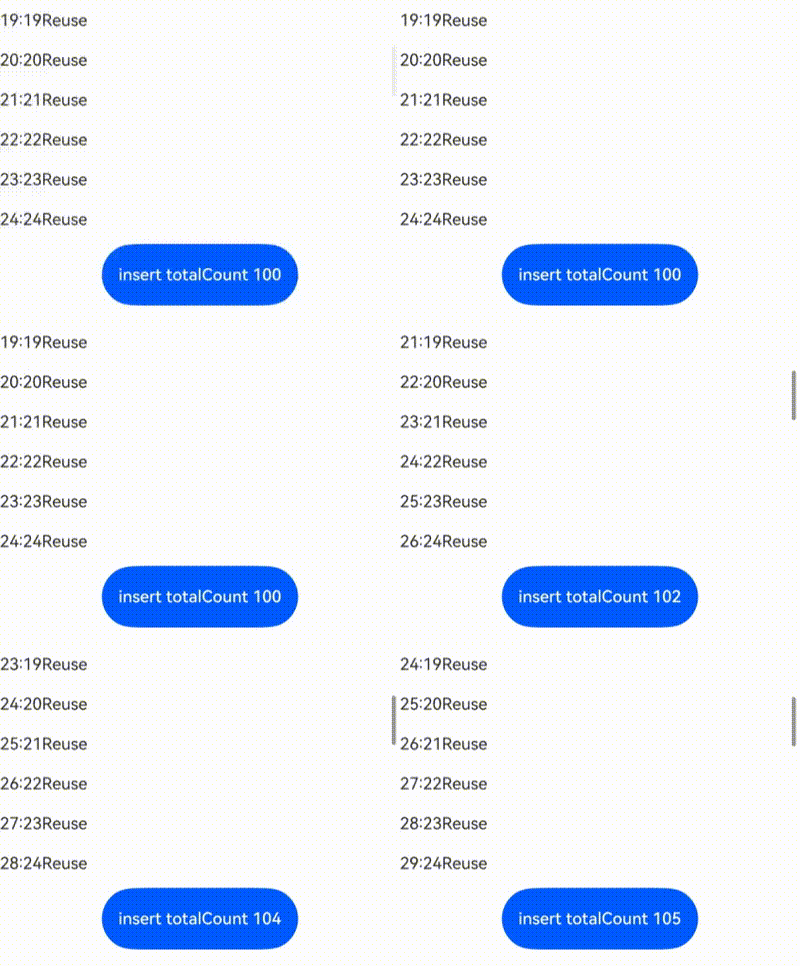
以下为修正后的示例:
在一些场景中,我们不希望屏幕外的数据源变化影响屏幕中List列表Scroller停留的位置,可以通过List组件的onScrollIndex事件对列表滚动动作进行监听,当列表发生滚动时,获取列表滚动位置。使用Scroller组件的scrollToIndex特性,滑动到指定index位置,实现屏幕外的数据源增加/删除数据时,Scroller停留的位置不变的效果。
示例代码仅对增加数据的情况进行展示。
- // ...ArrayHolder的定义和上述demo代码一致
-
- @Entry
- @ComponentV2
- struct RepeatTemplateSingle {
- @Local arrayHolder: ArrayHolder = new ArrayHolder(100);
- @Local totalCount: number = this.arrayHolder.arr.length;
- scroller: Scroller = new Scroller();
-
- private start: number = 1;
- private end: number = 1;
-
- build() {
- Column({ space: 5 }) {
- List({ space: 20, initialIndex: 19, scroller: this.scroller }) {
- Repeat(this.arrayHolder.arr)
- .virtualScroll({ totalCount: this.totalCount })
- .templateId((item, index) => {
- return 'number';
- })
- .template('number', (r) => {
- ListItem() {
- Text(r.index! + ":" + r.item + "Reuse")
- }
- })
- .each((r) => {
- ListItem() {
- Text(r.index! + ":" + r.item + "eachMessage")
- }
- })
- }
- .onScrollIndex((start, end) => {
- this.start = start;
- this.end = end;
- })
- .height('30%')
-
- Button(`insert totalCount ${this.totalCount}`)
- .height(60)
- .onClick(() => {
- // 插入元素,元素位置为屏幕显示的前一个元素
- this.arrayHolder.arr.splice(18, 0, this.totalCount);
- let rect = this.scroller.getItemRect(this.start); // 获取子组件的大小位置
- this.scroller.scrollToIndex(this.start + 1); // 滑动到指定index
- this.scroller.scrollBy(0, -rect.y); // 滑动指定距离
- this.totalCount = this.arrayHolder.arr.length;
- })
- }
- .width('100%')
- .margin({ top: 5 })
- }
- }
运行效果:
当数据源总长度很大时,会使用懒加载的方式先加载一部分数据,为了使Repeat显示正确的滚动条样式,需要将数据总长度赋值给totalCount,即数据源全部加载完成前,totalCount大于array.length。
totalCount > array.length时,在父组件容器滚动过程中,应用需要保证列表即将滑动到数据源末尾时请求后续数据,开发者需要对数据请求的错误场景(如网络延迟)进行保护操作,直到数据源全部加载完成,否则列表滑动的过程中会出现滚动效果异常。
上述规范可以通过实现父组件List/Grid的onScrollIndex属性的回调函数完成。示例代码如下:
- @ObservedV2
- class VehicleData {
- @Trace name: string;
- @Trace price: number;
-
- constructor(name: string, price: number) {
- this.name = name;
- this.price = price;
- }
- }
-
- @ObservedV2
- class VehicleDB {
- public vehicleItems: VehicleData[] = [];
-
- constructor() {
- // init data size 20
- for (let i = 1; i <= 20; i++) {
- this.vehicleItems.push(new VehicleData(`Vehicle${i}`, i));
- }
- }
- }
-
- @Entry
- @ComponentV2
- struct entryCompSucc {
- @Local vehicleItems: VehicleData[] = new VehicleDB().vehicleItems;
- @Local listChildrenSize: ChildrenMainSize = new ChildrenMainSize(60);
- @Local totalCount: number = this.vehicleItems.length;
- scroller: Scroller = new Scroller();
-
- build() {
- Column({ space: 3 }) {
- List({ scroller: this.scroller }) {
- Repeat(this.vehicleItems)
- .virtualScroll({ totalCount: 50 }) // total data size 50
- .templateId(() => 'default')
- .template('default', (ri) => {
- ListItem() {
- Column() {
- Text(`${ri.item.name} + ${ri.index}`)
- .width('90%')
- .height(this.listChildrenSize.childDefaultSize)
- .backgroundColor(0xFFA07A)
- .textAlign(TextAlign.Center)
- .fontSize(20)
- .fontWeight(FontWeight.Bold)
- }
- }.border({ width: 1 })
- }, { cachedCount: 5 })
- .each((ri) => {
- ListItem() {
- Text("Wrong: " + `${ri.item.name} + ${ri.index}`)
- .width('90%')
- .height(this.listChildrenSize.childDefaultSize)
- .backgroundColor(0xFFA07A)
- .textAlign(TextAlign.Center)
- .fontSize(20)
- .fontWeight(FontWeight.Bold)
- }.border({ width: 1 })
- })
- .key((item, index) => `${index}:${item}`)
- }
- .height('50%')
- .margin({ top: 20 })
- .childrenMainSize(this.listChildrenSize)
- .alignListItem(ListItemAlign.Center)
- .onScrollIndex((start, end) => {
- console.log('onScrollIndex', start, end);
- // lazy data loading
- if (this.vehicleItems.length < 50) {
- for (let i = 0; i < 10; i++) {
- if (this.vehicleItems.length < 50) {
- this.vehicleItems.push(new VehicleData("Vehicle_loaded", i));
- }
- }
- }
- })
- }
- }
- }
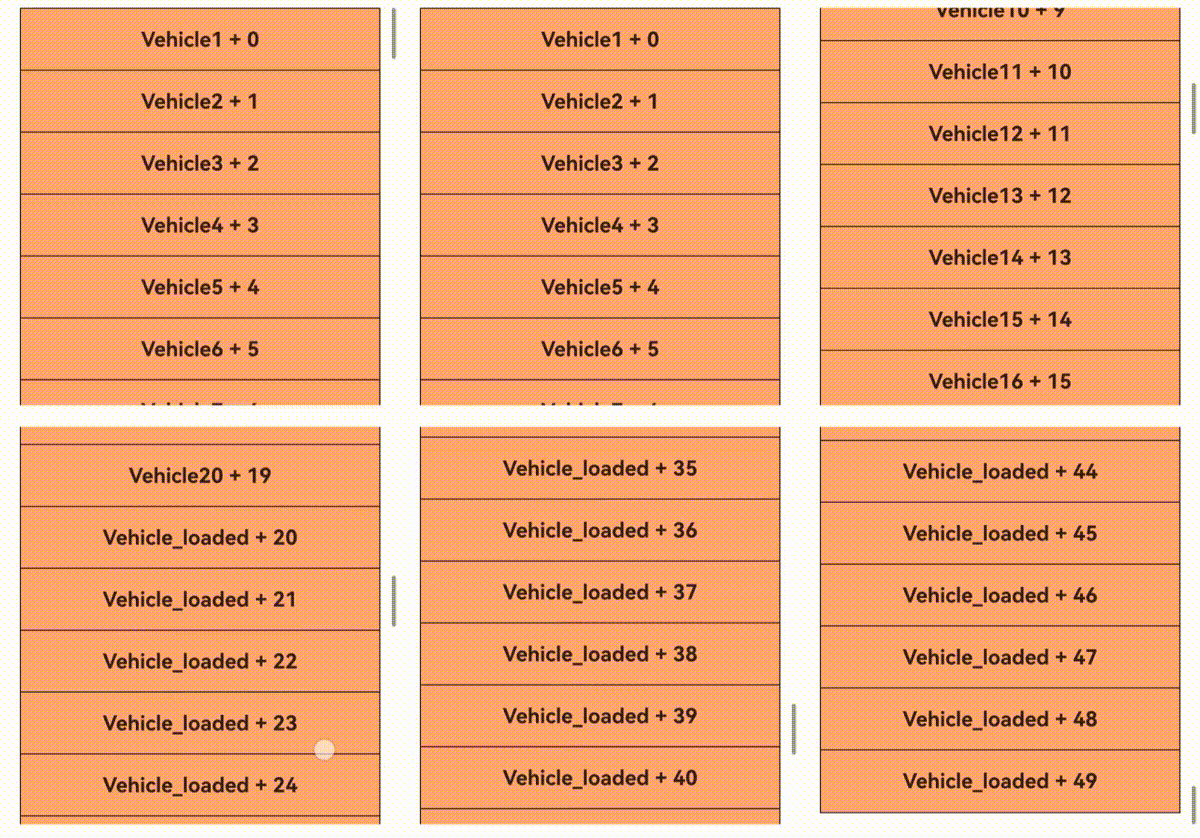
示例代码运行效果:
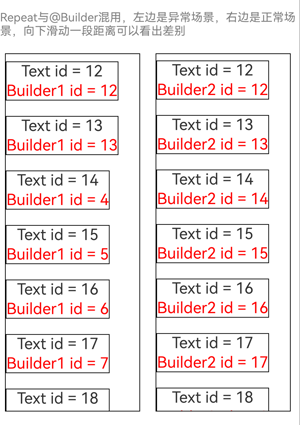
当Repeat与@Builder混用时,必须将RepeatItem类型整体进行传参,组件才能监听到数据变化,如果只传递RepeatItem.item或RepeatItem.index,将会出现UI渲染异常。
示例代码如下:
- @Entry
- @ComponentV2
- struct RepeatBuilderPage {
- @Local simpleList1: Array<number> = [];
- @Local simpleList2: Array<number> = [];
-
- aboutToAppear(): void {
- for (let i = 0; i < 100; i++) {
- this.simpleList1.push(i);
- this.simpleList2.push(i);
- }
- }
-
- build() {
- Column({ space: 20 }) {
- Text('Repeat与@Builder混用,左边是异常场景,右边是正常场景,向下滑动一段距离可以看出差别')
- .fontSize(15)
- .fontColor(Color.Gray)
-
- Row({ space: 20 }) {
- List({ initialIndex: 5, space: 20 }) {
- Repeat<number>(this.simpleList1)
- .each((ri) => {})
- .virtualScroll({ totalCount: this.simpleList1.length })
- .templateId((item: number, index: number) => "default")
- .template('default', (ri) => {
- ListItem() {
- Column() {
- Text('Text id = ' + ri.item)
- .fontSize(20)
- this.buildItem1(ri.item) // 错误示例,为避免渲染异常,应修改为:this.buildItem1(ri)
- }
- }
- .border({ width: 1 })
- }, { cachedCount: 3 })
- }
- .cachedCount(1)
- .border({ width: 1 })
- .width('45%')
- .height('60%')
-
- List({ initialIndex: 5, space: 20 }) {
- Repeat<number>(this.simpleList2)
- .each((ri) => {})
- .virtualScroll({ totalCount: this.simpleList2.length })
- .templateId((item: number, index: number) => "default")
- .template('default', (ri) => {
- ListItem() {
- Column() {
- Text('Text id = ' + ri.item)
- .fontSize(20)
- this.buildItem2(ri) // 正确示例,渲染正常
- }
- }
- .border({ width: 1 })
- }, { cachedCount: 3 })
- }
- .cachedCount(1)
- .border({ width: 1 })
- .width('45%')
- .height('60%')
- }
- }
- .height('100%')
- .justifyContent(FlexAlign.Center)
- }
-
- @Builder
- // @Builder参数必须传RepeatItem类型才能正常渲染
- buildItem1(item: number) {
- Text('Builder1 id = ' + item)
- .fontSize(20)
- .fontColor(Color.Red)
- .margin({ top: 2 })
- }
-
- @Builder
- buildItem2(ri: RepeatItem<number>) {
- Text('Builder2 id = ' + ri.item)
- .fontSize(20)
- .fontColor(Color.Red)
- .margin({ top: 2 })
- }
- }
界面展示如下图,进入页面后向下滑动一段距离可以看出差别,左边是错误用法,右边是正确用法(Text组件为黑色,Builder组件为红色)。上述代码展示了开发过程中易出错的场景,即在@Builder构造函数中传参方式为值传递。