














 155******25
@State状态发生变化时,UI并未更新
import { EasyPage } from './easypage/EasyPage';
import { ListPage } from './listpage/ListPage';

@Entry
@Component
struct Index {
  @State currentTab: number = 0;

  build() {
    Column() {
      Tabs({ barPosition: BarPosition.End }) {

        TabContent() {
          EasyPage()
        }.tabBar(this.tabBarItem("常规", this.currentTab == 0))

        TabContent() {
          ListPage()
        }.tabBar(this.tabBarItem("列表", this.currentTab == 1))

      }
      .width("100%")
      .height("100%")
      .barWidth("100%")
      .barHeight(70)
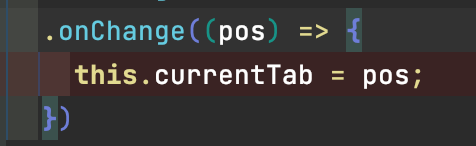
      .onChange((pos) => {
        this.currentTab = pos;
      })
    }.width("100%")
    .height("100%")
  }

  @Builder
  tabBarItem(title: string, $$: boolean) {
    Column() {
      Image($r("app.media.app_icon")).width(25).height(25)
      Text(title).fontColor($$.valueOf() ? Color.Red : Color.Gray).padding({ top: 10 })
    }.alignSelf(ItemAlign.Center)
  }
}
源代码如上,
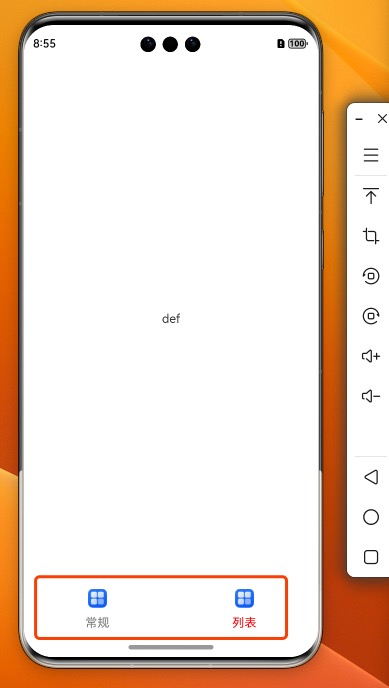
期望效果:
点击TAB时
更新tabBarItem中的文本颜色

实际Debug时发现,下面断点处,并未重新刷新



23


浏览1225 编辑于2024-04-01 08:28山东
全部评论
最多点赞
最新发布
最早发布








写回答
新增插入模板功能
一键使用模板,快速填写内容,轻松发帖~
知道了
- 为了保障您的信息安全,请勿上传您的敏感个人信息(如您的密码等信息)和您的敏感资产信息(如关键源代码、签名私钥、调试安装包、业务日志等信息),且您需自行承担由此产生的信息泄露等安全风险。
- 如您发布的内容为转载内容,请注明内容来源。
我要提问题
目录 收起
期望效果:
实际Debug时发现,下面断点处,并未重新刷新
了解社区公约,与您携手共创和谐专业的开发者社区。


 苏公安网备 32011402010933号