














 HarmonyOS技术支持
横竖屏切换适配
问题背景
横竖屏切换功能即实现应用内既支持竖屏显示也支持横屏显示的效果。对于应用内不同页面显示方向不同的情况,需要在应用逻辑中,动态修改窗口方向,来实现该效果,例如包含视频播放功能的应用,首页内容是采用竖屏方式,而视频详情页则采用横屏方式展示。
窗口形态示意图如下:
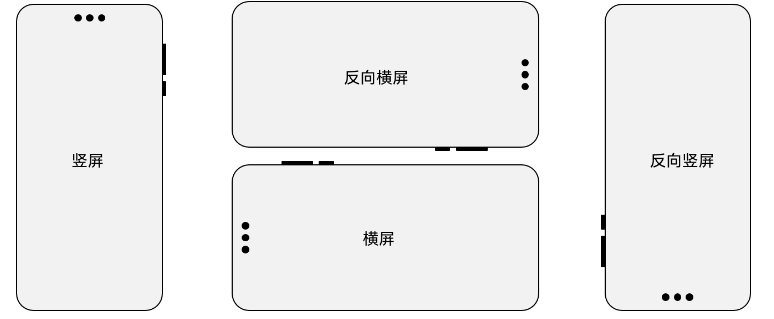
窗口显示方向类型枚举:Orientation
实现方案
1、module.json5文件配置
在module.json5文件中“abilitie标签-sorientation字段“配置应用启动时的方向。
{
  "module": {
    // ...
    "abilities": [
      {
        "name": "EntryAbility",
        // ...
        "orientation": "portrait"
      }
    ]
  }
}
2.代码实现
进入应用后修改应用窗口横竖屏状态,可以调用窗口window的setPreferredOrientation 方法进行设置。
// EntryAbility.ets
import { UIAbility } from '@kit.AbilityKit';
import { BusinessError } from '@kit.BasicServicesKit';

export default class EntryAbility extends UIAbility {
  // ...
  onWindowStageCreate(windowStage: window.WindowStage): void {
    console.info('onWindowStageCreate');
    let windowClass: window.Window | undefined = undefined;
    windowStage.getMainWindow((err: BusinessError, data) => {
      const errCode: number = err.code;
      if (errCode) {
        console.error(`Failed to obtain the main window. Cause code: ${err.code}, message: ${err.message}`);
        return;
      }
      windowClass = data;
      let orientation = window.Orientation.AUTO_ROTATION;
      try {
        let promise = windowClass.setPreferredOrientation(orientation);
        promise.then(() => {
          console.info('Succeeded in setting the window orientation.');
        }).catch((err: BusinessError) => {
          console.error(`Failed to set the window orientation. Cause code: ${err.code}, message: ${err.message}`);
        });
      } catch (exception) {
        console.error(`Failed to set window orientation. Cause code: ${exception.code}, message: ${exception.message}`);
      }
    });
  }
}
常见问题
1、应用反向横屏,视频或游戏等应用横屏播放时需要设置为反向横屏,反向横屏显示模式PORTRAIT_INVERTED。
反向横屏示例如下:
let context = getContext() as common.UIAbilityContext;
let windowClass: window.Window | undefined = undefined;
context.windowStage.getMainWindow((err: BusinessError, data) => {
  windowClass = data;
  let orientation = window.Orientation.LANDSCAPE_INVERTED; //反向横屏
  let promise = windowClass.setPreferredOrientation(orientation);
  promise.then(() => {
    console.info('Succeeded in setting the window orientation.');
  }).catch((err: BusinessError) => {
    console.error(`Failed to set the window orientation. Cause code: ${err.code}, message: ${err.message}`);
  });
}
2、控制中心打开旋转锁定后,应用仍可以旋转。
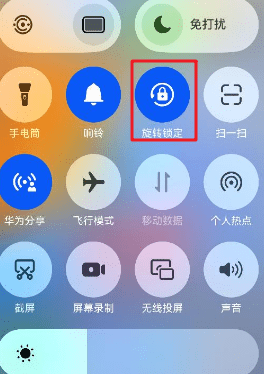
对于需要通过控制中心进行旋转锁定控制的,可以选择字段后方带有restricted字段的旋转策略,此字段表示旋转行为受到控制中心按钮控制,开关打开情况下,不随设备方向旋转,关闭情况下,则会发生跟随设备旋转。
let context = getContext() as common.UIAbilityContext;
windowClass = data;
let orientation = window.Orientation.AUTO_ROTATION_RESTRICTED; //跟随传感器自动旋转,且受控制中心的旋转开关控制
let promise = windowClass.setPreferredOrientation(orientation);
promise.then(() => {
  console.info('Succeeded in setting the window orientation.');
}).catch((err: BusinessError) => {
  console.error(`Failed to set the window orientation. Cause code: ${err.code}, message: ${err.message}`);
});
3、横竖屏开发实践
4、视频播放横竖屏切换
示例参考链接:https://gitee.com/harmonyos_samples/LandscapePortraitToggle

1

1

1


浏览1131 编辑于2025-07-17 07:55广东
全部评论
最多点赞
最新发布
最早发布

写回答
所见即所得编辑器, editor1
工具栏
0/50000
新增插入模板功能
一键使用模板,快速填写内容,轻松发帖~
知道了
- 为了保障您的信息安全,请勿上传您的敏感个人信息(如您的密码等信息)和您的敏感资产信息(如关键源代码、签名私钥、调试安装包、业务日志等信息),且您需自行承担由此产生的信息泄露等安全风险。
- 如您发布的内容为转载内容,请注明内容来源。
我要发帖子
了解社区公约,与您携手共创和谐专业的开发者社区。


 苏公安网备 32011402010933号