文档开发者中心
我的
|

HarmonyOS 5

共享元素

16

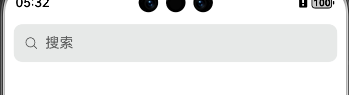
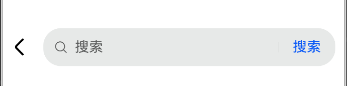
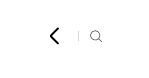
有时候会出现控件显示不全,大概四五次会出现一次

跳转前:cke_909.png

跳转后:cke_4306.png

偶尔出现问题的跳转后:cke_8790.png

代码:

首页:

收起
自动换行
深色代码主题
复制
Search({ placeholder: '搜索' })
  .id("searchCaseTitle")
  .focusOnTouch(false)
  .focusable(false)
  .enableKeyboardOnFocus(false)
  .backgroundColor('#E7E9E8')
  .width('100%')
  .height(43)
  .onClick(() => {
    animateTo({ duration: 800 }, () => {
      this.pathInfos.pushPathByName('PageElementShare02', null, false)
    });
  })
  .geometryTransition(this.geometryId, { follow: true })
  .backgroundColor('#E7E9E8')
  .borderRadius(10)

跳转页:

收起
自动换行
深色代码主题
复制
Row() {
  Image($r('sys.media.ohos_ic_public_arrow_left'))
    .width(36)
    .height(36)
    .transition(TransitionEffect.asymmetric(
      TransitionEffect.opacity(0)
        .animation({ curve: curves.cubicBezierCurve(0.33, 0, 0.67, 1), duration: 200, delay: 150 }),
      TransitionEffect.opacity(0)
        .animation({ curve: curves.cubicBezierCurve(0.33, 0, 0.67, 1), duration: 200 }),
    ))

  Search({ value: this.searchInput, placeholder: '搜索' })
    .id("searchCaseTitleContentCover")
    .searchButton('搜索', { fontSize: 16 })
    .geometryTransition('search',{follow : true})
    .defaultFocus(true)
    .enableKeyboardOnFocus(false)
    .backgroundColor('#E7E9E8')
    .onChange((value) => {
      this.searchInput = value;
    })
    .margin({ left: 10, right: 10 })
    .layoutWeight(1)
    .height(43)

}

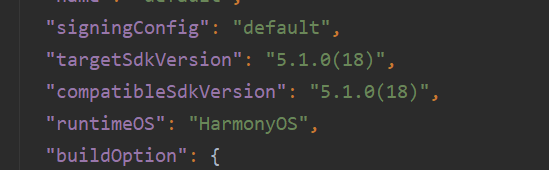
版本cke_17852.png
点赞
收藏
回复
4
分享
举报
浏览281 发布于2025-07-29 09:37山西
全部评论
最多点赞
最新发布
最早发布

|
技术支持

【背景知识】

  • 共享元素转场geometryTransition用于组件内的切换,在视图切换过程中提供丝滑的上下文传承过渡。通过绑定组件的进出状态(in指新视图、out指旧视图)来实现转场动画。它通过安排绑定的in/out组件的frame、position使得原本独立的transition动画在空间位置上发生联系,将视觉焦点由旧视图位置引导到新视图位置。这种方式区别于传统的opacity和scale转场效果,提供了更高的灵活性和创意空间。适用于一镜到底场景。必须配合animateTo使用才有动画效果。不支持animation隐式动画。
  • 共享元素转场 (sharedTransition)是一种在页面路由跳转时使用的过渡动画,其中特定的UI组件被标识为共享元素,并在页面跳转时展示转场动效。在相关的组件上设置sharedTransition属性,并指定相应的参数,确保在不同页面中使用的共享元素具有相同的ID值,来识别共享元素。特别适用于需要强调元素连续性的场景,如图库浏览,商品详情页等。仅发生在页面路由跳转时使用。

【问题定位】

通过上面的代码片段暂时没有复现该问题,但是通过代码分析geometryTransition共享元素用在了页面间的跳转,而geometryTransition用于的是组件间切换,可能引起显示问题。

【分析结论】

组件间切换使用geometryTransition,页面间切换使用共享元素转场 (sharedTransition)

【修改建议】

收起
自动换行
深色代码主题
复制
//Index.ets
@Entry
@Component
struct Index {
  @Provide('pageInfos') pageInfos: NavPathStack = new NavPathStack();
  build() {
    Navigation(this.pageInfos)
    {
      Search({ placeholder: '搜索' })
        .id("searchCaseTitle")
        .focusOnTouch(false)
        .focusable(false)
        .enableKeyboardOnFocus(false)
        .backgroundColor('#E7E9E8')
        .width('90%')
        .height(43)
        .onClick(() => {
          animateTo({ duration: 800 }, () => {
            this.pageInfos.pushPathByName('PageB', null, false)
          });
        })
        .sharedTransition('SEARCH_ONE_SHOT_DEMO_TRANSITION_ID', { duration: 800, curve: Curve.Linear, delay: 100 })
        .backgroundColor('#E7E9E8')
        .borderRadius(10)
    }

  }
}

//PageB.ets
import { curves } from "@kit.ArkUI";

@Builder
export function pageBBuilder() {
  pageBExample()
}

@Entry
@Component
struct pageBExample {
  @Consume('pageInfos') pageInfos: NavPathStack;
  @State searchInput: string = '';
  build() {
    NavDestination()
    {
      Row({ space: 8 }) {
        Image($r('sys.media.ohos_ic_public_arrow_left'))
          .width(36)
          .height(36)
          .transition(TransitionEffect.asymmetric(
            TransitionEffect.opacity(0)
              .animation({ curve: curves.cubicBezierCurve(0.33, 0, 0.67, 1), duration: 200, delay: 150 }),
            TransitionEffect.opacity(0)
              .animation({ curve: curves.cubicBezierCurve(0.33, 0, 0.67, 1), duration: 200 }),
          ))
        Search({ value: this.searchInput, placeholder: '搜索' })
          .id("searchCaseTitleContentCover")
          .searchButton('搜索', { fontSize: 16 })
          .sharedTransition('SEARCH_ONE_SHOT_DEMO_TRANSITION_ID', { duration: 800, curve: Curve.Linear, delay: 100 })
          .defaultFocus(true)
          .enableKeyboardOnFocus(false)
          .backgroundColor('#E7E9E8')
          .onChange((value) => {
            this.searchInput = value;
          })
          .margin({ left: 10, right: 10 })
          .layoutWeight(1)
          .height(43)
      }
    }
    .hideTitleBar(true)
  }
}

 工程配置文件信息如下:

收起
自动换行
深色代码主题
复制
//../entry/src/main/resources/base/profile/router_map.json
{
  "routerMap": [
    {
      "name": "PageB",
      "pageSourceFile": "src/main/ets/pages/PageB.ets",
      "buildFunction": "pageBBuilder",
      "data": {
        "description": "This is PageB"
      }
    }
  ]
}
//../entry/src/main/module.json5
"module": {
  ...
  "routerMap": "$profile:route_map"
  ...
}

【总结】

组件间切换使用geometryTransition,且必须要必须配合animateTo使用才有动画效果,页面间切换使用共享元素转场 (sharedTransition)。

展开全部
7楼回复于2025-07-31 02:10 来自广东
建议楼主进行组件层级优化试一下,避免过渡效果冲突,Image组件的transition效果可能影响布局稳定性,建议简化过渡动画:
收起
自动换行
深色代码主题
复制
.transition(TransitionEffect.opacity(0.8)

  .animation({ duration: 300 }))

在跳转后的页面onPageShow生命周期触发布局刷新:

收起
自动换行
深色代码主题
复制
onPageShow() {

  this.updateLayout()

}
4楼回复于2025-07-31 01:27 来自河北

1.楼主跳转前的搜索如果没有搜索作用的话直接自己封装一个样式一样的组件作为跳转,搜索也才用Search组件试试

2.页面的转场效果的话可以使用一镜到底的动画
一镜到底动效-动画与转场 - 华为HarmonyOS开发者

2楼回复于2025-07-30 08:35 来自湖南
把Row的宽度设置为100%
1楼回复于2025-07-30 08:18 来自重庆
写回答
新增插入模板功能
一键使用模板,快速填写内容,轻松发帖~
知道了
  • 为了保障您的信息安全,请勿上传您的敏感个人信息(如您的密码等信息)和您的敏感资产信息(如关键源代码、签名私钥、调试安装包、业务日志等信息),且您需自行承担由此产生的信息泄露等安全风险。
  • 如您发布的内容为转载内容,请注明内容来源。

我要提问题

了解社区公约,与您携手共创和谐专业的开发者社区。