文档开发者中心
我的
|

HarmonyOS 5

lottie库实现动态替换动画内某个图片资源

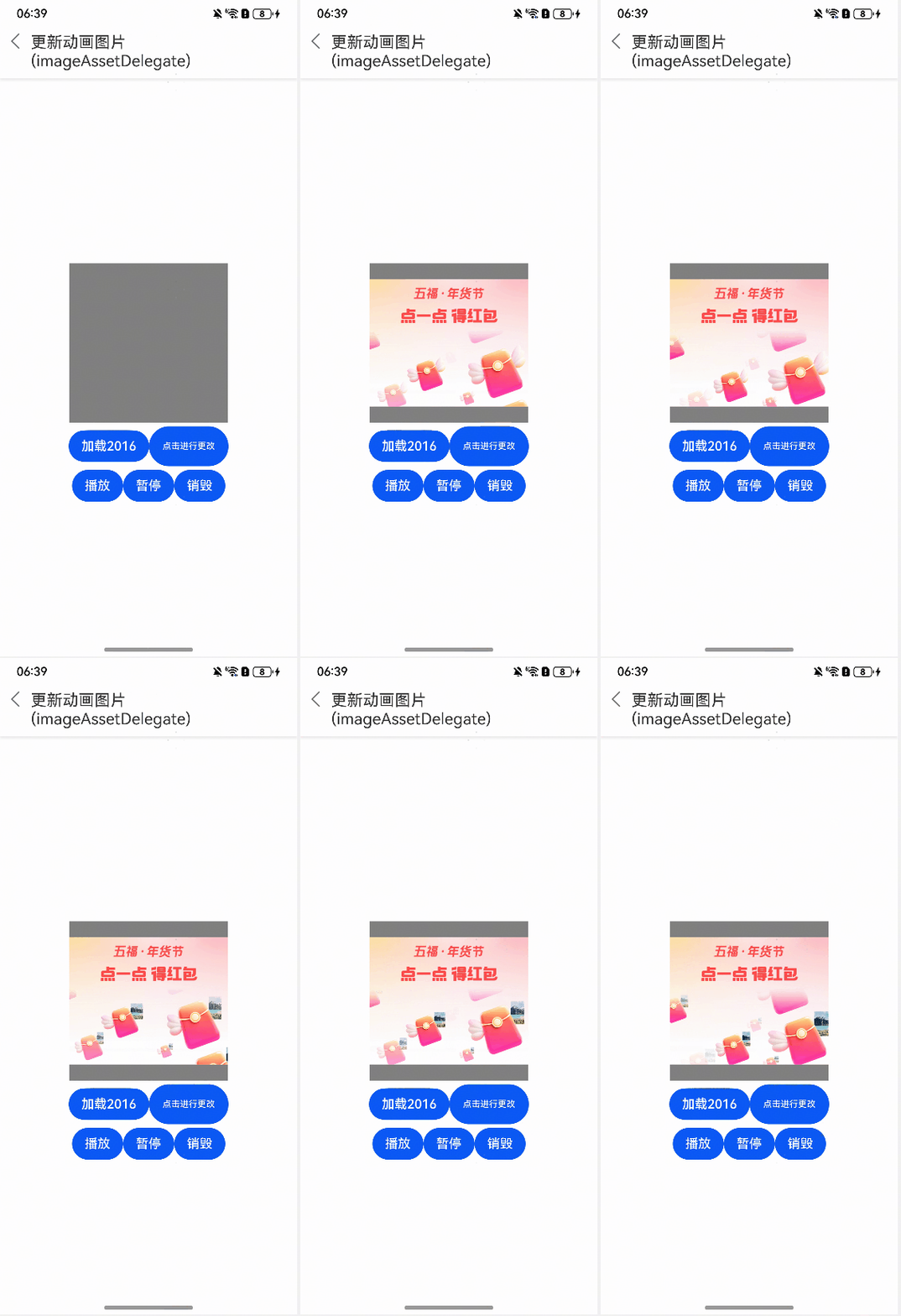
使用lottie库,可以通过代码去替换动画内某个图片资源,实现手动调整动画效果的功能。

点赞
收藏
回复
1
分享
举报
浏览134 发布于2025-09-24 01:01未知归属地
全部评论
最多点赞
最新发布
最早发布

【解决方案】

  1. 可以通过lottie库的方法imagePath.includes()去指定json文件中(动画资源)需要修改的图片名称。
  2. 给imagePath重新赋值新图片的路径。
  3. 重新加载动画,即可实现替换动画内图片的功能。
  • 替换动画内某个图片资源的代码如下:
收起
自动换行
深色代码主题
复制
import lottie from '@ohos/lottie';
import { AnimationItem } from '@ohos/lottie';
import { AsyncCallback } from '@kit.BasicServicesKit';
import { image } from '@kit.ImageKit';

@Entry
@Component
struct UpdatImageShow {
  private renderingSettings: RenderingContextSettings = new RenderingContextSettings(true);
  private canvasRenderingContext: CanvasRenderingContext2D = new CanvasRenderingContext2D(this.renderingSettings); // 渲染构建上下文
  private animateItem: AnimationItem | null = null;
  private animateName: string = "images"; // 动画名称
  @State isfalse: boolean = false

  aboutToDisappear() {
    lottie.destroy(this.animateName);
  }

  build() {
    Column() {
      Flex({ direction: FlexDirection.Column, alignItems: ItemAlign.Center, justifyContent: FlexAlign.Center }) {
        Row({ space: 10 }) {
         Canvas(this.canvasRenderingContext) // 关联画布
            .width(200)
            .height(200)
            .backgroundColor(Color.Gray)
            .onReady(() => {
              this.animateItem?.resize(); // 可在此生命回调周期中加载动画,可以保证动画尺寸正确
            })
            .onDisAppear(() => {
              lottie.destroy(this.animateName);
            })
        }

        Row() { // 加载zip
          Button($r("app.string.load_2016"))
            .onClick(() => {
              lottie.destroy(this.animateName)
              this.animateItem = lottie.loadAnimation({
                container: this.canvasRenderingContext,
                renderer: 'canvas', // canvas渲染模式
                loop: true,
                autoplay: true,
                name: this.animateName,
                path: "common/lottie/data_url.json",
                imageAssetDelegate: (imagePath: string, callback: AsyncCallback<PixelMap>) => {
                  console.info(imagePath)
                  if (this.isfalse) {
                    if (imagePath.includes('A6771a3c735e52ba97967c501775e5e67.png')) {
                      imagePath = 'images/img_4.png';
                      this.getUIContext()?.getHostContext()?.resourceManager.getRawFileContent(imagePath,
                        (err, raw_file_content) => {
                          if (!err) {
                            let image_source = image.createImageSource(raw_file_content.buffer);
                            image_source.createPixelMap({
                              editable: false,
                              desiredPixelFormat: image.PixelMapFormat.RGBA_8888
                            }, callback);
                          } else {
                            callback(err, null); // 加载依赖图片异常时,默认动画加载正常
                          }
                        });
                    } else {
                      callback(null, null);
                    }
                  } else {
                    callback(null, null);
                  }
                }
              })
              this.animateItem.addEventListener('error', (args: Object): void => {
                console.info(JSON.stringify(args));
              });
            })
          Button('点击进行更改')
            .width(100)
            .height(50)
            .onClick(() => {
              this.isfalse = !this.isfalse
            })
        }.margin({ top: 5 })

        Row() {
          Button($r("app.string.play"))
            .onClick(() => {
              lottie.play();
            })
          Button($r("app.string.pause"))
            .onClick(() => {
              lottie.pause();
            })
          Button($r("app.string.destroy"))
            .onClick(() => {
              if (this.animateItem != null) {
                this.animateItem = null;
              }
              lottie.destroy(this.animateName);
            })
        }.margin({ top: 5 })
      }
      .width('100%')
      .height('100%')
    }
    .width('100%')
    .height('100%')
  }
  onBackPress(): boolean | void {
    if (this.animateItem != null) {
      this.animateItem = null;
    }
    lottie.destroy(this.animateName);
    return false;
  }
  getResourceString(res: Resource) {
    try {
      return this.getUIContext()?.getHostContext()?.resourceManager.getStringSync(res.id) || '';
    } catch (e) {
      console.error(`getResourceString error`);
      return '';
    }
  }
}

效果图:

【常见FAQ】 Q:动画播放到最后一帧如何进行页面跳转? A:lottie中提供的addEventListener()回调方法,动画播放结束且不再播放动画触发回调,在此回调进行页面跳转。

展开全部
1楼回复于2025-09-24 01:01 未知归属地
写回答
新增插入模板功能
一键使用模板,快速填写内容,轻松发帖~
知道了
  • 为了保障您的信息安全,请勿上传您的敏感个人信息(如您的密码等信息)和您的敏感资产信息(如关键源代码、签名私钥、调试安装包、业务日志等信息),且您需自行承担由此产生的信息泄露等安全风险。
  • 如您发布的内容为转载内容,请注明内容来源。

我要提问题

了解社区公约,与您携手共创和谐专业的开发者社区。