文档开发者中心
我的
|

HarmonyOS 5

关于Navigation组件和Tabs组件的问题

已解决

我想实现一个底部有tabbar,点击可以切换,在每个tab的content区域里可以点击按钮跳转到二三级页面,路由使用Navigation组件。

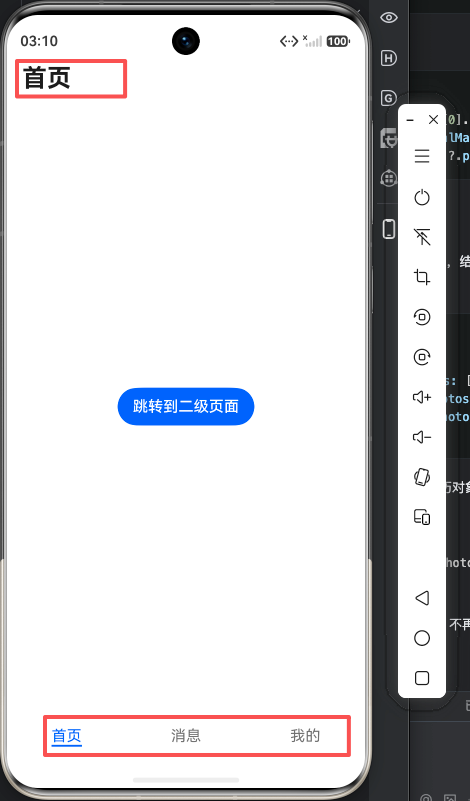
现在的问题是,如果我在Index.ets中的最外层使用一个Navigation控制,在切换tab时,顶部的标题不会改变;如果为每个tabContent单独给一个Navigation控制,跳转到二级页后,tabbar依然存在。

像这种典型的app结构,应该怎么写可以实现。

收起
自动换行
深色代码主题
复制
@Entry
@Component
struct Index {
  private homePathStack: NavPathStack = new NavPathStack();
  private msgPathStack: NavPathStack = new NavPathStack();
  private minePathStack: NavPathStack = new NavPathStack();

  build() {
    Tabs({barPosition:BarPosition.End}){
      TabContent(){
        Navigation(this.homePathStack){
          Column(){
            List({space:10}){
              ListItem(){
                Text('列表项')
              }
              .width('100%')
              .height(100)
              .backgroundColor(Color.Orange)

              ListItem(){
                Text('列表项')
              }
              .width('100%')
              .height(100)
              .backgroundColor(Color.Orange)
              ListItem(){
                Text('列表项')
              }
              .width('100%')
              .height(100)
              .backgroundColor(Color.Orange)
              ListItem(){
                Text('列表项')
              }
              .width('100%')
              .height(100)
              .backgroundColor(Color.Orange)
              ListItem(){
                Text('列表项')
              }
              .width('100%')
              .height(100)
              .backgroundColor(Color.Orange)
              ListItem(){
                Text('列表项')
              }
              .width('100%')
              .height(100)
              .backgroundColor(Color.Orange)
              ListItem(){
                Text('列表项')
              }
              .width('100%')
              .height(100)
              .backgroundColor(Color.Orange)
              ListItem(){
                Text('列表项')
              }
              .width('100%')
              .height(100)
              .backgroundColor(Color.Orange)
              ListItem(){
                Text('列表项')
              }
              .width('100%')
              .height(100)
              .backgroundColor(Color.Orange)
              ListItem(){
                Text('列表项')
              }
              .width('100%')
              .height(100)
              .backgroundColor(Color.Orange)
              ListItem(){
                Text('列表项')
              }
              .width('100%')
              .height(100)
              .backgroundColor(Color.Orange)
              ListItem(){
                Text('列表项')
              }
              .width('100%')
              .height(100)
              .backgroundColor(Color.Orange)
              ListItem(){
                Text('列表项')
              }
              .width('100%')
              .height(100)
              .backgroundColor(Color.Orange)

            }
            .width('100%')
            .layoutWeight(1)
            Button('跳转到二级页面')
              .onClick(() => {
                this.homePathStack.pushPath({name:'PageA'})
              })
          }
        }
        .title('首页')
        .hideToolBar(true)


      }.tabBar('首页')
      TabContent(){
        Navigation(this.msgPathStack){
          Column(){
            Text('消息')
            Image($r('sys.media.ai_recognize'))
              .width(100)
            Button('跳转到消息二级页').onClick((event: ClickEvent) => {
              this.msgPathStack.pushPath({name:'MsgSecondPage'})
            })
          }
          .width('100%')
          .height('100%')
          .backgroundColor(Color.Green)
          .alignItems(HorizontalAlign.Center)
          .justifyContent(FlexAlign.Center)
        }
        .title('消息')
        .hideToolBar(true)


      }.tabBar('消息')
      TabContent(){
        Navigation(this.minePathStack){
          Column(){
            Text('我的')
          }
          .width('100%')
          .height('100%')
          .backgroundColor(Color.Orange)
          .alignItems(HorizontalAlign.Center)
          .justifyContent(FlexAlign.Center)
        }
        .title('我的')
        .hideToolBar(true)

      }
      .tabBar('我的')

    }

  }
}
点赞
收藏
1
回复
14
分享
举报
浏览174 发布于2026-04-29 06:24北京
全部评论
最多点赞
最新发布
最早发布
|
采纳答复

喜欢哪种就用哪种方法:

收起
自动换行
深色代码主题
复制
@Entry
@Component
struct Index {
    private pathStack: NavPathStack = new NavPathStack();
    @State currentIndex: number = 0
    // 1. 定义与 Tab 顺序对应的标题数组
    private readonly tabTitles: string[] = ['首页', '消息', '我的']
    private tabsController: TabsController = new TabsController()

    build() {
            Navigation(this.pathStack) {
                    Tabs({ barPosition: BarPosition.End, controller: this.tabsController, index: this.currentIndex }) {
                            TabContent() {
                                    NavDestination() {
                                            Column() {
                                                    Button('跳转到二级页面')
                                                            .onClick(() => {
                                                                    this.pathStack.pushPath({ name: 'PageA' })
                                                            })
                                            }
                                    }.width('100%')
                                    .height('100%')
                                    .title("首页")
                                    .hideBackButton(true)

                            }.tabBar('首页')

                            TabContent() {
                                    NavDestination() {
                                            Column() {
                                                    Text('消息')
                                                    Image($r('sys.media.ai_recognize'))
                                                            .width(100)
                                                    Button('跳转到消息二级页').onClick((event: ClickEvent) => {
                                                            this.pathStack.pushPath({ name: 'MsgSecondPage' })
                                                    })
                                            }
                                    }.width('100%')
                                    .height('100%')
                                    .title("消息")
                                    .hideBackButton(true)

                            }.tabBar('消息')

                            TabContent() {
                                    NavDestination() {
                                            Column() {
                                                    Text('我的')
                                            }
                                            .width('100%')
                                            .height('100%')
                                            .backgroundColor(Color.Orange)
                                            .alignItems(HorizontalAlign.Center)
                                            .justifyContent(FlexAlign.Center)
                                    }.width('100%')
                                    .height('100%')
                                    .title("我的")
                                    .hideBackButton(true)

                            }
                            .tabBar('我的')
                    }
                    .onChange((index: number) => {
                            this.currentIndex = index
                    })
            }
            // .title(this.tabTitles[this.currentIndex])
            .hideBackButton(true)
            .titleMode(NavigationTitleMode.Mini)
            .title({
                    builder: undefined,
                    height: 0//目的是为了backgroundColor延伸到状态栏
            })

    }
}
展开全部
2楼回复于2026-04-29 08:20 来自广西


你这个场景里,更推荐的典型写法是:

推荐结构

  • 最外层只保留一个 Navigation
  • Tabs 只作为一级首页容器
  • 二级、三级页面统一走最外层 Navigation 的 NavPathStack
  • 不要在每个 TabContent 里再套一个独立 Navigation

也就是:

收起
自动换行
深色代码主题
复制
Navigation(rootPathStack) {
  TabsPage({ rootPathStack })
}

而不是:

收起
自动换行
深色代码主题
复制
Tabs {
  TabContent {
    Navigation(tabPathStack) { ... }
  }
}

为什么你现在这两种写法都会有问题

1. Tabs 外面套多个 Navigation

你现在的写法是:

收起
自动换行
深色代码主题
复制
Tabs {
  TabContent {
    Navigation(this.homePathStack) { ... }
  }
}

这种结构下,二级页只是替换了当前 Tab 的内容区,但 Tabs 本身还在最外层,所以:

  • 底部 tabBar 一定还在
  • 这正是你现在看到的现象

2. 最外层只放一个 Navigation 再包 Tabs

这种结构下,Navigation.title() 是整个导航容器的标题,不是每个 Tab 的标题,所以:

  • 切换 Tab 不会自动变标题
  • 因为 Navigation 不知道你只是切了 tab index

这也是正常现象。


典型 App 的推荐实现

如果你的目标是这种常见效果:

  • 底部有 tabBar
  • Tab 之间切换一级页面
  • 在某个 tab 里点按钮进入二级页
  • 进入二级页后 隐藏 tabBar
  • 返回后回到原 tab

那推荐这样做:

结构分层

一级

一个根 Navigation

首页

根 Navigation 的首页内容是一个 TabsPage

二级/三级页

都 push 到根 Navigation 上

这样一来:

  • 一级页显示 Tabs
  • 二级页压在 TabsPage 上面
  • tabBar 自然就看不到了

推荐代码思路

1. 根页面只保留一个 NavPathStack

收起
自动换行
深色代码主题
复制
@Entry
@Component
struct Index {
  private rootPathStack: NavPathStack = new NavPathStack();

  build() {
    Navigation(this.rootPathStack) {
      TabsPage({
        rootPathStack: this.rootPathStack
      })
    }
    .hideToolBar(true)
    .hideTitleBar(true)
  }
}

这里我建议:

  • 根 Navigation 把默认标题栏先隐藏
  • 一级 tab 页的标题自己画
  • 二级页再用 NavDestination 单独配置标题

2. Tabs 页面只负责一级内容,不再放 Navigation

收起
自动换行
深色代码主题
复制
@Component
struct TabsPage {
  @Prop rootPathStack: NavPathStack
  @State currentIndex: number = 0

  build() {
    Column() {
      this.HeaderBuilder()

      Tabs({ barPosition: BarPosition.End, index: this.currentIndex }) {
        TabContent() {
          this.HomeTabBuilder()
        }.tabBar('首页')

        TabContent() {
          this.MsgTabBuilder()
        }.tabBar('消息')

        TabContent() {
          this.MineTabBuilder()
        }.tabBar('我的')
      }
      .onChange((index: number) => {
        this.currentIndex = index
      })
      .layoutWeight(1)
    }
    .width('100%')
    .height('100%')
  }

  @Builder
  HeaderBuilder() {
    Row() {
      Text(this.currentIndex === 0 ? '首页' : this.currentIndex === 1 ? '消息' : '我的')
        .fontSize(24)
        .fontWeight(FontWeight.Bold)
    }
    .width('100%')
    .padding(16)
  }

  @Builder
  HomeTabBuilder() {
    Column() {
      List({ space: 10 }) {
        ListItem() {
          Text('列表项')
        }
        .width('100%')
        .height(100)
        .backgroundColor(Color.Orange)
      }
      .layoutWeight(1)

      Button('跳转到二级页面')
        .onClick(() => {
          this.rootPathStack.pushPath({ name: 'PageA' })
        })
    }
    .width('100%')
    .height('100%')
  }

  @Builder
  MsgTabBuilder() {
    Column() {
      Text('消息页')
      Button('跳转到消息二级页')
        .onClick(() => {
          this.rootPathStack.pushPath({ name: 'MsgSecondPage' })
        })
    }
    .width('100%')
    .height('100%')
    .justifyContent(FlexAlign.Center)
    .alignItems(HorizontalAlign.Center)
  }

  @Builder
  MineTabBuilder() {
    Column() {
      Text('我的')
    }
    .width('100%')
    .height('100%')
    .justifyContent(FlexAlign.Center)
    .alignItems(HorizontalAlign.Center)
  }
}

这样做的效果

一级页

  • 显示 Tabs
  • 底部 tabBar 可切换

二级页

  • rootPathStack.pushPath(...) 后
  • 根导航压入新页面
  • TabsPage 整体被盖住
  • 底部 tabBar 自然不显示

这就是大多数 App 的典型结构。


标题怎么处理

这是你刚才的另一个痛点。

一级 Tab 页标题

不要依赖 Navigation.title() 自动切换。

因为 tab 切换不是导航切换,所以最稳妥的方法是:

  • 在 TabsPage 里自己做顶部标题区域
  • 根据 currentIndex 切换标题文本

也就是上面 HeaderBuilder() 这种写法。

二级/三级页标题

交给 Navigation / NavDestination 去管。

也就是:

  • 一级 tabs 页:自定义 header
  • 二级详情页:导航标题栏

这是最清晰的分工。


如果你特别想“每个 Tab 都有独立返回栈”怎么办

那就是另一种结构了:

  • 每个 Tab 一个独立 NavPathStack
  • 每个 TabContent 内部一个 Navigation
  • 同时自己控制底部 tabBar 的显示隐藏

但这套结构会复杂很多,因为你要自己解决:

  • 某个 Tab 进入二级页后是否隐藏 tabBar
  • 切别的 tab 时是否保留栈
  • 返回时 tabBar 是否恢复
  • 顶部标题如何跟各 tab 栈同步

也就是说:

它适合“每个 tab 独立导航栈”的产品需求,但不适合你现在这个“典型 app 结构”诉求。

你的问题描述里,更像是想要:

  • 一级有 tab
  • 二级页隐藏 tabBar

那就别给每个 tab 单独套 Navigation。


一句话建议

你这种场景,最推荐:

  • 一个根 Navigation
  • 一个 TabsPage 作为首页
  • 所有二三级页都 push 到根 NavPathStack
  • 一级 tab 标题自己画,不依赖 Navigation.title()

你现在应该怎么改

把这三份:

收起
自动换行
深色代码主题
复制
private homePathStack: NavPathStack = new NavPathStack();
private msgPathStack: NavPathStack = new NavPathStack();
private minePathStack: NavPathStack = new NavPathStack();

先收敛成一个:

收起
自动换行
深色代码主题
复制
private rootPathStack: NavPathStack = new NavPathStack();

然后:

  • TabContent 里去掉 Navigation(...)
  • 按钮点击统一改成:
     
收起
自动换行
深色代码主题
复制
this.rootPathStack.pushPath({ name: 'PageA' })
展开全部
2
8楼回复于2026-05-03 09:35 未知归属地
  • 幻想丶花开半夏
    我想问下,像华为商城,应用市场,我的华为,主题等这些APP的tabbar的标题也是不依赖Navigation的title另外实现的吗?
    2026-05-06 07:46 来自河北
  • 提码拉米苏回复幻想丶花开半夏
    尊敬的开发者,您好,华为自研应用UI实现具有较高复杂度,涉及较多细节,属于综合性设计方案,并非简单的Navigation。
    2026-05-09 02:56 来自广东

Navigation.title(this.tabTitles[this.currentIndex]) 动态绑定,Tabs.onChange切换时,标题展示确实有点延迟,改为Tabs.onTabBarClick就没有延迟了:

收起
自动换行
深色代码主题
复制
@Entry
@Component
struct Index {
	private pathStack: NavPathStack = new NavPathStack();
	@State currentIndex: number = 0
	// 1. 定义与 Tab 顺序对应的标题数组
	private readonly tabTitles: string[] = ['首页', '消息', '我的']
	private tabsController: TabsController = new TabsController()

	build() {
		Navigation(this.pathStack) {
			Tabs({ barPosition: BarPosition.End, controller: this.tabsController, index: this.currentIndex }) {
				TabContent() {
					Column() {
						Button('跳转到二级页面')
							.onClick(() => {
								this.pathStack.pushPath({ name: 'PageA' })
							})
						}
				}.tabBar('首页')

				TabContent() {
					Column() {
						Text('消息')
						Image($r('sys.media.ai_recognize'))
								.width(100)
						Button('跳转到消息二级页').onClick((event: ClickEvent) => {
								this.pathStack.pushPath({ name: 'MsgSecondPage' })
						})
					}
				}.tabBar('消息')

				TabContent() {
					Column() {
							Text('我的')
					}
					.width('100%')
					.height('100%')
					.backgroundColor(Color.Orange)
					.alignItems(HorizontalAlign.Center)
					.justifyContent(FlexAlign.Center)
				}
				.tabBar('我的')
			}
			.animationDuration(0)
			.onChange((index: number) => {
					// this.currentIndex = index
			})
			.onTabBarClick((index: number) => {
					this.currentIndex = index
			})
		}
		.title(this.tabTitles[this.currentIndex])
		.hideBackButton(true)
		.titleMode(NavigationTitleMode.Mini)

	}
}
展开全部
7楼回复于2026-04-29 16:43 来自广西
这个延迟多半不是 Navigation.title 不能更新,而是 Tabs 切换动画和 onChange/onSelected 触发时机带来的视觉差。建议仍保留一个外层 Navigation,一级页标题由 currentIndex 驱动,二级页在各自 NavDestination 里设 title。如果希望标题和 Tab 内容同帧变化,可以隐藏 Navigation 一级 title,自己在 Tabs 上方渲染 Text(titles[currentIndex]) 作为标题栏;二级页继续用同一个 NavPathStack push,这样 TabBar 也不会在二级页露出。
6楼回复于2026-04-29 11:08 来自四川
学习了
5楼回复于2026-04-29 09:37 来自浙江

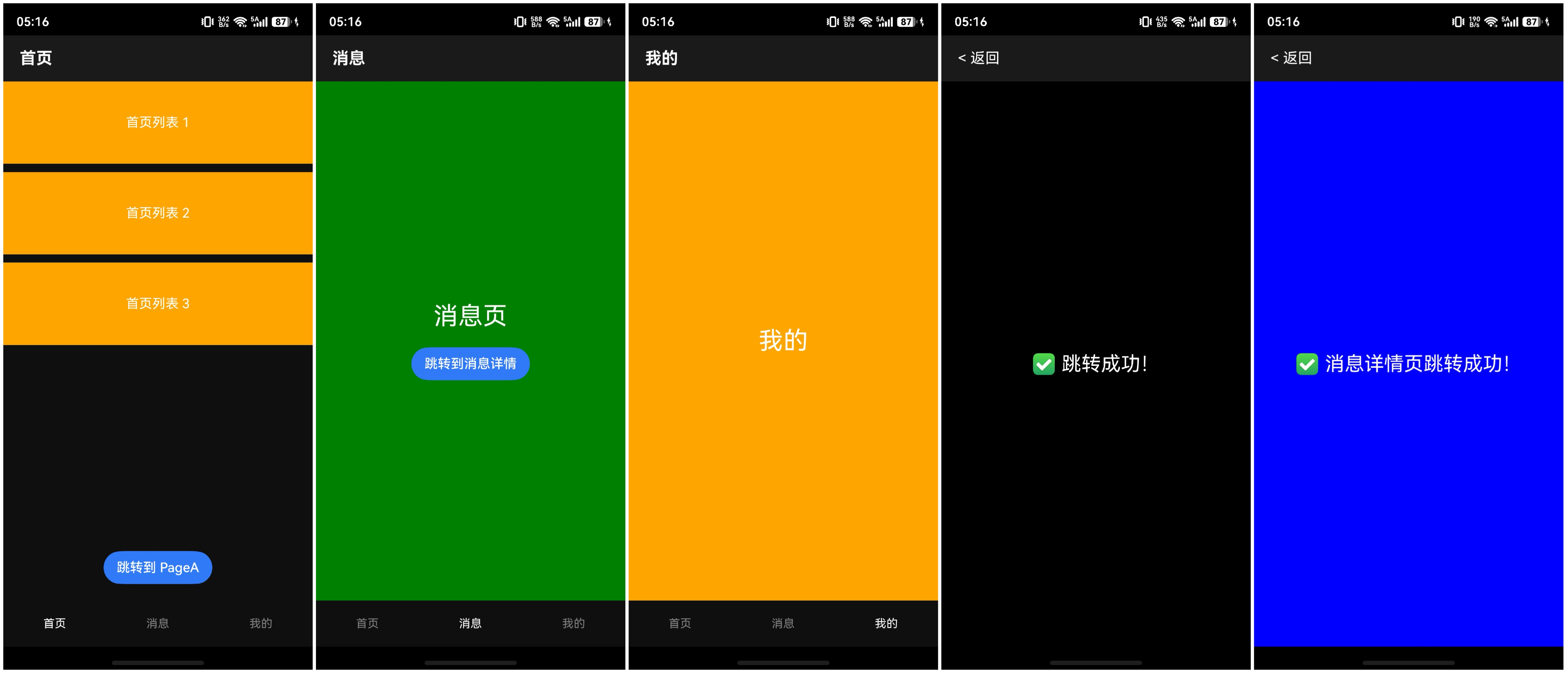
cke_213.jpeg

Index.ets

收起
自动换行
深色代码主题
复制
// ✅ 必须加这一行导入 router
import router from '@ohos.router'

@Entry
@Component
struct Index {
  @State currentTitle: string = '首页'
  @State currentIndex: number = 0

  build() {
    Column() {
      // 顶部标题栏
      Row() {
        Text(this.currentTitle)
          .fontSize(20)
          .fontWeight(FontWeight.Bold)
          .fontColor(Color.White)
      }
      .width('100%')
      .height(56)
      .padding({ left: 20 })
      .backgroundColor('#1A1A1A')

      // Tabs 内容
      Tabs({ barPosition: BarPosition.End, index: this.currentIndex }) {
        // Tab 1:首页
        TabContent() {
          Column() {
            List({ space: 10 }) {
              ForEach([1, 2, 3], (item: number) => {
                ListItem() {
                  Text(`首页列表 ${item}`)
                    .fontColor(Color.White)
                }
                .width('100%')
                .height(100)
                .backgroundColor(Color.Orange)
              })
            }
            .layoutWeight(1)

            // 跳转按钮(简化版)
            Button('跳转到 PageA')
              .onClick(() => {
                // 核心跳转代码
                router.pushUrl({ url: 'pages/PageA' })
              })
              .margin({ bottom: 20 })
          }
          .width('100%')
          .height('100%')
        }
        .tabBar(this.TabBarBuilder('首页', 0))

        // Tab 2:消息
        TabContent() {
          Column() {
            Text('消息页')
              .fontSize(30)
              .fontColor(Color.White)
            Button('跳转到消息详情')
              .onClick(() => {
                router.pushUrl({ url: 'pages/MsgSecondPage' })
              })
              .margin({ top: 20 })
          }
          .width('100%')
          .height('100%')
          .backgroundColor(Color.Green)
          .justifyContent(FlexAlign.Center)
        }
        .tabBar(this.TabBarBuilder('消息', 1))

        // Tab 3:我的
        TabContent() {
          Column() {
            Text('我的')
              .fontSize(30)
              .fontColor(Color.White)
          }
          .width('100%')
          .height('100%')
          .backgroundColor(Color.Orange)
          .justifyContent(FlexAlign.Center)
        }
        .tabBar(this.TabBarBuilder('我的', 2))
      }
      .onChange((index: number) => {
        const titles = ['首页', '消息', '我的']
        this.currentTitle = titles[index]
        this.currentIndex = index
      })
      .layoutWeight(1)
    }
    .width('100%')
    .height('100%')
    .backgroundColor('#0F0F0F')
  }

  @Builder
  TabBarBuilder(title: string, index: number) {
    Column() {
      Text(title)
        .fontSize(14)
        .fontColor(this.currentIndex === index ? Color.White : Color.Gray)
    }
    .width('100%')
    .height(56)
    .justifyContent(FlexAlign.Center)
  }
}

PageA.ets(二级页)

收起
自动换行
深色代码主题
复制
// ✅ 必须加这一行导入 router
import router from '@ohos.router'

@Entry
@Component
struct PageA {
  build() {
    Column() {
      // 返回按钮
      Row() {
        Text("< 返回")
          .fontSize(18)
          .fontColor(Color.White)
          .onClick(() => {
            router.back()
          })
        Blank()
      }
      .width('100%')
      .height(56)
      .padding({ left: 20 })
      .backgroundColor('#1A1A1A')

      // 内容
      Column() {
        Text('✅ 跳转成功!')
          .fontSize(24)
          .fontColor(Color.White)
      }
      .layoutWeight(1)
      .justifyContent(FlexAlign.Center)
    }
    .width('100%')
    .height('100%')
    .backgroundColor(Color.Black)
  }
}

MsgSecondPage.ets(消息二级页)

收起
自动换行
深色代码主题
复制
// ✅ 必须加这一行导入 router
import router from '@ohos.router'

@Entry
@Component
struct MsgSecondPage {
  build() {
    Column() {
      Row() {
        Text("< 返回")
          .fontSize(18)
          .fontColor(Color.White)
          .onClick(() => {
            router.back()
          })
        Blank()
      }
      .width('100%')
      .height(56)
      .padding({ left: 20 })
      .backgroundColor('#1A1A1A')

      Column() {
        Text('✅ 消息详情页跳转成功!')
          .fontSize(24)
          .fontColor(Color.White)
      }
      .layoutWeight(1)
      .justifyContent(FlexAlign.Center)
    }
    .width('100%')
    .height('100%')
    .backgroundColor(Color.Blue)
  }
}
展开全部
4楼回复于2026-04-29 09:19 来自广东
典型底部 Tab + 二级页结构,建议只保留一个外层 Navigation,把 Tabs 作为首页内容放进去;二级页通过同一个 NavPathStack push 到 Navigation 栈里,这样二级页会覆盖整个内容区,TabBar 不会继续露在页面底部。标题可以两种处理:一级 Tab 页面用 Navigation.title(this.tabTitles[this.currentIndex]) 动态绑定;二级页则在各自 NavDestination 里设置 title。不要给每个 TabContent 再套一个独立 Navigation,除非你明确希望每个 Tab 内部独立维护栈且二级页仍保留底部栏。如果要“每个 Tab 独立栈 + 进入二级隐藏底部栏”,需要根据当前 tab 的 pathStack.size() 条件渲染/隐藏 Tabs。
1
3楼回复于2026-04-29 09:14 来自四川
  • 幻想丶花开半夏
    我试了Navigation.title(this.tabTitles[this.currentIndex]) 动态绑定,感觉在切换时,标题展示有点延迟,效果没有上面那个兄弟的方法好
    2026-04-29 09:19 来自北京

在Index.ets中的最外层使用一个Navigation控制,

每个tabContent单独给一个NavDestination控制。

收起
自动换行
深色代码主题
复制
Navigation(this.pageInfos) {
  //Tabs
}
.hideBackButton(true)
.titleMode(NavigationTitleMode.Mini)
.mode(NavigationMode.Stack)
.title({
        builder: undefined,
        height: 0//目的是为了backgroundColor延伸到状态栏
}, { backgroundColor: $r('app.color.theme') })

大概这样子。

3
1楼编辑于2026-04-29 06:45 来自广西
  • 幻想丶花开半夏
    好像不行吧,顶部的标题是Navigation的,这个tab还是在Navigation,切换tab,标题不会变啊
    2026-04-29 06:46 来自北京
  • hyyly回复幻想丶花开半夏
    看代码,没问题的,我就是这样用的。
    2026-04-29 06:48 来自广西
  • 幻想丶花开半夏回复hyyly

    cke_260.png

    如果不需要显示Navigation的title没问题,现在需要显示,在切换tabbar的时候,顶部的标题就不会变,我现在用动态赋值的方法处理了

    收起
    自动换行
    深色代码主题
    复制
    @Entry
    @Component
    struct Index {
      private pathStack: NavPathStack = new NavPathStack();
      @State currentIndex: number = 0
      // 1. 定义与 Tab 顺序对应的标题数组
      private readonly tabTitles: string[] = ['首页','消息', '我的']
      private tabsController: TabsController = new TabsController()
      build() {
        Navigation(this.pathStack) {
          Tabs({ barPosition: BarPosition.End ,controller: this.tabsController, index: this.currentIndex}) {
            TabContent() {
              Column() {
                Button('跳转到二级页面')
                  .onClick(() => {
                    this.pathStack.pushPath({ name: 'PageA' })
                  })
              }
            }.tabBar('首页')
    
            TabContent() {
              Column() {
                Text('消息')
                Image($r('sys.media.ai_recognize'))
                  .width(100)
                Button('跳转到消息二级页').onClick((event: ClickEvent) => {
                  this.pathStack.pushPath({ name: 'MsgSecondPage' })
                })
              }
            }.tabBar('消息')
    
            TabContent() {
              Column() {
                Text('我的')
              }
              .width('100%')
              .height('100%')
              .backgroundColor(Color.Orange)
              .alignItems(HorizontalAlign.Center)
              .justifyContent(FlexAlign.Center)
            }
            .tabBar('我的')
          }
          .onChange((index: number) => {
            this.currentIndex = index
          })
        }
        .title(this.tabTitles[this.currentIndex])
        .hideBackButton(true)
        .titleMode(NavigationTitleMode.Mini)
    
      }
    }
    展开全部
    2026-04-29 07:12 来自北京
写回答
新增插入模板功能
一键使用模板,快速填写内容,轻松发帖~
知道了
  • 为了保障您的信息安全,请勿上传您的敏感个人信息(如您的密码等信息)和您的敏感资产信息(如关键源代码、签名私钥、调试安装包、业务日志等信息),且您需自行承担由此产生的信息泄露等安全风险。
  • 如您发布的内容为转载内容,请注明内容来源。

我要提问题

了解社区公约,与您携手共创和谐专业的开发者社区。