














 hid26801697
HarmonyOS 5
后台定位怎么做?


 AI助手
应用切后台约 10 分钟后位置更新停止,根本原因是应用退到后台后进程会被系统挂起,定时器、GPS、网络等资源随之冻结。HarmonyOS 对后台执行有严格管控,普通的后台运行无法维持持续定位,必须通过“定位类型的长时任务 + 后台定位权限 + 位置变化订阅”三者配合,才能实现类似网约车、骑手接单这类场景的持续位置上报。仅申请了 ohos.permission.LOCATION 而未申请长时任务时,系统默认只允许应用在后台短暂使用定位,随后即挂起,这正是您观察到“切后台 10 分钟后停止”的典型表现。
解决方案整体思路
第一步:module.json5 配置
在模块的 module.json5 中声明权限与后台模式,这是最容易被遗漏的一步:
{
  "module": {
    "abilities": [
      {
        "name": "EntryAbility",
        "srcEntry": "./ets/entryability/EntryAbility.ets",
        // 声明定位类型的后台模式,必须与真实业务一致
        "backgroundModes": [
          "location"
        ]
      }
    ],
    "requestPermissions": [
      {
        "name": "ohos.permission.APPROXIMATELY_LOCATION",
        "reason": "$string:location_reason",
        "usedScene": {
          "abilities": ["EntryAbility"],
          "when": "inuse"
        }
      },
      {
        "name": "ohos.permission.LOCATION",
        "reason": "$string:location_reason",
        "usedScene": {
          "abilities": ["EntryAbility"],
          "when": "inuse"
        }
      },
      {
        // 后台定位权限
        "name": "ohos.permission.LOCATION_IN_BACKGROUND",
        "reason": "$string:background_location_reason",
        "usedScene": {
          "abilities": ["EntryAbility"],
          "when": "always"
        }
      },
      {
        // 长时任务权限
        "name": "ohos.permission.KEEP_BACKGROUND_RUNNING",
        "reason": "$string:running_background",
        "usedScene": {
          "abilities": ["EntryAbility"],
          "when": "always"
        }
      }
    ]
  }
}
第二步:动态申请定位权限
import { abilityAccessCtrl, Permissions } from '@kit.AbilityKit';

// 动态申请定位权限,需在用户进入接单/上线页面时发起
function requestLocationPermissions(context: Context): void {
  let atManager: abilityAccessCtrl.AtManager = abilityAccessCtrl.createAtManager();
  let permissionList: Permissions[] = [
    'ohos.permission.APPROXIMATELY_LOCATION',
    'ohos.permission.LOCATION'
  ];
  atManager.requestPermissionsFromUser(context, permissionList).then((data) => {
    // 后台定位权限 LOCATION_IN_BACKGROUND 无法弹窗申请,
    // 需引导用户在系统设置中手动开启“允许始终访问位置信息”
    console.info(`request permissions result: ${JSON.stringify(data)}`);
  }).catch((err: BusinessError) => {
    console.error(`request permissions failed: ${JSON.stringify(err)}`);
  });
}
第三步:开启长时任务并订阅位置变化(核心代码)
import { backgroundTaskManager } from '@kit.BackgroundTasksKit';
import { geoLocationManager } from '@kit.LocationKit';
import { wantAgent, common } from '@kit.AbilityKit';
import { BusinessError } from '@kit.BasicServicesKit';

// 1. 开启 LOCATION 类型长时任务
function startLocationTask(context: common.UIAbilityContext): void {
  let wantAgentInfo: wantAgent.WantAgentInfo = {
    wants: [
      {
        bundleName: context.abilityInfo.bundleName,
        abilityName: context.abilityInfo.name
      }
    ],
    actionType: wantAgent.OperationType.START_ABILITY,
    requestCode: 1,
    wantAgentFlags: [wantAgent.WantAgentFlags.UPDATE_PRESENT_FLAG]
  };

  wantAgent.getWantAgent(wantAgentInfo).then((wantAgentObj: wantAgent.WantAgent) => {
    backgroundTaskManager.startBackgroundRunning(
      context,
      backgroundTaskManager.BackgroundMode.LOCATION,
      wantAgentObj
    ).then(() => {
      // 长时任务申请成功后再开启位置订阅
      startLocationUpdate();
    }).catch((err: BusinessError) => {
      console.error(`startBackgroundRunning failed, code: ${err.code}, message: ${err.message}`);
    });
  });
}

// 2. 订阅位置变化,持续上报
function startLocationUpdate(): void {
  let request: geoLocationManager.ContinuousLocationRequest = {
    interval: 5, // 上报间隔,单位秒,按业务需要调整
    locationScenario: geoLocationManager.LocationScenario.NAVIGATION // 导航场景,适合接单类应用
  };
  try {
    geoLocationManager.on('locationChange', request, (location: geoLocationManager.Location) => {
      // 在此回调中上报位置到服务器
      console.info(`location: latitude=${location.latitude}, longitude=${location.longitude}`);
      reportLocationToServer(location);
    });
  } catch (err) {
    console.error(`on locationChange failed, code: ${err.code}, message: ${err.message}`);
  }
}

// 3. 业务结束时释放资源:先关订阅,再停长时任务
function stopLocationTask(context: common.UIAbilityContext): void {
  geoLocationManager.off('locationChange');
  backgroundTaskManager.stopBackgroundRunning(context).then(() => {
    console.info('stopBackgroundRunning succeeded');
  }).catch((err: BusinessError) => {
    console.error(`stopBackgroundRunning failed: ${JSON.stringify(err)}`);
  });
}
补充说明与常见坑点
任务类型必须与真实行为匹配。系统会校验申请的
LOCATION长时任务与实际定位行为是否一致,只申请任务而不开启定位订阅,或声明了 location 模式但实际不做定位,都会被系统管控甚至上架审核驳回。设备静止冻结是正常省电策略。即使长时任务配置正确,当设备静止超过一定时间(退后台前静止超过约 30 秒、静止持续约 3 分钟)时,系统仍可能主动冻结进程(日志特征为
FROZEN_BY_DEVICE_STILL_ENTER)。用户移动后系统会恢复,业务侧需具备位置断点恢复能力,这属于正常行为,无法绕过。释放顺序要正确。业务结束时先调用
geoLocationManager.off('locationChange')关闭订阅,再调用stopBackgroundRunning停止长时任务;若长时任务申请失败,应立即回滚已开启的定位订阅,避免孤立的 GPS 消耗。商圈推送提醒建议改用地理围栏。相比在回调中自行判断是否进入商圈,
geoLocationManager提供的地理围栏能力(LocationKit的 geofence 接口)由系统低功耗监测围栏进出事件并直接触发通知,即使应用进程被冻结也能由系统侧触发,更适合“进入商圈推送提醒”这类场景,可显著降低功耗。同一 UIAbility 同一时刻只能申请一个长时任务。如果接单应用还需要后台语音播报来单提醒,需要创建多个 UIAbility 分别申请定位与音频播报类长时任务。
后台定位权限
ohos.permission.LOCATION_IN_BACKGROUND无法通过弹窗动态申请,需要引导用户进入系统设置,将应用的位置权限设置为“始终允许”。上架时需在审核材料中说明后台定位的用途,且需符合应用市场对后台定位类应用的管控要求。
 1
 征途是远方点赞7天前 来自陕西
 蓝瘦的蜕变

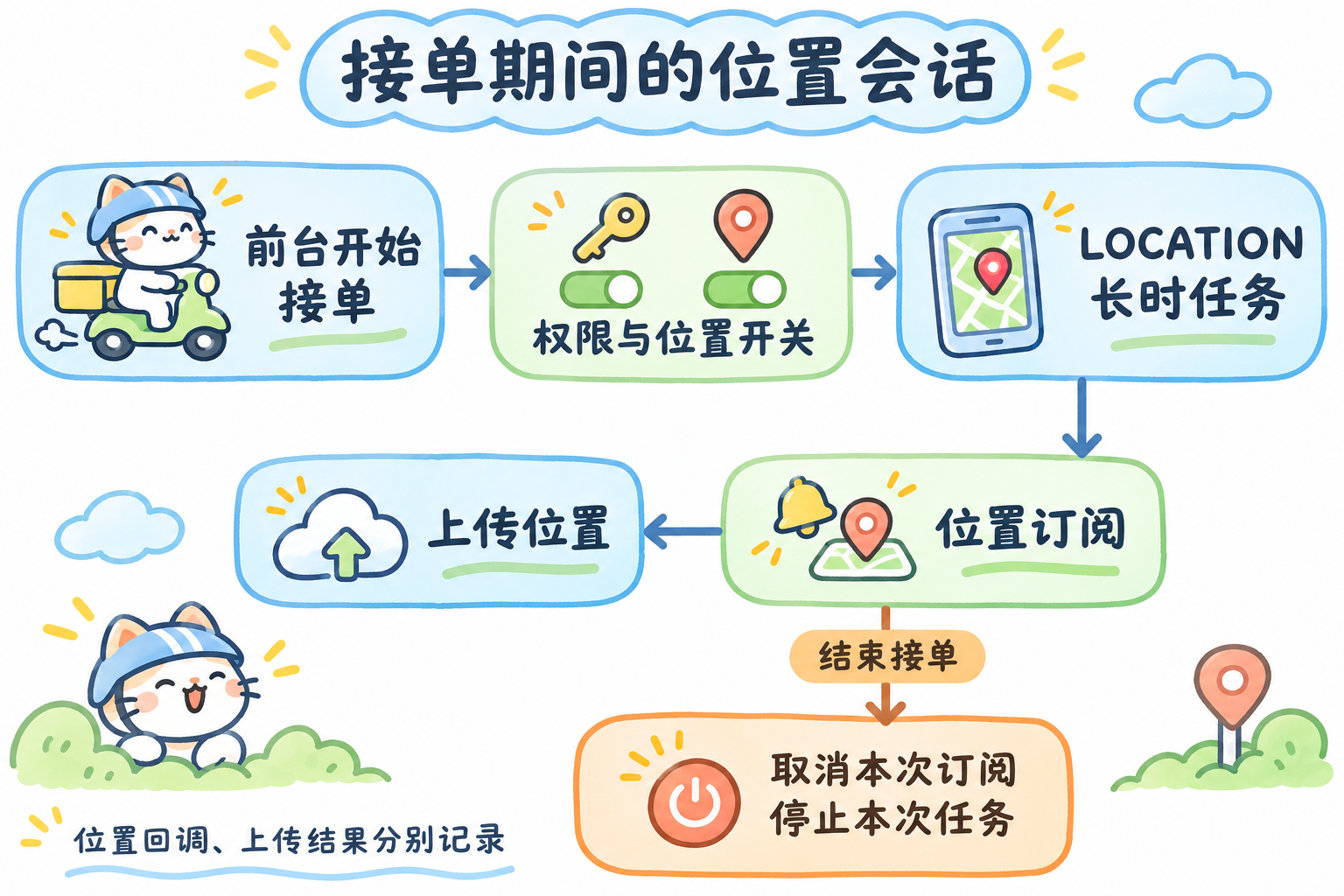
接单期间持续上报位置,用 LOCATION 类型的长时任务。 用户在前台点「开始接单」时,确认精准定位权限已授予、系统设置里的位置权限为「始终允许」。在 module.json5 声明 LOCATION_IN_BACKGROUND、KEEP_BACKGROUND_RUNNING,并给对应 UIAbility 配置 backgroundModes: ["location"]。调用 startBackgroundRunning() 成功后订阅 geoLocationManager.on('locationChange', …),收工时取消订阅并停止任务。后台持续定位配置 · 后台定位授权说明
约 10 分钟后停止,先区分是定位断了还是上传断了。 分别记录长时任务状态、最后一次定位回调和上传结果,在真机上对比锁屏静止与移动两种情况。如果静止时暂停、移动后恢复,可能命中了后台定位节电策略,服务端应避免仅凭一段时间没有新坐标就把接单人员判为离线。华为后台定位排查案例
如果某个功能只需要进出商圈时触发提醒,可以用 Location Kit 地理围栏。需要在后台接收围栏事件时,在 AGC 申请「围栏后台唤醒」能力。围栏能力申请指南
1 橙动创意
“后台约十分钟后不更新”还不能区分定位回调停了,还是坐标上传失败。接单值班场景建议把两条链路分开记时间和错误码:最近一次定位回调、最近一次上传成功;日志无需记录用户精确坐标。
先核对前台定位授权、UIAbility 的 backgroundModes 中 location,以及 KEEP_BACKGROUND_RUNNING 声明。在用户前台开启值班后,用真实 UIAbilityContext 和已创建的通知 WantAgent 启动 LOCATION 长时任务,异步方法中的调用是:
import { backgroundTaskManager } from '@kit.BackgroundTasksKit';

await backgroundTaskManager.startBackgroundRunning(
  context, backgroundTaskManager.BackgroundMode.LOCATION, notice);
上面的 context、notice 分别是当前 UIAbilityContext 和 WantAgent,须在前面的初始化流程取得,并处理启动失败。任务成功后再管理定位订阅;下班时取消订阅并停止长时任务,不要在页面一退后台就执行整套清理。官方权限规则包含“前台定位权限+定位长时任务”的后台使用路径,不能一概说必须申请 LOCATION_IN_BACKGROUND。长时任务也不是永不退出的保证;弱网时应缓存待上传记录、按序补传,订单围栏与通知链路另行验证。权限说明:https://developer.huawei.com/consumer/cn/doc/harmonyos-guides/permissions-for-all-user/ ;后台任务实践:https://developer.huawei.com/consumer/cn/doc/best-practices/bpta-back-task-implement/
 训犬者
先分别记录“最后一次位置回调”和“最后一次上传成功”的时间,确定断在采样还是网络;约 10 分钟本身不能证明具体原因。接单期间可采用前台位置授权 + LOCATION 长时任务,官方允许这条后台定位路径,不必一律再申请 LOCATION_IN_BACKGROUND。
在 module.json5 声明 KEEP_BACKGROUND_RUNNING,并为实际发起任务的 UIAbility 配置 backgroundModes: ["location"];权限名称均带 ohos.permission. 前缀。需要精确位置时,同时声明并申请 APPROXIMATELY_LOCATION、LOCATION,核对精确授权结果和系统位置开关。下面是 Stage、API 12+ 的最小会话函数:传入真实 UIAbilityContext、已创建的通知 WantAgent 和位置回调;用户在前台开始接单时调用,保存返回的结束函数。
import { common, WantAgent } from '@kit.AbilityKit';
import { backgroundTaskManager } from '@kit.BackgroundTasksKit';
import { geoLocationManager } from '@kit.LocationKit';

export async function beginDuty(
  context: common.UIAbilityContext,
  notice: WantAgent,
  receive: (value: geoLocationManager.Location) => void
): Promise<() => Promise<void>> {
  await backgroundTaskManager.startBackgroundRunning(
    context, backgroundTaskManager.BackgroundMode.LOCATION, notice);
  const finish = async (): Promise<void> => {
    try {
      geoLocationManager.off('locationChange', receive);
    } finally {
      await backgroundTaskManager.stopBackgroundRunning(context);
    }
  };
  const sample: geoLocationManager.ContinuousLocationRequest = {
    interval: 5,
    locationScenario: geoLocationManager.UserActivityScenario.TRANSPORT
  };
  try {
    geoLocationManager.on('locationChange', sample, receive);
  } catch (cause) {
    await finish();
    throw cause;
  }
  return finish;
}
示例按出行场景请求采样,间隔不是回调准时保证。开始/结束需串行并捕获异常;下线时 await 返回的结束函数,不要因为某个页面消失就停掉整个接单会话。此最小例约定该 UIAbility 仅有本业务管理的一个长时任务,多个任务需采用 API 21+ 的任务 ID 取消方式。商圈提醒可另评估地理围栏的设备能力和后台授权,它不能替代连续轨迹;也不要把长时任务理解为永不中断的承诺。
官方参考: https://developer.huawei.com/consumer/cn/doc/HarmonyOS-Guides/permissions-for-all-user/ https://developer.huawei.com/consumer/cn/doc/harmonyos-references/js-apis-resourceschedule-backgroundtaskmanager/ https://developer.huawei.com/consumer/cn/doc/harmonyos-references/js-apis-geolocationmanager/
 匿名用户
 大雷神
先把“位置没更新”与“位置上报没到服务器”分开查。仅凭约10分钟这个时间,不能确定是固定系统时限,也不能保证加上长时任务后永远不会中断。
在前台最后一次正常定位、切后台、停止更新三个时间点,分别记录:
1. 定位原始回调时间和位置时间戳;
2. 上报请求发起、响应及服务端收到的时间;
3. 定位授权、系统位置开关、长时任务申请结果和任务结束/取消情况。
如果回调仍在而服务端没数据,应查网络/鉴权/上传队列;如果回调也停止,再查定位订阅是否被页面清理、任务是否真正启动、权限是否变化及系统管控日志。不要只看通知是否显示或一个isTracking变量。
楼上已有长时任务方案,再补一个权限边界:官方当前开放权限文档明确,按业务申请LOCATION类型长时任务并取得前台位置权限,也可在后台获取位置,不必一律申请LOCATION_IN_BACKGROUND。精确定位和模糊定位的授权也要分别判定;“任意一个权限允许”不等于已取得精确位置。具体走哪条授权路径,应与实际业务和目标系统版本对应。
接单状态最好由独立业务服务管理,不让定位订阅的生命周期绑定某个会销毁的页面。上线:校验授权及开关→申请相应后台任务→启动订阅→确认收到数据;中途失败回滚已取得的资源。下线:停止订阅、取消本业务持有的任务、停止上报重试,各步独立清理,某一步失败也不能跳过后续。
位置采样、网络上传和商圈判定是三个环节。为位置加序号和采集时间,弱网重试要有队列上限,服务器拒绝过旧位置覆盖新位置;进入商圈提醒按事件去重,不能每次补传旧轨迹都重新发提醒。地理围栏是否可用需另核对设备、权限和接口,不能把“注册围栏”当成必然唤醒并成功推送。
建议用移动/静止、亮屏/锁屏、Wi-Fi/蜂窝、权限撤回等对照测试收集日志,再判断是授权、后台执行还是上传链路的问题。以上未在你的设备复现。
官方权限及LOCATION长时任务替代授权路径:
https://developer.huawei.com/consumer/cn/doc/HarmonyOS-Guides/permissions-for-all-user/
 卢队长
应用切到后台约 10 分钟后定位停止,是因为触发了系统的后台挂起机制:应用退至后台后,若未申请长时任务,系统会挂起应用进程,所有定时器与位置监听回调都会被强制暂停。要实现类似"切后台持续上报位置"的效果,核心组合是 "前台定位权限 + LOCATION 类型长时任务 + 持续定位订阅"。需要特别注意的是:LOCATION_IN_BACKGROUND 后台定位权限并非必需条件,官方明确说明,对于需要在后台使用位置的应用,可通过申请 LOCATION 类型的长时任务和前台位置权限的方式在后台获取位置,而不必申请后台位置权限。
一、问题原因拆解
1. 进程被系统挂起(Suspend):应用退至后台后,如果没有申请合法的长时任务,系统会在一定时间后挂起应用进程,setInterval 定时器和 geoLocationManager.on('locationChange') 的位置回调都会被强制暂停,导致上报断流。
2. 权限与长时任务的分工:定位权限解决的是"能否获取位置数据"的准入问题;长时任务解决的是"进程不被挂起"的保活问题。两者缺一不可,但后台定位权限(LOCATION_IN_BACKGROUND)仅在长时任务之外的后台偶发定位场景才需要申请。
二、大体实现代码
第 1 步:声明权限与后台模式(module.json5)
{
  "module": {
    "requestPermissions": [
      {
        "name": "ohos.permission.APPROXIMATELY_LOCATION",
        "reason": "$string:location_reason",
        "usedScene": { "abilities": ["EntryAbility"], "when": "inuse" }
      },
      {
        "name": "ohos.permission.LOCATION",
        "reason": "$string:location_reason",
        "usedScene": { "abilities": ["EntryAbility"], "when": "inuse" }
      },
      {
        "name": "ohos.permission.KEEP_BACKGROUND_RUNNING",
        "reason": "$string:background_reason",
        "usedScene": { "abilities": ["EntryAbility"], "when": "inuse" }
      }
    ],
    "abilities": [
      {
        "name": "EntryAbility",
        "srcEntry": "./ets/entryability/EntryAbility.ets",
        "backgroundModes": ["location"]
      }
    ]
  }
}
说明:backgroundModes: ["location"] 声明该 UIAbility 使用定位类型的后台模式,缺失此项会导致申请长时任务直接失败;若业务确需长时任务之外的后台定位能力(如围栏静默触发),再补充声明 ohos.permission.LOCATION_IN_BACKGROUND,该权限无法通过弹窗申请,必须在用户授予前台权限后,由用户在设置中手动授予或通过 requestPermissionOnSetting() 拉起权限设置弹窗引导授予。
第 2 步:页面侧完整代码(API 12 及以上版本)
import { backgroundTaskManager } from '@kit.BackgroundTasksKit';
import { abilityAccessCtrl, common, Permissions, WantAgent, wantAgent } from '@kit.AbilityKit';
import { BusinessError } from '@kit.BasicServicesKit';
import { geoLocationManager } from '@kit.LocationKit';

// 动态申请前台定位权限
async function requestLocationPermissions(context: common.UIAbilityContext): Promise<boolean> {
  const atManager: abilityAccessCtrl.AtManager = abilityAccessCtrl.createAtManager();
  const permissions: Array<Permissions> =
    ['ohos.permission.APPROXIMATELY_LOCATION', 'ohos.permission.LOCATION'];
  try {
    const result = await atManager.requestPermissionsFromUser(context, permissions);
    for (let i = 0; i < result.authResults.length; i++) {
      if (result.authResults[i] === 0) {
        return true; // 用户已授权
      }
    }
    return false;
  } catch (err) {
    console.error(`requestPermissionsFromUser failed: code=${(err as BusinessError).code}`);
    return false;
  }
}

@Entry
@Component
struct OrderTrackingPage {
  @State latitude: number = 0;
  @State longitude: number = 0;
  @State isTracking: boolean = false;
  // 保存回调引用,停止订阅时必须传入同一引用,否则抛 401 错误码
  private locationCallback = (location: geoLocationManager.Location): void => {
    this.latitude = location.latitude;
    this.longitude = location.longitude;
    // TODO: 在此向服务器上报经纬度
  };

  private getContextSafely(): common.UIAbilityContext | undefined {
    const ctx = this.getUIContext().getHostContext() as common.UIAbilityContext;
    return ctx;
  }

  // 上线接单:申请长时任务 + 开启持续定位
  async startTracking(): Promise<void> {
    const context: common.UIAbilityContext | undefined = this.getContextSafely();
    if (context === undefined) {
      return;
    }
    const granted: boolean = await requestLocationPermissions(context);
    if (!granted) {
      return;
    }
    const wantAgentInfo: wantAgent.WantAgentInfo = {
      wants: [
        {
          bundleName: 'com.example.myapp', // 替换为实际包名
          abilityName: 'EntryAbility'
        }
      ],
      actionType: wantAgent.OperationType.START_ABILITY,
      requestCode: 0,
      wantAgentFlags: [wantAgent.WantAgentFlags.UPDATE_PRESENT_FLAG]
    };
    try {
      const wantAgentObj: WantAgent = await wantAgent.getWantAgent(wantAgentInfo);
      // 长时任务类型必须与 module.json5 中 backgroundModes 声明一致
      await backgroundTaskManager.startBackgroundRunning(context, ['location'], wantAgentObj);
      const request: geoLocationManager.ContinuousLocationRequest = {
        interval: 5, // 上报间隔(秒),建议 5~10 秒兼顾功耗与实时性
        locationScenario: geoLocationManager.UserActivityScenario.NAVIGATION // 导航场景,定位优先级最高
      };
      geoLocationManager.on('locationChange', request, this.locationCallback);
      this.isTracking = true;
    } catch (err) {
      console.error(`startTracking failed: code=${(err as BusinessError).code}, message=${(err as BusinessError).message}`);
    }
  }

  // 下线收工:停止定位并取消长时任务,避免被系统判定违规保活
  async stopTracking(): Promise<void> {
    const context: common.UIAbilityContext | undefined = this.getContextSafely();
    if (context === undefined) {
      return;
    }
    try {
      geoLocationManager.off('locationChange', this.locationCallback);
      await backgroundTaskManager.stopBackgroundRunning(context);
      this.isTracking = false;
    } catch (err) {
      console.error(`stopTracking failed: code=${(err as BusinessError).code}`);
    }
  }

  build() {
    Column({ space: 12 }) {
      Button(this.isTracking ? '下线收工' : '上线接单')
        .width(240)
        .onClick(() => {
          if (this.isTracking) {
            this.stopTracking();
          } else {
            this.startTracking();
          }
        })
      Text(`latitude: ${this.latitude}`)
      Text(`longitude: ${this.longitude}`)
    }
    .width('100%')
    .height('100%')
    .justifyContent(FlexAlign.Center)
  }
}
第 3 步:商圈地理围栏(可选增强)
除了依赖后端轮询经纬度判断是否进入商圈,建议配合系统原生地理围栏能力,由芯片低功耗托管,跨入商圈边界时系统唤醒应用触发通知,降低后台高频计算带来的发热与耗电。注意围栏接口是 on('gnssFenceStatusChange')(而非 gnssStatusChange,后者是订阅卫星状态的接口):
import { geoLocationManager } from '@kit.LocationKit';
import { wantAgent, WantAgent } from '@kit.AbilityKit';
import { BusinessError } from '@kit.BasicServicesKit';

async function addBusinessDistrictFence(): Promise<void> {
  // 围栏能力由 GNSS 芯片提供,仅部分设备支持,必须先判断
  if (!geoLocationManager.isGnssFenceServiceSupported()) {
    console.error('当前设备不支持 GNSS 地理围栏');
    return;
  }
  const wantAgentInfo: wantAgent.WantAgentInfo = {
    wants: [
      {
        bundleName: 'com.example.myapp',
        abilityName: 'EntryAbility',
        action: 'geofence.enter' // 自定义 action,用于在 onCreate/onNewWant 中区分围栏事件
      }
    ],
    actionType: wantAgent.OperationType.START_ABILITY,
    requestCode: 0,
    wantAgentFlags: [wantAgent.WantAgentFlags.UPDATE_PRESENT_FLAG]
  };
  try {
    const wantAgentObj: WantAgent = await wantAgent.getWantAgent(wantAgentInfo);
    const request: geoLocationManager.GeofenceRequest = {
      scenario: geoLocationManager.LocationRequestScenario.NAVIGATION,
      geofence: {
        latitude: 31.12,   // 商圈中心纬度
        longitude: 121.11, // 商圈中心经度
        radius: 500,       // 围栏半径(米)
        expiration: 10000  // 围栏有效期(毫秒),过期自动失效
      }
    };
    geoLocationManager.on('gnssFenceStatusChange', request, wantAgentObj);
  } catch (err) {
    console.error(`addFence failed: code=${(err as BusinessError).code}`);
  }
}
进出围栏事件由系统通过 WantAgent 拉起对应 Ability,在 onCreate/onNewWant 中解析 Want 的 action 即可区分事件类型,再触发本地通知或推送。
三、关键注意事项
长时任务的运行限制(违反任意一条,即使申请了长时任务仍会被挂起):
- 申请长时任务后若应用未执行相应业务(如申请了 LOCATION 却未开启定位),系统会管控并挂起应用
- 执行的业务类型与申请类型不一致,会被挂起或终止
- 后台负载持续高于所申请类型的典型负载,会被挂起或终止
- 任务结束后必须及时主动取消长时任务,否则退后台会被挂起
 仙银
HarmonyOS 对后台应用有功耗管控——未申请长时任务的应用退到后台后,系统会强制停止其定位请求。你看到的"10分钟后停止"就是系统挂起进程的结果。
解决思路:申请 location 类型的长时任务(ContinuousTask),让系统知道你的应用在后台有用户可感知的定位业务,不要挂起它。
完整步骤
1. module.json5 声明权限
在 requestPermissions 中声明四个权限:
{
  "name": "ohos.permission.APPROXIMATELY_LOCATION",
  "reason": "$string:location_use",
  "usedScene": { "abilities": ["EntryAbility"], "when": "inuse" }
},
{
  "name": "ohos.permission.LOCATION",
  "reason": "$string:location_use",
  "usedScene": { "abilities": ["EntryAbility"], "when": "inuse" }
},
{
  "name": "ohos.permission.LOCATION_IN_BACKGROUND",
  "reason": "$string:location_use",
  "usedScene": { "abilities": ["EntryAbility"], "when": "inuse" }
},
{
  "name": "ohos.permission.KEEP_BACKGROUND_RUNNING",
  "reason": "$string:location_use",
  "usedScene": { "abilities": ["EntryAbility"], "when": "inuse" }
}
2. module.json5 声明后台模式
在对应 UIAbility 的 backgroundModes 中加 location:
"abilities": [
  {
    "name": "EntryAbility",
    "backgroundModes": ["location"]
  }
]
3. 引导用户授予后台位置权限
LOCATION_IN_BACKGROUND 不能通过弹窗授权,必须引导用户到系统设置中手动把位置权限设为"始终允许"。参考代码:
import { common, Want } from '@kit.AbilityKit';

function openLocationSettings(context: common.UIAbilityContext): void {
  let wantInfo: Want = {
    bundleName: 'com.huawei.hmos.settings',
    abilityName: 'com.huawei.hmos.settings.MainAbility',
    uri: 'application_info_entry',
    parameters: {
      settingsParamBundleName: '你的包名'
    }
  };
  context.startAbility(wantInfo);
}
4. 启动长时任务 + 开启持续定位
关键:先 startBackgroundRunning 申请长时任务,再开启定位监听。退出时反过来——先停定位,再 stopBackgroundRunning。
import { backgroundTaskManager } from '@kit.BackgroundTasksKit';
import { geoLocationManager } from '@kit.LocationKit';
import { wantAgent, common, BusinessError } from '@kit.AbilityKit';

async function startBackgroundLocation(context: common.UIAbilityContext): Promise<void> {
  // 1. 构建 wantAgent(点击通知拉起应用)
  let wantAgentInfo: wantAgent.WantAgentInfo = {
    wants: [{ bundleName: '你的包名', abilityName: 'EntryAbility' }],
    actionType: wantAgent.OperationType.START_ABILITY,
    requestCode: 0,
    actionFlags: [wantAgent.WantAgentFlags.UPDATE_PRESENT_FLAG]
  };
  let wantAgentObj: wantAgent.WantAgent =
    await wantAgent.getWantAgent(wantAgentInfo);

  // 2. 申请 location 类型长时任务
  await backgroundTaskManager.startBackgroundRunning(context, ['location'], wantAgentObj);

  // 3. 开启持续定位(接单场景用 CAR_HAILING 或 NAVIGATION)
  let request: geoLocationManager.ContinuousLocationRequest = {
    interval: 1,
    locationScenario: geoLocationManager.UserActivityScenario.NAVIGATION
  };
  geoLocationManager.on('locationChange', request, (location: geoLocationManager.Location) => {
    console.info(`lat=${location.latitude}, lng=${location.longitude}`);
    // 在这里上报位置到你的服务器
  });
}

function stopBackgroundLocation(context: common.UIAbilityContext): void {
  geoLocationManager.off('locationChange');
  backgroundTaskManager.stopBackgroundRunning(context);
}
几个坑要注意
LOCATION_IN_BACKGROUND权限声明后,用户在设置里才能看到"始终允许"选项,不声明的话只有"仅使用期间允许",后台定位不会生效- 长时任务申请成功后,系统通知栏会显示一个常驻通知(这是用户可感知的体现),不能隐藏
locationScenario建议用NAVIGATION或CAR_HAILING,这两个场景系统会优先保障定位精度和频率- 停止定位时必须同时
stopBackgroundRunning,否则长时任务通知不会消失,应用市场审核也会打回
 Z
你缺的是长时任务。光申请了位置权限和后台位置权限不够,HarmonyOS 对后台应用有挂起策略,官方文档原话:"未申请长时任务的应用退到后台后,系统会强制停止其定位请求"。你看到前台正常、后台撑了10分钟才停,是因为系统挂起不是立即执行的,有个窗口期。加上长时任务后进程就不会被挂起了。
需要做这几步:
1. module.json5 声明权限和 backgroundModes
权限需要四个全配上:APPROXIMATELY_LOCATION、LOCATION、LOCATION_IN_BACKGROUND、KEEP_BACKGROUND_RUNNING。abilities 里加 backgroundModes 为 location。
2. LOCATION_IN_BACKGROUND 不能弹窗授权
这个权限必须引导用户到系统设置里手动把位置权限切到"始终允许",否则后台定位权限不生效。跳转设置的写法可以参考动态申请后台位置权限失败该如何处理。
3. 启动定位前先申请长时任务,locationScenario 用 NAVIGATION
你的场景是持续位置上报 + 商圈围栏触发推送,用 NAVIGATION 场景比较合适。如果是轨迹记录场景就用 TRAJECTORY_TRACKING。别用 DAILY_LIFE_SERVICE 或 NO_POWER,这两种后台几乎不回调。
import { backgroundTaskManager } from '@kit.BackgroundTasksKit';
import { geoLocationManager } from '@kit.LocationKit';
import { abilityAccessCtrl, common, Permissions, WantAgent, wantAgent } from '@kit.AbilityKit';
import { BusinessError } from '@kit.BasicServicesKit';

@Entry
@Component
struct Index {
  private context: common.UIAbilityContext =
    this.getUIContext().getHostContext() as common.UIAbilityContext;
  @State message: string = 'waiting...';
  @State isTracking: boolean = false;

  async requestLocationPermission(): Promise<boolean> {
    let permissions: Array<Permissions> = [
      'ohos.permission.APPROXIMATELY_LOCATION',
      'ohos.permission.LOCATION'
    ];
    let atManager: abilityAccessCtrl.AtManager = abilityAccessCtrl.createAtManager();
    try {
      let data = await atManager.requestPermissionsFromUser(this.context, permissions);
      let grantStatus: Array<number> = data.authResults;
      for (let i = 0; i < grantStatus.length; i++) {
        if (grantStatus[i] !== 0) {
          return false;
        }
      }
      return true;
    } catch (err) {
      let error = err as BusinessError;
      return false;
    }
  }

  async startTracking(): Promise<void> {
    let granted = await this.requestLocationPermission();
    if (!granted) {
      this.message = 'Permission denied';
      return;
    }

    let wantAgentInfo: wantAgent.WantAgentInfo = {
      wants: [{
        bundleName: 'com.example.bglocdemo',
        abilityName: 'EntryAbility'
      }],
      actionType: wantAgent.OperationType.START_ABILITY,
      requestCode: 0,
      actionFlags: [wantAgent.WantAgentFlags.UPDATE_PRESENT_FLAG]
    };

    try {
      let wantAgentObj: WantAgent = await wantAgent.getWantAgent(wantAgentInfo);
      await backgroundTaskManager.startBackgroundRunning(
        this.context, ['location'], wantAgentObj
      );

      let request: geoLocationManager.ContinuousLocationRequest = {
        interval: 1,
        locationScenario: geoLocationManager.UserActivityScenario.NAVIGATION
      };

      geoLocationManager.on('locationChange', request,
        (location: geoLocationManager.Location) => {
        this.message = `lat=${location.latitude}, lng=${location.longitude}`;
      });

      this.isTracking = true;
      this.message = 'Tracking started';
    } catch (err) {
      let error = err as BusinessError;
      this.message = `Error: ${error.code}`;
    }
  }

  stopTracking(): void {
    try {
      geoLocationManager.off('locationChange');
      backgroundTaskManager.stopBackgroundRunning(this.context);
      this.isTracking = false;
      this.message = 'Tracking stopped';
    } catch (err) {
      let error = err as BusinessError;
    }
  }

  build() {
    Column({ space: 20 }) {
      Text(this.message)
        .fontSize(16)
        .textAlign(TextAlign.Center)
        .padding(10)

      Button(this.isTracking ? 'Stop' : 'Start')
        .onClick(() => {
          if (this.isTracking) {
            this.stopTracking();
          } else {
            this.startTracking();
          }
        })
    }
    .width('100%')
    .height('100%')
    .justifyContent(FlexAlign.Center)
  }
}
module.json5 关键配置:
{
  "module": {
    "requestPermissions": [
      {
        "name": "ohos.permission.APPROXIMATELY_LOCATION",
        "reason": "$string:EntryAbility_desc",
        "usedScene": { "abilities": ["EntryAbility"], "when": "inuse" }
      },
      {
        "name": "ohos.permission.LOCATION",
        "reason": "$string:EntryAbility_desc",
        "usedScene": { "abilities": ["EntryAbility"], "when": "inuse" }
      },
      {
        "name": "ohos.permission.LOCATION_IN_BACKGROUND",
        "reason": "$string:EntryAbility_desc",
        "usedScene": { "abilities": ["EntryAbility"], "when": "inuse" }
      },
      {
        "name": "ohos.permission.KEEP_BACKGROUND_RUNNING",
        "reason": "$string:EntryAbility_desc",
        "usedScene": { "abilities": ["EntryAbility"], "when": "inuse" }
      }
    ],
    "abilities": [
      {
        "name": "EntryAbility",
        "backgroundModes": ["location"]
      }
    ]
  }
}
有个坑要注意:即使加了长时任务,后台进程也有 CPU 配额限制,10分钟单核平均超10%进程会被终止。所以位置回调里别做重计算和频繁IO,重的操作放 TaskPool 里跑。
 阿家
应用后台定位需要申请后台定位权限ohos.permission.LOCATION_IN_BACKGROUND和长时任务权限ohos.permission.KEEP_BACKGROUND_RUNNING。申请了相关权限后,开启BackgroundMode为定位导航的长时任务(ArkTS),并在其回调接口中通过geoLocationManager.on('locationChange')订阅位置变化情况,在应用后台持续获取当前位置信息。

- 为了保障您的信息安全,请勿上传您的敏感个人信息(如您的密码等信息)和您的敏感资产信息(如关键源代码、签名私钥、调试安装包、业务日志等信息),且您需自行承担由此产生的信息泄露等安全风险。
- 如您发布的内容为转载内容,请注明内容来源。
我要提问题
HarmonyOS 应用在后台,可以接收到公共事件吗,后台多久内能接收到公共事件?(API12+)
HarmonyOS 应用切后台倒计时会停止(API12+)
HarmonyOS App退入后台挂起过快,同时网络请求被掐断,恢复前台时系统自动重发请求导致失败(API12+)
HarmonyOS 定位无法正常使用可能是什么原因(API12+)
HarmonyOS 使用后台长时任务进行持续定位,十分钟之后收不到定位数据 (API12+)
HarmonyOS 主线程繁忙时应用切换到后台无法及时拿到回调,如何处理? (API12+)
HarmonyOS 后台需要长时间获取定位,如何实现?(API12+)
HarmonyOS 手表应用在后台无法获取位置数据,如何解决?(API12+)


 苏公安网备 32011402010933号